
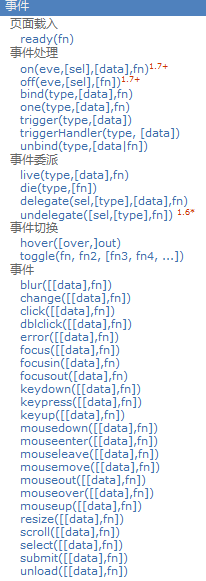
事件处理& 事件委托& 区别mouseover与mouseenter
<!DOCTYPE html>

<html>

<head>

  <meta charset="UTF-8">

  <title>18_事件绑定与解绑</title>

</head>

<style type="text/css">

  * {

    margin: 0px;

  }

  .out {

    position: absolute;

    width: 200px;

    height: 200px;

    top: 20px;

    left: 10px;

    background: blue;

  }

  .inner {

    position: absolute;

    width: 100px;

    height: 100px;

    top: 50px;

    background: red;

  }

  .divBtn {

    position: absolute;

    top: 250px;

  }

</style>

<body style="height: 2000px;">

<div class="out">

  外部DIV

  <div class="inner">内部div</div>

</div>

<div class='divBtn'>

  <button id="btn1">取消绑定所有事件</button>

  <button id="btn2">取消绑定mouseover事件</button>

  <button id="btn3">测试事件坐标</button>

  <a href="http://www.baidu.com" id="test4">百度一下</a>

</div>

<!--

1. 事件绑定(2种):

  * eventName(function(){})

    绑定对应事件名的监听,    例如:$('#div').click(function(){});

  * on(eventName, funcion(){})

    通用的绑定事件监听, 例如:$('#div').on('click', function(){})

  * 优缺点:

    eventName: 编码方便, 但只能加一个监听, 且有的事件监听不支持

    on: 编码不方便, 可以添加多个监听, 且更通用

2. 事件解绑:

  * off(eventName)

3. 事件的坐标

  * event.clientX, event.clientY  相对于视口的左上角

  * event.pageX, event.pageY  相对于页面的左上角

  * event.offsetX, event.offsetY 相对于事件元素左上角

4. 事件相关处理

  * 停止事件冒泡 : event.stopPropagation()

  * 阻止事件默认行为 : event.preventDefault()

-->

<script src="js/jquery-1.10.1.js" type="text/javascript" charset="utf-8"></script>

<script type="text/javascript">

  /*

   需求:

   1. 给.out绑定点击监听(用两种方法绑定)

   2. 给.inner绑定鼠标移入和移出的事件监听(用3种方法绑定)

   3. 点击btn1解除.inner上的所有事件监听

   4. 点击btn2解除.inner上的mouseover事件

   5. 点击btn3得到事件坐标

   6. 点击.inner区域, 外部点击监听不响应

   7. 点击链接, 如果当前时间是偶数不跳转

   */

  //1. 给.out绑定点击监听(用两种方法绑定)

  /*$('.out').click(function () {

   console.log('click out')

   })*/

  $('.out').on('click', function () {

    console.log('on click out')

  })

  //2. 给.inner绑定鼠标移入和移出的事件监听(用3种方法绑定)

  /*

   $('.inner')

   .mouseenter(function () { // 进入

    console.log('进入')

   })

   .mouseleave(function () { // 离开

   console.log('离开')

   })

   */

  /*

   $('.inner')

   .on('mouseenter', function () {

   console.log('进入2')

   })

   .on('mouseleave', function () {

   console.log('离开2')

   })

 */

  $('.inner').hover(function () {

    console.log('进入3')

  }, function () {

    console.log('离开3')

  })

//3. 点击btn1解除.inner上的所有事件监听

  $('#btn1').click(function () {

    $('.inner').off()

  })

  //4. 点击btn2解除.inner上的mouseenter事件

  $('#btn2').click(function () {

    $('.inner').off('mouseenter')

  })

  //5. 点击btn3得到事件坐标

  $('#btn3').click(function (event) { // event事件对象

    console.log(event.offsetX, event.offsetY) // 原点为事件元素的左上角

    console.log(event.clientX, event.clientY) // 原点为窗口的左上角

    console.log(event.pageX, event.pageY) // 原点为页面的左上角

  })

  //6. 点击.inner区域, 外部点击监听不响应

  $('.inner').click(function (event) {

    console.log('click inner')

    //停止事件冒泡

    event.stopPropagation()

  })

  //7. 点击链接, 如果当前时间是偶数不跳转

  $('#test4').click(function (event) {

    if(Date.now()%2===0) {

      event.preventDefault()

    }

  })

</script>

</body>

</html>
区别mouseover与mouseenter
<!DOCTYPE html>

<html>

<head>

    <meta charset="UTF-8">

    <title>19_事件切换</title>

</head>

<style type="text/css">

    * {

        margin: 0px;

    }

    .div1 {

        position: absolute;

        width: 200px;

        height: 200px;

        top: 50px;

        left: 10px;

        background: olive;

    }

    .div2 {

        position: absolute;

        width: 100px;

        height: 100px;

        top: 50px;

        background: red;

    }

    .div3 {

        position: absolute;

        width: 200px;

        height: 200px;

        top: 50px;

        left: 230px;

        background: olive;

    }

    .div4 {

        position: absolute;

        width: 100px;

        height: 100px;

        top: 50px;

        background: yellow;

    }

    .divText{

        position: absolute;

        top: 330px;

        left: 10px;

    }

</style>

<body>

<div class="divText">

    区分鼠标的事件

</div>

<div class="div1">

    div1.....

    <div class="div2">div2....</div>

</div>

<div class="div3">

    div3.....

    <div class="div4">div4....</div>

</div>

<!--

区别mouseover与mouseenter?

    * mouseover: 在移入子元素时也会触发, 对应mouseout

    * mouseenter: 只在移入当前元素时才触发, 对应mouseleave

      hover()使用的就是mouseenter()和mouseleave()

区别on('eventName', fun)与eventName(fun)

    * on('eventName', fun): 通用, 但编码麻烦

    * eventName(fun): 编码简单, 但有的事件没有对应的方法

-->

<script src="js/jquery-1.10.1.js" type="text/javascript"></script>

<script type="text/javascript">

    $('.div1')

        .mouseover(function () {

            console.log('mouseover 进入')

        })

        .mouseout(function () {

            console.log('mouseout 离开')

        })

    $('.div3')

        .mouseenter(function () {

            console.log('mouseenter 进入')

        })

        .mouseleave(function () {

            console.log('mouseleave 离开')

        })

</script>

</body>

</html>
事件委托
<!DOCTYPE HTML>

<html>

<head>

  <meta charset="UTF-8">

  <title>20_事件委托2</title>

</head>

<body>

<ul>

  <li>1111</li>

  <li>2222</li>

  <li>3333</li>

  <li>4444</li>

</ul>

<li>22222</li>

<br>

<button id="btn1">添加新的li</button>

<button id="btn2">删除ul上的事件委托的监听器</button>

<!--

1. 事件委托(委派/代理):

  * 将多个子元素(li)的事件监听委托给父辈元素(ul)处理

  * 监听回调是加在了父辈元素上

  * 当操作任何一个子元素(li)时, 事件会冒泡到父辈元素(ul)

  * 父辈元素不会直接处理事件, 而是根据event.target得到发生事件的子元素(li), 通过这个子元素调用事件回调函数

2. 事件委托的2方:

  * 委托方: 业主  li

  * 被委托方: 中介  ul

3. 使用事件委托的好处

  * 添加新的子元素, 自动有事件响应处理

  * 减少事件监听的数量: n==>1

4. jQuery的事件委托API

  * 设置事件委托: $(parentSelector).delegate(childrenSelector, eventName, callback)

  * 移除事件委托: $(parentSelector).undelegate(eventName)

-->

<script src="js/jquery-1.10.1.js"></script>

<script>

  // 设置事件委托

  $('ul').delegate('li', 'click', function () {

    // console.log(this)

    this.style.background = 'red'

  })

  $('#btn1').click(function () {

    $('ul').append('<li>新增的li....</li>')

  })

  $('#btn2').click(function () {

    // 移除事件委托

    $('ul').undelegate('click')

  })

</script>

</body>

</html>
事件处理& 事件委托& 区别mouseover与mouseenter的更多相关文章
- 区别mouseover与mouseenter?
区别mouseover与mouseenter? * mouseover: 在移入子元素时也会触发, 对应mouseout,进入子元素的时候,父元素显示离开状态 * mouseenter: 只在移入当前 ...
- 做二级菜单时候遇到的关于事件冒泡以及mouseover和mouseenter的不同
二级菜单作为最普通小组件,我遇到了坑. <style> .wrapper { height: 150px; border: 1px solid; width: 150px; } .wrap ...
- jQuery里的mouseover与mouseenter事件类型区别
JQ里面有mouseover和mouseenter 2个事件类型干着差不多的活,用不好经常出现些小问题. 今天我解释一下原理: 事件类型翻译: mouseover 鼠标移上 mouseenter 鼠 ...
- mouseover事件与mouseenter事件的区别
不论鼠标指针穿过被选元素或其子元素,都会触发 mouseover 事件.对应mouseout 只有在鼠标指针穿过被选元素时,才会触发 mouseenter 事件.对应mouseleave 被触发的 M ...
- 关于事件mouseover ,mouseout ,mouseenter,mouseleave的区别
轮播中大多会选择mouseover和mouseout 这个时候是没有任何问题的 但当遇到有css3动画的时候,会发现移入移出过快 动画还没加载完成就需要执行下一个动画,完了动画样式就错乱了. 这时候 ...
- 一个例子说明mouseover事件与mouseenter事件的区别
<html> <head> <meta charset="UTF-8"> <title>haha</title> < ...
- 最终解决 mouseenter, mouseleave , mouseout mousehover mousemove等事件的区别?
在jquery中, html页面的div的显示和隐藏, 修改等的功能, 最终都要由 事件 触发来引用, 不管是键盘事件, 还是鼠标事件... mouseenter和mouseleave是成对对应的, ...
- JQ中mouseover和mouseenter的区别
我最近也在学习JQuery,所以最近对JQ中的一些小问题进行总结,方便学习. 在对于刚开始学习JQ的初学者来说,mouseover事件和mouseenter事件总是傻傻分不清楚,毕竟刚开始学习的时候, ...
- jquery的hover mouseover mouseout mouseenter mouseleave的区别
jquery的hover mouseover mouseout mouseenter mouseleave的区别 1.mouseover mouseout mouseover - 鼠标指针经过任何子元 ...
随机推荐
- 06 ORM常用字段 关系字段 数据库优化查询
一.Django ORM 常用字段和参数 1.常用字段 models中所有的字段类型其实本质就那几种,整形varchar什么的,都没有实际的约束作用,虽然在models中没有任何限制作用,但是还是要分 ...
- Java——字符串操作
/** * java字符串操作 * @author wydream * */ public class StringTest { public static void main(String[] ar ...
- Pycharm修改HTML模板
- Spring Boot Admin简介及实践
问题 在若干年前的单体应用时代,我们可以相对轻松地对整个业务项目进行健康检查.指标监控.配置管理等等项目治理.如今随着微服务的发展,我们将大型单体应用按业务模型进行划分,以此形成众多小而自治的微服务, ...
- Flutter中如何使用WillPopScope
老孟导读:在Flutter中如何实现点击2次Back按钮退出App,如何实现App中多个Route(路由),如何实现Back按钮只退出指定页面,此篇文章将告诉你. WillPopScope WillP ...
- Redis学习笔记(七) 数据库
Redis 服务器将所有的数据库都保存在服务器状态redisServer结构的db数组中,db数组的每个项都是一个redisDB: struct redisServer{ //一个数组保存着服务器中的 ...
- layui 关闭弹出层方法
layer.closeAll();//疯狂模式,关闭所有层 layer.closeAll('dialog'); //关闭信息框 layer.closeAll('page');//关闭所有页面层 lay ...
- 利用python在微信群中签到、抢沙发(适用于任何账号)
利用python在微信群中签到.抢沙发 注意 程序仅能在电脑上运行,运行时需要保证群界面在最前端且不被移动. 背景 我是一名高中生(2020年),疫情期间,在家上网课,有的老师让我们在班群里签到. 其 ...
- .Net(c#)使用 Kafka 小结
.Net(c#)使用 Kafka 小结 1.开篇 由于项目中必须使用 kafka 来作为消息组件,所以使用 kafka 有一段时间了.不得不感叹 kafka 是一个相当优秀的消息系统.下面直接对使用过 ...
- Sentinel源码解析四(流控策略和流控效果)
引言 在分析Sentinel的上一篇文章中,我们知道了它是基于滑动窗口做的流量统计,那么在当我们能够根据流量统计算法拿到流量的实时数据后,下一步要做的事情自然就是基于这些数据做流控.在介绍Sentin ...