
基于Spring cloud Ribbon和Eureka实现客户端负载均衡
前言
本案例将基于Spring cloud Ribbon和Eureka实现客户端负载均衡,其中Ribbon用于实现客户端负载均衡,Eureka主要是用于服务注册及发现;
传统的服务端负载均衡
常见的服务端负载均衡有基于nginx实现的,Nginx收到请求后,通过轮询,IP哈希等算法来决定转发该请求到哪个服务来处理,这种方式缺点还是比较多的;
客户端负载均衡
在微服务架构中,会有很多服务,每个服务有可能会有多个实例,为了治理这些服务,我们可以通过eureka、consoul、 zookeeper来实现,解决完服务管理后,但是还有问题,如果当某个服务希望调用其它服务,通常会通过eureka去查询服务列表,然后eureka返回该服务的所有实例,and 然后调用方应该用哪个服务呢?
这时候,就需要客户端负载均衡来处理这个问题了,客户端负载均衡是和应用程序绑定在一起的,我们不需要单独部署一个额外的服务,本文将使用Spring cloud Ribbon,可以帮助客户端去决定选择哪个服务实例来调用,并可以设定负载均衡算法;
Netflix ribbon介绍
一个客户端的负载均衡实现,Netflix ribbon提供了以下功能:
1、负载均衡
2、故障容错
3、支持多种协议(HTTP, TCP, UDP)
4、缓存
在maven项目中,可以使用以下方式引入:
<dependency>

    <groupId>com.netflix.ribbon</groupId>

    <artifactId>ribbon</artifactId>

    <version>2.2.2</version>

</dependency>
Netflix ribbon例子
一种快速创建工程的方法是去https://start.spring.io/网站,添加对应的依赖,然后直接下载引入到IDE即可;
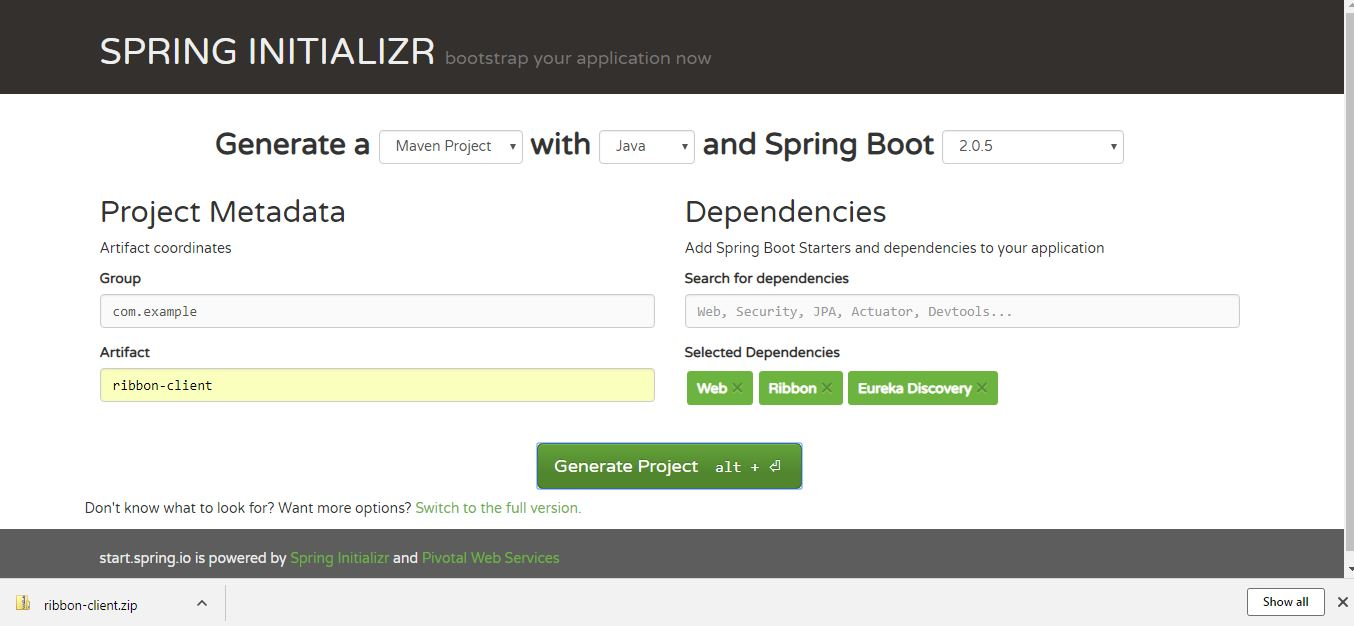
1、创建Eureka服务管理工程
很简单,主要是要在Spring boot工程里加上@EnableEurekaServer注解,并添加以下application.properties中的配置;
RibbonEurekaServerApplication
import org.springframework.boot.SpringApplication;

import org.springframework.boot.autoconfigure.SpringBootApplication;

import org.springframework.cloud.netflix.eureka.server.EnableEurekaServer;

@SpringBootApplication

@EnableEurekaServer

public class RibbonEurekaServerApplication {

    public static void main(String[] args) {

        SpringApplication.run(RibbonEurekaServerApplication.class, args);

    }

}
application.properties
spring.application.name= ${springboot.app.name:eureka-serviceregistry}

server.port = ${server-port:8761}

eureka.instance.hostname= ${springboot.app.name:eureka-serviceregistry}

eureka.client.registerWithEureka= false

eureka.client.fetchRegistry= false

eureka.client.serviceUrl.defaultZone: http://${registry.host:localhost}:${server.port}/eureka/
然后启动,界面如下:
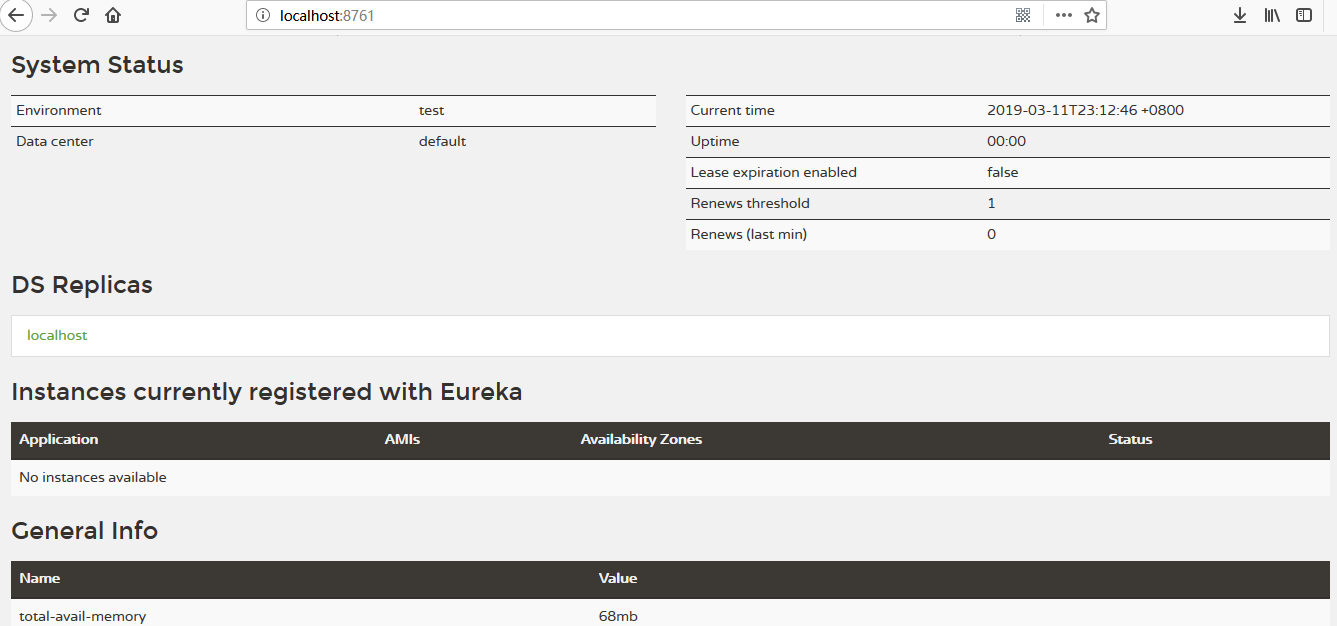
2、创建服务端工程
首先,建一个controller
@RestController

public class MyRestController {

    @Autowired

    Environment environment;

    @GetMapping("/")

    public String health() {

        return "I am Ok";

    }

    @GetMapping("/backend")

    public String backend() {

        System.out.println("Inside MyRestController::backend...");

        String serverPort = environment.getProperty("local.server.port");

        System.out.println("Port : " + serverPort);

        return "Hello form Backend!!! " + " Host : localhost " + " :: Port : " + serverPort;

    }

}
然后新建启动类,并加上@EnableDiscoveryClient注解
@SpringBootApplication

@EnableDiscoveryClient

public class RibbonServerApplication {

    public static void main(String[] args) {

        SpringApplication.run(RibbonServerApplication.class, args);

    }

}
最后,加上配置文件application.properties
spring.application.name=server

server.port = 9090

eureka.client.serviceUrl.defaultZone= http://${registry.host:localhost}:${registry.port:8761}/eureka/

eureka.client.healthcheck.enabled= true

eureka.instance.leaseRenewalIntervalInSeconds= 1

eureka.instance.leaseExpirationDurationInSeconds= 2
3、创建客户端工程
注意客户端工程需要添加spring-cloud-starter-netflix-ribbon依赖;
首先,我们新建启动类,并加上@RibbonClient,@EnableDiscoveryClient注解
@EnableDiscoveryClient

@SpringBootApplication

@RibbonClient(name = "server", configuration = RibbonConfiguration.class)

public class RibbonClientApplication {

    public static void main(String[] args) {

        SpringApplication.run(RibbonClientApplication.class, args);

    }

}
注意这里的RibbonConfiguration,是我们的自定义配置类,这里面的方法可以自己根据情况重写,本例子只是一个简单的测试,用的是Ribbon提供的默认方式,代码如下:
public class RibbonConfiguration {

    @Autowired

    IClientConfig config;

    @Bean

    public IPing ribbonPing(IClientConfig config) {

        return new PingUrl();

    }

    @Bean

    public IRule ribbonRule(IClientConfig config) {

        return new AvailabilityFilteringRule();

    }

}
最后,添加application.properties配置文件,如下:
spring.application.name=client

server.port=8888

eureka.client.serviceUrl.defaultZone= http://${registry.host:localhost}:${registry.port:8761}/eureka/

eureka.client.healthcheck.enabled= true

eureka.instance.leaseRenewalIntervalInSeconds= 1

eureka.instance.leaseExpirationDurationInSeconds= 2

server.ribbon.eureka.enabled=true

#server.ribbon.listOfServers=localhost:9090,localhost:9091,localhost:9092

server.ribbon.ServerListRefreshInterval=1000

#logging.level.root=TRACE
例子测试验证
首先,打包,然后启动所有的以上服务,使用java -jar -Dserver.port=XXXX YYYYY.jar命令启动即可;
启动后,可以在eureka中看到我们启动的服务:

由于我们要演示客户端负载均衡功能,所以再启动几个服务端服务,端口为9091 and 9092,启动后如下:

OK,准备工作搞好了,可以开测了,点击http://localhost:8888/client/frontend几次,结果如下,,
1、Server Response :: Hello form Backend!!! Host : localhost :: Port : 9090
2、Server Response :: Hello form Backend!!! Host : localhost :: Port : 9092
3、Server Response :: Hello form Backend!!! Host : localhost :: Port : 9091
然后可以再启动或删除几个后端服务,如启动一个9093端口,在测试一下,9093端口对应的服务也可以访问到,效果同样OK。。。
那么,如果只想写死,从几个服务中选择,而不是自动变动呢,可以在客户端用以下配置,那么就会一直从这三个服务中选取了。
server.ribbon.listOfServers=localhost:9090,localhost:9091,localhost:9092
基于Spring cloud Ribbon和Eureka实现客户端负载均衡的更多相关文章
- Spring Cloud官方文档中文版-客户端负载均衡:Ribbon
官方文档地址为:http://cloud.spring.io/spring-cloud-static/Dalston.SR2/#_spring_cloud_netflix 文中例子我做了一些测试在:h ...
- Spring Cloud入门教程(二):客户端负载均衡(Ribbon)
对于大型应用系统负载均衡(LB:Load Balancing)是首要被解决一个问题.在微服务之前LB方案主要是集中式负载均衡方案,在服务消费者和服务提供者之间又一个独立的LB,LB通常是专门的硬件,如 ...
- Spring Cloud Ribbon---微服务调用和客户端负载均衡
前面分析了Eureka的使用,作为服务注册中心,Eureka 分为 Server 端和 Client 端,Client 端作为服务的提供者,将自己注册到 Server 端,Client端高可用的方式是 ...
- Spring Cloud Ribbon 中的 7 种负载均衡策略
负载均衡通器常有两种实现手段,一种是服务端负载均衡器,另一种是客户端负载均衡器,而我们今天的主角 Ribbon 就属于后者--客户端负载均衡器. 服务端负载均衡器的问题是,它提供了更强的流量控制权,但 ...
- 《Spring Cloud》学习(二) 负载均衡!
第二章 负载均衡 负载均衡是对系统的高可用.网络压力的缓解和处理能力扩容的重要手段之一.Spring Cloud Ribbon是一个基于 HTTP 和 TCP 的客户端负载均衡工具,它基于Netfli ...
- Spring Cloud入门教程-Ribbon实现客户端负载均衡
简介 我们继续以之前博客的代码为基础,增加Ribbon组件来提供客户端负载均衡.负载均衡是实现高并发.高性能.可伸缩服务的重要组成部分,它可以把请求分散到一个集群中不同的服务器中,以减轻每个服务器的负 ...
- Spring Cloud Ribbon 客户端负载均衡 4.3
在分布式架构中,服务器端负载均衡通常是由Nginx实现分发请求的,而客户端的同一个实例部署在多个应用上时,也需要实现负载均衡.那么Spring Cloud中是否提供了这种负载均衡的功能呢?答案是肯 ...
- Spring Cloud学习 之 Spring Cloud Ribbon(负载均衡器源码分析)
文章目录 AbstractLoadBalancer: BaseLoadBalancer: DynamicServerListLoadBalancer: ServerList: ServerListUp ...
- 客户端负载均衡 - Ribbon
Ribbon是Netflix公司开源的一个负载均衡的项目(https://github.com/Netflix/ribbon),它是一个基于HTTP.TCP的客户端负载均衡器. 服务端负载均衡 负载均 ...
随机推荐
- Linux-软中断通信
进程间通信-软中断 内容 使用软中段机制实现Linux进程间通信 机理说明 软中断信号(signal)是一种简单且最基本的进程通信机制,它最大的特点是提供了一种简单的处理异步事件的方法.例如,常见 ...
- CAGradientLayer简介 实现颜色渐变
CAGradientLayer使用: CAGradientLayer*gradient = [CAGradientLayerlayer]; gradient.frame = subLayer.fram ...
- 本地的jar包添加到maven库中 jdbc举例
1.配置(检查)Java环境变量 2.配置(检查)maven环境变量 3.找到maven文件的根目录下的config目录,修改setting.xml文件 配置maven本地仓库 <!-- loc ...
- Html开发中document.getElementByTagName无法找到所有DOM元素的问题解决方法
let eleList = document.querySelectorAll('li') for (let i = 0; i < eleList.length; i++) { // 遍历操作 ...
- javascript 变量的引入、变量的声明、变量的初始化
变量的引入及声明和初始化: 变量: 操作的数据都是在内存中操作 Js中存储数据使用变量的方式(名称,值--->数据) Js中声明变量都用var--->存储数据,数据应该有对应的数据类型 存 ...
- hibernate框架中注意的几个问题
使用hibernate框架中,session.createSQLQuery创建sql语句的时候遇到的问题 1. select e.id,d.id from emp e,dept d where e. ...
- Python3 网络爬虫(请求库的安装)
Python3 网络爬虫(请求库的安装) 爬虫可以简单分为几步:抓取页面,分析页面和存储数据 在页面爬取的过程中我们需要模拟浏览器向服务器发送请求,所以需要用到一些python库来实现HTTP的请求操 ...
- React state和props使用场景
一个组件的显示状态可以由内部状态state.外部参数props所决定. props: 1.props 是从外部传进组件的参数,主要是父组件向子组件传递数据. 2.props 对于使用它的组件来说是只读 ...
- python Tags 母板 组件 静态文件相关 自定义simpletag inclusion_tag
一.Tags(一)for 1.基本用法 <ul> {% for user in user_list %} <li>{{ user.name }}</li> {% e ...
- Hadoop 集群安装(从节点安装配置)
1.Java环境配置 view plain copy sudo mv /tmp/java /opt/ jdk安装完配置环境变量,编辑/etc/profile: view plain copy sudo ...