
maven私服内容补充
1.添加阿里云中央仓库
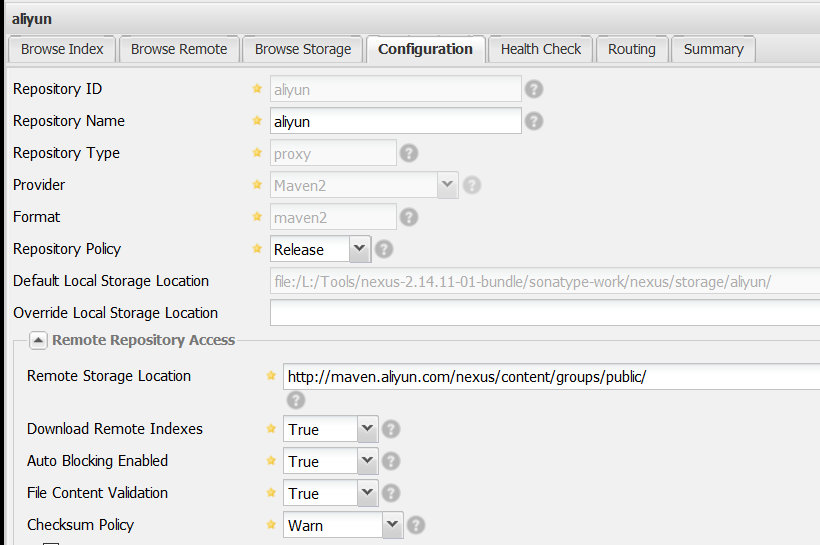
注意Download Remote Indexes选项为True
1.登陆nexus私服(默认账号密码:admin/admin123)
2.点击右侧Repositories
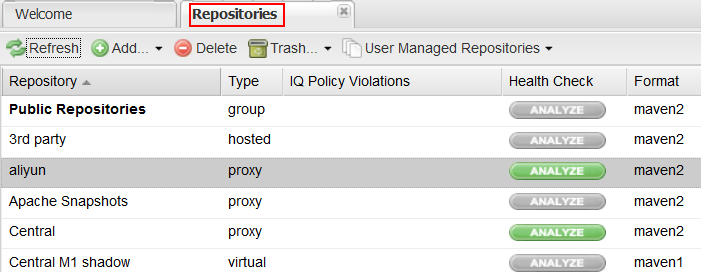
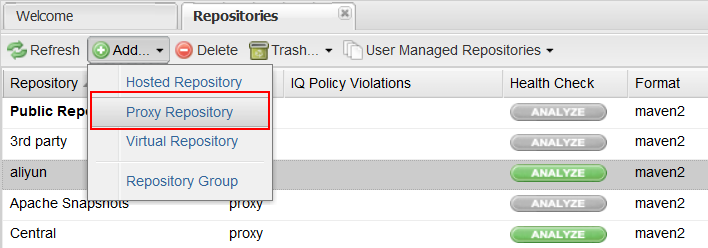
3.点击add,选择Proxy Repository
4.配置阿里云地址 http://maven.aliyun.com/nexus/content/groups/public/ , id,name随意填
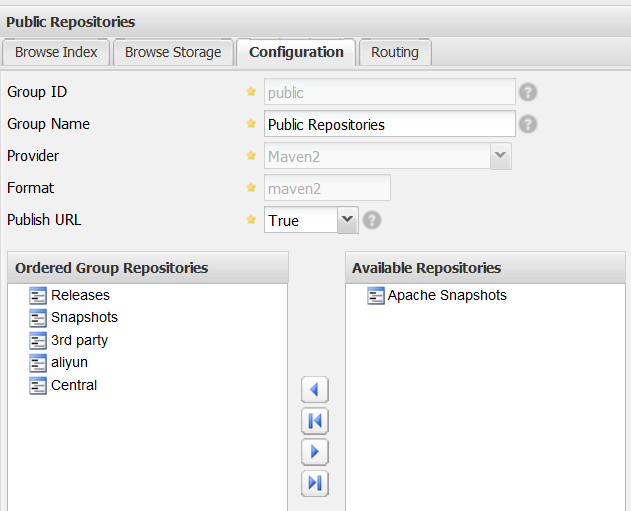
5.将阿里云仓库加入仓库组中,并将其排在Central仓库之前
可供引用的代码:
(一)
 <?xml version="1.0" encoding="UTF-8"?>

 <!--

 Licensed to the Apache Software Foundation (ASF) under one

 or more contributor license agreements.  See the NOTICE file

 distributed with this work for additional information

 regarding copyright ownership.  The ASF licenses this file

 to you under the Apache License, Version 2.0 (the

 "License"); you may not use this file except in compliance

 with the License.  You may obtain a copy of the License at

     http://www.apache.org/licenses/LICENSE-2.0

 Unless required by applicable law or agreed to in writing,

 software distributed under the License is distributed on an

 "AS IS" BASIS, WITHOUT WARRANTIES OR CONDITIONS OF ANY

 KIND, either express or implied.  See the License for the

 specific language governing permissions and limitations

 under the License.

 -->

 <!--

  | This is the configuration file for Maven. It can be specified at two levels:

  |

  |  1. User Level. This settings.xml file provides configuration for a single user,

  |                 and is normally provided in ${user.home}/.m2/settings.xml.

  |

  |                 NOTE: This location can be overridden with the CLI option:

  |

  |                 -s /path/to/user/settings.xml

  |

  |  2. Global Level. This settings.xml file provides configuration for all Maven

  |                 users on a machine (assuming they're all using the same Maven

  |                 installation). It's normally provided in

  |                 ${maven.home}/conf/settings.xml.

  |

  |                 NOTE: This location can be overridden with the CLI option:

  |

  |                 -gs /path/to/global/settings.xml

  |

  | The sections in this sample file are intended to give you a running start at

  | getting the most out of your Maven installation. Where appropriate, the default

  | values (values used when the setting is not specified) are provided.

  |

  |-->

 <settings xmlns="http://maven.apache.org/SETTINGS/1.0.0"

           xmlns:xsi="http://www.w3.org/2001/XMLSchema-instance"

           xsi:schemaLocation="http://maven.apache.org/SETTINGS/1.0.0 http://maven.apache.org/xsd/settings-1.0.0.xsd">

    <localRepository>E:\\maven\\repository</localRepository>

   <!-- 配置镜像 -->

   <mirrors>

     <mirror>

       <!-- 此镜像一般用来作为公司内部开发的版本快照,作为public-snapshots仓库的镜像地址 -->

       <!-- 镜像的id,id用来区分不同的mirror元素。 -->

       <id>nexus-public-snapshots</id>

       <!-- 被镜像的服务器的id。例如,如果我们要设置了一个Maven中央仓库(http://repo1.maven.org/maven2)的镜像,

           就需要将该元素设置成central。这必须和中央仓库的id “central”完全一致。 -->

       <mirrorOf>public-snapshots</mirrorOf>

       <!-- 该镜像的URL。 -->

       <url>http://192.168.10.92:8081/nexus/content/groups/public-snapshots</url>

     </mirror>

     <mirror>

       <!-- 此镜像一般用来作为公司第三方引用基础类库镜像,是所有仓库的镜像地址 -->

       <id>nexus</id>

       <!-- 为*表示为所有的仓库做镜像,有了这个配置,所有的构建都会包含public组,如果你想包含public-snapshots组,

           你必须添加public-snapshots这个Profile,通过在命令行使用如下的 -P 标志:$ mvn -P public-snapshots clean install -->

       <mirrorOf>*</mirrorOf>

       <url>http://192.168.10.92:8081/nexus/content/groups/public</url>

     </mirror>

   </mirrors>

   <!-- settings.xml中的profile元素是pom.xml中profile元素的裁剪版本。它包含了activation, repositories, pluginRepositories 和 properties元素。

       这里的profile元素只包含这四个子元素是因为这里只关心构建系统这个整体(这正是settings.xml文件的角色定位),而非单独的项目对象模型设置。

     如果一个settings中的profile被激活,它的值会覆盖任何其它定义在POM中或者profile.xml中的带有相同id的profile。 -->

   <profiles>

     <profile>

       <id>development</id>

       <!-- 仓库。仓库是Maven用来填充构建系统本地仓库所使用的一组远程项目。而Maven是从本地仓库中使用其插件和依赖。

           不同的远程仓库可能含有不同的项目,而在某个激活的profile下,可能定义了一些仓库来搜索需要的发布版或快照版构件。有了Nexus,这些应该交由Nexus完成 -->

       <repositories>

         <repository>

           <id>central</id>

           <!-- 虚拟的URL形式,指向镜像的URL,因为所有的镜像都是用的是nexus,这里的central实际上指向的是http://repos.d.xxx.com/nexus/content/groups/public -->

           <url>http://central</url>

           <!-- 表示可以从这个仓库下载releases版本的构件-->

           <releases><enabled>true</enabled></releases>

           <!-- 表示可以从这个仓库下载snapshot版本的构件 -->

           <snapshots><enabled>true</enabled></snapshots>

         </repository>

       </repositories>

      <!-- 插件仓库。仓库是两种主要构件的家。第一种构件被用作其它构件的依赖。这是中央仓库中存储大部分构件类型。

          另外一种构件类型是插件。Maven插件是一种特殊类型的构件。由于这个原因,插件仓库独立于其它仓库。

         pluginRepositories元素的结构和repositories元素的结构类似。每个pluginRepository元素指定一个Maven可以用来寻找新插件的远程地址。 -->

      <pluginRepositories>

         <pluginRepository>

           <id>central</id>

           <url>http://central</url>

           <releases><enabled>true</enabled></releases>

           <snapshots><enabled>true</enabled></snapshots>

         </pluginRepository>

       </pluginRepositories>

     </profile>

     <profile>

       <!--this profile will allow snapshots to be searched when activated-->

       <id>public-snapshots</id>

       <repositories>

         <repository>

           <id>public-snapshots</id>

           <!-- 虚拟的URL形式,指向镜像的URL,这里指向的是http://repos.d.xxx.com/nexus/content/groups/public-snapshots -->

           <url>http://public-snapshots</url>

           <releases><enabled>false</enabled></releases>

           <snapshots><enabled>true</enabled></snapshots>

         </repository>

       </repositories>

      <pluginRepositories>

         <pluginRepository>

           <id>public-snapshots</id>

           <url>http://public-snapshots</url>

           <releases><enabled>false</enabled></releases>

           <snapshots><enabled>true</enabled></snapshots>

         </pluginRepository>

       </pluginRepositories>

     </profile>

   </profiles>

   <!-- 激活的Profile。activation元素并不是激活profile的唯一方式。settings.xml文件中的activeProfile元素可以包含profile的id,

       任何在activeProfile中定义的profile id,不论环境设置如何,其对应的profile都会被激活。如果没有匹配的profile,则什么都不会发生。

     profile也可以通过在命令行,使用-P标记和逗号分隔的列表来显式的激活(如,-P test)。

     要了解在某个特定的构建中哪些profile会激活,可以使用maven-help-plugin(mvn help:active-profiles)。 -->

   <activeProfiles>

       <!-- 没有显示激活public-snapshots -->

     <activeProfile>development</activeProfile>

   </activeProfiles>

 <!-- 自定义本地仓库地址,其默认值为~/.m2/repository

 <localRepository>/data/maven-repository</localRepository>

 -->

   <!-- 发布的服务器和密码,暂时未限制权限 -->

    <servers>

     <server>

       <!-- 发布的位置在POM中配置,以ID为关联,有很多公用的信息需要配置在POM文件里,最佳实践是定义一个公司级别的root pom -->

       <id>nexus</id>

       <username>admin</username>

       <password>admin123</password>

     </server>

     <server>

       <id>nexus-snapshots</id>

       <username>admin</username>

       <password>admin123</password>

     </server>

     <server>

       <id>thirdparty</id>

       <username>admin</username>

       <password>admin123</password>

     </server>

   </servers>

 </settings>
(二)
maven连接私服的配置分为两步:
1、配置maven可以连接私服打包上传项目(maven的deploy指令)
在maven安装目录下的配置文件settings.xml中添加:
添加到servers标签内部
<server>

      <id>releases</id>

      <username>admin</username>

      <password>admin123</password>

     </server>

     <server>

      <id>snapshots</id>

      <username>admin</username>

      <password>admin123</password>

</server>
在项目中的pom.xml文件中添加:
<distributionManagement>

    <repository>

        <id>releases</id>

    <url>http://localhost:8081/nexus/content/repositories/releases/</url>

    </repository>

    <snapshotRepository>

        <id>snapshots</id>

    <url>http://localhost:8081/nexus/content/repositories/snapshots/</url>

    </snapshotRepository>

</distributionManagement>
2、配置maven可以从私服上下载jar包
在maven安装目录下的配置文件settings.xml中添加:
添加到profiles标签内部
<profile>

    <!--profile的id-->

    <id>dev</id>

    <repositories>

      <repository>

        <!--仓库id,repositories可以配置多个仓库,保证id不重复-->

        <id>nexus</id>

        <!--仓库地址,即nexus仓库组的地址-->

        <url>http://localhost:8081/nexus/content/groups/public/</url>

        <!--是否下载releases构件-->

        <releases>

          <enabled>true</enabled>

        </releases>

        <!--是否下载snapshots构件-->

        <snapshots>

          <enabled>true</enabled>

        </snapshots>

      </repository>

    </repositories>

     <pluginRepositories>

        <!-- 插件仓库,maven的运行依赖插件,也需要从私服下载插件 -->

        <pluginRepository>

            <!-- 插件仓库的id不允许重复,如果重复后边配置会覆盖前边 -->

            <id>public</id>

            <name>Public Repositories</name>

            <url>http://localhost:8081/nexus/content/groups/public/</url>

        </pluginRepository>

    </pluginRepositories>

</profile>
在配置文件settings.xml中添加用以激活上面的配置:
  <activeProfiles>

    <activeProfile>dev</activeProfile>

  </activeProfiles>
maven私服内容补充的更多相关文章
- nexus Maven私服的相关配置
Maven私服中如需本地上传Maven私服内容则需在 setting.xml中配置如下: <server> <id>nexus-releases</id> < ...
- maven私服搭建
一.软件安装 地址:http://www.sonatype.org/nexus/thank-you-for-downloading/?dl=tgz 解压: 启动: >> nexus sta ...
- Maven私服Nexus3.x环境构建操作记录
Maven介绍Apache Maven是一个创新的软件项目管理和综合工具.Maven提供了一个基于项目对象模型(POM)文件的新概念来管理项目的构建,可以从一个中心资料片管理项目构建,报告和文件.Ma ...
- Maven-004-使用 Nexus 搭建 maven 私服
从去年至今,自己一直在学习自动化测试工具,想利用自动化工具尽可能的将重复的.关键的.耗时耗力的工作实现自动化,减轻日常测试工作,提升测试效率.在学习的过程中,将 maven 作为了项目开发管理工具,进 ...
- 使用Nexus创建Maven私服
Nexus是一个强大的Maven仓库管理器,它极大地简化了自己内部仓库的维护和外部仓库的访问.利用Nexus你可以只在一个地方就能够完全控制访问和部署在你所维护仓库中的每个Artifact.Nexus ...
- Maven使用笔记(五)Sonatype Nexus 搭建Maven 私服
1. 为什么使用Nexus 如果没有私服,我们所需的所有构件都需要通过maven的中央仓库和第三方的Maven仓库下载到本地, 而一个团队中的所有人都重复的从maven仓库下载构件无疑加大了仓库的负载 ...
- Sonatype Nexus 搭建Maven 私服
国内私募机构九鼎控股打造APP,来就送 20元现金领取地址:http://jdb.jiudingcapital.com/phone.html 内部邀请码:C8E245J (不写邀请码,没有现金送) 国 ...
- maven仓库总结,maven私服搭建
配置pom.xml依赖包时在这里找包的描述: http://search.maven.org/#browse 以java为根目录. mvn archtype:generate -DgroupId=zt ...
- 搭建Maven私服那点事
摘要:本文主要介绍在CentOS7.1下使用nexus3.6.0搭建maven私服,以及maven私服的使用(将自己的Maven项目指定到私服地址.将第三方项目jar上传到私服供其他项目组使用) 一. ...
随机推荐
- 最大获利 HYSBZ - 1497 (最大权闭合图)
最大权闭合图: 有向图,每个点有点权,点权可正可负.对于任意一条有向边i和j,选择了点i就必须选择点j,你需要选择一些点使得得到权值最大. 解决方法: 网络流 对于任意点i,如果i权值为正,s向i连容 ...
- SSM poi通过模板 反射导出excel
1 import java.lang.reflect.Field; 2 import java.lang.reflect.Method; 3 import java.util.Iterator; 4 ...
- Twitter数据挖掘:如何使用Python分析大数据
我们可以创建变量来存放待拉取的微博数量(即count),以及待拉取的用户(即name).然后用这两个参数调用user_timeline()函数.下面是更新后的代码(注意,在代码的顶部应该保持认证和AP ...
- 几个面试经典算法题Java解答
题目一: public class testClockwiseOutput { //顺时针打印一个矩阵 @Test public void test(){ int[][] num = new int[ ...
- 用socket写一个简单的客户端和服务端程序
用来练手写写socket代码 客户端代码 #include <stdio.h> #include <sys/types.h> #include <sys/socket.h ...
- LoadRunner web请求和响应中文乱码解决办法
先来认识下lr_convert_string_encoding: int lr_convert_string_encoding( const char *sourceString, const cha ...
- vue2.0 之条件渲染
条件渲染v-if.v-show <template> <div> <a v-if="isPartA">partA</a> <a ...
- idea集成python插件
idea集成python插件 作者:尹正杰 版权声明:原创作品,谢绝转载!否则将追究法律责任. 在继承安装Python插件时,请确认你是否安装Python解释器(Python官网:https://ww ...
- 过滤选择器first与子元素过滤选择器first-child的区别
1.表格代码如下: <table id="table"> <tr> <td>id</td> <td>name</t ...
- #define宏定义中## #@ # \ 符号使用
C/C++ 宏命令的神奇用法. 先看下面三条语句: #define Conn(x,y) x##y#define ToChar(x) #@x#define ToString(x) ...