
GitHub使用笔记1:git客户端配置多ssh key
公司用gitlab
外网的github同时配置
这样就导致我们要配置不同的ssh-key对应不同的环境。
具体操作步骤如下:
一、生成SSH-key
1:生成一个公司用的SSH-Key
$ ssh-keygen -t rsa -C "youremail@yourcompany.com” -f ~/.ssh/id-rsa
在~/.ssh/目录会生成id-rsa和id-rsa.pub私钥和公钥。
我们将id-rsa.pub中的内容粘帖到公司gitlab服务器的SSH-key的配置中。
2:生成一个github用的SSH-Key
$ ssh-keygen -t rsa -C "youremail@your.com” -f ~/.ssh/github-rsa
在~/.ssh/目录会生成github-rsa和github-rsa.pub私钥和公钥。
我们将github-rsa.pub中的内容粘帖到github服务器的SSH-key的配置中。
3:生成一个gitee用的SSH-Key
MacBookPro:.ssh zhangxm$ ssh-keygen -t rsa -C "84348674@qq.com" -f ~/.ssh/gitee-rsa

Generating public/private rsa key pair.

/Users/zhangxm/.ssh/gitee-rsa already exists.

Overwrite (y/n)? y

Enter passphrase (empty for no passphrase):

Enter same passphrase again:

Your identification has been saved in /Users/zhangxm/.ssh/gitee-rsa.

Your public key has been saved in /Users/zhangxm/.ssh/gitee-rsa.pub.

The key fingerprint is:

SHA256:WFXq2h/2BNKHuxDGHyt+x0dVuSUp5rBgnOWNvoPJNuM 84348674@qq.com

The key's randomart image is:

+---[RSA 2048]----+

|       . oo..  ..|

|        =o.+o o.o|

|       ...+=.. .+|

|       o +.... ..|

|      . S B = . .|

|       . * = *  .|

|        O * *... |

|       o + *.=o .|

|        E ..o... |

+----[SHA256]-----+

MacBookPro:.ssh zhangxm$
二、添加私钥
1:添加私钥
$ ssh-add ~/.ssh/id_rsa

$ ssh-add ~/.ssh/github_rsa

$ ssh-add ~/.ssh/gitee_rsa
如果执行ssh-add时提示"Could not open a connection to your authentication agent",可以现执行命令:
$ ssh-agent bash
然后再运行ssh-add命令。
可以通过 ssh-add -l 来确私钥列表
$ ssh-add -l
可以通过 ssh-add -D 来清空私钥列表
$ ssh-add -D
三、修改配置文件
1:修改配置文件
在 ~/.ssh 目录下新建一个config文件
touch config
添加内容:
# gitlab

Host gitlab.yourcompany.com

    HostName gitlab.yourcompany.com

    PreferredAuthentications publickey

    IdentityFile ~/.ssh/id_rsa

# github

Host github.com

    HostName github.com

    PreferredAuthentications publickey

    IdentityFile ~/.ssh/github_rsa

# gitee

Host gitee.com

    HostName gitee.com

    PreferredAuthentications publickey

    IdentityFile ~/.ssh/gitee_rsa
2:目录结构
MacBookPro:.ssh zhangxm$ ll

total 56

drwx------   8 zhangxm  staff   272  9 24 13:53 .

drwxr-xr-x+ 64 zhangxm  staff  2176  9 24 13:53 ..

-rw-r--r--   1 zhangxm  staff   262  9 24 13:53 config

-rw-------   1 zhangxm  staff  1675  9 24 11:26 github_rsa

-rw-r--r--   1 zhangxm  staff   397  9 24 11:26 github_rsa.pub

-rw-------   1 zhangxm  staff  1675  9 24 11:26 gitee_rsa

-rw-r--r--   1 zhangxm  staff   397  9 24 11:26 gitee_rsa.pub

-rw-r--r--   1 zhangxm  staff  7453  7 31 12:17 known_hosts

-rw-------   1 zhangxm  staff  1675  6  1 15:17 id_rsa

-rw-r--r--   1 zhangxm  staff   409  6  1 15:17 id_rsa.pub
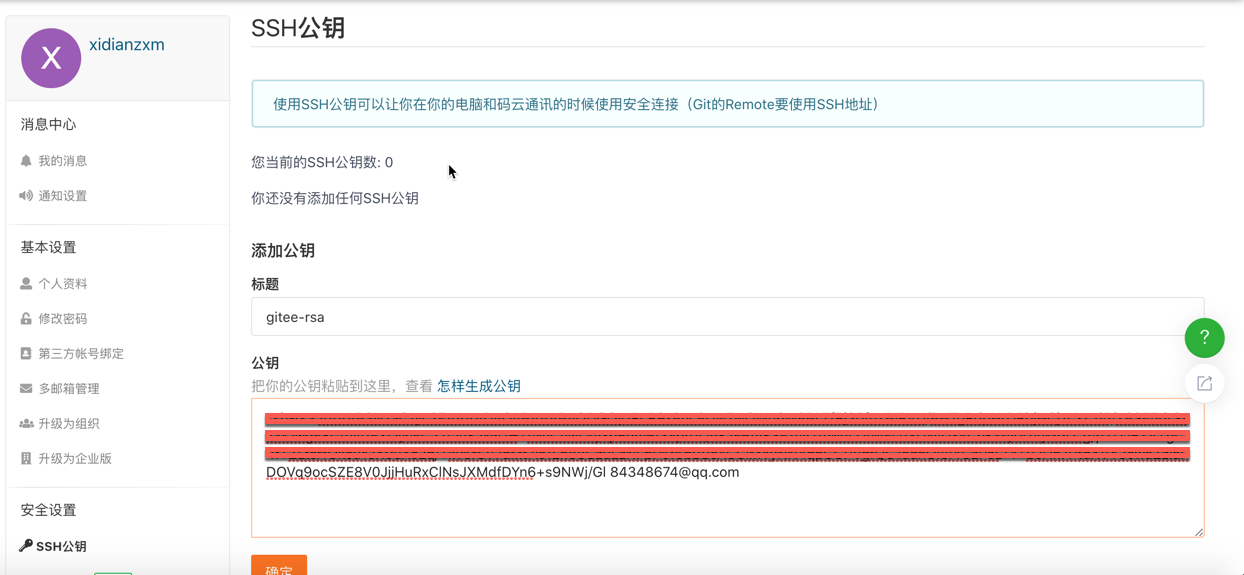
四、在对应的git服务器上配置添加SSH公钥
1:在公司gitlab、github、gitee上添加SSH公钥
以gitee为例
五 测试
1:测试
1)办公网
ssh -T git@gitlab.yourcompany.com
输出欢迎信息
2) github
$ ssh -T git@github.com
- gitee
$ ssh -T git@gitee.com
输出
github:Hi xxx! You've successfully authenticated, but GitHub does not provide shell access.
gitee:MacBookPro:.ssh zhangxm$ ssh -T git@gitee.com
Hi xidianzxm! You've successfully authenticated, but GITEE.COM does not provide shell access.
六、配置相关信息
1:配置提交用户明和邮箱
MacBookPro:SpringStack zhangxm$ git config --global user.name "xidianzxm"

MacBookPro:SpringStack zhangxm$ git config --global user.email 84348674@qq.com

MacBookPro:SpringStack zhangxm$
七、码云上的介绍的相关操作
https://gitee.com/help/articles/4229#article-header0
就表示成功的连上github了.也可以试试链接公司的gitlab.
GitHub使用笔记1:git客户端配置多ssh key的更多相关文章
- 「BUAA OO Pre」Git生成多个ssh key并连接GitLab仓库
「BUAA OO Pre」Git生成多个ssh key并连接GitLab仓库 Part 0 前言 写作背景 笔者在配置学校GitLab的ssh key时遇到一些问题,原因应为曾经配置过GitHub的s ...
- Android Studio 使用笔记:Git 的配置和第一次提交到仓库
Git客户端网址:http://git-scm.com/download/ 根据自己的使用平台下载对应的客户端.这里以Mac系统为例,当客户端软件安装配置完毕后,打开AS的配置面板,找到Git的选项 ...
- 利用Git生成本机SSH Key并添加到GitHub中
本地仓库和github之间是通过SSH加密传输的,所以需要先到github中添加你本机的SSH Key 进行认证. 1.在桌面打开git命令窗口 2.输入“ssh-keygen -t rsa -C ...
- Git生成本机SSH Key并添加到GitHub中
1.检查电脑里是否有SSH Key 打开git Bash客户端 cd ~/.ssh ls 如果有就会输出下面内容 config id_rsa id_rsa.pub known_hosts 2.创建 邮 ...
- Git密钥生成步骤SSH Key
顺便推荐下自己的网站: 一个php后台极速开发框架 https://www.lotusadmin.top/ 一个有趣的网站 https://www.waytomilky.com/ Git是分布式的代码 ...
- Git生成多个ssh key
在实际的工作中, 有可能需要连接多个远程仓库, 例如我想连接私有仓库.GitLab官网.GitHub官网, 那么同一台电脑就要生成多个ssh key: ssh-keygen -t rsa -C &qu ...
- Git使用之设置SSH Key
设置SSH Key 1. 检查是否已经有SSH Key. $cd ~/.ssh 如果说没有这个目录,就直接看第三步 2. 备份 3. 生成一个新的SSH. $ssh-keygen - ...
- intellij idea 配置gitlab ssh key
1 安装git,登录官网https://www.git-scm.com/download/ ,选择相应系统版本,下载后安装好. 公司网慢的可以用第三方的软件管家下载. 2 打开git bash,不需要 ...
- [转]SSH 原理和基本使用:ssh 安全配置 以及ssh key 认证登录
一.什么是 SSH ? SSH全称(Secure SHell)是一种网络协议,顾名思义就是非常安全的shell,主要用于计算机间加密传输.早期,互联网通信都是基于明文通信,一旦被截获,内容就暴露无遗. ...
随机推荐
- 【MySQL】-NO.21.MySQL.1.MySQL.1.001-【Install MySQL5.7 On Windows】
1.0.0 Summary Tittle:[MySQL]-NO.21.MySQL.1.MySQL.1.001-[Install MySQL5.7 On Windows] Style:Web Serie ...
- mac上命令行解压rar
时间进入到2018年12月,mac上好用的rar解压工具要收费了.被逼的没办法,用命令行吧,谁让咱擅长呢? 1,使用Homebrew安装unrar,没有自己装去 brew install unrar ...
- 产品设计教程:利用“系列位置效应”优化UI
任何博得人们喜欢的产品都在一定程度上契合了用户的心理需求.设计和心理学息息相关,掌握一些基本心理学知识,设计师的作品更能在潜意识中抓住用户的心. 系列位置效应 “系列位置效应”(The Serial ...
- Adobe Acrobat 9 Pro序列号
其实只删除c:\Program Files\Common Files\Adobe\Adobe PCD\cache目录下的cache.db文件也是可以的,然后重新打开Adobe ,输入序列号1118-4 ...
- ElementNotVisibleException: Message: element not visible
selenium自动化测试中,经常会报异常: 可能会有各种疑问,元素可以定位到啊.为什么报以下异常? ElementNotVisibleException: Message: element not ...
- keras图像分类参考大神博客总结
利用keras预加载模型添加新的层来构建自己所需的模型: from keras.layers import GlobalAveragePooling2D,Dense from keras.applic ...
- 27.给input边框和背景颜色设置全透明
给input边框和背景颜色设置全透明,但是里面的字不会消失 1.让背景颜色变透明(二选一) background-color:rgba(0,0,0,0); background:rgba(0,0,0, ...
- 关于linux中SSH爆破总结
2.思路 (1)对root账号进行暴力破解 (2)使用中国姓名top1000作为用户名进行暴力破解 (3)使用top 10000 password字典进行密码破解 (4)利用掌握信息进行社工信息整理并 ...
- IIS转发需要的模块
1.Application Request Routing https://www.iis.net/downloads/microsoft/application-request-routing 2 ...
- SQLConnect
SQLConnect 函数定义: 这个函数就是与数据库建立连接 SQLRETURN SQLConnect( SQLHDBC ConnectionHandle, SQLCHAR * Se ...