
laravel dingo/api添加jwt-auth认证
前面我们学了laravel dingo/api创建简单的api,这样api是开放给所有人的,如何查看和限制api的调用呢?可以用jwt-auth来验证,JSON Web Token Authentication
1,首先安装jwt-auth插件,在命令行中用composer安装
composer require tymon/jwt-auth '0.5.*'
2,然后发布
php artisan vendor:publish --provider="Tymon\JWTAuth\Providers\JWTAuthServiceProvider"
在/config/生成了一个jwt.php文件
3,生成key
php artisan jwt:generate
如果命令无法运行,可以在/config/jwt.php文件中修改changeme为自己设置的密匙
'secret' => env('JWT_SECRET', 'changeme'),
4,修改/app/Api/Controllers/HelloController.php为
<?php

namespace App\Api\Controllers;

use Illuminate\Http\Request;

use App\Http\Controllers\Controller;

//添加jwt-auth认证

use JWTAuth;

use Tymon\JWTAuth\Exceptions\JWTException;

class HelloController extends Controller

{

    public function index()

    {

        return '{content:Helloworld!}';

    }

//添加jwt-auth认证

  	public function authenticate(Request $request)

    {

        // grab credentials from the request

        $credentials = $request->only('email', 'password');

        try {

            // attempt to verify the credentials and create a token for the user

            if (! $token = JWTAuth::attempt($credentials)) {

                return response()->json(['error' => 'invalid_credentials'], 401);

            }

        } catch (JWTException $e) {

            // something went wrong whilst attempting to encode the token

            return response()->json(['error' => 'could_not_create_token'], 500);

        }

        // all good so return the token

        return response()->json(compact('token'));

    }

}
5,添加路由(/routes/web.php)
$api->post('auth', 'App\Api\Controllers\HelloController@authenticate');
6,测试路由:php artisan api:routes,如果出现如下提示表示正确

访问url:***.com/api/auth显示错误,因为没加token
重新修改hellocontrol和loutes
<?php

namespace App\Api\Controllers;

use Illuminate\Http\Request;

use App\Http\Controllers\Controller;

use JWTAuth;

use Tymon\JWTAuth\Exceptions\JWTException;

class HelloController extends Controller

{

    /**

     * Create a new controller instance.

     *

     * @return void

     */

    /**

     * Show the application dashboard.

     *

     * @return \Illuminate\Http\Response

     */

    public function index()

    {

        return '{content:Helloworld!}';

    }

  	public function authenticate(Request $request)

    {

        // grab credentials from the request

        $credentials = $request->only('email', 'password');

        try {

            // attempt to verify the credentials and create a token for the user

            if (! $token = JWTAuth::attempt($credentials)) {

                return response()->json(['error' => 'invalid_credentials'], 401);

            }

        } catch (JWTException $e) {

            // something went wrong whilst attempting to encode the token

            return response()->json(['error' => 'could_not_create_token'], 500);

        }

        // all good so return the token

        return response()->json(compact('token'));

    }

  //添加user

  	public function user()

    {

      JWTAuth::parseToken();

      $user = JWTAuth::parseToken()->authenticate();

      return $user;

    }

}
<?php

Route::get('/', function () {

    return view('welcome');

});

Auth::routes();

Route::get('/home', 'HomeController@index')->name('home');

$api = app('Dingo\Api\Routing\Router');

$api->version('v1', function ($api) {

    $api->get('helloworld', 'App\Api\Controllers\HelloController@index');

  $api->post('auth', 'App\Api\Controllers\HelloController@authenticate');

  $api->get('auth', 'App\Api\Controllers\HelloController@user');

});
用谷歌浏览器postman插件获取token,注意是post方法,步骤如下图所示
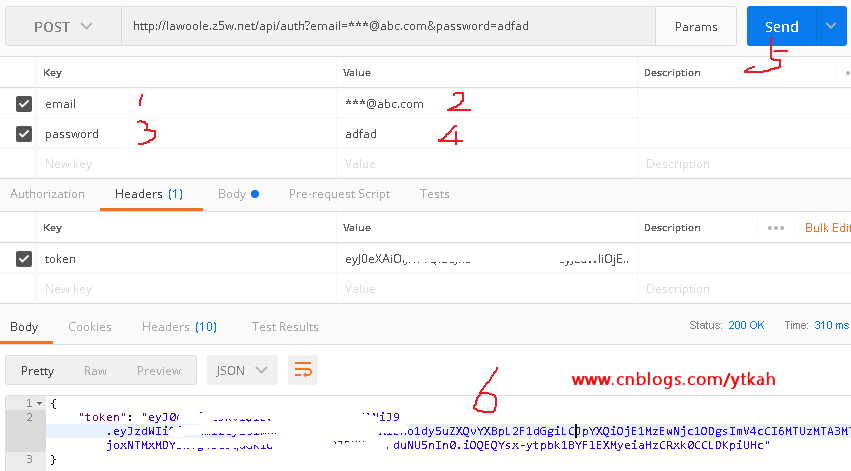
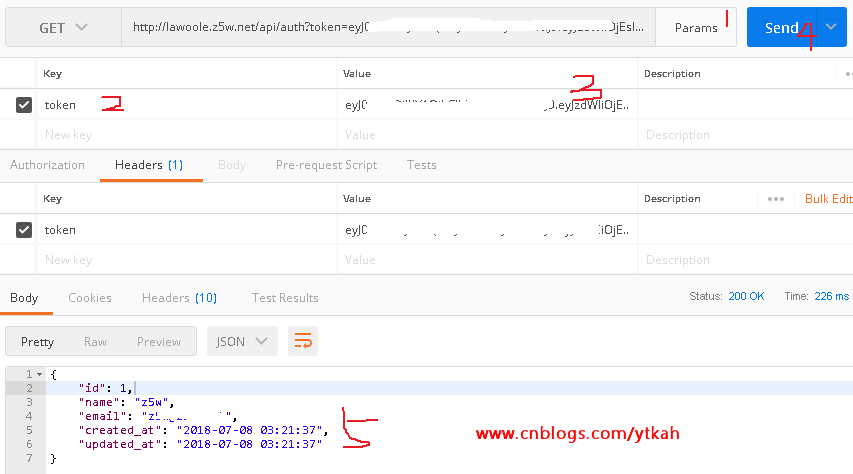
将获取的token复制,黏贴到第二步的用户验证token中,下图5中就是我们刚刚注册的用户
laravel dingo/api添加jwt-auth认证的更多相关文章
- 用laravel dingo/api创建产品api
沿着上一篇来讲,我们来创建一个简单的item产品api,也是用到laravel dingo/api来实现,对dingo/api不熟的朋友可以翻看前面的文章.好,我们随着ytkah一起来创建产品api ...
- 为Asp.Net Web Api添加Http基本认证
Asp.net Web Api提供了RESTFul web服务的编程接口.默认RESTFul 服务没有提供任何验证或者基于角色的验证,这显然不适合Put.Post.Delete这些操作.Aps.net ...
- 用laravel dingo api插件库创建api的一些心得笔记
用laravel创建api是很多大型项目正在使用的方法,一般他们都是用dingo api插件库来开发自己的api.以下是ytkah用dingo api的一些心得,有需要的朋友可以关注一下 1.安装 因 ...
- 用laravel dingo/api创建简单的api
1,修改.env配置文件添加 API_STANDARDS_TREE=vnd API_SUBTYPE=myapp API_PREFIX=api API_DOMAIN=null API_VERSION=v ...
- Laravel Passport API 认证使用小结
Laravel Passport API 认证使用小结 八月 4, 2017 发布在 Laravel 看到Laravel-China 社区常有人问 Laravel Passport 用于密码验证方式来 ...
- laravel5.5 dingo/api+jwt-auth
因为laravel5.5 具有发现包功能,只要包做了兼容laravel5.5就可以不用在config/app.php添加额外代码了. 集成dingo/api github:https://github ...
- lumen 使用 dingo API 在 phpunit 中 404 的解决方法, 以及鉴权问题
1. phpunit.xml 中添加 dingo 相关配置 <env name="API_STANDARDS_TREE" value="x"/> & ...
- 如何使用Swagger为.NET Core 3.0应用添加JWT授权说明文档
简介 本教程采用WHY-WHAT-HOW黄金圈思维模式编写,黄金圈法则强调的是从WHY为什么学,到WHAT学到什么,再到HOW如何学.从模糊到清晰的学习模式.大家的时间都很宝贵,我们做事前先想清楚为什 ...
- 精讲RestTemplate第9篇-如何通过HTTP Basic Auth认证
本文是精讲RestTemplate第9篇,前篇的blog访问地址如下: 精讲RestTemplate第1篇-在Spring或非Spring环境下如何使用 精讲RestTemplate第2篇-多种底层H ...
随机推荐
- MTK 隐藏底部状态栏
步骤: 源码/frameworks/base/policy/src/com/android/internal/policy/impl目录下修改PhoneWindowManager.java文件. 修改 ...
- [GPU] DIY for Deep Learning Workstation
Link: jcjohnson/cnn-benchmarks Ref: Build a super fast deep learning machine for under $1,000 Graphi ...
- android基础---->Broadcast的使用
在Android中,Broadcast是一种广泛运用的在应用程序之间传输信息的机制.而BroadcastReceiver是对发送出来的 Broadcast进行过滤接受并响应的一类组件. 目录导航: 广 ...
- PDF to image
http://www.verypdf.com/pdf2tif/pdf-to-image/help.htm http://www.softinterface.com/DL/DL_Alternate_Do ...
- MFC接收命令行参数的三种方法
方法一: CString sCmdline = ::GetCommandLine(); AfxMessageBox(sCmdline); 将获取到 "C:\test\app.exe -1 - ...
- 7.15python进程锁
#!/usr/bin/env python #!--*--coding:utf-8 --*-- #!@Time :2018/7/14 17:33 #!@Author TrueNewBee #锁 # 火 ...
- A - 小孩报数问题
有N个小孩围成一圈,给他们从1开始依次编号,现指定从第W个开始报数,报到第S个时,该小孩出列,然后从下一个小孩开始报数,仍是报到S个出列,如此重复下去,直到所有的小孩都出列(总人数不足S个时将循环报数 ...
- js删除Array数组中的某个元素
Array.prototype.indexOf = function (val) { ; i < this.length; i++) { if (this[i] == val) return i ...
- IAR 路径导致的错误
Error while running "c:\ti\simplelink_cc2640r2_sdk_1_50_00_58\..\xdctools_3_50_03_33_core\xs&qu ...
- win10 Java环境变量,hadoop 环境变量
妈呀,今天又重装了系统.需要装上java环境. 安装环境老百度,然后老掉坑.(path 路经) 1,新建环境变量 JAVA_HOME 2, 新建 CLASSPATH 环境变量 .;%JAVA_HOME ...