
[深度应用]·Keras极简实现Attention结构
[深度应用]·Keras极简实现Attention结构
在上篇博客中笔者讲解来Attention结构的基本概念,在这篇博客使用Keras搭建一个基于Attention结构网络加深理解。。
1.生成数据
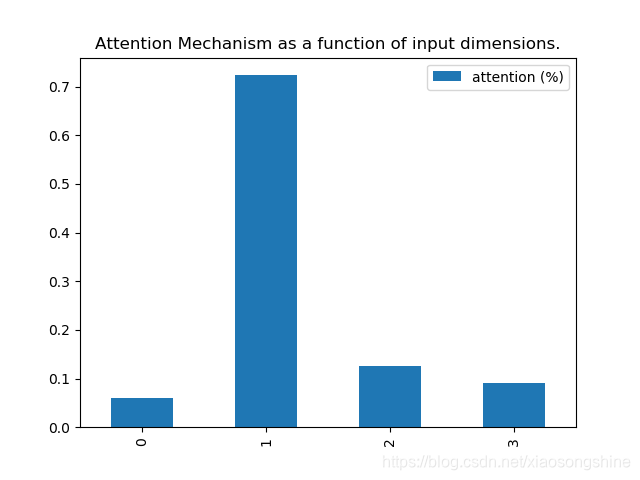
这里让x[:, attention_column] = y[:, 0],X数据的第一列等于Y数据第零列(其实就是label),这样第一列数据和label的相关度就会很大,最后通过输出相关度来证明思路正确性。
import keras.backend as K

import numpy as np

def get_activations(model, inputs, print_shape_only=False, layer_name=None):

    # Documentation is available online on Github at the address below.

    # From: https://github.com/philipperemy/keras-visualize-activations

    print('----- activations -----')

    activations = []

    inp = model.input

    if layer_name is None:

        outputs = [layer.output for layer in model.layers]

    else:

        outputs = [layer.output for layer in model.layers if layer.name == layer_name]  # all layer outputs

    funcs = [K.function([inp] + [K.learning_phase()], [out]) for out in outputs]  # evaluation functions

    layer_outputs = [func([inputs, 1.])[0] for func in funcs]

    for layer_activations in layer_outputs:

        activations.append(layer_activations)

        if print_shape_only:

            print(layer_activations.shape)

        else:

            print(layer_activations)

    return activations

def get_data(n, input_dim, attention_column=1):

    """

    Data generation. x is purely random except that it's first value equals the target y.

    In practice, the network should learn that the target = x[attention_column].

    Therefore, most of its attention should be focused on the value addressed by attention_column.

    :param n: the number of samples to retrieve.

    :param input_dim: the number of dimensions of each element in the series.

    :param attention_column: the column linked to the target. Everything else is purely random.

    :return: x: model inputs, y: model targets

    """

    x = np.random.standard_normal(size=(n, input_dim))

    y = np.random.randint(low=0, high=2, size=(n, 1))

    x[:, attention_column] = y[:, 0]

    return x, y

2.定义网络
import matplotlib.pyplot as plt

import pandas as pd

import numpy as np

from attention_utils import get_activations, get_data

np.random.seed(1337)  # for reproducibility

from keras.models import *

from keras.layers import Input, Dense,Multiply,Activation

input_dim = 4

def Att(att_dim,inputs,name):

    V = inputs

    QK = Dense(att_dim,bias=None)(inputs)

    QK = Activation("softmax",name=name)(QK)

    MV = Multiply()([V, QK])

    return(MV)

def build_model():

    inputs = Input(shape=(input_dim,))

    atts1 = Att(input_dim,inputs,"attention_vec")

    x = Dense(16)(atts1)

    atts2 = Att(16,x,"attention_vec1")

    output = Dense(1, activation='sigmoid')(atts2)

    model = Model(input=inputs, output=output)

    return model
3.训练与作图
if __name__ == '__main__':

    N = 10000

    inputs_1, outputs = get_data(N, input_dim)

    print(inputs_1[:2],outputs[:2])

    m = build_model()

    m.compile(optimizer='adam', loss='binary_crossentropy', metrics=['accuracy'])

    print(m.summary())

    m.fit(inputs_1, outputs, epochs=20, batch_size=128, validation_split=0.2)

    testing_inputs_1, testing_outputs = get_data(1, input_dim)

    # Attention vector corresponds to the second matrix.

    # The first one is the Inputs output.

    attention_vector = get_activations(m, testing_inputs_1,

                                       print_shape_only=True,

                                       layer_name='attention_vec')[0].flatten()

    print('attention =', attention_vector)

    # plot part.

    pd.DataFrame(attention_vector, columns=['attention (%)']).plot(kind='bar',

                                                                   title='Attention Mechanism as '

                                                                         'a function of input'

                                                                         ' dimensions.')

    plt.show()
4.结果展示
实验结果表明,第一列相关性最大,符合最初的思想。
__________________________________________________________________________________________________

Layer (type)                    Output Shape         Param #     Connected to

==================================================================================================

input_1 (InputLayer)            (None, 4)            0

__________________________________________________________________________________________________

dense_1 (Dense)                 (None, 4)            16          input_1[0][0]

__________________________________________________________________________________________________

attention_vec (Activation)      (None, 4)            0           dense_1[0][0]

__________________________________________________________________________________________________

multiply_1 (Multiply)           (None, 4)            0           input_1[0][0]

                                                                 attention_vec[0][0]

__________________________________________________________________________________________________

dense_2 (Dense)                 (None, 16)           80          multiply_1[0][0]

__________________________________________________________________________________________________

dense_3 (Dense)                 (None, 16)           256         dense_2[0][0]

__________________________________________________________________________________________________

attention_vec1 (Activation)     (None, 16)           0           dense_3[0][0]

__________________________________________________________________________________________________

multiply_2 (Multiply)           (None, 16)           0           dense_2[0][0]

                                                                 attention_vec1[0][0]

__________________________________________________________________________________________________

dense_4 (Dense)                 (None, 1)            17          multiply_2[0][0]

==================================================================================================

Total params: 369

Trainable params: 369

Non-trainable params: 0

__________________________________________________________________________________________________

None

Train on 8000 samples, validate on 2000 samples

Epoch 1/20

2019-05-26 20:02:22.289119: I tensorflow/core/platform/cpu_feature_guard.cc:141] Your CPU supports instructions that this TensorFlow binary was not compiled to use: SSE4.1 SSE4.2 AVX AVX2 FMA

2019-05-26 20:02:22.290211: I tensorflow/core/common_runtime/process_util.cc:69] Creating new thread pool with default inter op setting: 4. Tune using inter_op_parallelism_threads for best performance.

8000/8000 [==============================] - 2s 188us/step - loss: 0.6918 - acc: 0.5938 - val_loss: 0.6893 - val_acc: 0.7715

Epoch 2/20

8000/8000 [==============================] - 0s 23us/step - loss: 0.6848 - acc: 0.7889 - val_loss: 0.6774 - val_acc: 0.8065

Epoch 3/20

8000/8000 [==============================] - 0s 28us/step - loss: 0.6619 - acc: 0.8091 - val_loss: 0.6417 - val_acc: 0.7780

Epoch 4/20

8000/8000 [==============================] - 0s 29us/step - loss: 0.6132 - acc: 0.8166 - val_loss: 0.5771 - val_acc: 0.8610

Epoch 5/20

8000/8000 [==============================] - 0s 28us/step - loss: 0.5304 - acc: 0.8925 - val_loss: 0.4758 - val_acc: 0.9185

Epoch 6/20

8000/8000 [==============================] - 0s 28us/step - loss: 0.4177 - acc: 0.9433 - val_loss: 0.3554 - val_acc: 0.9680

Epoch 7/20

8000/8000 [==============================] - 0s 24us/step - loss: 0.3028 - acc: 0.9824 - val_loss: 0.2533 - val_acc: 0.9930

Epoch 8/20

8000/8000 [==============================] - 0s 40us/step - loss: 0.2180 - acc: 0.9961 - val_loss: 0.1872 - val_acc: 0.9985

Epoch 9/20

8000/8000 [==============================] - 0s 37us/step - loss: 0.1634 - acc: 0.9986 - val_loss: 0.1442 - val_acc: 0.9985

Epoch 10/20

8000/8000 [==============================] - 0s 33us/step - loss: 0.1269 - acc: 0.9998 - val_loss: 0.1140 - val_acc: 0.9985

Epoch 11/20

8000/8000 [==============================] - 0s 22us/step - loss: 0.1013 - acc: 0.9998 - val_loss: 0.0921 - val_acc: 0.9990

Epoch 12/20

8000/8000 [==============================] - 0s 28us/step - loss: 0.0825 - acc: 0.9999 - val_loss: 0.0758 - val_acc: 0.9995

Epoch 13/20

8000/8000 [==============================] - 0s 22us/step - loss: 0.0682 - acc: 1.0000 - val_loss: 0.0636 - val_acc: 0.9995

Epoch 14/20

8000/8000 [==============================] - 0s 20us/step - loss: 0.0572 - acc: 0.9999 - val_loss: 0.0538 - val_acc: 0.9995

Epoch 15/20

8000/8000 [==============================] - 0s 23us/step - loss: 0.0485 - acc: 1.0000 - val_loss: 0.0460 - val_acc: 0.9995

Epoch 16/20

8000/8000 [==============================] - 0s 22us/step - loss: 0.0416 - acc: 1.0000 - val_loss: 0.0397 - val_acc: 0.9995

Epoch 17/20

8000/8000 [==============================] - 0s 23us/step - loss: 0.0360 - acc: 1.0000 - val_loss: 0.0345 - val_acc: 0.9995

Epoch 18/20

8000/8000 [==============================] - 0s 22us/step - loss: 0.0314 - acc: 1.0000 - val_loss: 0.0302 - val_acc: 0.9995

Epoch 19/20

8000/8000 [==============================] - 0s 22us/step - loss: 0.0276 - acc: 1.0000 - val_loss: 0.0266 - val_acc: 0.9995

Epoch 20/20

8000/8000 [==============================] - 0s 21us/step - loss: 0.0244 - acc: 1.0000 - val_loss: 0.0235 - val_acc: 1.0000

----- activations -----

(1, 4)

attention = [0.05938202 0.7233456  0.1254946  0.09177781]
[深度应用]·Keras极简实现Attention结构的更多相关文章
- [深度学习工具]·极简安装Dlib人脸识别库
[深度学习工具]·极简安装Dlib人脸识别库 Dlib介绍 Dlib是一个现代化的C ++工具箱,其中包含用于在C ++中创建复杂软件以解决实际问题的机器学习算法和工具.它广泛应用于工业界和学术界,包 ...
- [深度应用]·Keras实现Self-Attention文本分类(机器如何读懂人心)
[深度应用]·Keras实现Self-Attention文本分类(机器如何读懂人心) 配合阅读: [深度概念]·Attention机制概念学习笔记 [TensorFlow深度学习深入]实战三·分别使用 ...
- Resty 一款极简的restful轻量级的web框架
https://github.com/Dreampie/Resty Resty 一款极简的restful轻量级的web框架 开发文档 如果你还不是很了解restful,或者认为restful只是一种规 ...
- php 极简框架ES发布(代码总和不到 400 行)
ES 框架简介 ES 是一款 极简,灵活, 高性能,扩建性强 的php 框架. 未开源之前在商业公司 经历数年,数个高并发网站 实践使用! 框架结构 整个框架核心四个文件,所有文件加起来放在一起总行数 ...
- 极极极极极简的的增删查改(CRUD)解决方案
去年这个时候写过一篇全自动数据表格的文章http://www.cnblogs.com/liuyh/p/5747331.html.文章对自己写的一个js组件做了个概述,很多人把它当作了一款功能相似的纯前 ...
- 工具(5): 极简开发文档编写(How-to)
缘起 一个合格的可维护项目,必须要有足够的文档,因此一个项目开发到一定阶段后需要适当的编写文档.项目的类型多种多样,有许多项目属于内部项目,例如一个内部的开发引擎,或者一个本身就是面向开发者的项目. ...
- 基于Linux-3.9.4的mykernel实验环境的极简内核分析
382 + 原创作品转载请注明出处 + https://github.com/mengning/linuxkernel/ 一.实验环境 win10 -> VMware -> Ubuntu1 ...
- .NET开源项目 QuarkDoc 一款自带极简主义属性的文档管理系统
有些话说在前头 因为公司产品业务重构且功能拆分组件化,往后会有很多的接口文档需要留存,所以急需一款文档管理系统.当时选型要求3点: 1.不能是云平台上的Saas服务,整个系统都要在自己公司部署维护(数 ...
- SpringBoot系列: 极简Demo程序和Tomcat war包部署
=================================SpringBoot 标准项目创建步骤================================= 使用 Spring IDE( ...
随机推荐
- spark读取hbase(NewHadoopAPI 例子)
package cn.piesat.controller import java.text.{DecimalFormat, SimpleDateFormat}import java.utilimpor ...
- css grid 随笔
原文出自Arien的博客https://www.w3cplus.com/css3/line-base-placement-layout.html 首先定义一个网格 1.可以给父容器的display属性 ...
- 使用word2vec对中文维基百科数据进行处理
一.下载中文维基百科数据https://dumps.wikimedia.org/zhwiki/并使用gensim中的wikicorpus解析提取xml中的内容 二.利用opencc繁体转简体 三.利用 ...
- 「SDOI2017」硬币游戏
题目链接 问题分析 首先一个显然的做法就是建出AC自动机,然后高斯消元.但是这样的复杂度是\(O(n^3m^3)\)的. 我们发现其实只需要求AC自动机上\(n\)个状态的概率,而其余的概率是没有用的 ...
- 利用H5缓存机制实现点击按钮第一次与之后再点击分别跳转不同页面
昨天碰到这样一个需求,要求点击按钮第一次跳转到a页面,之后再点击它就跳转到b页面.这个问题我首先就想到了利用H5的缓存sessionstorage来实现,SessionStorage用于本地存储一个会 ...
- 用node.js搭建一个静态资源站 html,js,css正确加载 跳转也完美实现!
昨天买了一个服务器想着用来测试一些自己的项目,由于是第一次建站,在tomcat,linux,node.js间想了好久.最终因为node搭建比较方便没那么麻烦就决定用node.js来搭建网站项目. 搭建 ...
- 程序代码运行结果是(abdcbdcb)
public class Test { public static boolean show(char ch) { System.out.print(ch); return true; } publi ...
- windows管理员权限激活
第一步:计算机-右键--管理--选择用户,选择administrator用户--取消勾选:账户禁用 第二步:alt+ctrl+delete,快捷键调出资源管理器--点击切换用户 第三步:显示出现adm ...
- 剑指offer:把一个支付算转化为整数
1:首先,根据课本上的程序,是这样的: #include "stdafx.h" #include "iostream" using namespace std; ...
- 190707Python-Redis
一.Redis的简单使用 Redis操作模式 # Author:Li Dongfei import redis r = redis.Redis(host='192.168.56.7', port=63 ...