
跨平台迁移数据库windows-Linux
将10.10.1.127服务器的数据库ORCL(WINDOWS)迁移到VM 10.10.10.168LINUX平台
操作系统:Windows server 2008r2 64bit
CentOS Linux 6.5 64bit
ORACLE软件:11.2.0.3.0
目录:
- 1. 在源数据库(Windows数据库orcl准备迁移)
2. 用 RMAN 生成迁移文件
3. 修改对应的转换文件
4. 修改对应的 INIT 文件
5. 在目标 LINUX(linux 数据库 orcl)在用 DBCA 创建数据库
6. 删除文件,复制文件
7. 升级
1.在源数据库(Windows数据库orcl准备迁移)
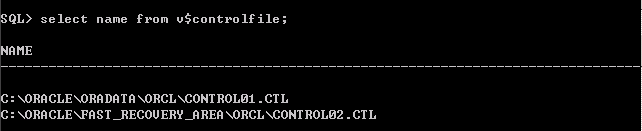
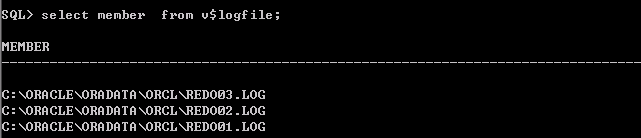
1,检查源库的控制文件,数据文件,日志文件,临时文件,参数文件等!


查看可以转换的平台
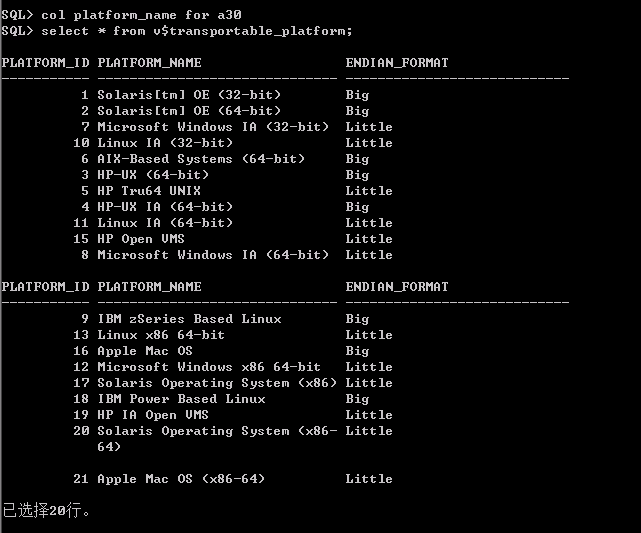
在目标端执行,捕获目标库平台

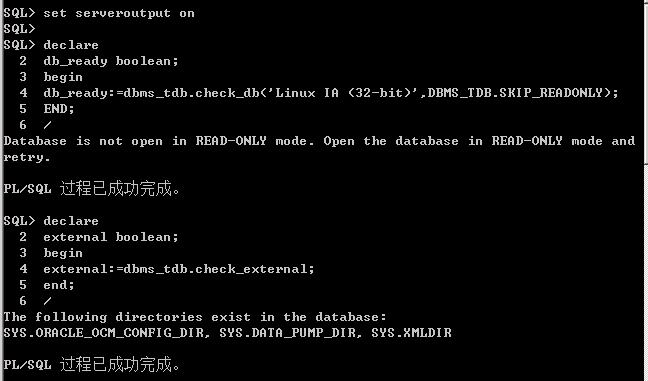
运行检查包
查看归档模式

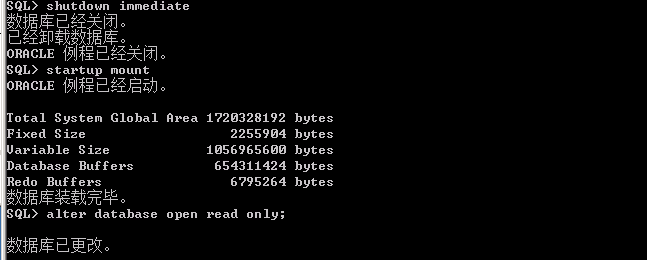
关闭数据库,将数据库启动到只读模式!
2. 用
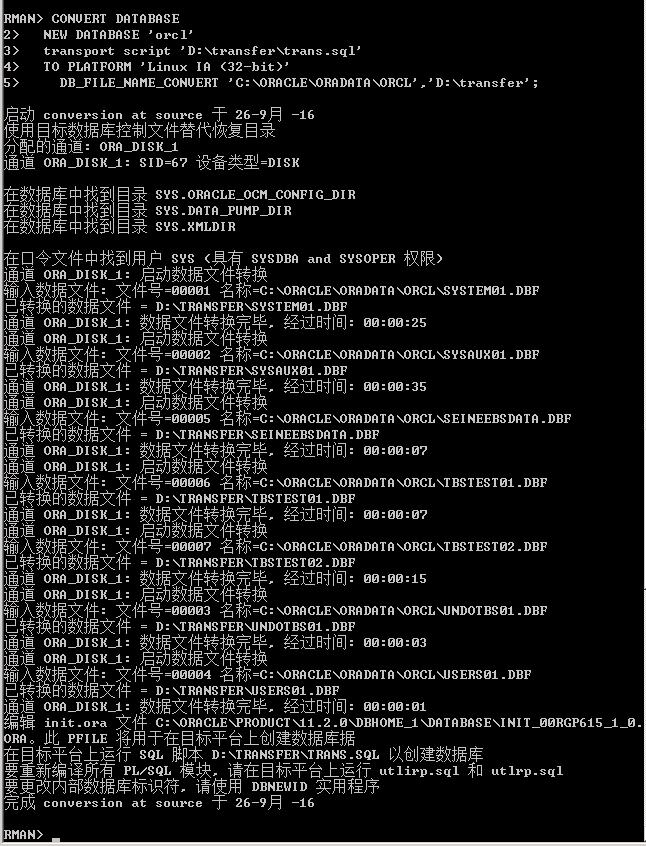
RMAN 生成迁移文件
对源数据文件进行转换,并生成升级脚本
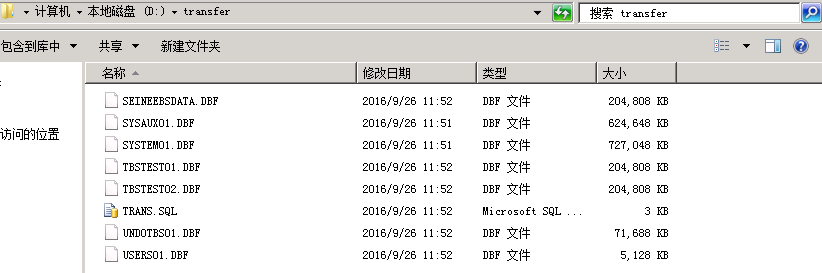
查看生成的数据文件和升级脚本
3. 修改对应的转换文件
更改TRANS.SQL的路劲,对应LINUX平台的路劲
Linux路劲:
ORACLE_BASE=/u01/app/oracle
ORACLE_HOME=/u01/app/oracle/product/11.2.0/db_1
-- The following commands will create a new
control file and use it
-- to open the database.
-- Data used by Recovery Manager will be
lost.
-- The contents of online logs will be lost
and all backups will
-- be invalidated. Use this only if online
logs are damaged.
-- After mounting the created controlfile,
the following SQL
-- statement will place the database in the
appropriate
-- protection mode:
--
ALTER DATABASE SET STANDBY DATABASE TO MAXIMIZE PERFORMANCE
STARTUP NOMOUNT PFILE='C:\ORACLE\PRODUCT\11.2.0\DBHOME_1\DATABASE\INIT_00RGP615_1_0.ORA'
CREATE CONTROLFILE REUSE SET DATABASE
"ORCL" RESETLOGS ARCHIVELOG
MAXLOGFILES 16
MAXLOGMEMBERS 3
MAXDATAFILES 100
MAXINSTANCES 8
MAXLOGHISTORY 292
LOGFILE
GROUP 1 'C:\ORACLE\PRODUCT\11.2.0\DBHOME_1\DATABASE\ARCH_D-ORCL_ID-1451024903_S-10_T-1_A-923244170_03RGP615' SIZE 50M BLOCKSIZE 512,
GROUP 2
'C:\ORACLE\PRODUCT\11.2.0\DBHOME_1\DATABASE\ARCH_D-ORCL_ID-1451024903_S-11_T-1_A-923244170_04RGP615' SIZE 50M BLOCKSIZE 512,
GROUP 3 'C:\ORACLE\PRODUCT\11.2.0\DBHOME_1\DATABASE\ARCH_D-ORCL_ID-1451024903_S-12_T-1_A-923244170_05RGP615' SIZE 50M BLOCKSIZE 512
DATAFILE
'D:\TRANSFER\SYSTEM01.DBF',
'D:\TRANSFER\SYSAUX01.DBF',
'D:\TRANSFER\UNDOTBS01.DBF',
'D:\TRANSFER\USERS01.DBF',
'D:\TRANSFER\SEINEEBSDATA.DBF',
'D:\TRANSFER\TBSTEST01.DBF',
'D:\TRANSFER\TBSTEST02.DBF'
CHARACTER SET AL32UTF8
;
-- Database can now be opened zeroing the
online logs.
ALTER DATABASE OPEN RESETLOGS;
-- Commands to add tempfiles to temporary
tablespaces.
-- Online tempfiles have complete space
information.
-- Other tempfiles may require adjustment.
ALTER TABLESPACE TEMP ADD TEMPFILE 'C:\ORACLE\PRODUCT\11.2.0\DBHOME_1\DATABASE\DATA_D-ORCL_I-1451024903_TS-TEMP_FNO-1_06RGP615'
SIZE 30408704 AUTOEXTEND ON NEXT
655360 MAXSIZE 32767M;
-- End of tempfile additions.
--
set echo off
prompt
~~~~~~~~~~~~~~~~~~~~~~~~~~~~~~~~~~~~~~~~~~~~~~~~~~~~~~~~~~~~~~~~~~~
prompt * Your database has been created
successfully!
prompt * There are many things to think
about for the new database. Here
prompt * is a checklist to help you stay on
track:
prompt * 1. You may want to redefine the
location of the directory objects.
prompt * 2. You may want to change the
internal database identifier (DBID)
prompt *
or the global database name for this database. Use the
prompt *
NEWDBID Utility (nid).
prompt
~~~~~~~~~~~~~~~~~~~~~~~~~~~~~~~~~~~~~~~~~~~~~~~~~~~~~~~~~~~~~~~~~~~
SHUTDOWN IMMEDIATE
STARTUP UPGRADE PFILE='C:\ORACLE\PRODUCT\11.2.0\DBHOME_1\DATABASE\INIT_00RGP615_1_0.ORA'
@@ ?/rdbms/admin/utlirp.sql
SHUTDOWN IMMEDIATE
STARTUP PFILE='C:\ORACLE\PRODUCT\11.2.0\DBHOME_1\DATABASE\INIT_00RGP615_1_0.ORA'
-- The following step will recompile all
PL/SQL modules.
-- It may take serveral hours to complete.
@@ ?/rdbms/admin/utlrp.sql
set feedback 6;
------------------------------------------------------------------------------------------------------------------------------------------------------------------------------------------------------------------------------------------------------------------
修改之后的TRANS.SQL文件:
- The following commands will create a new
control file and use it
-- to open the database.
-- Data used by Recovery Manager will be
lost.
-- The contents of online logs will be lost
and all backups will
-- be invalidated. Use this only if online
logs are damaged.
-- After mounting the created controlfile,
the following SQL
-- statement will place the database in the
appropriate
-- protection mode:
--
ALTER DATABASE SET STANDBY DATABASE TO MAXIMIZE PERFORMANCE
STARTUP NOMOUNT PFILE='/u01/app/oracle/product/11.2.0/db_1/dbs/initorcl.ora'
CREATE CONTROLFILE REUSE SET DATABASE
"ORCL" RESETLOGS ARCHIVELOG
MAXLOGFILES 16
MAXLOGMEMBERS 3
MAXDATAFILES 100
MAXINSTANCES 8
MAXLOGHISTORY 292
LOGFILE
GROUP 1 '/u01/app/oracle/oradata/orcl/redo01.log' SIZE 50M BLOCKSIZE 512,
GROUP 2 '/u01/app/oracle/oradata/orcl/redo02.log
' SIZE 50M BLOCKSIZE 512,
GROUP 3 '/u01/app/oracle/oradata/orcl/redo03.log
' SIZE 50M BLOCKSIZE 512
DATAFILE
'/u01/app/oracle/oradata/orcl/SYSTEM01.DBF',
'/u01/app/oracle/oradata/orcl/SYSAUX01.DBF',
'/u01/app/oracle/oradata/orcl/UNDOTBS01.DBF',
'/u01/app/oracle/oradata/orcl/USERS01.DBF',
'/u01/app/oracle/oradata/orcl/SEINEEBSDATA.DBF',
'/u01/app/oracle/oradata/orcl/TBSTEST01.DBF',
'/u01/app/oracle/oradata/orcl/TBSTEST02.DBF'
CHARACTER SET AL32UTF8
;
-- Database can now be opened zeroing the
online logs.
ALTER DATABASE OPEN RESETLOGS;
-- Commands to add tempfiles to temporary
tablespaces.
-- Online tempfiles have complete space
information.
-- Other tempfiles may require adjustment.
ALTER TABLESPACE TEMP ADD TEMPFILE '/u01/app/oracle/oradata/orcl/temp01.dbf'
SIZE 30408704 AUTOEXTEND ON NEXT
655360 MAXSIZE 32767M;
-- End of tempfile additions.
--
set echo off
prompt
~~~~~~~~~~~~~~~~~~~~~~~~~~~~~~~~~~~~~~~~~~~~~~~~~~~~~~~~~~~~~~~~~~~
prompt * Your database has been created
successfully!
prompt * There are many things to think
about for the new database. Here
prompt * is a checklist to help you stay on
track:
prompt * 1. You may want to redefine the
location of the directory objects.
prompt * 2. You may want to change the
internal database identifier (DBID)
prompt *
or the global database name for this database. Use the
prompt *
NEWDBID Utility (nid).
prompt
~~~~~~~~~~~~~~~~~~~~~~~~~~~~~~~~~~~~~~~~~~~~~~~~~~~~~~~~~~~~~~~~~~~
SHUTDOWN IMMEDIATE
STARTUP UPGRADE PFILE='/u01/app/oracle/product/11.2.0/db_1/dbs/initorcl.ora
'
@@ ?/rdbms/admin/utlirp.sql
SHUTDOWN IMMEDIATE
STARTUP PFILE='/u01/app/oracle/product/11.2.0/db_1/dbs/initorcl.ora '
-- The following step will recompile all
PL/SQL modules.
-- It may take serveral hours to complete.
@@ ?/rdbms/admin/utlrp.sql
set feedback 6;
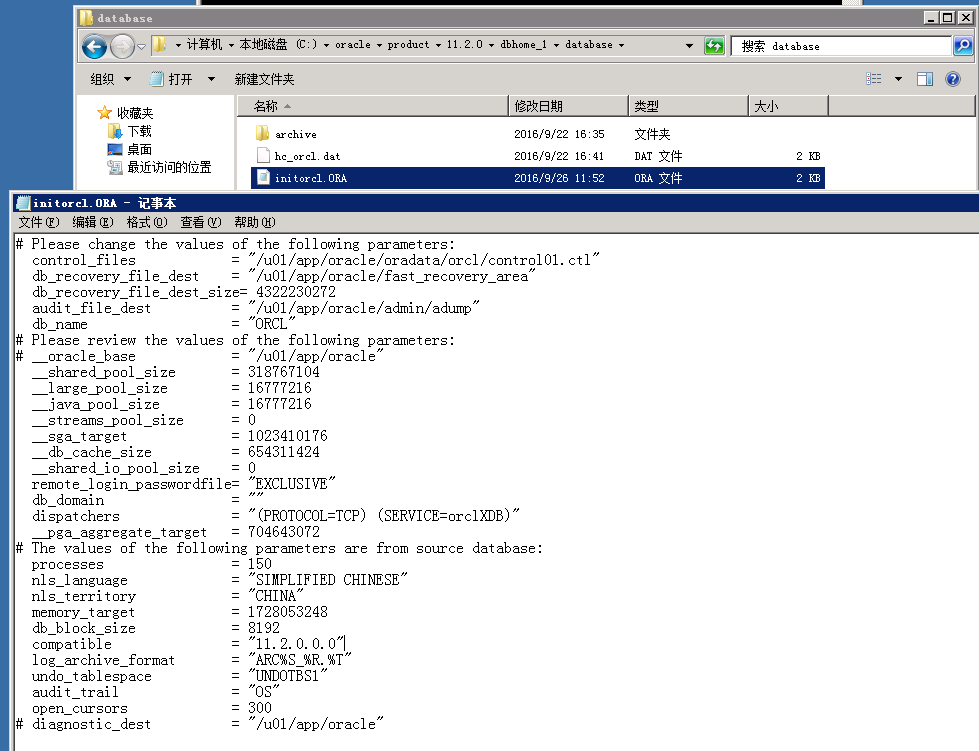
4. 修改对应的
INIT 文件
更改参数文件的相关参数路劲
5. 在目标
LINUX(linux 数据库 orcl)在用 DBCA 创建数据库
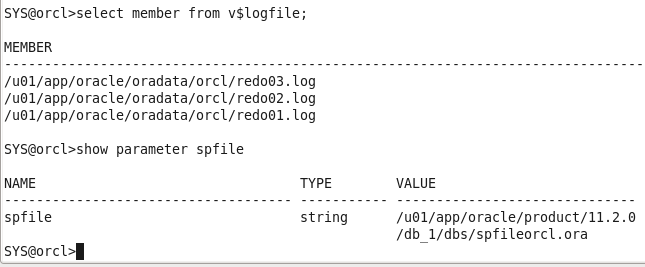
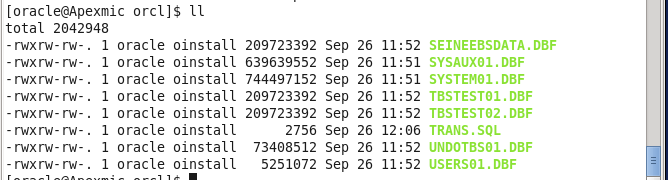
用DBCA创建ORCL数据库,并将数据文件,参数文件,日志文件和控制文件删除,再把转换好的相应文件复制到linux相应的路劲


6. 删除文件,复制文件
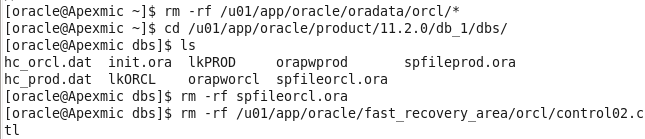
删除复制后文件后,执行TRANS.SQL脚本

7,升级
执行升级脚本

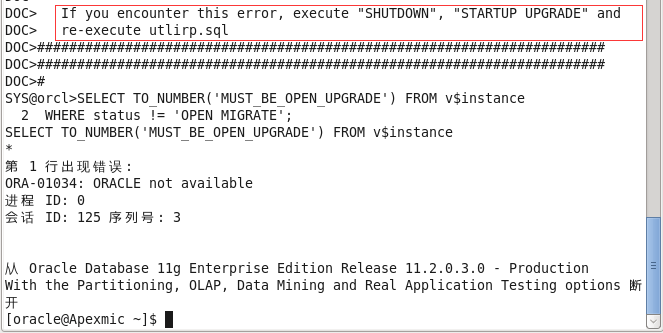
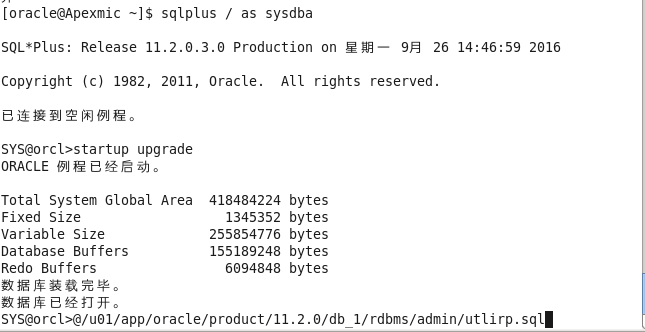
遇到错误,提示将数据库启动到升级模式,再执行UTLIRP.SQL脚本
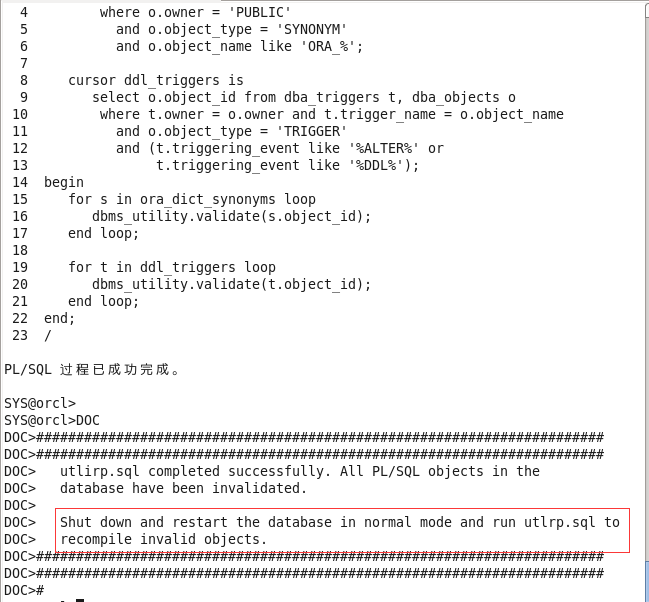
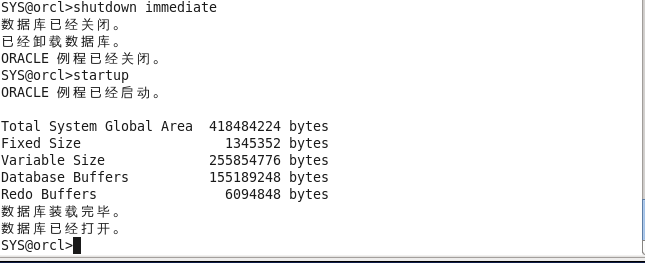
跑完脚本,提示正常关闭和启动数据库,脚本已经执行,可以不用执行
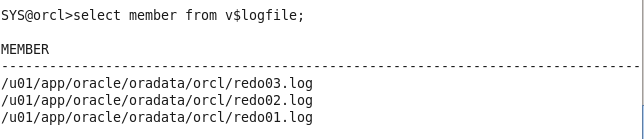
检查数据库的状态和文件
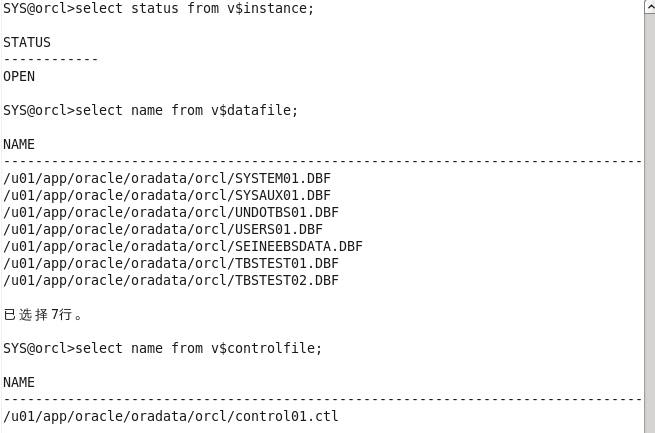
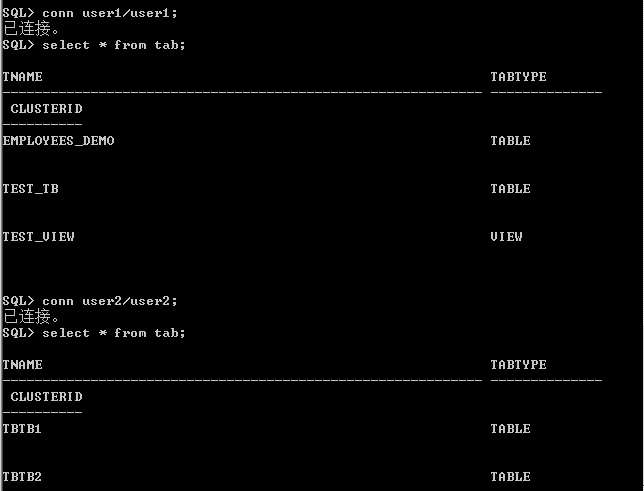
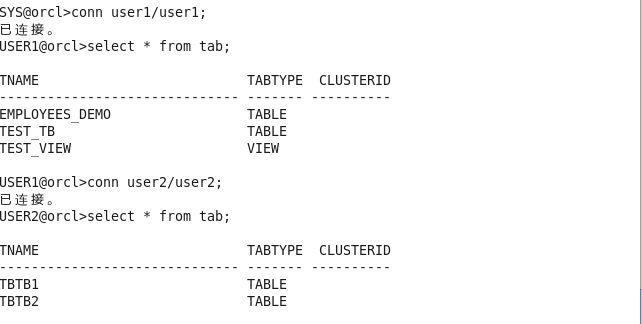
验证数据的有效性
跨平台迁移数据库windows-Linux的更多相关文章
- 如丝般顺滑地从Windows迁移SQLServer数据库到Linux
老鸟看过菜鸟的上一篇<MSSQL On Linux备份与还原>文章后,很满意,但是还是忍不住发问:"这篇文章讲的是MSSQL在Linux系统上的备份与还原,如果我之前是Windo ...
- mongodb数据库备份迁移 windows -> linux
mongodb数据库备份迁移 windows -> linux cd 到本机mongodb的安装目录 如: C:\Program Files\MongoDB\Server\3.4\bin 可以发 ...
- lower_case_table_names和数据库在Linux和windows平台之间的相互迁移问题
MySQL关于 lower_case_table_names 的文档 https://dev.mysql.com/doc/refman/5.7/en/identifier-case-sensitivi ...
- 使用Active Database Duplication创建跨平台Data Guard设置 (Windows/Linux) (Doc ID 881421.1)
Using Active Database Duplication to Create Cross Platform Data Guard Setup (Windows/Linux) (Doc ID ...
- linux 下一个 jira-6.3.6 组态 皴 翻译 迁移数据库
每一个版本号翻译包下载 https://translations.atlassian.com/dashboard/download jira下载地址 https://www.atlassian.c ...
- windows clone 迁移数据库
windows clone 迁移数据库可行.(c 盘底成复制)
- 将 Java Spring Framework 应用程序迁移到 Windows Azure
我们刚刚发布了一个新教程和示例代码,以阐述如何在Windows Azure中使用 Java 相关技术.在该指南中,我们提供了分步教程,说明如何将 Java Spring Framework 应用程序( ...
- 使用数据泵(expdp、impdp)迁移数据库流程
转载原文地址为:http://blog.itpub.net/26736162/viewspace-2652256/ 使用数据泵迁移数据库流程 How To Move Or Copy A Databas ...
- MongoDb Windows linux平台环境及主流编程语言驱动安装同时配置mongoDb的远程连接
<一,>MongoDB 简介篇Ruiy; MongoDB是一个高性能,开源,无模式的文档型数据库,是当前NoSql数据库中比较热门的一种.它在许多场景下可用于替代传统的关系型数据库或键/值 ...
随机推荐
- 面试宝典:25个最经典的JavaScript面试题及答案
1.使用 typeof bar === "object" 来确定 bar 是否是对象的潜在陷阱是什么?如何避免这个陷阱? 尽管 typeof bar === "objec ...
- 不要64 数位DP
Problem Description 杭州人称那些傻乎乎粘嗒嗒的人为62(音:laoer). 杭州交通管理局经常会扩充一些的士车牌照,新近出来一个好消息,以后上牌照,不再含有不吉利的数字了,这样一来 ...
- node.js--使用Express中app.use()分模块开发
app.use(path,callback)中的callback既可以是router对象又可以是函数:将一个URL路径与一个函数绑定,第一个参数为访问的路径,如果第一参数为空,则表示任何路径都触发这个 ...
- django admin站点美化
使用django-simpleui 安装 pip install django-simpleui 源码地址 https://github.com/newpanjing/simpleui django ...
- java 正则表达式 复习
正则表达式在日常开发中会经常的接触到,学会了正则可以更有效的对字符进行验证.拆分.替换.判断字符串是否合法等操作... 常用语法: 字符的取值范围 1.[abc] : 表示可能是a,可能是b,也可能是 ...
- 日语能力考试N2级必备外来语
日语能力考试N2级必备外来语 ア行外来语アンテナ:(antenna) 天线インタビュー :(interview) 采访,访谈ウイルス:(virus ) 病 ...
- PAT Advanced 1041 Be Unique (20 分)
Being unique is so important to people on Mars that even their lottery is designed in a unique way. ...
- 23_1spring基础
1.spring是什么 2.spring的优势 3.spring体系结构 4.耦合 程序间的依赖关系:类之间的依赖和方法之间的依赖. 解构:降低程序间的依赖关系. 实际开发中应该做到:编译期不依赖,实 ...
- php set_magic_quotes_runtime() 函数过时解决方法
PHP5.3中 bool set_magic_quotes_runtime ( bool $new_setting )函数过时.把函数: set_magic_quotes_runtime($newse ...
- python 文件夹压缩
import os import zipfile def zipDir(dirpath,outFullName): """ 压缩指定文件夹 :param dirpath: ...