
pycharm问题集锦
1.pycharm的激活方式
参考博客https://blog.csdn.net/u014044812/article/details/78727496
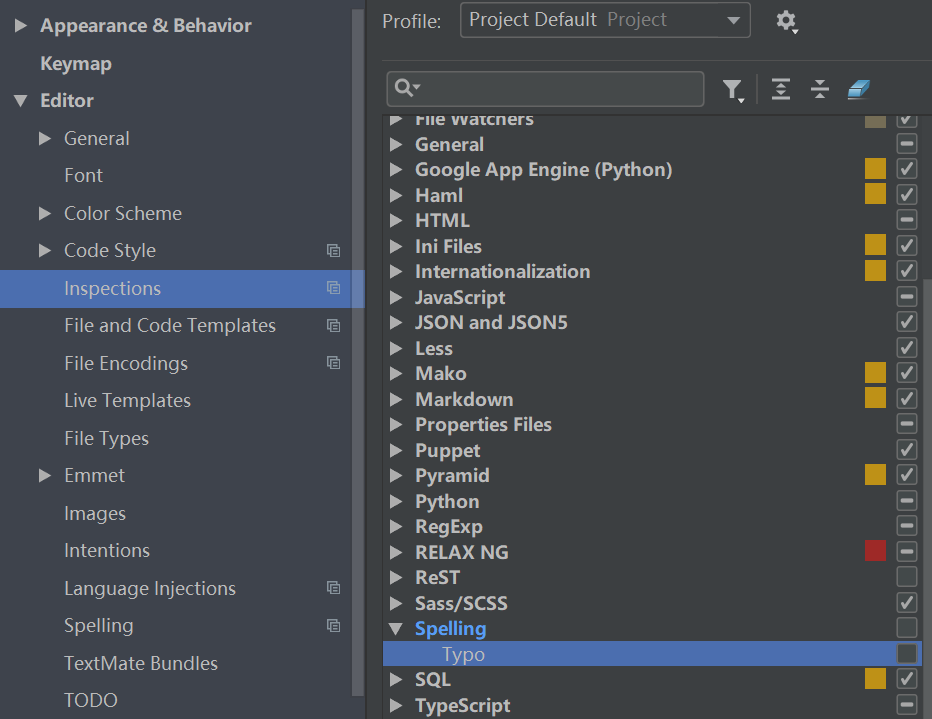
2.总是出现波浪线,如下问题

问题原因:knncls为自己定义的函数名,pycharm检查的时候,认为这是拼写错误的,所以会有波浪线提示;
解决办法:将Typos前面的√去掉即可
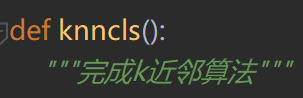
3.三引号的注释语句出现波浪线提示
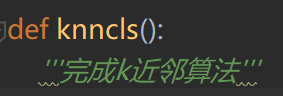
解决办法:换成三个双引号即可
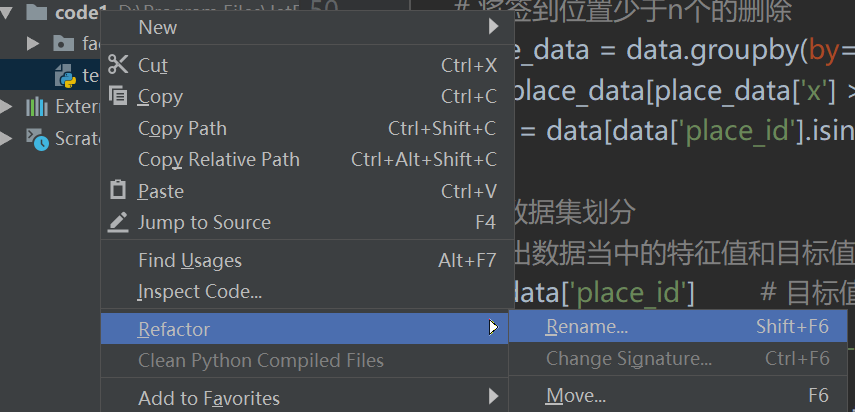
4.如何给文件或项目重命名
5. PEP8规范
本条转自:https://blog.csdn.net/Jason_Lewis/article/details/75386598
PEP 8: module level import not at top of file
解决:import不在文件的最上面,可能引用之前还有代码,把import引用放到文件的最上部就可以消除警告了。
PEP 8: expected 2 blank lines,found 0
解决:期望上面有2个空白行,发现0个,添加两个空白行就可以了。
function name should be lowercase
解决:函数名改成小写。
PEP 8: indentation contains tabs
解决:缩进中有tab空格,推荐用四个空格缩进。
Indent expected
解决:意思是没有缩进,解析器报错了,添加缩进就可以了。
Unexpected indent
解决:不期望的缩进,重新添加符合规范的缩进或者Alt+Enter快捷键会提示你转化成规范的缩进。
PEP 8: missing whitespace around operator
解决:意思是操作符(‘=’,‘<’等)前后丢失了空格,举个例子a=b会报警告,a = b正常。
PEP 8: no newline at end of file
解决:文件尾部没有新起一行,光标移到最后回车即可。
PEP 8: blank line at end of file
解决:文件最后多了一个空白行,只要有一个即可,删掉一个。
Shadows name ‘xxx’ from outer scope
解决:意思是‘xxx’在外部已经定义了,修改一下‘xxx’-> ‘uuu’或者其他符合要求的修改都可。
PEP 8: block comment should start with ‘# ’
解决:说的很清楚要以#加一个空格开始
PEP 8: inline comment should start with ‘# ’
解决:注释信息单独放一行
PEP 8: multiple statements on one line (colon)
解决:多行语句写到一行了,Python3.0好像不允许写到一行了,例如if x == 2: print(something)这样写就会有警告,必须要分两行。像下面这样
if x == 2:
print(something)
Symplify chained comparision
解决:警告的意思是可简化连锁比较,下面举个例子
if a > 0 and a < 9 可修改为 if
6.pycharm如何批量修改
例如把 \ 替换为 /
ctrl + F,查找
ctrl + R,替换,选择replace all即可

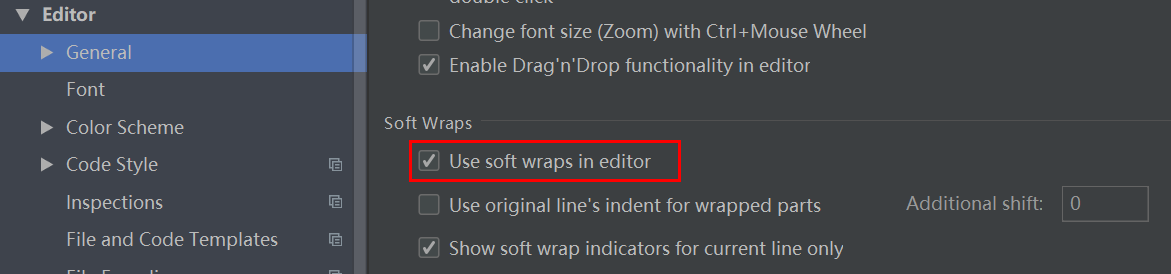
7.pycharm代码太长怎么自动换行 -- settings里面设置
8.PEP8: line too long,相关代码下面会有波浪线,如何忽略?
options中添加忽略选项E501即可
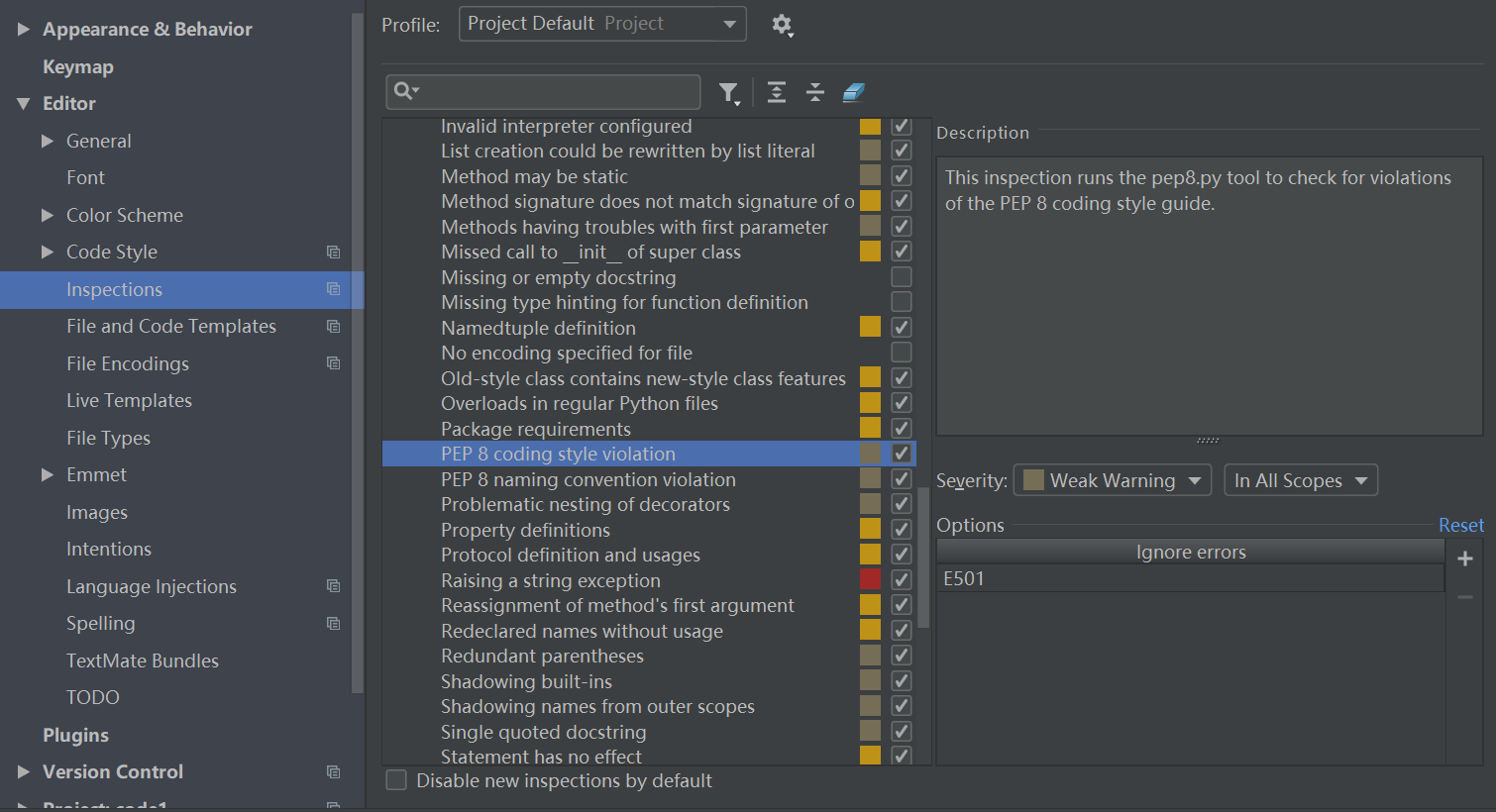
备注:PEP8规范提示编码如下:
code sample message
E1 Indentation
E101 indentation contains mixed spaces and tabs
E111 indentation is not a multiple of four
E112 expected an indented block
E113 unexpected indentation
E114 indentation is not a multiple of four (comment)
E115 expected an indented block (comment)
E116 unexpected indentation (comment)
E121 (*^) continuation line under-indented for hanging indent
E122 (^) continuation line missing indentation or outdented
E123 (*) closing bracket does not match indentation of opening bracket’s line
E124 (^) closing bracket does not match visual indentation
E125 (^) continuation line with same indent as next logical line
E126 (*^) continuation line over-indented for hanging indent
E127 (^) continuation line over-indented for visual indent
E128 (^) continuation line under-indented for visual indent
E129 (^) visually indented line with same indent as next logical line
E131 (^) continuation line unaligned for hanging indent
E133 (*) closing bracket is missing indentation
E2 Whitespace
E201 whitespace after ‘(‘
E202 whitespace before ‘)’
E203 whitespace before ‘:’
E211 whitespace before ‘(‘
E221 multiple spaces before operator
E222 multiple spaces after operator
E223 tab before operator
E224 tab after operator
E225 missing whitespace around operator
E226 (*) missing whitespace around arithmetic operator
E227 missing whitespace around bitwise or shift operator
E228 missing whitespace around modulo operator
E231 missing whitespace after ‘,’, ‘;’, or ‘:’
E241 (*) multiple spaces after ‘,’
E242 (*) tab after ‘,’
E251 unexpected spaces around keyword / parameter equals
E261 at least two spaces before inline comment
E262 inline comment should start with ‘# ‘
E265 block comment should start with ‘# ‘
E266 too many leading ‘#’ for block comment
E271 multiple spaces after keyword
E272 multiple spaces before keyword
E273 tab after keyword
E274 tab before keyword
E275 missing whitespace after keyword
E3 Blank line
E301 expected 1 blank line, found 0
E302 expected 2 blank lines, found 0
E303 too many blank lines (3)
E304 blank lines found after function decorator
E305 expected 2 blank lines after end of function or class
E4 Import
E401 multiple imports on one line
E402 module level import not at top of file
E5 Line length
E501 (^) line too long (82 > 79 characters)
E502 the backslash is redundant between brackets
E7 Statement
E701 multiple statements on one line (colon)
E702 multiple statements on one line (semicolon)
E703 statement ends with a semicolon
E704 (*) multiple statements on one line (def)
E711 (^) comparison to None should be ‘if cond is None:’
E712 (^) comparison to True should be ‘if cond is True:’ or ‘if cond:’
E713 test for membership should be ‘not in’
E714 test for object identity should be ‘is not’
E721 (^) do not compare types, use ‘isinstance()’
E731 do not assign a lambda expression, use a def
E741 do not use variables named ‘l’, ‘O’, or ‘I’
E742 do not define classes named ‘l’, ‘O’, or ‘I’
E743 do not define functions named ‘l’, ‘O’, or ‘I’
E9 Runtime
E901 SyntaxError or IndentationError
E902 IOError
W1 Indentation warning
W191 indentation contains tabs
W2 Whitespace warning
W291 trailing whitespace
W292 no newline at end of file
W293 blank line contains whitespace
W3 Blank line warning
W391 blank line at end of file
W5 Line break warning
W503 (*) line break occurred before a binary operator
W6 Deprecation warning
W601 .has_key() is deprecated, use ‘in’
W602 deprecated form of raising exception
W603 ‘<>’ is deprecated, use ‘!=’
W604 backticks are deprecated, use ‘repr()’
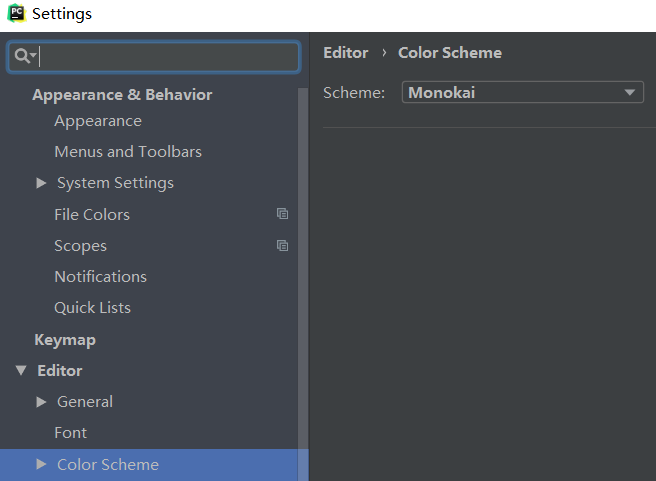
9.pycharm如何修改背景色
file -- settings -- Editor -- Color Scheme -- 选择“Monokai”
10. 待补充...
pycharm问题集锦的更多相关文章
- python pycharm错误集锦
url:http://www.cnblogs.com/hinimix/p/8016859.html 1, this list creation could be rewritten as a list ...
- pycharm实用快捷键集锦
以下是本人需要记录的快捷键,并不针对大众,所以是断断续续补充的,大家看看图个乐呵就成! 生成代码块(Surround with):Ctrl + Alt + t . 历史浏览页面跳转:很多时候,我们需要 ...
- 看完SQL Server 2014 Q/A答疑集锦:想不升级都难!
看完SQL Server 2014 Q/A答疑集锦:想不升级都难! 转载自:http://mp.weixin.qq.com/s/5rZCgnMKmJqeC7hbe4CZ_g 本期嘉宾为微软技术中心技术 ...
- Android之常见问题集锦Ⅱ
Android问题集锦Ⅰ:http://www.cnblogs.com/AndroidJotting/p/4608025.html EditText输入内容改变事件监听 _edit.addTextCh ...
- git和pycharm管理代码
首先明白三个概念,服务器代码库,本地代码库,和正在coding的项目. coding完毕后,先通过commit提交到本地代码库,然后通过push再提交server的代码库 git步骤 git c ...
- 通过pycharm使用git[图文详解]
前言 使用git+pycharm有一段时间了,算是稍有点心得,这边整理一下,可能有的方法不是最优,欢迎交流,可能还是习惯敲命令去使用git,不过其实pycharm已经帮忙做了很多了,我们可以不用记住那 ...
- pycharm连接mysql数据库
新的环境配置pycharm的项目时,发现pycharm不能连接到mysql数据库.由于安了java环境但是还没配置相关的库,并且jetbrains家的IDE一般都是java写的,于是猜想可能是java ...
- Visual Studio问题集锦:coloader80.dll未正确安装
问题 今天在修改之前的一个项目的时候报了一个错,大概内容如下: 有一个 Visual Studio 的 DLL 文件(coloader80.dll)未正确安装.请通过"控制面板"中 ...
- PyCharm断点调试django
我在用PyCharm开发django程序的时候,对于打印日志调试程序的方式感觉还是有点麻烦和不直观,所以研究了一下断点调试的方法如下: 1.打开你的工程,在菜单栏里找到Run-->Edit Co ...
随机推荐
- [ASP.NET] [JS] GridView点击高亮当前选择行,并在点击另一行时恢复上一选择行背景颜色
在ASP.NET中的gridview控件里面可以通过设定其OnRowDataBound事件来进行实现高亮当前行的操作 前端控件的设置: 只要设置好OnRowDataBound属性即可,会自动在.cs文 ...
- [转帖].NET Core 项目指定SDK版本
.NET Core 项目指定SDK版本 https://www.cnblogs.com/stulzq/p/9503121.html 一. 版本里的坑 自从 .NET Core 2.1.0版本发布以后, ...
- 高性能异步分布式事务TCC框架(资料汇总)
https://github.com/yu199195/hmily tcc源码解析系列(一)之项目结构 https://yu199195.github.io/2017/10/11/TCC/tcc-on ...
- POJ - 2421 Constructing Roads(最小生成树&并查集
There are N villages, which are numbered from 1 to N, and you should build some roads such that ever ...
- PhpStorm配置Xdebug调试
安装xdebug 去官网下载对应版本的xdebug扩展 XDEBUG EXTENSION FOR PHP | DOWNLOADS 如何选择正确版本 输出phpinfo()函数的内容 查看输出页面的网页 ...
- php文件上传错误信息说明对照表
php文件上传错误信息说明对照表: UPLOAD_ERR_OK:其值为0,没有错误发生,文件上传成功UPLOAD_ERR_INI_SIZE:其值为1,上传的文件超过了php.ini中upload_ma ...
- [.net core]2.hello word(.net core web app模版简介)
创建一个.net core web app project 弹出这个窗口 empty代表 最低依赖, 意味着往往需要手动按需添加依赖. web应用程序(模型视力控制器) 则会帮你创建好control ...
- 14.AutoMapper 之依赖注入(Dependency Injection)
https://www.jianshu.com/p/f66447282780 依赖注入(Dependency Injection) AutoMapper支持使用静态服务定位构建自定义值解析器和自定 ...
- 使用Vim打开十六进制的文件
So Easy 这里使用打开 Hello.class 文件为例 首先使用 vim -b Hello.class 打开文件,然后在 Vim 的命令模式下输入 :%!xxd 回车即可看见文件内容. 效果: ...
- shell脚本之删除内容相同的重复文件
#!/bin/bash #!当前文件夹下,删除内容相同的重复文件,只保留重复文件中的一个. ls -lS --time-style=long-iso | awk 'BEGIN{ getline;get ...