
AndroChef Java Decompile
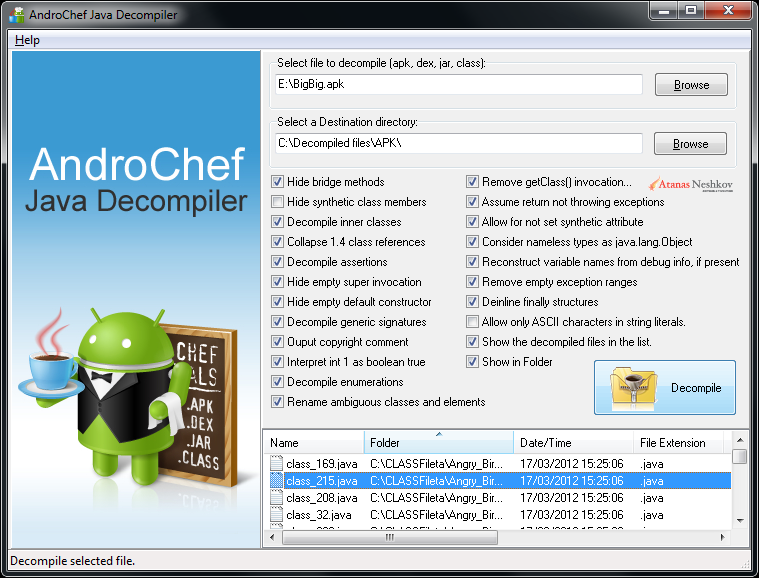
With AndroChef Java Decompiler you can decompile apk., dex, jar and java class-files. It's simple and easy.
AndroChef Java Decompiler is Windows XP, Windows 2003, Windows Vista, Windows 7, Windows 8, 8.1 and Windows 10 decompiler for Java that reconstructs the original source code from the compiled binary CLASS files. AndroChef Java Decompiler is able to decompile the most complex Java 6 applets and binaries, producing accurate source code.
AndroChef successfully decompiles obfuscated Java 6, Java 7 and Java 8 .class and .jar files. Support Java language features like generics, enums and annotations. According to some studies, AndroChef Java Decompiler is able to decompile 98.04% of Java applications generated with traditional Java compilers- a very high recovery rate. It is simple but powerful tool that allows you to decompile Java and Dalvik bytecode (DEX, APK) into readable Java source. Easy to use.
Useful for Java developers, programmers, software engineers and enthusiasts. Complete Android Decompilation suite, very easy to use.
How to use AndroChef Java Decompiler:
Using AndroChef Java Decompiler is easy:
- Select the file (apk, dex, jar, class) or folder you want to decompile.
- Select a folder to decompile file to (Destination directory).
- Click on "Decompile" -button.
Selected files will be decompiled to the location you choose. This will display the decompiled file as syntax-highlighted source code in the right pane - "Code vew".
If you click Left Mouse button + move the mouse wheel , the text in "Code vew" will zoom in or out.
New in version 1.0.0.13: Updated decompiler engine, converter and "APK Tool Decode and Baksmaling".
New in version 1.0.0.12: Updated decompiler engine, converter and "APK Tool Decode and Baksmaling".
New in version 1.0.0.11: Updated decompiler engine. Added option "APK Tool Decode and Baksmaling" to extract, decode and baksmali APK files with apktool (credits: brut.all, iBotPeaches and JesusFreke).
New in version 1.0.0.10: Updated converter and decompiler engine. Added option to explore previously decompiled Java archive files (JAR).
New in version 1.0.0.9: Improvements, updates, bug fixes and better handling of obfuscated files (apk, dex, class and jar).
New in version 1.0.0.8: Improvements in the converter, bug fixed.
New in version 1.0.0.7: Minor improvements and better handling of some obfuscated files (apk, dex, class and jar).
New in version 1.0.0.6: Fixed some minor bugs.
New in version 1.0.0.5: Fixed some minor bugs in the GUI. Special thanks to Assoc. Prof. Dr. Tzvetomir Vassilev for his bug reports.
New in version 1.0.0.4: Added a Tree view in the left-side. This view lets you examine the decompiled APK, DEX or JAR file in a folder-tree hierarchy structure, according to path and package names of classes. Menu-item to export the Tree to XML is available. Added a Code view with syntax highlighting. This view displays decompiled Java code corresponding to the file that you decompile or navigate to. Export decompiled file to HTML menu-option is available. Find (Ctrl+F), Find Next (F3), and Find Previous (Shift+F3) will display the Find Text dialog box. Bugs fixed in sorting the list with decompiled files. Bug fixed in extracting files from the list case-sensitively...
The problem with AndroChef Java Decompiler not working on Windows® 8 was finally fixed.
New in version 1.0.0.3: To avoid some glitches in decompilation when using a large APK, JAR or DEX files: In this case it is better to extract these files to a directory on your hard drive before decompiling them. In this version, it is possible to select a directory with files and to decompile the entire directory. Directories are recursively scanned for file extensions class, zip and jar.
Please Note: Decompilation process is not instantaneous. For large APK files (over 10 MB) - decompilation may take several minutes to complete or even longer, depending on the configuration of your computer and the size of the file. This does not mean that the program is not responding, or that is frozen. It isn't, it just has to do a lot of file reading and writing. If you see the status bar message "Decompiling ... This may take a while. Please wait." - everything is fine and you just need to wait until the end of the decompilation process. There is no progress indicator yet. Using the "APK Tool Decode and Baksmaling" is significantly faster.
Known Issues: AndroChef may not work properly with Java JRE 64-bit. Probably not a big issue as Oracle recommend to install the 32-bit JRE on 64-Bit Windows Computers.
You can use AndroChef in conjunction with DJ Java Decompiler.
Why is AndroChef Java Decompiler useful?
- AndroChef Java Decompiler is useful for recovery of lost or accidentally destroyed source code.
- Decompiling Java is an excellent way of learning both Java and how the Java VM works. AndroChef Java Decompiler makes it easy to peek into Java classes and learn from the source. Its easy to use and intuitive graphical user interface eases the learning curve for new starters in Java.
- Fixing and debugging .class files. Use AndroChef Java Decompiler when developers are slow to respond to questions that need immediate answers.
- AndroChef Java Decompiler is useful for exploring the sources of Java runtime libraries.
- Like the possibility to inline bytecode.
- To check the results of your class file obfuscation;)
How to buy AndroChef Java Decompiler:
Without a valid license, AndroChef may be used for evaluation purposes only. Evaluation reminder screens are removed after purchasing an AndroChef license.
We sell AndroChef Java Decompiler via well-known e-commerce service providers: DR MyCommerce, Inc. (RegNow)
AndroChef Java Decompiler v1.0.0.13 is available at: AndroChef Java Decompiler 1.0.0.13
For more information visit AndroChef Java Decompiler home page: http://www.neshkov.com/ac_decompiler.html.
PAD file is available at: http://www.neshkov.com/acdec100.xml
The files are digitally signed with Symantec Class 3 SHA256 Code Signing CA - Microsoft Software Validation v2

AndroChef Java Decompile的更多相关文章
- How to decompile class file in Java and Eclipse - Javap command example(转)
Ability to decompile a Java class file is quite helpful for any Java developer who wants to look int ...
- Java核心 --- 枚举
Java核心 --- 枚举 枚举把显示的变量与逻辑的数字绑定在一起在编译的时候,就会发现数据不合法也起到了使程序更加易读,规范代码的作用 一.用普通类的方式实现枚举 新建一个终态类Season,把构造 ...
- [转]探究java IO之FileInputStream类
使用FileInputStream类创建的InputStream对象可以用于从文件读取内容.两个常用的构造函数如下所示: ? 1 2 FileInputStream(String filePath) ...
- 反编译APK终结教程
现在来教大家如何由网上下载的Android应用反编译为源码.如果你感兴趣,就来看一看吧.前提是你的电脑得已经配置好了java环境,如果没有配置好的话,下面我会附带一提,如果你还是不懂的话,那就上网搜一 ...
- Spark案例分析
一.需求:计算网页访问量前三名 import org.apache.spark.rdd.RDD import org.apache.spark.{SparkConf, SparkContext} /* ...
- java反编译获取源码
最近在研究反射,想做一个东西,把运行的java程序饭编译(Decompile)成.java文件.现思路如下: 1.写出程序反编译一个类 2.将所有类反编译 3.java代码注入一个正在运行的java程 ...
- Java 反编译工具几枚(class转java)
1.Java Decompiler Yet another fast Java decompiler. 下载地址:http://jd.benow.ca/#jd-gui-download 一款非常简洁的 ...
- Java 多线程 - Synchronized关键字
目录 1-Synchronized 关键字概述 2- Synchronized关键字作用域 3- Synchronized 原理(反编译指令解释) 正文 1-Synchronized 关键字概述 由于 ...
- Java| 编译和反编译
原文链接: http://www.yveshe.com/articles/2018/05/01/1525172129089.html 什么是编程语言? 在介绍编译和反编译之前,我们先来简单介绍下编程语 ...
随机推荐
- RBAC | YAML |
YAML配置文件: 1.凡是可以在application.properties配置的文件,都可以在application.yaml文件中配置 2.properties的优先级大于yaml的优先级 后端 ...
- Uva 10054 欧拉回路 打印路径
看是否有欧拉回路 有的话打印路径 欧拉回路存在的条件: 如果是有向图的话 1.底图必须是连通图 2.最多有两个点的入度不等于出度 且一个点的入度=出度+1 一个点的入度=出度-1 如果是无向图的话 1 ...
- itchat的使用
python 微信接口 -- itchat 文档 发表于 2018-03-16 | 分类于 Python | itchat 一. 安装 $ pip install itchat 特殊的字典使用方式通过 ...
- u-boot bl _main分析
ldr r0, =(CONFIG_SYS_INIT_SP_ADDR): #define CONFIG_SYS_INIT_SP_ADDR (CONFIG_SYS_INIT_RAM_ADDR ...
- Spring Boot JPA - Querydsl
https://lufficc.com/blog/spring-boot-jpa-querydsl
- js对象的创建模式
方式一: Object构造函数模式 * 套路: 先创建空Object对象, 再动态添加属性/方法 * 适用场景: 起始时不确定对象内部数据 * 问题: 语句太多 /* 一个人: name:" ...
- 什么是工作流java Activity
见:http://www.it165.net/pro/html/201504/37443.html 一. 什么是工作流 以请假为例,现在大多数公司的请假流程是这样的 员工打电话(或网聊)向上级提出请假 ...
- 手动安装jar包到maven仓库
1.手动安装jar包到maven仓库 本地没有下载安装maven,但是eclipse已经集成的maven. 选中任何一个maven项目,右键/Run as/maven build... 在Goals输 ...
- CDOJ 1063 堆排序模板
D - 秋实大哥与妹纸 Time Limit:1000MS Memory Limit:1500KB 64bit IO Format:%lld & %llu Submit Sta ...
- qtp识别验证码
花了两天时间才完整的完成识别验证码的登录操作,在网上看到很多关于验证码识别的方法,但是我用的qtp版本比较高级,所以还是要自己花心思研究.po上我的识别验证码的详细历程: 一.读取浏览器中的图片验证码 ...