
OpenCV在ARM-linux上的移植过程遇到的问题3---共享库中嵌套库居然带路径【未解决】
【Linux开发】OpenCV在ARM-linux上的移植过程遇到的问题3—共享库中嵌套库居然带路径【未解决】
标签(空格分隔): 【Linux开发】
移植opencv到tq2440
一、下载opencv及cmake

1,download opencv_2.3.1

OpenCV-2.3.1a.tar.bz2

下载链接:http://opencv.org/downloads.html

2,download cmake

//cmake-3.1.0.tar.gz //without gui

cmake-3.1.0-Linux-i386.sh

下载链接:http://www.cmake.org/cmake/resources/software.html

二、将下载文件放入linux下

1,cmake

文件路径

/opt/EmbedSky/cmake/cmake-3.1.0

解压

[root@EmbedSky cmake-3.1.0]# tar -xzvf cmake-3.1.0.tar.gz -C ./

2,opencv

文件路径

where is the source code:

/opt/EmbedSky/opencv_2_3_1/OpenCV-2.3.1

where to build the binaries:

/opt/EmbedSky/opencv_2_3_1/opencv_forArm

#./cmake-3.1.0-Linux-i386.sh

#cd cmake-3.1.0-Linux-i386

#cd bin

#./cmake-gui

where is the source code:/opt/EmbedSky/opencv_2_3_1/OpenCV-2.3.1

where to build the binaries:/opt/EmbedSky/opencv_2_3_1/opencv_forArm

然后,点击Configure,保持generator为Unix Makefiles,选择Specify options for cross-compiling,点击Next

Operating System填写arm-linux 或者 Linux 注意L是大写(我用的是这个,ok的)

C Compilers填写/opt/EmbedSky/4.3.3/bin/arm-linux-gcc

C++ Compilers填写/opt/EmbedSky/4.3.3/bin/arm-linux-g++

Target Root填写/opt/EmbedSky/4.3.3

点击finish

///////////////////////////////////////

err1:

System is unknown to cmake, create:

Platform/arm-linux to use this system, please send your config file to cmake@www.cmake.org so it can be added to cmake

Your CMakeCache.txt file was copied to CopyOfCMakeCache.txt. Please send that file to cmake@www.cmake.org.

Extracting svn version, please wait...

SVNVERSION: exported

Detected version of GNU GCC: 20091 (200901)

Could NOT find PythonLibs (missing:  PYTHON_INCLUDE_DIRS)

Unknown option: -B

usage: /usr/bin/python [option] ... [-c cmd | -m mod | file | -] [arg] ...

Try `python -h' for more information.

Unknown option: -B

usage: /usr/bin/python [option] ... [-c cmd | -m mod | file | -] [arg] ...

Try `python -h' for more information.

CUDA_TOOLKIT_ROOT_DIR not found or specified

CMake Error at /opt/EmbedSky/cmake/cmake-3.1.0-Linux-i386/share/cmake-3.1/Modules/FindCUDA.cmake:616 (if):

  if given arguments:

    "CUDA_VERSION" "VERSION_GREATER" "5.0" "AND" "CMAKE_CROSSCOMPILING" "AND" "MATCHES" "arm" "AND" "EXISTS" "CUDA_TOOLKIT_ROOT_DIR-NOTFOUND/targets/armv7-linux-gnueabihf"

  Unknown arguments specified

Call Stack (most recent call first):

  CMakeLists.txt:958 (find_package)

Configuring incomplete, errors occurred!

See also "/opt/EmbedSky/opencv_2_3_1/opencv_forArm/CMakeFiles/CMakeOutput.log".

anwser:将 WITH_CUDA的钩去掉

//////////////////////////////////////////

err2:

CMake Warning (dev) at CMakeLists.txt:1508 (add_custom_target):

  Policy CMP0037 is not set: Target names should not be reserved and should

  match a validity pattern.  Run "cmake --help-policy CMP0037" for policy

  details.  Use the cmake_policy command to set the policy and suppress this

  warning.

  The target name "package_source" is reserved or not valid for certain CMake

  features, such as generator expressions, and may result in undefined

  behavior.

This warning is for project developers.  Use -Wno-dev to suppress it.

anwser2:WITH_TIFF去掉

////////////////////////////////////////

System is unknown to cmake, create:

Platform/arm-linux to use this system, please send your config file to cmake@www.cmake.org so it can be added to cmake

Your CMakeCache.txt file was copied to CopyOfCMakeCache.txt. Please send that file to cmake@www.cmake.org.

Extracting svn version, please wait...

SVNVERSION: exported

Detected version of GNU GCC: 20091 (200901)

Could NOT find PythonLibs (missing:  PYTHON_INCLUDE_DIRS)

Unknown option: -B

usage: /usr/bin/python [option] ... [-c cmd | -m mod | file | -] [arg] ...

Try `python -h' for more information.

Unknown option: -B

usage: /usr/bin/python [option] ... [-c cmd | -m mod | file | -] [arg] ...

Try `python -h' for more information.

Parsing 'cvconfig.h.cmake'

CMake Warning (dev) at CMakeLists.txt:1508 (add_custom_target):

  Policy CMP0037 is not set: Target names should not be reserved and should

  match a validity pattern.  Run "cmake --help-policy CMP0037" for policy

  details.  Use the cmake_policy command to set the policy and suppress this

  warning.

  The target name "package_source" is reserved or not valid for certain CMake

  features, such as generator expressions, and may result in undefined

  behavior.

This warning is for project developers.  Use -Wno-dev to suppress it.

CMake Warning (dev) at OpenCVModule.cmake:158 (get_target_property):

  Policy CMP0026 is not set: Disallow use of the LOCATION target property.

  Run "cmake --help-policy CMP0026" for policy details.  Use the cmake_policy

  command to set the policy and suppress this warning.

  The LOCATION property should not be read from target "opencv_test_calib3d".

  Use the target name directly with add_custom_command, or use the generator

  expression $<TARGET_FILE>, as appropriate.

Call Stack (most recent call first):

  modules/calib3d/CMakeLists.txt:1 (define_opencv_module)

This warning is for project developers.  Use -Wno-dev to suppress it.

CMake Warning (dev) at OpenCVModule.cmake:158 (get_target_property):

  Policy CMP0026 is not set: Disallow use of the LOCATION target property.

  Run "cmake --help-policy CMP0026" for policy details.  Use the cmake_policy

  command to set the policy and suppress this warning.

  The LOCATION property should not be read from target "opencv_test_core".

  Use the target name directly with add_custom_command, or use the generator

  expression $<TARGET_FILE>, as appropriate.

Call Stack (most recent call first):

  modules/core/CMakeLists.txt:8 (define_opencv_module)

This warning is for project developers.  Use -Wno-dev to suppress it.

CMake Warning (dev) at OpenCVModule.cmake:158 (get_target_property):

  Policy CMP0026 is not set: Disallow use of the LOCATION target property.

  Run "cmake --help-policy CMP0026" for policy details.  Use the cmake_policy

  command to set the policy and suppress this warning.

  The LOCATION property should not be read from target

  "opencv_test_features2d".  Use the target name directly with

  add_custom_command, or use the generator expression $<TARGET_FILE>, as

  appropriate.

Call Stack (most recent call first):

  modules/features2d/CMakeLists.txt:1 (define_opencv_module)

This warning is for project developers.  Use -Wno-dev to suppress it.

CMake Warning (dev) at modules/highgui/CMakeLists.txt:418 (get_target_property):

  Policy CMP0026 is not set: Disallow use of the LOCATION target property.

  Run "cmake --help-policy CMP0026" for policy details.  Use the cmake_policy

  command to set the policy and suppress this warning.

  The LOCATION property should not be read from target "opencv_test_highgui".

  Use the target name directly with add_custom_command, or use the generator

  expression $<TARGET_FILE>, as appropriate.

This warning is for project developers.  Use -Wno-dev to suppress it.

CMake Warning (dev) at modules/highgui/CMakeLists.txt:418 (get_target_property):

  Policy CMP0022 is not set: INTERFACE_LINK_LIBRARIES defines the link

  interface.  Run "cmake --help-policy CMP0022" for policy details.  Use the

  cmake_policy command to set the policy and suppress this warning.

  Target "opencv_highgui" has an INTERFACE_LINK_LIBRARIES property which

  differs from its LINK_INTERFACE_LIBRARIES properties.

  INTERFACE_LINK_LIBRARIES:

    opencv_core;opencv_imgproc;zlib;libjpeg;libpng;libjasper

  LINK_INTERFACE_LIBRARIES:

This warning is for project developers.  Use -Wno-dev to suppress it.

CMake Warning (dev) at OpenCVModule.cmake:158 (get_target_property):

  Policy CMP0026 is not set: Disallow use of the LOCATION target property.

  Run "cmake --help-policy CMP0026" for policy details.  Use the cmake_policy

  command to set the policy and suppress this warning.

  The LOCATION property should not be read from target "opencv_test_imgproc".

  Use the target name directly with add_custom_command, or use the generator

  expression $<TARGET_FILE>, as appropriate.

Call Stack (most recent call first):

  modules/imgproc/CMakeLists.txt:1 (define_opencv_module)

This warning is for project developers.  Use -Wno-dev to suppress it.

CMake Warning (dev) at OpenCVModule.cmake:158 (get_target_property):

  Policy CMP0026 is not set: Disallow use of the LOCATION target property.

  Run "cmake --help-policy CMP0026" for policy details.  Use the cmake_policy

  command to set the policy and suppress this warning.

  The LOCATION property should not be read from target "opencv_test_ml".  Use

  the target name directly with add_custom_command, or use the generator

  expression $<TARGET_FILE>, as appropriate.

Call Stack (most recent call first):

  modules/ml/CMakeLists.txt:1 (define_opencv_module)

This warning is for project developers.  Use -Wno-dev to suppress it.

CMake Warning (dev) at OpenCVModule.cmake:158 (get_target_property):

  Policy CMP0026 is not set: Disallow use of the LOCATION target property.

  Run "cmake --help-policy CMP0026" for policy details.  Use the cmake_policy

  command to set the policy and suppress this warning.

  The LOCATION property should not be read from target

  "opencv_test_objdetect".  Use the target name directly with

  add_custom_command, or use the generator expression $<TARGET_FILE>, as

  appropriate.

Call Stack (most recent call first):

  modules/objdetect/CMakeLists.txt:1 (define_opencv_module)

This warning is for project developers.  Use -Wno-dev to suppress it.

CMake Warning (dev) at OpenCVModule.cmake:158 (get_target_property):

  Policy CMP0026 is not set: Disallow use of the LOCATION target property.

  Run "cmake --help-policy CMP0026" for policy details.  Use the cmake_policy

  command to set the policy and suppress this warning.

  The LOCATION property should not be read from target "opencv_test_video".

  Use the target name directly with add_custom_command, or use the generator

  expression $<TARGET_FILE>, as appropriate.

Call Stack (most recent call first):

  modules/video/CMakeLists.txt:1 (define_opencv_module)

This warning is for project developers.  Use -Wno-dev to suppress it.

CMake Warning (dev) at modules/gpu/CMakeLists.txt:213 (get_target_property):

  Policy CMP0026 is not set: Disallow use of the LOCATION target property.

  Run "cmake --help-policy CMP0026" for policy details.  Use the cmake_policy

  command to set the policy and suppress this warning.

  The LOCATION property should not be read from target "opencv_test_gpu".

  Use the target name directly with add_custom_command, or use the generator

  expression $<TARGET_FILE>, as appropriate.

This warning is for project developers.  Use -Wno-dev to suppress it.

CMake Warning (dev) at modules/gpu/CMakeLists.txt:88 (add_library):

  Policy CMP0038 is not set: Targets may not link directly to themselves.

  Run "cmake --help-policy CMP0038" for policy details.  Use the cmake_policy

  command to set the policy and suppress this warning.

  Target "opencv_gpu" links to itself.

This warning is for project developers.  Use -Wno-dev to suppress it.

General configuration for opencv 2.3.1 =====================================

    Built as dynamic libs?:     YES

    Compiler:                   /opt/EmbedSky/4.3.3/bin/arm-linux-g++

    C++ flags (Release):          -Wall -ffunction-sections  -O3 -DNDEBUG  -fomit-frame-pointer -DNDEBUG

    C++ flags (Debug):            -Wall -ffunction-sections  -g  -O0 -DDEBUG -D_DEBUG -ggdb3

    Linker flags (Release):

    Linker flags (Debug):

  GUI:

    GTK+ 2.x:                   NO

    GThread:                    NO

  Media I/O:

    ZLib:                       build

    JPEG:                       build

    PNG:                        build

    TIFF:

    JPEG 2000:                  build

    OpenEXR:                    NO

    OpenNI:                     NO

    OpenNI PrimeSensor Modules: NO

    XIMEA:                      NO

  Other third-party libraries:

    Use IPP:                    NO

    Use TBB:                    NO

    Use Cuda:                   NO

    Use Eigen:                  NO

  Interfaces:

    Python:                     YES

    Python interpreter:         /usr/bin/python -B (ver 2.5)

    Python numpy:               NO (Python wrappers will not be generated)

    Java:                       NO

  Documentation:

    Sphinx:                     NO

    PdfLaTeX compiler:          /usr/bin/pdflatex

    Build Documentation:        NO

  Tests and samples:

    Tests:                      YES

    Examples:                   NO

  Install path:                 /usr/local

  cvconfig.h is in:             /opt/EmbedSky/opencv_2_3_1/opencv_forArm

-----------------------------------------------------------------

Configuring done

有些警告忽略了

#make

/usr/lib/libImath.so: could not read symbols: File in wrong format

collect2: ld returned 1 exit status

make[2]: *** [lib/libopencv_highgui.so] 错误 1

make[1]: *** [modules/highgui/CMakeFiles/opencv_highgui.dir/all] 错误 2

make: *** [all] 错误 2

answer:

remove BUILD_OPENEXR options

#make

....

[100%] Building CXX object modules/stitching/CMakeFiles/opencv_stitching.dir/main.o

Linking CXX executable ../../bin/opencv_stitching

[100%] Built target opencv_stitching

参考:

http://blog.sina.com.cn/s/blog_92942dba0101d1wj.html

http://blog.csdn.net/embeddedman/article/details/7416934

http://blog.csdn.net/chenaini119/article/details/39079965

http://blog.csdn.net/eagelangel/article/details/7232364

http://lbn321.blog.163.com/blog/static/227841017201422491245680/

http://blog.csdn.net/b5w2p0/article/details/39211013

<span style="color:#FF0000;">////////////////////////////////////////////////////////////////////////////

小的总结

以上是用CMAKE编译OPENCV2.3.1,需要主要几个问题:

1,下载cmake和opencv,解压到linux下,这步很简单不会有什么问题

2,怎么去config cmake,最关键的

参考:http://blog.csdn.net/luotuo44/article/details/8958990

3,修改CMakeCache.txt  添加-lpthread -ldl -lrt

//Flags used by the linker.

CMAKE_EXE_LINKER_FLAGS:STRING=-lpthread -lrt -ldl

4,make && make install

5,测试应用程序

6,移植到arm

我认为如果没有必要用更高opencv的话,比如opencv2.3.1

就用opencv2.0.0

为什么推荐opencv2.0呢,很简单,

1,没有cmake,直接config...就可以了;

2,节约时间;

3,最头痛的是 遇到一大推BUG,比如出现找不到链接库,最老火的是,那库就在那儿,它还说找不到,

哈哈,如果懂修改工具链会得到解决,我遇到这个问题,网上也有人遇到这个问题

/opt/EmbedSky/4.3.3/bin/../lib/gcc/arm-none-linux-gnueabi/4.3.3/../../../../arm-none-linux-gnueabi/bin/ld:

warning: ../../lib/libopencv_imgproc.so, needed by

/opt/EmbedSky/4.3.3/arm-none-linux-gnueabi/lib/libopencv_highgui.so,

not found (try using -rpath or -rpath-link)

/opt/EmbedSky/4.3.3/bin/../lib/gcc/arm-none-linux-gnueabi/4.3.3/../../../../arm-none-linux-gnueabi/bin/ld:

warning: ../../lib/libopencv_core.so, needed by

/opt/EmbedSky/4.3.3/arm-none-linux-gnueabi/lib/libopencv_highgui.so,

not found (try using -rpath or -rpath-link)

下面介绍一下移植opencv2.0.0

1,下载及解压

2,生成opencv编译后的目录,方便管理

</span><h3><pre name="code" class="cpp"><span style="color:#FF0000;">#mkdir -p /opt/arm/opencv

#mkdir -p /opt/arm/opencv/lib

#mkdir -p /opt/arm/opencv/include</span>
2016-8-28 张朋艺 added:
【实际操作中遇到的问题:】
1. CMAKE之后的make命令错误:
Linking CXX shared library ../../lib/libopencv_core.so

/opt/EmbedSky/4.4.6/lib/gcc/arm-embedsky-linux-gnueabi/4.4.6/../../../../arm-embedsky-linux-gnueabi/bin/ld: ../../3rdparty/lib/libzlib.a(inflate.c.obj): relocation R_ARM_MOVW_ABS_NC against `a local symbol' can not be used when making a shared object; recompile with -fPIC

../../3rdparty/lib/libzlib.a: could not read symbols: Bad value

collect2: ld returned 1 exit status

make[2]: *** [lib/libopencv_core.so] 错误 1

make[1]: *** [modules/core/CMakeFiles/opencv_core.dir/all] 错误 2

make: *** [all] 错误 2
解决方法:
进入opencv目录下的3rdparty的对应目录CMakeFiles/ *.dir下,打开flags.make,在C_FLAGS = 后添加-O3 -fPIC用来支持在64位机上编译

如../3rdparty/zlib/CMakeFiles/zlib.dir/flags.make

修改C_FLAGS =  -W -Wall 为 C_FLAGS =  -O3 -fPIC  -W -Wall

和修改CXX_FLAGS =  -W -Wall 为 C_FLAGS =  -O3 -fPIC  -W -Wall
好像得对应到每一个出错的路径下进行修改(多个都出现这种问题的话)。
编译一个能在 arm 平台上用的动态库,结果报错如下:

relocation R_ARM_MOVW_ABS_NC against `a local symbol' can not be used when making a shared object; recompile with -fPIC

./obj/xxx.o: could not read symbols: Bad value

collect2: error: ld returned 1 exit status

其实错误信息已经给出解决办法了,加 -fPIC 参数从新编译(recompile with -fPIC)

所以如果是命令行,直接添加 -fPIC

如果是Makefile,添加编译选项:CFLAGS  +=  -fPIC

Done !
2. CMAKE的配置问题:
可以先用apt-get install cmake-gui获得CMAKE的图像化配置界面;
安装好之后,打开cmake-gui,然后选择source路径为OpenCv2.4.9,然后build路径可以放到另一个文件夹比如OpenCv2.4.9-arm,然后可以点击configure,然后配置交叉编译工具,选择:
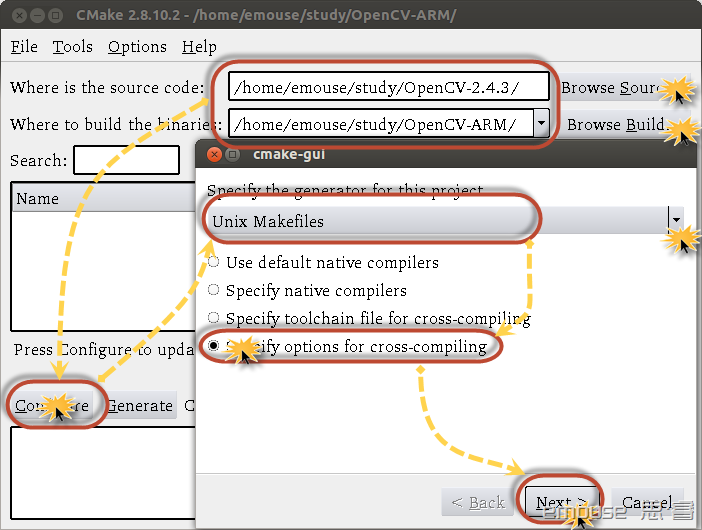
丫丫个呸的!
最后也没搞定关于生成的动态链接库中共享库有路径的依赖关系的问题
比如 readelf -d libopencv_highgui.so
root@huty-virtual-machine:/home/huty/opencv/opencv-2.4.9-arm/lib# readelf -d libopencv_highgui.so

Dynamic section at offset 0x8c868 contains 29 entries:

  标记        类型                         名称/值

 0x00000001 (NEEDED)                     共享库:[../../lib/libopencv_core.so]

 0x00000001 (NEEDED)                     共享库:[../../lib/libopencv_imgproc.so]

 0x00000001 (NEEDED)                     共享库:[libstdc++.so.6]

 0x00000001 (NEEDED)                     共享库:[libm.so.6]

 0x00000001 (NEEDED)                     共享库:[libgcc_s.so.1]

 0x00000001 (NEEDED)                     共享库:[libc.so.6]

 0x0000000c (INIT)                       0x14979

 0x0000000d (FINI)                       0x82f1d

 0x00000019 (INIT_ARRAY)                 0x94000

 0x0000001b (INIT_ARRAYSZ)               16 (bytes)

 0x0000001a (FINI_ARRAY)                 0x94010

 0x0000001c (FINI_ARRAYSZ)               4 (bytes)

 0x00000004 (HASH)                       0x118

 0x00000005 (STRTAB)                     0x8428

 0x00000006 (SYMTAB)                     0x2838

 0x0000000a (STRSZ)                      32289 (bytes)

 0x0000000b (SYMENT)                     16 (bytes)

 0x00000003 (PLTGOT)                     0x94970

 0x00000002 (PLTRELSZ)                   7064 (bytes)

 0x00000014 (PLTREL)                     REL

 0x00000017 (JMPREL)                     0x12de0

 0x00000011 (REL)                        0x10e78

 0x00000012 (RELSZ)                      8040 (bytes)

 0x00000013 (RELENT)                     8 (bytes)

 0x6ffffffe (VERNEED)                    0x10dc8

 0x6fffffff (VERNEEDNUM)                 4

 0x6ffffff0 (VERSYM)                     0x1024a

 0x6ffffffa (RELCOUNT)                   359

 0x00000000 (NULL)                       0x0
我也是哭了,反正,不想再弄了,直接在编译或者运行程序的时候把路径都放好就行了。
比如:
可执行程序:

./lib/../OpenCVTesting
或者直接用./OpenCVTesting/lib/bin/OpenCVTesting这样好了,lib路径下放opencv的库,bin路径下放可执行文件。
还有一个大问题就是cvNamedWindow不能运行的问题,就躲过算了,Qt来处理就好了,这种方法已经验证过了!
具体参看:
【Linux开发】OpenCV在ARM-linux上的移植过程遇到的问题1—cvNamedWindow调用报错的问题
2016-8-28 23:42
张朋艺 pyZhangBIT2010@126.com
OpenCV在ARM-linux上的移植过程遇到的问题3---共享库中嵌套库居然带路径【未解决】的更多相关文章
- 【Linux开发】OpenCV在ARM-linux上的移植过程遇到的问题4---共享库中嵌套库带路径【已解决】
[Linux开发]OpenCV在ARM-linux上的移植过程遇到的问题4-共享库中嵌套库带路径[已解决] 标签:[Linux开发] 紧接着上一篇,我居然又尝试了一下编译opencv,主要是因为由于交 ...
- Boa服务器在ARM+Linux上的移植
下面给大家介绍一下Boa服务器移植的具体操作步骤,希望能够有帮助. 环境 主机:ubuntu8.10 交叉工具链:gcc-3.4.5-glibc-2.3.6 ...
- 16C554在LINUX上的移植(AT91)
16C554在LINUX上的移植(AT91) linux版本:3.14.17 AT91SAMa5d36 EINTA_0 ARM-IO5 PA14 14 EINTA ...
- 【Linux开发】OpenCV在ARM-linux上的移植过程遇到的问题2---CMAKE配置问题
实际上这里说的是移植的第一步,下载到源码后,我用的是opencv2.4.9,解压缩,然后可以利用cmake-gui来进行configure配置,这里面需要设置交叉编译的工具链,具体的可以参考[Linu ...
- opencv在arm和x86在移植
一个.开发环境 操作系统:fedora14 Opencv版本号:2.0 Qt版本号:4.7 arm:mini6410 交叉编译工具:arm-linux-gcc-4.5.1 二.安装与配置 Linux系 ...
- 转载:JProfiler远程监控LINUX上的Tomcat过程细讲
来源于xuwanbest的博客 所谓"工欲善其事,必先利其器",好的工具确能起到事半工倍的作用.我用到的最多的就两个JConsole 和JProfiler .JConsole监 ...
- Linux上 Can't connect to X11 window server using XX as the value of the DISPLAY 错误解决方法
在Linux上运行需要图形界面的程序时出现如下错误提示: No protocol specified Exception in thread "main" java.awt.AWT ...
- 【Linux开发】OpenCV在ARM-linux上的移植过程遇到的问题1---cvNamedWindow调用报错的问题
问题描述: 这个实际上是最后一部的问题,将生成的共享库文件放入到了/usr/local/opencv-arm/lib下,并且设置了LD_LIBRARY_PATH中为/usr/local/opencv- ...
- arm linux上的第一个应用程序 BOA移植
1. 首先, linux在开发板上能跑起来了. 包括网络驱动也有了, ifconfig之后, 能看到在rcS里面设置的IP, 也能ping通windows主机了, 当然, 也要window关掉防火墙才 ...
随机推荐
- SpringCloud组件架构图
总结一下spring cloud 的结构: 1.请求统一通过API网关(Zuul)来访问内部服务. 2.网关接收到请求后,从注册中心(Eureka)获取可用服务 3.由Ribbon进行均衡负载后,分发 ...
- Codeforces Round #593 (Div. 2) C. Labs A. Stones
题目:https://codeforces.com/contest/1236/problem/A 思路:两种操作收益都是3 且都会消耗b 操作2对b消耗较小 则可优先选择操作2 再进行操作1 即可得到 ...
- 跳跃表-原理及Java实现
跳跃表-原理及Java实现 引言: 上周现场面试阿里巴巴研发工程师终面,被问到如何让链表的元素查询接近线性时间.笔者苦思良久,缴械投降.面试官告知回去可以看一下跳跃表,遂出此文. 跳跃表的引入 我们知 ...
- cve-2019-1609,Harbor任意管理员注册漏洞复现
一.Harbor介绍 以Docker为代表的容器技术的出现,改变了传统的交付方式.通过把业务及其依赖的环境打包进Docker镜像,解决了开发环境和生产环境的差异问题,提升了业务交付的效率.如何高效地管 ...
- Python修炼之路-装饰器、生成器、迭代器
装饰器 本质:是函数,用来装饰其他函数,也就是为其他函数添加附加功能. 使用情景 1.不能修改被装饰的函数的源代码: 2.不能修改被装饰的函数的调用方式. 在这两种条件下,为函数添加附加 ...
- 【优化】SPA项目的基础优化
开启gzip压缩功能 引入CDN 路由懒加载 某些第三方组件按需加载而不是全部加载 较小的图片资源用base64嵌入src中,减少http请求
- 百度地图api的简单应用(一):POI检索
使用之前,需要注册一个百度地图开发者账号,最好申请一个认证以获取更高的使用配额和并发上限. 注册之后,申请一个应用,获得一个ak(密钥),并填写ip地址白名单.(这里我使用0.0.0.0/0,查了自己 ...
- hdu 3376 : Matrix Again【MCMF】
题目链接 题意:给定一个n*n的矩阵,找一条路,从左上角到右下角再到左上角,每个点最多经过一次,求路径上的点的权值的最大和. 将矩阵中每个点拆点,点容量为1,费用为点权值的相反数.每个点向自己右侧和下 ...
- springboot使用外部application.properties配置文件
一.背景介绍 springboot默认的application.properties文件只能在项目内部,如果打成docker镜像后配置文件也打进去了,这样每次需要改动配置(比如数据库的连接信息)就需要 ...
- Leaflet使用vector tiles样式设置
//point style var myIcon = L.icon({ iconUrl: 'css/images/dian.svg', // shadowUrl: 'css/images/leaf-s ...