
KNN算法案例--手写数字识别
import numpy as np

import matplotlib .pyplot as plt

import pandas as pd

from sklearn.neighbors import KNeighborsClassifier
# 加载数据

img_arr = plt.imread('./data/8/8_88.bmp')

plt.imshow(img_arr)
<matplotlib.image.AxesImage at 0x1786b073780>
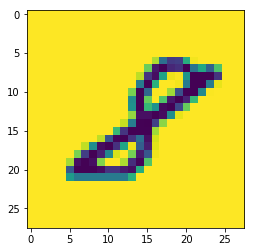
img_arr.shape # 图片的像素为28*28,对应的numpy数组是二维
(28, 28)
# 提取样本数据

feature = []

target = []

for i in range(10): # i表示的文件夹的名称

    for j in range(1,501):

        img_path = './data/'+str(i)+'/'+str(i)+'_'+str(j)+'.bmp'

        img_arr = plt.imread(img_path)

        feature.append(img_arr)

        target.append(i)
# 提取样本数据

feature = np.array(feature)  # 必须保证是二维

target = np.array(target)
feature.shape # 目前的特征是3维
(5000, 28, 28)
# 特征处理:将三维的特征变形成二维

feature = feature.reshape((5000,-1))
feature.shape
(5000, 784)
总结:feature特征数据中存放是5000个一维的图片数据
对样本数据进行拆分
# 对样本数据进行打乱

np.random.seed(10)

np.random.shuffle(feature)

np.random.seed(10)

np.random.shuffle(target)
# 拆分

x_train = feature[:4950]

y_train = target[:4950]

x_test = feature[4950:]

y_test = target[4950:]
- 实例化模型对象,然后对其进行训练
knn = KNeighborsClassifier(n_neighbors=5)

knn.fit(x_train,y_train)

knn.score(x_test,y_test)
0.98
print('真实的分类结果:',y_test)

print('模型的分类结果:',knn.predict(x_test))
真实的分类结果: [1 2 2 3 9 1 7 9 8 5 5 4 9 0 7 0 3 5 0 7 2 7 1 2 0 8 8 6 1 1 6 6 4 4 0 8 5

 8 2 2 4 3 3 9 4 2 6 2 9 2]

模型的分类结果: [1 2 2 3 9 1 7 9 8 5 5 4 9 0 7 0 3 5 0 7 2 7 1 2 0 8 8 6 1 1 6 6 4 4 0 8 5

 8 2 2 4 3 3 9 4 1 6 2 9 2]
- 保存模型
from sklearn.externals import joblib

joblib.dump(knn,'./knn.m')
['./knn.m']
knn = joblib.load('./knn.m')

knn
KNeighborsClassifier(algorithm='auto', leaf_size=30, metric='minkowski',

           metric_params=None, n_jobs=1, n_neighbors=5, p=2,

           weights='uniform')
- 使用模型识别外部的数字图片
img_arr = plt.imread('./数字.jpg')

plt.imshow(img_arr)
<matplotlib.image.AxesImage at 0x1786b3da7b8>
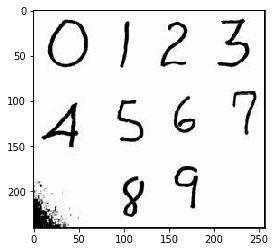
img_arr.shape
(241, 257, 3)
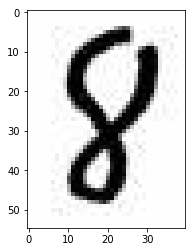
eight_img = img_arr[180:235,90:130,:]

plt.imshow(eight_img)
<matplotlib.image.AxesImage at 0x1786bc14e48>
feature[0].shape # 模型可以识别的图片
(784,)
- 模型可以识别的图片的维度是取决于样本数据的
- 可以识别的图片是28*28像素
- 图片是没有颜色这个维度
- 模型识别的图片(784,)
eight_img.shape
(55, 40, 3)
eight_img = eight_img.mean(axis=2) # 降维
eight_img.shape
(55, 40)
- 对降维之后的图片的像素进行等比例压缩
import scipy.ndimage as ndimage

eight_img = ndimage.zoom(eight_img,zoom=(28/55,28/40))

eight_img.shape
C:\anaconda3\lib\site-packages\scipy\ndimage\interpolation.py:616: UserWarning: From scipy 0.13.0, the output shape of zoom() is calculated with round() instead of int() - for these inputs the size of the returned array has changed.

  "the returned array has changed.", UserWarning)

(28, 28)
eight_img = eight_img.reshape(1,-1)

eight_img.shape
(1, 784)
knn.predict(eight_img)
array([8])KNN算法案例--手写数字识别的更多相关文章
- 基于OpenCV的KNN算法实现手写数字识别
基于OpenCV的KNN算法实现手写数字识别 一.数据预处理 # 导入所需模块 import cv2 import numpy as np import matplotlib.pyplot as pl ...
- C#中调用Matlab人工神经网络算法实现手写数字识别
手写数字识别实现 设计技术参数:通过由数字构成的图像,自动实现几个不同数字的识别,设计识别方法,有较高的识别率 关键字:二值化 投影 矩阵 目标定位 Matlab 手写数字图像识别简介: 手写 ...
- 使用AI算法进行手写数字识别
人工智能 人工智能(Artificial Intelligence,简称AI)一词最初是在1956年Dartmouth学会上提出的,从那以后,研究者们发展了众多理论和原理,人工智能的概念也随之扩展 ...
- KNN分类算法实现手写数字识别
需求: 利用一个手写数字“先验数据”集,使用knn算法来实现对手写数字的自动识别: 先验数据(训练数据)集: ♦数据维度比较大,样本数比较多. ♦ 数据集包括数字0-9的手写体. ♦每个数字大约有20 ...
- 实验楼 1. k-近邻算法实现手写数字识别系统--《机器学习实战 》
首先看看一些关键词:K-NN算法,训练集,测试集,特征(空间),标签 举实验楼中的样例,通俗的讲讲K-NN算法:电影有两个分类(标签)-动作片-爱情片.两个特征--打斗场面--亲吻画面. 将那些数字和 ...
- Python实现KNN算法及手写程序识别
1.Python实现KNN算法 输入:inX:与现有数据集(1xN)进行比较的向量 dataSet:已知向量的大小m数据集(NxM) 个标签:数据集标签(1xM矢量) k:用于比较的邻居数 ...
- CNN:人工智能之神经网络算法进阶优化,六种不同优化算法实现手写数字识别逐步提高,应用案例自动驾驶之捕捉并识别周围车牌号—Jason niu
import mnist_loader from network3 import Network from network3 import ConvPoolLayer, FullyConnectedL ...
- KNN算法实现手写数字
from numpy import * import operator from os import listdir def classify0(inX, dataSet, labels, k): d ...
- 一看就懂的K近邻算法(KNN),K-D树,并实现手写数字识别!
1. 什么是KNN 1.1 KNN的通俗解释 何谓K近邻算法,即K-Nearest Neighbor algorithm,简称KNN算法,单从名字来猜想,可以简单粗暴的认为是:K个最近的邻居,当K=1 ...
随机推荐
- [书接上一回]在Oracle Enterprise Linux (v5.7) 中安装DB - (2/4)
在最后一行,书写shmfs /dev/shm tmpfs size=2g 0 用来调高数据库运行是的内存分配问题. 创建需要的路径和分配权限. 设置 oracle 用户环境参数. 修改标头显示的部分. ...
- uwsgi配置cheaper模式进行自动弹性
[uwsgi] socket = 0.0.0.0:8080 protocol = http master = true hara-kiri = 60 chdir = /home/test/projec ...
- android 打卡 虚拟定位 sqlite
1.使用android5.1模拟器 android5.1模拟器使用数据库管理参数文件,6.0及以后的版本使用xml文件管理 2.使用sqlite修改配置文件 3.修改secure库中的android_ ...
- 【学习】004 java并发包
并发包[jdk1.7] 同步容器类 Vector与ArrayList区别 1.ArrayList是最常用的List实现类,内部是通过数组实现的,它允许对元素进行快速随机访问.数组的缺点是每个元素之间不 ...
- postgresql windows 服务启动失败
1命令行 启动服务 pg_ctl -D "C:\Program Files\PostgreSQL\9.1\data" start 2 查看状态 pg_ctl -D "C: ...
- 查看Linux系统所对应的版本
#cat /etc/issue 在CentOS下执行显示为:CentOS release 5.7 (Final)Kernel \r on an \m 或在Ubuntu下显示为:Ubuntu 11.04 ...
- 前端每日实战:32# 视频演示如何用纯 CSS 创作六边形按钮特效
效果预览 按下右侧的"点击预览"按钮可以在当前页面预览,点击链接可以全屏预览. https://codepen.io/comehope/pen/xjoOeM 可交互视频教程 此视频 ...
- Android 播放器开发
GSY https://github.com/CarGuo/GSYVideoPlayer/blob/master/doc/USE.md 阿里云播放器 https://helpcdn.aliyun.co ...
- The list of list is modified unexpected, python
Be careful! The list of list is modified unexpected, python # code patch A: list = [1,2,3,4,5,6,7] p ...
- PB系统颜色值
Colour Red Green Blue 值黑色 Black 0 0 0 0白色 White 255 255 255 16777215灰色 Gray 192 192 192 12632256深灰色 ...