
spring cloud学习--eureka 01
本博客为学习使用,学习教程翟永超 spring cloud 微服务实战
搭建eureka server注册中心
spring initialize构建spring boot项目
版本与spring boot版本匹配

此处选择Brixton.SR5版本,spring boot选择1.3.7版本
maven dependencies
<dependency>

            <groupId>org.springframework.cloud</groupId>

            <artifactId>spring-cloud-starter-eureka-server</artifactId>

</dependency>

<dependencyManagement>

        <dependencies>

            <dependency>

                <groupId>org.springframework.cloud</groupId>

                <artifactId>spring-cloud-dependencies</artifactId>

                <version>Brixton.SR5</version>

                <type>pom</type>

                <scope>import</scope>

            </dependency>

        </dependencies>

    </dependencyManagement>
启动eureka服务注册中心
//启动eureka 服务

@EnableEurekaServer

@SpringBootApplication

public class EurekaServerApplication {

	public static void main(String[] args) {

		SpringApplication.run(EurekaServerApplication.class, args);

	}

}
eureka配置文件配置
spring.application.name=eureka-server

server.port=1111

eureka.instance.hostname=localhost

#禁用eureka的client功能,为false表示不向注册中心注册自己

eureka.client.register-with-eureka=false

#不检索服务

eureka.client.fetch-registry=false

#服务地址

eureka.client.serviceUrl.defaultZone=http://${eureka.instance.hostname}:${server.port}/eureka/
通过访问http://localhost:1111/可以查看Eureka的信息面板
注册服务提供者
maven dependencies
<dependency>

            <groupId>org.springf ramework.boot</groupId>

            <artifactId>spring-boot-starter-web</artifactId>

            <scope>test</scope>

        </dependency>

<dependency>

            <groupId>org.springframework.cloud</groupId>

            <artifactId>spring-cloud-starter-eureka</artifactId>

        </dependency>
启动项
//激活erueka中的DiscoveryClient实现

//自动化配置,创建DiscoveryClient接口针对Eureka客户端的EurekaDiscoveryClient实例

@EnableDiscoveryClient

@SpringBootApplication

public class EurekaServerApplication {

	public static void main(String[] args) {

		SpringApplication.run(EurekaServerApplication.class, args);

	}

}
提供的服务接口
@RestController

public class HelloController

{

    private final Logger logger = LoggerFactory.getLogger(HelloController.class);

    @Autowired

    private DiscoveryClient discoveryClient;

    @RequestMapping(value = "/hello", method = RequestMethod.GET)

    public String index()

    {

        ServiceInstance serviceInstance = discoveryClient.getLocalServiceInstance();

        logger.info("/hello, host: {}, service_id : {}.", serviceInstance.getHost(), serviceInstance.getServiceId());

        return "hello world!";

    }

}
配置文件
spring.application.name=eureka-client

server.port=2001

eureka.instance.hostname=localhost

#eureka的client功能默认为true

#eureka.client.register-with-eureka=false

#eureka.client.fetch-registry=false

#注册服务的注册中心地址

eureka.client.serviceUrl.defaultZone=http://localhost:1111/eureka/
启动eureka-client,发现eureka-server注册中心页面出现了一个服务实例,说明注册成功
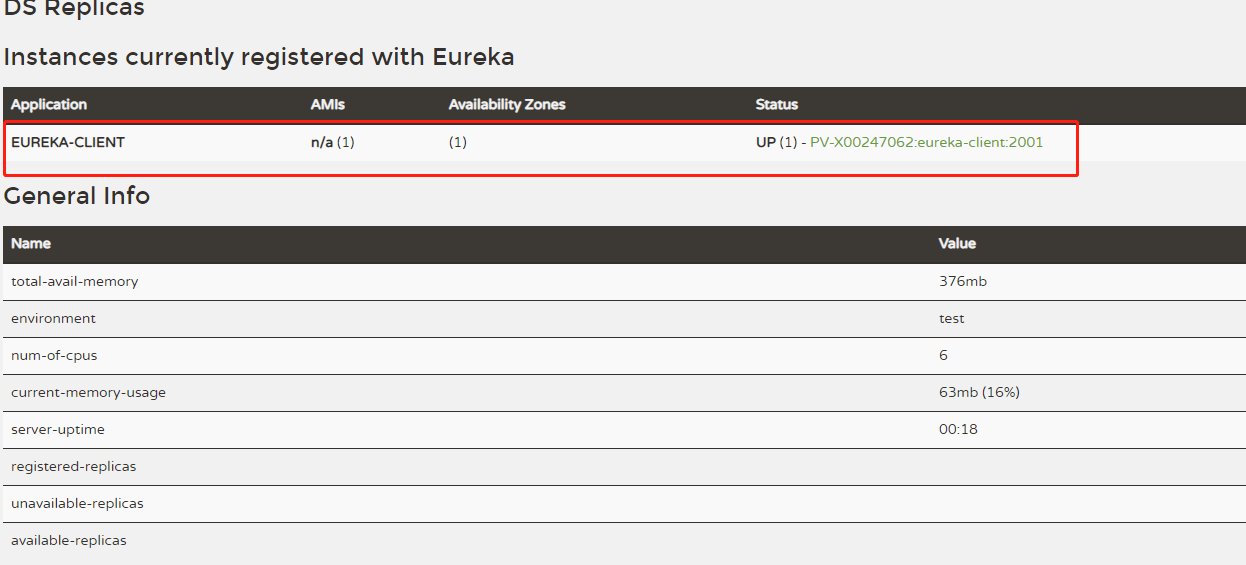
然后访问eureka-client服务接口http://localhost:2001/hello,打印出hello world!,说明服务调用成功
服务高可用
注册中心服务高可用是建立在注册中心即使注册中心,本身也是服务,也可以注册到其他的注册中心
修改eureka-server服务配置文件
- 复制application.properties两份,命名为application-peer1.properties,application-peer2.properties。清空application.peroperties
- 修改applicaton-peer1.properties内容为
spring.application.name=eureka-server

server.port=1111

eureka.instance.hostname=peer1

#禁用eureka的client功能

#eureka.client.register-with-eureka=false

#eureka.client.fetch-registry=false

eureka.client.serviceUrl.defaultZone=http://peer2:1112/eureka/
- 修改application-peer2.properties内容为
spring.application.name=eureka-server

server.port=1112

eureka.instance.hostname=peer2

#禁用eureka的client功能

#eureka.client.register-with-eureka=false

#eureka.client.fetch-registry=false

eureka.client.serviceUrl.defaultZone=http://peer2:1111/eureka/
在/etc/hosts文件下加入127.0.0.1 peer1 127.0.0.1 peer2。
如果不在此处用peer1和peer2,而是在两个properties中都使用localhost,则会出问题修改eureka-client的application.properties配置文件为
spring.application.name=eureka-client

server.port=2001

eureka.instance.hostname=localhost

#eureka的client功能默认为true

#eureka.client.register-with-eureka=false

#获取服务清单,默认为true

#eureka.client.fetch-registry=false

#修改缓存清单的更新时间

eureka.client.registry-fetch-interval-seconds=30

#服务续约

#服务续约调用的时间间隔,默认是30秒

eureka.instance.lease-renewal-interval-in-seconds=30

#服务失效时间

eureka.instance.lease-expiration-duration-in-seconds=90

#注册服务的注册中心地址

eureka.client.serviceUrl.defaultZone=http://localhost:1111/eureka/,http://localhost:1112/eureka/
启动两个eureka-server注册中心和eureka-client
java -jar eureka-server-001.jar --spring.profiles.active=peer1
java -jar eureka-server-001.jar --spring.profiles.active=peer2
在peer1的服务页面会看到的内容为

在peer2的服务页看到的内容为
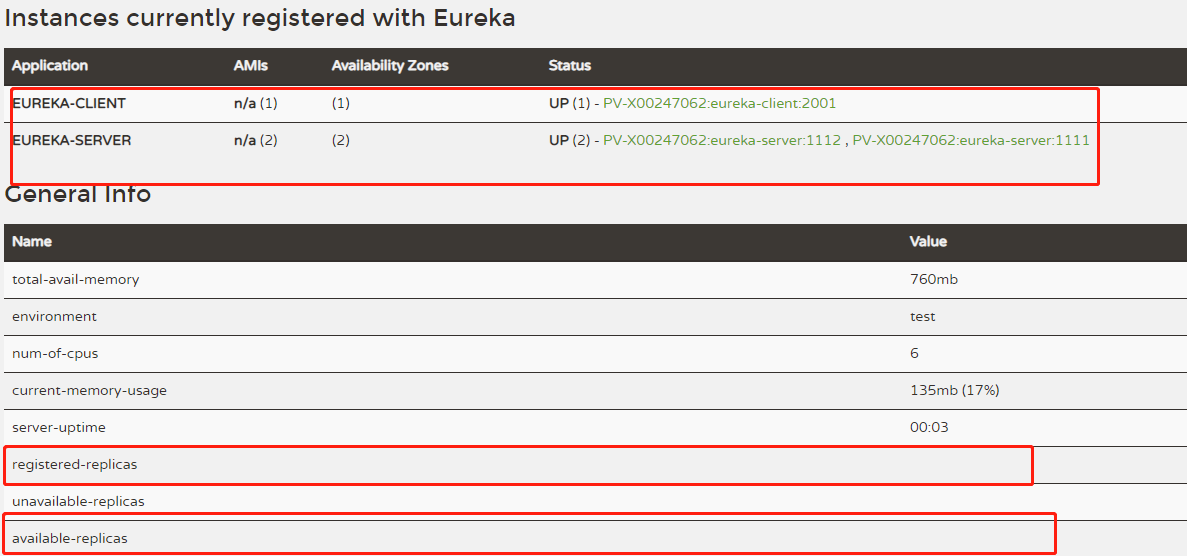
当关闭peer1注册中心,调用eureka-client服务接口,仍然能够获得hello world!,说明注册中心高可用配置成功
ribbon服务消费者
在eureka-client基础上加入ribbonmaven依赖
<dependency>

            <groupId>org.springframework.cloud</groupId>

            <artifactId>spring-cloud-starter-ribbon</artifactId>

        </dependency>
配置application.properties
spring.application.name=ribbon-consumer

server.port=9000

eureka.instance.hostname=localhost

#eureka的client功能默认为true

#eureka.client.register-with-eureka=false

#获取服务清单,默认为true

#eureka.client.fetch-registry=false

#修改缓存清单的更新时间

eureka.client.registry-fetch-interval-seconds=30

#服务续约

#服务续约调用的时间间隔,默认是30秒

eureka.instance.lease-renewal-interval-in-seconds=30

#服务失效时间

eureka.instance.lease-expiration-duration-in-seconds=90

#注册服务的注册中心地址

eureka.client.serviceUrl.defaultZone=http://localhost:1111/eureka/
主类上增加代码
//激活erueka中的DiscoveryClient实现

//自动化配置,创建DiscoveryClient接口针对Eureka客户端的EurekaDiscoveryClient实例

@EnableDiscoveryClient

@SpringBootApplication

public class ConsumerApplication

{

	//注入RestTemplate

	@Bean

	//开启客户端负载均衡

	@LoadBalanced

	RestTemplate restTemplate()

	{

		return new RestTemplate();

	}

	public static void main(String[] args) {

		SpringApplication.run(ConsumerApplication.class, args);

	}

}
写一个消费类
@RestController

public class ConsumerController

{

    @Autowired

    RestTemplate restTemplate;

    @RequestMapping(value = "/ribbon-consumer", method = RequestMethod.GET)

    public String helloConsumer()

    {

        return restTemplate.getForEntity("http://EUREKA-CLIENT/hello", String.class).getBody();

    }

}
spring cloud学习--eureka 01的更多相关文章
- spring cloud学习--eureka 02
开启eureka client的注解@EnableDiscoveryClient的功能类DiscoveryClient梳理图 获取server url位于类EndpointUtils的getServi ...
- spring cloud 学习(9) - turbine stream无法在eureka注册的解决办法
turbine是啥就不多解释了,初次接触的可以移步spring cloud 学习(4) - hystrix 服务熔断处理 拉到最后看一下,turbine stream默认情况下启动成功后,eureka ...
- Spring Cloud学习(一):Eureka服务注册与发现
1.Eureka是什么 Eureka是Netflix开发的服务发现框架,本身是一个基于REST的服务,主要用于定位运行在AWS域中的中间层服务,以达到负载均衡和中间层服务故障转移的目的. Eureka ...
- Spring Cloud 学习 之 Spring Cloud Eureka(源码分析)
Spring Cloud 学习 之 Spring Cloud Eureka(源码分析) Spring Boot版本:2.1.4.RELEASE Spring Cloud版本:Greenwich.SR1 ...
- Spring cloud系列教程第十篇- Spring cloud整合Eureka总结篇
Spring cloud系列教程第十篇- Spring cloud整合Eureka总结篇 本文主要内容: 1:spring cloud整合Eureka总结 本文是由凯哥(凯哥Java:kagejava ...
- spring cloud之eureka简介
最近线上的接口出了一些问题,有一些可能不是代码的问题,但是由于是测试和其他方面的同事爆出来的,所以感觉对接口的监控应该提上日程. 经过搜索发现,spring cloud的eureka就是专门做这方面工 ...
- spring cloud 学习资料
spring cloud 学习资料 网址 拜托!面试请不要再问我Spring Cloud底层原理 https://mp.weixin.qq.com/s/ZH-3JK90mhnJPfdsYH2yDA
- Spring Boot和Spring Cloud学习资源推荐
Spring Boot和Spring Cloud学习资源推荐 比较好的学习资源,分享一下. 1.Spring Boot官方文档:http://projects.spring.io/spring-b ...
- Spring Cloud Security&Eureka安全认证(Greenwich版本)
Spring Cloud Security&Eureka安全认证(Greenwich版本) 一·安全 Spring Cloud支持多种安全认证方式,比如OAuth等.而默认是可以直接添加spr ...
随机推荐
- js实现方块弹珠游戏
下载地址:https://files.cnblogs.com/files/liumaowu/%E5%BC%B9%E4%B8%80%E5%BC%B9%E6%89%93%E6%96%B9%E5%9D%97 ...
- CodeChef Sereja and LCM(矩阵快速幂)
Sereja and LCM Problem code: SEALCM Submit All Submissions All submissions for this problem ar ...
- 合并石子 (区间dp+前缀和)
[题目描述] N堆石子.现要将石子有次序地合并成一堆.规定每次只能选相邻的2堆石子合并成新的一堆,并将新的一堆石子数记为该次合并的得分.计算出将N堆石子合并成一堆的最小得分. [题目链接] http: ...
- C# DataTable、实体相互转换
public static T GetEntity<T>(DataTable table) where T : new() { T entity = new T(); foreach (D ...
- 七、WebApi跨域操作
情景:测试后返回"no response from server"? 请求响应: js调试控制台: 一.搜索安装 Microsoft.AspNet.WebApi.Cors 二.添加 ...
- 关于.net中使用reportview所需注意
参考文章链接:http://www.cnblogs.com/watercold/p/5258608.html 这段时间在做一个winform的小项目时,发现使用.net中的ReportViewer插件 ...
- Python网络编程:Linux epoll
原文地址:http://scotdoyle.com/python-epoll-howto.html 介绍 Python已于2.6版本添加访问Linux epoll库的API.这篇教程使用Python ...
- java使用对象类型作为方法的参数
- maven多模块
https://www.cnblogs.com/lichking2017/p/8996939.html
- JVM、JRE、JDK的区别
什么是Java虚拟机(JVM)?为什么Java被称作是"平台无关的编程语言"? Java虚拟机是一个可以执行Java字节码的虚拟机进程.Java源文件被编译成能被Java虚拟机执行 ...