
一、ASP.NET Iframework_SignalR集线器类(v2)
一、新建项目,选MVC项目默认 添加mvc文件夹和核心引用
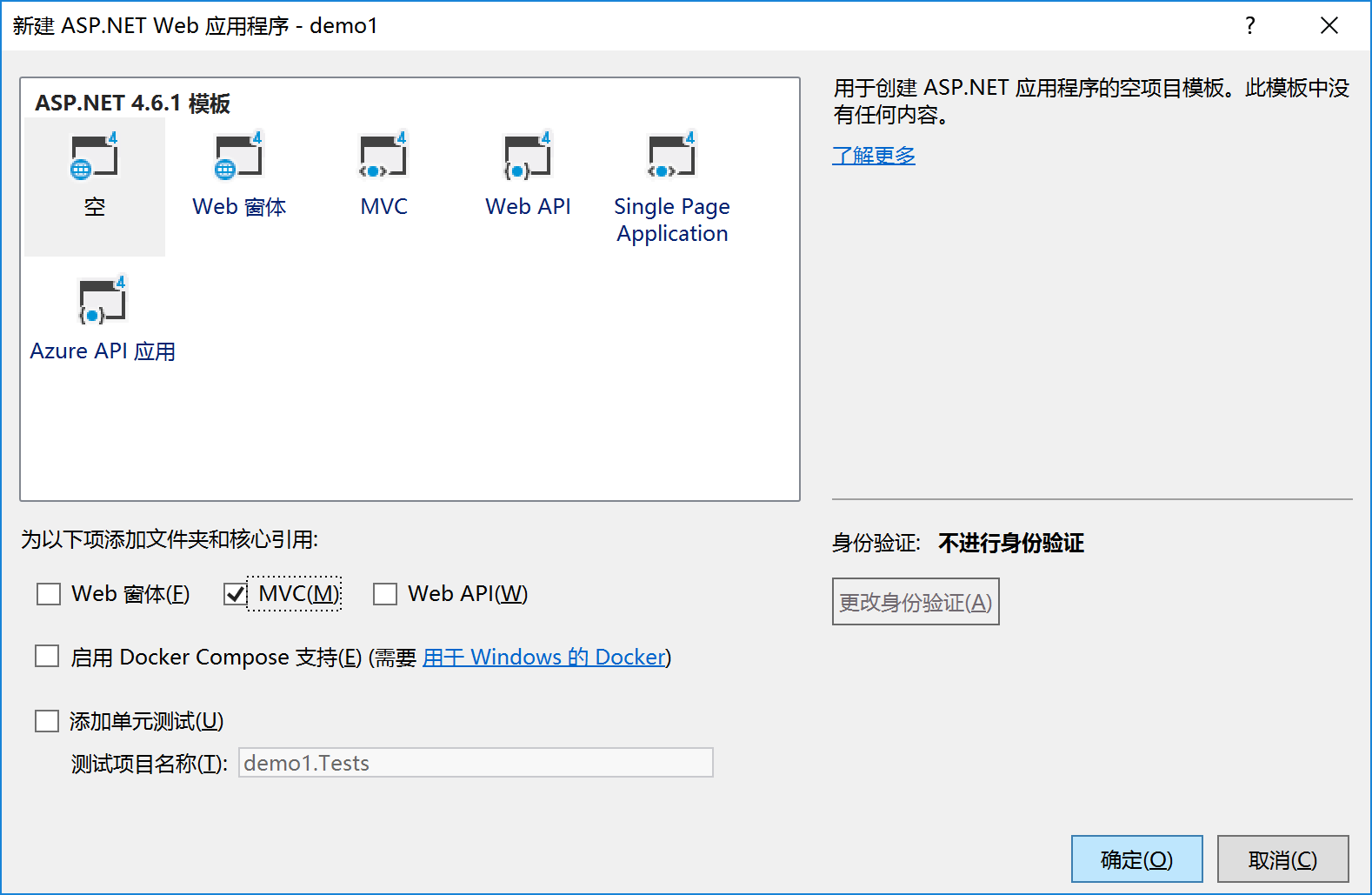
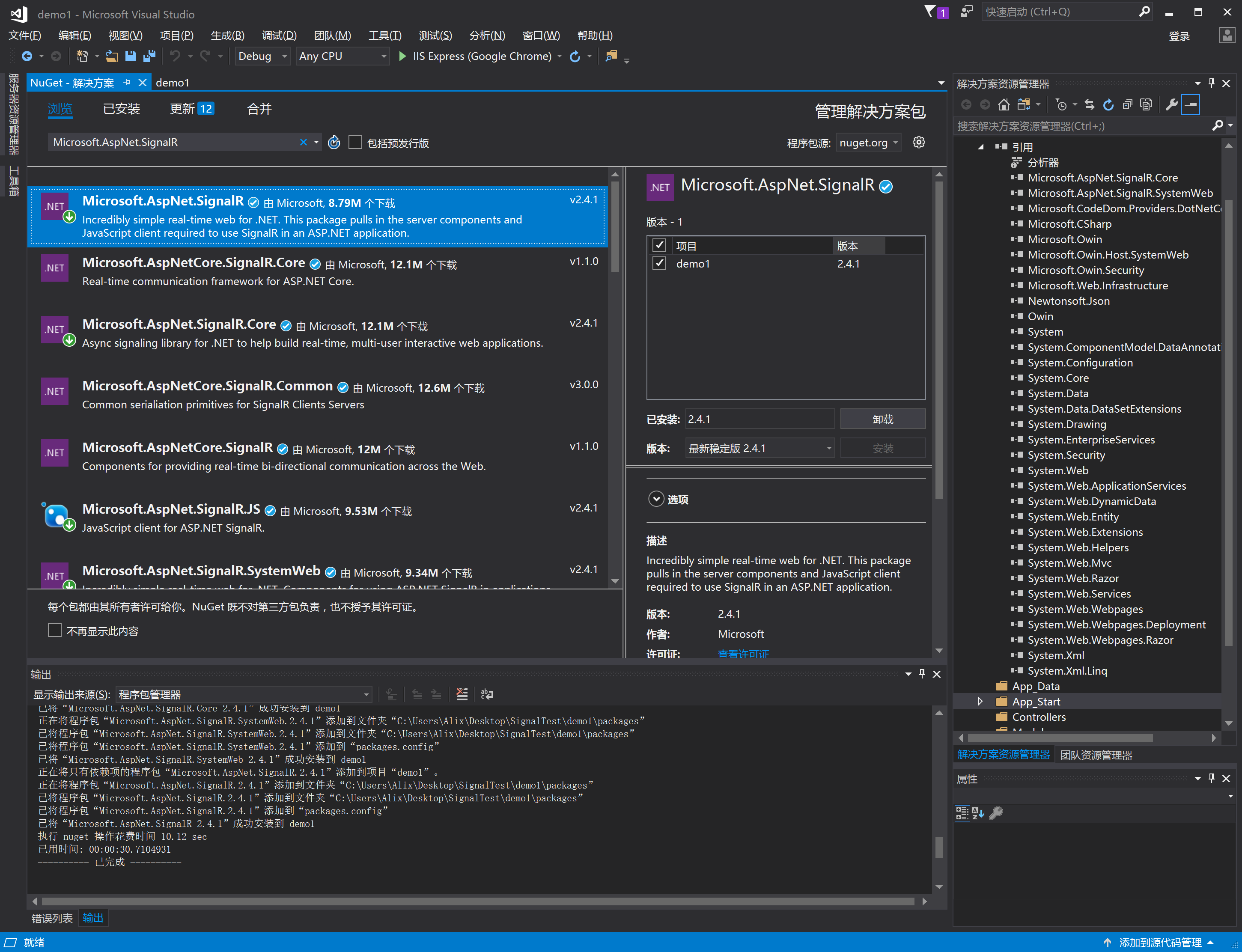
二、添加SignaIR包
SignalR的准备:NuGet包管理器搜索:工具——>库程序包管理器——>Microsoft.AspNet.SignalR 或者 工具——>库程序包管理器——>程序包管理器控制台 Install-Package Microsoft.AspNet.SignalR。
三、新建startup文件(在App_Start目录内),用来启动SignalR
选择常规-->选择OWIN Startup类-->修改名字: Startup.cs
using Microsoft.Owin;

using Owin;

using System;

using System.Collections.Generic;

using System.Linq;

using System.Web;

[assembly: OwinStartup(typeof(demo2.App_Start.Startup))]

namespace demo2.App_Start

{

    public class Startup

    {

        public void Configuration(IAppBuilder app)

        {

            // 有关如何配置应用程序的详细信息,请访问 http://go.microsoft.com/fwlink/?LinkID=316888

            app.MapSignalR();

        }

    }

}

项目外ServerHub.cs文件
using System;

using System.Collections.Generic;

using System.Linq;

using System.Web;

using Microsoft.AspNet.SignalR;

namespace ChatSignalR

{

    public class ServerHub : Hub

    {

        public void SendMsg(string message)

        {

            //调用所有客户端的sendMessage方法

            Clients.All.sendMessage(DateTime.Now.ToString("yyyy-MM-dd HH:mm:ss"), message);

        }

    }

}
四、客户端代码
@{

    Layout = null;

}

<!DOCTYPE html>

<html>

<head>

    <meta name="viewport" content="width=device-width" />

    <title>Index</title>

    <script src="~/scripts/jquery-1.6.4.min.js"></script>

    <!--引用SignalR库. -->

    <script src="~/scripts/jquery.signalR-2.3.0.min.js"></script>

    <!--引用自动生成的SignalR 集线器(Hub)脚本.在运行的时候在浏览器的Source下可看到

    <script src="~/signalr/hubs"></script>这个js。这是在项目中找不到,是有signalr自己生成作为桥接的js。引入最重要的hubs js,这个js其实并不存在,SignalR会反射获取所有供客户端调用的方法放入hubs js中-->

    <script src="~/signalr/hubs"></script>

</head>

<body>

    <div>

        <div class="container">

            <input type="text" id="message" />

            <input type="button" id="sendmessage" value="Send" />

            <input type="hidden" id="displayname" />

            <ul id="messageBox"></ul>

        </div>

    </div>

</body>

<script>

        $(function () {

            //引用自动生成的集线器代理

            var chat = $.connection.serverHub;

             //定义服务器调用的客户端sendMessage来显示新消息

            chat.client.sendMessage = function (name, message)

            {

                //向页面添加消息

                $("#messageBox").append('<li><strong style="color:green">'+htmlEncode(name)+'</strong>:'+htmlEncode(message)+'</li>');

            }

            //设置焦点到输入框

            $('#message').focus();

            //开始连接服务器

            $.connection.hub.start().done(function () {

                $('#sendmessage').click(function () {

                    //调用服务器端集线器的Send方法

                    chat.server.sendMsg($('#message').val());

                    //清空输入框信息并获取焦点

                    $("#message").val('').focus();

                })

            })

        });

        //为显示的消息进行html编码

        function htmlEncode(value)

        {

            var encodeValue = $('<div/>').text(value).html();

            return encodeValue;

        }

</script>

</html>
扩展 App_Start文件夹内启动文件不变,集线器操作类,实现控制器内发送
1、新建login控制器如下
using System;

using System.Collections.Generic;

using System.Linq;

using System.Web;

using System.Web.Mvc;

namespace ChatSignalR.Controllers

{

    public class LoginController : Controller

    {

        // GET: Login

        public ActionResult Index()

        {

            // 判断是否是新用户

            if (Request.Cookies["USERNAME"] != null) //如果是新用户,则跳转到新用户页面

            {

                return RedirectToAction("Index", "Index");

            }

            //iewBag.UserName = HttpUtility.UrlDecode(cookieUserName.Value);

            return View();

        }

        [HttpPost]

        public ActionResult Login(FormCollection fc)

        {

            string userName = fc["uid"];

            Response.Cookies.Add(new HttpCookie("USERNAME", HttpUtility.UrlEncode(userName)));

            return RedirectToAction("Index", "Index");

        }

    }

}
View:
@{

    Layout = null;

}

<!DOCTYPE html>

<html>

<head>

    <meta name="viewport" content="width=device-width" />

    <title>Index</title>

    <script src="~/scripts/jquery-1.6.4.min.js"></script>

</head>

<body>

    <div>

        @using (Html.BeginForm("login", "Login", FormMethod.Post, new { @class = "form-horizontal", role = "form" }))

        {

            <div class="loginBox">

                <div class="loginBoxCenter">

                    <p><input type="text" id="uid" name="uid" class="loginInput" required="required" placeholder="请输入用户名" value="" /></p>

                </div>

                <div class="loginBoxButtons">

                    <button class="loginBtn">登录</button>

                </div>

            </div>

        }

    </div>

    <script type="text/javascript">

        $(function () {

        });

    </script>

</body>

</html>
1、新建Index控制器如下
    public class IndexController : Controller

    {

        /// <summary>

        /// Clients,用来主动发送消息

        /// </summary>

        ///

        // GET: Index

        public ActionResult Index()

        {

            ViewBag.hard_value = new List<SelectListItem>() {

                new SelectListItem(){Value="",Text="xpy0928"},

                new SelectListItem(){Value="",Text="cnblogs"}

            };

            return View();

        }

        [HttpPost]

        public ActionResult ClearCookIe()

        {

            HttpCookie cookies = Request.Cookies["USERNAME"]; //一定要注意设置Cookies是用Response读取是用Request两者不一样!

            if (cookies != null)

            {

                cookies.Expires = DateTime.Today.AddDays(-);

                Response.Cookies.Add(cookies);

                Request.Cookies.Remove("USERNAME");

            }

            if (Request.Cookies["USERNAME"] == null)

            {

                return Content("/Login/Index");

            }

            else {

                return Content("fail");

            }

        }

        [HttpPost]

        public ActionResult SendSystemMsg()

        {

            //从外部访问类访问服务器上相对应的hub服务方式

            var hub = GlobalHost.ConnectionManager.GetHubContext<ServerHub>();

            //在集线器外部推送消息

            //hub.Clients.All.notice("都起来吃饭了");

            hub.Clients.All.sendMessage(DateTime.Now.ToString("yyyy-MM-dd HH:mm:ss"), "都起来吃饭了");

            if ( == null)

            {

                return Content("ok");

            }

            else

            {

                return Content("fail");

            }

        }

        /*

        //从外部访问持久性连接服务 方式

           var connectionContext = GlobalHost.ConnectionManager.GetConnectionContext<TestConnection>();//管理相对应的持久性连接

           connectionContext.Connection.Broadcast("该吃饭了");//向所有已连接的客户端发送信息

        */

    }
View
@{

    Layout = null;

}

<!DOCTYPE html>

<html>

<head>

    <meta name="viewport" content="width=device-width" />

    <title>Index</title>

    <script src="~/scripts/jquery-1.6.4.min.js"></script>

    <!--引用SignalR库. -->

    <script src="~/scripts/jquery.signalR-2.3.0.min.js"></script>

    <!--引用自动生成的SignalR 集线器(Hub)脚本.在运行的时候在浏览器的Source下可看到

    <script src="~/signalr/hubs"></script>这个js。这是在项目中找不到,是有signalr自己生成作为桥接的js。引入最重要的hubs js,这个js其实并不存在,SignalR会反射获取所有供客户端调用的方法放入hubs js中-->

    <script src="~/signalr/hubs"></script>

</head>

<body>

    <div>

        @Html.DropDownList("hard-code-dropdownlist", new SelectList(ViewBag.hard_value, "Value", "Text"), new { @class = "btn btn-success dropdown-toggle form-control" })

        <div class="container">

            <input type="text" id="message" />

            <input type="button" id="sendmessage" value="Send" />

            <input type="hidden" id="displayname" />

            <ul id="messageBox"></ul>

        </div>

        <input type="button" id="clearcookie" value="清楚cookie" />

        <input type="button" id="SendSystemMsg" value="发送系统消息" />

    </div>

</body>

<script type="text/javascript">

        $(function () {

            //引用自动生成的集线器代理

            var chat = $.connection.chatHub;

             //定义服务器调用的客户端sendMessage来显示新消息

            chat.client.sendMessage = function (name, message)

            {

                //向页面添加消息

                $("#messageBox").append('<li><strong style="color:green">'+htmlEncode(name)+'</strong>:'+htmlEncode(message)+'</li>');

            }

            //设置焦点到输入框

            $('#message').focus();

            //开始连接服务器

            $.connection.hub.start().done(function () {

                // 连接成功时

                $('#sendmessage').click(function () {

                    //调用服务器端集线器的Send方法

                    chat.server.sendMsg($('#message').val());

                    //清空输入框信息并获取焦点

                    $("#message").val('').focus();

                })

            }).fail(function (res) {

                // 连接失败时

            });

        });

        $("#clearcookie").click(function () {

                $.ajax({

                    url: '/Index/ClearCookIe',

                    type:'post',

                    //dataType:'json',

                    timeout:,

                    success: function (data, status) {

                        if(data=="fail")

                            console.log(data)

                        else

                            location.href = data;

                    },

                    fail: function (err, status) {

                        console.log(err)

                    }

                });

        })

        $("#SendSystemMsg").click(function () {

            $.ajax({

                url: '/Index/SendSystemMsg',

                type: 'post',

                //dataType:'json',

                timeout: ,

                success: function (data, status) {

                        console.log(data)

                },

                fail: function (err, status) {

                    console.log(err)

                }

            });

        })

        //为显示的消息进行html编码

        function htmlEncode(value)

        {

            var encodeValue = $('<div/>').text(value).html();

            return encodeValue;

        }

</script>

</html>
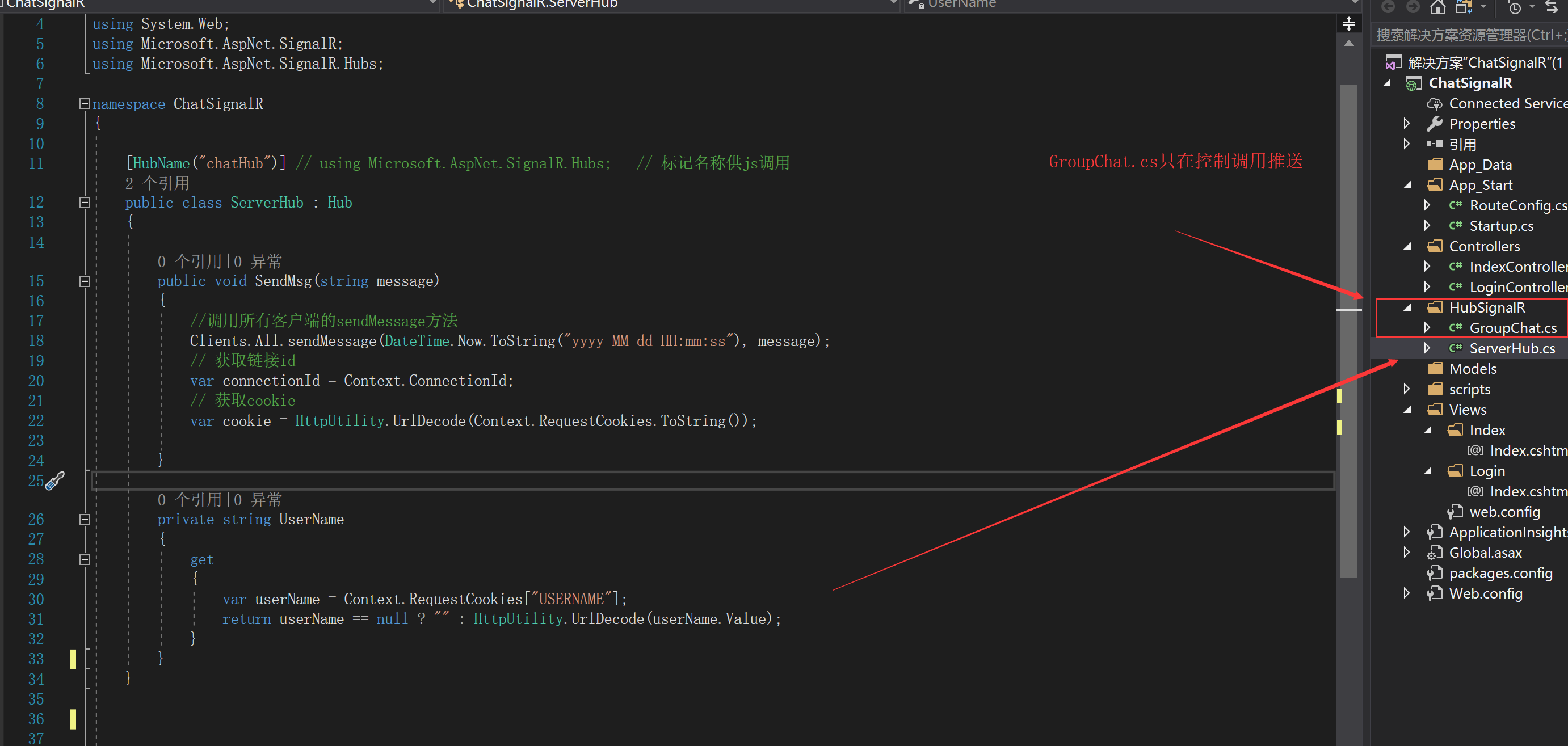
另外集线器代码也更改--我放入HubignaIR文件夹内
using Microsoft.AspNet.SignalR;

using Microsoft.AspNet.SignalR.Hubs;

using System;

using System.Collections.Generic;

using System.Diagnostics;

using System.Linq;

using System.Threading.Tasks;

using System.Web;

namespace demo2.HubignaIR

{

    [HubName("chatHub")] // using Microsoft.AspNet.SignalR.Hubs;   // 标记名称供js调用

    public class ServerHub : Hub

    {

        public void SendMsg(string message)

        {

            //调用所有客户端的sendMessage方法

            Clients.All.sendMessage(DateTime.Now.ToString("yyyy-MM-dd HH:mm:ss"), message);

            // 获取链接id

            var connectionId = Context.ConnectionId;

            // 获取cookie

            var cookie = HttpUtility.UrlDecode(Context.RequestCookies.ToString());

        }

        /// <summary>

        /// 客户端连接的时候调用

        /// </summary>

        /// <returns></returns>

        public override Task OnConnected()

        {

            Trace.WriteLine("客户端连接成功");

            return base.OnConnected();

        }

        private string UserName

        {

            get

            {

                var userName = Context.RequestCookies["USERNAME"];

                return userName == null ? "" : HttpUtility.UrlDecode(userName.Value);

            }

        }

    }

}
GroupChat.cs
namespace ChatSignalR.HubSignalR

{

    /*封装主动发送消息的单例

    如果需要发送消息,直接控制器里面调用SendSystemMsg即可。

    GroupChat.Instance.SendSystemMsg("消息");

    */

    /// <summary>

    /// 主动发送给用户消息,单例模式

    /// </summary>

    public class GroupChat

    {

        /// <summary>

        /// Clients,用来主动发送消息

        /// </summary>

        private IHubConnectionContext<dynamic> Clients { get; set; }

        private readonly static GroupChat _instance = new GroupChat(GlobalHost.ConnectionManager.GetHubContext<ServerHub>().Clients);

        private GroupChat(IHubConnectionContext<dynamic> clients)

        {

            Clients = clients;

        }

        public static GroupChat Instance

        {

            get

            {

                return _instance;

            }

        }

        /// <summary>

        /// 主动给所有人发送消息,系统直接调用

        /// </summary>

        /// <param name="msg"></param>

        public void SendSystemMsg(string msg)

        {

            Clients.All.publshMsg(new { Name = "系统消息", Msg = msg, Time = DateTime.Now.ToString("yyyy-MM-dd HH:mm:ss") });

        }

    }

}
一、ASP.NET Iframework_SignalR集线器类(v2)的更多相关文章
- ASP.NET导出EXCEL类
最新ASP.NET导出EXCEL类 说明:可以导出ASP.NET页面和DATAGRID(WebControl)数据,可以导出表单头 using System;using System.Data;usi ...
- 扩展ASP.NET MVC HtmlHelper类
在这篇帖子中我会使用一个示例演示扩展ASP.NET MVC HtmlHelper类,让它们可以在你的MVC视图中工作.这个示例中我会提供一个简单的方案生成Html表格. HtmlHelper类 Htm ...
- 【ASP.NET MVC系列】浅谈ASP.NET MVC八大类扩展(上篇)
lASP.NET MVC系列文章 [01]浅谈Google Chrome浏览器(理论篇) [02]浅谈Google Chrome浏览器(操作篇)(上) [03]浅谈Google Chrome浏览器(操 ...
- ASP.NET -- WebForm -- ScriptManager 类
ASP.NET -- WebForm -- ScriptManager 类 通过 ScriptManager 可注册随后将作为页面一部分呈现的脚本. 1. 注册并立即执行脚本. --RegisterS ...
- ASP.NET -- WebForm -- HttpRequest类的方法和属性
ASP.NET -- WebForm -- HttpRequest类的方法和属性 1. HttpRequest类的方法(1) BinaryRead: 执行对当前输入流进行指定字节数的二进制读取. ( ...
- ASP.NET -- WebForm -- HttpResponse 类的方法和属性
ASP.NET -- WebForm -- HttpResponse 类的方法和属性 1. HttpResponse 类的方法 (1) AddCacheDependency: 将一组缓存依赖项与响应关 ...
- 一、ASP.NET Iframework_SignalR永久连接类(v2)
一.新建项目,选MVC项目默认 添加mvc文件夹和核心引用 二.添加SignaIR包 SignalR的准备:NuGet包管理器搜索:工具——>库程序包管理器——>Microsoft.Asp ...
- 史上最全面的SignalR系列教程-3、SignalR 实现推送功能-集线器类实现方式
1.概述 通过前两篇 史上最全面的SignalR系列教程-1.认识SignalR 史上最全面的SignalR系列教程-2.SignalR 实现推送功能-永久连接类实现方式 文章对SignalR的介绍, ...
- Asp.net的request类
ASP.NET获取客户端信息,暂时就这几个,有待添加~~ 1. 在ASP.NET中专用属性: 获取服务器电脑名:Page.Server.ManchineName 获取用户信息:Page.User 获取 ...
随机推荐
- 8.并发编程--多线程通信-wait-notify-模拟Queue
并发编程--多线程通信-wait-notify-模拟Queue 1. BlockingQueue 顾名思义,首先是一个队列,其次支持阻塞的机制:阻塞放入和获取队列中的数据. 如何实现这样一个队列: 要 ...
- 当遇到npm ERR! Unexpected end of JSON input while parsing near……时的解决办法
运行npm install时有时会遇到以下错误: npm ERR! Unexpected end of JSON input while parsing near ... 这时可以先执行下面的命令: ...
- 关于spotlight_on_oracle的配置及操作
Spotlight是一个强有力的Oracle数据库实时性能诊断工具,提供了一个直观的.可视化的数据库活动展现.Spotlight可视化展现性能瓶颈,一旦某个指标超出可接受的阀值的话.而且,通过下钻功能 ...
- 【重点突破】—— UniApp 微信小程序开发官网学习One
一.初步认识 uni-app官网:https://uniapp.dcloud.io/component/README HBuilderX官方IDE下载地址: http://www.dcloud.io/ ...
- 一、基础篇--1.1Java基础-包装类的装箱和拆箱
包装类:java是典型的面向对象编程,但是八种基本数据类型并不支持面向对象编程.基本类型的数据不具备对象的特性,没有属性和方法.沿用它们只是为了迎合人类根深蒂固的习惯,并的确能简单.有效地进行常规数据 ...
- 使用collection:分段查询结果集
1.在人员接口书写方法 public List<Employee> getEmpsByDeptId(Integer deptId); 2在人员映射文件中进行配置 <!-- publi ...
- centOS7杀死进程命令
查看当前所有正在运行的进程,可以看到80端口被httpd占用了(80端口希望分配给nginx使用,而不是httpd) netstat -tpnul 这里以杀死httpd进程为例: 先查看 httpd ...
- Ehlib好用的版本
EhLib 6.2
- 【Spring】的【bean】管理(XML配置文件)【Bean实例化的三种方式】
Bean实例化的三种方式 说明:通过配置文件创建对象就称为Bean实例化. 第一种:使用类的无参构造创建(重点) 实体类 package com.tyzr.ioc; public class User ...
- Django框架效率问题的解决方法和总…
由于项目的需要,学习了Django框架,Django框架的MTV很清晰,通过MTV能够很好地了解Django框架的内部机理.但是在使用过程中发现了一个严重的问题,就是当有大量IO(写数据库操作)的时候 ...