
一、ASP.NET Iframework_SignalR集线器类(v2)
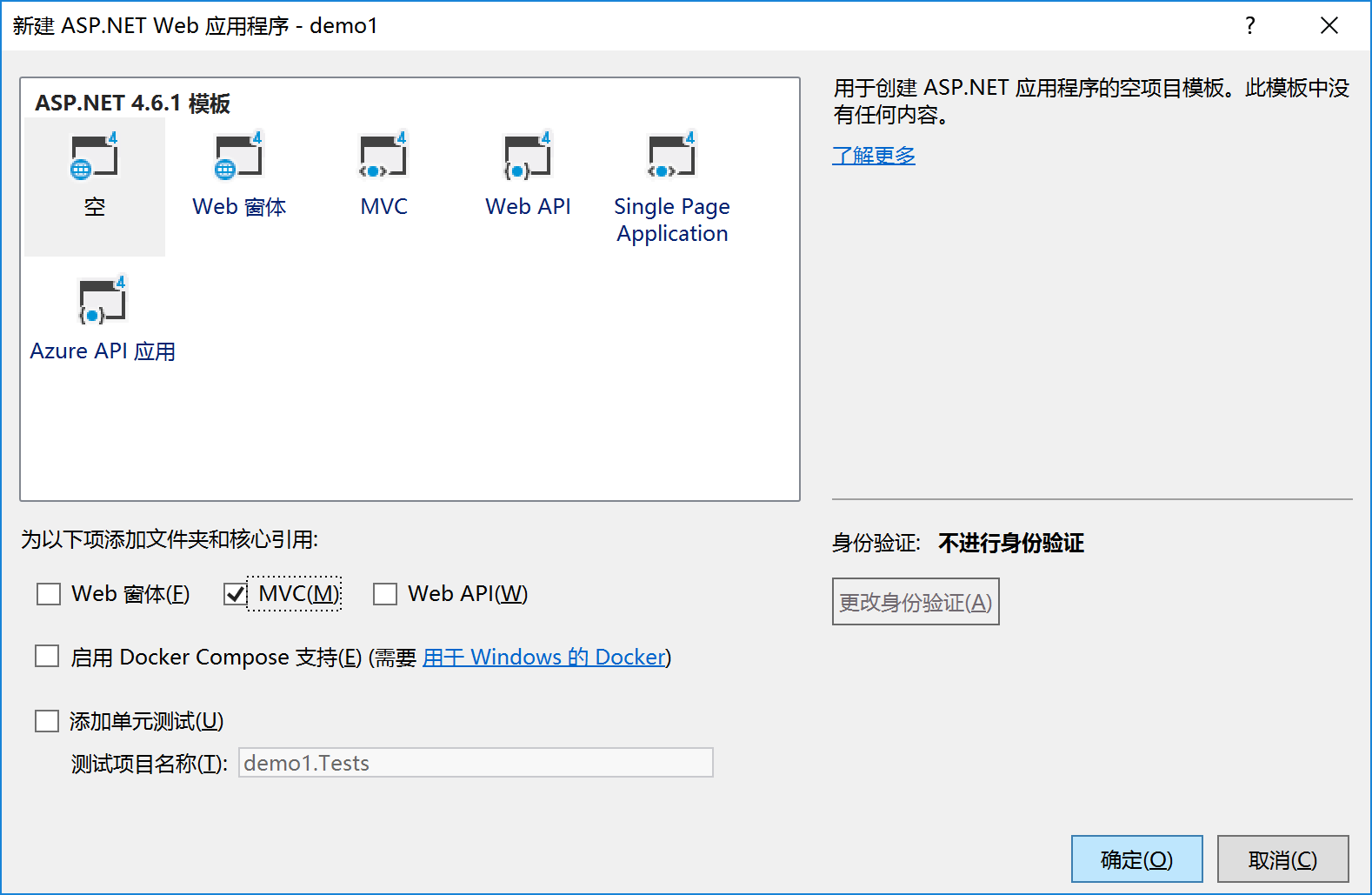
一、新建项目,选MVC项目默认 添加mvc文件夹和核心引用
二、添加SignaIR包
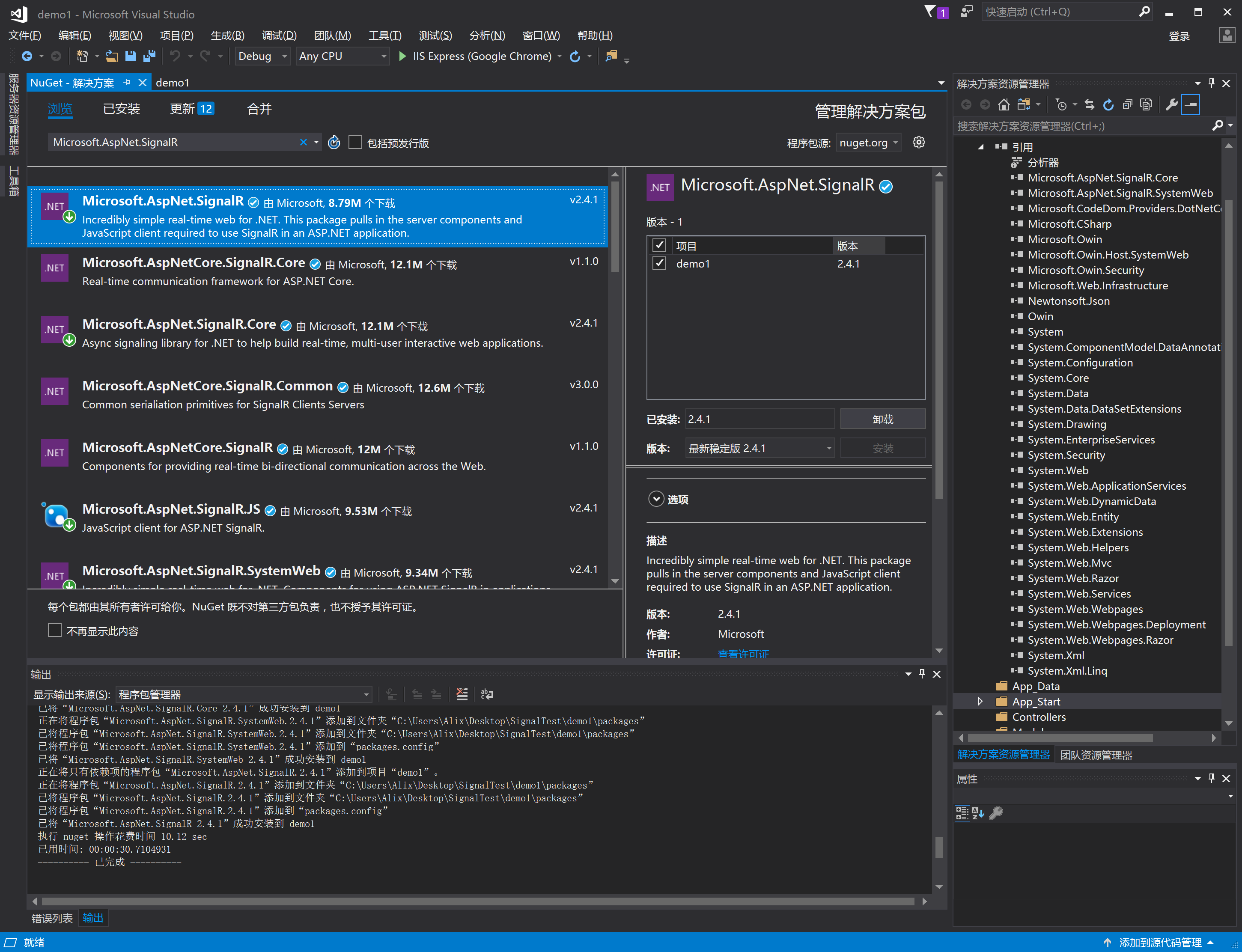
SignalR的准备:NuGet包管理器搜索:工具——>库程序包管理器——>Microsoft.AspNet.SignalR 或者 工具——>库程序包管理器——>程序包管理器控制台 Install-Package Microsoft.AspNet.SignalR。
三、新建startup文件(在App_Start目录内),用来启动SignalR
选择常规-->选择OWIN Startup类-->修改名字: Startup.cs
using Microsoft.Owin;

using Owin;

using System;

using System.Collections.Generic;

using System.Linq;

using System.Web;

[assembly: OwinStartup(typeof(demo2.App_Start.Startup))]

namespace demo2.App_Start

{

    public class Startup

    {

        public void Configuration(IAppBuilder app)

        {

            // 有关如何配置应用程序的详细信息,请访问 http://go.microsoft.com/fwlink/?LinkID=316888

            app.MapSignalR();

        }

    }

}

项目外ServerHub.cs文件
using System;

using System.Collections.Generic;

using System.Linq;

using System.Web;

using Microsoft.AspNet.SignalR;

namespace ChatSignalR

{

    public class ServerHub : Hub

    {

        public void SendMsg(string message)

        {

            //调用所有客户端的sendMessage方法

            Clients.All.sendMessage(DateTime.Now.ToString("yyyy-MM-dd HH:mm:ss"), message);

        }

    }

}
四、客户端代码
@{

    Layout = null;

}

<!DOCTYPE html>

<html>

<head>

    <meta name="viewport" content="width=device-width" />

    <title>Index</title>

    <script src="~/scripts/jquery-1.6.4.min.js"></script>

    <!--引用SignalR库. -->

    <script src="~/scripts/jquery.signalR-2.3.0.min.js"></script>

    <!--引用自动生成的SignalR 集线器(Hub)脚本.在运行的时候在浏览器的Source下可看到

    <script src="~/signalr/hubs"></script>这个js。这是在项目中找不到,是有signalr自己生成作为桥接的js。引入最重要的hubs js,这个js其实并不存在,SignalR会反射获取所有供客户端调用的方法放入hubs js中-->

    <script src="~/signalr/hubs"></script>

</head>

<body>

    <div>

        <div class="container">

            <input type="text" id="message" />

            <input type="button" id="sendmessage" value="Send" />

            <input type="hidden" id="displayname" />

            <ul id="messageBox"></ul>

        </div>

    </div>

</body>

<script>

        $(function () {

            //引用自动生成的集线器代理

            var chat = $.connection.serverHub;

             //定义服务器调用的客户端sendMessage来显示新消息

            chat.client.sendMessage = function (name, message)

            {

                //向页面添加消息

                $("#messageBox").append('<li><strong style="color:green">'+htmlEncode(name)+'</strong>:'+htmlEncode(message)+'</li>');

            }

            //设置焦点到输入框

            $('#message').focus();

            //开始连接服务器

            $.connection.hub.start().done(function () {

                $('#sendmessage').click(function () {

                    //调用服务器端集线器的Send方法

                    chat.server.sendMsg($('#message').val());

                    //清空输入框信息并获取焦点

                    $("#message").val('').focus();

                })

            })

        });

        //为显示的消息进行html编码

        function htmlEncode(value)

        {

            var encodeValue = $('<div/>').text(value).html();

            return encodeValue;

        }

</script>

</html>
扩展 App_Start文件夹内启动文件不变,集线器操作类,实现控制器内发送
1、新建login控制器如下
using System;

using System.Collections.Generic;

using System.Linq;

using System.Web;

using System.Web.Mvc;

namespace ChatSignalR.Controllers

{

    public class LoginController : Controller

    {

        // GET: Login

        public ActionResult Index()

        {

            // 判断是否是新用户

            if (Request.Cookies["USERNAME"] != null) //如果是新用户,则跳转到新用户页面

            {

                return RedirectToAction("Index", "Index");

            }

            //iewBag.UserName = HttpUtility.UrlDecode(cookieUserName.Value);

            return View();

        }

        [HttpPost]

        public ActionResult Login(FormCollection fc)

        {

            string userName = fc["uid"];

            Response.Cookies.Add(new HttpCookie("USERNAME", HttpUtility.UrlEncode(userName)));

            return RedirectToAction("Index", "Index");

        }

    }

}
View:
@{

    Layout = null;

}

<!DOCTYPE html>

<html>

<head>

    <meta name="viewport" content="width=device-width" />

    <title>Index</title>

    <script src="~/scripts/jquery-1.6.4.min.js"></script>

</head>

<body>

    <div>

        @using (Html.BeginForm("login", "Login", FormMethod.Post, new { @class = "form-horizontal", role = "form" }))

        {

            <div class="loginBox">

                <div class="loginBoxCenter">

                    <p><input type="text" id="uid" name="uid" class="loginInput" required="required" placeholder="请输入用户名" value="" /></p>

                </div>

                <div class="loginBoxButtons">

                    <button class="loginBtn">登录</button>

                </div>

            </div>

        }

    </div>

    <script type="text/javascript">

        $(function () {

        });

    </script>

</body>

</html>
1、新建Index控制器如下
    public class IndexController : Controller

    {

        /// <summary>

        /// Clients,用来主动发送消息

        /// </summary>

        ///

        // GET: Index

        public ActionResult Index()

        {

            ViewBag.hard_value = new List<SelectListItem>() {

                new SelectListItem(){Value="",Text="xpy0928"},

                new SelectListItem(){Value="",Text="cnblogs"}

            };

            return View();

        }

        [HttpPost]

        public ActionResult ClearCookIe()

        {

            HttpCookie cookies = Request.Cookies["USERNAME"]; //一定要注意设置Cookies是用Response读取是用Request两者不一样!

            if (cookies != null)

            {

                cookies.Expires = DateTime.Today.AddDays(-);

                Response.Cookies.Add(cookies);

                Request.Cookies.Remove("USERNAME");

            }

            if (Request.Cookies["USERNAME"] == null)

            {

                return Content("/Login/Index");

            }

            else {

                return Content("fail");

            }

        }

        [HttpPost]

        public ActionResult SendSystemMsg()

        {

            //从外部访问类访问服务器上相对应的hub服务方式

            var hub = GlobalHost.ConnectionManager.GetHubContext<ServerHub>();

            //在集线器外部推送消息

            //hub.Clients.All.notice("都起来吃饭了");

            hub.Clients.All.sendMessage(DateTime.Now.ToString("yyyy-MM-dd HH:mm:ss"), "都起来吃饭了");

            if ( == null)

            {

                return Content("ok");

            }

            else

            {

                return Content("fail");

            }

        }

        /*

        //从外部访问持久性连接服务 方式

           var connectionContext = GlobalHost.ConnectionManager.GetConnectionContext<TestConnection>();//管理相对应的持久性连接

           connectionContext.Connection.Broadcast("该吃饭了");//向所有已连接的客户端发送信息

        */

    }
View
@{

    Layout = null;

}

<!DOCTYPE html>

<html>

<head>

    <meta name="viewport" content="width=device-width" />

    <title>Index</title>

    <script src="~/scripts/jquery-1.6.4.min.js"></script>

    <!--引用SignalR库. -->

    <script src="~/scripts/jquery.signalR-2.3.0.min.js"></script>

    <!--引用自动生成的SignalR 集线器(Hub)脚本.在运行的时候在浏览器的Source下可看到

    <script src="~/signalr/hubs"></script>这个js。这是在项目中找不到,是有signalr自己生成作为桥接的js。引入最重要的hubs js,这个js其实并不存在,SignalR会反射获取所有供客户端调用的方法放入hubs js中-->

    <script src="~/signalr/hubs"></script>

</head>

<body>

    <div>

        @Html.DropDownList("hard-code-dropdownlist", new SelectList(ViewBag.hard_value, "Value", "Text"), new { @class = "btn btn-success dropdown-toggle form-control" })

        <div class="container">

            <input type="text" id="message" />

            <input type="button" id="sendmessage" value="Send" />

            <input type="hidden" id="displayname" />

            <ul id="messageBox"></ul>

        </div>

        <input type="button" id="clearcookie" value="清楚cookie" />

        <input type="button" id="SendSystemMsg" value="发送系统消息" />

    </div>

</body>

<script type="text/javascript">

        $(function () {

            //引用自动生成的集线器代理

            var chat = $.connection.chatHub;

             //定义服务器调用的客户端sendMessage来显示新消息

            chat.client.sendMessage = function (name, message)

            {

                //向页面添加消息

                $("#messageBox").append('<li><strong style="color:green">'+htmlEncode(name)+'</strong>:'+htmlEncode(message)+'</li>');

            }

            //设置焦点到输入框

            $('#message').focus();

            //开始连接服务器

            $.connection.hub.start().done(function () {

                // 连接成功时

                $('#sendmessage').click(function () {

                    //调用服务器端集线器的Send方法

                    chat.server.sendMsg($('#message').val());

                    //清空输入框信息并获取焦点

                    $("#message").val('').focus();

                })

            }).fail(function (res) {

                // 连接失败时

            });

        });

        $("#clearcookie").click(function () {

                $.ajax({

                    url: '/Index/ClearCookIe',

                    type:'post',

                    //dataType:'json',

                    timeout:,

                    success: function (data, status) {

                        if(data=="fail")

                            console.log(data)

                        else

                            location.href = data;

                    },

                    fail: function (err, status) {

                        console.log(err)

                    }

                });

        })

        $("#SendSystemMsg").click(function () {

            $.ajax({

                url: '/Index/SendSystemMsg',

                type: 'post',

                //dataType:'json',

                timeout: ,

                success: function (data, status) {

                        console.log(data)

                },

                fail: function (err, status) {

                    console.log(err)

                }

            });

        })

        //为显示的消息进行html编码

        function htmlEncode(value)

        {

            var encodeValue = $('<div/>').text(value).html();

            return encodeValue;

        }

</script>

</html>
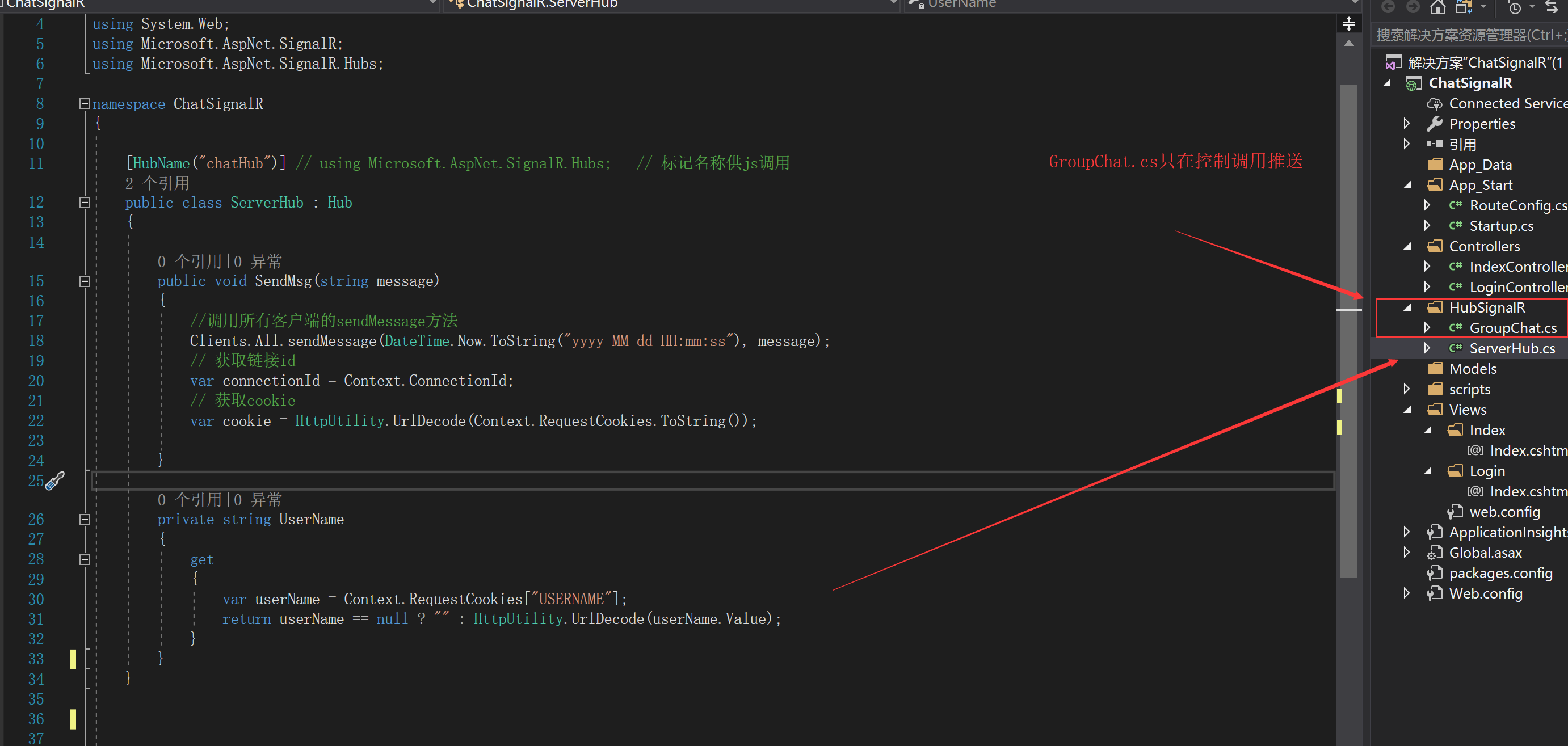
另外集线器代码也更改--我放入HubignaIR文件夹内
using Microsoft.AspNet.SignalR;

using Microsoft.AspNet.SignalR.Hubs;

using System;

using System.Collections.Generic;

using System.Diagnostics;

using System.Linq;

using System.Threading.Tasks;

using System.Web;

namespace demo2.HubignaIR

{

    [HubName("chatHub")] // using Microsoft.AspNet.SignalR.Hubs;   // 标记名称供js调用

    public class ServerHub : Hub

    {

        public void SendMsg(string message)

        {

            //调用所有客户端的sendMessage方法

            Clients.All.sendMessage(DateTime.Now.ToString("yyyy-MM-dd HH:mm:ss"), message);

            // 获取链接id

            var connectionId = Context.ConnectionId;

            // 获取cookie

            var cookie = HttpUtility.UrlDecode(Context.RequestCookies.ToString());

        }

        /// <summary>

        /// 客户端连接的时候调用

        /// </summary>

        /// <returns></returns>

        public override Task OnConnected()

        {

            Trace.WriteLine("客户端连接成功");

            return base.OnConnected();

        }

        private string UserName

        {

            get

            {

                var userName = Context.RequestCookies["USERNAME"];

                return userName == null ? "" : HttpUtility.UrlDecode(userName.Value);

            }

        }

    }

}
GroupChat.cs
namespace ChatSignalR.HubSignalR

{

    /*封装主动发送消息的单例

    如果需要发送消息,直接控制器里面调用SendSystemMsg即可。

    GroupChat.Instance.SendSystemMsg("消息");

    */

    /// <summary>

    /// 主动发送给用户消息,单例模式

    /// </summary>

    public class GroupChat

    {

        /// <summary>

        /// Clients,用来主动发送消息

        /// </summary>

        private IHubConnectionContext<dynamic> Clients { get; set; }

        private readonly static GroupChat _instance = new GroupChat(GlobalHost.ConnectionManager.GetHubContext<ServerHub>().Clients);

        private GroupChat(IHubConnectionContext<dynamic> clients)

        {

            Clients = clients;

        }

        public static GroupChat Instance

        {

            get

            {

                return _instance;

            }

        }

        /// <summary>

        /// 主动给所有人发送消息,系统直接调用

        /// </summary>

        /// <param name="msg"></param>

        public void SendSystemMsg(string msg)

        {

            Clients.All.publshMsg(new { Name = "系统消息", Msg = msg, Time = DateTime.Now.ToString("yyyy-MM-dd HH:mm:ss") });

        }

    }

}
一、ASP.NET Iframework_SignalR集线器类(v2)的更多相关文章
- ASP.NET导出EXCEL类
最新ASP.NET导出EXCEL类 说明:可以导出ASP.NET页面和DATAGRID(WebControl)数据,可以导出表单头 using System;using System.Data;usi ...
- 扩展ASP.NET MVC HtmlHelper类
在这篇帖子中我会使用一个示例演示扩展ASP.NET MVC HtmlHelper类,让它们可以在你的MVC视图中工作.这个示例中我会提供一个简单的方案生成Html表格. HtmlHelper类 Htm ...
- 【ASP.NET MVC系列】浅谈ASP.NET MVC八大类扩展(上篇)
lASP.NET MVC系列文章 [01]浅谈Google Chrome浏览器(理论篇) [02]浅谈Google Chrome浏览器(操作篇)(上) [03]浅谈Google Chrome浏览器(操 ...
- ASP.NET -- WebForm -- ScriptManager 类
ASP.NET -- WebForm -- ScriptManager 类 通过 ScriptManager 可注册随后将作为页面一部分呈现的脚本. 1. 注册并立即执行脚本. --RegisterS ...
- ASP.NET -- WebForm -- HttpRequest类的方法和属性
ASP.NET -- WebForm -- HttpRequest类的方法和属性 1. HttpRequest类的方法(1) BinaryRead: 执行对当前输入流进行指定字节数的二进制读取. ( ...
- ASP.NET -- WebForm -- HttpResponse 类的方法和属性
ASP.NET -- WebForm -- HttpResponse 类的方法和属性 1. HttpResponse 类的方法 (1) AddCacheDependency: 将一组缓存依赖项与响应关 ...
- 一、ASP.NET Iframework_SignalR永久连接类(v2)
一.新建项目,选MVC项目默认 添加mvc文件夹和核心引用 二.添加SignaIR包 SignalR的准备:NuGet包管理器搜索:工具——>库程序包管理器——>Microsoft.Asp ...
- 史上最全面的SignalR系列教程-3、SignalR 实现推送功能-集线器类实现方式
1.概述 通过前两篇 史上最全面的SignalR系列教程-1.认识SignalR 史上最全面的SignalR系列教程-2.SignalR 实现推送功能-永久连接类实现方式 文章对SignalR的介绍, ...
- Asp.net的request类
ASP.NET获取客户端信息,暂时就这几个,有待添加~~ 1. 在ASP.NET中专用属性: 获取服务器电脑名:Page.Server.ManchineName 获取用户信息:Page.User 获取 ...
随机推荐
- matplotlib画图——条形图
一.单条 import numpy as np import matplotlib.pyplot as plt N = 5 y1 = [20, 10, 30, 25, 15] y2 = [15, 14 ...
- Spring容器的基本使用
1)如何将一个Bean组件交给Spring容器 方法:在applicationContext.xml中添加以下定义 <bean id = “标识符” class = “Bean组件类型”> ...
- 如何使用Jetbrains Clion 在一个工程里 编译单个C++源文件 (实现一键编译且运行)
这篇文章主要在下面这篇文章的基础上,先是实现了一键编译和一键运行两个单个功能,最后又进一步使用Clion自带的Custom Build Application实现编译且运行一键实现. https:// ...
- C++拷贝构造函数心得
C++Primer作者提到拷贝构造函数调用的三种时机: 1. 当用一个类对象去初始化另外一个类对象(类似于 AClass aInstance = bInstance),这里不是调用赋值构造函数(也叫赋 ...
- 性能测试工具之Apache ab
一.apache ab简介 ab全称ApacheBench,是著名的Web服务器软件apache附带的一款非常简单的压力测试工具,它可以同时模拟多个并发请求,测试Web服务器最大承受压力.Apache ...
- OPEN SQL:插入、删除、修改语法
1. UPDATE 用于实现对数据据的更新操作,语法如下: UPDATE <dbtab> set f1...fn (where <condition>). UPDATE < ...
- Dubbo分布式服务框架入门(附工程)
要想了解Dubbo是什么,我们不防先了解它有什么用. 使用场景:比如我想开发一个网上商城项目,这个网上商城呢,比较复杂,分为pc端web管理后台,微信端销售公众号,那么我们分成四个项目,pc端网站,微 ...
- ES快速入门
一.概念 1.ES基础概念 ES是ElasticSearch的缩写.ES是基于Apache Lucene的开源搜索引擎,是一款实时分布式搜索和分析引擎,提供RestfulAPI可以进行可视化的交互.具 ...
- html的标签规范
if/else标签{ % if condition1 %} ... display 1{ % elif conditon2 %} ... display 2{ % else % } ... displ ...
- idea把java web项目打成war包
1.新建artifacts 2.设置你的目录内容路径 3.找到项目web或webapp的路径 4.可以直接添加已经跑通的项目 5.配置完成点OK 6.编译打成war包 7.点击编译结束打完收工 8.找 ...