
Typora自动生成标题编号
1、要实现的效果
按照markdown语法输入 # 一级标题后,自动生成前面的编号
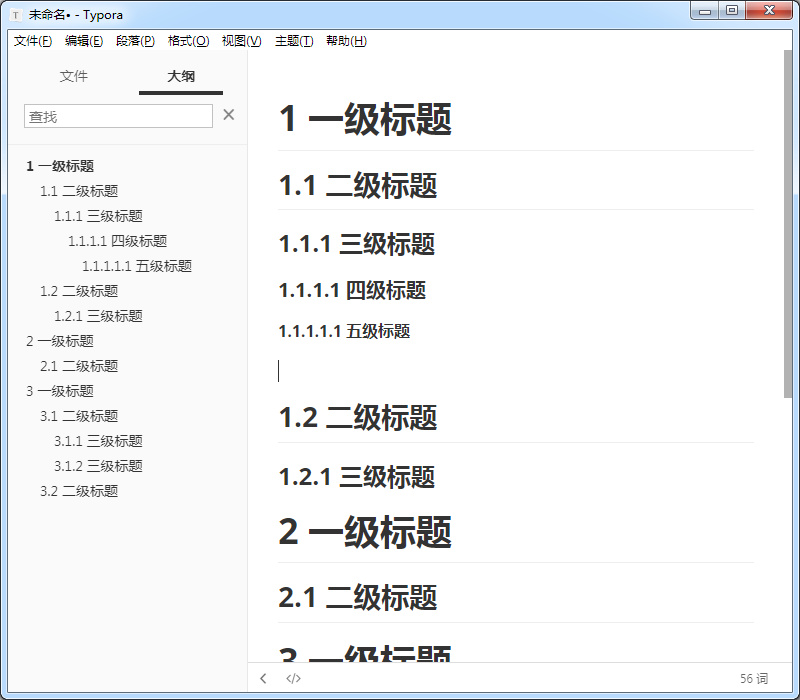
2、配置方法
2.1、进入目录
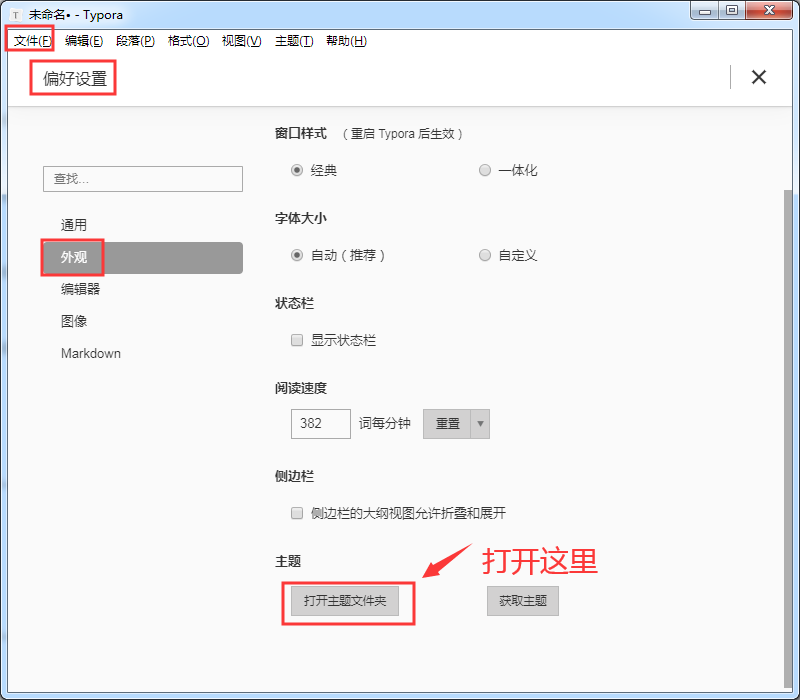
2.2、创建文件
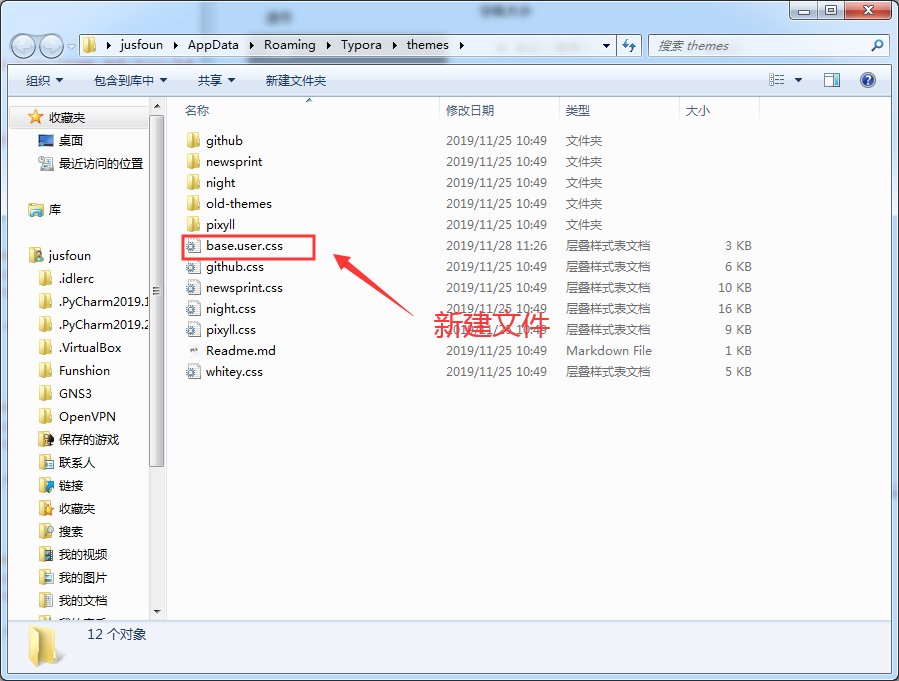
2.3、编辑文件 base.user.css
/** initialize css counter */

#write, .sidebar-content,.md-toc-content {

    counter-reset: h1

}

#write h1, .outline-h1, .md-toc-item.md-toc-h1  {

    counter-reset: h2

}

#write h2, .outline-h2, .md-toc-item.md-toc-h2 {

    counter-reset: h3

}

#write h3, .outline-h3, .md-toc-item.md-toc-h3 {

    counter-reset: h4

}

#write h4, .outline-h4, .md-toc-item.md-toc-h4 {

    counter-reset: h5

}

#write h5, .outline-h5, .md-toc-item.md-toc-h5 {

    counter-reset: h6

}

/** put counter result into headings */

#write h1:before,

h1.md-focus.md-heading:before,

.outline-h1>.outline-item>.outline-label:before,

.md-toc-item.md-toc-h1>.md-toc-inner:before{

    counter-increment: h1;

    content: counter(h1) " "

}

#write h2:before,

h2.md-focus.md-heading:before,

.outline-h2>.outline-item>.outline-label:before,

.md-toc-item.md-toc-h2>.md-toc-inner:before{

    counter-increment: h2;

    content: counter(h1) "." counter(h2) " "

}

#write h3:before,

h3.md-focus.md-heading:before,

.outline-h3>.outline-item>.outline-label:before,

.md-toc-item.md-toc-h3>.md-toc-inner:before {

    counter-increment: h3;

    content: counter(h1) "." counter(h2) "." counter(h3) " "

}

#write h4:before,

h4.md-focus.md-heading:before,

.outline-h4>.outline-item>.outline-label:before,

.md-toc-item.md-toc-h4>.md-toc-inner:before  {

    counter-increment: h4;

    content: counter(h1) "." counter(h2) "." counter(h3) "." counter(h4) " "

}

#write h5:before,

h5.md-focus.md-heading:before,

.outline-h5>.outline-item>.outline-label:before,

.md-toc-item.md-toc-h5>.md-toc-inner:before  {

    counter-increment: h5;

    content: counter(h1) "." counter(h2) "." counter(h3) "." counter(h4) "." counter(h5) " "

}

#write h6:before,

h6.md-focus.md-heading:before,

.outline-h6>.outline-item>.outline-label:before,

.md-toc-item.md-toc-h6>.md-toc-inner:before {

    counter-increment: h6;

    content: counter(h1) "." counter(h2) "." counter(h3) "." counter(h4) "." counter(h5) "." counter(h6) " "

}

/** override the default style for focused headings */

#write>h3.md-focus:before,

#write>h4.md-focus:before,

#write>h5.md-focus:before,

#write>h6.md-focus:before,

h3.md-focus:before,

h4.md-focus:before,

h5.md-focus:before,

h6.md-focus:before {

    color: inherit;

    border: inherit;

    border-radius: inherit;

    position: inherit;

    left:initial;

    float: none;

    top:initial;

    font-size: inherit;

    padding-left: inherit;

    padding-right: inherit;

    vertical-align: inherit;

    font-weight: inherit;

    line-height: inherit;

}
2.4、重新启动Typora
Typora自动生成标题编号的更多相关文章
- 使用Python从Markdown文档中自动生成标题导航
概述 知识与思路 代码实现 概述 Markdown 很适合于技术写作,因为技术写作并不需要花哨的排版和内容, 只要内容生动而严谨,文笔朴实而优美. 为了编写对读者更友好的文章,有必要生成文章的标题导航 ...
- 【SQL-自动生成编号】按规则自动生成单据编号 以及并发问题_使用触发器、函数 等
描述:每种单据新建时,自动生成它的单据编号. 规则如:固定码+日期+流水号 (ABC1603180001) 方法一:触发器 触发器的缺点是,执行了sql之后才看到编码. 测试:流水号不能超过最大数,否 ...
- commonhelper 通用类:计时器、数组去重、自动生成日志编号、生成随机数、处理字符串
using System;using System.Collections.Generic;using System.Diagnostics;using System.Text; namespace ...
- 重复打印相同内容(Doc档)的时候自动生成打印编号
昨天突然接到一个好久未联系的朋友电话,说是江湖救急,要打印一份单据,单据上有个号码要自动生成,如下图,最土的办法是打印完一张,手工改下号码,但这种方法估计碰到成百上千张时估计会疯掉 网上找了实现方法, ...
- Microsoft Dynamics CRM4.0 创建单据的时候,自动生成单据编号的通用方法
一.新建两个实体,具体如下: 单据流水号(new_maxbillcode) 显示名称 名称 类型 格式 最大长度 需求级别 IME模式 备注 名称 new_name nvarchar 文本 100 业 ...
- odoo10如何自定义自动生成单据编号
1.在已有的model中穿件一个字段name class qingjiadan(models.Model): _name = 'qingjia.qingjiadan' name = fields.Ch ...
- Word2010 自动生成二级编号
http://jingyan.baidu.com/article/3ea5148901919752e61bbafe.html
- 帝国cms实现自动生成缩略图和自动分页功能
无论你手工发布,还是采集而来,免不了要进行手工操作弄缩略图,不然标题图片没有,挺烦人的 只需一次设定,就可以在文章编辑框里自动勾选上分页和生成缩略图,免除你次次进行操作的麻烦,好了,废话不多说,上菜“ ...
- Word章 节标题自动编号并由此自动生成目录 -- 含视频教程(1)
1. 写论文之前事先调好 写论文的时候,难免要用到章节,如何实现下图的效果呢? 其实结合用好两个功能就行了: >> 视频教程链接:B站,速度快,清晰 事先调好,可以给后续工作带来很多便利, ...
随机推荐
- Centos7部署jenkins
1. 下载rpm包: a) 下载地址:https://pkg.jenkins.io/redhat-stable/ b) 点选一个下载即可,例如点选:“jen ...
- js模板引擎mustache介绍及实例
在Javascript中 mustache.js是实现mustache模板系统. Mustache是一种没有逻辑的模板语法.它可以应用于HTML.配置文件.源代码等任何地方. 它通过使用散列或对象中提 ...
- memcached和redis对比
关于memcached和redis的使用场景,总结如下:两者对比: redis提供数据持久化功能,memcached无持久化. redis的数据结构比memcached要丰富,能完成场景以外的事情: ...
- vue mvvm原理与简单实现 -- 上篇
Object.defineProperty介绍-- let obj = {}; Object.defineProperty(obj,'school',{ configurable : true, // ...
- JS 获取随机颜色值
获取随机颜色值 function fn1(){ return '#' + Math.floor( Math.random() * 0xffffff ).toString(16); } function ...
- JavaScript可视化运行工具推荐
事件循环.执行栈和任务队列可视化 这个宏任务.微任务,自带例子,也可以自己编辑,不过超过5s的例子就不行 JavaScript Visualizer Tyler Mcginnis大佬的Advanced ...
- UNICODE下CString转string
真搞不懂,为毛C++这么多类型转换.. CString m_str(_T("fuck conversion")); char *chr=new char[m_str.GetLeng ...
- zabbix监控规划及实施
一.规划监控拓扑 二.主机分组 例:交换机.Nginx.Tomcat.MySQL 三.监控对象识别: 1.使用SNMP监控交换机 a.交换机开启snmp config -t snmp-server c ...
- 【转】Java8 Stream 流详解
当我第一次阅读 Java8 中的 Stream API 时,说实话,我非常困惑,因为它的名字听起来与 Java I0 框架中的 InputStream 和 OutputStream 非常类似.但是 ...
- 【13】堆排序 最小K个数
题目 输入整数数组 arr ,找出其中最小的 k 个数.例如,输入4.5.1.6.2.7.3.8这8个数字,则最小的4个数字是1.2.3.4. 收获 优先队列实现 (n1,n2)->n2-n1是 ...