
[转]深入理解定位父级offsetParent及偏移大小
偏移量(offset dimension)是javascript中的一个重要的概念。涉及到偏移量的主要是offsetLeft、offsetTop、offsetHeight、offsetWidth这四个属性。当然,还有一个偏移参照——定位父级offsetParent。本文将详细介绍该部分内容

定位父级
在理解偏移大小之前,首先要理解offsetParent。人们并没有把offsetParent翻译为偏移父级,而是翻译成定位父级,很大原因是offsetParent与定位有关
定位父级offsetParent的定义是:与当前元素最近的经过定位(position不等于static)的父级元素,主要分为下列几种情况
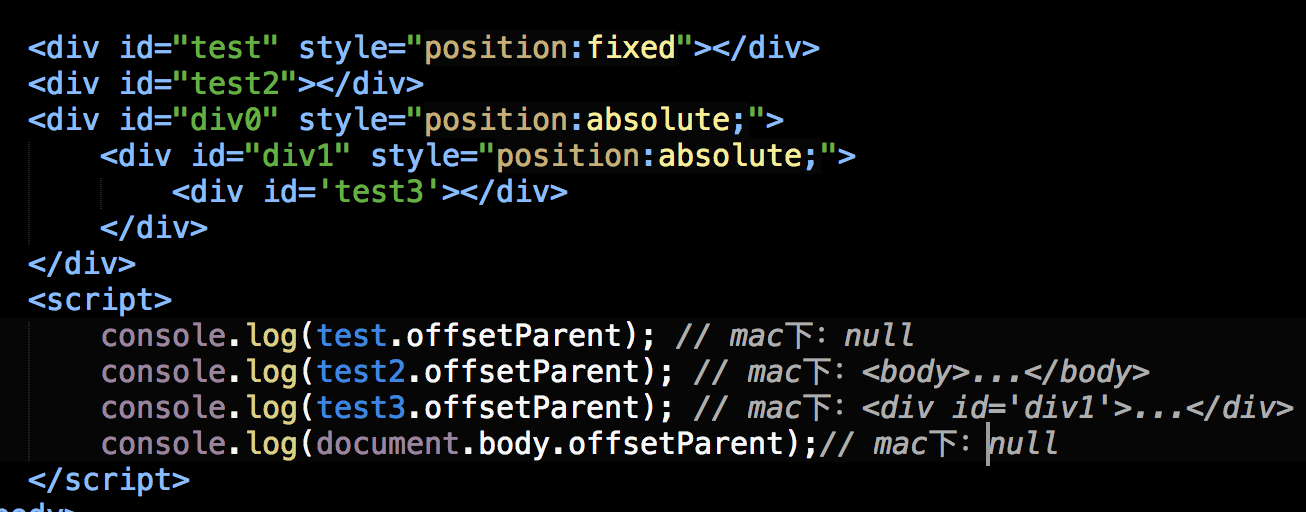
【1】元素自身有fixed定位,offsetParent的结果为null
当元素自身有fixed固定定位时,我们知道固定定位的元素相对于视口进行定位,此时没有定位父级,offsetParent的结果为null
[注意]firefox浏览器有兼容性问题
<div id="test" style="position:fixed"></div>

<script>

//firefox并没有考虑固定定位的问题,返回<body>,其他浏览器都返回null

console.log(test.offsetParent);

</script>
【2】元素自身无fixed定位,且父级元素都未经过定位,offsetParent的结果为<body>
<div id="test"></div>

<script>

console.log(test.offsetParent);//<body>

</script>
【3】元素自身无fixed定位,且父级元素存在经过定位的元素,offsetParent的结果为离自身元素最近的经过定位的父级元素

<div id="div0" style="position:absolute;">

    <div id="div1" style="position:absolute;">

        <div id='test'></div>

    </div>

</div>

<script>

console.log(test.offsetParent);    //<div id="div1">

</script>
【4】<body>元素的parentNode是null
console.log(document.body.offsetParent);//null
IE7-浏览器Bug
对于定位父级offsetParent来说,IE7-浏览器存在以下bug
【bug1】当元素本身经过绝对定位或相对定位,且父级元素无经过定位的元素时,IE7-浏览器下,offsetParent是<html>
<div id="test" style="position:absolute;"></div>

<script>

//IE7-浏览器返回<html>,其他浏览器返回<body>

console.log(test.offsetParent);

</script>
<div id="test" style="position:relative;"></div>

<script>

//IE7-浏览器返回<html>,其他浏览器返回<body>

console.log(test.offsetParent);

</script>
<div id="test" style="position:fixed;"></div>

<script>

//firefox并没有考虑固定定位的问题,返回<body>,其他浏览器都返回null

console.log(test.offsetParent);

</script>
【bug2】如果父级元素存在触发haslayout的元素或经过定位的元素,且offsetParent的结果为离自身元素最近的经过定位或触发haslayout的父级元素
[注意]关于haslayout的详细信息移步至此
<div id="div0" style="display:inline-block;">

    <div id='test'></div>

</div>

<script>

//IE7-浏览器返回<div id="div0">,其他浏览器返回<body>

console.log(test.offsetParent);

</script>
<div id="div0" style="position:absolute;">

    <div id="div1" style="display:inline-block;">

        <div id='test'></div>

    </div>

</div>

<script>

//IE7-浏览器返回<div id="div1">,其他浏览器返回<div id="div0">

console.log(test.offsetParent);

</script>
<div id="div0" style="display:inline-block;">

    <div id="div1" style="position:absolute;">

        <div id='test'></div>

    </div>

</div>

<script>

//所有浏览器都返回<div id="div1">

console.log(test.offsetParent);

</script>
偏移量
偏移量共包括offsetHeight、offsetWidth、offsetLeft、offsetTop这四个属性
offsetWidth
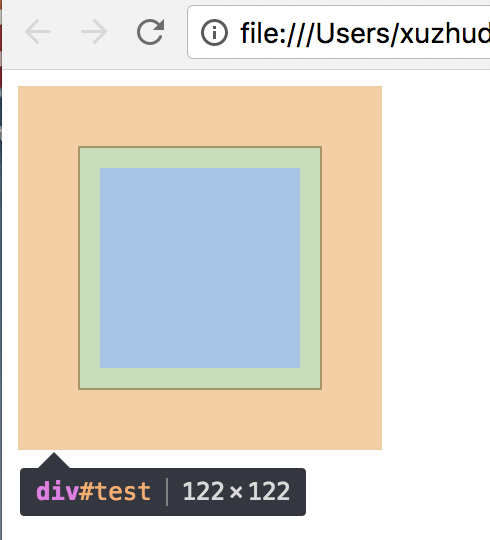
offsetWidth表示元素在水平方向上占用的空间大小,无单位(以像素px计)
offsetWidth = border-left-width + padding-left + width + padding-right + border-right-width;
offsetHeight
offsetHeight表示元素在垂直方向上占用的空间大小,无单位(以像素px计)
offsetHeight = border-top-width + padding-top + height + padding-bottom + border-bottom-width
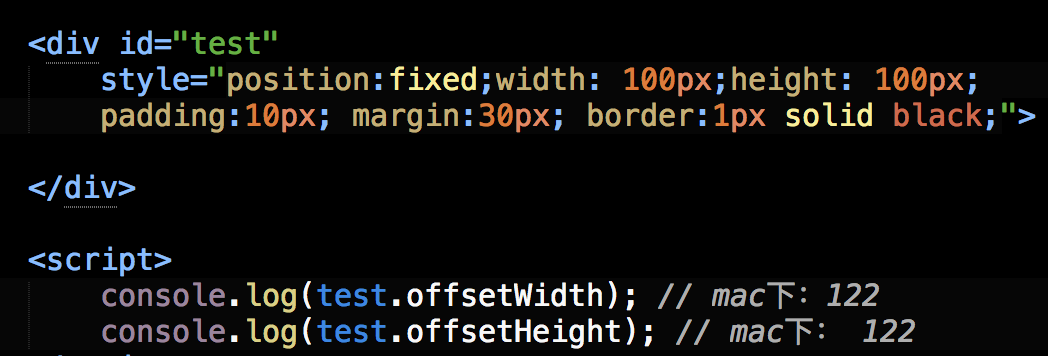
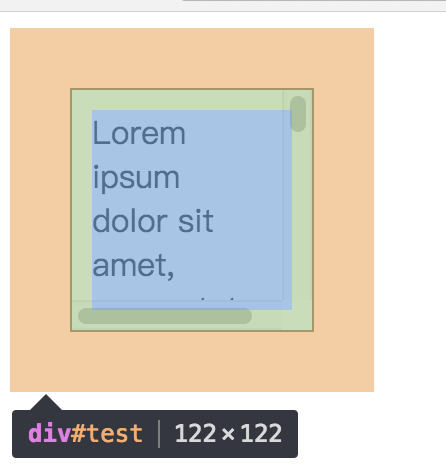
<div id="test" style="width:100px; height:100px; padding:10px; margin:10px; border:1px solid black;"></div>

<script>

//122=1+10+100+10+1

console.log(test.offsetWidth);

console.log(test.offsetHeight);

</script>
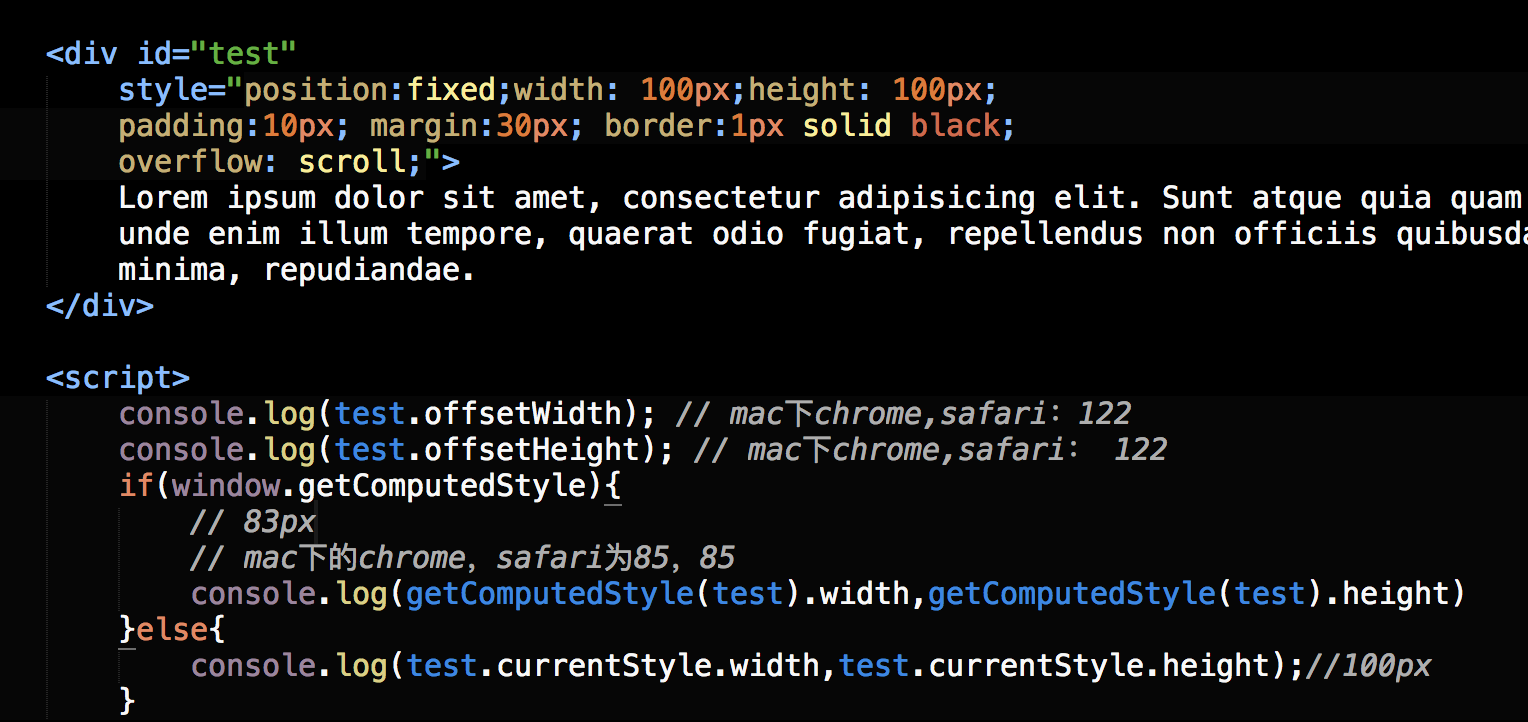
[注意]如果存在垂直滚动条,offsetWidth也包括垂直滚动条的宽度;如果存在水平滚动条,offsetHeight也包括水平滚动条的高度
<div id="test" style="width:100px; height:100px; padding:10px; margin:10px; border:1px solid black; overflow: scroll;"></div>

<script>

//IE8-浏览器将垂直滚动条的宽度计算在width宽度和height高度中,width和height的值仍然是100px;

//而其他浏览器则把垂直滚动条的宽度从width宽度中移出,把水平滚动条的高度从height高度中移出,则滚动条宽度为17px,width宽度和height高度为剩下的83px

if(window.getComputedStyle){

    console.log(getComputedStyle(test).width,getComputedStyle(test).height)//83px

}else{

    console.log(test.currentStyle.width,test.currentStyle.height);//100px

}

//122=1+10+100+10+1

console.log(test.offsetWidth,test.offsetHeight);

</script>
offsetTop
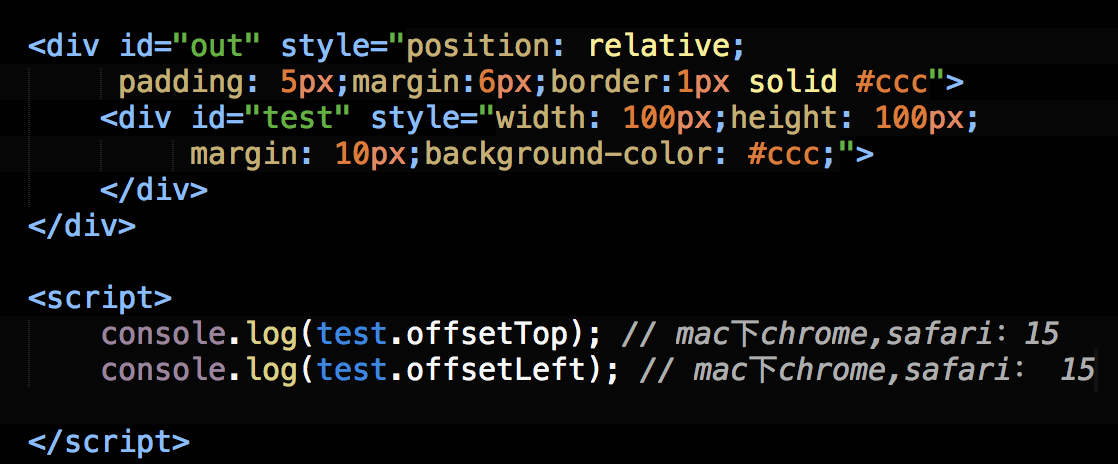
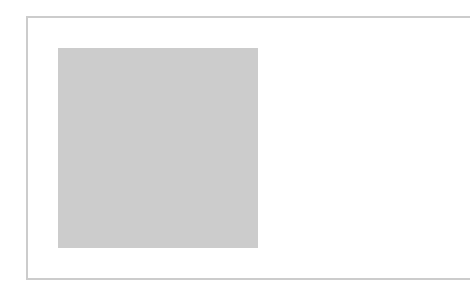
offsetTop表示元素的上外边框至offsetParent元素的上内边框之间的像素距离
offsetLeft
offsetLeft表示元素的左外边框至offsetParent元素的左内边框之间的像素距离
<div id="out" style="padding: 5px;position: relative;margin: 6px;border:1px solid black">

    <div id="test" style="width:100px; height:100px; margin:10px;"></div>

</div>

<script>

// 15=test.marginTop(10) + out.paddingTop(5)

alert(test.offsetTop);

//15=test.marginLeft(10) + out.paddingLeft(5)

alert(test.offsetLeft);

</script>
IE7-Bug
IE7-浏览器在offsetTop属性的处理上存在bug
【1】若父级设置position: relative,则在IE7-浏览器下,offsetTop值为offsetParent元素的paddingBottom值
<div id="out" style="padding: 5px;position: relative;">

    <div id="test" style="width:100px; height:100px; margin:10px;"></div>

</div>

<script>

//其他浏览器返回15(5+10),而IE7-浏览器返回5

console.log(test.offsetTop);

</script>
【2】若父级设置position: aboslute(或其他触发haslayout的条件),offsetTop值为offsetParent元素的paddingBottom值和当前元素的marginTop值的较大值
<div id="out" style="padding: 5px;position:absolute;">

    <div id="test" style="width:100px; height:100px; margin:10px;"></div>

</div>

<script>

//其他浏览器返回15(5+10),而IE7-浏览器返回10(10和5的较大值)

console.log(test.offsetTop);

</script>
页面偏移
要知道某个元素在页面上的偏移量,将这个元素的offsetLeft和offsetTop与其offsetParent的相同属性相加,并加上offsetParent的相应方向的边框,如此循环直到根元素,就可以得到元素到页面的偏移量
[注意]在默认情况下,IE8-浏览器下如果使用currentStyle()方法获取<html>和<body>(甚至普通div元素)的边框宽度都是medium,而如果使用clientLeft(或clientTop)获取边框宽度,则是实际的数值
html,body{border: 0;}

body{margin:0;}
function getElementLeft(element){

    var actualLeft = element.offsetLeft;

    var current = element.offsetParent;

    while(current != null){

        actualLeft += current.offsetLeft + current.clientLeft;

        current = current.offsetParent;

    }

    return actualLeft + 'px';

}

function getElementTop(element){

    var actualTop = element.offsetTop;

    var current = element.offsetParent;

    while(current != null){

        actualTop += current.offsetTop + current.clientTop;

        current = current.offsetParent;

    }

    return actualTop + 'px';

}
<div style="padding: 20px;border:1px solid black;position:absolute;">

    <div id="test" style="width:100px; height:100px; margin:10px;"></div>

</div>

<script>

//其他浏览器返回31(10+20+1),而IE7-浏览器返回21((20和10的较大值)+1)

console.log(getElementTop(test));

//所有浏览器返回31(10+20+1)

console.log(getElementLeft(test));

</script>
注意事项
【1】所有偏移量属性都是只读的
<div id="test" style="width:100px; height:100px; margin:10px;"></div>

<script>

console.log(test.offsetWidth);//100

//IE8-浏览器会报错,其他浏览器则静默失败

test.offsetWidth = 10;

console.log(test.offsetWidth);//100

</script>
【2】如果给元素设置了display:none,则它的偏移量属性都为0
<div id="test" style="width:100px; height:100px; margin:10px;display:none"></div>

<script>

console.log(test.offsetWidth);//0

console.log(test.offsetTop);//0

</script>
【3】每次访问偏移量属性都需要重新计算
<div id="test" style="width:100px; height:100px; margin:10px;"></div>

<script>

console.time("time");

for(var i = 0; i < 100000; i++){

    var a = test.offsetWidth;

}

console.timeEnd('time');//65.129ms

</script>
<div id="test" style="width:100px; height:100px; margin:10px;"></div>

<script>

console.time("time");

var a = test.offsetWidth;

for(var i = 0; i < 100000; i++){

    var b = a;

}

console.timeEnd('time');//1.428ms

</script>
由上面代码对比可知,重复访问偏移量属性需要耗费大量的性能,所以要尽量避免重复访问这些属性。如果需要重复访问,则把它们的值保存在变量中,以提高性能。
[转]深入理解定位父级offsetParent及偏移大小的更多相关文章
- 深入理解定位父级offsetParent及偏移大小offsetTop / offsetLeft / offsetHeight / offsetWidth
深入理解定位父级offsetParent及偏移大小 [转载] 前面的话 偏移量(offset dimension)是javascript中的一个重要的概念.涉及到偏移量的主要是offsetLeft.o ...
- 深入理解定位父级offsetParent及偏移大小
前面的话 偏移量(offset dimension)是javascript中的一个重要的概念.涉及到偏移量的主要是offsetLeft.offsetTop.offsetHeight.offsetWid ...
- javascript好文---深入理解定位父级offsetParent及偏移大小
前面的话 偏移量(offset dimension)是javascript中的一个重要的概念.涉及到偏移量的主要是offsetLeft.offsetTop.offsetHeight.offsetWid ...
- [jQuery]相对父级元素的fixed定位
(function($) { var DNG = {}; //----------------------------------------------------/ // ...
- JS-offsetParent定位父节点
offsetParent:离当前元素最激动呢一个有定位的父节点 如果没有定位父级,默认是body IE7以下如果当前元素没有定位默认是body,如果有定位就是html IE7以下,如果当前元素的某个父 ...
- CSS定位 深入理解定位(position)的偏移
前言 CSS有三种基本的布局机制:普通流.浮动和绝对定位.利用定位,可以准确地定义元素框相对于其正常位置应该出现的位置,或者相对于父元素.另一个元素甚至浏览器窗口本身的位置.但元素究竟如何定位,定位到 ...
- width:100%与绝对定位同时存在,偏移出父级容器
当父级容器内的子元素width设为100%,而子元素又有绝对定位时,子元素伸展超出父级容器,像下面 出现这种情况的原因,width:100%,这个百分之百是相对其定位父级而言的,其定位父级有多宽,这个 ...
- css使absolute相对于父容器进行定位而不是以body(为什么绝对定位(absolute)的父级元素必须是相对定位(relative))
借知乎的回答如下解释: 首先,我想告诉你的是,如果父级元素是绝对定位(absolute)或者没有设置,里面的绝对定位(absolute)自动以body定位.这句话是错的.正确的是:只要父级元素设了po ...
- html css样式子元素相对父级元素定位
废话不多说. 父级元素 样式设置: position:relative; 子元素样式: position: absolute; 这样就可以达到子元素相对父级元素定位了.
随机推荐
- 使用vue-cli3快速适配H5项目
跟我老大学到了一招使用vue-cli3快速适配H5项目的方法. 我之前也有进行一个版本的适配,直接使用cnpm install -g vue-cli,然后安装各种插件进行适配,见我之前的博客. 后来老 ...
- loj2212 方伯伯的OJ
题意: n<=1e8,m<=1e5. 标程: #include<cstdio> #include<algorithm> #include<cstring> ...
- leetcode 132 Palindrome Pairs 2
lc132 Palindrome Pairs 2 大致与lc131相同,这里要求的是最小分割方案 同样可以分割成子问题 dp[i][j]还是表示s(i~j)是否为palindrome res[i]则用 ...
- 学习笔记 css样式
大小 width:宽度 height:高度 背景 background-color 背景色 background-image 背景图片 background-repeat 背景平铺 ...
- CSS所有选择器
.class .intro 选择所有class="intro"的元素 1 #id #firstname 选择所有id="firstname"的元素 1 * * ...
- 「题解」:[线性代数]:relays 奶牛接力跑
问题: relays 奶牛接力跑 时间限制: 1 Sec 内存限制: 256 MB 题面 题目描述 FJ的N(2 <= N <= 1,000,000)头奶牛选择了接力跑作为她们的日常锻炼 ...
- Joomla - 模块系统(新建模块、模块类别、自定义模块)
Joomla - 模块系统,模块配合模板的布局设置.菜单分配.权限分配能创建出一个内容丰富且易于管理的高度自定义前端页面架构 一.新建模块 进入后台,点击顶栏菜单 扩展管理 -> 模块管理 ,进 ...
- SpringCloud学习笔记(五):Ribbon负载均衡
简介 Spring Cloud Ribbon是基于Netflix Ribbon实现的一套 客户端 负载均衡的工具 .(重点:客户端) 简单的说,Ribbon是Netflix发布的开源项目,主要功能是提 ...
- day 47 前端基础之BOM和DOM
前端基础之BOM和DOM 前戏 到目前为止,我们已经学过了JavaScript的一些简单的语法.但是这些简单的语法,并没有和浏览器有任何交互. 也就是我们还不能制作一些我们经常看到的网页的一些 ...
- Django项目订单接入支付宝
1.首先下载所需要的包 pip install python-alipay-sdk 2.在视图函数里面引入所需要的类 from alipay import AliPay 3.利用这个类创建一个实例对象 ...