
UICollectionView入门--使用系统UICollectionViewFlowLayout布局类
初始化:
//初始化布局类(UICollectionViewLayout的子类)
UICollectionViewFlowLayout *fl = [[UICollectionViewFlowLayout alloc]init];
//初始化collectionView
self.collectionView = [[UICollectionView alloc]initWithFrame:CGRectZero collectionViewLayout:fl];
//设置代理
self.collectionView.delegate = self;
self.collectionView.dataSource = self;
--------------------
需要实现的协议:
UICollectionViewDataSource, UICollectionViewDelegateFlowLayout
PS:UICollectionViewDelegateFlowLayout是UICollectionViewDelegate的子协议
--------------------
注册相应的UICollectionViewCell子类到collectionView用来从队列提取和显示
- (void)registerClass:(Class)cellClass forCellWithReuseIdentifier:(NSString *)identifier;
PS:如果是用nib创建的话,使用下面这个函数来注册。
- (void)registerNib:(UINib *)nib forCellWithReuseIdentifier:(NSString *)identifier;
如果需要显示每个section的headerView或footerView,则还需注册相应的UICollectionReusableView的子类到collectionView
elementKind是header或footer的标识符,只有两种可以设置UICollectionElementKindSectionHeader和UICollectionElementKindSectionFooter
- (void)registerClass:(Class)viewClass forSupplementaryViewOfKind:(NSString *)elementKind withReuseIdentifier:(NSString *)identifier;
PS:如果是用nib创建的话,使用下面这个函数来注册。
- (void)registerNib:(UINib *)nib forSupplementaryViewOfKind:(NSString *)kind withReuseIdentifier:(NSString *)identifier;
--------------------
实现协议的函数:
跟UITableView的DataSource和Delegate很像,大可自行代入理解。
DataSource:
//每一组有多少个cell
- (NSInteger)collectionView:(UICollectionView *)collectionView numberOfItemsInSection:(NSInteger)section;
//定义并返回每个cell
- (UICollectionViewCell *)collectionView:(UICollectionView *)collectionView cellForItemAtIndexPath:(NSIndexPath *)indexPath;
//collectionView里有多少个组
- (NSInteger)numberOfSectionsInCollectionView:(UICollectionView *)collectionView;
//定义并返回每个headerView或footerView
- (UICollectionReusableView *)collectionView:(UICollectionView *)collectionView viewForSupplementaryElementOfKind:(NSString *)kind atIndexPath:(NSIndexPath *)indexPath;
上面这个方法使用时必须要注意的一点是,如果布局没有为headerView或footerView设置size的话(默认size为CGSizeZero),则该方法不会被调用。所以如果需要显示header或footer,需要手动设置size。
可以通过设置UICollectionViewFlowLayout的headerReferenceSize和footerReferenceSize属性来全局控制size。或者通过重载以下代理方法来分别设置
- (CGSize)collectionView:(UICollectionView *)collectionView layout:(UICollectionViewLayout*)collectionViewLayout referenceSizeForHeaderInSection:(NSInteger)section;
- (CGSize)collectionView:(UICollectionView *)collectionView layout:(UICollectionViewLayout*)collectionViewLayout referenceSizeForFooterInSection:(NSInteger)section;
Delegate:
//每一个cell的大小
- (CGSize)collectionView:(UICollectionView *)collectionView layout:(UICollectionViewLayout*)collectionViewLayout sizeForItemAtIndexPath:(NSIndexPath *)indexPath;
//设置每组的cell的边界, 具体看下图
- (UIEdgeInsets)collectionView:(UICollectionView *)collectionView layout:(UICollectionViewLayout*)collectionViewLayout insetForSectionAtIndex:(NSInteger)section;
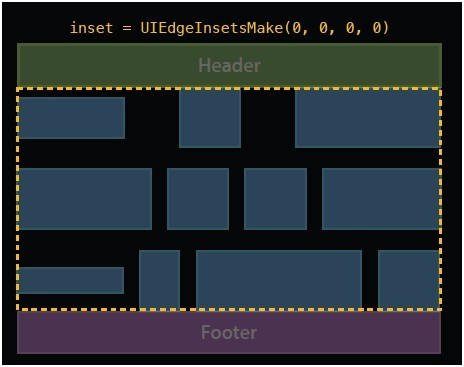
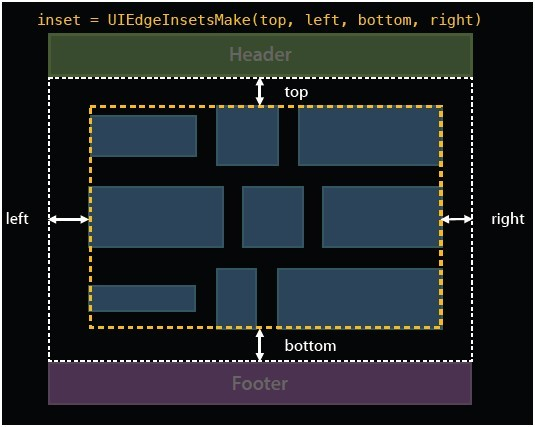
//cell的最小行间距
- (CGFloat)collectionView:(UICollectionView *)collectionView layout:(UICollectionViewLayout*)collectionViewLayout minimumLineSpacingForSectionAtIndex:(NSInteger)section;
//cell的最小列间距
- (CGFloat)collectionView:(UICollectionView *)collectionView layout:(UICollectionViewLayout*)collectionViewLayout minimumInteritemSpacingForSectionAtIndex:(NSInteger)section;
//cell被选择时被调用
- (void)collectionView:(UICollectionView *)collectionView didSelectItemAtIndexPath:(NSIndexPath *)indexPath;
//cell反选时被调用(多选时才生效)
- (void)collectionView:(UICollectionView *)collectionView didDeselectItemAtIndexPath:(NSIndexPath *)indexPath;
本文出自 “rainbownight” 博客,请务必保留此出处http://rainbownight.blog.51cto.com/1336585/1323780
UICollectionView入门--使用系统UICollectionViewFlowLayout布局类的更多相关文章
- JS面向对象(1) -- 简介,入门,系统常用类,自定义类,constructor,typeof,instanceof,对象在内存中的表现形式
相关链接: JS面向对象(1) -- 简介,入门,系统常用类,自定义类,constructor,typeof,instanceof,对象在内存中的表现形式 JS面向对象(2) -- this的使用,对 ...
- [bootstrap] 栅格系统和布局
1.简介 栅格系统(grid systems),也称为“网格系统”,运用固定的格子设计版面布局,风格工整简洁.是从平面栅格系统演变而来. Bootstrap建立在12列栅格系统.布局.组件之上.以规则 ...
- [置顶] Android系统五大布局详解Layout
我们知道Android系统应用程序一般是由多个Activity组成,而这些Activity以视图的形式展现在我们面前,视图都是由一个一个的组件构成的.组件就是我们常见的Button.TextEdit等 ...
- Bootstrap栅格系统(布局)
栅格系统(布局) Bootstrap内置了一套响应式.移动设备优先的流式栅格系统,随着屏幕设备或视口(viewport)尺寸的增加,系统会自动分为最多12列. 我在这里是把Bootstrap中的栅格系 ...
- Android系统五大布局详解Layout
我们知道Android系统应用程序一般是由多个Activity组成,而这些Activity以视图的形式展现在我们面前, 视图都是由一个一个的组件构成的.组件就是我们常见的Button.TextEdit ...
- Android经常使用的布局类整理(一)
Android经常使用的布局类整理 近期又回头做了一下android的项目,发觉越来越不从心,非常多东西都忘了,简单的页面布局也非常多写不出来,首先还是先整理一下一些会混淆的概念先 layout_wi ...
- 巧用 BootStrap --- 栅格系统(布局)轻松搞定网页响应式布局!
摘要:Bootstrap 为我们提供了一套响应式.移动设备优先的流式栅格系统,合理的使用栅格系统将会使得网站页面布局变得更加简单,在设置了媒体查询之后,响应式网站也无需再单独写了.接下来我以Boots ...
- BootStrap3栅格系统与布局
栅格系统与布局 Use our powerful mobile-first flexbox grid to build layouts of all shapes and sizes thanks t ...
- runtime-给系统已有类添加属性
在没有接触runtime之前,我们接触到的能给类进行扩展的方法有类目(category)和延展(extension)两种.类目(category)可以给系统已有类添加扩展方法但是不能添加属性,并且被添 ...
随机推荐
- Nginx:413 Request Entity Too Large 的解决方法
报错信息413 Request Entity Too Large 解决方法: (20M大小,自己调节,根据文件大小.)修改 php 的配置文件 /etc/php5/fpm/php.ini upload ...
- ubuntu 删除 mysql (转)
1 sudo apt-get autoremove --purge mysql-server-5.0 2 sudo apt-get remove mysql-server 3 sudo apt-get ...
- 前端开发者进阶之ECMAScript新特性--Object.create
前端开发者进阶之ECMAScript新特性[一]--Object.create Object.create(prototype, descriptors) :创建一个具有指定原型且可选择性地包含指 ...
- Spring AOP源码分析(三):基于JDK动态代理和CGLIB创建代理对象的实现原理
AOP代理对象的创建 AOP相关的代理对象的创建主要在applyBeanPostProcessorsBeforeInstantiation方法实现: protected Object applyBea ...
- duboo注解使用详解
一.背景 随着互联网的发展,网站应用的规模不断扩大,常规的垂直应用架构已无法应对,分布式服务架构以及流动计算架构势在必行. 当越来越的的接口与实现类的增加后,duboo的xml配置会越来越多,为了防止 ...
- 9_山寨系统调用 SystemCallEntry
思想: 再次在 GDT 中偷内存 搭建 系统调用需要的 逻辑框架与功能实现: 基本分解妄想: 构建系统调用的代码: 拷贝到 偷取的内存中: idt 向量 序号21位置: 8003ee00`0008f1 ...
- lnmp高人笔记
http://www.cnblogs.com/qizekai/p/5878774.html http://www.cnblogs.com/qizekai/p/5879461.html
- drupal7 代码生成用户,并自动登录
直接上代码 1. 生成用户(注册) $edit = [ "name" => "name", "pass" => "pa ...
- mysql 数据库 内容的增删改查
/*所有字段插入值*//*注意插入值数目要与字段值一致*/INSERT INTO student VALUES(1,'熊大','123','2019-10-18',1200);INSERT INTO ...
- Oracle大数据查询优化
1.对于像状态之类的列,不是很多的,就可以加位图索引,对于唯一的列,就加唯一索引,其余的创建普通索引. 2.尽量不要使用select * 这样的查询,指定需要查询的列. 3.使用hits selec ...