
css3基本选择器+属性选择器+动态伪类+UI状态伪类+结构类
后代选择器
祖先元素 后代元素{ }
子元素选择器(直接子元素选择器)
父元素>子元素{ }
兄弟选择器
元素+兄弟元素(紧邻该元素之后的下一个兄弟元素)
所有兄弟元素选择器
元素~兄弟元素(该元素之后的所有兄弟元素)
<!DOCTYPE html>

<html lang="en" manifest="index.manifest">

<head>

<meta charset="UTF-8">

<title>Document</title>

<style>

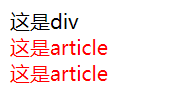
    div+article{color:red;}

</style>

</head>

<body>

    <div>这是div</div>

    <article>这是article</article>

    <article>这是article</article>

</body>

</html>

<!DOCTYPE html>

<html lang="en" manifest="index.manifest">

<head>

<meta charset="UTF-8">

<title>Document</title>

<style>

    div~article{color:red;}

</style>

</head>

<body>

    <div>这是div</div>

    <article>这是article</article>

    <article>这是article</article>

</body>

</html>
属性选择器
元素[属性]
选择所有带指定属性的元素
元素[属性=值]
选择所有带指定属性,并且指定属性值的元素
元素[属性~=值]
选择所有带指定属性,并且属性所包含的某个单词为指定属性值的元素
元素[属性*=值]
选择所有带指定属性,并且属性所包含的某个单词或者字母为指定属性值的元素
元素[属性^=值]
选择所有带指定属性,并且属性以指定值开头的元素,开头可以是一个完整的单词,也可以是单个字母
元素[属性$=值]
选择所有带指定属性,并且属性以指定值结尾的元素,结尾可以是一个完整的单词,也可以是单个字母
元素[属性|=值]
选择所有带指定属性,并且属性值为指定值,或者属性值以指定值-开头(在js中常常使用到)
<!DOCTYPE html>

<html lang="en" manifest="index.manifest">

<head>

<meta charset="UTF-8">

<title>Document</title>

<style>

    a[class]{font-weight:bold;}

    a[class="one"]{color:red;}

    a[class~="two"]{text-decoration: underline;}

    a[class^="one"]{font-style:italic;}

    a[class$="two"]{border-top:1px solid red;}

    a[class*="two"]{border-bottom:1px solid red;}

    a[class|="four"]{border-left:1px solid purple;}

</style>

</head>

<body>

    <a class="one">链接</a>

    <a class="one two">链接</a>

    <a class="three one two">链接</a>

    <a class="one~">链接</a>

    <a class="threetwo">链接</a>

    <a class="four">链接</a>

    <a class="four-oo">链接</a>

</body>

</html>

动态伪类
:link :visited :hover :active :focus
<!DOCTYPE html>

<html lang="en" manifest="index.manifest">

<head>

<meta charset="UTF-8">

<title>Document</title>

<style>

    a:link{color:red;}

    a:visited{color:blue;}

    a:hover{color:orange;}

    a:active{color:green;}

   input:hover{background-color: orange;}

    input:focus{background-color: #abcdef;}

</style>

</head>

<body>

    <a href="#">链接</a>

    <br>

    <input type="text">

</body>

</html>

UI元素状态伪类
:enabled :disabled :checked
<!DOCTYPE html>
<html lang="en" manifest="index.manifest">
<head>
<meta charset="UTF-8">
<title>Document</title>
<style>
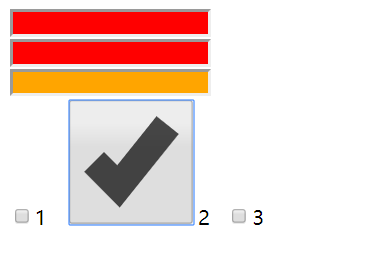
input:enabled{background-color: red;}
input:disabled{background-color: orange;}
input:checked{width:100px;height:100px;}
</style>
</head>
<body>
<input type="text"><br>
<input type="text" enabled><br>
<input type="text" disabled><br>
<input type="checkbox" name="number" value="1">1
<input type="checkbox" name="number" value="2">2
<input type="checkbox" name="number" value="3">3
</body>
</html>
结构选择器
ele:first-child
满足某一个父元素的第一个子元素是指定元素
如section的第一个子元素,并且是div元素
<!DOCTYPE html>

<html lang="en" manifest="index.manifest">

<head>

<meta charset="UTF-8">

<title>Document</title>

<style>

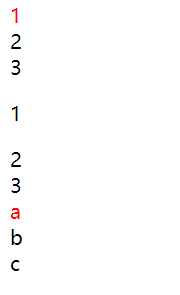
    section>div:first-child{color:red;}

</style>

</head>

<body>

    <section>

        <div>1</div>

        <div>2</div>

        <div>3</div>

    </section>

    <section>

        <p>1</div>

        <div>2</div>

        <div>3</div>

    </section>

    <section>

        <div>a</div>

        <div>b</div>

        <div>c</div>

    </section>

</body>

</html>
:last-child :nth-child(n)同理
:nth-child(数字) 某个位置
:nth-child(n) 所有
:nth-child(odd) 奇数
:nth-child(even) 偶数
:nth-child(计算式) 指定计算式(n的取值从0开始)
<!DOCTYPE html>

<html lang="en" manifest="index.manifest">

<head>

<meta charset="UTF-8">

<title>Document</title>

<style>

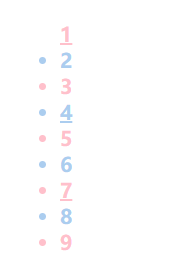
    li:nth-child(1){list-style: none;}

    li:nth-child(n){font-weight:bold;}

    li:nth-child(odd){color:pink;}

    li:nth-child(even){color:#abcdef;}

    li:nth-child(3n+1){text-decoration: underline;}

</style>

</head>

<body>

    <ul>

        <li>1</li>

        <li>2</li>

        <li>3</li>

        <li>4</li>

        <li>5</li>

        <li>6</li>

        <li>7</li>

        <li>8</li>

        <li>9</li>

    </ul>

</body>

</html>
nth-last-child() 同理
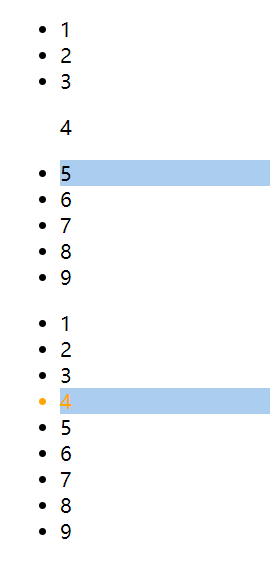
nth-of-type() 计数时会跳过非指定元素
<!DOCTYPE html>

<html lang="en" manifest="index.manifest">

<head>

<meta charset="UTF-8">

<title>Document</title>

<style>

    li:nth-child(4){color:orange;} /*li的父元素的第4个子元素,且为li*/

    li:nth-of-type(4){background-color: #abcdef;}/* li的父元素的li子元素中的第4个*/

</style>

</head>

<body>

    <ul>

        <li>1</li>

        <li>2</li>

        <li>3</li>

        <p>4</p>

        <li>5</li>

        <li>6</li>

        <li>7</li>

        <li>8</li>

        <li>9</li>

    </ul>

    <ul>

        <li>1</li>

        <li>2</li>

        <li>3</li>

        <li>4</li>

        <li>5</li>

        <li>6</li>

        <li>7</li>

        <li>8</li>

        <li>9</li>

    </ul>

</body>

</html>
nth-last-of-type() 同理
first-of-type() last-of-type()
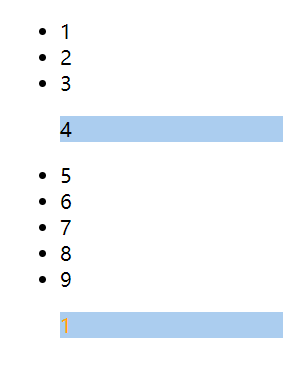
:only-child 作为唯一子元素
:only-of-type 指定类型的唯一子元素,可以有其他类型
<!DOCTYPE html>

<html lang="en" manifest="index.manifest">

<head>

<meta charset="UTF-8">

<title>Document</title>

<style>

    p:only-child{color:orange;}

    p:only-of-type{background-color: #abcdef;}

</style>

</head>

<body>

    <ul>

        <li>1</li>

        <li>2</li>

        <li>3</li>

        <p>4</p>

        <li>5</li>

        <li>6</li>

        <li>7</li>

        <li>8</li>

        <li>9</li>

    </ul>

    <ul>

        <p>1</p>

    </ul>

</body>

</html>
css3基本选择器+属性选择器+动态伪类+UI状态伪类+结构类的更多相关文章
- python 全栈开发,Day47(行级块级标签,高级选择器,属性选择器,伪类选择器,伪元素选择器,css的继承性和层叠性,层叠性权重相同处理,盒模型,padding,border,margin)
一.HTML中的行级标签和块级标签 块级标签 常见的块级标签:div,p,h1-h6,ul,li,dl,dt,dd 1.独占一行,不和其他元素待在同一行2.能设置宽高3.如果不设置宽高,默认为body ...
- jQuery---jq基础了解(语法,特性),JQ和JS的区别对比,JQ和JS相互转换,Jquery的选择器(基础选择器,层级选择器,属性选择器),Jquery的筛选器(基本筛选器,表单筛选器),Jquery筛选方法
jQuery---jq基础了解(语法,特性),JQ和JS的区别对比,JQ和JS相互转换,Jquery的选择器(基础选择器,层级选择器,属性选择器),Jquery的筛选器(基本筛选器,表单筛选器),Jq ...
- CSS3 01. CSS3现状、属性选择器、伪类选择器、结构伪类、伪元素选择器、颜色、文本阴影shadow、盒子模型、私有化前缀
CSS 3 现状 兼容性差,需添加私有前缀/移动端优于PC端/不断改进中/渐进增强原则/考虑用户群体/遵照产品的方案 : CSS3手册 需要阅读其--阅读及使用指引 []表示全部的可选项 || 或者 ...
- CSS3新增(选择器{属性选择器,结构伪类选择器,伪元素选择器})
1.属性选择器 属性选择器,可以根据元素特定的属性来选择元素,这样就不用借助 类 或者 id选择器. E [ att ] 选择具有 att 属性的 E 元素 例如:input [ value ...
- CSS 选择器之基本选择器 属性选择器 伪类选择器
CSS 选择器 常见的选择器列表图 CSS选择器笔记 基本选择器 通配符选择器(*) 元素选择器(E) 类选择器(.className) 所有浏览器都支持类选择器,但多类选择器(.classNa ...
- 第49天学习打卡(CSS 层次选择器 结构伪类选择器 属性选择器 美化网页元素 盒子模型)
推荐书籍:码出高效: Java 开发手册 2.2 层次选择器 idea里代码规范是按:ctrl +alt+L快捷键 注释快捷键:ctrl+/ 1.后代选择器:在某个元素的后面 祖爷爷 爷爷 爸爸 你 ...
- HTML[2种特殊选择器]_伪类选择器&属性选择器
本文介绍两种特殊的选择器 1.伪类选择器 2.属性选择器 1.伪类选择器 ...: nth-of -type (x) x为同类型兄弟元素中的排名 例如: <body> <ul> ...
- CSS3 选择器——属性选择器
上一节在<CSS3选择器——基本选择器>中主要介绍了CSS3选择器的第一部分,这节主要和大家一起来学习CSS3选择器的第二部分——属性选择器.属性选择器早在CSS2中就被引入了,其主要作用 ...
- css3新增的属性选择器
使用css选择器,可以实现一个样式对应多个html文档的元素,在{}前面的部分就是"选择器",指明了样式的作用对象. 在CSS中追加了三个属性选择器:[att*=val].[att ...
随机推荐
- hashlib 模块的用法
import hashlib #多用于加密a=hashlib.md5()print(a) #<md5 HASH object @ 0x00000000021CCF90> a.update( ...
- <img>和background-img区别
1. 是否占位 background-image是背景图片,是css的一个样式,不占位 <img />是一个块状元素,它是一个图片,是html的一个标签,占位 2.否可操作 backgro ...
- 实验3: DHCP 基本配置
实验3-1: DHCP 基本配置 实验目的通过本实验可以掌握:(1)DHCP 的工作原理和工作过程(2)DHCP 服务器的基本配置和调试(3)客户端配置 拓扑结构 实验步骤n 步骤1:配置路由器 ...
- DOCKER 学习笔记7 Docker Machine 建立虚拟机实战,以及错误总结
前言 通过以上6小节的学习,已经可以使用DOCKER 熟练的部署应用程序了.大家都可以发现使用 DOCKER 带来的方便之处,因为现在的话,只是在一台服务器上部署,这样部署,我们只需要一条命令,需要的 ...
- 网络最大流(EK)
以前在oi中见到网络流的题都是直接跳过,由于本蒟蒻的理解能力太弱,导致网络流的学习不断推迟甚至被安排在了tarjan之后,原本计划于学习完最短路后就来学网络流的想法也随之破灭,在看完众多大佬 的博客后 ...
- Codeforces_822
A.小的那个数的阶乘. #include<bits/stdc++.h> using namespace std; int a,b; int main() { ios::sync_with_ ...
- MySQL复制(四)—多源(主)复制
(一)多主复制概述 MySQL从5.7版本开启支持多主复制,所谓多主复制,是将多个主库的数据复制到一个从库中.通常用于数据仓库整合数据,比如OLTP系统为了分散业务压力,对数据库进行分库分表,当要对数 ...
- Python 协程 - Coroutines
协程 - Coroutines Awaitable Objects, Awaitable Objects 通常由 __await__() 生成, 而 Coroutine objects 是由 asyn ...
- firewall-cmd命令
firewalld 基本操作 安装firewalld # yum install firewalld firewall-config firewalld启动,停止,开机启动与否,查看状态 # syst ...
- Iperf 网络性能测试
1.iperf安装 1.1将iperf_PC.rar工具解压放在默认的盘目录下即可,无需安装 1.2安装iperf for android 2.06.apk"到手机端. adb instal ...