
iOS 用 SDWebImage 清理图片缓存
效果图如下:
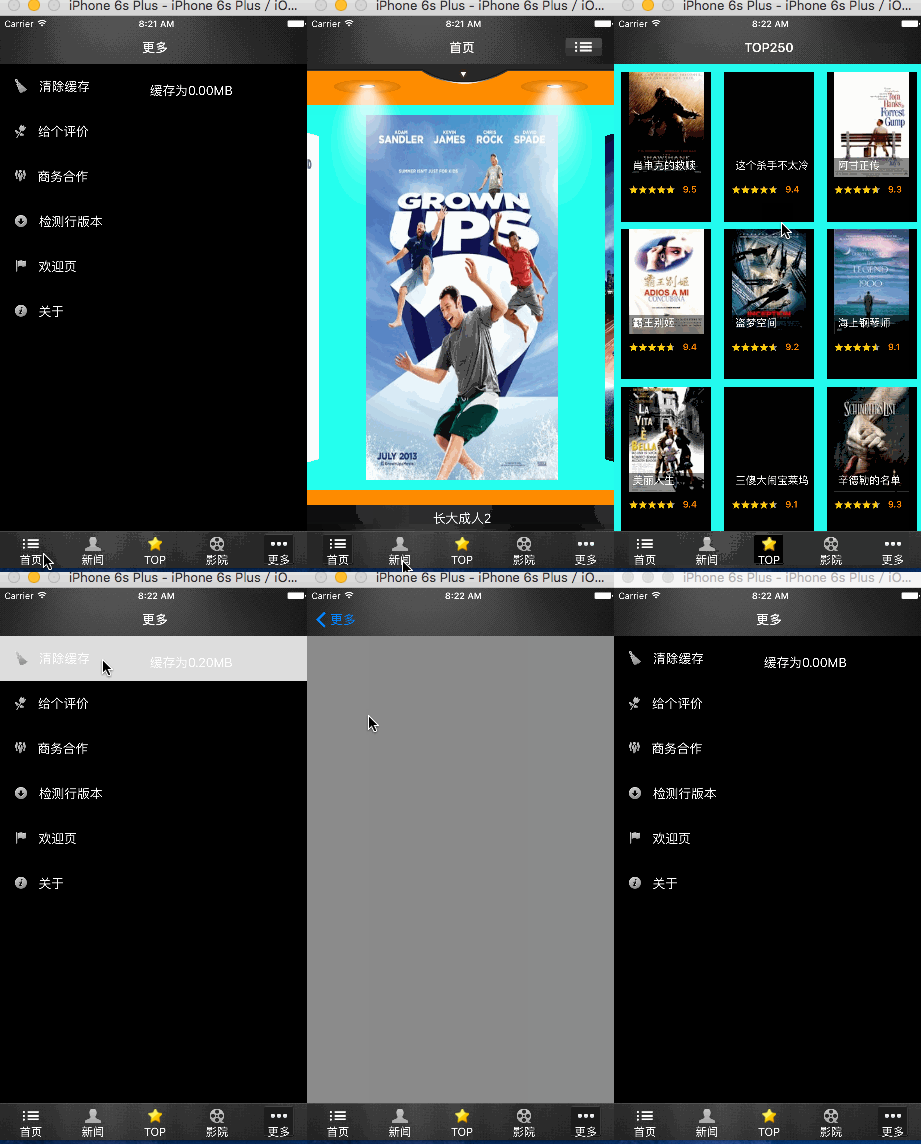
1.找到 SDWebImage找到SDImageCache类
2.添加如下方法
- (float)checkTmpSize

{

    float totalSize = ;

    NSDirectoryEnumerator *fileEnumerator = [[NSFileManager defaultManager] enumeratorAtPath:_diskCachePath];

    for (NSString *fileName in fileEnumerator)

    {

        NSString *filePath = [_diskCachePath stringByAppendingPathComponent:fileName];

        NSDictionary *attrs = [[NSFileManager defaultManager] attributesOfItemAtPath:filePath error:nil];

        unsigned long long length = [attrs fileSize];

        totalSize += length / 1024.0 / 1024.0;

    }

    //    NSLog(@"tmp size is %.2f",totalSize);

    return totalSize;

}
具体用tableView实现
MoreViewController.h
#import "BaseViewController.h"

#import "More.h"

@interface MoreViewController : BaseViewController<UITableViewDataSource,UITableViewDelegate>

@property(strong,nonatomic)UITableView *MoreTableView;

@property(strong,nonatomic)NSArray *arrayTitle;

@property(strong,nonatomic)NSArray *arrayImage;

@end
MoreViewController.m
#import "MoreViewController.h"

@interface MoreViewController ()

@property(strong,nonatomic)UILabel *lbl;

@end

@implementation MoreViewController

- (void)viewDidLoad {

    [super viewDidLoad];

    self.title=@"更多";

    [self _loadData];

    NSLog(@"%@",NSHomeDirectory());

}

-(void)_loadData

{

    // 设置tableview的title和image

    self.arrayTitle=@[@"清除缓存",@"给个评价",@"商务合作",@"检测行版本",@"欢迎页",@"关于"];

    self.arrayImage=@[@"moreClear@2x",@"moreScore@2x",@"moreBusiness@2x",@"moreVersion@2x",@"moreWelcome@2x",@"moreAbout@2x"];

    // 初始化UItableView

    self.MoreTableView=[[UITableView alloc] initWithFrame:self.view.frame style:UITableViewStylePlain];

    // 设置UItableView的背景色

    self.MoreTableView.backgroundColor=[UIColor blackColor];

    // 指定代理

    self.MoreTableView.delegate=self;

    self.MoreTableView.dataSource=self;

    // 分割线的样式

    self.MoreTableView.separatorStyle=UITableViewCellSeparatorStyleSingleLine;

    [self.view addSubview:self.MoreTableView];

    // 指定唯一标识符

    [self.MoreTableView registerClass:[UITableViewCell class] forCellReuseIdentifier:@"MoreTableCell"];

    self.lbl=[[UILabel alloc]init];

    self.lbl.textColor=[UIColor whiteColor];

}

- (NSInteger)numberOfSectionsInTableView:(UITableView *)tableView

{

    return ;

}

- (NSInteger)tableView:(UITableView *)tableView numberOfRowsInSection:(NSInteger)section

{

    return self.arrayTitle.count;

}

- (UITableViewCell *)tableView:(UITableView *)tableView cellForRowAtIndexPath:(NSIndexPath *)indexPath

{

    UITableViewCell *cell = [tableView dequeueReusableCellWithIdentifier:@"MoreTableCell" forIndexPath:indexPath];

    if (indexPath.row==) {

       self.lbl.frame= CGRectMake(,,, cell.frame.size.height*0.5);

        self.lbl.text=[NSString stringWithFormat:@"缓存为%.2fMB",[[SDImageCache sharedImageCache] checkTmpSize]];

        [cell addSubview:self.lbl];

    }

    // 设置Cell的背景色

    cell.backgroundColor=[UIColor blackColor];

    // 设置title的文字颜色

    cell.textLabel.textColor=[UIColor whiteColor];

    cell.textLabel.text=self.arrayTitle[indexPath.row];

    cell.imageView.image=[UIImage imageNamed:self.arrayImage[indexPath.row]];

    return cell;

}

-(CGFloat)tableView:(UITableView *)tableView heightForRowAtIndexPath:(NSIndexPath *)indexPath

{

    return ;

}

#pragma Mark - 选中跳转

-(void)tableView:(UITableView *)tableView didSelectRowAtIndexPath:(NSIndexPath *)indexPath

{

    if (indexPath.row==) {

        [self alertView];

    }else if (indexPath.row==){

        EvaluationViewController *evaluation=[EvaluationViewController new];

        [self.navigationController pushViewController:evaluation animated:YES];

    }

    else if (indexPath.row==){

        BusinessViewController *business=[BusinessViewController new];

        [self.navigationController pushViewController:business animated:YES];

    }else if (indexPath.row==){

        VersionViewController *version=[VersionViewController new];

        [self.navigationController pushViewController:version animated:YES];

    }else if (indexPath.row==){

        WelcomeViewController *welcome=[WelcomeViewController new];

        [self.navigationController pushViewController:welcome animated:YES];

    }else{

        AboutViewController *about=[AboutViewController new];

        [self.navigationController pushViewController:about animated:YES];

    }

}

#pragma Mark - 弹出框

-(void)alertView

{

    NSLog(@"-----");

    float tmpSize=[[SDImageCache sharedImageCache] checkTmpSize];

    UIAlertController *alert=[UIAlertController alertControllerWithTitle:@"提示" message:[NSString  stringWithFormat:@"清理缓存(%.2fM)",tmpSize] preferredStyle:UIAlertControllerStyleAlert];

    UIAlertAction *ok=[UIAlertAction actionWithTitle:@"确定" style:UIAlertActionStyleDefault handler:^(UIAlertAction * _Nonnull action) {

        // 清除磁盘

        [[SDImageCache sharedImageCache] clearDisk];

        // 刷新数据

        [self.MoreTableView reloadData];

    }];

    UIAlertAction *cancle=[UIAlertAction actionWithTitle:@"取消" style:UIAlertActionStyleDefault handler:nil];

    [alert addAction:ok];

    [alert addAction:cancle];

    [self presentViewController:alert animated:YES completion:nil];

}

#pragma Mark - 整体刷新

-(void)viewWillAppear:(BOOL)animated

{

    //

    [super viewWillAppear:YES];

    [self.MoreTableView reloadData];

}

- (void)didReceiveMemoryWarning {

    [super didReceiveMemoryWarning];

}

@end
iOS 用 SDWebImage 清理图片缓存的更多相关文章
- SDWebImage清理图片缓存方法
//获取当前缓存大小 @property (nonatomic, assign) NSUInteger tmpSize; //获取缓存大小并储存 _tmpSize=[[SDImageCache sha ...
- SDWebImage实现图片缓存
我之前写过一篇博客,介绍缓存处理的三种方式,其中最难,最麻烦,最占内存资源的还是图片缓存,最近做的项目有大量的图片处理,还是采用了SDWebImage来处理,但是发现之前封装好的代码报错了.研究发现, ...
- iOS网络加载图片缓存策略之ASIDownloadCache缓存优化
iOS网络加载图片缓存策略之ASIDownloadCache缓存优化 在我们实际工程中,很多情况需要从网络上加载图片,然后将图片在imageview中显示出来,但每次都要从网络上请求,会严重影响用 ...
- Fast Image Cache – iOS 应用程序高性能图片缓存
Fast Image Cache 是一种在 iOS 应用程序中高效.持续.超快速的存储和检索图像的解决方案.任何良好的 iOS 应用程序的用户体验都应该是快速,平滑滚动的,Fast Image Cac ...
- iOS网络加载图片缓存与SDWebImage
加载网络图片可以说是网络应用中必备的.如果单纯的去下载图片,而不去做多线程.缓存等技术去优化,加载图片时的效果与用户体验就会很差. 一.自己实现加载图片的方法 tips: *iOS中所有网络访问都是异 ...
- iOS之SDWebImage清理缓存
.找到 SDWebImage找到SDImageCache类 添加如下方法 - (float)checkTmpSize { float totalSize = 0; NSDirectoryEnumera ...
- SDWebImage清除图片缓存
背景: 使用 SDWebImage 库,由于内存中一直缓存着加载的图片,而导致内存过高(我们无法手动管理内存),弹出内存警告而导致程序很卡或者直接crash掉. 我的解决方法: 在AppDelegat ...
- iOS中 SDWebImage手动清除缓存的方法 技术分享
1.找到SDImageCache类 2.添加如下方法: - (float)checkTmpSize { float totalSize = 0; NSDirectoryEnumerator *file ...
- iOS利用SDWebImage实现缓存的计算与清理
概述 可以仅仅清理图片缓存, 也可以清理所有的缓存文件(包括图片.视频.音频等). 详细 代码下载:http://www.demodashi.com/demo/10717.html 一般我们项目中的缓 ...
随机推荐
- .NET平台开源项目速览(2)Compare .NET Objects对象比较组件
.NET平台开源项目速览今天介绍一款小巧强大的对象比较组件.可以更详细的获取2个对象的差别,并记录具体差别,比较过程和要求可以灵活配置. .NET开源目录:[目录]本博客其他.NET开源项目文章目录 ...
- Android自定义View 画弧形,文字,并增加动画效果
一个简单的Android自定义View的demo,画弧形,文字,开启一个多线程更新ui界面,在子线程更新ui是不允许的,但是View提供了方法,让我们来了解下吧. 1.封装一个抽象的View类 B ...
- PHP+MySQL代码部署在Linux(Ubuntu)上注意事项
最近帮同学做一个网站,同学买的是阿里云服务器,Linux发行版是Ubuntu12.04.我在本地把程序写好,都调试好了.然后他让我自己发布和部署.之前在大学里上操作系统课程时,也用过一段时间的Ubun ...
- IOS开发之显示微博表情
在上一篇博客中山寨了一下新浪微博,在之后的博客中会对上一篇代码进行优化和重用,上一篇的微博请求的文字中有一些表情没做处理,比如带有表情的文字是这样的“我要[大笑],[得意]”.显示的就是请求的字符串, ...
- Ubuntu杂记——Ubuntu自带拼音输入发杂乱不堪
打开终端,用管理员权限输入ibus-daemon -drx,重启即可
- Android随笔之——PackageManager详解
参考:http://www.cnblogs.com/xingfuzzhd/p/3374504.html 今天要讲的是PackageManager.Android系统为我们提供了很多服务管理的类,包括A ...
- geotrellis使用(二十一)自动导入数据
目录 前言 整体介绍 前台界面 后台控制 总结 一.前言 之前Geotrellis数据导入集群采用的是命令行的方式,即通过命令行提交spark任务来ingest数据,待数据导入完毕再启动 ...
- ASP.NET MVC 概述
目标:学习ASP.NET MVC 和ASP.NET WebForm的不同之处.学习在合适的地方使用ASP.NET MVC. MVC(Model-View-Controller)结构模式把一个对象分离成 ...
- 图片每天换及纯css3手风琴特效
<a target="_blank" id="a"><img id="img" /></a> <s ...
- 【Python实战】Pandas:让你像写SQL一样做数据分析(二)
1. 引言 前一篇介绍了Pandas实现简单的SQL操作,本篇中将主要介绍一些相对复杂一点的操作.为了方便后面实操,先给出一份简化版的设备统计数据: 0 android NLL 387546520 2 ...