
Android事件分发与责任链模式
一、责任链模式
责任链模式是一种行为模式,为请求创建一个接收者的对象链.这样就避免,一个请求链接多个接收者的情况.进行外部解耦.类似于单向链表结构。
优点:
1. 降低耦合度。它将请求的发送者和接收者解耦。
2. 简化了对象。使得对象不需要知道链的结构。
3. 增强给对象指派职责的灵活性。通过改变链内的成员或者调动它们的次 序,允许动态地新增或者删除责任。
4. 增加新的请求处理类很方便。
缺点:
1. 不能保证请求一定被接收。
2. 系统性能将受到一定影响,而且在进行代码调试时不太方便,可能会造成循环调用。
3. 可能不容易观察运行时的特征,有碍于除错。
在Android事件分发机制是责任链模式最典型的应用:
dispatchTouchEvent的,就是责任链中的将事件交给下一级处理的.
onInterceptTouchEvent ,就是责任链中,处理自己处理事务的方法.
onTouchEvent 是责任链中 事件上报的事件链。
下面我们来通过Android事件分发机制来感悟一下责任链模式在Android中的应用。
二、Android 事件分发传递机制
1. View事件传递分发层级结构
a). 事件收集之后最先传递给 Activity, 然后依次向下传递,大致如下:
Activity -> PhoneWindow -> DecorView -> ViewGroup -> ... -> View
这样的事件分发机制逻辑非常清晰,可是,你是否注意到一个问题?如果最后分发到View,如果这个View也没有处理事件怎么办,就这样让事件浪费掉?当然不会啦。
b). 如果没有任何View消费掉事件,那么这个事件会按照反方向回传,最终传回给Activity,如果最后 Activity 也没有处理,本次事件才会被抛弃:
Activity <- PhoneWindow <- DecorView <- ViewGroup <- ... <- View
可以看到,这是一个非常经典的责任链模式,如果我能处理就拦截下来自己干,如果自己不能处理或者不确定就交给责任链中下一个对象。 这种设计是非常精巧的,上层View既可以直接拦截该事件,自己处理,也可以先询问(分发给)子View,如果子View需要就交给子View处理,如果子View不需要还能继续交给上层View处理。既保证了事件的有序性,又非常的灵活。
View点击事件分发有三个关键流程方法:
1.dispatchTouchEvent:事件下发 --- View和ViewGroup都有的方法
2.onInterceptTouchEvent:拦截下发的事件,并交给自己OnTouchEvent处理处理 ---ViewGroup才有的方法
3.onTouchEvent:事件上报 --- View和ViewGroup都有的方法
以下是不同层级对事件的分发、拦截和消费的功能表:
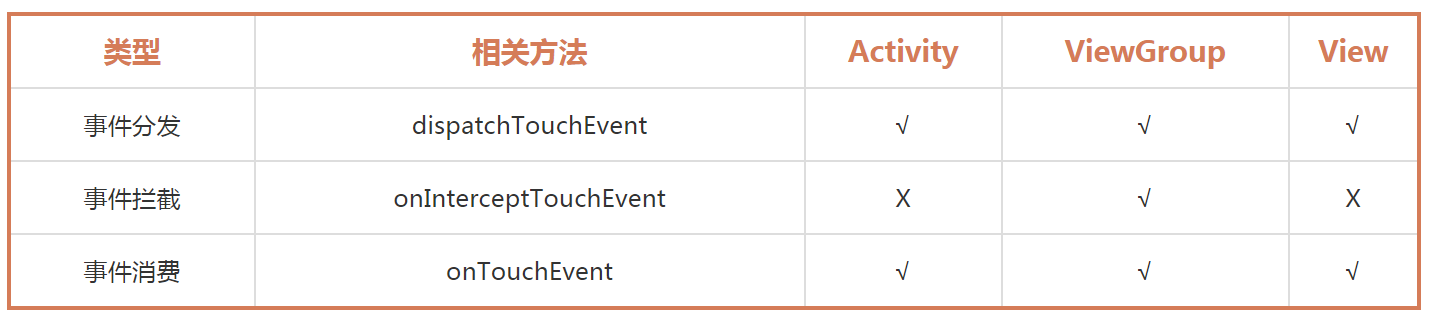
可以看到 Activity 和 View 都是没有事件拦截的:
a). Activity 作为原始的事件分发者,如果 Activity 拦截了事件会导致整个屏幕都无法响应事件,这肯定不是我们想要的效果。
b). View最为事件传递的最末端,要么消费掉事件,要么不处理进行回传,根本没必要进行事件拦截。
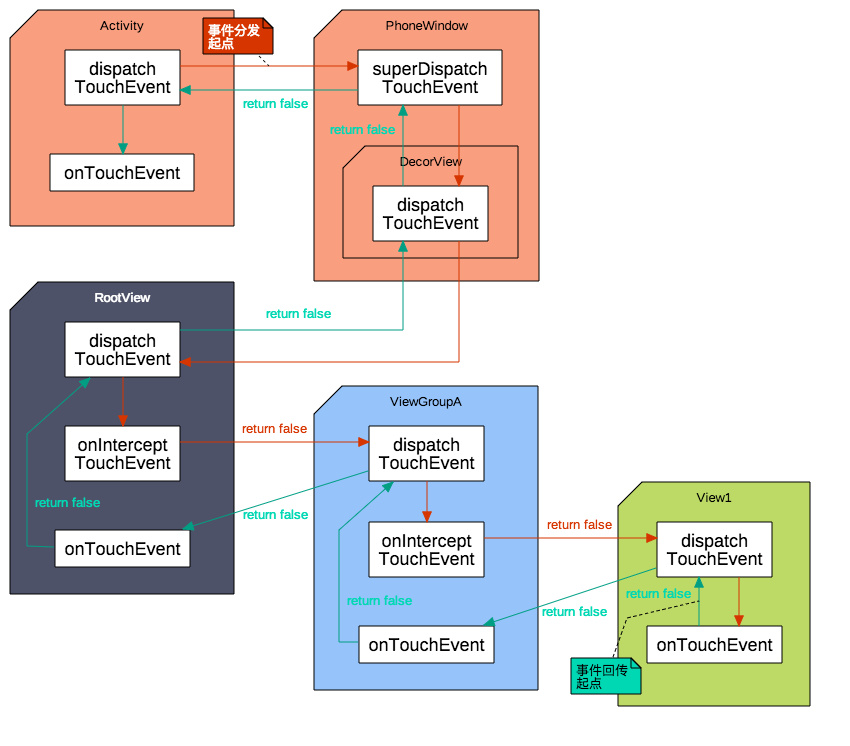
下图是点击View,事件传递但是都没有被处理,生成的一个完整的事件分发流程图:
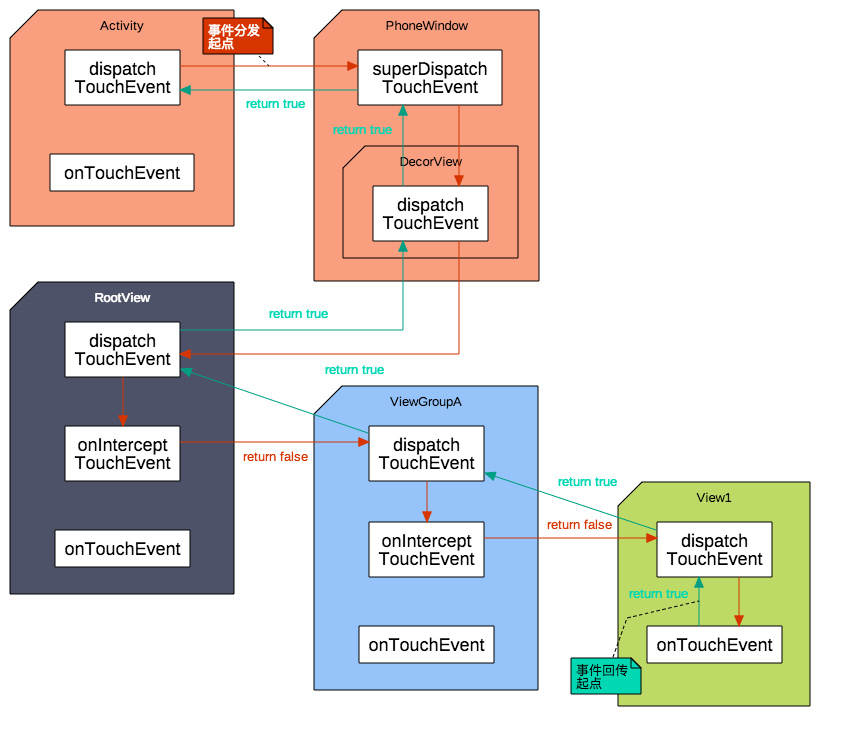
如果事件被View处理了,那么事件分发流程图应该如下:
如果事件被ViewGroup拦截处理了, 那么事件分发流程图应该如下:

从上面的流程,我们可以概括Android的事件分发机制为:责任链模式,事件层层传递,直到被消费。
三、Q&A
上面我们讲解了一下Android的事件分发机制,可能很多人会有疑惑,下面我们针对部分疑惑进行分析和说明:
1. 为什么 View 会有 dispatchTouchEvent ?
答:我们知道 View 可以注册很多事件监听器,例如:单击事件(onClick)、长按事件(onLongClick)、触摸事件(onTouch),并且View自身也有 onTouchEvent 方法,那么问题来了,这么多与事件相关的方法应该由谁管理?毋庸置疑就是 dispatchTouchEvent,所以 View 也会有事件分发。
View的dispatchTouchEvent源码:
/**

     * Pass the touch screen motion event down to the target view, or this

     * view if it is the target.

     *

     * @param event The motion event to be dispatched.

     * @return True if the event was handled by the view, false otherwise.

     */

    public boolean dispatchTouchEvent(MotionEvent event) {

        // If the event should be handled by accessibility focus first.

        if (event.isTargetAccessibilityFocus()) {

            // We don't have focus or no virtual descendant has it, do not handle the event.

            if (!isAccessibilityFocusedViewOrHost()) {

                return false;

            }

            // We have focus and got the event, then use normal event dispatch.

            event.setTargetAccessibilityFocus(false);

        }

        boolean result = false;

        if (mInputEventConsistencyVerifier != null) {

            mInputEventConsistencyVerifier.onTouchEvent(event, 0);

        }

        final int actionMasked = event.getActionMasked();

        if (actionMasked == MotionEvent.ACTION_DOWN) {

            // Defensive cleanup for new gesture

            stopNestedScroll();

        }

        if (onFilterTouchEventForSecurity(event)) {

            if ((mViewFlags & ENABLED_MASK) == ENABLED && handleScrollBarDragging(event)) {

                result = true;

            }

            //noinspection SimplifiableIfStatement

            ListenerInfo li = mListenerInfo;

            if (li != null && li.mOnTouchListener != null

                    && (mViewFlags & ENABLED_MASK) == ENABLED

                    && li.mOnTouchListener.onTouch(this, event)) {

                result = true;

            }

            if (!result && onTouchEvent(event)) {

                result = true;

            }

        }

        if (!result && mInputEventConsistencyVerifier != null) {

            mInputEventConsistencyVerifier.onUnhandledEvent(event, 0);

        }

        // Clean up after nested scrolls if this is the end of a gesture;

        // also cancel it if we tried an ACTION_DOWN but we didn't want the rest

        // of the gesture.

        if (actionMasked == MotionEvent.ACTION_UP ||

                actionMasked == MotionEvent.ACTION_CANCEL ||

                (actionMasked == MotionEvent.ACTION_DOWN && !result)) {

            stopNestedScroll();

        }

        return result;

    }
2. View事件分发时各个方法调用顺序是怎样的?
a). 单击事件(onClickListener) 需要两个两个事件(ACTION_DOWN 和 ACTION_UP )才能触发,如果先分配给onClick判断,等它判断完再交由其他相应时间显然是不合理的,会造成 View 无法响应其他事件,应该最后调用。(所以此调用顺序最后)
b). 长按事件(onLongClickListener) 同理,也是需要长时间等待才能出结果,肯定不能排到前面,但因为不需要ACTION_UP,应该排在 onClick 前面。(onLongClickListener > onClickListener)
c). 触摸事件(onTouchListener) 如果用户注册了触摸事件,说明用户要自己处理触摸事件了,这个应该排在最前面。(最前)
d). View自身处理(onTouchEvent) 提供了一种默认的处理方式,如果用户已经处理好了,也就不需要了,所以应该排在 onClickListener 后面。(onTouchListener > onClickListener)
所以事件的调度顺序应该是 onTouchListener > onTouchEvent > onLongClickListener > onClickListener。
3. ViewGroup 的事件分发流程又是如何的呢?
在默认的情况下 ViewGroup 事件分发流程是这样的。
a). 判断自身是否需要(询问 onInterceptTouchEvent 是否拦截),如果需要,调用自己的 onTouchEvent。
b). 自身不需要或者不确定,则询问 ChildView ,一般来说是调用手指触摸位置的 ChildView。
c). 如果子 ChildView 不需要则调用自身的 onTouchEvent。
ViewGroup的dispatchTouchEvent源码:
@Override

public boolean dispatchTouchEvent(MotionEvent ev) {

        if (mInputEventConsistencyVerifier != null) {

            mInputEventConsistencyVerifier.onTouchEvent(ev, 1);

        }

        // If the event targets the accessibility focused view and this is it, start

        // normal event dispatch. Maybe a descendant is what will handle the click.

        if (ev.isTargetAccessibilityFocus() && isAccessibilityFocusedViewOrHost()) {

            ev.setTargetAccessibilityFocus(false);

        }

        boolean handled = false;

        if (onFilterTouchEventForSecurity(ev)) {

            final int action = ev.getAction();

            final int actionMasked = action & MotionEvent.ACTION_MASK;

            // Handle an initial down.

            if (actionMasked == MotionEvent.ACTION_DOWN) {

                // Throw away all previous state when starting a new touch gesture.

                // The framework may have dropped the up or cancel event for the previous gesture

                // due to an app switch, ANR, or some other state change.

                cancelAndClearTouchTargets(ev);

                resetTouchState();

            }

            // Check for interception.

            final boolean intercepted;

            if (actionMasked == MotionEvent.ACTION_DOWN

                    || mFirstTouchTarget != null) {

                final boolean disallowIntercept = (mGroupFlags & FLAG_DISALLOW_INTERCEPT) != 0;

                if (!disallowIntercept) {

                    intercepted = onInterceptTouchEvent(ev);

                    ev.setAction(action); // restore action in case it was changed

                } else {

                    intercepted = false;

                }

            } else {

                // There are no touch targets and this action is not an initial down

                // so this view group continues to intercept touches.

                intercepted = true;

            }

            // If intercepted, start normal event dispatch. Also if there is already

            // a view that is handling the gesture, do normal event dispatch.

            if (intercepted || mFirstTouchTarget != null) {

                ev.setTargetAccessibilityFocus(false);

            }

            // Check for cancelation.

            final boolean canceled = resetCancelNextUpFlag(this)

                    || actionMasked == MotionEvent.ACTION_CANCEL;

            // Update list of touch targets for pointer down, if needed.

            final boolean split = (mGroupFlags & FLAG_SPLIT_MOTION_EVENTS) != 0;

            TouchTarget newTouchTarget = null;

            boolean alreadyDispatchedToNewTouchTarget = false;

            if (!canceled && !intercepted) {

                // If the event is targeting accessibility focus we give it to the

                // view that has accessibility focus and if it does not handle it

                // we clear the flag and dispatch the event to all children as usual.

                // We are looking up the accessibility focused host to avoid keeping

                // state since these events are very rare.

                View childWithAccessibilityFocus = ev.isTargetAccessibilityFocus()

                        ? findChildWithAccessibilityFocus() : null;

                if (actionMasked == MotionEvent.ACTION_DOWN

                        || (split && actionMasked == MotionEvent.ACTION_POINTER_DOWN)

                        || actionMasked == MotionEvent.ACTION_HOVER_MOVE) {

                    final int actionIndex = ev.getActionIndex(); // always 0 for down

                    final int idBitsToAssign = split ? 1 << ev.getPointerId(actionIndex)

                            : TouchTarget.ALL_POINTER_IDS;

                    // Clean up earlier touch targets for this pointer id in case they

                    // have become out of sync.

                    removePointersFromTouchTargets(idBitsToAssign);

                    final int childrenCount = mChildrenCount;

                    if (newTouchTarget == null && childrenCount != 0) {

                        final float x = ev.getX(actionIndex);

                        final float y = ev.getY(actionIndex);

                        // Find a child that can receive the event.

                        // Scan children from front to back.

                        final ArrayList<View> preorderedList = buildTouchDispatchChildList();

                        final boolean customOrder = preorderedList == null

                                && isChildrenDrawingOrderEnabled();

                        final View[] children = mChildren;

                        for (int i = childrenCount - 1; i >= 0; i--) {

                            final int childIndex = getAndVerifyPreorderedIndex(

                                    childrenCount, i, customOrder);

                            final View child = getAndVerifyPreorderedView(

                                    preorderedList, children, childIndex);

                            // If there is a view that has accessibility focus we want it

                            // to get the event first and if not handled we will perform a

                            // normal dispatch. We may do a double iteration but this is

                            // safer given the timeframe.

                            if (childWithAccessibilityFocus != null) {

                                if (childWithAccessibilityFocus != child) {

                                    continue;

                                }

                                childWithAccessibilityFocus = null;

                                i = childrenCount - 1;

                            }

                            if (!canViewReceivePointerEvents(child)

                                    || !isTransformedTouchPointInView(x, y, child, null)) {

                                ev.setTargetAccessibilityFocus(false);

                                continue;

                            }

                            newTouchTarget = getTouchTarget(child);

                            if (newTouchTarget != null) {

                                // Child is already receiving touch within its bounds.

                                // Give it the new pointer in addition to the ones it is handling.

                                newTouchTarget.pointerIdBits |= idBitsToAssign;

                                break;

                            }

                            resetCancelNextUpFlag(child);

                            if (dispatchTransformedTouchEvent(ev, false, child, idBitsToAssign)) {

                                // Child wants to receive touch within its bounds.

                                mLastTouchDownTime = ev.getDownTime();

                                if (preorderedList != null) {

                                    // childIndex points into presorted list, find original index

                                    for (int j = 0; j < childrenCount; j++) {

                                        if (children[childIndex] == mChildren[j]) {

                                            mLastTouchDownIndex = j;

                                            break;

                                        }

                                    }

                                } else {

                                    mLastTouchDownIndex = childIndex;

                                }

                                mLastTouchDownX = ev.getX();

                                mLastTouchDownY = ev.getY();

                                newTouchTarget = addTouchTarget(child, idBitsToAssign);

                                alreadyDispatchedToNewTouchTarget = true;

                                break;

                            }

                            // The accessibility focus didn't handle the event, so clear

                            // the flag and do a normal dispatch to all children.

                            ev.setTargetAccessibilityFocus(false);

                        }

                        if (preorderedList != null) preorderedList.clear();

                    }

                    if (newTouchTarget == null && mFirstTouchTarget != null) {

                        // Did not find a child to receive the event.

                        // Assign the pointer to the least recently added target.

                        newTouchTarget = mFirstTouchTarget;

                        while (newTouchTarget.next != null) {

                            newTouchTarget = newTouchTarget.next;

                        }

                        newTouchTarget.pointerIdBits |= idBitsToAssign;

                    }

                }

            }

            // Dispatch to touch targets.

            if (mFirstTouchTarget == null) {

                // No touch targets so treat this as an ordinary view.

                handled = dispatchTransformedTouchEvent(ev, canceled, null,

                        TouchTarget.ALL_POINTER_IDS);

            } else {

                // Dispatch to touch targets, excluding the new touch target if we already

                // dispatched to it.  Cancel touch targets if necessary.

                TouchTarget predecessor = null;

                TouchTarget target = mFirstTouchTarget;

                while (target != null) {

                    final TouchTarget next = target.next;

                    if (alreadyDispatchedToNewTouchTarget && target == newTouchTarget) {

                        handled = true;

                    } else {

                        final boolean cancelChild = resetCancelNextUpFlag(target.child)

                                || intercepted;

                        if (dispatchTransformedTouchEvent(ev, cancelChild,

                                target.child, target.pointerIdBits)) {

                            handled = true;

                        }

                        if (cancelChild) {

                            if (predecessor == null) {

                                mFirstTouchTarget = next;

                            } else {

                                predecessor.next = next;

                            }

                            target.recycle();

                            target = next;

                            continue;

                        }

                    }

                    predecessor = target;

                    target = next;

                }

            }

            // Update list of touch targets for pointer up or cancel, if needed.

            if (canceled

                    || actionMasked == MotionEvent.ACTION_UP

                    || actionMasked == MotionEvent.ACTION_HOVER_MOVE) {

                resetTouchState();

            } else if (split && actionMasked == MotionEvent.ACTION_POINTER_UP) {

                final int actionIndex = ev.getActionIndex();

                final int idBitsToRemove = 1 << ev.getPointerId(actionIndex);

                removePointersFromTouchTargets(idBitsToRemove);

            }

        }

        if (!handled && mInputEventConsistencyVerifier != null) {

            mInputEventConsistencyVerifier.onUnhandledEvent(ev, 1);

        }

        return handled;

    }
可能看这么长的代码,我们会比较懵,下面我们用伪代码来表示一下:
public boolean dispatchTouchEvent(MotionEvent ev) {

     boolean consume = false;

     if (onInterceptTouchEvent(ev)) {

          consume = onTouchEvent(ev);

     } else {

          consume = child.dispatchTouchEvent(ev)

     }

     return consume;

}
这样我们就能更直白的看懂View事件的传递机制了。
4. ViewGroup将事件分发给ChildView的机制
- ViewGroup分发事件时会遍历 ChildView,如果手指触摸的点在 ChildView 区域内就分发给这个View。当 ChildView 重叠时,一般会分配给显示在最上面的 ChildView。
- ViewGroup判断是否需要拦截,主要是根据onInterruptTouchEvent的返回值进行判断。
- 在Down事件中将touch事件分发给ChildView,如果有ChildView捕获消费了Down事件,就会对mFirstTouchTarget进行赋值。mFirstTouchTarget的作用就是记录消费事件的View。
- 在ViewGroup的dispatchTouchEvent方法中,会根据mFirstTouchTarget 是否为 null,决定是自己处理 touch 事件,还是分发给子 View。
- Down事件是touch事件序列的起点,决定了后续的事件由谁来消费处理。Cancel事件的触发场景为:父View先不拦截,但在MOVE事件中又重新拦截,此时子View会收到一个Cancel事件,
5. ViewGroup 和 ChildView 同时注册了事件监听器(onClick等),哪个会执行?
事件优先给 ChildView,会被 ChildView消费掉,ViewGroup 不会响应。
四、参考资料
Android事件分发与责任链模式的更多相关文章
- 设计模式 -- 责任链模式或者叫职责链模式(Chain of Responsibility(CoR))
什么是链?前后相连,一个连接下一个,其中包括多个节点,其实责任链模式也类似,他是多个对象之间相互关联,下一个对象的操作由上一个对象关联下来,上一个对象有个方法用于指向其他对象.职责链之间的前后关系是可 ...
- 我的Java设计模式-责任链模式
今天来说说程序员小猿和产品就关于需求发生的故事.前不久,小猿收到了产品的需求. 产品经理:小猿,为了迎合大众屌丝用户的口味,我们要放一张图,要露点的. 小猿:......露点?你大爷的,让身为正义与纯 ...
- 《Android源码设计模式》--状态模式--责任链模式--解释器模式--命令模式--观察者模式--备忘录模式--迭代器模式
[状态模式] No1: Wifi设置界面是一个叫做WifiSetting的Fragment实现的 No2: 在不同的状态下对于扫描Wifi这个请求的处理是完全不一样的.在初始状态下扫描请求被直接忽略, ...
- python设计模式之责任链模式
python设计模式之责任链模式 开发一个应用时,多数时候我们都能预先知道哪个方法能处理某个特定请求.然而,情况并非总是如此.例如,想想任意一种广播计算机网络,例如最早的以太网实现.在广播计算机网络中 ...
- Android事件分发机制二:viewGroup与view对事件的处理
前言 很高兴遇见你~ 在上一篇文章 Android事件分发机制一:事件是如何到达activity的? 中,我们讨论了触摸信息从屏幕产生到发送给具体 的view处理的整体流程,这里先来简单回顾一下: 触 ...
- 十一个行为模式之责任链模式(Responsible Chain Pattern)
定义: 将具有相同接口的责任类串行在一起,解耦请求的发送者和处理者.沿着这条链进行请求,直到有对象处理它为止. 结构图: Handler:抽象处理类,定义了所有责任类处理方法的接口,不同的处理方法在子 ...
- 第 17 章 责任链模式【Chain of Responsibility Pattern】
以下内容出自:<<24种设计模式介绍与6大设计原则>> 中国古代对妇女制定了“三从四德”的道德规范,“三从”是指“未嫁从父.既嫁从夫.夫死从子”,也就是说一个女性,在没有结婚的 ...
- iOS设计模式解析(五)责任链模式
责任链模式:使多个对象都有机会处理请求,从而避免发送者和接受者之间发生耦合. 应用场景: 有多个对象可以处理请求,而处理程序只有在运行时才能确定 例如: 英雄联盟中伤害计算,伤害类型分为AP.AD.真 ...
- 详解java设计模式之责任链模式
详见:http://blog.yemou.net/article/query/info/tytfjhfascvhzxcyt175 从击鼓传花谈起 击鼓传花是一种热闹而又紧张的饮酒游戏.在酒宴上宾客依次 ...
随机推荐
- mysql使用唯一索引避免插入重复数据
使用MySQL 索引防止一个表中的一列或者多列产生重复值 一:介绍MYSQL唯一索引 如果要强烈使一列或多列具有唯一性,通常使用PRIMARY KEY约束. 但是,每个表只能有一个主键. 因此,如果使 ...
- 7、python基本数据类型之散列类型
前言:python的基本数据类型可以分为三类:数值类型.序列类型.散列类型,本文主要介绍散列类型. 一.散列类型 内部元素无序,不能通过下标取值 1)字典(dict):用 {} 花括号表示,每一个元素 ...
- 使用Razor表达式 使用条件语句 来自 精通ASP-NET-MVC-5-弗瑞曼
- 开发工具篇:Git和Github
开发工具篇:Git和Github Git是什么? Git是目前世界上最先进的分布式版本控制系统.工作原理 / 流程: Workspace:工作区 Index / Stage:暂存区 Repositor ...
- openlayer3 坐标系转换
'EPSG:4326'-经纬度坐标-WGS84'EPSG:3857'- xy坐标-web墨卡托 ol3默认的坐标系为3857,即在创建ol.map的时候,若不指定projection,则默认为EPSG ...
- centos7安装mysql5.5.62
mysql是我们最常用的开源的关系型数据库,mysql不同版本有时候安装的方式也不尽相同,下面梳理一下mysql5.5.62版本的安装 1.下载mysql5.5.62,URL:https://down ...
- centos7中搭建ftp服务
博客搬家: centos7中搭建ftp服务 最近想和同学共享一些文件资源,于是在实验室服务器上搭建个ftp服务,本博客记录一下配置的流程.过程基本是参照别人的方法来做的,博客也是在别人博客基础上修改的 ...
- 机器学习总结-bias–variance tradeoff
bias–variance tradeoff 通过机器学习,我们可以从历史数据学到一个\(f\),使得对新的数据\(x\),可以利用学到的\(f\)得到输出值\(f(x)\).设我们不知道的真实的\( ...
- WeChall_Training: ASCII (Training, Encoding)
In a computer, you can only work with numbers.In this challenge you have to decode the following mes ...
- 2020你还不会Java8新特性?
Java8(1)新特性介绍及Lambda表达式 前言: 跟大娃一块看,把原来的电脑拿出来放中间看视频用 --- 以后会有的课程 难度 深入Java 8 难度1 并发与netty 难度3 JVM 难度4 ...