
jquery二级导航
效果图
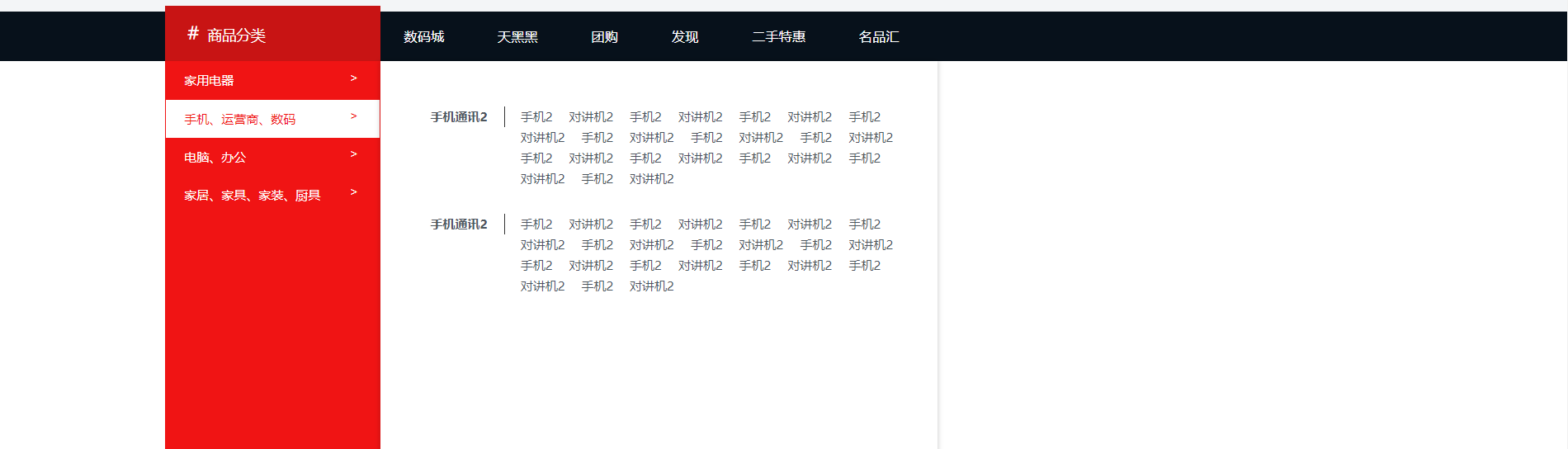
直接放代码
<!DOCTYPE html>
<html lang="en">
<head>
<meta charset="UTF-8">
<title>cat</title>
<link rel="stylesheet" href="../css/base.css">
<link rel="stylesheet" href="../css/cat.css">
</head>
<body>
<div class="content">
<div class="container">
<div id="cat" class="cat">
<a href="#" class="cat-title"><i class="cart-icon">#</i>商品分类</a>
<div class="cat-item dropdown" data-active="cat" data-load="../js/cat-1.json">
<div class="dropdown-toggle">
<a href="#" class="cat-item-link">家用电器</a>
<span class="dropdown-arrow cat-arrow">></span>
</div>
<div class="dropdown-list">
<div class="dropdown-loading"></div>
</div>
</div>
<div class="cat-item dropdown" data-active="cat" data-load="../js/cat-2.json">
<div class="dropdown-toggle">
<a href="#" class="cat-item-link">手机、运营商、数码</a>
<span class="dropdown-arrow cat-arrow">></span>
</div>
<div class="dropdown-list">
<div class="dropdown-loading"></div>
</div>
</div>
<div class="cat-item dropdown" data-active="cat" data-load="../js/cat-3.json">
<div class="dropdown-toggle">
<a href="#" class="cat-item-link">电脑、办公</a>
<span class="dropdown-arrow cat-arrow">></span>
</div>
<div class="dropdown-list">
<div class="dropdown-loading"></div>
</div>
</div>
<div class="cat-item dropdown" data-active="cat" data-load="../js/cat-4.json">
<div class="dropdown-toggle">
<a href="#" class="cat-item-link">家居、家具、家装、厨具</a>
<span class="dropdown-arrow cat-arrow">></span>
</div>
<div class="dropdown-list">
<div class="dropdown-loading"></div>
</div>
</div>
</div>
</div>
</div>
<script src="../js/jquery.js"></script>
<script src="../js/transition.js"></script>
<script src="../js/showhide.js"></script>
<script src="../js/dropdown.js"></script>
<script src="../js/cat.js"></script>
</body>
</html>
base.css https://www.cnblogs.com/chenyingying0/p/12363689.html
cat.css
/*公共样式 */

    .container{

        width:1200px;

        margin:0 auto;

    }

    .link{

        color:#4d555d;

    }

    a.link:hover{

        color:#f01414;

    }

    .fl{

        float:left;

    }

    .fr{

        float:right;

    }

    /*提取出过渡样式,可公用*/

    .transition{

        -webkit-transition:all .5s;

        -moz-transition:all .5s;

        -ms-transition:all .5s;

        -o-transition:all .5s;

        transition:all .5s;

    }

    /*文字隐藏*/

    .text-hidden{

        text-indent:-9999px;

        overflow:hidden;

    }

    /*文字溢出省略显示*/

    .text-ellipsis{

        overflow: hidden;

        white-space: nowrap;

        text-overflow:ellipsis;

    }

/*dropdown下拉组件*/

    .dropdown{

        position: relative;

    }

    .dropdown-toggle{

        position: relative;

        z-index:;

    }

    .dropdown-arrow{

        display: inline-block;

        vertical-align: middle;

        background-repeat: no-repeat;

        line-height:;/*否则图标字体会继承父元素的line-height属性,占据过多空间*/

    }

    .dropdown-list{

        display: none;

        position: absolute;

        z-index:;

    }

    .dropdown-left{

        left:;

        right:auto;

    }

    .dropdown-right{

        right:;

        left:auto;

    }

    .dropdown-loading{

        width:32px;

        height:32px;

        background:url(../img/loading.gif) no-repeat;

        margin:20px;

    }

/*showhide*/

    .fadeOut{

        opacity:;

        visibility: hidden;

    }

    .slideUpDownCollapse{

        height:0 !important;/*避免因为优先级不够而无法生效*/

        padding-top:0 !important;

        padding-bottom:0 !important;

    }

    .slideLeftRightCollapse{

        width:0 !important;/*避免因为优先级不够而无法生效*/

        padding-left:0 !important;

        padding-right:0 !important;

    }

/*侧导航*/

    .cat{

        width:209px;

        height:566px;

        background-color:#f01414;

        position: absolute;

        top: -54px;

        z-index:;

    }

    .cat-title{

        display: inline-block;

        width:165px;

        height:54px;

        line-height:54px;

        color:#fff;

        font-size:14px;

        padding:0 22px;

        background-color:#c81414;

    }

    .cart-icon{

        color:#fff;

        font-style:normal;

        font-size:18px;

        margin-right:8px;

    }

    .cat-item{

        height:37px;

        line-height: 37px;

        padding-left:18px;

        color:#fff;

        border-left:1px solid #f01414;

        border-right:1px solid #f01414;

        position: static;/*覆盖掉之前的relative定位,使右边list相对于整个大容器进行顶部对齐*/

    }

    .cat-arrow{

        position: absolute;

        right: 20px;

        top: 9px;

    }

    .cat-item-link{

        color:#fff;

    }

    .cat .dropdown-loading{

        margin:220px auto 0;

    }

    .cat .dropdown-list{

        position: absolute;

        left:209px;

        top:54px;

        background:#fff;

        width:500px;

        box-shadow:0 0 5px rgba(0,0,0,.2);

        padding:20px;

        height:472px;

        overflow:hidden;

    }

    .dropdown-list-item{

        width:500px !important;

        display: block;

        margin:24px 0;

        line-height:20px;

    }

    .dropdown-list-item-title{

        display: block;

        float:left;

        width:84px;

        padding-right:16px;

        border-right:1px solid #333;

        text-align:right;

        font-weight:bold;

    }

    .dropdown-list-item-txt{

        display: inline-block;

        padding-left:15px;

        width:380px;

    }

    .dropdown-list-item-txt a{

        margin-right:16px;

        display: inline-block;/*否则内联元素换行时文字会被拆开*/

    }

    /*激活样式*/

    .cat-active.cat-item{

        background-color:#fff;

        color:#f01414;

    }

    .cat-active .cat-item-link{

        color:#f01414;

    }

    .cat-active .dropdown-list{

        display:block;

    }
jquery.js
transition.js https://www.cnblogs.com/chenyingying0/p/12363649.html
showhide.js https://www.cnblogs.com/chenyingying0/p/12363707.html
dropdown.js https://www.cnblogs.com/chenyingying0/p/12363739.html
cat.js
// 不要暴露在全局,使用匿名函数自执行

(function($){

    "use strict";

//cat

    $("#cat").find(".dropdown").on("dropdown-show",function(e){

        loadOnce($(this),buildCatItem);

    }).dropdown({

        css3:true,

        js:true,

        animation:"slideLeftRight"

    });

    //创建cat的item结构

    function buildCatItem($elem,data){

        var list=$elem.find(".dropdown-list");

        var html="";

        if(data.length===0) return;

        html=``;

        for(var i=0;i<data.length;i++){

            html+=`<dl class="dropdown-list-item">

                        <dt class="dropdown-list-item-title">

                            <a href="#">`+data[i].title+`</a>

                        </dt>

                        <dd class="dropdown-list-item-txt">`;

            for(var j=0;j<data[i].items.length;j++){

                html+=`<a href="#">`+data[i].items[j]+`</a>`;

            }

            html+=`</dd></dl>`;

        }

        list.html(html);

    }

//加载一次数据

function loadOnce($elem,success){

    var dataLoad=$elem.data("load");

    if(!dataLoad) return;

    if(!$elem.data("loaded")){

        $elem.data("loaded",true);

        $.getJSON(dataLoad).done(function(data){

            success($elem,data);

        }).fail(function(){

            $elem.data("loaded",false);

        });

    }

}

})(jQuery);
jquery二级导航的更多相关文章
- 分享21个基于jquery菜单导航的效果
jquery导航菜单插件制作jquery动画菜单熔岩灯菜单效果更新时间:02月15日 14:53:03 虾米精选-菜单导航-导航菜单 0浏览 / ★★★☆☆星级 / 未知软件大小/ jquery导航菜 ...
- 一款jquery编写图文下拉二级导航菜单特效
一款jquery编写图文下拉二级导航菜单特效,效果非常简洁大气,很不错的一款jquery导航菜单特效. 这款jquery特效适用于很多的个人和门户网站. 适用浏览器:IE8.360.FireFox.C ...
- jQuery制作右侧边垂直二级导航菜单
<!DOCTYPE html PUBLIC "-//W3C//DTD XHTML 1.0 Transitional//EN" "http://www.w3.org/ ...
- jQuery垂直二级导航菜单代码
http://www.sucaihuo.com/js/395.html 分享一个简单的垂直二级菜单导航. HTML <div id="my_menu" class=&qu ...
- 用jquery制作一个二级导航下拉菜单
1使用$(function(){...})获取到想要作用的HTML元素. 2通过使用children()方法寻找子元素. 3通过使用show()方法来显示HTML元素. 4通过 ...
- 一款基于jquery和css3的响应式二级导航菜单
今天给大家分享一款基于jquery和css3的响应式二级导航菜单,这款导航是传统的基于顶部,鼠标经过的时候显示二级导航,还采用了当前流行的响应式设计.效果图如下: 在线预览 源码下载 实现的代码. ...
- 二级导航内容均分--jquery
这个是去年做过的一个项目中的算法,个人感觉还可以,所以拿出来分享下. 背景:头部导航二级导航有些内容太长,一列的话太过难看,就要分成两列,要做到按块尽量均分,排列顺序没有限制. 原理: 1.把各个二级 ...
- jQuery 顶部导航尾随滚动,固定浮动在顶部
jQuery 顶部导航尾随滚动.固定浮动在顶部 演示 XML/HTML Code <section> <article class="left"> < ...
- jquery-menu-aim插件实现二级导航
jquery-menu-aim插件是实现二级导航亚马逊式三角滑动的强力工具,它在性能上极佳,快速滑动,基本无延迟效果,源码位置见对应作者的github,接下来附上样例代码: $(function () ...
随机推荐
- 实验一:通过Access划分vlan
1.配置图 Switch0的fa0/1.fa0/2.fa0/3端口设置为Access模式,PC1和PC2属于vlan 2,PC3属于vlan 3. 2.Switch0配置 3.实验现象 PC1可以pi ...
- 深入Nodejs模块fs - 文件系统操作
node 的fs文档密密麻麻的 api 非常多,毕竟全面支持对文件系统的操作.文档组织的很好,操作基本分为文件操作.目录操作.文件信息.流这个大方面,编程方式也支持同步.异步和 Promise. 本文 ...
- Ubuntu下makefile的简单使用
在Windows下,只需要简单的点击以下make,rebuild即可.而在Linux下,这样的IDE环境并没有提供,难道必须每一步都执行一遍吗?比较ok的做法自然是能够利用批处理脚本来进行操作了,这样 ...
- vscode 调试 react 项目
主要分为以下三个步骤 安装 debug for chrome 配置 launch.json 文件 配置内容如下 { "version": "0.2.0", &q ...
- 技术派-github常见的一些用法和缩写
PR: Pull Request. 拉取请求,给其他项目提交代码 LGTM: Looks Good To Me. 看起来不错,代码已 review,可以合并 SGTM: Sounds Good To ...
- web语义化这个坑
什么是wen语义化:https://www.zhihu.com/question/20455165 标签大全:http://www.w3school.com.cn/tags/tag_html.asp ...
- fgets汉字问题
#include<stdio.h> #include <stdlib.h> #define N 10 int main(int argc, char *argv[]) { FI ...
- QT笔记:数据库总结
http://blog.csdn.net/reborntercel/article/details/6991147 #include <QtSql> QT += sql QSqlDatab ...
- 【VC++开发实战】迅雷晒密及批量查询流量程序
迅雷第一次登录是不需要验证码的,就很方便了.首先还是要解决登录的问题,也不是那么容易解决的,这个是在POST是提交的表单[u=joneeky%40qq.com&p=cf1e22e61d987c ...
- Grevl旅游注册的初步界面,以源代码和运行图片展示
<!DOCTYPE html> <html> <head> <meta charset="utf-8"> <title> ...