
centos7安装lnmp
一、配置CentOS 第三方yum源(CentOS默认的标准源里没有nginx软件包)
[root@localhost ~]# yum install wget  #安装下载工具wget

[root@localhost ~]#wget http://www.atomicorp.com/installers/atomic  #下载atomic yum源

[root@localhost ~]#sh ./atomic   #安装

[root@localhost ~]# yum check-update #更新yum软件包
二、安装开发包和库文件
[root@localhost ~]# yum -y install ntp make openssl openssl-devel pcre pcre-devel libpng libpng-devel libjpeg-6b libjpeg-devel-6b freetype freetype-devel gd gd-devel zlib zlib-devel gcc gcc-c++ libXpm libXpm-devel ncurses ncurses-devel libmcrypt libmcrypt-devel libxml2 libxml2-devel imake autoconf automake screen sysstat compat-libstdc++-33 curl curl-devel
三、卸载已安装的apache、mysql、php
[root@localhost ~]# yum remove httpd
[root@localhost ~]# yum remove mysql
[root@localhost ~]# yum remove php
四、安装nginx
[root@localhost ~]# yum install nginx -y
[root@localhost ~]# systemctl start nginx.service
[root@localhost ~]# systemctl status nginx.service
[root@localhost ~]# systemctl enable nginx.service
Created symlink from /etc/systemd/system/multi-user.target.wants/nginx.service to /usr/lib/systemd/system/nginx.service.
[root@localhost ~]#
五、安装mariadb
[root@localhost ~]# yum install mariadb-devel mariadb mariadb-server
[root@localhost ~]# systemctl start mariadb.service
[root@localhost ~]# systemctl status mariadb.service
● mariadb.service - MariaDB database server
   Loaded: loaded (/usr/lib/systemd/system/mariadb.service; disabled; vendor preset: disabled)
   Active: active (running) since Sat 2017-12-23 10:37:58 HKT; 4s ago
  Process: 18474 ExecStartPost=/usr/libexec/mariadb-wait-ready $MAINPID (code=exited, status=0/SUCCESS)
  Process: 18395 ExecStartPre=/usr/libexec/mariadb-prepare-db-dir %n (code=exited, status=0/SUCCESS)
 Main PID: 18473 (mysqld_safe)
   CGroup: /system.slice/mariadb.service
           ├─18473 /bin/sh /usr/bin/mysqld_safe --basedir=/usr
           └─18635 /usr/libexec/mysqld --basedir=/usr --datadir=/var/lib/mysql --plugin-dir=/usr/lib64/mysql/plugin --log-error=/var/log/...

Dec 23 10:37:56 localhost.localdomain mariadb-prepare-db-dir[18395]: MySQL manual for more instructions.
Dec 23 10:37:56 localhost.localdomain mariadb-prepare-db-dir[18395]: Please report any problems at http://mariadb.org/jira
Dec 23 10:37:56 localhost.localdomain mariadb-prepare-db-dir[18395]: The latest information about MariaDB is available at http://mar...org/.
Dec 23 10:37:56 localhost.localdomain mariadb-prepare-db-dir[18395]: You can find additional information about the MySQL part at:
Dec 23 10:37:56 localhost.localdomain mariadb-prepare-db-dir[18395]: http://dev.mysql.com
Dec 23 10:37:56 localhost.localdomain mariadb-prepare-db-dir[18395]: Consider joining MariaDB's strong and vibrant community:
Dec 23 10:37:56 localhost.localdomain mariadb-prepare-db-dir[18395]: https://mariadb.org/get-involved/
Dec 23 10:37:56 localhost.localdomain mysqld_safe[18473]: 171223 10:37:56 mysqld_safe Logging to '/var/log/mariadb/mariadb.log'.
Dec 23 10:37:56 localhost.localdomain mysqld_safe[18473]: 171223 10:37:56 mysqld_safe Starting mysqld daemon with databases from /v.../mysql
Dec 23 10:37:58 localhost.localdomain systemd[1]: Started MariaDB database server.
Hint: Some lines were ellipsized, use -l to show in full.
[root@localhost ~]# systemctl enable mariadb.service
Created symlink from /etc/systemd/system/multi-user.target.wants/mariadb.service to /usr/lib/systemd/system/mariadb.service
#为root账户设置密码
[root@localhost ~]#mysql_secure_installation  #初始化MySQL
Enter current password for root (enter for none):   <---输入现在的root密码,因为我们还没设置,直接回车
Set root password? [Y/n] Y                                    <---是否设定root密码,当然设置了,输入Y回车
New password:                                                      <---输入root密码,并回车,输入的过程中不会有任何显示
Re-enter new password:                                        <---再次输入root密码,并回车,输入的过程中不会有任何显示
Remove anonymous users? [Y/n] Y                      <---是否删除匿名用户,删除,输入Y回车
Disallow root login remotely? [Y/n] Y                     <---是否删禁止root用户远程登录,当然禁止,输入Y回车
Remove test database and access to it? [Y/n]      <---是否删除测试数据库test,看个人喜好
Reload privilege tables now? [Y/n] Y                    <---刷新权限,输入Y回车
最后出现:Thanks for using MySQL!
MySql密码设置完成,重新启动 MySQL:
六、安装php
[root@localhost ~]# yum -y install php php-cli php-mysql php-gd php-imap php-ldap php-odbc php-pear php-xml php-xmlrpc php-mbstring php-mcrypt php-mssql php-snmp php-soap
安装php和所需组件使PHP支持MySQL、FastCGI模式
[root@localhost ~]# yum install  php-tidy php-common php-devel php-fpm php-mysql -y
[root@localhost ~]# systemctl start php-fpm.service
[root@localhost ~]# systemctl status php-fpm.service
● php-fpm.service - The PHP FastCGI Process Manager
   Loaded: loaded (/usr/lib/systemd/system/php-fpm.service; disabled; vendor preset: disabled)
   Active: active (running) since Sat 2017-12-23 10:53:59 HKT; 4s ago
 Main PID: 18953 (php-fpm)
   Status: "Ready to handle connections"
   CGroup: /system.slice/php-fpm.service
           ├─18953 php-fpm: master process (/etc/php-fpm.conf)
           ├─18955 php-fpm: pool www
           ├─18956 php-fpm: pool www
           ├─18957 php-fpm: pool www
           ├─18958 php-fpm: pool www
           └─18959 php-fpm: pool www

Dec 23 10:53:59 localhost.localdomain systemd[1]: Starting The PHP FastCGI Process Manager...
Dec 23 10:53:59 localhost.localdomain systemd[1]: Started The PHP FastCGI Process Manager.
[root@localhost ~]#
[root@localhost ~]# systemctl enable php-fpm.service
Created symlink from /etc/systemd/system/multi-user.target.wants/php-fpm.service to /usr/lib/systemd/system/php-fpm.service.
[root@localhost ~]#
七、配置nginx支持php
[root@localhost ~]# cp /etc/nginx/nginx.conf{,.bak} #将配置文件改为备份文件

#修改nginx配置文件,添加fastcgi支持
[root@localhost ~]# vim /etc/nginx/nginx.conf
vim /etc/nginx/nginx.conf  #编辑
user  nginx  nginx;  #修改nginx运行账号为:nginx组的nginx用户
:wq!    #保存退出

[root@localhost nginx]# vim /etc/nginx/conf.d/default.conf

    location / {
        root   /usr/share/nginx/html;
        index  index.php index.html index.htm;   #增加index.php
    }
      location ~ \.php$ {
        root           /usr/share/nginx/html;
        fastcgi_pass   127.0.0.1:9000;
        fastcgi_index  index.php;
        fastcgi_param  SCRIPT_FILENAME  /usr/share/nginx/html$fastcgi_script_name;
        include        fastcgi_params;
    }
八、配置php
[root@localhost nginx]# cp /etc/php.ini{,.bak}
[root@localhost nginx]#vim /etc/php.ini

expose_php = Off #禁止显示php版本的信息
九、重启nginx php-fpm
[root@localhost ~]# systemctl restart nginx.service

[root@localhost ~]# systemctl restart php-fpm.service
十、测试
[root@localhost ~]# cd /usr/share/nginx/html/

[root@localhost html]# vim  index.php

<?php

     phpinfo();

?>

[root@localhost html]# chown nginx.nginx /usr/share/nginx/html/ -R  #设置目录所有者
#配置防火墙,开启80端口、3306端口
[root@localhost html]# firewall-cmd --zone=public --add-port=/tcp --permanent

success

[root@localhost html]# firewall-cmd --zone=public --add-port=/tcp --permanent

success

[root@localhost html]# systemctl restart firewalld.service

[root@localhost html]# systemctl enable firewalld.service
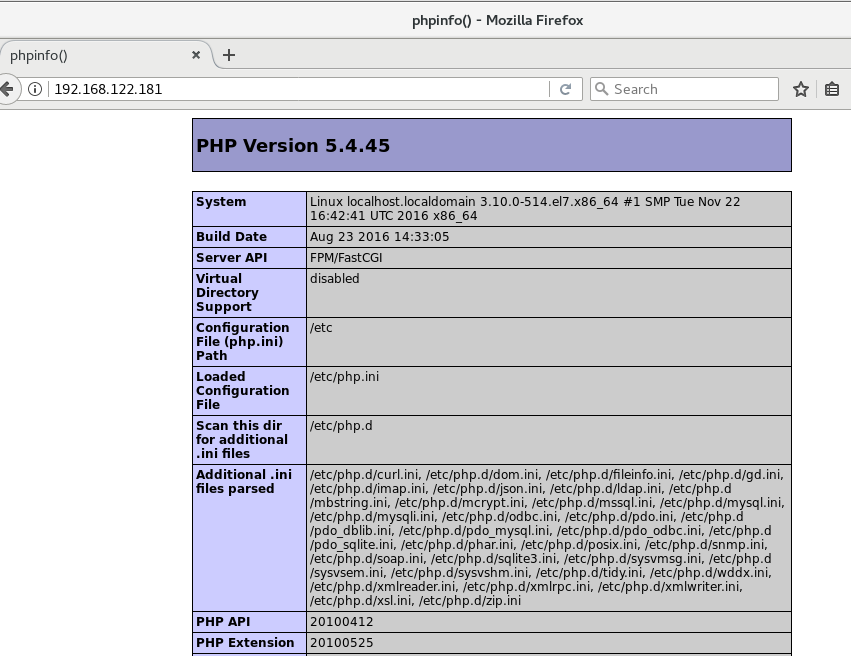
在客户端浏览器输入服务器IP地址,可以看到相关的配置信息!
#############################################################################
备注
nginx默认站点目录是:/usr/share/nginx/html/

权限设置:chown nginx.nginx/usr/share/nginx/html/ -R

MySQL数据库目录是:/var/lib/mysql

权限设置:chown mysql.mysql -R /var/lib/mysql
参考:
https://www.cnblogs.com/xiaoit/p/3991037.html
http://www.kuitao8.com/20150305/3571.shtml
centos7安装lnmp的更多相关文章
- 腾讯云CentOS7安装LNMP+wordpress
许多云主机都有学生优惠,于是我趁着现在大一买了个腾讯1元云主机+免费cn域名(高中生的话就别想了).鉴于我只知道用服务器安装博客,别的用途不了解,所以我就去安装wordpress. 而由于我看的教程有 ...
- centos7安装Lnmp(Linux+Nginx+MySql+Php+phpMyAdmin+Apache)
centos7安装Lnmp(Linux+Nginx+MySql+Php)及Apache Nginx是俄罗斯人编写的十分轻量级的HTTP服务器,Nginx是一个高性能的HTTP和反向代理服务器,Ng ...
- Centos7 安装lnmp
Centos7 安装lnmp 1.下载 wget http://soft.vpser.net/lnmp/lnmp1.5-full.tar.gz 2.解压 tar -zvxf lnmp1.5-full. ...
- centos7安装LNMP与Laravel遇到的一些小问题
安装LNMP 第一次安装 yum update CentOS7下 Nginx1.13.5 + PHP7.1.10 + MySQL5.7.19 源码编译安装 安装mySQL时,mysqld: error ...
- CentOS7 安装LNMP(Linux+Nginx+MySQL+PHP)
由于工作须要,须要学习php,本来想安装lamp的可是考虑到如今nginxserver有良好的性能且应用广泛. 这里我决定搭建Linux(CentOS7+Nginx+MySQL+PHP)下的webse ...
- Centos7安装lnmp环境
系统版本:centos7 64位 PHP版本:PHP 7.0.21 Nginx版本:1.8.1 MySQL版本:5.5.17 注:1.所有安装都必须放在 /usr/local/src文件夹下 2.添加 ...
- centos7 安装lnmp环境
准备工作 一.配置防火墙 vim /etc/sysconfig/iptables 开启80端口.3306.22端口 -A INPUT -m state --state NEW -m tcp -p tc ...
- CentOS 7 安装phpredis和redis(接上一篇centos7安装lnmp)
一.安装扩展phpredis 1.PHP7 安装redis 扩展phpredis cd /root/software wget https://github.com/edtechd/phpredis/ ...
- centos7 安装LNMP(php7)之php7.0 yum安装
http://www.jianshu.com/p/35f21210668a 安装过程参考上面的网址
- centos7 安装LNMP(php7)之mysql安装,更改密码,远程授权
1.执行命令 yum install mysql mysql-server mysql-devel -y 知道出现complete!则安装mysql完成 当执行 service mysqld rest ...
随机推荐
- 【简要题解】Hihocoder 重复旋律1-9简要题解
[简要题解]Hihocoder 重复旋律1-8简要题解 编号 名称标签 难度 1403 后缀数组一·重复旋律 Lv.4 1407 后缀数组二·重复旋律2 Lv.4 1415 后缀数组三·重复旋律3 L ...
- 微信小程序背景音乐官方实例代码无效问题解决及音乐src获取方法
最近在学习微信小程序时遇到了个问题:官方的背景音乐的api实例代码中的音乐src不管用(可能有期限,后面的方法获取的src同样可能有期限),因此本人只能自己去寻找办法获取src,现将方法记录在下面.( ...
- 【THE LAST TIME】深入浅出 JavaScript 模块化
前言 The last time, I have learned [THE LAST TIME]一直是我想写的一个系列,旨在厚积薄发,重温前端. 也是对自己的查缺补漏和技术分享. 欢迎大家多多评论指点 ...
- 常用加密算法-Delphi XE 10.3.3
主要用到 DELPHI XE 10.2新增HASH函数 class function TUtils.GetStringMD5(const AInPut: string): string; begin ...
- 2018 东北地区大学生程序设计竞赛(ABEHIK)
HDU6500:Problem A. Game with string 题意: 给你一个字符串s以及它的m个子串的首尾位置,现在Alice和 Bob两个人轮流在任一子串的前面或者后面加1个字符,要求加 ...
- 侠说java8--Stream流操作学习笔记,都在这里了
前言 首次接触到Stream的时候以为它是和InputStream.OutputStream这样的输入输出流的统称. 流和集合的前世今生 概念的差异 在开发中,我们使用最多的类库之一就是集合.集合是一 ...
- EntityFramework Core一劳永逸动态加载模型,我们要知道些什么呢?
前言 这篇文章源于一位问我的童鞋:在EntityFramework Core中如何动态加载模型呢?在学习EntityFramwork时关于这个问题已有对应园友给出答案,故没有过多研究,虽然最后解决了这 ...
- Spring HTTP invoker简介
Spring HTTP invoker简介 Spring HTTP invoker是spring框架中的一个远程调用模型,执行基于HTTP的远程调用(意味着可以通过防火墙),并使用java的序列化机制 ...
- MySQL快速回顾:更新和删除操作
前提要述:参考书籍<MySQL必知必会> 6.1 更新数据 为了更新(修改)表中的数据,可使用UPDATE语句.可采用两种方式使用UPDATE: 更新表中特定的行: 更新表中所有的行. U ...
- Spring学习记录1——IoC容器
IoC容器 1.1 IoC概述 Ioc(Inverse of Control,控制反转)是Spring容器的内核.对于软件来说,即某一接口具体实现类的选择控制权从调用类中移除,转交给第三方决定,即由 ...