
vue 实现单选框
参考:https://blog.csdn.net/qq_42221334/article/details/81630634
效果:
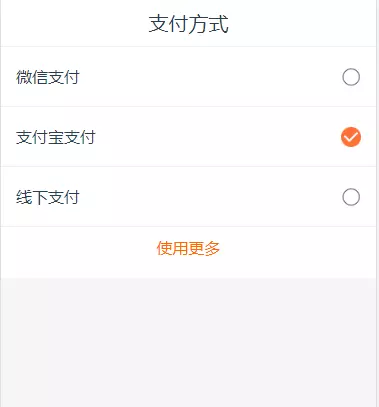
vue:
<template>

    <div>

        <p class="title">支付方式</p>

        <section class="selectPay">

            <ul class="payBox active" id="payBox">

                <li class="payWay" v-for="(item,index) in payList" @click="addImg(index,item)">

                    <span>{{item}}</span>

                    <span class="chooseIcon" :class="payIndex==index?'active':''"></span>

                </li>

            </ul>

        </section>

        <p v-if="payList.length>3" class="useMore"><span class="moreBtn" @click="useMore">使用更多</span></p>

    </div>

</template>

<script>

    export default {

        data() {

            return {

                payList: ["微信支付", "支付宝支付", "线下支付", '其他支付'],

                payIndex: 0, //默认选中第一个

                isBlanced: true //用于取消选中

            }

        },

        methods: {

            addImg: function(index, item) { //选择支付方式

                let _this = this;

                _this.isBlanced = !_this.isBlanced;

                if (_this.payIndex == index) {

                    if (!_this.isBlanced) {

                        _this.payIndex = -1;

                    } else {

                        _this.payIndex = index;

                    }

                } else {

                    _this.payIndex = index;

                }

            },

            useMore() { //查看更多

                let payBox = document.getElementById('payBox'),

                    moreBtn = document.getElementsByClassName('moreBtn')[0];

                if (this.hasClass(payBox, 'active')) {

                    this.removeClass(payBox, 'active');

                    moreBtn.innerHTML = "收起";

                } else {

                    this.addClass(payBox, 'active');

                    moreBtn.innerHTML = "展开全部";

                }

            },

            hasClass(el, cl) {

                var clArr = el.className.split(' ');

                if (clArr.indexOf(cl) != -1) {

                    return clArr;

                } else {

                    return false;

                }

            },

            addClass(el, cl) {

                if (!this.hasClass(el, cl)) {

                    var oldcl = el.className;

                    el.className = oldcl ? oldcl + ' ' + cl : cl;

                }

            },

            removeClass(el, cl) {

                var clArr = this.hasClass(el, cl);

                if (clArr) {

                    clArr.splice(clArr.indexOf(cl), 1);

                    el.className = clArr.join(' ');

                }

            }

        }

    }

</script>

<style scoped>

    div {

        font-size: 16px;

        background: #fff;

    }

    .title {

        font-size: 20px;

        padding: .1rem 0;

        border-bottom: 1px solid #eee;

    }

    .payBox.active {

        max-height: 1.8rem;

        overflow: hidden;

    }

    .payWay {

        height: .6rem;

        display: -webkit-box;

        display: -webkit-flex;

        display: -ms-flexbox;

        display: flex;

        box-sizing: border-box;

        border-bottom: 1px solid #eee;

        padding: 0 .15rem;

        align-items: center;

        justify-content: space-between;

    }

    .chooseIcon {

        width: .2rem;

        height: .2rem;

        display: inline-block;

        background: url(../assets/images/shopMall/noselect2.png)no-repeat;

        background-size: 100%;

    }

    .chooseIcon.active {

        width: .2rem;

        height: .2rem;

        display: inline-block;

        background: url(../assets/images/shopMall/hasSelect1.png)no-repeat;

        background-size: 100%;

    }

    .useMore {

        color: #fe6903;

        background: #fff;

        padding: .1rem 0 .2rem 0;

    }

</style>
vue 实现单选框的更多相关文章
- vue中单选框与多选框的实现与美化
我们在做一些页面时,可能会用到很多的单选框和复选框,但是原生的radio和checkbox前面的原型图标或方框样式不尽人意.于是,决定自己来实现单选框和复选框.我用的是vue,所以就用vue的方式实现 ...
- vue中单选框,利用不存在的值标示选中状态
1.效果预览 2.index.html <!DOCTYPE html> <html lang="en"> <head> <meta cha ...
- vue的单选框
- ~Vue实现简单答题功能,主要包含单选框和复选框
内容 实现简单答题效果 环境 Vue,webpack(自行安装) 实现方式 页面将答题列表传递给调用组件,组件将结果返回给调用页面(其它模式也ok,这只是例子) ------------------- ...
- 使用vue如何默认选中单选框
使用了vue以后,发现这真的是一个灵活高效的框架,能够轻松实现页面的实时刷新.那么,今天先聊聊单选框的使用.一般我们使用单选框,会这么写: //HTML <input type=" c ...
- vue.js实现单选框、复选框和下拉框
Vue.js可以很方便的实现数据双向绑定,所以在处理表单,人机交互方面具有很大的优势.下边以单选框.复选框和下拉框为例介绍他们在HTML和Vue.js中的具体实现方式. 一.单选框 在传统的HTM ...
- vue+elementUI中单选框el-radio设置默认值和唯一标识某个单选框
vue+elementUI中单选框el-radio设置默认值 如果后台返回的单选框的值是number:单选框的lable需要设置成 :lable='0';如下: <el-form-item la ...
- Vue 单选框与单选框组 组件
radio组件 v-model : 通过当然绑定的值与input上的value值来确定当前选中项. 在父作用域中通过active设置当前默认选中项,如果选中项发生改变后通过input事件通知传递到父 ...
- vue 下拉框单选、多选以及默认值
背景: 单选框和多选框 都是使用了 el-select,但传给后端的值类型不一样,多选框传的值是 list类型: ['value1','value2'] ,单选框传值和其他类型一样:设置默认值也是如此 ...
随机推荐
- centos lamp笔记
cron and crontab are missing in docker image of ubuntu 16.04 在鏡像中沒有 cron 命令 How to install php-redis ...
- leetcode-157周赛-5214-最长定差子序列
题目描述: class Solution: def longestSubsequence(self, arr: List[int], difference: int) -> int: dp = ...
- leetcood学习笔记-3-无重复字符的最长子串
题目描述: 方法一:O(N) class Solution: def lengthOfLongestSubstring(self, s: str) -> int: slow = 0 fast = ...
- C/C++ Microsoft Visual Studio c++ DOC Home
{ // https://docs.microsoft.com/zh-cn/cpp/overview/visual-cpp-in-visual-studio?view=vs-2017 // https ...
- 应用上云新模式,Aliware 全家桶亮相杭州云栖大会
全面上云带来的变化,不仅是上云企业数量上的攀升,也是企业对云的使用方式的转变,越来越多的企业用户不仅将云作为一种弹性资源,更是开始在云上部署架构和应用,借助 Serverless 等技术,开发人员只需 ...
- luoguP1154 奶牛分厩 [数论]
题目描述 农夫约翰有N(1<=N<=5000)头奶牛,每头奶牛都有一个唯一的不同于其它奶牛的编号Si,所有的奶牛都睡在一个有K个厩的谷仓中,厩的编号为0到K-1.每头奶牛都知道自己该睡在哪 ...
- 双线程DP
1.传纸条 好像是一道普及组水题? //Twenty #include<cstdio> #include<iostream> #include<cstring> # ...
- php算法题---连续子数组的最大和
php算法题---连续子数组的最大和 一.总结 一句话总结: 重要:一定要本机调试过了再提交代码,因为很容易出现考虑不周的情况,或者修改了之后没有考虑修改的这部分 利用空间来换时间,或者利用空间来换算 ...
- VS2008编译出现问题:error C2485: “__restrict”: 无法识别的扩展属性 解决办法
错误:Error3 error C2485: '__restrict' : unrecognized extended attribute f:\program files\microsoft vis ...
- 搞大数据,你不懂这三大数据处理趋势就OUT了
搞大数据,你不懂这三大数据处理趋势就OUT了 企业数据每年以PB级甚至上百PB爆炸式增长,越来越大的数据量正为扩大分析策略在企业应用软件领域的拓展提供了数据基础,但数据的价值是有时效性的,越早分析越能 ...