
How to use bmw icom a2
Lan Connect Operation Details
1. Connect the LAN cable to ICOM A1/ICOM A2, another side to laptop LAN port
2. Connect OBDII cable to car OBDII Port; sometimes you might need the external OBDII cable.
3. Insert the USB KEY to laptop USB Port and power on the laptop
4. Input the password: BMW ICOM (all Capital letters) and press “Enter” to continue.
5. Wait the software well loaded (The red letters disappear and the offline day appears)
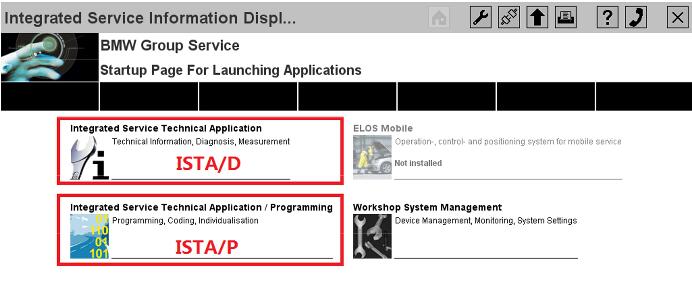

6. Choose ISTA/D or ISTA/P to enter the diagnostic or programming software.
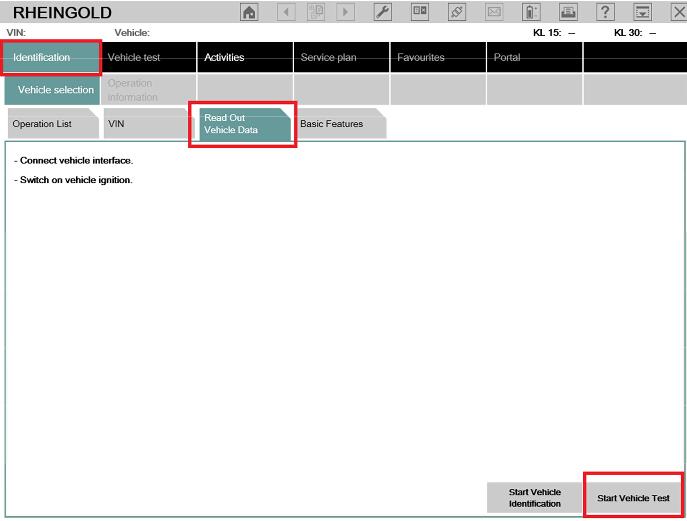
7. For ISTA/D Choose [Vehicle identification] and choose read out vehicle data or start vehicle
test to diagnostic with cars.
8. For ISTA/P choose [Create new session], then choose the free icom, it will read out all the
vehicle’s information and modules one by one.
Wireless Connection Details
1. Power on the router firstly, till the green LED is flashing on the router. (Important)
2. Connect the ICOM A1/ A2 to car OBDII port via the OBDII cable and make the ignition on.
3. Wait till the ICOM A1/ A2 WLAN LED is light up and flashing (around 10 seconds or so)
4. Insert the USB KEY to laptop USB Port and power on the laptop
5. Input the password: BMW ICOM (all Capital letters) and press “Enter” to continue.
6. Wait the software well loaded (The red letters disappear and the offline day appears)
7. Choose ISTA/D or ISTA/P to enter the diagnostic or programming software.
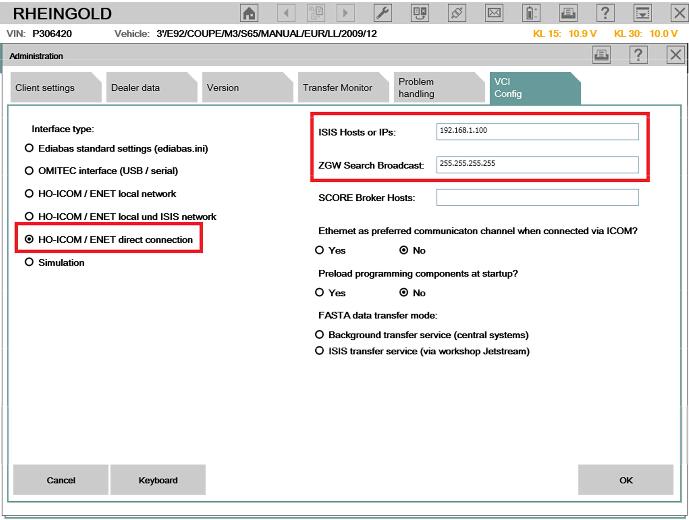
8. For ISTA/D Choose firstly, then choose [VCI Config], check the IP address like this:
192.168.1.100 / 255.255.255.255
9. The interface type must choose [HO-ICOM/ENET direct connection], click save and close the
window.
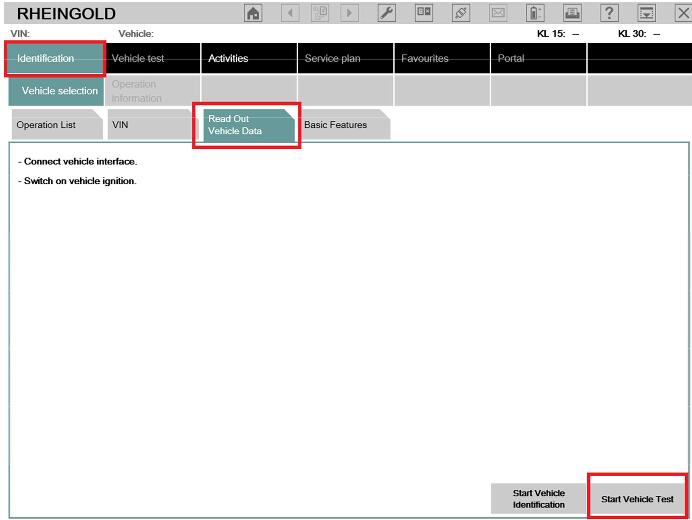
10. Choose [Identification] then choose [Read Out Vehicle data], then choose [Start Vehicle
Test].
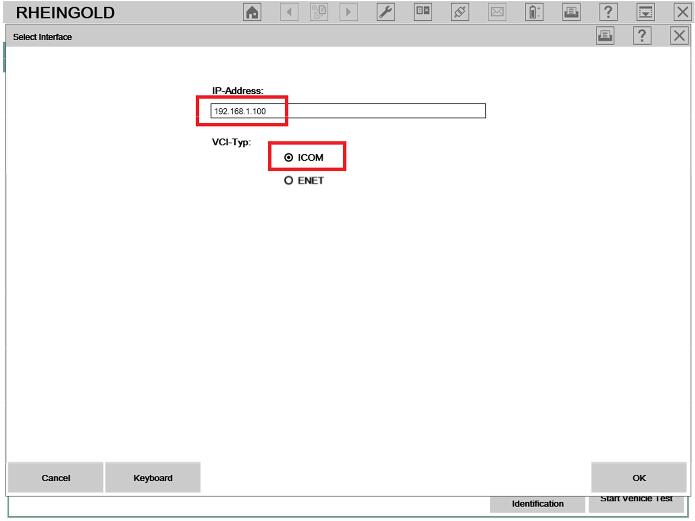
11. At the popup screen, please confirm the IP address is [192.168.1.100] and choose [ICOM],
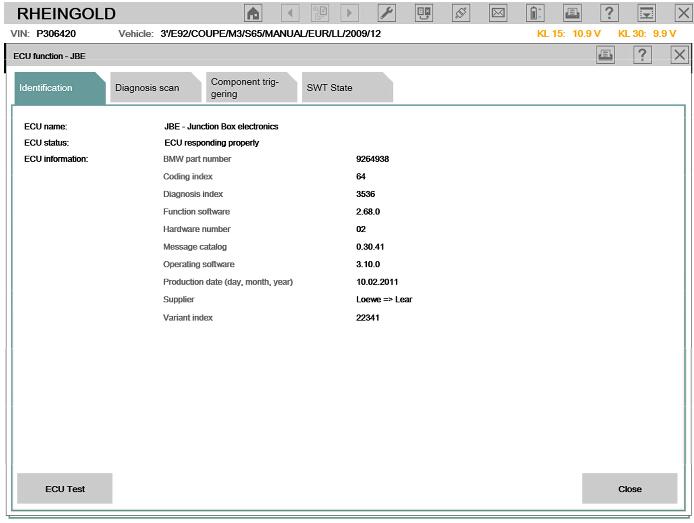
and then system will read out all the car information and modules one by one.

NOTICE:
1. All the internal settings are well configured, please DO NOT change settings, this might lead
the software not working.
2. Switch between LAN and WLAN, you need plug off the OBDII cable from car and re-plug in
(Make the ICOM A1/A2 multiplexer restart)
3. Please keep your laptop/ Routers with stable power when using.
4. If you cannot diagnostic with cars by WLAN, please make sure the router is powered on and
restart the laptop to try.
5. All operations must base on the software well loaded! (red letter disappear and offline day
appear)
How to use bmw icom a2的更多相关文章
- Top 5 Reasons to Get BMW ICOM A2 with Latest Software
Top 5 Reasons to Get BMW ICOM A2 with Latest Software 1.BMW ICOM A2 Hardware Version: V2018.03 2.Sup ...
- 2013 New available ICOM A2 Diagnostic & Programming For BMW ICOM A2+B+C
AUTONUMEN.COM offer best price New ICOM A2 Diagnostic & Programming For BMW ICOM A2+B+C. bmw ico ...
- How to solve the problem that BMW Icom A2 A3 host can’t be connected?
Aftre the BMW ICOM host is connected to the car via a 16PIN connector, and the other side is connect ...
- 018.07 New BMW ICOM A3+B+C+D Plus EVG7 Controller Tablet PC with WIFI Function
2018.07 New BMW ICOM A3+B+C+D Plus EVG7 Controller Tablet PC with WIFI Function Software Version : ...
- How to diagnose vehicle fault code by BMW ICOM and ISTA-D software
Today illustrate how to diagnose vehicle fault code by BMW diagnostic tool BMW ICOM and ISTA-D softw ...
- How to program BMW KOMBI and NBTwith ENET E sys cable ICOM A2
This is how to set up Router or DHCP server for BMW KOMBI and NBT programming with Enet e sys cable ...
- Remap BMW F11 2010 all ECUs with E-Sys and ENET cable
Just wanted to share some experiences remaping all the ECUs in my F11 2010 BMW, hopefully other BMW ...
- //给定N个整数序列{A1,A2,A3...An},求函数f(i,j)=(k=i~j)Ak的求和
//给定N个整数序列{A1,A2,A3...An},求函数f(i,j)=(k=i~j)Ak的求和 # include<stdio.h> void main() { ,sum1; ]={,- ...
- a0=1、a1=1、a2=a1+a0、a3=a2+a1,以此类推,请写代码用递归算出a30?
public class Test { public static void main(String[] args) { System.out.println(recursive(30)); } pu ...
随机推荐
- 学JS的心路历程 - PixiJS -基础(一)
建立canvas 今天开始我们一步步来看怎么使用PixiJS吧! 在开始之前,要先提醒各位需要先运行webserver,否则将会遇到一些奇怪的问题喔! 最基本的canvas画布是肯定需要的,Pixi提 ...
- R语言-直方图
1.直方图 直方图和柱形图的区别:直方图表示频数,柱形图表示数量. 一般直方图的X轴表示取值范围,Y轴表示频数 hist() 函数 > hist(rnorm(1000)) #1000个正态随机数 ...
- CSS----盒子模型与浮动
盒模型(框模型) 页面上任何一个元素我们都可以看成是一个盒子,盒子会占用一定的空间和位置他们之间相互制约,就形成了网页的布局 w3c的盒模型的构成:content border padding ma ...
- xshell连接不上linux情况一
设置网络的地址使用桥接方式
- python添加到环境变量
1.命令 vi ~/.bashrc export PATH="/home/tiany/software/python/python3/3.6.1/bin:$PATH" export ...
- WebView 加载网页返回后,jsp界面数据消失(一个斜杆引起来的风波)
http://ip:port//interface/app/index.jsp 如果不小心就会把,port后面的//两个斜杆给忽略... 当有两个斜杆时,webview仍可以将网页,正常加载.但是数据 ...
- jstorm集成kafka
本人是spark的拥趸,因为工作中需要用到jstorm,作记录如下. pom.xml <dependencies> <dependency> <groupId>co ...
- oracle中sequence(自增序号)的用法
转载:https://www.cnblogs.com/liuzy2014/p/5794928.html 在oracle中sequence就是序号,每次取的时候它会自动增加.sequence与表没有关系 ...
- BufferedReader .BufferedWriter执行文本复制
/** * 需求:演示 BufferedReader 和 BufferedWriter 的使用,复制一个 java 文件 */ package cn.itcast.others.iostream; i ...
- LibreOJ 6282. 数列分块入门 6
题目链接:https://loj.ac/problem/6282 参考博客:http://www.cnblogs.com/stxy-ferryman/p/8560551.html 这里如果用数组的话元 ...