
How to use bmw icom a2
Lan Connect Operation Details
1. Connect the LAN cable to ICOM A1/ICOM A2, another side to laptop LAN port
2. Connect OBDII cable to car OBDII Port; sometimes you might need the external OBDII cable.
3. Insert the USB KEY to laptop USB Port and power on the laptop
4. Input the password: BMW ICOM (all Capital letters) and press “Enter” to continue.
5. Wait the software well loaded (The red letters disappear and the offline day appears)
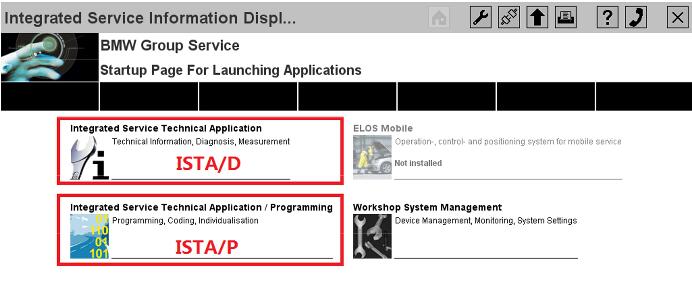

6. Choose ISTA/D or ISTA/P to enter the diagnostic or programming software.
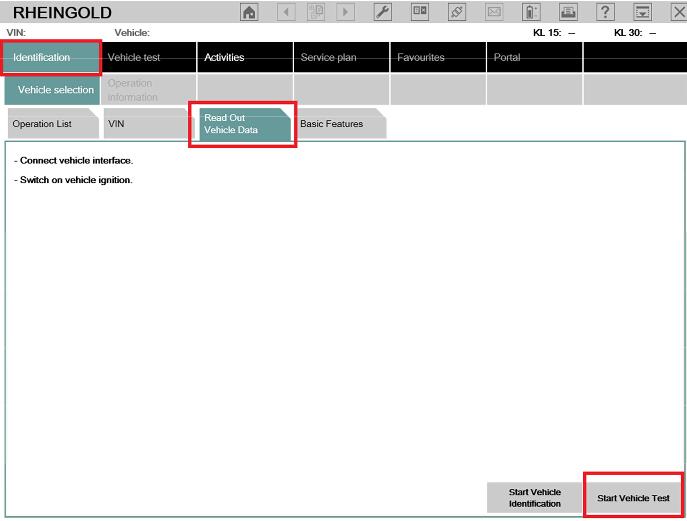
7. For ISTA/D Choose [Vehicle identification] and choose read out vehicle data or start vehicle
test to diagnostic with cars.
8. For ISTA/P choose [Create new session], then choose the free icom, it will read out all the
vehicle’s information and modules one by one.
Wireless Connection Details
1. Power on the router firstly, till the green LED is flashing on the router. (Important)
2. Connect the ICOM A1/ A2 to car OBDII port via the OBDII cable and make the ignition on.
3. Wait till the ICOM A1/ A2 WLAN LED is light up and flashing (around 10 seconds or so)
4. Insert the USB KEY to laptop USB Port and power on the laptop
5. Input the password: BMW ICOM (all Capital letters) and press “Enter” to continue.
6. Wait the software well loaded (The red letters disappear and the offline day appears)
7. Choose ISTA/D or ISTA/P to enter the diagnostic or programming software.
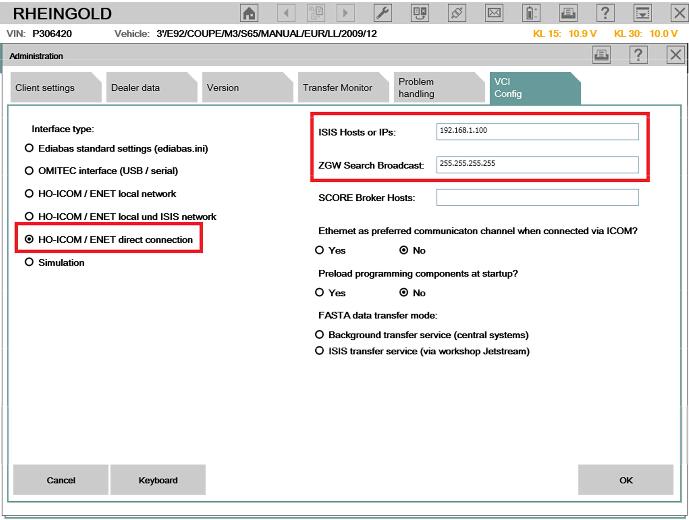
8. For ISTA/D Choose firstly, then choose [VCI Config], check the IP address like this:
192.168.1.100 / 255.255.255.255
9. The interface type must choose [HO-ICOM/ENET direct connection], click save and close the
window.
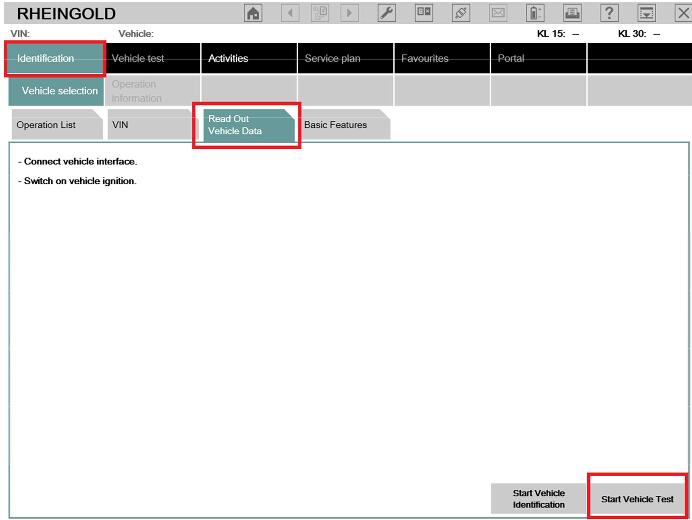
10. Choose [Identification] then choose [Read Out Vehicle data], then choose [Start Vehicle
Test].
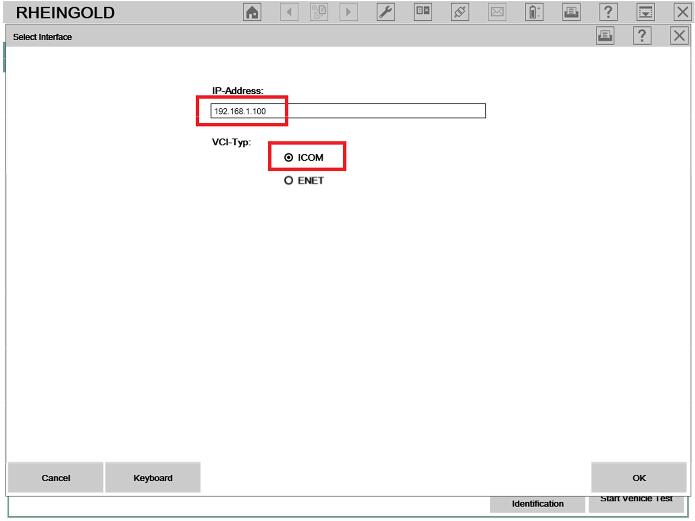
11. At the popup screen, please confirm the IP address is [192.168.1.100] and choose [ICOM],
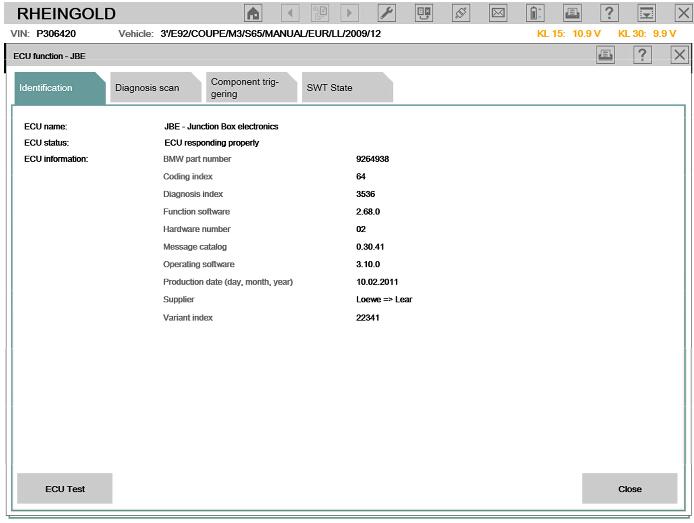
and then system will read out all the car information and modules one by one.

NOTICE:
1. All the internal settings are well configured, please DO NOT change settings, this might lead
the software not working.
2. Switch between LAN and WLAN, you need plug off the OBDII cable from car and re-plug in
(Make the ICOM A1/A2 multiplexer restart)
3. Please keep your laptop/ Routers with stable power when using.
4. If you cannot diagnostic with cars by WLAN, please make sure the router is powered on and
restart the laptop to try.
5. All operations must base on the software well loaded! (red letter disappear and offline day
appear)
How to use bmw icom a2的更多相关文章
- Top 5 Reasons to Get BMW ICOM A2 with Latest Software
Top 5 Reasons to Get BMW ICOM A2 with Latest Software 1.BMW ICOM A2 Hardware Version: V2018.03 2.Sup ...
- 2013 New available ICOM A2 Diagnostic & Programming For BMW ICOM A2+B+C
AUTONUMEN.COM offer best price New ICOM A2 Diagnostic & Programming For BMW ICOM A2+B+C. bmw ico ...
- How to solve the problem that BMW Icom A2 A3 host can’t be connected?
Aftre the BMW ICOM host is connected to the car via a 16PIN connector, and the other side is connect ...
- 018.07 New BMW ICOM A3+B+C+D Plus EVG7 Controller Tablet PC with WIFI Function
2018.07 New BMW ICOM A3+B+C+D Plus EVG7 Controller Tablet PC with WIFI Function Software Version : ...
- How to diagnose vehicle fault code by BMW ICOM and ISTA-D software
Today illustrate how to diagnose vehicle fault code by BMW diagnostic tool BMW ICOM and ISTA-D softw ...
- How to program BMW KOMBI and NBTwith ENET E sys cable ICOM A2
This is how to set up Router or DHCP server for BMW KOMBI and NBT programming with Enet e sys cable ...
- Remap BMW F11 2010 all ECUs with E-Sys and ENET cable
Just wanted to share some experiences remaping all the ECUs in my F11 2010 BMW, hopefully other BMW ...
- //给定N个整数序列{A1,A2,A3...An},求函数f(i,j)=(k=i~j)Ak的求和
//给定N个整数序列{A1,A2,A3...An},求函数f(i,j)=(k=i~j)Ak的求和 # include<stdio.h> void main() { ,sum1; ]={,- ...
- a0=1、a1=1、a2=a1+a0、a3=a2+a1,以此类推,请写代码用递归算出a30?
public class Test { public static void main(String[] args) { System.out.println(recursive(30)); } pu ...
随机推荐
- 2019.2.4 nfs原理和安装实验
NFS 访问一个本地文件还是NFS共享文件对于客户端而言都是透明的,当文件打开的瞬间,内核会作出一个决定,如果是本地文件内核会将本地NFS共享文件内核会将NFS共享文件的所有引用传递给——>NF ...
- 用git bash 传数据到远程出错:git push origin master 出错:error: failed to push some refs to
https://blog.csdn.net/qq_28055429/article/details/51007453
- 终止执行js的方法
(一)在function里面 (1)return;(2)return false; (二)非function方法里面 alert("before error.");throw Sy ...
- js 获取 this 的属性 obj[0].getAttribute
js 获取 this 的属性 obj[0].getAttribute
- shiro 基于springmvc中做登陆功能
1.添加依赖 <!-- shiro --> <dependency> <groupId>org.apache.shiro</groupId> <a ...
- 动态代理 JDK动态代理 CGLIB代理
代理模式:代理类和被代理类实现共同的接口(或继承),代理类中存有指向被代理类的索引,实际执行时通过调用代理类的方法.实际执行的是被代理类的方法. 而AOP,是通过动态代理实现的. 一.简单来说: JD ...
- JMeter学习(二)录制脚本(转载)
转载自 http://www.cnblogs.com/yangxia-test 环境 Badboy version 2.1.1 JDK: 1.7.0_67 Apache JMeter-2.11 - ...
- IDEA中配置JUnit单元测试
参考安装教程:https://www.jianshu.com/p/c37753b6dbd6 如果想用junit4的话,需要在pom.xml中配置. 需要安装JUnitGenerator V2.0插件, ...
- CentOS 下lvm 磁盘扩容
打算给系统装一个oracle,发现磁盘空间不足.在安装系统的时候我选择的是自动分区,系统就会自动以LVM的方式分区.为了保证系统后期的可用性,建议所有新系统安装都采用LVM,之后生产上的设备我也打算这 ...
- layer数据表格换行
在使用layer数据表格的时候,默认是不可以换行的.这样显示 改动后 数据格式为 aa<br>bb就会显示为换行 比如我们的字符串是 a<br>b 这样的字符串浏览器 ...