
用canvas画弧形进度条
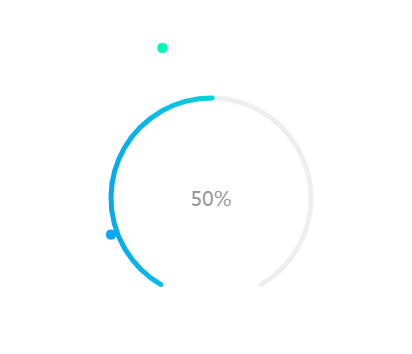
function toCanvas(id ,progress){
//canvas进度条
var canvas = document.getElementById(id),
ctx = canvas.getContext("2d"),
percent = progress, //最终百分比
circleX = canvas.width / 2, //中心x坐标
circleY = canvas.height / 2, //中心y坐标
radius = 100, //圆环半径
lineWidth = 5, //圆形线条的宽度
fontSize = 20; //字体大小
//两端圆点
function smallcircle1(cx, cy, r) {
ctx.beginPath();
//ctx.moveTo(cx + r, cy);
ctx.lineWidth = 1;
ctx.fillStyle = '#06a8f3';
ctx.arc(cx, cy, r,0,Math.PI*2);
ctx.fill();
}
function smallcircle2(cx, cy, r) {
ctx.beginPath();
//ctx.moveTo(cx + r, cy);
ctx.lineWidth = 1;
ctx.fillStyle = '#00f8bb';
ctx.arc(cx, cy, r,0,Math.PI*2);
ctx.fill();
}
//画圆
function circle(cx, cy, r) {
ctx.beginPath();
//ctx.moveTo(cx + r, cy);
ctx.lineWidth = lineWidth;
ctx.strokeStyle = '#eee';
ctx.arc(cx, cy, r, Math.PI*2/3, Math.PI * 1/3);
ctx.stroke();
}
// 画弧线
function sector(cx, cy, r, startAngle, endAngle, anti) {
ctx.beginPath();
//ctx.moveTo(cx, cy + r); // 从圆形底部开始画
ctx.lineWidth = lineWidth;
// 渐变色 - 可自定义
var linGrad = ctx.createLinearGradient(
circleX-radius-lineWidth, circleY, circleX+radius+lineWidth, circleY
);
linGrad.addColorStop(0.0, '#06a8f3');
//linGrad.addColorStop(0.5, '#9bc4eb');
linGrad.addColorStop(1.0, '#00f8bb');
ctx.strokeStyle = linGrad;
//圆弧两端的样式
ctx.lineCap = 'round';
//圆弧
ctx.arc(
cx, cy, r,
(Math.PI*2/3),
(Math.PI*2/3) + endAngle/100 * (Math.PI*5/3),
false
);
ctx.stroke();
}
//刷新
function loading() {
if (process >= percent) {
clearInterval(circleLoading);
}
//清除canvas内容
ctx.clearRect(0, 0, circleX * 2, circleY * 2);
//中间的字
ctx.font = fontSize + 'px April';
ctx.textAlign = 'center';
ctx.textBaseline = 'middle';
ctx.fillStyle = '#999';
ctx.fillText(parseFloat(process).toFixed(0) + '%', circleX, circleY);
// 圆形
circle(circleX, circleY, radius);
//圆弧
sector(circleX, circleY, radius, Math.PI*2/3, process);
//两端圆点
smallcircle1(150+Math.cos(2*Math.PI/360*120)*100, 150+Math.sin(2*Math.PI/360*120)*100, 5);
smallcircle2(150+Math.cos(2*Math.PI/360*(120+process*3))*100, 150+Math.sin(2*Math.PI/360*(120+process*3))*100, 5);
//控制结束时动画的速度
if (process / percent > 0.90) {
process += 0.30;
} else if (process / percent > 0.80) {
process += 0.55;
} else if (process / percent > 0.70) {
process += 0.75;
} else {
process += 1.0;
}
}
var process = 0.0; //进度
var circleLoading = window.setInterval(function () {
loading();
}, 20);
}
toCanvas('canvas',50);
用canvas画弧形进度条的更多相关文章
- android弧形进度条,有详细注释的,比较简单
Java code? 1 2 3 4 5 6 7 8 9 10 11 12 13 14 15 16 17 18 19 20 21 22 23 24 25 26 27 28 29 30 31 32 33 ...
- canvas绘制圆形进度条(或显示当前已浏览网页百分比)
使用canvas绘制圆形进度条,或者是网页加载进度条 或者是显示你浏览了本网页多少-- 由于个浏览器的计算差异,打开浏览器时 初始值有所不同,但是当拉倒网页底部时,均显示100%. 兼容性:测试浏览器 ...
- 用layer-list实现弧形进度条
本文转载自:http://www.linuxidc.com/Linux/2013-04/82743.htm 之前我有写过如何用style或者是layer-list实现自定义的横向进度条(http:// ...
- html5 canvas绘制环形进度条,环形渐变色仪表图
html5 canvas绘制环形进度条,环形渐变色仪表图 在绘制圆环前,我们需要知道canvas arc() 方 ...
- Canvas实现环形进度条
Canvas实现环形进度条 直接上代码: <canvas width="200" height="200" >60%</canvas> ...
- [WPF] 使用三种方式实现弧形进度条
1. 需求 前天看到有人问弧形进度条怎么做,我模仿了一下,成果如下图所示: 当时我第一反应是可以用 Microsoft.Toolkit.Uwp.UI.Controls 里的 RadialGauge 实 ...
- 【iOS实现一个颜色渐变的弧形进度条】
在Github上看到一些进度条的功能,都是通过Core Graph来实现.无所谓正确与否,但是开发效率明显就差很多了,而且运行效率还是值得考究的.其实使用苹果提供的Core Animation能够非常 ...
- canvas绘制环形进度条
<!DOCTYPE html> <html > <head> <meta http-equiv="content-type" conten ...
- css and canvas实现圆形进度条
进度条效果: 话不多说,上代码 使用css动画实现,看到一篇博客的启发,稍微修改了下, css实现的原理是用两个半圆一开始隐藏,再分别旋转180度,最后成为一个整圆 半圆效果,一开始右边的半圆在盒 ...
随机推荐
- 简单创建一个“嗨新房”的mac客户端
下载地址:https://github.com/mapanguan/Mac_HiNewHouse
- .Net Core Web应用发布至IIS后报“An error occurred while starting the application”错误
An error occurred while starting the application. .NET Core X64 v4.1.1.0 | Microsoft.AspNetCore ...
- 【转】IE浏览器CSS BUG集锦
Internet Explorer CSS Bugs Overview Internet Explorer is famous for not supporting many of CSS prope ...
- 关于GridControl--gridview的下拉框列(下拉列表列)
1.Run Designer→Columns→需要设置的列→Columns properties→ColumnsEdit→New→选择(repositoryItemComboBox1) 2.给下拉框列 ...
- .net中的SelectList在Html.DropdownList中的使用
.net中的SelectList可以用于前端下拉框的内容填充 譬如:Html.DropdownList(下拉框标签名称, SelectList实例) 实际上,上述Html.DropdownList的第 ...
- C/S,B/S的应用和区别
·C/S——客户/服务器模式 特点:非对等相互作用——即客户与服务器出于不平等的地位 表现在:服务器用有客户所不具备的硬件和软件资源以及运算能力,服务器提供服务,客户请求服务. A.客户端与服务器的数 ...
- jQuery中FormData的使用
web中数据提交事件是常常发生的,但是大多数情况下我们不希望使用html中的form表单提交,因为form表单提交会中断当前浏览器的操作并且会调到另一个地址(即使这个地址是当前页面),并且会重复加载一 ...
- Spring学习笔记1——IOC: 尽量使用注解以及java代码
在实战中学习Spring,本系列的最终目的是完成一个实现用户注册登录功能的项目. 预想的基本流程如下: 1.用户网站注册,填写用户名.密码.email.手机号信息,后台存入数据库后返回ok.(学习IO ...
- Testing - 软件测试知识梳理 - 软件可靠性测试
软件可靠性的基本概念 错误,缺陷,故障和失效 错误:指的是软件在生命周期中各个阶段的状态和行为与人们的期待不一致的偏差,不单单是软件系统本身,中间产品的偏差也算是软件错误 缺陷:指的是软件中一切不好的 ...
- day 73 初学vue (1)
前情提要: vue 框架的初学习, 主要是,指令,属性,函数,计算属性,监听属性,钩子,生命周期,过滤器,阻止事件和综合案例todo list 学习准备,感谢学习资源: vue 官网:https:// ...