
ASP.NET Core 1.0 基础与应用启动
.NET Core http://dotnet.github.io/[https://github.com/dotnet/coreclr]
ASP.NET Core 1.0 https://get.asp.net/
Documentation:https://docs.asp.net/en/latest/index.html
MVC:https://docs.asp.net/projects/mvc/en/latest/overview.html
EF: http://docs.efproject.net/en/latest/
WIN下安装VS2015sp1 https://www.visualstudio.com/downloads/download-visual-studio-vs ,安装 AspNet Web Frameworks Tools 2015_KB3137909,也就是 AspNet5,后面会改名 Asp.Net Core 1,DNX会迁移到CLI。
项目结构
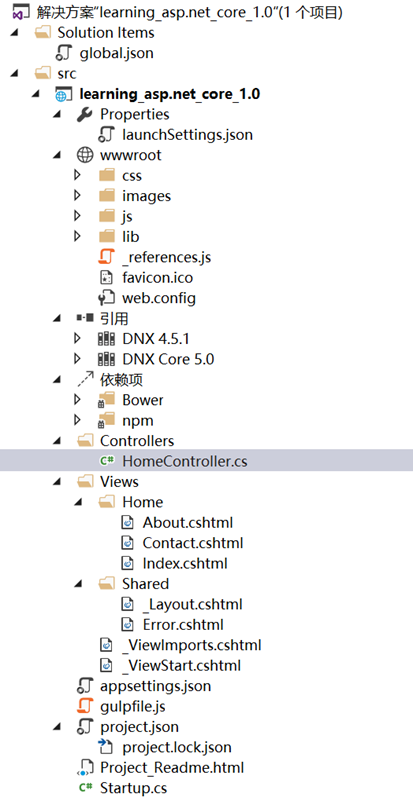
相比之前变动比较大的是项目扩展名从csproj变成了xproj,web.config 改名appsetting.json,默认使用了npm与bower等包管理工具,gulp等前端管理工具;使用了DNX 4.5与DNX Core 5.0来支持.NET Framework 与跨平台的.NET Core.
Startup类
public class Startup

{

    /// <summary>

    /// 配置信息

    /// </summary>

    public IConfigurationRoot Configuration { get; set; }

    /// <summary>

    /// 程序入口点

    /// </summary>

    /// <param name="env"></param>

    public Startup(IHostingEnvironment env)

    {

        var builder = new ConfigurationBuilder()

                     .AddJsonFile("appsettings.json")

                     .AddEnvironmentVariables();

        Configuration = builder.Build();

    }

    /// <summary>

    /// 配置服务

    /// </summary>

    /// <param name="services"></param>

    public void ConfigureServices(IServiceCollection services)

    {

        services.AddAntiforgery()

                .AddCaching()

                .AddLogging()

                .AddMvc();

        /*

        services.AddEntityFramework()

                .AddSqlServer()

                .AddDbContext<ApbContext>(options => options.UseSqlServer(connection));

         */

    }

    /// <summary>

    /// 配置组件

    /// </summary>

    /// <param name="app"></param>

    /// <param name="env"></param>

    /// <param name="loggerFactory"></param>

    public void Configure(IApplicationBuilder app, IHostingEnvironment env, ILoggerFactory loggerFactory)

    {

        //使用日志

        loggerFactory.AddConsole(Configuration.GetSection("Logging"));

        loggerFactory.AddDebug();

        //是否调试模式

        if (env.IsDevelopment())

        {

            app.UseBrowserLink();

            app.UseDeveloperExceptionPage();

        }

        else

        {

            app.UseExceptionHandler("/Home/Error");

        }

        app.UseIISPlatformHandler();

        //使用静态文件

        app.UseStaticFiles();

        //使用MVC

        app.UseMvc(routes =>

        {

            routes.MapRoute(

                name: "default",

                template: "{controller=Home}/{action=Index}/{id?}");

        });

    }

    /// <summary>

    /// 配置启动的类

    /// </summary>

    /// <param name="args"></param>

    public static void Main(string[] args) => WebApplication.Run<Startup>(args);

}
1)Startup方法是整个程序的启动入口,类似于Global.asax,在构造函数中初始化基础配置信息后绑定到一个Configuration属性上。
2)ConfigureServices方法是依赖注入的核心,默认参数services,也可以注册依赖注入自定义的类型,同时需要启一些功能也需要在这里开启,比如添加MVC,缓存,日志模块等 就需要增加如下代码:
services.AddAntiforgery()

             .AddCaching()

             .AddLogging()

             .AddMvc()
在新版的ASP.NET Core 1.0中,除了最基础的模块大部分模块都是以组件化方式来实现,也就是官方的GITHUB上有很多模块源码组成,要启用这些组件首先要添加该模块才能使用。如启用EF模块:
services.AddEntityFramework()

              .AddSqlServer()

              .AddDbContext<ApbContext>(options => options.UseSqlServer(connection));
3)Configure方法则是对增加的组件进行配置,如使用MVC功能并配置路由:
app.UseMvc(routes =>

          {

               routes.MapRoute(

                   name: "default",

                   template: "{controller=Home}/{action=Index}/{id?}");

           });
ASP.NET Core 1.0 基础与应用启动的更多相关文章
- ASP.NET Core 1.0基础之应用启动
来源https://docs.asp.net/en/latest/fundamentals/startup.html ASP.NET 5 使得应用对每个http请求有完整的控制权.Startup类是程 ...
- ASP.NET Core 1.0基础之依赖注入
来源https://docs.asp.net/en/latest/fundamentals/dependency-injection.html ASP.NET Core 1.0在设计上原生就支持和 ...
- ASP.NET Core 1.0 基础之配置
来源https://docs.asp.net/en/latest/fundamentals/configuration.html ASP.NET Core 1.0支持不同的配置选项.应用配置数据可以是 ...
- ASP.NET Core 1.0基础之日志
过年出去玩了一圈,回来继续翻译.前两天偷懒没有翻译,只是转了两篇C# 7计划中的新features,大家还是很支持的.现在继续完善这个系列. 来源https://docs.asp.net/en/lat ...
- ASP.NET Core 1.0基础之诊断
来源https://docs.asp.net/en/latest/fundamentals/diagnostics.html ASP.NET Core 1.0包含了一些新的特性来辅助诊断问题.可以在S ...
- 探索ASP.Net Core 3.0系列四:在ASP.NET Core 3.0的应用中启动时运行异步任务
前言:在本文中,我将介绍ASP.NET Core 3.0 WebHost的微小更改如何使使用IHostedService在应用程序启动时更轻松地运行异步任务. 翻译 :Andrew Lock ht ...
- ASP.NET Core 1.0基础之静态文件处理
来源 这些HTML , CSS files, image files, 和JavaScript这些静态文件,是ASP.NET能够直接响应给客户端的.本文详述下ASP.NET和静态文件的关系. Serv ...
- 探索ASP.NET Core 3.0系列一:新的项目文件、Program.cs和generic host
前言:在这篇文章中我们来看看ASP.Net Core 3.0应用程序中一些基本的部分—— .csproj项目文件和Program.cs文件.我将会介绍它们从 ASP.NET Core 2.x 中的默认 ...
- [转]探索ASP.NET Core 3.0 系列
这是该系列的第一篇文章:探索ASP.NET Core 3.0. 第1部分-探索新的项目文件Program.cs和通用主机(本文) 第2部分-比较ASP.NET Core 3.0模板之间的Startup ...
随机推荐
- highcharts x轴中文刻度太长换行
xAxis: { type: 'category', title:null, gridLineWidth: 1, lineColor: "#50ae93", labels: { s ...
- MySQL导入导出表数据
原文链接:http://blog.163.com/yang_jianli/blog/static/1619900062010111011041228/ 1.这里的导出和mysqldump不同,只是导出 ...
- Redis的appendfsync参数详解
redis.conf中的appendfysnc是对redis性能有重要影响的参数之一.可取三种值:always.everysec和no. 设置为always时,会极大消弱Redis的性能,因为这种模式 ...
- 用Kotlin写一个基于Spring Boot的RESTful服务
Spring太复杂了,配置这个东西简直就是浪费生命.尤其在没有什么并发压力,随便搞一个RESTful服务 让整个业务跑起来先的情况下,更是么有必要纠结在一堆的XML配置上.显然这么想的人是很多的,于是 ...
- 基于SVG+AJAX的网页数据监控
这个是前一阵做的一个火灾报警主机数据网页监控,前后台主要耗时5小时.绘图2小时,配置后端采集端1小时,测试2小时. 用的SVG,上面画的指示灯可以实时显示传感器的状态. 用开源方案实现. 如果集成到自 ...
- Beta阶段第五篇Scrum冲刺博客-Day4
1.站立式会议 提供当天站立式会议照片一张 2.每个人的工作 (有work item 的ID),并将其记录在码云项目管理中: 昨天已完成的工作. 张晨晨:目标增加单词收藏功能 郭琪容:学习收藏功能的实 ...
- STL容器之一vector
STL中最简单也是最有用的容器之一是vector<T>类模板,称为向量容器,是序列类型容器中的一种. 1.vector<T> 对象的基本用法(1)声明:vector<ty ...
- spark 中划分stage的思路
窄依赖指父RDD的每一个分区最多被一个子RDD的分区所用,表现为 一个父RDD的分区对应于一个子RDD的分区 两个父RDD的分区对应于一个子RDD 的分区. 宽依赖指子RDD的每个分区都要依赖于父RD ...
- cxGrid 的 Sorting和Filtering的总开关
- ServiceStack DateTime数据类型转Json出现的困扰
执行dotnet-new selfhost sstest 创建项目,然后打开解决方案 修改ssTest.ServiceModel中的Hello.cs,在HellopResponse中添加时间属性,然后 ...