
Django Rest Framework源码剖析(三)-----频率控制
| 一、简介 |
承接上篇文章Django Rest Framework源码剖析(二)-----权限,当服务的接口被频繁调用,导致资源紧张怎么办呢?当然或许有很多解决办法,比如:负载均衡、提高服务器配置、通过代理限制访问频率等,但是django rest framework自身就提供了访问频率的控制,可以从代码本身做控制。
| 二、频率控制内部原理概述 |
django rest framework 中频率控制基本原理基于访问次数和时间,通过计算实现,当然我们也可以自己定义频率控制方法。基本原理如下:
启用频率,DRF内部会有一个字典记录来访者的IP,以及访问时间最近几(通过配置)次的访问时间,这样确保每次列表中最后一个元素都是该用户请求的最早时间,形式如下:
{

IP1:[第三次请求时间,第二次请求时间,第一次请求时间,],

IP2:[第二次请求时间,第一次请求时间,],

.....

}
举例说明,比如我现在配置了5秒内只能访问2次,每次请求到达频率控制时候先判断请求者IP是否已经在这个请求字典中,若存在,在判断用户请求5秒内的请求次数,若次数小于等于2,则允许请求,若大于2,则超过频率,不允许请求。
关于请求频率的的算法(以5秒内最多访问两次为例):
1.首先删除掉列表里5秒之前的请求,循环判断当前请求时间和最早请求时间之差记作t1,若t1大于5则代表列表中最早的请求已经在5秒外了,删除掉,继续判断倒数第二个请求,直到t1小于5.
2.当确保请求列表中只有5秒内请求时候,接着判断其请求次数(列表长度),若长度大于2,则证明超过5秒内访问超过2次了,则不允许,否则,通过并将此次访问时间插入到列表最前面,作为最新访问时间。
| 三、基本使用 |
同样,先来了解下频率控制的使用方法,后面在分析源码
1.在utils目录下新建立文件,throttle.py,添加频率控制为每分钟只能访问5次
#!/usr/bin/env python3

#_*_ coding:utf-8 _*_

#Author:wd

from rest_framework.throttling import SimpleRateThrottle

class VisitThrottle(SimpleRateThrottle):

    """5秒内最多访问三次"""

    scope = "WD"  #settings配置文件中的key,用于获取配置的频率

    def get_cache_key(self, request, view):

        return self.get_ident(request)
2.settings.py中配置全局频率控制
REST_FRAMEWORK = {

    #频率控制配置

    "DEFAULT_THROTTLE_CLASSES":['utils.throttle.VisitThrottle'],   #全局配置,

    "DEFAULT_THROTTLE_RATES":{

        'WD':'5/m',         #速率配置每分钟不能超过5次访问,WD是scope定义的值,

    }

}
urls.py
from django.conf.urls import url

from django.contrib import admin

from app01 import views

urlpatterns = [

    url(r'^api/v1/auth', views.AuthView.as_view()),

    url(r'^api/v1/order', views.OrderView.as_view()),

]
models.py
from django.db import models

class UserInfo(models.Model):

    user_type_choice = (

        (1,"普通用户"),

        (2,"会员"),

    )

    user_type = models.IntegerField(choices=user_type_choice)

    username = models.CharField(max_length=32,unique=True)

    password = models.CharField(max_length=64)

class UserToken(models.Model):

    user = models.OneToOneField(to=UserInfo)

    token = models.CharField(max_length=64)
订单视图
class OrderView(APIView):

    '''查看订单'''

    from utils.permissions import MyPremission

    authentication_classes = [Authentication,]    #添加认证

    permission_classes = [MyPremission,]           #添加权限控制

    def get(self,request,*args,**kwargs):

        #request.user

        #request.auth

        ret = {'code':1000,'msg':"你的订单已经完成",'data':"买了一个mac"}

        return JsonResponse(ret,safe=True)
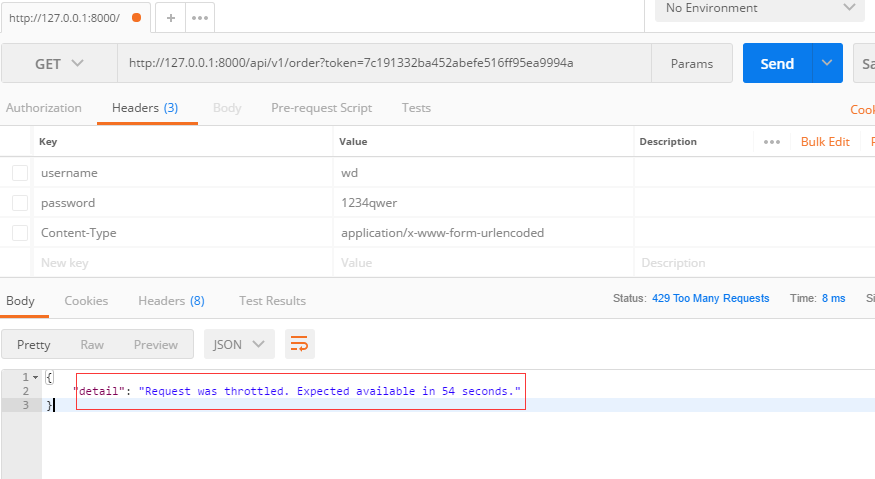
使用postman验证如下图,可以看到频率限制已经起作用了。
| 四、频率控制源码剖析 |
在前面几篇文章中已经分析了DRF的认证、权限源码,频率控制也一样也从APIView的dispatch方法说起,参考注解:
dispatch()
def dispatch(self, request, *args, **kwargs):

        """

        `.dispatch()` is pretty much the same as Django's regular dispatch,

        but with extra hooks for startup, finalize, and exception handling.

        """

        self.args = args

        self.kwargs = kwargs

        #对原始request进行加工,丰富了一些功能

        #Request(

        #     request,

        #     parsers=self.get_parsers(),

        #     authenticators=self.get_authenticators(),

        #     negotiator=self.get_content_negotiator(),

        #     parser_context=parser_context

        # )

        #request(原始request,[BasicAuthentications对象,])

        #获取原生request,request._request

        #获取认证类的对象,request.authticators

        #1.封装request

        request = self.initialize_request(request, *args, **kwargs)

        self.request = request

        self.headers = self.default_response_headers  # deprecate?

        try:

            self.initial(request, *args, **kwargs)

            # Get the appropriate handler method

            if request.method.lower() in self.http_method_names:

                handler = getattr(self, request.method.lower(),

                                  self.http_method_not_allowed)

            else:

                handler = self.http_method_not_allowed

            response = handler(request, *args, **kwargs)

        except Exception as exc:

            response = self.handle_exception(exc)

        self.response = self.finalize_response(request, response, *args, **kwargs)

        return self.response
2.执行inital方法,initial方法中执行check_throttles则开始频率控制
def initial(self, request, *args, **kwargs):

        """

        Runs anything that needs to occur prior to calling the method handler.

        """

        self.format_kwarg = self.get_format_suffix(**kwargs)

        # Perform content negotiation and store the accepted info on the request

        neg = self.perform_content_negotiation(request)

        request.accepted_renderer, request.accepted_media_type = neg

        # Determine the API version, if versioning is in use.

        version, scheme = self.determine_version(request, *args, **kwargs)

        request.version, request.versioning_scheme = version, scheme

        # Ensure that the incoming request is permitted

        #2.实现认证

        self.perform_authentication(request)

        #3.权限判断

        self.check_permissions(request)

        #4.频率限制

        self.check_throttles(request)
3.下面是check_throttles源码,与认证、权限一样采用列表对象方式,通过判断allow_request方法返回值判断频率是否通过
  def check_throttles(self, request):

        """

        Check if request should be throttled.

        Raises an appropriate exception if the request is throttled.

        """

        for throttle in self.get_throttles(): #循环频率控制类结果

            if not throttle.allow_request(request, self): #判断其中的allow_requestf返回结果,true则频率通过,否则返回等待多少秒可以访问

                self.throttled(request, throttle.wait())
4.get_throttles方法,采用列表生成式生成频率控制对象,与认证、权限一直
    def get_throttles(self):

        """

        Instantiates and returns the list of throttles that this view uses.

        """

        return [throttle() for throttle in self.throttle_classes] #列表生成式生成控制频率对象列表
5.self.throttle_classes属性获取
class APIView(View):

    # The following policies may be set at either globally, or per-view.

    renderer_classes = api_settings.DEFAULT_RENDERER_CLASSES

    parser_classes = api_settings.DEFAULT_PARSER_CLASSES

    authentication_classes = api_settings.DEFAULT_AUTHENTICATION_CLASSES

    throttle_classes = api_settings.DEFAULT_THROTTLE_CLASSES     #频率控制全局配置

    permission_classes = api_settings.DEFAULT_PERMISSION_CLASSES

    content_negotiation_class = api_settings.DEFAULT_CONTENT_NEGOTIATION_CLASS

    metadata_class = api_settings.DEFAULT_METADATA_CLASS

    versioning_class = api_settings.DEFAULT_VERSIONING_CLASS
6.通过以上分析,知道了频率控制是通过判断每个类中的allow_request放法的返回值来判断频率是否通过,下面我们来看看我们所使用的SimpleRateThrottle怎么实现的,分析部分请看注解:
SimpleRateThrottle类源码:
class SimpleRateThrottle(BaseThrottle):

    """

    A simple cache implementation, that only requires `.get_cache_key()`

    to be overridden.

    The rate (requests / seconds) is set by a `rate` attribute on the View

    class.  The attribute is a string of the form 'number_of_requests/period'.

    Period should be one of: ('s', 'sec', 'm', 'min', 'h', 'hour', 'd', 'day')

    Previous request information used for throttling is stored in the cache.

    """

    cache = default_cache  # 存放请求时间,类似与示例中的大字典,这里使用的是django的缓存

    timer = time.time

    cache_format = 'throttle_%(scope)s_%(ident)s'

    scope = None

    THROTTLE_RATES = api_settings.DEFAULT_THROTTLE_RATES

    def __init__(self):

        if not getattr(self, 'rate', None):

            self.rate = self.get_rate()

        self.num_requests, self.duration = self.parse_rate(self.rate)

    def get_cache_key(self, request, view):
 # 获取请求的key标识,必须要有否则会报错,这里可以重写,使用用户的用户名、或其他作为key,在示例中使用的get_ident方法用户获取用户IP作为key

        """

        Should return a unique cache-key which can be used for throttling.

        Must be overridden.

        May return `None` if the request should not be throttled.

        """

        raise NotImplementedError('.get_cache_key() must be overridden')

    def get_rate(self):   # 获取配置文件的配置速率

        """

        Determine the string representation of the allowed request rate.

        """

        if not getattr(self, 'scope', None):  # 通过获取共有属性scope来获取配置的速率

            msg = ("You must set either `.scope` or `.rate` for '%s' throttle" %

                   self.__class__.__name__)

            raise ImproperlyConfigured(msg)

        try:

            return self.THROTTLE_RATES[self.scope]

        except KeyError:

            msg = "No default throttle rate set for '%s' scope" % self.scope

            raise ImproperlyConfigured(msg)

    def parse_rate(self, rate):  # 格式化速率

        """

        Given the request rate string, return a two tuple of:

        <allowed number of requests>, <period of time in seconds>

        """

        if rate is None:

            return (None, None)

        num, period = rate.split('/')  # 分离字符串

        num_requests = int(num)

        duration = {'s': 1, 'm': 60, 'h': 3600, 'd': 86400}[period[0]]  # 转换时间为数字,示例配置的5/m,m转为60秒

        return (num_requests, duration)

    def allow_request(self, request, view):   #  判断请求的速率是否通过

        """

        Implement the check to see if the request should be throttled.

        On success calls `throttle_success`.

        On failure calls `throttle_failure`.

        """

        if self.rate is None:

            return True

        self.key = self.get_cache_key(request, view)

        if self.key is None:

            return True

        self.history = self.cache.get(self.key, [])

        self.now = self.timer()

        # Drop any requests from the history which have now passed the

        # throttle duration

        while self.history and self.history[-1] <= self.now - self.duration:   # 频率判断实现原理,已经举例进行了说明

            self.history.pop()

        if len(self.history) >= self.num_requests:

            return self.throttle_failure()

        return self.throttle_success()

    def throttle_success(self):       # 频率通过返回true

        """

        Inserts the current request's timestamp along with the key

        into the cache.

        """

        self.history.insert(0, self.now)

        self.cache.set(self.key, self.history, self.duration)

        return True

    def throttle_failure(self):    # 不通过返回false

        """

        Called when a request to the API has failed due to throttling.

        """

        return False

    def wait(self):               # 返回等待时间

        """

        Returns the recommended next request time in seconds.

        """

        if self.history:

            remaining_duration = self.duration - (self.now - self.history[-1])

        else:

            remaining_duration = self.duration

        available_requests = self.num_requests - len(self.history) + 1

        if available_requests <= 0:

            return None

        return remaining_duration / float(available_requests)
get_ident方法源码,该方法用于获取请求的IP:
    def get_ident(self, request):

        """

        Identify the machine making the request by parsing HTTP_X_FORWARDED_FOR

        if present and number of proxies is > 0. If not use all of

        HTTP_X_FORWARDED_FOR if it is available, if not use REMOTE_ADDR.

        """

        xff = request.META.get('HTTP_X_FORWARDED_FOR')

        remote_addr = request.META.get('REMOTE_ADDR')

        #这里request是封装以后的requst,django原生的是request._request.META 这样也可以获取

        num_proxies = api_settings.NUM_PROXIES

        if num_proxies is not None:

            if num_proxies == 0 or xff is None:

                return remote_addr

            addrs = xff.split(',')

            client_addr = addrs[-min(num_proxies, len(addrs))]

            return client_addr.strip()

        return ''.join(xff.split()) if xff else remote_addr
| 五、内置频率控制类 |
DRF内置了多种频率控制类提供我们使用,其核心原理都是通过判断request_allow方法返回值来判断频率是否通过,通过wait方法返回等待时间。
1.BaseThrottle:最基本的频率控制需要重写allow_request方法和wait方法
class BaseThrottle(object):

    """

    Rate throttling of requests.

    """

    def allow_request(self, request, view):

        """

        Return `True` if the request should be allowed, `False` otherwise.

        """

        raise NotImplementedError('.allow_request() must be overridden')

    def get_ident(self, request):

        """

        Identify the machine making the request by parsing HTTP_X_FORWARDED_FOR

        if present and number of proxies is > 0. If not use all of

        HTTP_X_FORWARDED_FOR if it is available, if not use REMOTE_ADDR.

        """

        xff = request.META.get('HTTP_X_FORWARDED_FOR')

        remote_addr = request.META.get('REMOTE_ADDR')

        num_proxies = api_settings.NUM_PROXIES

        if num_proxies is not None:

            if num_proxies == 0 or xff is None:

                return remote_addr

            addrs = xff.split(',')

            client_addr = addrs[-min(num_proxies, len(addrs))]

            return client_addr.strip()

        return ''.join(xff.split()) if xff else remote_addr

    def wait(self):

        """

        Optionally, return a recommended number of seconds to wait before

        the next request.

        """

        return None
class BaseThrottle(object)
2.SimpleRateThrottle:示例中已经使用,并对源码和原理进行了分析。
class SimpleRateThrottle(BaseThrottle):

    """

    A simple cache implementation, that only requires `.get_cache_key()`

    to be overridden.

    The rate (requests / seconds) is set by a `rate` attribute on the View

    class.  The attribute is a string of the form 'number_of_requests/period'.

    Period should be one of: ('s', 'sec', 'm', 'min', 'h', 'hour', 'd', 'day')

    Previous request information used for throttling is stored in the cache.

    """

    cache = default_cache

    timer = time.time

    cache_format = 'throttle_%(scope)s_%(ident)s'

    scope = None

    THROTTLE_RATES = api_settings.DEFAULT_THROTTLE_RATES

    def __init__(self):

        if not getattr(self, 'rate', None):

            self.rate = self.get_rate()

        self.num_requests, self.duration = self.parse_rate(self.rate)

    def get_cache_key(self, request, view):

        """

        Should return a unique cache-key which can be used for throttling.

        Must be overridden.

        May return `None` if the request should not be throttled.

        """

        raise NotImplementedError('.get_cache_key() must be overridden')

    def get_rate(self):

        """

        Determine the string representation of the allowed request rate.

        """

        if not getattr(self, 'scope', None):

            msg = ("You must set either `.scope` or `.rate` for '%s' throttle" %

                   self.__class__.__name__)

            raise ImproperlyConfigured(msg)

        try:

            return self.THROTTLE_RATES[self.scope]

        except KeyError:

            msg = "No default throttle rate set for '%s' scope" % self.scope

            raise ImproperlyConfigured(msg)

    def parse_rate(self, rate):

        """

        Given the request rate string, return a two tuple of:

        <allowed number of requests>, <period of time in seconds>

        """

        if rate is None:

            return (None, None)

        num, period = rate.split('/')

        num_requests = int(num)

        duration = {'s': 1, 'm': 60, 'h': 3600, 'd': 86400}[period[0]]

        return (num_requests, duration)

    def allow_request(self, request, view):

        """

        Implement the check to see if the request should be throttled.

        On success calls `throttle_success`.

        On failure calls `throttle_failure`.

        """

        if self.rate is None:

            return True

        self.key = self.get_cache_key(request, view)

        if self.key is None:

            return True

        self.history = self.cache.get(self.key, [])

        self.now = self.timer()

        # Drop any requests from the history which have now passed the

        # throttle duration

        while self.history and self.history[-1] <= self.now - self.duration:

            self.history.pop()

        if len(self.history) >= self.num_requests:

            return self.throttle_failure()

        return self.throttle_success()

    def throttle_success(self):

        """

        Inserts the current request's timestamp along with the key

        into the cache.

        """

        self.history.insert(0, self.now)

        self.cache.set(self.key, self.history, self.duration)

        return True

    def throttle_failure(self):

        """

        Called when a request to the API has failed due to throttling.

        """

        return False

    def wait(self):

        """

        Returns the recommended next request time in seconds.

        """

        if self.history:

            remaining_duration = self.duration - (self.now - self.history[-1])

        else:

            remaining_duration = self.duration

        available_requests = self.num_requests - len(self.history) + 1

        if available_requests <= 0:

            return None

        return remaining_duration / float(available_requests)
3.AnonRateThrottle:匿名用户频率控制
class AnonRateThrottle(SimpleRateThrottle):

    """

    Limits the rate of API calls that may be made by a anonymous users.

    The IP address of the request will be used as the unique cache key.

    """

    scope = 'anon'

    def get_cache_key(self, request, view):

        if request.user.is_authenticated:

            return None  # Only throttle unauthenticated requests.

        return self.cache_format % {

            'scope': self.scope,

            'ident': self.get_ident(request)

        }
AnonRateThrottle
4.UserRateThrottle:基于SimpleRateThrottle,对用户的频率控制
class UserRateThrottle(SimpleRateThrottle):

    """

    Limits the rate of API calls that may be made by a given user.

    The user id will be used as a unique cache key if the user is

    authenticated.  For anonymous requests, the IP address of the request will

    be used.

    """

    scope = 'user'

    def get_cache_key(self, request, view):

        if request.user.is_authenticated:

            ident = request.user.pk

        else:

            ident = self.get_ident(request)

        return self.cache_format % {

            'scope': self.scope,

            'ident': ident

        }
UserRateThrottle
| 六、自定义频率控制 |
自定义频率控制无非实现request_allow方法和wait方法,你可以根据实际需求来定制你的频率控制,下面是示例:
from rest_framework.throttling import BaseThrottle

import time

REQUEST_RECORD = {}  # 访问记录,可使用nosql数据库

class VisitThrottle(BaseThrottle):

    '''60s内最多能访问5次'''

    def __init__(self):

        self.history = None

    def allow_request(self, request, view):

        # 获取用户ip (get_ident)

        remote_addr = self.get_ident(request)

        ctime = time.time()

        if remote_addr not in REQUEST_RECORD:

            REQUEST_RECORD[remote_addr] = [ctime, ]  # 保持请求的时间,形式{ip:[时间,]}

            return True  # True表示可以访问

        # 获取当前ip的历史访问记录

        history = REQUEST_RECORD.get(remote_addr)

        self.history = history

        while history and history[-1] < ctime - 60:

            # while循环确保每列表中是最新的60秒内的请求

            history.pop()

        # 访问记录小于5次,将本次请求插入到最前面,作为最新的请求

        if len(history) < 5:

            history.insert(0, ctime)

            return True

    def wait(self):

        '''返回等待时间'''

        ctime = time.time()

        return 60 - (ctime - self.history[-1])
| 七、总结 |
1.使用方法:
- 继承BaseThrottle类
- 重写request_allow方法和wait方法,request_allow方法返回true代表通过,否则拒绝,wait返回等待的时间
2.配置
###全局使用

REST_FRAMEWORK = {

    #频率控制配置

    "DEFAULT_THROTTLE_CLASSES":['utils.throttle.VisitThrottle'],   #全局配置,

    "DEFAULT_THROTTLE_RATES":{

        'WD':'5/m',         #速率配置每分钟不能超过5次访问,WD是scope定义的值

    }

}

##单一视图使用

throttle_classes = [VisitThrottle,]

##优先级

单一视图>全局
Django Rest Framework源码剖析(三)-----频率控制的更多相关文章
- Django Rest Framework源码剖析(八)-----视图与路由
一.简介 django rest framework 给我们带来了很多组件,除了认证.权限.序列化...其中一个重要组件就是视图,一般视图是和路由配合使用,这种方式给我们提供了更灵活的使用方法,对于使 ...
- Django Rest Framework源码剖析(七)-----分页
一.简介 分页对于大多数网站来说是必不可少的,那你使用restful架构时候,你可以从后台获取数据,在前端利用利用框架或自定义分页,这是一种解决方案.当然django rest framework提供 ...
- Django Rest Framework源码剖析(六)-----序列化(serializers)
一.简介 django rest framework 中的序列化组件,可以说是其核心组件,也是我们平时使用最多的组件,它不仅仅有序列化功能,更提供了数据验证的功能(与django中的form类似). ...
- Django Rest Framework源码剖析(五)-----解析器
一.简介 解析器顾名思义就是对请求体进行解析.为什么要有解析器?原因很简单,当后台和前端进行交互的时候数据类型不一定都是表单数据或者json,当然也有其他类型的数据格式,比如xml,所以需要解析这类数 ...
- Django Rest Framework源码剖析(四)-----API版本
一.简介 在我们给外部提供的API中,可会存在多个版本,不同的版本可能对应的功能不同,所以这时候版本使用就显得尤为重要,django rest framework也为我们提供了多种版本使用方法. 二. ...
- Django Rest Framework源码剖析(二)-----权限
一.简介 在上一篇博客中已经介绍了django rest framework 对于认证的源码流程,以及实现过程,当用户经过认证之后下一步就是涉及到权限的问题.比如订单的业务只能VIP才能查看,所以这时 ...
- Django REST framework 源码剖析
前言 Django REST framework is a powerful and flexible toolkit for building Web APIs. 本文由浅入深的引入Django R ...
- Django Rest Framework源码剖析(一)-----认证
一.简介 Django REST Framework(简称DRF),是一个用于构建Web API的强大且灵活的工具包. 先说说REST:REST是一种Web API设计标准,是目前比较成熟的一套互联网 ...
- 跨站请求伪造(csrf),django的settings源码剖析,django的auth模块
目录 一.跨站请求伪造(csrf) 1. 什么是csrf 2. 钓鱼网站原理 3. 如何解决csrf (1)思路: (2)实现方法 (3)实现的具体代码 3. csrf相关的装饰器 (1)csrf_p ...
随机推荐
- 活字格Web应用平台学习笔记3-显示数据列表
活字格第二课的目标,用活字格创建一个简单的在线数据管理系统. 看下设计界面.刚开始跟着点,有点懵圈,到做完,回忆了一下,其实就是先建一张表,然后,把表和页面联系起来,即在页面中划出一些区域,和表的字段 ...
- TensorFlow数据读取方式:Dataset API
英文详细版参考:https://www.cnblogs.com/jins-note/p/10243716.html Dataset API是TensorFlow 1.3版本中引入的一个新的模块,主要服 ...
- Adapter中用不了getWindowManager()
在写popupwindow的时候一般会获取屏幕的宽高来设置popupwindow的宽高,但是在adapter中用不了getWindowManager(), 但是为什么Activity中就可以用getW ...
- windows无法访问linux服务器
解决: 或者有效 iptables -A INPUT -p tcp --dport 8000 -j ACCEPT[root@localhost ~]# iptables -A OUTPUT -p tc ...
- http的断点续传
要实现断点续传的功能,通常都需要客户端记录下当前的下载进度,并在需要续传的时候通知服务端本次需要下载的内容片段. HTTP1.1协议(RFC2616)中定义了断点续传相关的HTTP头 Range和Co ...
- Eclipse中Tomcat的配置
1.Window-Preferences-Server-Runtime Environments 2.点击Add,选择相应的Tomcat版本,我的是7.0的所以我选择这个.并勾选Create a ne ...
- 匿名访问windows server 2008 R2 文件服务器的共享
匿名访问windows server 2008 R2 文件服务器的共享 匿名访问windows 2008 R2 文件服务器的共享,七步:第一步 取消简单文件共享:第二步 设置需要共享的文件夹every ...
- C# MVC 使用 CKEditor图片上传 提示“不正确的服务器响应”
重点:看一下你使用的CKEditor版本 过程: 后台需要一款富文本编辑器.经过挑选后,最后选择了FCKEditor 的升级版 CKEditor .在官网下载了4.10.1版本. 经过一番配置后,富文 ...
- 使用PhotoShop将视频转为gif格式
由于文档中不方便上传视频,尤其是一些短视频,将其制作成gif格式更便于浏览,刚好PhotoShop中有这种功能,笔者在这里分享一下. 在PS中打开需要转换格式的视频文件,选择文件选项导出中的导出为We ...
- BZOJ2744:[HEOI2012]朋友圈(最大团,乱搞)
Description 在很久很久以前,曾经有两个国家和睦相处,无忧无虑的生活着.一年一度的评比大会开始了,作为和平的两国,一个朋友圈数量最多的永远都是最值得他人的尊敬,所以现在就是需要你求朋友圈的最 ...