
YARN label 特性 & 指定队列及label提交任务
以下基于 hadoop版本 hadoop-2.8.4
给各个节点打标签
yarn rmadmin -addToClusterNodeLabels fastcpu,normal

        # 是否独占默认是true,不独占其他队列就可以normal标签资源

        yarn rmadmin -addToClusterNodeLabels "fastcpu,normal(exclusive=false)"

yarn rmadmin -replaceLabelsOnNode "container-192-168-200-140,fastcpu"

# container-192-168-200-141不打标签,也可以不执行此命令

yarn rmadmin -replaceLabelsOnNode "container-192-168-200-141, "

yarn rmadmin -replaceLabelsOnNode "container-192-168-200-142,normal"
1.spark任务可以通过spark-submit方式指定参数spark.yarn.am.nodeLabelExpression和spark.yarn.executor.nodeLabelExpression来实现,使任务提交到特定的分区。
./bin/spark-submit --class org.apache.spark.examples.SparkPi

  --master yarn --deploy-mode cluster --driver-memory 3g --executor-memory 2g

  --conf spark.yarn.am.nodeLabelExpression=fastcpu

  --conf spark.yarn.executor.nodeLabelExpression=fastcpu  jars/spark-examples.jar 10
2.hadoop distribute shell / hadoop job 也可以。
hadoop jar ./share/hadoop/yarn/hadoop-yarn-applications-distributedshell-2.8.4.jar -shell_command "sleep 100000" -jar ./share/hadoop/yarn/hadoop-yarn-applications-distributedshell-2.8.4.jar -num_containers 5 -queue etl-ywpt -node_label_expression fastcpu
mr example wordcount:
hadoop jar share/hadoop/mapreduce/hadoop-mapreduce-examples-2.8.4.jar wordcount -D mapreduce.job.node-label-expression="fastcpu" -D mapreduce.job.queuename="etl-ywpt" /hadoop-hadoop-namenode-container-192-168-200-140.log /output
3.另外还可以通过yarn代码的方式提交;hive可以指定如下参数 提交指定队列及label。
set mapreduce.job.node-label-expression=fastcpu;

set mapreduce.job.queuename=etl-bi;
yarn web ui
yarn 8088调度页面

node 的 label 页面
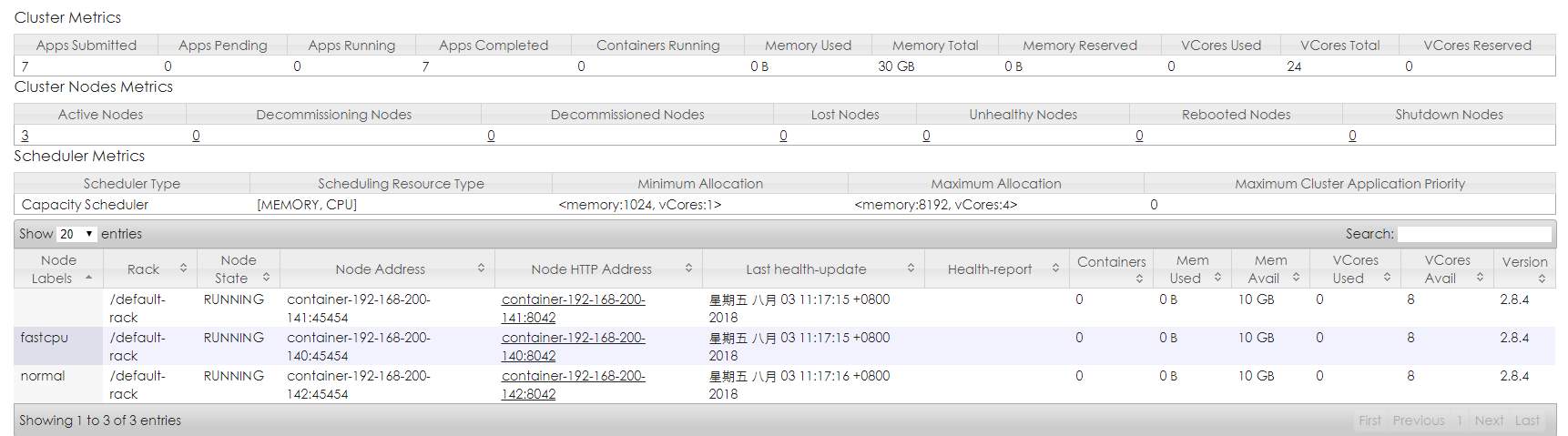
容量调度才能使用label便签,公平调度暂时不支持标签。
配置文件 capacity-scheduler.xml
<!--

  Licensed under the Apache License, Version 2.0 (the "License");

  you may not use this file except in compliance with the License.

  You may obtain a copy of the License at

    http://www.apache.org/licenses/LICENSE-2.0

  Unless required by applicable law or agreed to in writing, software

  distributed under the License is distributed on an "AS IS" BASIS,

  WITHOUT WARRANTIES OR CONDITIONS OF ANY KIND, either express or implied.

  See the License for the specific language governing permissions and

  limitations under the License. See accompanying LICENSE file.

-->

<configuration>

   <property>

    <name>yarn.scheduler.capacity.maximum-applications</name>

    <value>10000</value>

    <description>

      Maximum number of applications that can be pending and running.

    </description>

  </property>

  <property>

     <name>yarn.scheduler.capacity.root.queues</name>

     <value>default,etl-ywpt,etl-bi,etl-ly,etl-test,hue,bi</value>

  </property>

 <!--

  <property>

   <name>yarn.scheduler.capacity.root.acl_submit_applications</name>

   <value> </value>

  </property>

 <property>

 <name>yarn.scheduler.capacity.root.acl_administer_queue</name>

 <value>hadoop </value>

</property>

-->

 <property>

    <name>yarn.scheduler.capacity.maximum-am-resource-percent</name>

    <value>0.2</value>

    <description>

      Maximum percent of resources in the cluster which can be used to run

      application masters i.e. controls number of concurrent running

      applications.

    </description>

  </property>

 <property>

  <name>yarn.scheduler.capacity.resource-calculator</name>

  <value>org.apache.hadoop.yarn.util.resource.DominantResourceCalculator</value>

 </property>

 <!--

  <property>

    <name>yarn.scheduler.capacity.resource-calculator</name>

    <value>org.apache.hadoop.yarn.util.resource.DefaultResourceCalculator</value>

    <description>

      The ResourceCalculator implementation to be used to compare

      Resources in the scheduler.

      The default i.e. DefaultResourceCalculator only uses Memory while

      DominantResourceCalculator uses dominant-resource to compare

      multi-dimensional resources such as Memory, CPU etc.

    </description>

  </property>

  -->

<!-- label两种模式 normal/fastcpu -->

<!-- root队列可提交的标签 -->

<property>

   <name>yarn.scheduler.capacity.root.capacity</name>

   <value>100</value>

</property>

<property>

      <name>yarn.scheduler.capacity.root.maximum-capacity</name>

      <value>100</value>

</property>

<property>

  <name>yarn.scheduler.capacity.root.accessible-node-labels</name>

  <value>*</value>

</property>

<property>

    <name>yarn.scheduler.capacity.root.accessible-node-labels.normal.capacity</name>

    <value>100</value>

    <description>root队列对normal标签节点可用的百分比</description>

</property>

<property>

    <name>yarn.scheduler.capacity.root.accessible-node-labels.fastcpu.capacity</name>

    <value>100</value>

    <description>root队列对fastcpu标签节点可用的百分比</description>

</property>

<!-- default队列 -->

 <property>

    <name>yarn.scheduler.capacity.root.default.accessible-node-labels</name>

    <value>normal</value>

    <description>default队列应用可用的节点标签</description>

</property>

<property>

    <name>yarn.scheduler.capacity.root.default.default-node-label-expression</name>

    <value>normal</value>

    <description>default队列应用默认节点标签</description>

</property>

<property>

    <name>yarn.scheduler.capacity.root.default.accessible-node-labels.normal.capacity</name>

    <value>10</value>

    <description>default队列对normal标签节点可用的百分比</description>

</property>

<property>

    <name>yarn.scheduler.capacity.root.default.accessible-node-labels.normal.maximum-capacity</name>

    <value>50</value>

</property>

 <property>

    <name>yarn.scheduler.capacity.root.default.capacity</name>

    <value>10</value>

    <description>Default queue target capacity.</description>

  </property>

  <property>

    <name>yarn.scheduler.capacity.root.default.maximum-capacity</name>

    <value>20</value>

    <description>

      The maximum capacity of the default queue.

    </description>

  </property>

<!-- etl-ywpt队列 -->

<property>

    <name>yarn.scheduler.capacity.root.etl-ywpt.accessible-node-labels</name>

    <value>*</value>

    <description>etl-ywpt队列应用可用的节点标签</description>

</property>

<property>

    <name>yarn.scheduler.capacity.root.etl-ywpt.default-node-label-expression</name>

    <value>normal</value>

    <description>etl-ywpt队列应用默认节点标签</description>

</property>

<property>

    <name>yarn.scheduler.capacity.root.etl-ywpt.accessible-node-labels.normal.capacity</name>

    <value>10</value>

    <description>etl-ywpt队列对fastcpu标签节点可用的百分比</description>

</property>

<property>

      <name>yarn.scheduler.capacity.root.etl-ywpt.accessible-node-labels.normal.maximum-capacity</name>

      <value>20</value>

</property>

<property>

    <name>yarn.scheduler.capacity.root.etl-ywpt.accessible-node-labels.fastcpu.capacity</name>

    <value>50</value>

    <description>etl-ywpt队列对fastcpu标签节点可用的百分比</description>

</property>

<property>

      <name>yarn.scheduler.capacity.root.etl-ywpt.accessible-node-labels.fastcpu.maximum-capacity</name>

      <value>60</value>

</property>

<property>

  <name>yarn.scheduler.capacity.root.etl-ywpt.capacity</name>

  <value>5</value>

</property>

<property>

    <name>yarn.scheduler.capacity.root.etl-ywpt.maximum-capacity</name>

    <value>30</value>

</property>

<!-- etl-bi队列 -->

<property>

    <name>yarn.scheduler.capacity.root.etl-bi.accessible-node-labels</name>

    <value>fastcpu</value>

    <description>etl-bi队列应用可用的节点标签</description>

</property>

<property>

    <name>yarn.scheduler.capacity.root.etl-bi.default-node-label-expression</name>

    <value>fastcpu</value>

    <description>etl-bi队列应用默认节点标签</description>

</property>

<property>

    <name>yarn.scheduler.capacity.root.etl-bi.accessible-node-labels.fastcpu.capacity</name>

    <value>50</value>

    <description>etl-bi队列对fastcpu标签节点可用的百分比</description>

</property>

<property>

      <name>yarn.scheduler.capacity.root.etl-bi.accessible-node-labels.fastcpu.maximum-capacity</name>

      <value>100</value>

</property>

<property>

  <name>yarn.scheduler.capacity.root.etl-bi.capacity</name>

  <value>3</value>

</property>

<property>

    <name>yarn.scheduler.capacity.root.etl-bi.maximum-capacity</name>

    <value>20</value>

</property>

<!-- etl-ly队列 -->

<property>

    <name>yarn.scheduler.capacity.root.etl-ly.accessible-node-labels</name>

    <value>normal</value>

    <description>etl-ly队列应用可用的节点标签</description>

</property>

<property>

    <name>yarn.scheduler.capacity.root.etl-ly.default-node-label-expression</name>

    <value>normal</value>

    <description>etl-ly队列应用默认节点标签</description>

</property>

<property>

    <name>yarn.scheduler.capacity.root.etl-ly.accessible-node-labels.normal.capacity</name>

    <value>20</value>

    <description>default队列对normal标签节点可用的百分比</description>

</property>

<property>

    <name>yarn.scheduler.capacity.root.etl-ly.accessible-node-labels.fastcpu.maximum-capacity</name>

    <value>100</value>

</property>

<property>

  <name>yarn.scheduler.capacity.root.etl-ly.capacity</name>

  <value>52</value>

</property>

<property>

    <name>yarn.scheduler.capacity.root.etl-ly.maximum-capacity</name>

    <value>55</value>

</property>

<!-- etl-test队列 -->

<property>

    <name>yarn.scheduler.capacity.root.etl-test.accessible-node-labels</name>

    <value>normal</value>

    <description>etl-test队列应用可用的节点标签</description>

</property>

<property>

    <name>yarn.scheduler.capacity.root.etl-test.default-node-label-expression</name>

    <value>normal</value>

    <description>etl-test队列应用默认节点标签</description>

</property>

<property>

    <name>yarn.scheduler.capacity.root.etl-test.accessible-node-labels.normal.capacity</name>

    <value>10</value>

    <description>etl-test队列对normal标签节点可用的百分比</description>

</property>

<property>

    <name>yarn.scheduler.capacity.root.etl-test.accessible-node-labels.normal.maximum-capacity</name>

    <value>100</value>

</property>

<property>

  <name>yarn.scheduler.capacity.root.etl-test.capacity</name>

  <value>10</value>

</property>

<property>

  <name>yarn.scheduler.capacity.root.etl-test.maximum-capacity</name>

  <value>50</value>

</property>

<!-- hue队列  -->

<property>

    <name>yarn.scheduler.capacity.root.hue.accessible-node-labels</name>

    <value>normal</value>

    <description>hue队列应用可用的节点标签</description>

</property>

<property>

    <name>yarn.scheduler.capacity.root.hue.default-node-label-expression</name>

    <value>normal</value>

    <description>hue队列应用默认节点标签</description>

</property>

<property>

    <name>yarn.scheduler.capacity.root.hue.accessible-node-labels.normal.capacity</name>

    <value>10</value>

    <description>hue队列对normal标签节点可用的百分比</description>

</property>

<property>

    <name>yarn.scheduler.capacity.root.hue.accessible-node-labels.normal.maximum-capacity</name>

    <value>100</value>

</property>

<property>

  <name>yarn.scheduler.capacity.root.hue.capacity</name>

  <value>10</value>

</property>

<property>

  <name>yarn.scheduler.capacity.root.hue.maximum-capacity</name>

  <value>50</value>

</property>

 <!-- bi队列 -->

 <property>

    <name>yarn.scheduler.capacity.root.bi.accessible-node-labels</name>

    <value>normal</value>

    <description>bi队列应用可用的节点标签</description>

</property>

<property>

    <name>yarn.scheduler.capacity.root.bi.default-node-label-expression</name>

    <value>normal</value>

    <description>bi队列应用默认节点标签</description>

</property>

<property>

    <name>yarn.scheduler.capacity.root.bi.accessible-node-labels.normal.capacity</name>

    <value>40</value>

    <description>bi队列对fastcpu标签节点可用的百分比</description>

</property>

<property>

    <name>yarn.scheduler.capacity.root.bi.accessible-node-labels.normal.maximum-capacity</name>

    <value>100</value>

</property>

<property>

  <name>yarn.scheduler.capacity.root.bi.capacity</name>

  <value>10</value>

</property>

<property>

  <name>yarn.scheduler.capacity.root.bi.maximum-capacity</name>

  <value>20</value>

</property>

</configuration>
YARN label 特性 & 指定队列及label提交任务的更多相关文章
- django-celery 创建多个broker队列 异步执行任务时指定队列
一.这里不再详细述说 django 框架中如何使用celery, 重点放在如何实现创建多个队列, 并指定队列存放异步任务 笔者使用 django-celery==3.2.2 模块, 配置项及配置参 ...
- 洛谷 P1160 队列安排 Label:链表 数据结构
题目描述 一个学校里老师要将班上N个同学排成一列,同学被编号为1-N,他采取如下的方法: 1.先将1号同学安排进队列,这时队列中只有他一个人: 2.2-N号同学依次入列,编号为i的同学入列方式为:老师 ...
- 转: 【Java并发编程】之二十一:并发新特性—阻塞队列和阻塞栈(含代码)
转载请注明出处:http://blog.csdn.net/ns_code/article/details/17511147 阻塞队列 阻塞队列是Java5并发新特性中的内容,阻塞队列的接口是Java. ...
- db2 v9.7 新特性cur_commit 能够实现未提交读新特性cur_commit 能够实现未提交读
db2 get db cfg|find "CUR_COMMIT" 当前已落实 (CUR_COMMIT) = ON ...
- 【Java并发编程】:并发新特性—塞队列和阻塞栈
阻塞队列 阻塞队列是Java5并发新特性中的内容,阻塞队列的接口是Java.util.concurrent.BlockingQueue,它有多个实现类:ArrayBlockingQueue.Delay ...
- 使用FROM确认按钮(键盘13号键)提交特性并使用ajax.POST提交.
如果又想使用FROM确认按钮(键盘13号键)提交特性 还能继续用AJAX.POST提交.就需要使用return false 来阻止FROM默认提交 代码如下: HTML页面 这里最关键就是用了ret ...
- label 标签的用法,点label选中单选、复选框或文本框
<label>拥有的权限</label> <label class="checkbox" id="privilege_id" st ...
- Java高级特性—消息队列
1)什么是jms JMS即Java消息服务(Java Message Service)应用程序接口是一个Java平台中关于面向消息中间件(MOM)的API. 它便于消息系统中的Java应用程序进行消息 ...
- Qt添加窗口背景图片、Label图片显示、、Label文字显示
一.添加窗口背景图片 重写MainWindow绘制事件 void MainWindow::paintEvent(QPaintEvent *event) { QPainter painter(this) ...
随机推荐
- 黄聪:清理微信浏览网站的缓存,Cookie
微信官方说明是取消关注,但是开发中发现取消关注缓存还是存在! 解决方法如下: 方法一: 用微信内置浏览器打开这个网页debugx5.qq.com ,就会有清除缓存的选项,如下图 方法二: 如果你用An ...
- [蓝桥杯]ALGO-92.算法训练_前缀表达式
问题描述 编写一个程序,以字符串方式输入一个前缀表达式,然后计算它的值.输入格式为:“运算符 对象1 对象2”,其中,运算符为“+”(加法).“-”(减法).“*”(乘法)或“/”(除法),运算对象为 ...
- bzoj5019: [Snoi2017]遗失的答案
Description 小皮球在计算出答案之后,买了一堆皮肤,他心里很开心,但是一不小心,就忘记自己买了哪些皮肤了.==|||万 幸的是,他还记得他把所有皮肤按照1-N来编号,他买来的那些皮肤的编号( ...
- 云中树莓派(5):利用 AWS IoT Greengrass 进行 IoT 边缘计算
云中树莓派(1):环境准备 云中树莓派(2):将传感器数据上传到AWS IoT 并利用Kibana进行展示 云中树莓派(3):通过 AWS IoT 控制树莓派上的Led 云中树莓派(4):利用声音传感 ...
- git安装及git命令的用法
git安装流程 https://git-scm.com/download/win (官网下载) git安装步骤 1.双击安装包 图文解释:
- 部署redis5.0.3
一.准备环境 1.下载 # wget http://download.redis.io/releases/redis-5.0.3.tar.gz [root@localhost ~]# wget htt ...
- centos7.0KVM虚拟化
需要在图形化界面完成实验 查看CPU信息 # cat /proc/cpuinfo centos7默认安装的虚拟化包 # yum list open*tools 如果没安装就安装 #yum instal ...
- 经典算法冒泡排序java版
写个冒泡排序吧 冒泡排序(Bubble Sort)是一种典型的交换排序算法,通过交换数据元素的位置进行排序. public class BubbleSort{ public int[] bubbleS ...
- java使用freemarker模板导出word(带有合并单元格)文档
来自:https://blog.csdn.net/qq_33195578/article/details/73790283 前言:最近要做一个导出word功能,其实网上有很多的例子,但是我需要的是合并 ...
- [UE4]在C++中使用中文变量和中文注释
一.如果直接在C++中使用中文变量名称,在UE4中编译是会出错的,方法的中文注释也会在UE4中变成乱码 二.只要将h文件和cpp文件用记事本另存为utf-8编码就可以了. 也可以配置VS环境: 如何解 ...