
购物商城学习--第二讲(maven工程介绍)
接下来第二讲介绍整体工程如何使用maven搭建的。
使用maven管理工程的好处:
- jar包的管理;
- 工程之间的依赖管理;
- 自动打包
maven常见打包方式:jar、war和pom三种。jar工程,是pom工程的子工程,由pom工程来管理;war工程,是web工程放到web服务器下运行的工程;pom工程一般都是父工程,用于管理jar包版本,maven插件版本和统一的依赖管理,是一个聚合工程。
商城的maven目录结构如下图所示:

首先创建tmall-parent聚合工程,在eclipse中新建maven工程,如下图所示,注意标识出来的方框需要勾选:

在点击下一步之后,弹出以下界面,输出对于土办法group id和artifact id,打包方式选择pom,如下图所示:
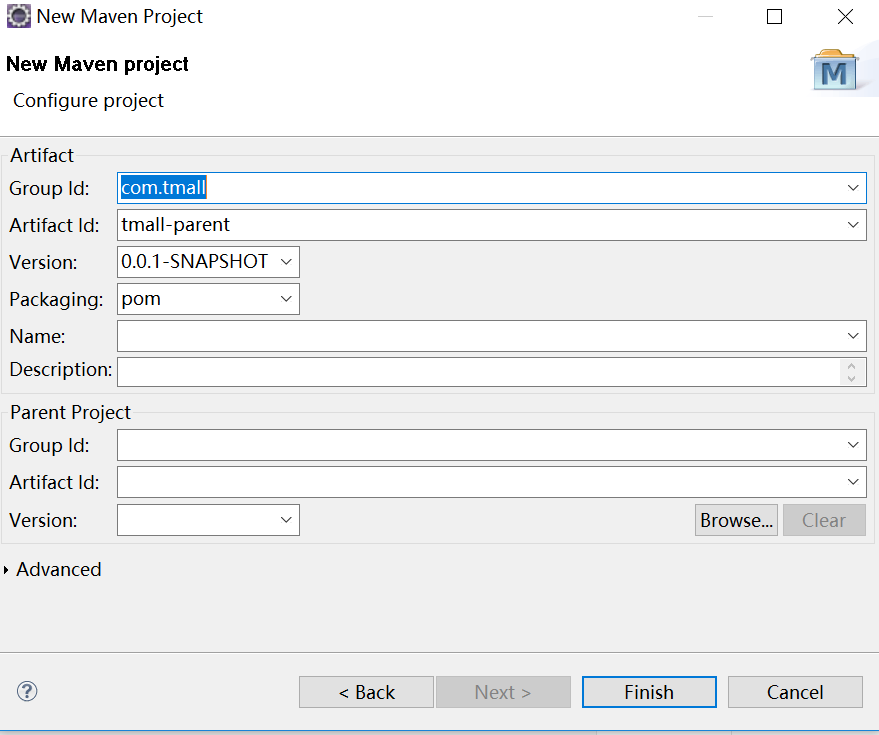
点击finish完成,则生成如下maven聚合工程:

在tmall-parent工程中只统一管理jar包版本,不实际依赖工程,注意此处为dependencyManagement节点,只管理版本。对应pom文件如下图所示:
<project xmlns="http://maven.apache.org/POM/4.0.0" xmlns:xsi="http://www.w3.org/2001/XMLSchema-instance"

    xsi:schemaLocation="http://maven.apache.org/POM/4.0.0 http://maven.apache.org/xsd/maven-4.0.0.xsd">

  <modelVersion>4.0.0</modelVersion>

  <groupId>com.tmall</groupId>

  <artifactId>tmall-parent</artifactId>

  <version>0.0.1-SNAPSHOT</version>

  <packaging>pom</packaging>

  <!-- 集中定义依赖版本号 -->

  <properties>

        <junit.version>4.12</junit.version>

        <spring.version>4.2.4.RELEASE</spring.version>

        <mybatis.version>3.2.8</mybatis.version>

        <mybatis.spring.version>1.2.2</mybatis.spring.version>

        <mybatis.paginator.version>1.2.15</mybatis.paginator.version>

        <mysql.version>5.1.32</mysql.version>

        <slf4j.version>1.6.4</slf4j.version>

        <jackson.version>2.4.2</jackson.version>

        <druid.version>1.0.9</druid.version>

        <httpclient.version>4.3.5</httpclient.version>

        <jstl.version>1.2</jstl.version>

        <servlet-api.version>2.5</servlet-api.version>

        <jsp-api.version>2.0</jsp-api.version>

        <joda-time.version>2.5</joda-time.version>

        <commons-lang3.version>3.3.2</commons-lang3.version>

        <commons-io.version>1.3.2</commons-io.version>

        <commons-net.version>3.3</commons-net.version>

        <pagehelper.version>5.1.6</pagehelper.version>

        <jsqlparser.version>0.9.1</jsqlparser.version>

        <commons-fileupload.version>1.3.1</commons-fileupload.version>

        <jedis.version>2.7.2</jedis.version>

        <solrj.version>4.10.3</solrj.version>

        <dubbo.version>2.5.3</dubbo.version>

        <zookeeper.version>3.4.7</zookeeper.version>

        <zkclient.version>0.1</zkclient.version>

        <activemq.version>5.11.2</activemq.version>

        <freemarker.version>2.3.23</freemarker.version>

        <quartz.version>2.2.2</quartz.version>

    </properties>

    <dependencyManagement>

        <dependencies>

            <!-- 时间操作组件 -->

            <dependency>

                <groupId>joda-time</groupId>

                <artifactId>joda-time</artifactId>

                <version>${joda-time.version}</version>

            </dependency>

            <!-- Apache工具组件 -->

            <dependency>

                <groupId>org.apache.commons</groupId>

                <artifactId>commons-lang3</artifactId>

                <version>${commons-lang3.version}</version>

            </dependency>

            <dependency>

                <groupId>org.apache.commons</groupId>

                <artifactId>commons-io</artifactId>

                <version>${commons-io.version}</version>

            </dependency>

            <dependency>

                <groupId>commons-net</groupId>

                <artifactId>commons-net</artifactId>

                <version>${commons-net.version}</version>

            </dependency>

            <!-- Jackson Json处理工具包 -->

            <dependency>

                <groupId>com.fasterxml.jackson.core</groupId>

                <artifactId>jackson-databind</artifactId>

                <version>${jackson.version}</version>

            </dependency>

            <!-- httpclient -->

            <dependency>

                <groupId>org.apache.httpcomponents</groupId>

                <artifactId>httpclient</artifactId>

                <version>${httpclient.version}</version>

            </dependency>

            <!-- quartz任务调度框架 -->

            <dependency>

                <groupId>org.quartz-scheduler</groupId>

                <artifactId>quartz</artifactId>

                <version>${quartz.version}</version>

            </dependency>

            <!-- 单元测试 -->

            <dependency>

                <groupId>junit</groupId>

                <artifactId>junit</artifactId>

                <version>${junit.version}</version>

                <scope>test</scope>

            </dependency>

            <!-- 日志处理 -->

            <dependency>

                <groupId>org.slf4j</groupId>

                <artifactId>slf4j-log4j12</artifactId>

                <version>${slf4j.version}</version>

            </dependency>

            <!-- Mybatis -->

            <dependency>

                <groupId>org.mybatis</groupId>

                <artifactId>mybatis</artifactId>

                <version>${mybatis.version}</version>

            </dependency>

            <dependency>

                <groupId>org.mybatis</groupId>

                <artifactId>mybatis-spring</artifactId>

                <version>${mybatis.spring.version}</version>

            </dependency>

            <dependency>

                <groupId>com.github.miemiedev</groupId>

                <artifactId>mybatis-paginator</artifactId>

                <version>${mybatis.paginator.version}</version>

            </dependency>

            <dependency>

                <groupId>com.github.pagehelper</groupId>

                <artifactId>pagehelper</artifactId>

                <version>${pagehelper.version}</version>

            </dependency>

            <!-- MySql -->

            <dependency>

                <groupId>mysql</groupId>

                <artifactId>mysql-connector-java</artifactId>

                <version>${mysql.version}</version>

            </dependency>

            <!-- 连接池 -->

            <dependency>

                <groupId>com.alibaba</groupId>

                <artifactId>druid</artifactId>

                <version>${druid.version}</version>

            </dependency>

            <!-- Spring -->

            <dependency>

                <groupId>org.springframework</groupId>

                <artifactId>spring-context</artifactId>

                <version>${spring.version}</version>

            </dependency>

            <dependency>

                <groupId>org.springframework</groupId>

                <artifactId>spring-beans</artifactId>

                <version>${spring.version}</version>

            </dependency>

            <dependency>

                <groupId>org.springframework</groupId>

                <artifactId>spring-webmvc</artifactId>

                <version>${spring.version}</version>

            </dependency>

            <dependency>

                <groupId>org.springframework</groupId>

                <artifactId>spring-jdbc</artifactId>

                <version>${spring.version}</version>

            </dependency>

            <dependency>

                <groupId>org.springframework</groupId>

                <artifactId>spring-aspects</artifactId>

                <version>${spring.version}</version>

            </dependency>

            <dependency>

                <groupId>org.springframework</groupId>

                <artifactId>spring-jms</artifactId>

                <version>${spring.version}</version>

            </dependency>

            <dependency>

                <groupId>org.springframework</groupId>

                <artifactId>spring-context-support</artifactId>

                <version>${spring.version}</version>

            </dependency>

            <!-- JSP相关 -->

            <dependency>

                <groupId>jstl</groupId>

                <artifactId>jstl</artifactId>

                <version>${jstl.version}</version>

            </dependency>

            <dependency>

                <groupId>javax.servlet</groupId>

                <artifactId>servlet-api</artifactId>

                <version>${servlet-api.version}</version>

                <scope>provided</scope>

            </dependency>

            <dependency>

                <groupId>javax.servlet</groupId>

                <artifactId>jsp-api</artifactId>

                <version>${jsp-api.version}</version>

                <scope>provided</scope>

            </dependency>

            <!-- 文件上传组件 -->

            <dependency>

                <groupId>commons-fileupload</groupId>

                <artifactId>commons-fileupload</artifactId>

                <version>${commons-fileupload.version}</version>

            </dependency>

            <!-- Redis客户端 -->

            <dependency>

                <groupId>redis.clients</groupId>

                <artifactId>jedis</artifactId>

                <version>${jedis.version}</version>

            </dependency>

            <!-- solr客户端 -->

            <dependency>

                <groupId>org.apache.solr</groupId>

                <artifactId>solr-solrj</artifactId>

                <version>${solrj.version}</version>

            </dependency>

            <!-- dubbo相关 -->

            <dependency>

                <groupId>com.alibaba</groupId>

                <artifactId>dubbo</artifactId>

                <version>${dubbo.version}</version>

            </dependency>

            <dependency>

                <groupId>org.apache.zookeeper</groupId>

                <artifactId>zookeeper</artifactId>

                <version>${zookeeper.version}</version>

            </dependency>

            <dependency>

                <groupId>com.github.sgroschupf</groupId>

                <artifactId>zkclient</artifactId>

                <version>${zkclient.version}</version>

            </dependency>

            <dependency>

                <groupId>org.apache.activemq</groupId>

                <artifactId>activemq-all</artifactId>

                <version>${activemq.version}</version>

            </dependency>

            <dependency>

                <groupId>org.freemarker</groupId>

                <artifactId>freemarker</artifactId>

                <version>${freemarker.version}</version>

            </dependency>

        </dependencies>

    </dependencyManagement>

    <build>

        <finalName>${project.artifactId}</finalName>

        <plugins>

            <!-- 资源文件拷贝插件 -->

            <plugin>

                <groupId>org.apache.maven.plugins</groupId>

                <artifactId>maven-resources-plugin</artifactId>

                <version>2.7</version>

                <configuration>

                    <encoding>UTF-8</encoding>

                </configuration>

            </plugin>

            <!-- java编译插件 -->

            <plugin>

                <groupId>org.apache.maven.plugins</groupId>

                <artifactId>maven-compiler-plugin</artifactId>

                <version>3.6.0</version>

                <configuration>

                    <source>1.8</source>

                    <target>1.8</target>

                    <encoding>UTF-8</encoding>

                </configuration>

            </plugin>

        </plugins>

        <pluginManagement>

            <plugins>

                <!-- 配置Tomcat插件 -->

                <plugin>

                    <groupId>org.apache.tomcat.maven</groupId>

                    <artifactId>tomcat7-maven-plugin</artifactId>

                    <version>2.2</version>

                </plugin>

            </plugins>

        </pluginManagement>

    </build>

</project>
创建完tmall-parent工程之后,接下来创建tmall-common工程,注意创建时是创建maven工程,而不是maven模块,模块是子工程,与父工程具有依赖关系。针对maven project和maven module的区别可以参见https://blog.csdn.net/J080624/article/details/81067587。如果是创建maven工程,tmall-common工程需要依赖tmall-parent中的jar包版本关系,在层级上与tmall-parent是同一层级的,创建如下所示:
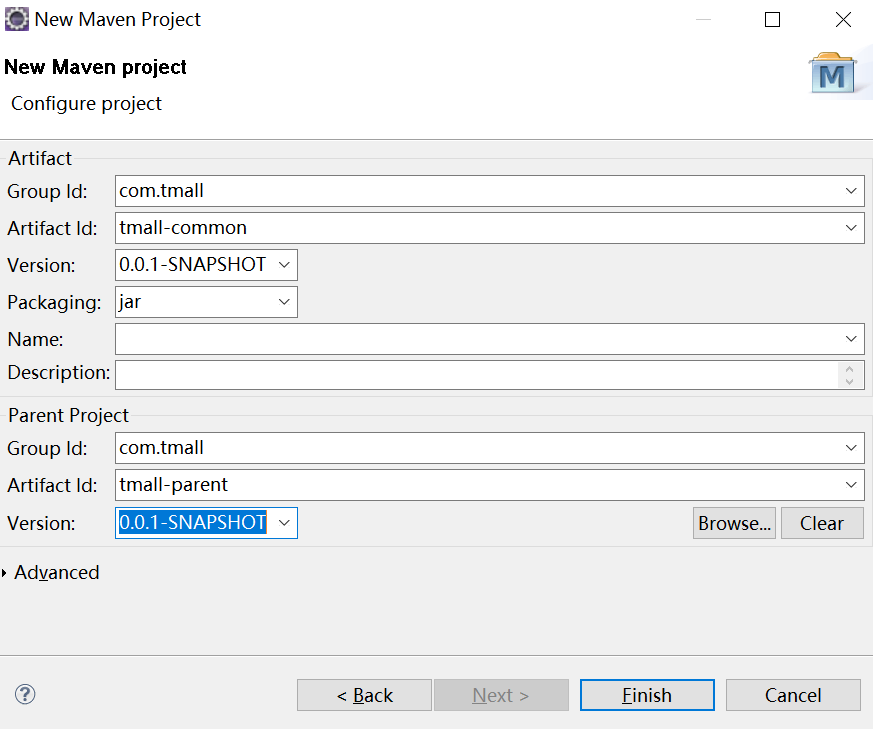
对应tmall-common工程的pom文件如下所示:
<project xmlns="http://maven.apache.org/POM/4.0.0" xmlns:xsi="http://www.w3.org/2001/XMLSchema-instance" xsi:schemaLocation="http://maven.apache.org/POM/4.0.0 http://maven.apache.org/xsd/maven-4.0.0.xsd">

  <modelVersion>4.0.0</modelVersion>

  <parent>

    <groupId>com.tmall</groupId>

    <artifactId>tmall-parent</artifactId>

    <version>0.0.1-SNAPSHOT</version>

  </parent>

  <artifactId>tmall-common</artifactId>

  <dependencies>

          <!-- 时间操作组件 -->

        <dependency>

            <groupId>joda-time</groupId>

            <artifactId>joda-time</artifactId>

        </dependency>

        <!-- Apache工具组件 -->

        <dependency>

            <groupId>org.apache.commons</groupId>

            <artifactId>commons-lang3</artifactId>

        </dependency>

        <dependency>

            <groupId>org.apache.commons</groupId>

            <artifactId>commons-io</artifactId>

        </dependency>

        <dependency>

            <groupId>commons-net</groupId>

            <artifactId>commons-net</artifactId>

        </dependency>

        <!-- Jackson Json处理工具包 -->

        <dependency>

            <groupId>com.fasterxml.jackson.core</groupId>

            <artifactId>jackson-databind</artifactId>

        </dependency>

        <!-- httpclient -->

        <dependency>

            <groupId>org.apache.httpcomponents</groupId>

            <artifactId>httpclient</artifactId>

        </dependency>

        <!-- quartz任务调度框架 -->

        <dependency>

            <groupId>org.quartz-scheduler</groupId>

            <artifactId>quartz</artifactId>

        </dependency>

        <!-- 单元测试 -->

        <dependency>

            <groupId>junit</groupId>

            <artifactId>junit</artifactId>

            <scope>test</scope>

        </dependency>

        <!-- 日志处理 -->

        <dependency>

            <groupId>org.slf4j</groupId>

            <artifactId>slf4j-log4j12</artifactId>

        </dependency>

  </dependencies>

</project>
接下来创建tmall-manager工程,这是个聚合工程,依赖tmall-parent工程。
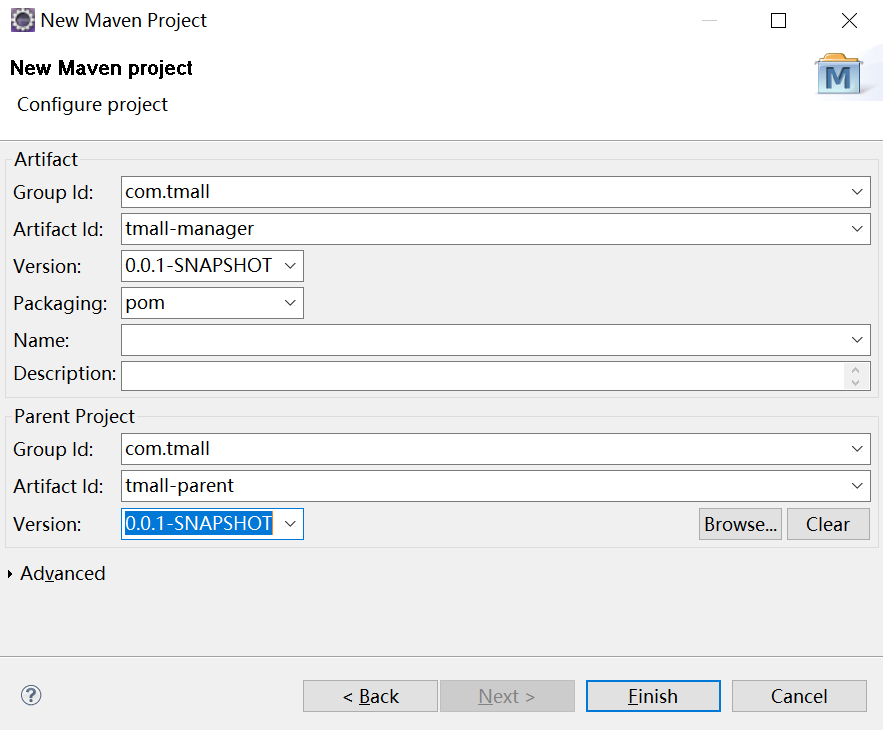
在pom.xml文件中添加对tmall-common工程的依赖关系,如下图所示:
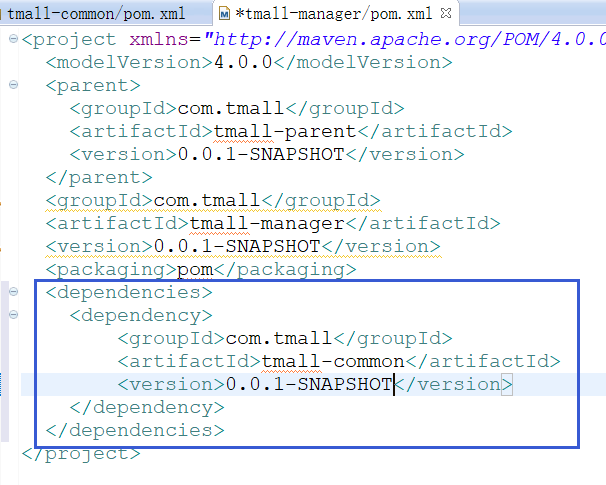
然后添加当前manager工程的四个聚合模块,dao、pojo、interface和service。首先添加dao模块,在taotao-manager工程上右键,在右键菜单New-->Other,创建maven module,如下图所示:

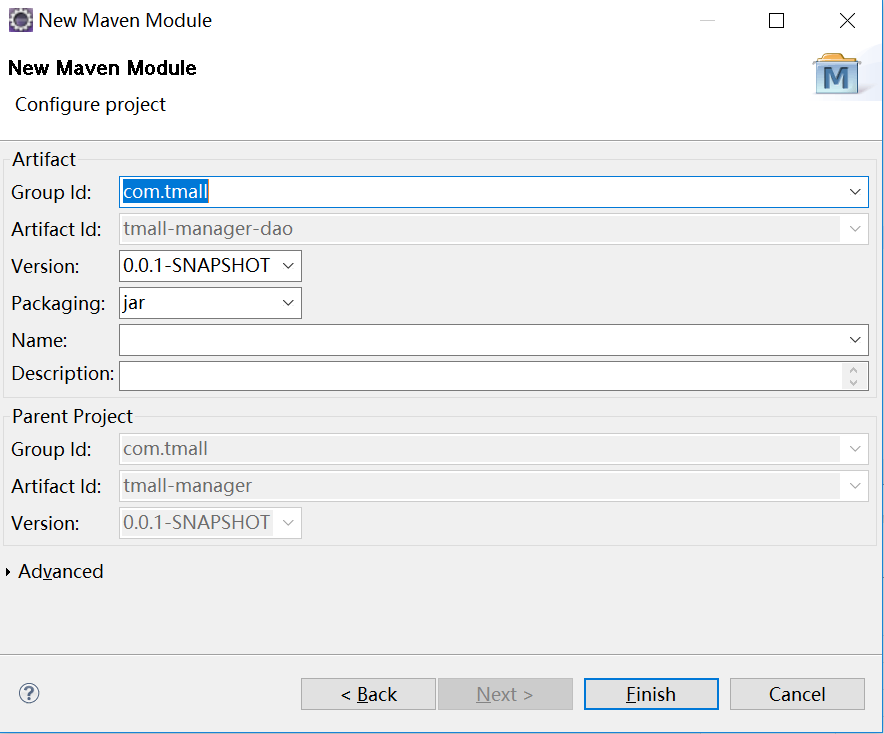
点击“finish”按钮即可完成jar包打包方式的创建,接下来创建pojo,类似过程,不再介绍。
打开tmall-dao工程的pom文件,添加对tmall-pojo工程、mybatis、mysql、分页以及数据池的支持,修改文件如下所示:
<project xmlns="http://maven.apache.org/POM/4.0.0" xmlns:xsi="http://www.w3.org/2001/XMLSchema-instance" xsi:schemaLocation="http://maven.apache.org/POM/4.0.0 http://maven.apache.org/xsd/maven-4.0.0.xsd">

  <modelVersion>4.0.0</modelVersion>

  <parent>

    <groupId>com.tmall</groupId>

    <artifactId>tmall-manager</artifactId>

    <version>0.0.1-SNAPSHOT</version>

  </parent>

  <artifactId>tmall-manager-dao</artifactId>

  <dependencies>

      <dependency>

          <groupId>com.tmall</groupId>

        <artifactId>tmall-manager-pojo</artifactId>

        <version>0.0.1-SNAPSHOT</version>

      </dependency>

      <!-- Mybatis -->

    <dependency>

        <groupId>org.mybatis</groupId>

        <artifactId>mybatis</artifactId>

    </dependency>

    <dependency>

        <groupId>org.mybatis</groupId>

        <artifactId>mybatis-spring</artifactId>

    </dependency>

    <dependency>

        <groupId>com.github.miemiedev</groupId>

        <artifactId>mybatis-paginator</artifactId>

    </dependency>

    <dependency>

        <groupId>com.github.pagehelper</groupId>

        <artifactId>pagehelper</artifactId>

    </dependency>

    <!-- MySql -->

    <dependency>

        <groupId>mysql</groupId>

        <artifactId>mysql-connector-java</artifactId>

    </dependency>

    <!-- 连接池 -->

    <dependency>

        <groupId>com.alibaba</groupId>

        <artifactId>druid</artifactId>

    </dependency>

  </dependencies>

</project>
接下来创建tmall-interface模块,与tmall-dao类似,接口工程添加对pojo的依赖,pom文件如下图所示:
<project xmlns="http://maven.apache.org/POM/4.0.0" xmlns:xsi="http://www.w3.org/2001/XMLSchema-instance" xsi:schemaLocation="http://maven.apache.org/POM/4.0.0 http://maven.apache.org/xsd/maven-4.0.0.xsd">

  <modelVersion>4.0.0</modelVersion>

  <parent>

    <groupId>com.tmall</groupId>

    <artifactId>tmall-manager</artifactId>

    <version>0.0.1-SNAPSHOT</version>

  </parent>

  <artifactId>tmall-manager-interface</artifactId>

  <dependencies>

      <dependency>

          <groupId>com.tmall</groupId>

          <artifactId>tmall-pojo</artifactId>

          <version>0.0.1-SNAPSHOT</version>

      </dependency>

  </dependencies>

</project>
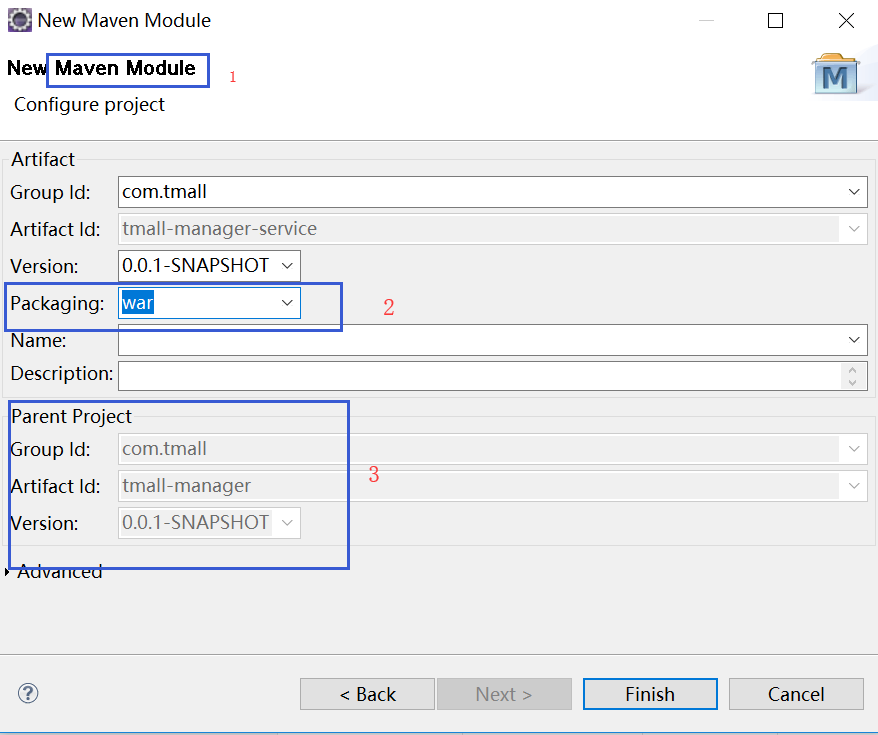
接着创建tmall-service模块,打包方式为war包,创建maven工程如下所示:
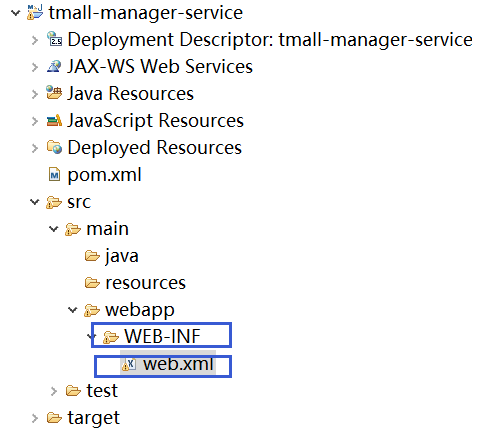
因为tmall-service模块是以war包方式需要部署到web服务器上,确认下是否含有web.xml文件,如果没有需要在tmall-service模块下创建,如下图所示:
web.xml文件内容如下所示:
<?xml version="1.0" encoding="UTF-8"?>

<web-app version="2.5"

 id="WebApp_ID"

 xmlns="http://java.sun.com/xml/ns/javaee"

 xmlns:xsi="http://www.w3.org/2001/XMLSchema-instance"

 xsi:schemaLocation="http://java.sun.com/xml/ns/javaee

 http://java.sun.com/xml/ns/javaee/web-app_2_5.xsd">

 <display-name>taotao-manager</display-name>

 <welcome-file-list>

     <welcome-file>index.jsp</welcome-file>

 </welcome-file-list>

</web-app>
tmall-service模块需要添加对dao层的依赖,以及spring相关组件的依赖,修改pom.xml文件,如下所示:
<project xmlns="http://maven.apache.org/POM/4.0.0"

    xmlns:xsi="http://www.w3.org/2001/XMLSchema-instance"

    xsi:schemaLocation="http://maven.apache.org/POM/4.0.0

    http://maven.apache.org/xsd/maven-4.0.0.xsd">

  <modelVersion>4.0.0</modelVersion>

  <parent>

    <groupId>com.tmall</groupId>

    <artifactId>tmall-manager</artifactId>

    <version>0.0.1-SNAPSHOT</version>

  </parent>

  <artifactId>tmall-manager-service</artifactId>

  <packaging>war</packaging>

  <dependencies>

      <dependency>

          <groupId>com.tmall</groupId>

        <artifactId>tmall-manager-dao</artifactId>

        <version>0.0.1-SNAPSHOT</version>

      </dependency>

      <!-- Spring -->

    <dependency>

        <groupId>org.springframework</groupId>

        <artifactId>spring-context</artifactId>

    </dependency>

    <dependency>

        <groupId>org.springframework</groupId>

        <artifactId>spring-beans</artifactId>

    </dependency>

    <dependency>

        <groupId>org.springframework</groupId>

        <artifactId>spring-webmvc</artifactId>

    </dependency>

    <dependency>

        <groupId>org.springframework</groupId>

        <artifactId>spring-jdbc</artifactId>

    </dependency>

    <dependency>

        <groupId>org.springframework</groupId>

        <artifactId>spring-aspects</artifactId>

    </dependency>

    <dependency>

        <groupId>org.springframework</groupId>

        <artifactId>spring-jms</artifactId>

    </dependency>

    <dependency>

        <groupId>org.springframework</groupId>

        <artifactId>spring-context-support</artifactId>

    </dependency>

  </dependencies>

</project>
创建完tmall-manager工程,接下来创建tmall-manager-web表现层工程,如下图所示:
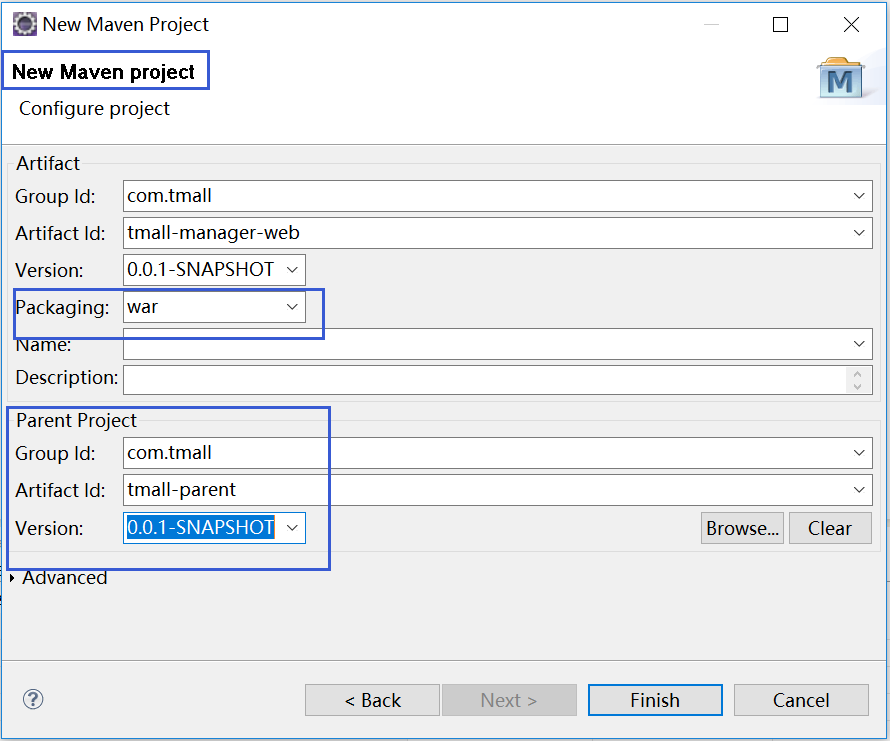
创建对应web.xml文件,如tmall-manager-service模块所示。web工程的pom文件添加对common工程以及jsp、spring相关模块的依赖。如下所示:
<project xmlns="http://maven.apache.org/POM/4.0.0" xmlns:xsi="http://www.w3.org/2001/XMLSchema-instance" xsi:schemaLocation="http://maven.apache.org/POM/4.0.0 http://maven.apache.org/xsd/maven-4.0.0.xsd">

  <modelVersion>4.0.0</modelVersion>

  <parent>

    <groupId>com.tmall</groupId>

    <artifactId>tmall-parent</artifactId>

    <version>0.0.1-SNAPSHOT</version>

  </parent>

  <artifactId>tmall-manager-web</artifactId>

  <packaging>war</packaging>

  <dependencies>

    <!-- 依赖taotao-common -->

    <dependency>

        <groupId>com.tmall</groupId>

        <artifactId>tmall-common</artifactId>

        <version>0.0.1-SNAPSHOT</version>

    </dependency>

      <!-- Spring -->

    <dependency>

        <groupId>org.springframework</groupId>

        <artifactId>spring-context</artifactId>

    </dependency>

    <dependency>

        <groupId>org.springframework</groupId>

        <artifactId>spring-beans</artifactId>

    </dependency>

    <dependency>

        <groupId>org.springframework</groupId>

        <artifactId>spring-webmvc</artifactId>

    </dependency>

    <dependency>

        <groupId>org.springframework</groupId>

        <artifactId>spring-jdbc</artifactId>

    </dependency>

    <dependency>

        <groupId>org.springframework</groupId>

        <artifactId>spring-aspects</artifactId>

    </dependency>

    <dependency>

        <groupId>org.springframework</groupId>

        <artifactId>spring-jms</artifactId>

    </dependency>

    <dependency>

        <groupId>org.springframework</groupId>

        <artifactId>spring-context-support</artifactId>

    </dependency>

    <!-- JSP相关 -->

    <dependency>

        <groupId>jstl</groupId>

        <artifactId>jstl</artifactId>

    </dependency>

    <dependency>

        <groupId>javax.servlet</groupId>

        <artifactId>servlet-api</artifactId>

        <scope>provided</scope>

    </dependency>

    <dependency>

        <groupId>javax.servlet</groupId>

        <artifactId>jsp-api</artifactId>

        <scope>provided</scope>

    </dependency>

  </dependencies>

</project>
到此,所有maven相关项目搭建已经完成。
购物商城学习--第二讲(maven工程介绍)的更多相关文章
- python学习第二讲,pythonIDE介绍以及配置使用
目录 python学习第二讲,pythonIDE介绍以及配置使用 一丶集成开发环境IDE简介,以及配置 1.简介 2.PyCharm 介绍 3.pycharm 的安装 二丶IDE 开发Python,以 ...
- 购物商城学习--第三讲(tomcat插件启动web工程)
此处提到的tomcat插件即maven工程集成的tomcat插件,可以在添加maven的tomcat插件之后,在本地通过脚本或者命令行方式运行web工程,tomcat插件启动只需要修改一个端口即可,非 ...
- 第二讲:WCF介绍(2)
代码 https://yunpan.cn/cPns5DkGnRGNs 密码:3913 在上一讲中我们说到 在代码 当中 完成了 服务的寄宿. 这里我们说下 在实际的开发 当中 我们一般不会去 ...
- CI(CodeIgniter)学习第二讲
一.CI的文件结构: 了解CI的文件结构可以帮助我们快速的对CI框架有一个整体的认识,就好像我们去了一个陌生的城市一样,对你来讲周围的一切都是陌生和未知的,要想快速的了解这座城市,你可以买一张这座城市 ...
- android学习-第二讲(修改项目名称和图标,log,过滤器)
一.在app/src/main/res下有 AndroidManifest.xml打开,打开后如下图1 二.日志工具log log.v() log.d() log.i() log.w() lo ...
- 001淘淘商城项目:项目的Maven工程搭建
开始一个新的项目,特此记录,资料全部来源于传智播客,感谢. 我们要做一个类似电商的项目.用maven做管理. maven里面主要分为三种工程: 1:pom工程:用在父级工程,聚合工程中 2:war工程 ...
- Maven详解(三)------ Maven工程目录介绍
上一章我们配置并安装好了 Maven,那么这一章我们介绍如何用eclipse创建一个 Maven 工程,然后介绍 Maven 工程的目录结构. 1.eclipse 创建 Maven 工程 第一步:Fi ...
- spring 学习(一):使用 intellijIDEA 创建 maven 工程进行 Spring ioc 测试
spring学习(一):使用 intellijIDEA 创建 maven 工程进行 Spring ioc 测试 ioc 概念 控制反转(Inversion of Control,缩写为IOC),是面向 ...
- Java并发包下锁学习第二篇Java并发基础框架-队列同步器介绍
Java并发包下锁学习第二篇队列同步器 还记得在第一篇文章中,讲到的locks包下的类结果图吗?如下图: 从图中,我们可以看到AbstractQueuedSynchronizer这个类很重要(在本 ...
随机推荐
- 一次Linux服务器被入侵和删除木马程序的经历
转载时请务必以超链接形式标明文章 原始出处 .作者信息和本声明.否则将追究法律责任.http://wzlinux.blog.51cto.com/8021085/1740113 一.背景 晚上看到有台服 ...
- FFmpeg进行视频帧提取&音频重采样-Process.waitFor()引发的阻塞超时
由于产品需要对视频做一系列的解析操作,利用FFmpeg命令来完成视频的音频提取.第一帧提取作为封面图片.音频重采样.字幕压缩等功能: 前一篇文章已经记录了FFmpeg在JAVA中的使用-音频提取&am ...
- Spark2.1.0——剖析spark-shell
在<Spark2.1.0——运行环境准备>一文介绍了如何准备基本的Spark运行环境,并在<Spark2.1.0——Spark初体验>一文通过在spark-shell中执行wo ...
- C# 文本转语音,在语音播放过程中停止语音
1,运用SpVoice播放语音 在VS2013创建Windows窗体应用程序项目,添加引用COM组件Microsoft Speech Object Library: using SpeechLib; ...
- Java基础之多态性
class A { public void fun1(){ System.out.println("A--->public fun1()"); } public void f ...
- [css3] 看博客学习别人的旋转的星球
定义一个div 太阳轨道sunline,边框显示出来,定义position为relative #sunline{ width: 500px; height: 500px; border:2px sol ...
- 如何让企业邮箱更安全之gmail yahoo hotmail 反垃圾邮件机制
一.雅虎.Gmail Domainkeys 是由雅虎公司推出的一项确保电子邮件来源的真实性和内容的完整性的技术,它能让电子邮件服务商确定某封信是否真实的来自某个域和帮助他们的用户免受“钓鱼欺诈邮件“的 ...
- BestCoder Round #29——A--GTY's math problem(快速幂(对数法))、B--GTY's birthday gift(矩阵快速幂)
GTY's math problem Time Limit: 1000/1000 MS (Java/Others) Memory Limit: 65536/65536 K (Java/Other ...
- Mybatis之SessionFactory原理
Mybatis在使用前需进行初始化,下面就针对Mybatis的初始化过程进行介绍.Mybatis的初始化过程有两种:基于XML和基于Java API两种方式,下面就针对基于XML的方式进行展开. 一. ...
- [转载] MySQL的四种事务隔离级别
本文实验的测试环境:Windows 10+cmd+MySQL5.6.36+InnoDB 一.事务的基本要素(ACID) 1.原子性(Atomicity):事务开始后所有操作,要么全部做完,要么全部不做 ...