
Error Fix – Replication subscriber does not exist on the server anymore(删除Replication时报错的解决办法)
Recently one of my client has faced weird situation related to SQL Server Replication. Their main database goes down so they started running mirroring database as a primary database, removed subscriber and distributor. Once they have setup primary server back properly, they have restored mirrored database backup to primary server.
Now situation is complicated as subscriber was removed, distributor was removed but in primary server, they are seeing publication as well as subscriber. They have already tried the way I have explained in one of my earlier article “Forcefully remove replication publisher, subscriber and distributor in SQL Server” but no luck.
When they tried to remove publication by pressing “Del” key after selecting “Publication” under “Replication” in SSMS, they faced following message.
TITLE: Microsoft SQL Server Management Studio

------------------------------

Could not delete publication 'SMXPPublisher'.

For help, click: http://go.microsoft.com/fwlink?ProdName=Microsoft+SQL+Server&ProdVer=10.50.1600.1&EvtSrc=Microsoft.SqlServer.Management.UI.VSIntegration.ObjectExplorer.Replication.ReplicationMenuItem&EvtID=CantDeletePublication&LinkId=20476

------------------------------

ADDITIONAL INFORMATION:

An exception occurred while executing a Transact-SQL statement or batch. (Microsoft.SqlServer.ConnectionInfo)

------------------------------

Cannot drop the publication because at least one subscription exists for this publication. Drop all subscriptions to the publication before attempting to drop the publication. If the problem persists, replication metadata might be incorrect; consult Books Online for troubleshooting information.

Changed database context to 'SMXP'. (Microsoft SQL Server, Error: 14005)

For help, click: http://go.microsoft.com/fwlink?ProdName=Microsoft+SQL+Server&ProdVer=10.50.2500&EvtSrc=MSSQLServer&EvtID=14005&LinkId=20476

------------------------------

BUTTONS:

OK

------------------------------
Here is the screen capture of the error:
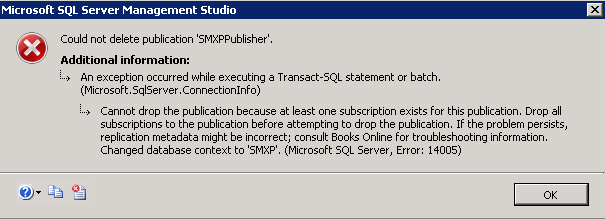
This is obvious message that they can’t delete Publisher until and unless they remove subscriber under publication but the twist is they have already deleted subscriber from the secondary server and primary server were down at that time so effect doesn’t came there so while deleting subscriber from the primary server, they were greeted with following message.
TITLE: Microsoft SQL Server Management Studio

------------------------------

"MARS:SMXPRepl" does not exist on the server anymore. Please refresh its parent tree node.

For help, click: http://go.microsoft.com/fwlink?ProdName=Microsoft+SQL+Server&ProdVer=10.50.1600.1&EvtSrc=Microsoft.SqlServer.Management.UI.VSIntegration.ObjectExplorer.Replication.ReplicationMenuItem&EvtID=ObjectNoLongerExists&LinkId=20476

------------------------------

BUTTONS:

OK

------------------------------
Here is the capture for this error:
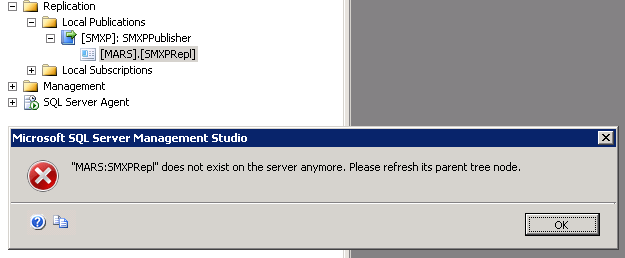
Now, there is a big question, how to remove this replication?
After getting in this clumsy situation, they have called me up to help. They needed very fast solution so I provided undocumented and dirty but yet workable way. Here is what I have asked them to perform and update me with the result.
Here is the small TSQL script I told them to run on primary server in replicated database.
USE master

EXEC sp_removedbreplication @dbname='smxp'

GO

sp_dropsubscription @subscriber='smxprepl'

sp_droppublication 'smxppublisher'
After executing above given commands, they were facing following error:
--Cannot drop the table 'dbo.MSpeer_lsns' because it is being used for replication.
Well, my suggestion now is to unmark “MSPeer_lsns” object from replication with following command and then try to execute above script to remove and drop replication.
sp_MSunmarkreplinfo 'MSpeer_lsns'
Again there wasn’t luck with them so finally I send them one more TSQL which did the magic.
DROP TABLE sysarticleupdates

DROP TABLE sysarticles

sp_removedbreplication 'smxp'

GO

DROP TABLE syspublications

DROP TABLE sysschemaarticles

DROP TABLE systranschemas

DROP TABLE syssubscriptions

DROP TABLE sysarticlecolumns

DROP TABLE MSpub_identity_range

DROP TABLE MSpeer_response

DROP TABLE MSpeer_request

DROP TABLE MSpeer_lsns

DROP VIEW sysextendedarticlesview
After executing above given TSQL script, it has removed everything related to replication. However, I don’t recommend this script for normal situation.
Error Fix – Replication subscriber does not exist on the server anymore(删除Replication时报错的解决办法)的更多相关文章
- mac 安装mysql 报错“ERROR 2002 (HY000): Can not connect to local MySQL server through socket '/tmp/mysql.sock' (2)” 解决办法
首先安装 homebrew 再 brew install mysql 之后连接 mysql 无论是登录还是修改初始密码都会报如下的错误 ERROR 2002 (HY000): Can not conn ...
- error: Failed to start domain lb error: Failed to activate service 'org.freedesktop.machine1': timed out 报错的解决办法
能正常查看kvm虚拟机列表: virsh list 但在执行virsh start lb启动虚拟机时卡顿了好几秒,然后报以下错误: error: Failed to start domain lber ...
- 【LR11】Error -27796: Failed to connect to server"server:port": [10060] Connection timed out错误解决办法
场景描述:被测系统是发布在远程服务器上的,假设IP是10.10.10.10,端口是8066,那么访问地址是http://10.10.10.10:8066/,在control机器上我设置了IP欺骗. ...
- android eclipse 报error loading /system/media/audio/ xxx 错的解决办法。
只针对 报错..error loading /system/media/audio/ xxx.ogg 一步操作 解决烦恼..把 模拟器声音 关了..所有的错 都没了. 包括 关闭按键声音,触摸声音 ...
- 安装“Microsoft SQL Server 2014 Management Objects”时报错"Error Writing to file: Microsoft.SqlServer.XEvent.Linq.dll."
问题: 当安装的软件依赖Microsoft SQL Server 2014 Management Objects时,会把这个组件打进安装包里,但是在服务器上安装时却报如下错误: “Error Writ ...
- [AS3.0] Error #1069: Property onBWDone not found on flash.net.NetConnection and there is no default value.解决办法
在运用FMS录制视频时,假如出现这个错误,最直接的解决办法如下: _netConnection.client = { onBWDone: function():void{ trace("on ...
- 【Runtime Error】打开Matlib7.0运行程序报错的解决办法
1.在C盘建立一个文件夹temp,存放临时文件: 2.右键我的电脑-属性-高级系统设置-环境变量-系统变量,将TEMP.TMP的值改成C:\temp: 3.还是在第2步那里,新建变量,变量名称为BLA ...
- Mac上csv导入mysql提示错误[Error Code] 1290 - The MySQL server is running with the --secure-file-priv option解决办法
1.进入mysql查看secure_file_prive的值 $mysql -u root -p mysql>SHOW VARIABLES LIKE "secure_file_priv ...
- 错误error: Exception at 0x613baa14, code: 0xc0000005: read access violation at: 0x0, flags=0x0 (first chance)的解决办法
一.错误原因 出现这个错误的原因多半是由于指针出现错误,即出现了空指针,也有说是变量没有初始化,笔者碰到的情况是发生了内存溢出. 二.定位方法 一般这种问题直接导致程序崩溃,直接调试,就能找到对应的问 ...
随机推荐
- tomcat8 进入不了Manager App 界面 403 Access Denied
准备 1.注释掉context.xml中的value属性 使用下面的命令: vim /usr/local/tomcats/tomcat-daily/webapps/manager/META-INF/c ...
- [Java初探08]__简单学习Java类和对象
前言 在前面的学习中,我们对面向对象的编程思想有了一个基本的了解,并且简单的了解了类和对象的定义.那么类和对象在Java语言中是如何表现的,这次,就从实际出发,学习一下一下类和对象在Java语言中的使 ...
- Visual Studio 2017 取消 break mode
用 Visual Studio 2017 (以下简称 VS 2017) 运行程序,程序出错后,只是进入中断模式,仅显示 The application is in break mode而没有像 VS ...
- NAT介绍
NAT 即网络地址转换NAT作用:实现内网IP地址和公网IP地址之间的转换可以有效地缓解IP地址危机可以隐藏内网地址实现负载均衡实现内网和内网之间的通信 NAT分类:分类静态NAT:将内网IP地址一对 ...
- rails中accepts_nested_attributes_for应用
Model: class Blog < ActiveRecord::Base has_many :strip_rules accepts_nested_attributes_for :strip ...
- 并发编程 —— ConcurrentHashMap size 方法原理分析
前言 ConcurrentHashMap 博大精深,从他的 50 多个内部类就能看出来,似乎 JDK 的并发精髓都在里面了.但他依然拥有体验良好的 API 给我们使用,程序员根本感觉不到他内部的复杂. ...
- ASP.NET开发,从二层至三层,至面向对象 (2)
继续上一篇<ASP.NET开发,从二层至三层,至面向对象>http://www.cnblogs.com/insus/p/3822624.html .我们了解到怎样把自己的程序由二层变为三层 ...
- Visual Studio 命令提示符
Visual Studio 命令提示和 SDK 命令提示会自动设置环境变量,使您能够轻松使用 .NET Framework 工具. 在 .NET Framework 4 版 和更高版本中,应使用 Vi ...
- Android - 序列化与反序列化
http://www.cnblogs.com/yezhennan/p/5527506.html http://blog.csdn.net/wangchunlei123/article/details/ ...
- CentOS7安装tomcat9
1.去官网下载tomcat9的tar.gz安装包 2.移到centos7中并解压 解压命令: tar -xzvf tomcat9.tar.gz 3.打开文件 /etc 目录下的 profile 文件: ...