
iOS开发手记-iOS8中使用定位服务解决方案
问题描述:
在iOS8之前,app第一次开始定位服务时,系统会弹出一个提示框来让用户选择是否允许使用定位信息。但iOS8后,app将不会出现这个弹窗。第一次运行之后,在设置->隐私->定位服务中,你的app没有任何设置,既不是“永不”,也不是“始终”。
代码如下:
#import "XYZFirstViewController.h"

@interface XYZFirstViewController ()

- (IBAction)LocateButtonClick:(id)sender;

@end

@implementation XYZFirstViewController

- (void)viewDidLoad {

    [super viewDidLoad];

    // Do any additional setup after loading the view.

    [[NSNotificationCenter defaultCenter] addObserver:self selector:@selector(startLocate) name:@"startLocateNotification" object:nil];

    _locationManager=[[CLLocationManager alloc] init];

    _locationManager.delegate=self;

    _locationManager.desiredAccuracy=kCLLocationAccuracyBest;

    _locationManager.distanceFilter=1000.0f;

    _mapView.mapType=MKMapTypeStandard;

    _mapView.delegate=self;

}

- (void)didReceiveMemoryWarning {

    [super didReceiveMemoryWarning];

    // Dispose of any resources that can be recreated.

}

-(void) viewWillAppear:(BOOL)animated{

    [super viewWillAppear:animated];

    [_locationManager startUpdatingLocation];

}

-(void) viewWillDisappear:(BOOL)animated

{

    [super viewWillDisappear:animated];

    [_locationManager stopUpdatingLocation];

}

-(void) locationManager:(CLLocationManager *)manager didUpdateLocations:(NSArray *)locations

{

    CLLocation *currentLocation=[locations lastObject];

    _currentLocation=currentLocation;

    self.currentLocationLabel.text=[NSString stringWithFormat:@"%3.5f,%3.5f,%3.5f", currentLocation.coordinate.longitude,currentLocation.coordinate.latitude,currentLocation.altitude];

    MKCoordinateRegion region=MKCoordinateRegionMakeWithDistance(currentLocation.coordinate, , );

    [_mapView setRegion:region animated:YES];

    MKPointAnnotation *point=[[MKPointAnnotation alloc] init];

    point.coordinate=_currentLocation.coordinate;

    point.title=@"my location";

    [_mapView addAnnotation:point];

}

-(void) locationManager:(CLLocationManager *)manager didFailWithError:(NSError *)error

{

    NSLog(@"error:%@",error);

}

/*

#pragma mark - Navigation

// In a storyboard-based application, you will often want to do a little preparation before navigation

- (void)prepareForSegue:(UIStoryboardSegue *)segue sender:(id)sender {

    // Get the new view controller using [segue destinationViewController].

    // Pass the selected object to the new view controller.

}

*/

- (IBAction)LocateButtonClick:(id)sender {

    [[NSNotificationCenter defaultCenter] postNotificationName:@"startLocateNotification" object:self ];

}

-(void) startLocate

{

    CLGeocoder *geocoder=[[CLGeocoder alloc]init];

    [geocoder reverseGeocodeLocation:_currentLocation completionHandler:^(NSArray *placeMarks, NSError *error)

     {

        if([placeMarks count]>)

        {

            NSLog(@"%@",placeMarks);

            CLPlacemark *placeMark=placeMarks[];

            NSDictionary *addressDictonary=placeMark.addressDictionary;

            _currentAddressLabel.text=[NSString stringWithFormat:@"%@,%@,%@",[addressDictonary objectForKey:(NSString *)kABPersonAddressStateKey],[addressDictonary objectForKey:(NSString *)kABPersonAddressCityKey],[addressDictonary objectForKey:(NSString *) kABPersonAddressStreetKey] ];

        }

     }];

}

@end
解决方案:
以上代码在iOS8之后需要手动调用CLLocationManager对象的requestAlwaysAuthorization/
requestWhenInUseAuthorization方法。 调用该方法需要在Info.plist中设置NSLocationAlwaysUsageDescription/NSLocationWhenInUseUsageDescription的值,这个值会显示在系统提示框中。
代码如下:
-(void) viewWillAppear:(BOOL)animated{

    [super viewWillAppear:animated];

    [_locationManager requestWhenInUseAuthorization];

    [_locationManager startUpdatingLocation];

}
info.plist设置如下:

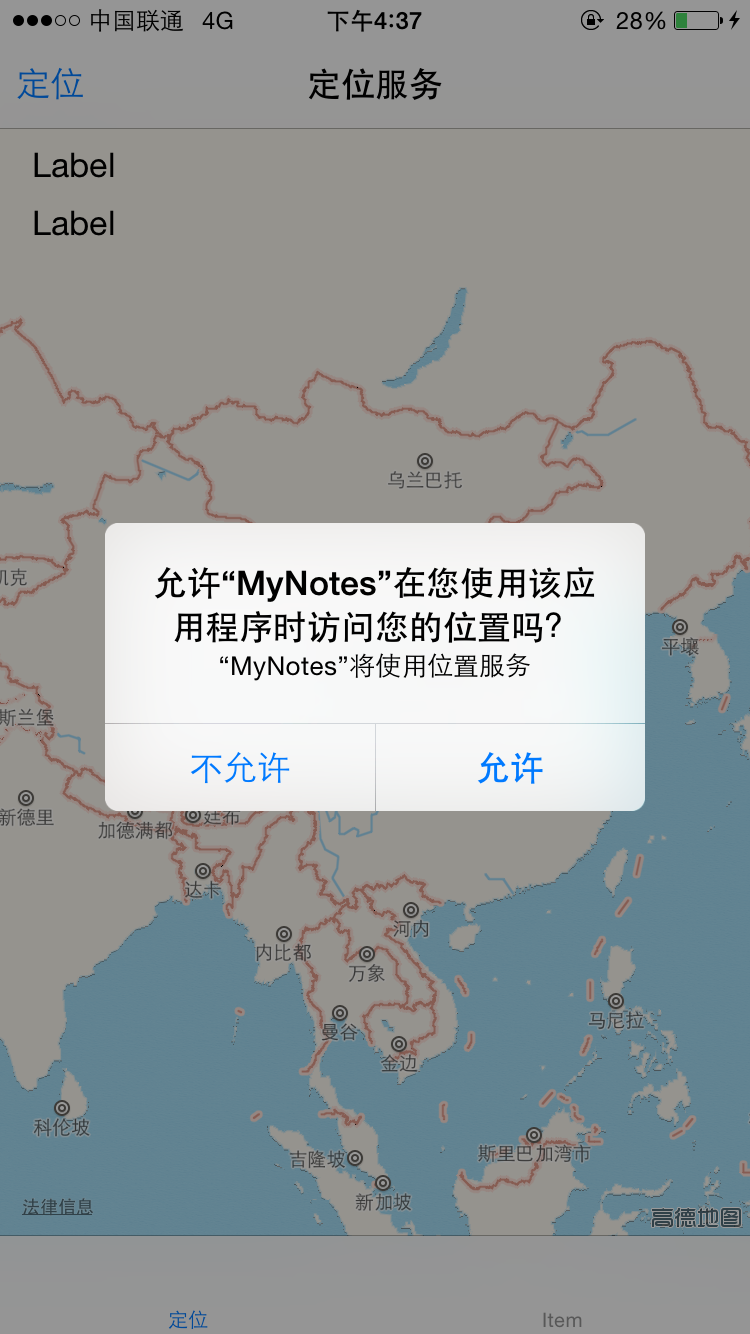
允许效果:

iOS开发手记-iOS8中使用定位服务解决方案的更多相关文章
- iOS8中的定位服务
iOS8中的定位服务 My app that worked fine in iOS 7 doesn't work with the iOS 8 SDK. CLLocationManager doesn ...
- iOS开发雕虫小技之傻瓜式定位神器-超简单方式解决iOS后台定时定位
1.概述 由于公司一款产品的需求,最近一直在研究iOS设备的后台定位.主要的难点就是,当系统进入后台之后,程序会被挂起,届时定时器.以及代码都不会Run~ 所以一旦用户将我的App先换到了后台,我的定 ...
- iOS开发之动画中的时间(概况)
一.引言 在iOS开发中使用动画时,可以通过设置动画的duration.speed.begintime.offset属性,来设置动画的时长.速度.起始时间及起始偏移. 用一个简单的例子来说明各个参数的 ...
- CentOS6.5(4)----宿主机无法访问虚拟机中的web服务解决方案
宿主机无法访问虚拟机中的web服务 在Windows7宿主机中的VMware虚拟机中安装了CentOS6.5操作系统,并且基于Nginx搭建了Web服务器,网页刚刚搭建好的时候,通过宿主机的浏览器可以 ...
- iOS开发手记 - iOS9.3 UINavigationController添加后不显示storyboard中viewcontroller里的控件的解决方法
我原先是这么做的,通常也是这么做 - (BOOL)application:(UIApplication *)application didFinishLaunchingWithOptions:(NSD ...
- (转)iOS 开发,工程中混合使用 ARC 和非ARC
[前提知识] ARC:Automatic Reference Counting,自动引用计数 在开发 iOS 3 以及之前的版本的项目时我们要自己负责使用引用计数来管理内存,比如要手动 retain. ...
- iOS 开发,工程中混合使用 ARC 和非ARC(转)
[前提知识] ARC:Automatic Reference Counting,自动引用计数 在开发 iOS 3 以及之前的版本的项目时我们要自己负责使用引用计数来管理内存,比如要手动 retain. ...
- iOS8 无法设置定位服务
针对iOS8系统,需要在plist文件中添加这两个参数 NSLocationAlwaysUsageDescription = YES NSLocationWhenInUseUsageDescripti ...
- iOS开发关于xcode中souceControl的苹果文档翻译(节选)
Subversion 1.7 provides many benefits: svn1.7版本有以下好处: Improved performance. Increased speed for many ...
随机推荐
- 区间DP初探 P1880 [NOI1995]石子合并
https://www.luogu.org/problemnew/show/P1880 区间dp,顾名思义,是以区间为阶段的一种线性dp的拓展 状态常定义为$f[i][j]$,表示区间[i,j]的某种 ...
- thinkphp生成的验证码提示因存在错误无法显示
/** * 生成验证码 */ public function verify(){ ob_clean();//加上这段代码 $Verify = new Captcha(); $Verify->le ...
- 分享url带中文参数,打开html操作完毕跳转jsp页面中文乱码解决
1.在app端分享参数组合时不对传递的url进行任何编码. 2.打开html页面时使用 escape函数对有中文的参数进行编码 escape(GetQueryString("paramete ...
- 补全爬取的url
有时爬取到的href不全,如href=‘/11031/’解决方法:from urllib import parseurl=parse.urljoin(response.url,get_url)resp ...
- mybatis xml中的大于、小于等符号写法
xml特殊符号转义写法 < < > > <> <> & & ' ...
- VMware14 安装CentOS7及其配置;CentOS7配置网桥,做远程连接;
1.VMware14安装 进入百度链接,按照图形安装就好了.https://jingyan.baidu.com/article/9f7e7ec09da5906f281554d6.html ...
- ubuntu 出现device not managed,解决方法
1. 编辑/etc/NetworkManager/NetworkManager.conf: sudo vi /etc/NetworkManager/NetworkManager.conf将其中的man ...
- c++中指针的指针和指针的引用的使用
当指针作为函数的参数进行传递时,实际上本质上是安置传递,即将指针进行了一份拷贝,在函数的内部对这个指针的修改实际上就是对一个在函数内部的那个局部变量的修改.这点事和引用不同的,引用实际上是在参数传递时 ...
- poj 1753 2965
这两道题类似,前者翻转上下左右相邻的棋子,使得棋子同为黑或者同为白.后者翻转同行同列的所有开关,使得开关全被打开. poj 1753 题意:有一4x4棋盘,上面有16枚双面棋子(一面为黑,一面为白), ...
- 类变量的初始化时机(摘录自java突破程序员基本功德16课)
先看书本的一个例子,代码如下: public class Price { final static Price INSTANCE=new Price(2.8); static double initP ...