
python的数字图像处理学习(3)
高级滤波:
 from skimage import data,color,data_dir

 import matplotlib.pyplot as plt

 from skimage.morphology import disk

 import skimage.filters.rank as sfr

 img =color.rgb2gray(data.camera())

 auto =sfr.autolevel(img, disk(5))  #半径为5的圆形滤波器

 plt.figure('filters',figsize=(8,8))

 plt.subplot(121)

 plt.imshow(img,plt.cm.gray)

 plt.subplot(122)

 plt.imshow(auto,plt.cm.gray)

 data_dir
高级滤波.....
 from skimage import data,color

 import matplotlib.pyplot as plt

 from skimage.morphology import disk

 import skimage.filters.rank as sfr

 img =color.rgb2gray(data.camera())

 auto =sfr.bottomhat(img, disk(5))  #半径为5的圆形滤波器

 auto1 =sfr.tophat(img, disk(5))  #半径为5的圆形滤波器

 plt.figure('filters',figsize=(12,12))

 plt.subplot(131)

 plt.imshow(img,plt.cm.gray)

 plt.subplot(132)

 plt.imshow(auto,plt.cm.gray)

 plt.subplot(133)

 plt.imshow(auto1,plt.cm.gray)
提取轮廓....
 import numpy as np

 import matplotlib.pyplot as plt

 from skimage import measure,draw,data,filters

 #生成二值测试图像

 img=data.page()

 thresh = filters.threshold_isodata(img)

 img1 = (img <= thresh)*1.0   #根据阈值进行分割

 #检测所有图形的轮廓

 img2 = img1[:,:]

 contours = measure.find_contours(img1, 0.5)

 #绘制轮廓

 fig, (ax0,ax1,ax2) = plt.subplots(1,3,figsize=(15,15))

 ax0.imshow(img,plt.cm.gray)

 ax1.imshow(img1,plt.cm.gray)

 ax2.imshow(img2,plt.cm.gray)    #enumerate索引序列

 for n, contour in enumerate(contours):

     ax2.plot(contour[:, 1], contour[:, 0], linewidth=1)

 plt.show()
提取轮廓..............
 import matplotlib.pyplot as plt

 from skimage import measure,data,color

 img=color.rgb2gray(data.horse())

 contours = measure.find_contours(img, 0.5)

 fig, axes = plt.subplots(1,2,figsize=(8,8))

 ax0, ax1= axes.ravel()

 ax0.imshow(img,plt.cm.gray)

 rows,cols=img.shape

 ax1.axis([0,rows,cols,0])

 for n, contour in enumerate(contours):

     ax1.plot(contour[:, 1], contour[:, 0], linewidth=1)

 ax1.axis('image')

 plt.show()
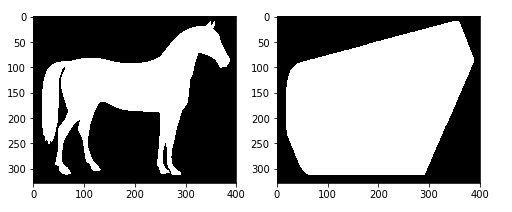
凸包............
import matplotlib.pyplot as plt

from skimage import data,color,morphology

img=color.rgb2gray(data.horse())

img=(img<0.5)*1

chull = morphology.convex_hull_image(img)

fig, axes = plt.subplots(1,2,figsize=(8,8))

ax0, ax1= axes.ravel()

ax0.imshow(img,plt.cm.gray)

ax1.imshow(chull,plt.cm.gray)
多个凸包.....................................................................................
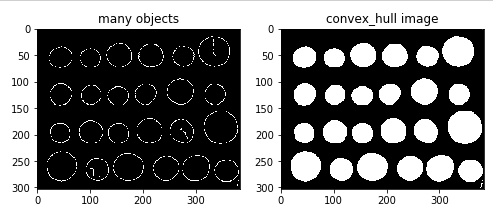
 import matplotlib.pyplot as plt

 from skimage import data,color,morphology,feature

 img=color.rgb2gray(data.coins())

 edgs=feature.canny(img, sigma=3, low_threshold=10, high_threshold=50)

 chull = morphology.convex_hull_object(edgs)

 #绘制轮廓

 fig, axes = plt.subplots(1,2,figsize=(8,8))

 ax0, ax1= axes.ravel()

 ax0.imshow(edgs,plt.cm.gray)

 ax0.set_title('many objects')

 ax1.imshow(chull,plt.cm.gray)

 ax1.set_title('convex_hull image')

 plt.show()
看不懂也写不下去了...
python的数字图像处理学习(3)的更多相关文章
- python的数字图像处理学习(2)
图像的重定义大小,图像的缩扩,图像的旋转: from skimage import transform,data import matplotlib.pyplot as plt img = data. ...
- python的数字图像处理学习(1)
导入原有的测试图片,测试图片路径,和一些方法,显示出测试图像,测试图像路径. from skimage import io,data,data_dir img_rgb=data.chelsea() i ...
- 【笔记】基于Python的数字图像处理
[博客导航] [Python相关] 前言 基于Python的数字图像处理,离不开相关处理的第三方库函数.搜索网络资源,列出如下资源链接. Python图像处理库到底用哪家 python计算机视觉编程— ...
- 数字图像处理学习笔记之一 DIP绪论与MATLAB基础
写在前面的话 数字图像处理系列的学习笔记是作者结合上海大学计算机学院<数字图像处理>课程的学习所做的笔记,使用参考书籍为<冈萨雷斯数字图像处理(第二版)(MATLAB版)>,同 ...
- MATLAB数字图像处理学习笔记
我们都知道一幅图片就相当于一个二维数组,可以用一个矩阵来表示,而MATLAB可以说就是为矩阵运算而生的,所以学习图像处理,学习MATLAB势在必行! 一. MATLAB基础知识 1. 读取图像 %im ...
- 初始----python数字图像处理--:环境安装与配置
一提到数字图像处理编程,可能大多数人就会想到matlab,但matlab也有自身的缺点: 1.不开源,价格贵 2.软件容量大.一般3G以上,高版本甚至达5G以上. 3.只能做研究,不易转化成软件. 因 ...
- 数字图像处理(一)之灰度转换和卷积python实现
使用Python实现数字图像处理中如下功能: 彩色图像转成灰度图像 实现图像的相关&卷积操作 实现图像的高斯核卷积 使用的库和python版本如下: imageio:2.9.0 用于读取磁盘中 ...
- python数字图像处理(17):边缘与轮廓
在前面的python数字图像处理(10):图像简单滤波 中,我们已经讲解了很多算子用来检测边缘,其中用得最多的canny算子边缘检测. 本篇我们讲解一些其它方法来检测轮廓. 1.查找轮廓(find_c ...
- python数字图像处理(1):环境安装与配置
一提到数字图像处理编程,可能大多数人就会想到matlab,但matlab也有自身的缺点: 1.不开源,价格贵 2.软件容量大.一般3G以上,高版本甚至达5G以上. 3.只能做研究,不易转化成软件. 因 ...
随机推荐
- LightOJ - 1030 期望+dp
题目链接:https://vjudge.net/problem/25907/origin 一个山洞,里面有有1到n个位置,每个位置都有一定的金币,你有一个六面的骰子,一开始你在1,每次摇到了哪个数就往 ...
- 3. Longest Substring Without Repeating Characters (ASCII码128个,建立哈西表)
Given a string, find the length of the longest substring without repeating characters. For example, ...
- Balanced Numbers (数位DP)
Balanced Numbers https://vjudge.net/contest/287810#problem/K Balanced numbers have been used by math ...
- MySQL基本SQL语句之数据插入、删除数据和更新数据
一.INSERT插入数据: 方法一:批量插入 基本语法: INSERT INTO tb_name (col1, col2, ...) VALUES (val1, val2, ...)[,(val1, ...
- vue 引用公共方法(例子:截取字符串固定字数,其余显示...)
1.写公共js 2.main.js引入公共js 3.在组件中用this.common.方法名 引用
- postman接口测试实例
牛刀小试项目 抽奖项目
- java 线程Thread 技术--1.5 Executor Executors,ThreadPool,Queue
Executors : Executors ,就是一个线程工具类:大部分操作线程的方法,都可以在这个工具类中就行创建,执行,调用一些线程的方法: Executor : 用于执行和提交一个runnabl ...
- java 动手动脑解决问题
1.Java的基本运行单位是类还是方法?是类,因为没有方法可以独立存在,方法在逻辑上属于类或属于对象. 2.类的组成成员?成员变量,成员方法. 3.成员变量的种类? byte short int lo ...
- log4j日志配置(按天/按日)
项目中尽管对log4j有基本的配置,例如按天生成日志文件以作区分,但如果系统日志文件过大,则就需要考虑以更小的单位切分或者其他切分方式.下面就总结一下log4j常用的配置参数以及切分日志的不同方式. ...
- MongoDB的增、删、改、查操作(五)
按照我们关系型数据库的思想,一个服务器要想存放数据,首先要有数据库,表,字段,约束,当然了也少不了主键,外键,索引,关系等: 但是在MongoDB的世界里边,我们不用预先的去创建这些信息从而直接来使用 ...