
opengl 学习 之 08 lesson
opengl 学习 之 08 lesson
简介
基础的光照渲染。漫反射,镜面反射,环境光。
光的主要计算在GLSL里面的碎片着色器中编写。
link
http://www.opengl-tutorial.org/uncategorized/2017/06/07/website-update/
The Diffuse part(漫反射)
Material Color
材料颜色,红色的材料会吸收绿色和蓝色。只反射红色。
简单使用数学公式
\]
Modeling the light
光模型=点光源
能量随着距离的平方进行了衰减( In fact, the amount of light will diminish with the square of the distance :)
\]
光源的初始能量设定(e.g. 60 Watts) 60W
\]
The Ambient component
环境光其实使用墙壁的反射光来模拟,但是这种方式计算成本太高昂。所以使用cheat(欺骗人眼)的方式实现
就是物体有一个基础的物质光
vec3 MaterialAmbientColor = vec3(0.1,0.1,0.1) * MaterialDiffuseColor;

color =

// Ambient : simulates indirect lighting

MaterialAmbientColor +

// Diffuse : "color" of the object

MaterialDiffuseColor * LightColor * LightPower * cosTheta / (distance*distance) ;
The Specular component(镜面反射)
// Eye vector (towards the camera)

vec3 E = normalize(EyeDirection_cameraspace);

// Direction in which the triangle reflects the light

vec3 R = reflect(-l,n);

// Cosine of the angle between the Eye vector and the Reflect vector,

// clamped to 0

// - Looking into the reflection -> 1

// - Looking elsewhere -> < 1

float cosAlpha = clamp( dot( E,R ), 0,1 );

color =

 // Ambient : simulates indirect lighting

 MaterialAmbientColor +

 // Diffuse : "color" of the object

 MaterialDiffuseColor * LightColor * LightPower * cosTheta / (distance*distance) ;

 // Specular : reflective highlight, like a mirror

 MaterialSpecularColor * LightColor * LightPower * pow(cosAlpha,5) / (distance*distance);
code
// Include standard headers

#include <stdio.h>

#include <stdlib.h>

#include <vector>

// Include GLEW

#include <GL/glew.h>

// Include GLFW

#include <GLFW/glfw3.h>

GLFWwindow* window;

// Include GLM

#include <glm/glm.hpp>

#include <glm/gtc/matrix_transform.hpp>

using namespace glm;

#include <common/shader.hpp>

#include <common/texture.hpp>

#include <common/controls.hpp>

#include <common/objloader.hpp>

#include <common/vboindexer.hpp>

int main( void )

{

	// Initialise GLFW

	if( !glfwInit() )

	{

		fprintf( stderr, "Failed to initialize GLFW\n" );

		getchar();

		return -1;

	}

	glfwWindowHint(GLFW_SAMPLES, 4);

	glfwWindowHint(GLFW_CONTEXT_VERSION_MAJOR, 3);

	glfwWindowHint(GLFW_CONTEXT_VERSION_MINOR, 3);

	glfwWindowHint(GLFW_OPENGL_FORWARD_COMPAT, GL_TRUE); // To make MacOS happy; should not be needed

	glfwWindowHint(GLFW_OPENGL_PROFILE, GLFW_OPENGL_CORE_PROFILE);

	// Open a window and create its OpenGL context

	window = glfwCreateWindow( 1024, 768, "Tutorial 08 - Basic Shading", NULL, NULL);

	if( window == NULL ){

		fprintf( stderr, "Failed to open GLFW window. If you have an Intel GPU, they are not 3.3 compatible. Try the 2.1 version of the tutorials.\n" );

		getchar();

		glfwTerminate();

		return -1;

	}

	glfwMakeContextCurrent(window);

	// Initialize GLEW

	glewExperimental = true; // Needed for core profile

	if (glewInit() != GLEW_OK) {

		fprintf(stderr, "Failed to initialize GLEW\n");

		getchar();

		glfwTerminate();

		return -1;

	}

	// Ensure we can capture the escape key being pressed below

	glfwSetInputMode(window, GLFW_STICKY_KEYS, GL_TRUE);

    // Hide the mouse and enable unlimited mouvement

    glfwSetInputMode(window, GLFW_CURSOR, GLFW_CURSOR_DISABLED);

    // Set the mouse at the center of the screen

    glfwPollEvents();

    glfwSetCursorPos(window, 1024/2, 768/2);

	// Dark blue background

	glClearColor(0.0f, 0.0f, 0.4f, 0.0f);

	// Enable depth test

	glEnable(GL_DEPTH_TEST);

	// Accept fragment if it closer to the camera than the former one

	glDepthFunc(GL_LESS);

	// Cull triangles which normal is not towards the camera

	glEnable(GL_CULL_FACE);

	GLuint VertexArrayID;

	glGenVertexArrays(1, &VertexArrayID);

	glBindVertexArray(VertexArrayID);

	// Create and compile our GLSL program from the shaders

	GLuint programID = LoadShaders( "StandardShading.vertexshader", "StandardShading.fragmentshader" );

	// Get a handle for our "MVP" uniform

	GLuint MatrixID = glGetUniformLocation(programID, "MVP");

	GLuint ViewMatrixID = glGetUniformLocation(programID, "V");

	GLuint ModelMatrixID = glGetUniformLocation(programID, "M");

	// Load the texture

	GLuint Texture = loadDDS("uvmap.DDS");

	// Get a handle for our "myTextureSampler" uniform

	GLuint TextureID  = glGetUniformLocation(programID, "myTextureSampler");

	// Read our .obj file

	std::vector<glm::vec3> vertices;

	std::vector<glm::vec2> uvs;

	std::vector<glm::vec3> normals;

	bool res = loadOBJ("suzanne.obj", vertices, uvs, normals);

	// Load it into a VBO

	GLuint vertexbuffer;

	glGenBuffers(1, &vertexbuffer);

	glBindBuffer(GL_ARRAY_BUFFER, vertexbuffer);

	glBufferData(GL_ARRAY_BUFFER, vertices.size() * sizeof(glm::vec3), &vertices[0], GL_STATIC_DRAW);

	GLuint uvbuffer;

	glGenBuffers(1, &uvbuffer);

	glBindBuffer(GL_ARRAY_BUFFER, uvbuffer);

	glBufferData(GL_ARRAY_BUFFER, uvs.size() * sizeof(glm::vec2), &uvs[0], GL_STATIC_DRAW);

	GLuint normalbuffer;

	glGenBuffers(1, &normalbuffer);

	glBindBuffer(GL_ARRAY_BUFFER, normalbuffer);

	glBufferData(GL_ARRAY_BUFFER, normals.size() * sizeof(glm::vec3), &normals[0], GL_STATIC_DRAW);

	// Get a handle for our "LightPosition" uniform

	glUseProgram(programID);

	GLuint LightID = glGetUniformLocation(programID, "LightPosition_worldspace");

	do{

		// Clear the screen

		glClear(GL_COLOR_BUFFER_BIT | GL_DEPTH_BUFFER_BIT);

		// Use our shader

		glUseProgram(programID);

		// Compute the MVP matrix from keyboard and mouse input

		computeMatricesFromInputs();

		glm::mat4 ProjectionMatrix = getProjectionMatrix();

		glm::mat4 ViewMatrix = getViewMatrix();

		glm::mat4 ModelMatrix = glm::mat4(1.0);

		glm::mat4 MVP = ProjectionMatrix * ViewMatrix * ModelMatrix;

		// Send our transformation to the currently bound shader,

		// in the "MVP" uniform

		glUniformMatrix4fv(MatrixID, 1, GL_FALSE, &MVP[0][0]);

		glUniformMatrix4fv(ModelMatrixID, 1, GL_FALSE, &ModelMatrix[0][0]);

		glUniformMatrix4fv(ViewMatrixID, 1, GL_FALSE, &ViewMatrix[0][0]);

		glm::vec3 lightPos = glm::vec3(4,4,4);

		glUniform3f(LightID, lightPos.x, lightPos.y, lightPos.z);

		// Bind our texture in Texture Unit 0

		glActiveTexture(GL_TEXTURE0);

		glBindTexture(GL_TEXTURE_2D, Texture);

		// Set our "myTextureSampler" sampler to use Texture Unit 0

		glUniform1i(TextureID, 0);

		// 1rst attribute buffer : vertices

		glEnableVertexAttribArray(0);

		glBindBuffer(GL_ARRAY_BUFFER, vertexbuffer);

		glVertexAttribPointer(

			0,                  // attribute

			3,                  // size

			GL_FLOAT,           // type

			GL_FALSE,           // normalized?

			0,                  // stride

			(void*)0            // array buffer offset

		);

		// 2nd attribute buffer : UVs

		glEnableVertexAttribArray(1);

		glBindBuffer(GL_ARRAY_BUFFER, uvbuffer);

		glVertexAttribPointer(

			1,                                // attribute

			2,                                // size

			GL_FLOAT,                         // type

			GL_FALSE,                         // normalized?

			0,                                // stride

			(void*)0                          // array buffer offset

		);

		// 3rd attribute buffer : normals

		glEnableVertexAttribArray(2);

		glBindBuffer(GL_ARRAY_BUFFER, normalbuffer);

		glVertexAttribPointer(

			2,                                // attribute

			3,                                // size

			GL_FLOAT,                         // type

			GL_FALSE,                         // normalized?

			0,                                // stride

			(void*)0                          // array buffer offset

		);

		// Draw the triangles !

		glDrawArrays(GL_TRIANGLES, 0, vertices.size() );

		glDisableVertexAttribArray(0);

		glDisableVertexAttribArray(1);

		glDisableVertexAttribArray(2);

		// Swap buffers

		glfwSwapBuffers(window);

		glfwPollEvents();

	} // Check if the ESC key was pressed or the window was closed

	while( glfwGetKey(window, GLFW_KEY_ESCAPE ) != GLFW_PRESS &&

		   glfwWindowShouldClose(window) == 0 );

	// Cleanup VBO and shader

	glDeleteBuffers(1, &vertexbuffer);

	glDeleteBuffers(1, &uvbuffer);

	glDeleteBuffers(1, &normalbuffer);

	glDeleteProgram(programID);

	glDeleteTextures(1, &Texture);

	glDeleteVertexArrays(1, &VertexArrayID);

	// Close OpenGL window and terminate GLFW

	glfwTerminate();

	return 0;

}
#version 330 core

// Input vertex data, different for all executions of this shader.

layout(location = 0) in vec3 vertexPosition_modelspace;

layout(location = 1) in vec2 vertexUV;

layout(location = 2) in vec3 vertexNormal_modelspace;

// Output data ; will be interpolated for each fragment.

out vec2 UV;

out vec3 Position_worldspace;

out vec3 Normal_cameraspace;

out vec3 EyeDirection_cameraspace;

out vec3 LightDirection_cameraspace;

// Values that stay constant for the whole mesh.

uniform mat4 MVP;

uniform mat4 V;

uniform mat4 M;

uniform vec3 LightPosition_worldspace;

void main(){

	// Output position of the vertex, in clip space : MVP * position

	gl_Position =  MVP * vec4(vertexPosition_modelspace,1);

	// Position of the vertex, in worldspace : M * position

	Position_worldspace = (M * vec4(vertexPosition_modelspace,1)).xyz;

	// Vector that goes from the vertex to the camera, in camera space.

	// In camera space, the camera is at the origin (0,0,0).

	vec3 vertexPosition_cameraspace = ( V * M * vec4(vertexPosition_modelspace,1)).xyz;

	EyeDirection_cameraspace = vec3(0,0,0) - vertexPosition_cameraspace;

	// Vector that goes from the vertex to the light, in camera space. M is ommited because it's identity.

	vec3 LightPosition_cameraspace = ( V * vec4(LightPosition_worldspace,1)).xyz;

	LightDirection_cameraspace = LightPosition_cameraspace + EyeDirection_cameraspace;

	// Normal of the the vertex, in camera space

	Normal_cameraspace = ( V * M * vec4(vertexNormal_modelspace,0)).xyz; // Only correct if ModelMatrix does not scale the model ! Use its inverse transpose if not.

	// UV of the vertex. No special space for this one.

	UV = vertexUV;

}
#version 330 core

// Interpolated values from the vertex shaders

in vec2 UV;

in vec3 Position_worldspace;

in vec3 Normal_cameraspace;

in vec3 EyeDirection_cameraspace;

in vec3 LightDirection_cameraspace;

// Ouput data

out vec3 color;

// Values that stay constant for the whole mesh.

uniform sampler2D myTextureSampler;

uniform mat4 MV;

uniform vec3 LightPosition_worldspace;

void main(){

	// Light emission properties

	// You probably want to put them as uniforms

	vec3 LightColor = vec3(1,1,1);

	float LightPower = 50.0f;

	// Material properties

	vec3 MaterialDiffuseColor = texture( myTextureSampler, UV ).rgb;

	vec3 MaterialAmbientColor = vec3(0.1,0.1,0.1) * MaterialDiffuseColor;

	vec3 MaterialSpecularColor = vec3(0.3,0.3,0.3);

	// Distance to the light

	float distance = length( LightPosition_worldspace - Position_worldspace );

	// Normal of the computed fragment, in camera space

	vec3 n = normalize( Normal_cameraspace );

	// Direction of the light (from the fragment to the light)

	vec3 l = normalize( LightDirection_cameraspace );

	// Cosine of the angle between the normal and the light direction,

	// clamped above 0

	//  - light is at the vertical of the triangle -> 1

	//  - light is perpendicular to the triangle -> 0

	//  - light is behind the triangle -> 0

	float cosTheta = clamp( dot( n,l ), 0,1 );

	// Eye vector (towards the camera)

	vec3 E = normalize(EyeDirection_cameraspace);

	// Direction in which the triangle reflects the light

	vec3 R = reflect(-l,n);

	// Cosine of the angle between the Eye vector and the Reflect vector,

	// clamped to 0

	//  - Looking into the reflection -> 1

	//  - Looking elsewhere -> < 1

	float cosAlpha = clamp( dot( E,R ), 0,1 );

	color =

		// Ambient : simulates indirect lighting

		MaterialAmbientColor +

		// Diffuse : "color" of the object

		MaterialDiffuseColor * LightColor * LightPower * cosTheta / (distance*distance) +

		// Specular : reflective highlight, like a mirror

		MaterialSpecularColor * LightColor * LightPower * pow(cosAlpha,5) / (distance*distance);

}
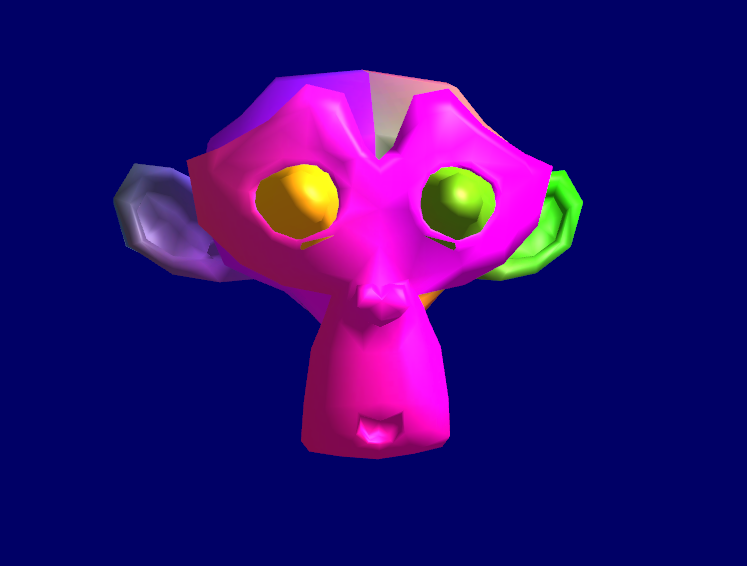
image
经过调整环境光的显示图片。
opengl 学习 之 08 lesson的更多相关文章
- OpenGL学习之windows下安装opengl的glut库
OpenGL学习之windows下安装opengl的glut库 GLUT不是OpenGL所必须的,但它会给我们的学习带来一定的方便,推荐安装. Windows环境下的GLUT下载地址:(大小约为15 ...
- C++ GUI Qt4学习笔记08
C++ GUI Qt4学习笔记08 qtc++signal图形引擎文档 本章介绍Qt的二维图形引擎,Qt的二维图形引擎是基于QPainter类的.<span style="colo ...
- OpenGL学习笔记2017/8/29
OpenGL学习日志: 感谢doing5552 的OpenGL入门学习:http://www.cppblog.com/doing5552/archive/2009/01/08/71532.html 相 ...
- OpenGL学习笔记3——缓冲区对象
在GL中特别提出了缓冲区对象这一概念,是针对提高绘图效率的一个手段.由于GL的架构是基于客户——服务器模型建立的,因此默认所有的绘图数据均是存储在本地客户端,通过GL内核渲染处理以后再将数据发往GPU ...
- OpenGL学习进程(12)第九课:矩阵乘法实现3D变换
本节是OpenGL学习的第九个课时,下面将详细介绍OpenGL的多种3D变换和如何操作矩阵堆栈. (1)3D变换: OpenGL中绘制3D世界的空间变换包括:模型变换.视图变换.投影变换和视口 ...
- OpenGL学习进程(11)第八课:颜色绘制的详解
本节是OpenGL学习的第八个课时,下面将详细介绍OpenGL的颜色模式,颜色混合以及抗锯齿. (1)颜色模式: OpenGL支持两种颜色模式:一种是RGBA,一种是颜色索引模式. R ...
- OpenGL学习笔记:拾取与选择
转自:OpenGL学习笔记:拾取与选择 在开发OpenGL程序时,一个重要的问题就是互动,假设一个场景里面有很多元素,当用鼠标点击不同元素时,期待作出不同的反应,那么在OpenGL里面,是怎么知道我当 ...
- OpenGL学习之路(一)
1 引子 虽然是计算机科班出身,但从小对几何方面的东西就不太感冒,空间想象能力也较差,所以从本科到研究生,基本没接触过<计算机图形学>.为什么说基本没学过呢?因为好奇(尤其是惊叹于三维游戏 ...
- OpenGL学习之路(三)
1 引子 这些天公司一次次的软件发布节点忙的博主不可开交,另外还有其它的一些事也占用了很多时间.现在坐在电脑前,在很安静的环境下,与大家分享自己的OpenGL学习笔记和理解心得,感到格外舒服.这让我回 ...
- OpenGL学习之路(四)
1 引子 上次读书笔记主要是学习了应用三维坐标变换矩阵对二维的图形进行变换,并附带介绍了GLSL语言的编译.链接相关的知识,之后介绍了GLSL中变量的修饰符,着重介绍了uniform修饰符,来向着色器 ...
随机推荐
- 揭秘AI自动化框架Browser-use(四):Browser-use记忆模块技术解析
一.从一次失败的景点采集说起 在 AI 自动化任务中,记忆模块是实现复杂任务处理的关键组件.Browser-use 项目通过引入记忆模块,解决了 LLM 在连续性任务中的无状态性问题,使代理能够维持上 ...
- 系统自动化DTO实施流程简图
- 信息资源管理综合题之“绘制利用RSA进行数字签名的过程图并进行简要说明”
一.李三在上课中听不懂利用RSA进行数字签名的过程,老师便在黑板上清晰地画出了利用RSA进行数字签名过程图,李三方才明白是什么一回事.假设数字签名的原文方为A,按收方为B,A的公钥为(e,n),私钥为 ...
- 操作系统综合题之“短进程优先调度算法(Shortest-Process-First,SPF)和非抢占式优先权调度算法(Priority-Scheduling Lgorithm)的进程执行顺序并计算周转时间以及平均周转时间【分开计算题】”
一.问题: 1.当系统采用短进程优先调度算法时,试写出进程的执行顺序,并计算各个进程的周转时间以及平均周转时间 2.当系统采用优先权调度算法时,试写出进程的执行顺序,并计算各个进程的周转时间以及平均周 ...
- 一文速通Python并行计算:10 Python多进程编程-进程之间的数据共享-基于共享内存和数据管理器
一文速通 Python 并行计算:10 Python 多进程编程-进程之间的数据共享-基于共享内存和数据管理器 摘要: Python 多进程通信中,共享内存通过 Value 和 Array 实现高效数 ...
- JavaScript最佳实践:从基础到高级
@charset "UTF-8"; .markdown-body { line-height: 1.75; font-weight: 400; font-size: 15px; o ...
- asp.net core的launchSettings.json
{ "profiles": { "welcomeMiddleware": { "commandName": "Project&qu ...
- Python标准库学习之logging
前言 在python程序中,出于调试监测或者追踪(track)的目的,一般会在关键的部位加print语句来输出监测的变量值,但对于复杂的程序来讲,这样的调试手段就远远不够了,这也是logging库存在 ...
- 【语义分割专栏】:FCN实战篇(附上完整可运行的代码pytorch)
目录 前言 FCN全流程代码 模型搭建(model) 数据处理(dataloader) 评价指标(metric) 训练流程(train) 模型测试(test) 效果图 结语 前言 FCN原理篇讲解:[ ...
- 微信小程序map 动态markers的解决方法
先上效果图 这里演示点击标记点,改变他的气泡背景颜色和字体颜色 1.动态修改数据,需要用到 this.setData(), 2.markers 是一个数组,这里需要涉及setData 修改内部属性的方 ...