
使用Scalar.AspNetCore来管理你的OpenApi
一直觉得很好的一个组件,网上介绍少得可怜,没办法,只有自己爬官网了,又是对照git又是看doc文档,总算是玩明白了,现在完全抛弃那个谁谁谁了。因人喜好各取所长吧
先来官方参考地址:
https://learn.microsoft.com/zh-cn/aspnet/core/fundamentals/openapi/include-metadata?view=aspnetcore-9.0&tabs=minimal-apis
这是scalar的.net 集成文档地址
https://guides.scalar.com/scalar/scalar-api-references/integrations/net-aspnet-core/integration
github地址
https://github.com/scalar/scalar
先放个图,诱惑一下,集成了很多主题,还可以自定主题(留给前端去玩吧)
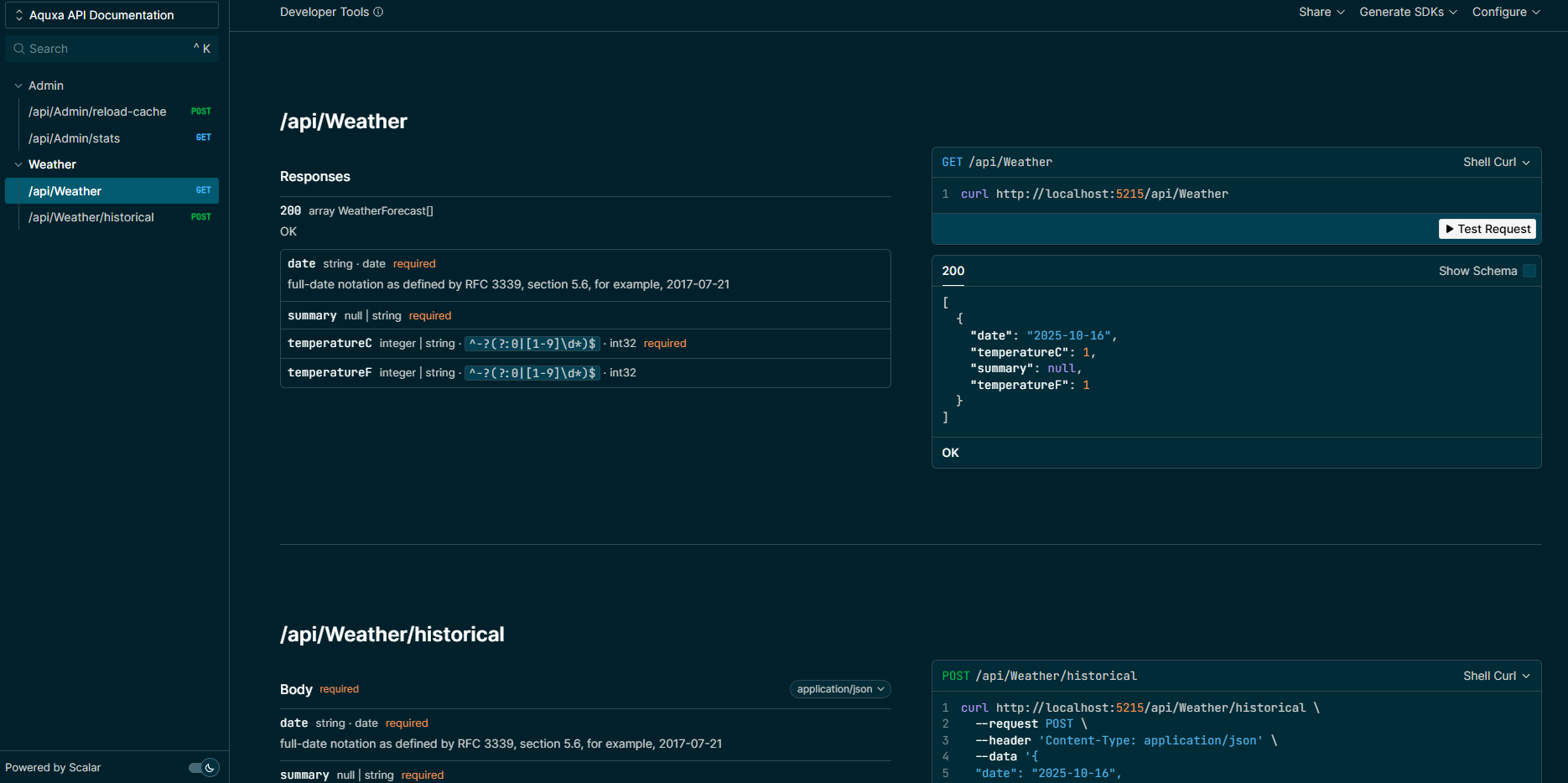
一、简单使用
1.建立一个API项目,(最小,mvc都可)
2.引用包
dotnet add package Scalar.AspNetCore (当前版本2.9.0)
3.添加引用
using Scalar.AspNetCore;
4.添加配置,在Program.cs中添加下面配置
builder.Services.AddOpenApi();

if (app.Environment.IsDevelopment())

{

    app.MapOpenApi();

    app.MapScalarApiReference();

}
现在运行一下,看看,localhost:xxxx/scalar
是不是看到列出漂亮的界面了?
二、基本配置
1.自定义路由
不想使用/salar,可以换成自己的地址
app.MapScalarApiReference("/api-docs");

app.MapScalarApiReference("/docs");
2.多文当或版本控制
// Chain multiple documents

app.MapScalarApiReference(options =>

{

    options.AddDocument("v1", "Production API", "api/v1/openapi.json")

           .AddDocument("v2-beta", "Beta API", "api/v2-beta/openapi.json", isDefault: true)

           .AddDocument("internal", "Internal API", "internal/openapi.json");

});
isDefault: true是默认打开的页面
3.自定义文档的默认调试语言
app.MapScalarApiReference(options =>

{

    options.WithDefaultHttpClient(ScalarTarget.CSharp, ScalarClient.HttpClient);

});
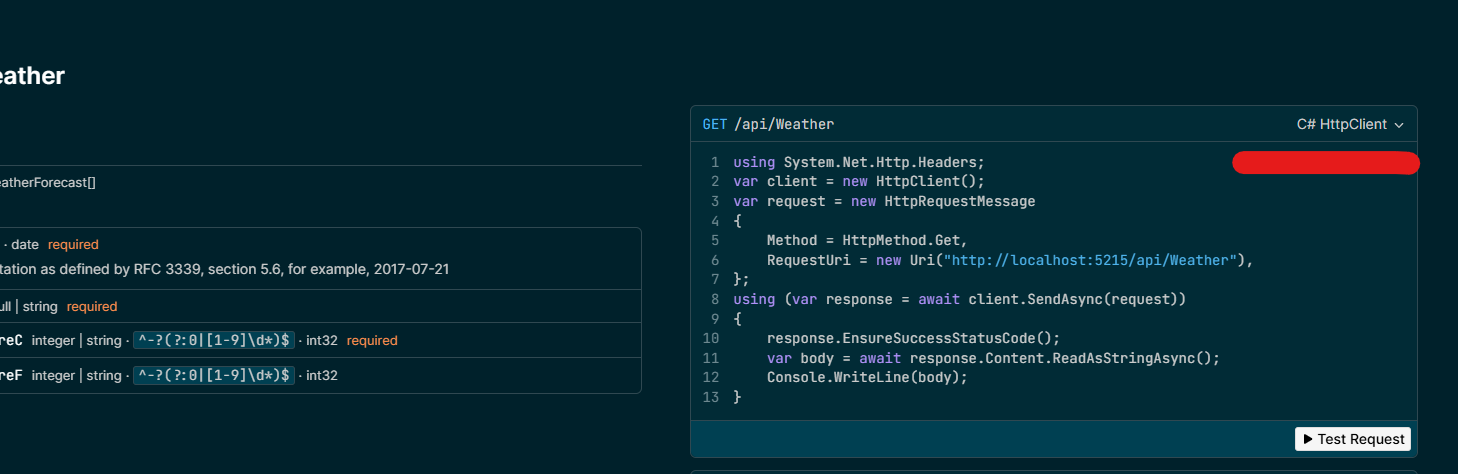
它对应右边窗口的语言,基本上都支持,java,php,rust,py,swift
三、高级配置
之前的老版本使用的硬编码option加配置,2.9.0以后,在界面右上角菜单栏上出现了一个编辑配置功能
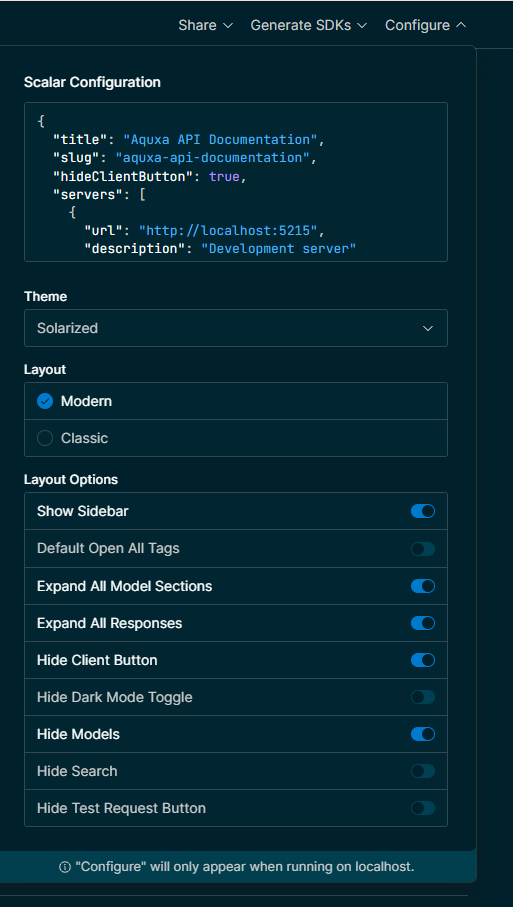
根据自己的喜好,调试编辑完配置文件后,可以复制到文件中单独保存,真是太贴心了
{

  "title": "Aquxa API Documentation",

  "slug": "aquxa-api-documentation",

  "hideClientButton": true,

  "servers": [

    {

      "url": "http://localhost:5215",

      "description": "Development server"

    }

  ],

  "showSidebar": true,

  "showToolbar": "localhost",//这里特别说明一下,编辑完后,不想出现这个菜单栏,就在这里可以关闭showToolbar: "never"

  "operationTitleSource": "summary",

  "theme": "solarized",//主题可以自己选,喜欢哪个选哪个

  "_integration": "dotnet",

  "persistAuth": false,

  "telemetry": true,

  "layout": "modern",

  "isEditable": false,

  "isLoading": false,

  "hideModels": true,

  "documentDownloadType": "both",

  "hideTestRequestButton": false,

  "hideSearch": false,

  "showOperationId": false,

  "hideDarkModeToggle": false,

  "favicon": "favicon.svg",

  "withDefaultFonts": true,

  "defaultOpenAllTags": false,

  "expandAllModelSections": true,

  "expandAllResponses": true,

  "orderSchemaPropertiesBy": "alpha",

  "orderRequiredPropertiesFirst": true,

  "url": "http://localhost:5215/openapi/v1.json"

}
PS:这里特别说明一下,编辑完后,不想出现这个菜单栏,就在这里可以关闭showToolbar: "never"
得到这个文件,保存到wwwroot/js/scalar-config.js,注意,一定要保存到能访问的静态目录里,并在program.cs添加静态目录的配置
app.UseStaticFiles(). //这个要放在scalar配置的前面,不然访问不到
添加配置文件加载
.WithJavaScriptConfiguration("/js/scalar-config.js")
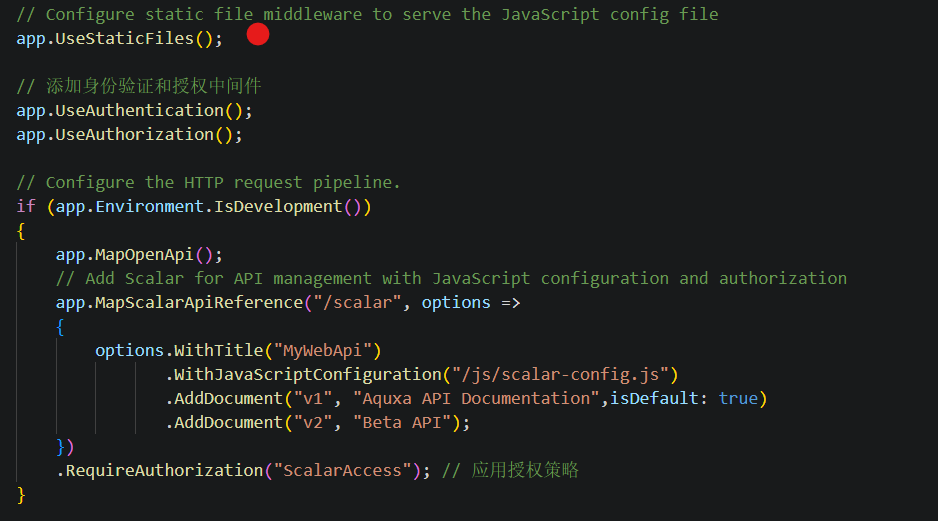
这里费了好大的劲,查官方,看代码,因为官方文档还是老文档,只是简单的概括了一下。最后整出来了
四、文档的编辑
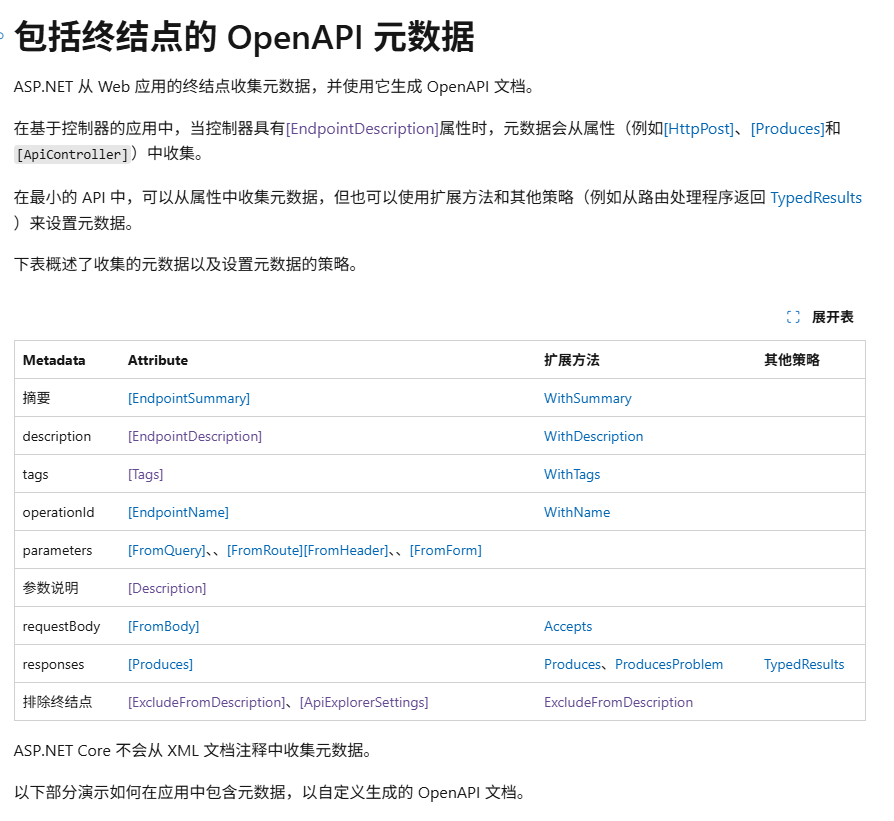
使用最重要的还是API文档编辑,其实它完全用的标准的OpenApi,只要参考这个表就可以完全配置了
[ApiController]

    [Route("api/[controller]")]

    [ApiExplorerSettings(GroupName = "v1")]

    [Tags("Admin")] // 为整个控制器添加标签

    public class AdminController : ControllerBase

    {

        [HttpPost("reload-cache")]

        public IActionResult ReloadCache()

        {

            // 模拟重新加载缓存的操作

            return Ok("Cache reloaded successfully");

        }

        [HttpGet("stats")]

        public IActionResult GetStats()

        {

            return Ok(new { Users = 100, Requests = 1000 });

        }

    }
下面说一下常用的特性
1.API分组
[ApiExplorerSettings]
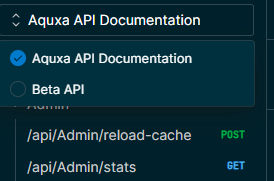
这个比较熟悉,它可以分组,分版本,当你分好版本后[ApiExplorerSettings(GroupName = "v1")]/[ApiExplorerSettings(GroupName = "v2")],会在scalar中左上角可以选择,当然,你也可以把它做为组来用
如果有不想显示的API也可以用[ApiExplorerSettings(IgnoreApi = true)]来排除显示
[HttpGet("/private")]

[ApiExplorerSettings(IgnoreApi = true)]

public IActionResult PrivateEndpoint() {

    return Ok("This is a private endpoint");

}
2.API分类
[Tags]
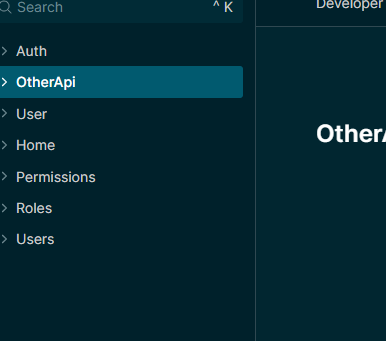
分类的API,会归档在一起,方便查询,这样看起来没有那么乱了
[Tags(["Admin", "OtherAPI"])]

[HttpGet("attributes")]

public IResult Attributes()

{

    return Results.Ok("Hello world!");

}
3.描述
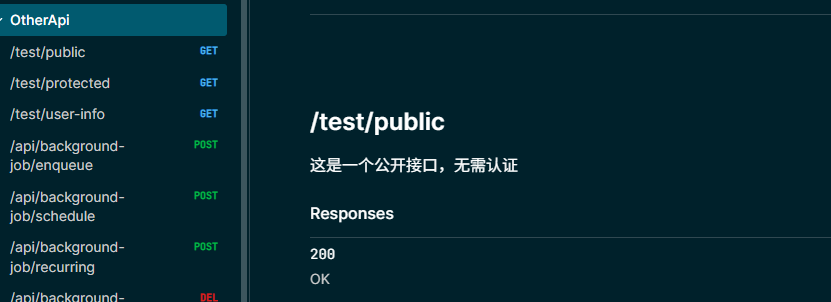
[EndpointSummary("OtherApi")]

[EndpointDescription("这是一个公开接口,无需认证")]

[HttpGet("attributes")]

public IResult Attributes()

{

    return Results.Ok("Hello world!");

}
更多编辑文档就看这里吧
https://learn.microsoft.com/zh-cn/aspnet/core/fundamentals/openapi/include-metadata?view=aspnetcore-9.0&tabs=controllers
五、认证授权
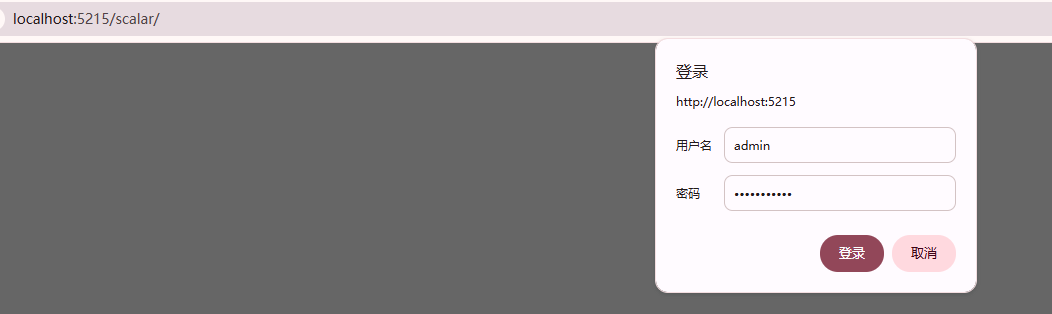
这里就使用自己的授权就可以,这里就偷懒找AI完成了。参考部分都有备注
using Scalar.AspNetCore;

using Microsoft.AspNetCore.Authentication;

using Microsoft.Extensions.Options;

using System.Security.Claims;

using System.Text.Encodings.Web;

using Microsoft.AspNetCore.Mvc;

using MyWebApi; // 添加对WeatherForecast的引用

var builder = WebApplication.CreateBuilder(args);

// Add services to the container.

// Learn more about configuring OpenAPI at https://aka.ms/aspnet/openapi

builder.Services.AddOpenApi("v1");

builder.Services.AddOpenApi("v2");

// 添加控制器服务

builder.Services.AddControllers();

// 添加身份验证服务

builder.Services.AddAuthentication("BasicAuthentication")

    .AddScheme<AuthenticationSchemeOptions, BasicAuthenticationHandler>("BasicAuthentication", null);

// 添加授权服务

builder.Services.AddAuthorization(options =>

{

    options.AddPolicy("ScalarAccess", policy => policy.RequireAuthenticatedUser());

});

// 配置服务器URL,避免端口冲突

builder.WebHost.UseUrls("http://localhost:5215");

var app = builder.Build();

// Configure static file middleware to serve the JavaScript config file

app.UseStaticFiles();

// 添加身份验证和授权中间件

app.UseAuthentication();

app.UseAuthorization();

// Configure the HTTP request pipeline.

if (app.Environment.IsDevelopment())

{

    app.MapOpenApi();

    // Add Scalar for API management with JavaScript configuration and authorization

    app.MapScalarApiReference("/scalar", options =>

    {

        options.WithTitle("MyWebApi")

               .WithJavaScriptConfiguration("/js/scalar-config.js")

               .AddDocument("v1", "Aquxa API Documentation",isDefault: true)

               .AddDocument("v2", "Beta API");

    })

    .RequireAuthorization("ScalarAccess"); // 应用授权策略

}

// 添加控制器路由

app.MapControllers();

app.Run();

// Basic Authentication Handler

public class BasicAuthenticationHandler : AuthenticationHandler<AuthenticationSchemeOptions>

{

    public BasicAuthenticationHandler(

        IOptionsMonitor<AuthenticationSchemeOptions> options,

        ILoggerFactory logger,

        UrlEncoder encoder)

        : base(options, logger, encoder)

    {

    }

    protected override async Task<AuthenticateResult> HandleAuthenticateAsync()

    {

        // 检查是否有Authorization头

        if (!Request.Headers.ContainsKey("Authorization"))

            return AuthenticateResult.NoResult();

        try

        {

            // 解析Basic认证头

            var authHeader = Request.Headers["Authorization"].ToString();

            if (!authHeader.StartsWith("Basic "))

                return AuthenticateResult.NoResult();

            var encodedCredentials = authHeader.Substring("Basic ".Length).Trim();

            var decodedCredentials = System.Text.Encoding.UTF8.GetString(Convert.FromBase64String(encodedCredentials));

            var credentials = decodedCredentials.Split(':', 2);

            var username = credentials[0];

            var password = credentials[1];

            // 验证用户名和密码(这里使用硬编码,实际应用中应从配置或数据库获取)

            if (username == "admin" && password == "password123")

            {

                var claims = new[] { new Claim(ClaimTypes.Name, username) };

                var identity = new ClaimsIdentity(claims, Scheme.Name);

                var principal = new ClaimsPrincipal(identity);

                var ticket = new AuthenticationTicket(principal, Scheme.Name);

                return AuthenticateResult.Success(ticket);

            }

            return AuthenticateResult.Fail("Invalid username or password");

        }

        catch

        {

            return AuthenticateResult.Fail("Invalid Authorization Header");

        }

    }

    protected override async Task HandleChallengeAsync(AuthenticationProperties properties)

    {

        // 发送WWW-Authenticate头以触发浏览器的认证对话框

        Response.Headers["WWW-Authenticate"] = "Basic realm=\"Scalar API Documentation\"";

        await base.HandleChallengeAsync(properties);

    }

}
使用Scalar.AspNetCore来管理你的OpenApi的更多相关文章
- 除了Swagger UI,你还能选择 IGeekFan.AspNetCore.RapiDoc
IGeekFan.AspNetCore.RapiDoc 看到博客园上的这个文章,说了下Knife4J,评论里有人推荐RapiDoc,放了几个图,看了下,还不错. 心里 便有个想法,借着上次研究 Kni ...
- NetCore 3.0 中使用Swagger生成Api说明文档及升级报错原因
认识Swagger Swagger 是一个规范和完整的框架,用于生成.描述.调用和可视化 RESTful 风格的 Web 服务.总体目标是使客户端和文件系统作为服务器以同样的速度来更新.文件的方法,参 ...
- ASP.NET Core WebApi使用Swagger生成api说明文档看这篇就够了
引言 在使用asp.net core 进行api开发完成后,书写api说明文档对于程序员来说想必是件很痛苦的事情吧,但文档又必须写,而且文档的格式如果没有具体要求的话,最终完成的文档则完全取决于开发者 ...
- ASP.NET Core WebApi使用Swagger生成api
引言 在使用asp.net core 进行api开发完成后,书写api说明文档对于程序员来说想必是件很痛苦的事情吧,但文档又必须写,而且文档的格式如果没有具体要求的话,最终完成的文档则完全取决于开发者 ...
- 【转】ASP.NET Core WebApi使用Swagger生成api说明文档看这篇就够了
原文链接:https://www.cnblogs.com/yilezhu/p/9241261.html 引言 在使用asp.net core 进行api开发完成后,书写api说明文档对于程序员来说想必 ...
- .NET Core WebApi帮助文档使用Swagger生成Api说明文档
Swagger也称为Open API,Swagger从API文档中手动完成工作,并提供一系列用于生成,可视化和维护API文档的解决方案.简单的说就是一款让你更好的书写API文档的框架. 我们为什么选择 ...
- swagger 的使用
最近在用 .Net Core 做项目 了解到swagger 是一个不错的工具 简单介绍一下 在使用asp.net core 进行api开发完成后,书写api说明文档对于程序员来说想必是件很痛苦的事情吧 ...
- 《DNS稳定保障系列3--快如闪电,域名解析秒级生效》
在刚刚过去的双十一,又是一个全民狂欢的盛宴,天猫双十一的成交量高达2684亿.无数小伙伴在淘宝.天猫里买买买,今年你又剁手了多少?言归正传,在你疯狂秒杀的时候,有没有发现,今年的购物体验一如既往的好, ...
- TensorFlow 2.0高效开发指南
Effective TensorFlow 2.0 为使TensorFLow用户更高效,TensorFlow 2.0中进行了多出更改.TensorFlow 2.0删除了篇冗余API,使API更加一致(统 ...
- .NET 6当中的Web API版本控制
大家好,我是张飞洪,感谢您的阅读,我会不定期和你分享学习心得,希望我的文章能成为你成长路上的垫脚石,让我们一起精进. 为了了解ASP.NET Core Web API的版本控制,我们必须了解API中的 ...
随机推荐
- 最好的Transformer讲解:The Illustrated Transformer + The Annotated Transformer
The Illustrated Transformer https://jalammar.github.io/illustrated-transformer/ The Annotated Transf ...
- Applied Statistics - 应用统计学习 - numpy array交换两行 ? How to Swap Two Rows in a NumPy Array (With Example)
https://www.statology.org/qualitative-vs-quantitative-variables/ https://www.statology.org/numpy-swa ...
- POLIR-Society-Organization-Politics-Self- Identity:Qualities + Habits:To-Be List + Behaviors:To-Do List + Prioritize: ProblemsResolving
POLIR-Society-Organization-Political Habits:To-Be List Behaviors:To-Do List when it comes to habits, ...
- IDEA的安装与卸载
IDEA安装 什么是IDE IDE是集成开发环境,用于提供程序开发环境的应用程序,一般包括代码编辑器,编译器,调试器图形用户界面等工具. 常见的Java的IDE工具有Eclipse,IntelliJ ...
- C#性能优化:为何 x * Math.Sqrt(x) 远胜 Math.Pow(x, 1.5)
大家好,今天我们来聊一个由 AI 引发的"血案",主角是我们日常开发中可能不太在意的 Math.Pow 函数. 缘起:一个"烧CPU"的爱好 熟悉我的朋友可能知 ...
- 简单介绍一下Linux中ELF格式文件
摘自:http://www.elecfans.com/emb/20190402898901.html ELF(Executable and Linkable Format)即可执行连接文件格式,是一种 ...
- MySQL事务原理:从ACID到隔离级别的全解析
事务的四个特性ACID 原子性(Atomicity):语句要么全执行,要么全不执行,是事务最核心的特性,事务本身就是以原子性来定义的:实现主要基于undo log 持久性(Durability):保证 ...
- MySQL 28 读写分离有哪些坑?
读写分离的基本结构: 上图的结构是客户端主动做负载均衡,这种模式下一般会把数据库连接信息放在客户端的连接层,由客户端选择后端数据库进行查询. 还有一种架构是在MySQL和客户端间加入中间代理层prox ...
- RISC-V篇-VSCode+qemu+gdb可视化调试Linux Kernel
https://zhuanlan.zhihu.com/p/4185359719 本文发布于微信公众号:Linux底层小工,欢迎关注,获取更多原创技术文章! "VSCode+qemu+gdb调 ...
- 为什么一些前端不喜欢 Restful Api?
做过不少系统架构,全栈.前后端一起设计,我认为至少在部分领域restful可以扔了. 第一个被淘汰的是URI风格,主要是现在都是纯JSON请求和返回,例如post一般情况下id都和JSON放一起提交了 ...