
左右躲避障碍-神手ts版本
TypeScript-左右躲避障碍-神手
学习typescript,第一步应该是学习官方文档,理解最基础的语法。第二步开始用typescript实现一些js+css 或者canvas类型的游行。现在开始我们用ts写跳一跳
前言:
最近微信小程序里面,出现了一个左右手躲避障碍物的游戏:神手。玩了一下觉得很有意思,决定用typescript写一版。
核心点:
1.识别手势动作:双指同时点击,单指随机放开
2.障碍物的成对生成。
3.动画帧的优化
游戏截图
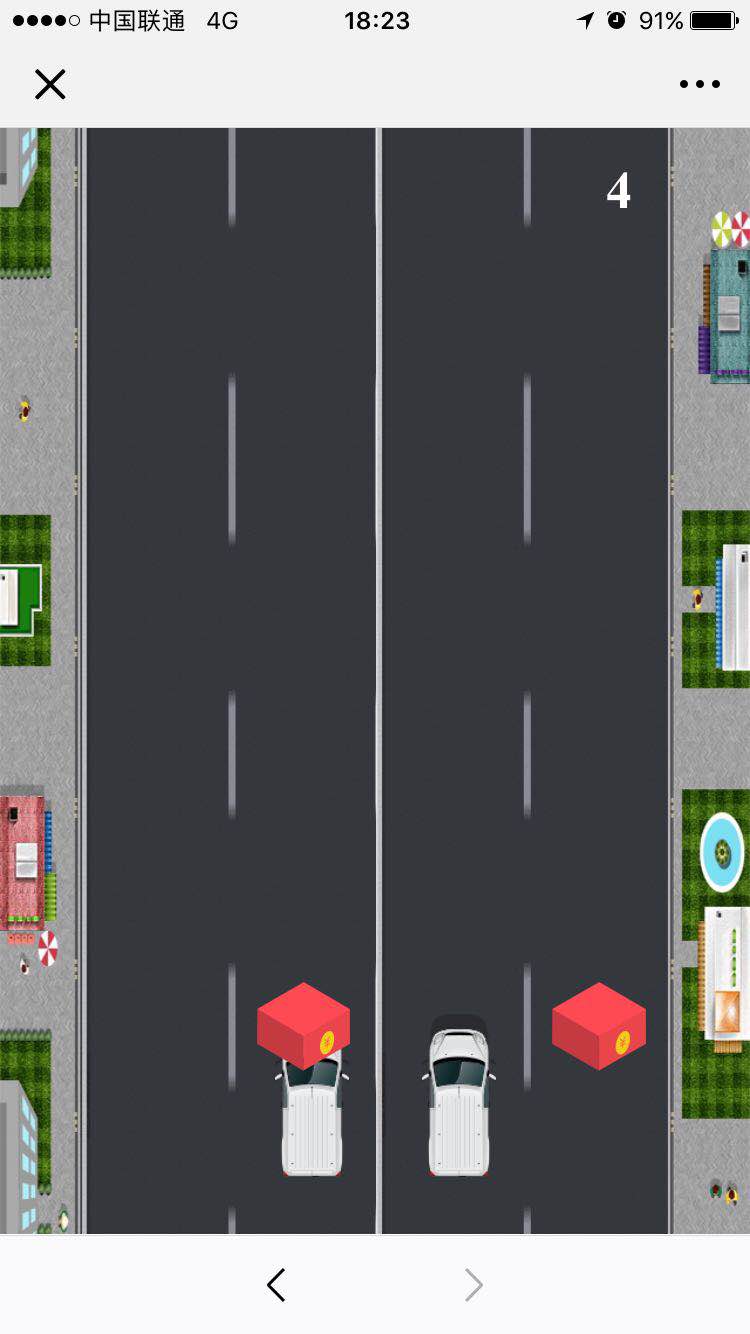
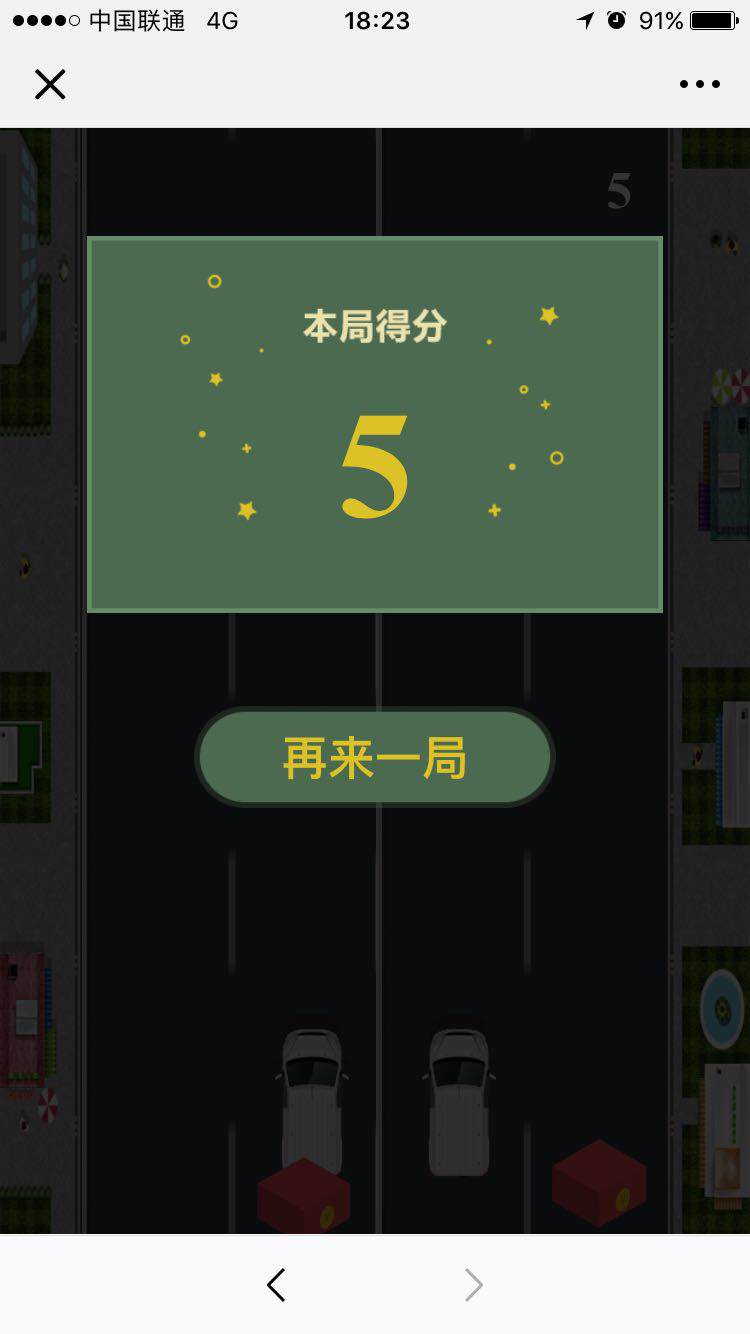
Typescript脚本:
 //1.创建障碍

 //2.移动障碍

 //3.小球控制

 //4.碰撞检测

 module game {

     interface FootBall {

         node: JQuery<HTMLElement>;

         track: Track;

     }

     enum Direction {

         left, right

     }

     enum Track {

         one, two, three, four

     }

     let mask: JQuery<HTMLElement> = $(".game");

     let speed: number = 10;

     let score: number = 0;

     let rblist: Array<RandBox> = [];

     let roadList: Array<Road> = [];

     let ft1: FootBall = { node: $("#ft1"), track: Track.two };

     let ft2: FootBall = { node: $("#ft2"), track: Track.three };

     //h5的专门适应绘制动画的属性

     window.requestAnimationFrame =

         window.requestAnimationFrame ||

         window.webkitRequestAnimationFrame ||

         (function () {

             return function (callback: Function, element: { __lastTime: number }) {

                 var lastTime = element.__lastTime;

                 if (lastTime === undefined) {

                     lastTime = 0;

                 }

                 var currTime = Date.now();

                 var timeToCall = Math.max(1, 33 - (currTime - lastTime));

                 window.setTimeout(callback, timeToCall);

                 element.__lastTime = currTime + timeToCall;

             };

         })();

     window.cancelAnimationFrame = window.cancelAnimationFrame || window.webkitCancelAnimationFrame;

     let requestAnimationFrameFlag = 0;

     class MathHelp {

         /**

          * 返回范围内随机数[min,max]

          * @param min 最小值

          * @param max 最大值

          */

         static RandRange(min: number, max: number): number {

             return Math.floor(Math.random() * (max - min + 1) + min);

         }

     }

     export class Road {

         top: number = 0;

         id: number = 0;

         heigth: number = document.documentElement.clientHeight;

         node: JQuery<HTMLElement> = $('');

         static num: number = 0;

         constructor() {

             this.id = Road.num;

             this.top = -(Road.num) * this.heigth;

             this.node = $(`<div id="${this.id}" class="road" style="top:${this.top}px;"></div>`);

             mask.append(this.node);

             Road.num++;

         }

         move() {

             this.top += speed;

             this.node.css({

                 top: this.top + "px"

             });

             //循环路面

             if (this.top >= this.heigth) {

                 this.top -= Road.num * this.heigth;

             }

         }

     }

     export class RandBox {

         left: number = 0;

         top: number = -100;

         heigth: number = 80;

         width: number = 80;

         node: JQuery<HTMLElement> = $('');

         type: Direction = Direction.left;

         id: string = "p" + new Date().getTime();

         track: Track = Track.one;

         constructor(p: number = 0) {

             this.top = p;

         }

         createrb(type: Direction) {

             this.type = type;

             let r = 0;

             if (type == Direction.left) {

                 r = MathHelp.RandRange(0, 1);

             } else {

                 r = MathHelp.RandRange(2, 3);

             }

             this.track = r;

             //计算所属赛道

             this.left = 70 + 126 * r + (126 - this.width) / 2;

             this.node = $(`<div id="${this.id}" class='rb'style='left:${this.left}px;top:${this.top}px;    background-image:url(img/c${MathHelp.RandRange(1, 4)}.png);'></div>`);

             mask.append(this.node);

         }

         move() {

             this.top += speed;

             this.node.css({

                 top: this.top + "px"

             });

             //碰撞检测

             if (this.top >= 870 && this.top < 950) {

                 if (this.track == ft1.track || this.track == ft2.track) {

                     scence.gameover();

                     return false;

                 }

             }

             return true;

         }

     }

     export class scence {

         static timer: number;

         static Init() {

             //重新开始

             $(".againBtn").on("click", () => {

                 scence.restart();

             });

             //创建路面

             for (let i = 0; i < 3; i++) {

                 let road = new Road();

                 roadList.push(road);

             }

             //最开始给一对障碍,此后是每秒一对

             scence.makeDoubleRb(450);

             //开始游戏(可以绑定到开始按钮)

             scence.start();

         }

         static start() {

             scence.loadlisten();

             //场景平移

             let move = () => {

                 let status = true;

                 $.each(rblist, (i, item) => {

                     if (!item.move()) {

                         status = false;

                         return false;

                     }

                 });

                 if (status) {

                     $.each(roadList, (i, item) => {

                         item.move();

                     });

                     requestAnimationFrameFlag = requestAnimationFrame(move);

                 } else {

                     cancelAnimationFrame(requestAnimationFrameFlag);

                 }

             }

             move();

             //积分及创建障碍

             scence.timer = setInterval(() => {

                 score++;

                 speed++;

                 $(".jfb").html(score.toString());

                 scence.makeDoubleRb();

                 //移除超出屏幕路障

                 rblist.forEach((item, i) => {

                     if (item.top > 1200) {

                         $("#" + item.id).remove();

                         rblist.splice(i, 1);

                     }

                 })

             }, 1000);

         }

         static gameover() {

             clearInterval(scence.timer);

             $(".gameEnd").show();

             $(".score").html(score.toString());

             scence.removelisten();

             //小车回到原始位置

             ft1.node.animate({

                 left: "235px"

             }, 50);

             ft1.track = Track.two;

             ft2.node.animate({

                 left: "360px"

             }, 50);

             ft2.track = Track.three;

         }

         static restart() {

             speed = 10;

             score = 0;

             $(".rb").remove();

             rblist = [];

             $(".jfb").html(score.toString());

             $(".gameEnd").hide();

             scence.start();

         }

         //创建成对出现的障碍

         static makeDoubleRb(top?: number) {

             let RB1 = new game.RandBox(top);

             RB1.createrb(Direction.left);

             rblist.push(RB1);

             let RB2 = new game.RandBox(top);

             RB2.createrb(Direction.right);

             rblist.push(RB2);

         }

         private static loadlisten() {

             document.addEventListener('touchstart', scence.touch, false);

             document.addEventListener('touchmove', scence.touch, false);

             document.addEventListener('touchend', scence.touch, false);

         }

         private static removelisten() {

             document.removeEventListener('touchstart', scence.touch, false);

             document.removeEventListener('touchmove', scence.touch, false);

             document.removeEventListener('touchend', scence.touch, false);

         }

         private static touch(e: TouchEvent) {

             e.preventDefault();

             if (e.type == "touchstart") {

                 if (e.touches.length == 1) {

                     //一指的情况

                     let x1 = e.touches[0].clientX;

                     if (x1 < 320) {

                         //左边

                         ft1.node.animate({

                             left: "112px"

                         }, 50);

                         ft1.track = Track.one;

                     } else {

                         //右边

                         ft2.node.animate({

                             left: "490px"

                         }, 50);

                         ft2.track = Track.four;

                     }

                 } else if (e.touches.length == 2) {

                     //两指手指的情况

                     let x1 = e.touches[0].clientX;

                     let x2 = e.touches[1].clientX;

                     let a = x1 < 320 ? 0 : 1;

                     let b = x2 < 320 ? 0 : 1;

                     if (a + b == 0) {

                         //两指都在左边

                         ft1.node.animate({

                             left: "112px"

                         }, 50);

                         ft1.track = Track.one;

                     } else if (a + b == 1) {

                         //两指一左一右

                         ft1.node.animate({

                             left: "112px"

                         }, 50);

                         ft1.track = Track.one;

                         ft2.node.animate({

                             left: "490px"

                         }, 50);

                         ft2.track = Track.four;

                     } else if (a + b == 2) {

                         //两指都在右边

                         ft2.node.animate({

                             left: "490px"

                         }, 50);

                         ft2.track = Track.four;

                     }

                 }

             } else if (e.type == "touchend") {

                 if (e.touches.length == 0) {

                     //放开两指

                     ft1.node.animate({

                         left: "235px"

                     }, 50);

                     ft1.track = Track.two;

                     ft2.node.animate({

                         left: "360px"

                     }, 50);

                     ft2.track = Track.three

                 } else if (e.touches.length == 1) {

                     //放开一指

                     let x1 = e.touches[0].clientX;

                     if (x1 > 320) {

                         //放开的左边

                         ft1.node.animate({

                             left: "235px"

                         }, 50);

                         ft1.track = Track.two;

                     } else {

                         //放开的右边

                         ft2.node.animate({

                             left: "360px"

                         }, 50);

                         ft2.track = Track.three

                     }

                 }

             }

         }

     }

 }

 game.scence.Init();
html代码
<!DOCTYPE html>

<html>

    <head>

        <meta charset="utf-8" />

        <title></title>

        <meta name="viewport" content="width=device-width,initial-scale=1,minimum-scale=1,maximum-scale=1,user-scalable=no" />

        <script src="http://lib.sinaapp.com/js/jquery/1.9.1/jquery-1.9.1.min.js"></script>

        <script type="text/javascript">

            var isios = false;

            ! function(userAgent) {

                var screen_w = parseInt(window.screen.width),

                    scale = screen_w / 640;

                console.log(scale);

                if(/Android (\d+\.\d+)/.test(userAgent)) {

                    var version = parseFloat(RegExp.$1);

                    document.write(version > 2.3 ? '<meta name="viewport" content="width=640, initial-scale = ' + scale + ',user-scalable=1, minimum-scale = ' + scale + ', maximum-scale = ' + scale + ', target-densitydpi=device-dpi">' : '<meta name="viewport" content="width=640, target-densitydpi=device-dpi">');

                } else {

                    isios = true;

                    document.write('<meta name="viewport" content="width=640, initial-scale = ' + scale + ' ,minimum-scale = ' + scale + ', maximum-scale = ' + scale + ', user-scalable=no, target-densitydpi=device-dpi">');

                }

            }(navigator.userAgent);

        </script>

        <style>

            html,

            body {

                margin: 0;

                padding: 0;

                height: 100%;

                width: 100%;

                overflow: hidden;

            }

            .game {

                height: 100%;

                width: 100%;

                background-size: 100% auto;

                position: relative;

                left: 0;

                top: 0;

            }

            .road{

                height: 100%;

                width: 100%;

                background: url(img/road.jpg) no-repeat;

                background-size: 100% 100%;

                position: absolute;

                left: 0;

                top: 0;

                z-index: 10;

            }

            .rb {

                height: 80px;

                width: 80px;

                position: absolute;

                left: 70px;

                top: 70px;

                background-position: left top;

                background-size: 100% 100%;

                /*    animation: move 5s linear;*/

                z-index: 11;

            }

            .ft {

                height: 139px;

                width: 63px;

                /*border-radius: 25px;*/

                background-image: url(img/tyn.png);

                background-position: left top;

                background-size: 100% 100%;

                position: absolute;

                bottom: 50px;

                left: 235px;

                z-index: 11;

            }

            #ft1 {

                /*animation: football1 1.5s linear infinite;*/

            }

            #ft2 {

                left: 360px;

                /*animation: football2 1.5s linear infinite;*/

            }

            @keyframes football2 {

                from {

                    transform: rotate(0deg);

                }

                to {

                    transform: rotate(360deg);

                }

            }

            @keyframes football1 {

                from {

                    transform: rotate(0deg);

                }

                to {

                    transform: rotate(-360deg);

                }

            }

            @keyframes move {

                from {

                    top: 0px;

                }

                to {

                    top: 1300px;

                }

            }

            .gameEnd {

                position: absolute;

                top: 0;

                left: 0;

                width: 100%;

                height: 100%;

                overflow: hidden;

                background-color: rgba(0, 0, 0, .8);

                z-index: 999;

                display: none;

            }

            .getScore {

                width: 492px;

                height: 760px;

                background: url(img/getScore.png) no-repeat;

                background-size: 100% auto;

                position: absolute;

                top: 0;

                right: 0;

                left: 0;

                bottom: 0;

                margin: auto;

            }

            .score {

                color: #dcc226;

                font-size: 130px;

                text-align: center;

                margin-top: 120px;

                font-weight: 900;

            }

            .againBtn {

                width: 309px;

                height: 87px;

                background: url(img/bg.png) no-repeat;

                background-size: 100% 100%;

                font-size: 40px;

                color: #dcc226;

                text-align: center;

                border: none;

                font-weight: 900;

                position: absolute;

                left: 50%;

                margin-left: -154.5px;

            }

            .jfb {

                position: absolute;

                top: 30px;

                right: 100px;

                font-size: 45px;

                font-weight: 800;

                color: #FFF;

                text-align: center;

                line-height: 45px;

                z-index: 11;

            }

        </style>

    </head>

    <body>

        <div class="game">

            <div id="ft1" class="ft"></div>

            <div id="ft2" class="ft"></div>

            <div class="jfb">0</div>

        </div>

        <div class="gameEnd">

            <div class="getScore">

                <p class="score">10</p>

                <button class="againBtn">再来一局</button>

            </div>

        </div>

        <script src="js/game.js" type="text/javascript" charset="utf-8"></script>

    </body>

</html>
左右躲避障碍-神手ts版本的更多相关文章
- 一、laya学习笔记 --- layabox环境搭建 HelloWorld(坑:ts版本问题解决方案)
好吧,使用layabox需要从官网下载些啥呢 一.下载layabox 官网 https://www.layabox.com/ 首页上有两个,一个Engine,一个IDE Engine我下载的TS版本, ...
- electron教程(番外篇二): 使用TypeScript版本的electron, VSCode调试TypeScript, TS版本的ESLint
我的electron教程系列 electron教程(一): electron的安装和项目的创建 electron教程(番外篇一): 开发环境及插件, VSCode调试, ESLint + Google ...
- Kuhn-Munkres算法。带权二分图匹配模板 (bin神小改版本)
/****************************************************** 二分图最佳匹配 (kuhn munkras 算法 O(m*m*n)). 邻接矩阵形式 . ...
- PHP中VC6、VC9、TS、NTS版本的区别与用法详解
Thread safe(线程安全)是运行在Apache上以模块的PHP上,如果你以CGI的模式运行PHP,请选择非线程安全模式(non-thread safe). 1. VC6与VC9的区别: VC6 ...
- 电影TS、TC、SCR、R5、BD、HD等版本是什么意思
在很多电影下载网站的影片标题中我们都能看到,比如<刺杀希特勒BD版>.<游龙戏凤TS版>等,这些英文缩写都是什么意思呢?都代表什么画质?以下就是各个版本的具体含义: 1.CAM ...
- PHP版本中的VC6,VC9,VC11,TS,NTS区别
以windows为例,看看下载到得php zip的文件名 php-5.4.4-nts-Win32-VC9-x86.zip VC6:legacy Visual Studio 6 compiler,是使用 ...
- PHP TS 和 NTS 版本选择
在PHP 开发和生产环境搭建过程中,需要安装PHP语言解析器.官方提供了2种类型的版本,线程安全(TS)版和非线程安全(NTS)版,有时后我们开发环境和实际生产的环境有所不同,因此也需要选择安装对应的 ...
- 认识影片版本(CAM、TS、TC、DVD、HD、BD、TVRIP等)
许多朋友在下载电影的时候, 往往会被各种各样的版本标识弄糊涂,今天把各种版本的缩写收集在一起,希望对大家有所帮助 . 引用: 1.CAM(枪版) CAM 通常是用数码摄像机从电影院盗录.有时会使 ...
- 电影TS/TC/SCR/R5/BD/HD/HC版本意思收集(转)
一.版本说明: 1.CAM(枪版) CAM通常是用数码摄像机从电影院盗录.有时会使用小三角架,但大多数时候不可能使用,所以摄像机会抖动.因此我们看到画面通常偏暗人物常常会失真,下方的 字幕时常会出现倾 ...
随机推荐
- 【学时总结&模板时间】◆学时·10 & 模板·3◆ AC自动机
◇学时·10 & 模板·3◇ AC自动机 跟着高中上课……讲AC自动机的扩展运用.然而连KMP.trie字典树都不怎么会用的我一脸懵逼<(_ _)> 花一上午自学了一下AC自动机 ...
- ci框架 用框架自带db 添加括号,比如 like 等等左右添加括号 解决办法
$this->load->model('station/Station_model','Station'); // East // North $this->Station-> ...
- CentOS7下rsync服务的基本详解和使用
第1章 Rsync基本概述 1.1 什么是Rsync rsync是一款开源,快速,多功能的可实现增量的本地或远程的数据镜像同步备份的优秀工具.适用于多个平台.从软件名称可以看出来是远程同步的意思(re ...
- Maven命令参数
命令参数 备注 mvn -v --version 显示版本信息; mvn -V --show-version 显示版本信息后继续执行Maven其他目标; mvn -h --help 显示帮助信息; m ...
- node 动态页面渲染
代码: 'use strict' const express = require('express'); const consoldiate = require('consolidate'); con ...
- 贪心算法之Kruskal
克鲁斯卡尔Kruskal算法同Prim算法一样,都是求最小生成树.Kruskal是不断的找最短边,加入集合,且不构成回路. 所以,我们可以给每个点定义一个集合,一边的起点和终点查看是否属于同一集合,如 ...
- ES6--Set之再理解
Set 其实2016年就看过阮大神的ECMAScript 6 入门,当时看了Set之后,大致看懂了,但事实上根本没有理解Set到底是什么,所以更记不住,平时做项目大多用到的还是ES5的传统写法,以至于 ...
- Hive 函数之内置运算符
本章介绍Hive的内置运算符.在Hive有四种类型的运算符: 关系运算符 算术运算符 逻辑运算符 复杂运算符 关系运算符 这些操作符被用来比较两个操作数.下表描述了在Hive中可用的关系运算符: 运算 ...
- Spark是什么
官方直达电梯 Spark一种基于内存的通用的实时大数据计算框架(作为MapReduce的另一个更优秀的可选的方案) 通用:Spark Core 用于离线计算,Spark SQL 用于交互式查询,Spa ...
- Java - 问题集 - 导出csv文件中文乱码
微软的excel文件需要通过文件头的bom来识别编码,所以写文件时,需要先写入bom头. FileOutputStream fos = new FileOutputStream(new File(&q ...