
[html/js]点击标题出现下拉列表
效果
初始
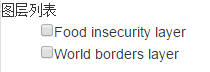
点击后

参考代码
<!DOCTYPE html>

<html>

<head>

<title>Layer group example</title>

<script src="js/jquery-1.11.1.min.js"></script>

<link rel="stylesheet" href="css/bootstrap.min.css">

<script src="js/bootstrap.min.js"></script>

<style>

    #layertree li > span {

      cursor: pointer;

    }

</style>

<style>

    ul,ol {

        list-style: none

    }

</style>

</head>

<body>

<div id="layertree" class="span6">

  <span>图层列表</span>

  <ul class='layer-list'>

      <li><input type="checkbox"><span>Food insecurity layer</span>

        <fieldset>

          <input class="opacity" type="range" min="0" max="1" step="0.01"/>

        </fieldset>

      </li>

      <li><input type="checkbox"><span>World borders layer</span>

        <fieldset>

          <input class="opacity" type="range" min="0" max="1" step="0.01"/>

        </fieldset>

      </li>

  </ul>

</div>

<script>

$('#layertree li > span').click(function() {

  $(this).siblings('fieldset').toggle();

}).siblings('fieldset').hide();

</script>

</body>

</html>
其中:
1. <html>标签<ul>表示无序列表;<ol>比奥斯有序列表
2. 以下格式,表示每一小项的前边没有默认的黑点
ul,ol {

    list-style: none

}
实例
<!DOCTYPE html>

<html>

<head>

<title>Layer group example</title>

<script src="js/jquery-1.11.1.min.js"></script>

<link rel="stylesheet" href="css/bootstrap.min.css">

<script src="js/bootstrap.min.js"></script>

<link rel="stylesheet" href="css/ol.css" type="text/css">

<script src="js/ol.js"></script>

<style>

#layertree li > span {

  cursor: pointer;

}

</style>

<style>

  ol,ul{

    list-style:none

  }

</style>

</head>

<body>

<div class="row-fluid">

  <div id="map" class="map"></div>

  <div id="layertree" >

    <span>图层列表</span>

    <ul>      <!--无序列表-->

      <li><span>Food insecurity layer</span>

        <fieldset id="layer0">

            <input class="visible" type="checkbox"/>

            <input class="opacity" type="range" min="0" max="1" step="0.01"/>

        </fieldset>

      </li>

      <li><span>World borders layer</span>

        <fieldset id="layer1">

            <input class="visible" type="checkbox"/>

            <input class="opacity" type="range" min="0" max="1" step="0.01"/>

        </fieldset>

      </li>

    </ul>

  </div>

</div>

<script>

var map = new ol.Map({

  layers: [

    new ol.layer.Tile({

      source: new ol.source.MapQuest({layer: 'sat'})

    }),

    new ol.layer.Group({

      layers: [

        new ol.layer.Tile({

          source: new ol.source.TileJSON({

            url: 'http://api.tiles.mapbox.com/v3/' +

                'mapbox.20110804-hoa-foodinsecurity-3month.jsonp',

            crossOrigin: 'anonymous'

          })

        }),

        new ol.layer.Tile({

          source: new ol.source.TileJSON({

            url: 'http://api.tiles.mapbox.com/v3/' +

                'mapbox.world-borders-light.jsonp',

            crossOrigin: 'anonymous'

          })

        })

      ]

    })

  ],

  target: 'map',

  view: new ol.View({

    center: ol.proj.fromLonLat([37.40570, 8.81566]),

    zoom: 4

  })

});

function bindInputs(layerid, layer) {

  var visibilityInput = $(layerid + ' input.visible');

  visibilityInput.on('change', function() {

    layer.setVisible(this.checked);

  });

  visibilityInput.prop('checked', layer.getVisible());

  $.each(['opacity'],

      function(i, v) {

        var input = $(layerid + ' input.' + v);

        input.on('input change', function() {

          layer.set(v, parseFloat(this.value));

        });

        input.val(String(layer.get(v)));

      }

  );

}

map.getLayers().forEach(function(layer, i) {

  bindInputs('#layer' + i, layer);

  if (layer instanceof ol.layer.Group) {

    layer.getLayers().forEach(function(sublayer, j) {

      bindInputs('#layer' + i + j, sublayer);

    });

  }

});

$('#layertree li > span').click(function() {

  $(this).siblings('fieldset').toggle();

}).siblings('fieldset').hide();

</script>

</body>

</html>
[html/js]点击标题出现下拉列表的更多相关文章
- JS弹出模态窗口下拉列表特效
效果体验:http://hovertree.com/texiao/js/20/ 或者扫描二维码在手机体验: 点击选择城市后,在弹出的层中的输入框,输入英文字母 h,会有HoverTree和Hewenq ...
- jquery如何实现点击标题收缩下面的内容
jquery如何实现点击标题收缩下面的内容 一.总结 一句话总结:怎么做复杂前端任务,先把样式(最简单)做出来,然后在写js. 1.如何取jquery集合中的某个索引号的元素? 不是get(),是eq ...
- [WPF]ComboBox.Items为空时,点击不显示下拉列表
ComboBox.Items为空时,点击后会显示空下拉列表: ComboBox点击显示下拉列表,大概原理为: ComboBox存在ToggleButton控件,默认ToggleButton.IsChe ...
- js点击左右滚动+默认自动滚动类
js点击左右滚动+默认自动滚动类 点击下载
- selenium—JS点击方法
package com.allin.pc;import java.util.NoSuchElementException;import org.openqa.selenium.By;import or ...
- 用 JS 点击左右按钮 使图片切换 - 最精简版-ljx2380000-ChinaUnix博客
body { font-family: "Microsoft YaHei UI","Microsoft YaHei",SimSun,"Segoe UI ...
- 项目遇到的小问题(关于vue-cli中js点击事件不起作用和iconfont图片下载页面css样式乱的解答)
第一个:关于vue-cli中js点击事件不起作用 在vue的methods方法queryBtnFun()中拼接html和click操作事件的时候,发现点击事件一起未起作用: 后来发现是DOM执行顺序 ...
- Js点击触发Css3的动画Animations、过渡Transitions效果
关键是首先指定动画效果的CSS属性名称,然后在Js中改变这个属性 如果不使用Js触发,可以选择利用css的状态:hover,focus,active 来触发,也可以一开始就触发 下例为Js点击触发过渡 ...
- JS中点击事件冒泡阻止
JS中点击事件冒泡阻止 解析: 一个div层'out',内含有一个div层'in'.如下: 两个层都绑定了点击事件,但是点击in层的时候,点击事件会出现冒泡现象,同时也会触发out层的点击事件. 但是 ...
随机推荐
- C#存取数据库图片
form1 using System; using System.Collections.Generic; using System.ComponentModel; using System.Data ...
- GraphQL 优势之处
一次查询,搞定需求 举个例子,Book对象有bookTypeId,那我想看对应的bookTypeName,bookType对应的summary咋办? 如果你用RESTful Api ,免不了要定制接口 ...
- angular 响应式表单
- leecode刷题(3)-- 旋转数组
leecode刷题(3)-- 旋转数组 旋转数组 给定一个数组,将数组中的元素向右移动 K 个位置,其中 K 是非负数. 示例: 输入: [1,2,3,4,5,6,7] 和 k = 3 输出: [5, ...
- Django 实现购物车功能
购物车思路:使用 session 功能识别不同浏览器用户,使得用户不管是否登录了网站,均能够把想要购买的产品放在某个地方,之后随时可以显示或修改要购买的产品,等确定了之后再下订单,购物车可以用来暂存商 ...
- #首行输入数n,接下来输入n行数,以空格隔开
#首行输入数n,接下来输入n行数,以空格隔开 n = int(raw_input())# print nL = []for i in range(n): L.append([int(x) for x ...
- eclipse中查看java源码时,出现source not found问题
- CentOS 中查看软件的版本号
CentOS 中查看软件的版本号 1. rpm 查看 [root@hadoop110 ~]# rpm -qa | grep mysql mysql-community-client--.el6.x8 ...
- JAVA基础——重新认识String字符串
深入剖析Java之String字符串 在程序开发中字符串无处不在,如用户登陆时输入的用户名.密码等使用的就是字符串. 在 Java 中,字符串被作为 String 类型的对象处理. String 类位 ...
- DataFactory使用和注意,排列组合
DataFactory使用和注意 mysql 连接ODBC开放数据库连接(Open Database Connectivity,ODBC)驱动程序 生成数据:int不能用 Build a compos ...