
JDBC的PreparedStatement启动事务使用批处理executeBatch()
JDBC使用MySQL处理大数据的时候,自然而然的想到要使用批处理,
普通的执行过程是:每处理一条数据,就访问一次数据库;
而批处理是:累积到一定数量,再一次性提交到数据库,减少了与数据库的交互次数,所以效率会大大提高
至于事务:事务指逻辑上的一组操作,组成这组操作的各个单元,要不全部成功,要不全部不成功,默认是关闭事务的。
更多事务的资料,请参考这里:http://blog.csdn.net/caomiao2006/article/details/22412755
1. PreparedStatement使用批处理 executeBatch()
1.1. 不使用executeBatch(),而使用executeUpdate()
代码如下:
Class.forName("com.mysql.jdbc.Driver");
Connection conn = DriverManager.getConnection(dbUrl, user, password);
PreparedStatement pstmt = conn.prepareStatement("update content set introtext=? where id=?");
for(int i=0; i<10000; i++){
pstmt.setString(1, "abc"+i);
pstmt.setInt(2, id);
pstmt.executeUpdate();
}
这样,更新10000条数据,就得访问数据库10000次
1.2. 而使用executeBatch()
代码如下:
Class.forName("com.mysql.jdbc.Driver");
Connection conn = DriverManager.getConnection(dbUrl, user, password);
PreparedStatement pstmt = conn.prepareStatement("update content set introtext=? where id=?");
for(int i=0; i<10000; i++){
pstmt.setString(1, "abc"+i);
pstmt.setInt(2, id);
pstmt.addBatch();//添加到同一个批处理中
}
pstmt.executeBatch();//执行批处理
注意:1. 如果使用了 addBatch() -> executeBatch() 还是很慢,那就得使用到这个参数了
rewriteBatchedStatements=true (启动批处理操作)
在数据库连接URL后面加上这个参数:
String dbUrl = "jdbc:mysql://localhost:3306/User? rewriteBatchedStatements=true";
2. 在代码中,pstmt的位置不能乱放,
//必须放在循环体外
pstmt = conn.prepareStatement("update content set introtext=? where id=?");
for(int i=0; i<10000; i++){
//放这里,批处理会执行不了,因为每次循环重新生成了pstmt,不是同一个了
//pstmt = conn.prepareStatement("update content set introtext=? where id=?");
pstmt.setString(1, "abc"+i);
pstmt.setInt(2, id);
pstmt.addBatch();//添加到同一个批处理中
}
pstmt.executeBatch();//执行批处理
2. 启用事务处理
Class.forName("com.mysql.jdbc.Driver");
Connection conn = DriverManager.getConnection(dbUrl, user, password);
conn.setAutoCommit(false);//将自动提交关闭
PreparedStatement pstmt = conn.prepareStatement("update content set introtext=? where id=?");
pstmt.setString(1, tempintrotext);
pstmt.setInt(2, id);
pstmt.addBatch();
pstmt.executeBatch();
pstmt.close();
conn.commit();//执行完后,手动提交事务
conn.setAutoCommit(true);//再把自动提交打开,避免影响其他需要自动提交的操作
conn.close();
3. 事务和批处理混合使用
Class.forName("com.mysql.jdbc.Driver");
Connection conn = DriverManager.getConnection(dbUrl, user, password);
conn.setAutoCommit(false);//将自动提交关闭
PreparedStatement pstmt = conn.prepareStatement("update content set introtext=? where id=?");
for(int i=0; i<1000000; i++){
pstmt.setString(1, tempintrotext);
pstmt.setInt(2, id);
pstmt.addBatch();
//每500条执行一次,避免内存不够的情况,可参考,Eclipse设置JVM的内存参数
if(i>0 && i%500==0){
pstmt.executeBatch();
//如果不想出错后,完全没保留数据,则可以每执行一次提交一次,但得保证数据不会重复
conn.commit();
}
}
pstmt.executeBatch();//执行最后剩下不够500条的
pstmt.close();
conn.commit();//执行完后,手动提交事务
conn.setAutoCommit(true);//再把自动提交打开,避免影响其他需要自动提交的操作
conn.close();
较完整的代码:
 public class ExecuteBatchTest {

     private Connection conn;

     private PreparedStatement pstmt;

     private PreparedStatement pstmt2;

     private ResultSet rs;

     private String user = "root";

     private String password = "123456";

     private String dbUrl = "jdbc:mysql://localhost:3306/user?rewriteBatchedStatements=true";

     private int limitNum = 10000;

     public void changeData() {

         try {

             Class.forName("com.mysql.jdbc.Driver");

             conn = DriverManager.getConnection(dbUrl, user, password);

             //既不用batch,也不用事务

             testBatch(false,false);

             //只用batch, 不用事务

             testBatch(false,true);

             //只用事务,不用batch

             testBatch(true,false);

             //不仅用事务,还用batch

             testBatch(true,true);

             pstmt.close();

             conn.close();

         } catch (ClassNotFoundException e) {

             e.printStackTrace();

         } catch (SQLException e) {

             e.printStackTrace();

         }

     }

     public void testBatch(Boolean openTransaction, Boolean useBatch) throws SQLException{

         if(openTransaction)

             conn.setAutoCommit(false);

         if(pstmt!=null){

             pstmt.clearParameters();

             pstmt.clearBatch();

         }

         pstmt = conn.prepareStatement("insert into person (name) values (?)");

         long start = System.currentTimeMillis();

         for(int a = 0;a<limitNum;a++){

             String name = "tommy"+a;

             pstmt.setString(1, name);

             if(useBatch)

                 pstmt.addBatch();

             else

                 pstmt.executeUpdate();

         }

         if(useBatch)

            pstmt.executeBatch();

         if(openTransaction){

             conn.commit();

             conn.setAutoCommit(true);

         }

         long end = System.currentTimeMillis();

         System.out.println("use time:"+(end-start)+" ms");

     }

     //main method

     publi static void main(String[] args){

         ExecuteBatchTest ebt = new ExecuteBatchTest();

         ebt.changeData();

     }

 }
运行结果:
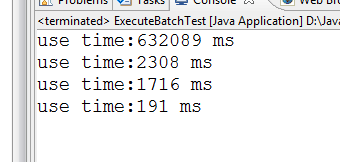
分别是: 不用批处理,不用事务;
只用批处理,不用事务;
只用事务,不用批处理;
既用事务,也用批处理;(很明显,这个最快,所以建议在处理大批量的数据时,同时使用批处理和事务)
JDBC的PreparedStatement启动事务使用批处理executeBatch()的更多相关文章
- JDBC批处理executeBatch
JDBC运行SQL声明,有两个处理接口,一PreparedStatement,Statement,一般程序JDBC有多少仍然比较PreparedStatement 只要运行批处理,PreparedSt ...
- java中使用JDBC的preparedStatement批处理数据的添加
在项目中我们偶尔可能会遇到批量向数据库中导入数据,如果批处理的情况较多的情况下可以使用spring batch,如果只是一个导入功能的话可以考虑使用jdbc的preparedStatement处理. ...
- JDBC之PreparedStatement
JDBC之PreparedStatement 一.java.sql.PreparedStatement接口简介 该接口表示预编译的 SQL 语句的对象. SQL 语句被预编译并存储在 Prepared ...
- JDBC&&c3p0、事务、批处理、多线程 于一体的经典秘方QueryRunner
目录: 基础篇_功能各自回顾 JDBC基础代码回顾(使用JdbcUtils工具简化) c3p0数据库连接池的使用(使用JdbcUtils工具简化) 大数据的插入(使用c3p0+JdbcUtils工具简 ...
- JDBC 中preparedStatement和Statement区别
一.概念 PreparedStatement是用来执行SQL查询语句的API之一,Java提供了 Statement.PreparedStatement 和 CallableStatement三种方式 ...
- JDBC入门(4)--- 批处理
1.Statement批处理 当你有10条SQL语句要执行时,一次向服务器发送一条SQL语句,这样做的效率上极差,处理的方案是使用批处理,即一次向服务发送多条SQL语句,然后由服务器一次性处理. 批处 ...
- JDBC 中的事务和批处理 batch
JDBC事务处理: 事务处理一般在事务开始前把事务提交设置为false 所有DML语句执行完成后提交事务 demo: package com.xzlf.jdbc; import java.sql.Co ...
- jdbc java数据库连接 10)批处理
批处理 很多时候,需要批量执行sql语句! 需求:批量保存信息! 设计: AdminDao Public void save(List<Admin list){ // 目前用这种方式 ...
- jdbc、事务(Transaction)、批处理 回顾
论文写的头疼,回顾一下jdbc,换换脑子 传统的写法: 1.加载驱动类 class.forname("jdbc类的包结构"); 2.获得连接 Connection conn=Dri ...
随机推荐
- .NET&C#的异常处理
应用程序未捕获异常的处理 处理未捕获的异常是每个应用程序起码有的功能 无论是Windows窗体程序还是WPF程序,我们都看到捕获的异常当中分为"窗体线程异常"和"非窗体线 ...
- WinForm中使用自定义Tooltip控件
private ToolTip tooltipCtr; 构造函数中: 隐藏默认的Tooltip:this.ShowCellToolTips = false; this.tooltipCtr = new ...
- 一、SpringBoot是什么?
SpringBoot是什么? 我管她是什么,好用就行了啊!!!但是无奈我的简历上写了“精通SpringBoot”...那总得大体说得上SpringBoot是个啥东西吧! Spring相信大家都用过,那 ...
- KVO 的代码简洁使用
1.类属性设置与创建 详细使用介绍 KVO 键值观察 // KvoClass.h @interface KvoClass : NSObject @property(nonatomic, copy) N ...
- GitHub+Hexo 搭建个人网站详细教程
原文链接 GitHub+Hexo 搭建个人网站详细教程 前言: 随着互联网浪潮的翻腾,国内外涌现出越来越多优秀的社交网站让用户分享信息更加便捷.然后,如果你是一个不甘寂寞的程序猿(媛),是否也想要搭建 ...
- pycharm 不显示代码提示
1.检查是否代码本身有问题. 2.检查代码提示是否成功开启. 3.检查IDE省电模式是否关闭状态. 4.使用快捷键:ctrl+j.ctrl+space.alt+/ 其他(不能安装): 1.检查是否Py ...
- Qt 学习之路 2(70):进程间通信
Qt 学习之路 2(70):进程间通信 豆子 2013年11月12日 Qt 学习之路 2 16条评论 上一章我们了解了有关进程的基本知识.我们将进程理解为相互独立的正在运行的程序.由于二者是相互独立的 ...
- C# 检查键盘是否唤醒到桌面上显示
大概需要的win32函数 public static extern IntPtr FindWindow(string lpClassName, string lpWindowName)//返回值为具有 ...
- Codeforces - 240F 是男人就上26棵线段树
#include<bits/stdc++.h> using namespace std; const int maxn = 1e5+11; typedef long long ll; ch ...
- 微信公众平台开发 OAuth2.0网页授权认证
一.什么是OAuth2.0 官方网站:http://oauth.NET/ http://oauth.Net/2/ 权威定义:OAuth is An open protocol to allow s ...