
Burning widget
This is a widget that we can see in Nero, K3B, or other CD/DVD burning software.
#!/usr/bin/python

# -*- coding: utf-8 -*-

"""

ZetCode PyQt4 tutorial

In this example, we create a custom widget.

author: Jan Bodnar

website: zetcode.com

last edited: October 2011

"""

import sys

from PyQt4 import QtGui, QtCore

class Communicate(QtCore.QObject):

    updateBW = QtCore.pyqtSignal(int)

class BurningWidget(QtGui.QWidget):

    def __init__(self):

        super(BurningWidget, self).__init__()

        self.initUI()

    def initUI(self):

        self.setMinimumSize(1, 30)

        self.value = 75

        self.num = [75, 150, 225, 300, 375, 450, 525, 600, 675]

    def setValue(self, value):

        self.value = value

    def paintEvent(self, e):

        qp = QtGui.QPainter()

        qp.begin(self)

        self.drawWidget(qp)

        qp.end()

    def drawWidget(self, qp):

        font = QtGui.QFont('Serif', 7, QtGui.QFont.Light)

        qp.setFont(font)

        size = self.size()

        w = size.width()

        h = size.height()

        step = int(round(w / 10.0))

        till = int(((w / 750.0) * self.value))

        full = int(((w / 750.0) * 700))

        if self.value >= 700:

            qp.setPen(QtGui.QColor(255, 255, 255))

            qp.setBrush(QtGui.QColor(255, 255, 184))

            qp.drawRect(0, 0, full, h)

            qp.setPen(QtGui.QColor(255, 175, 175))

            qp.setBrush(QtGui.QColor(255, 175, 175))

            qp.drawRect(full, 0, till-full, h)

        else:

            qp.setPen(QtGui.QColor(255, 255, 255))

            qp.setBrush(QtGui.QColor(255, 255, 184))

            qp.drawRect(0, 0, till, h)

        pen = QtGui.QPen(QtGui.QColor(20, 20, 20), 1,

            QtCore.Qt.SolidLine)

        qp.setPen(pen)

        qp.setBrush(QtCore.Qt.NoBrush)

        qp.drawRect(0, 0, w-1, h-1)

        j = 0

        for i in range(step, 10*step, step):

            qp.drawLine(i, 0, i, 5)

            metrics = qp.fontMetrics()

            fw = metrics.width(str(self.num[j]))

            qp.drawText(i-fw/2, h/2, str(self.num[j]))

            j = j + 1

class Example(QtGui.QWidget):

    def __init__(self):

        super(Example, self).__init__()

        self.initUI()

    def initUI(self):

        sld = QtGui.QSlider(QtCore.Qt.Horizontal, self)

        sld.setFocusPolicy(QtCore.Qt.NoFocus)

        sld.setRange(1, 750)

        sld.setValue(75)

        sld.setGeometry(30, 40, 150, 30)

        self.c = Communicate()

        self.wid = BurningWidget()

        self.c.updateBW[int].connect(self.wid.setValue)

        sld.valueChanged[int].connect(self.changeValue)

        hbox = QtGui.QHBoxLayout()

        hbox.addWidget(self.wid)

        vbox = QtGui.QVBoxLayout()

        vbox.addStretch(1)

        vbox.addLayout(hbox)

        self.setLayout(vbox)

        self.setGeometry(300, 300, 390, 210)

        self.setWindowTitle('Burning widget')

        self.show()

    def changeValue(self, value):

        self.c.updateBW.emit(value)

        self.wid.repaint()

def main():

    app = QtGui.QApplication(sys.argv)

    ex = Example()

    sys.exit(app.exec_())

if __name__ == '__main__':

    main()
In our example, we have a QtGui.QSlider and a custom widget. A slider controls the custom widget. This widget shows graphically the total capacity of a medium and the free space available to us. The minimum value of our custom widget is 1, the maximum is 750. If we reach value 700, we begin drawing in red colour. This normally indicates overburning.
The burning widget is placed at the bottom of the window. This is achieved using oneQtGui.QHBoxLayout and one QtGui.QVBoxLayout.
class BurningWidget(QtGui.QWidget):

    def __init__(self):

        super(BurningWidget, self).__init__()
The burning widget it based on the QtGui.QWidget widget.
self.setMinimumSize(1, 30)
We change the minimum size (height) of the widget. The default value is a bit small for us.
font = QtGui.QFont('Serif', 7, QtGui.QFont.Light)

qp.setFont(font)
We use a smaller font than the default one. This better suits our needs.
size = self.size()

w = size.width()

h = size.height()

step = int(round(w / 10.0))

till = int(((w / 750.0) * self.value))

full = int(((w / 750.0) * 700))
We draw the widget dynamically. The greater is the window, the greater is the burning widget and vice versa. That is why we must calculate the size of the widget onto which we draw the custom widget. The till parameter determines the total size to be drawn. This value comes from the slider widget. It is a proportion of the whole area. The full parameter determines the point where we begin to draw in red colour. Notice the use of floating point arithmetics to achieve greater precision in drawing.
The actual drawing consists of three steps. We draw the yellow or the red and yellow rectangle. Then we draw the vertical lines which divide the widget into several parts. Finally, we draw the numbers which indicate the capacity of the medium.
metrics = qp.fontMetrics()

fw = metrics.width(str(self.num[j]))

qp.drawText(i-fw/2, h/2, str(self.num[j]))
We use font metrics to draw the text. We must know the width of the text in order to center it around the vertical line.
def changeValue(self, value):

    self.c.updateBW.emit(value)

    self.wid.repaint()
When we move the slider, the changeValue() method is called. Inside the method, we send a customupdateBW signal with a parameter. The parameter is the current value of the slider. The value is later used to calculate the capacity of the Burning widget to be drawn. The custom widget is then repainted.
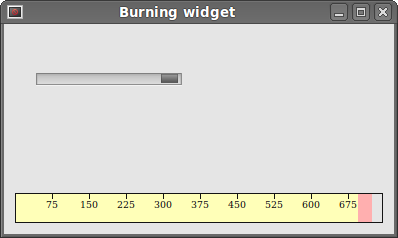 Figure: The burning widget
Burning widget的更多相关文章
- ZetCode PyQt4 tutorial custom widget
#!/usr/bin/python # -*- coding: utf-8 -*- """ ZetCode PyQt4 tutorial In this example, ...
- 读Pyqt4教程,带你入门Pyqt4 _013
你是否曾经看着应用程序并思考特定的GUI项是如何产生的?大概每位程序员都这样过.然后你能看到你喜欢的GUI库提供的一系列窗口组件,但是你无法找到它.工具包通常仅仅提供最常用的窗口组件,比如按钮.文本组 ...
- StructureMap 代码分析之Widget 之Registry 分析 (1)
说句实话,本人基本上没用过Structuremap,但是这次居然开始看源码了,不得不为自己点个赞.Structuremap有很多的类,其中有一个叫做Widget的概念.那么什么是Widget呢?要明白 ...
- Sencha ExtJS 6 Widget Grid 入门
最近由于业务需要,研究了一下Sencha ExtJS 6 ,虽然UI和性能上据相关资料说都有提升,但是用起来确实不太顺手,而且用Sencha cmd工具进行测试和发布,很多内部细节都是隐藏的,出了问题 ...
- 使用 CoordinatorLayout 出错 inflating class android.support.design.widget.CoordinatorLayout
ava.lang.RuntimeException: Unable to start activity ComponentInfo{com.czr.ianpu/com.czr.ianpu.MainAc ...
- yii2——自定义widget
参考资料:http://www.bsourcecode.com/yiiframework2/how-to-create-custom-widget-in-yii2-0-framework/ 如何使 ...
- Yii2 时间控件之把layDate做成widget
实现效果如下 1.把layDate封装成Yii2的widget,存在 "\common\widgets"目录下,命名为DycLayDate,具体引用查看代码. 2.对应的model ...
- 解决Android中No resource found that matches android:TextAppearance.Material.Widget.Button.Inverse问题
解决Android中No resource found that matches android:TextAppearance.Material.Widget.Button.Inverse问题http ...
- Ext.js细节:在MVC中处理Widget Column,GetCmp和ComponentQuery, Id和ItemId
针对EXT.JS版本的演进,要不断的学习新的最佳实践方法. 比如,在定义组件时,尽管用itemid,而不是id. 在搜索组件时,尽量用ComponentQuery,而不是getCmp. 在MVC中处理 ...
随机推荐
- Educational Codeforces Round 43 (Rated for Div. 2) ABCDE
A. Minimum Binary Number time limit per test 1 second memory limit per test 256 megabytes input stan ...
- CF1009G Allowed Letters
link 题意: 给你一个长为n的串,字符集'a'~'f'.你可以重排这个串,满足指定m个位置上只能放特定的字符,m个位置以及字符集会给出.求字典序最小的串? $n,m\leq 10^5.$ 题解: ...
- Parse要垮了
一清早收到邮件就睡不着了... 花了那么多时间熟悉api,第一个基于parse的app也要做完了... 看来国内的类似产品也不敢用了,还是老老实实用阿里云自己写backend吧...
- [TC6194]AllWoundUp
[TC6194]AllWoundUp 题目大意: 有\(A\)和\(B\)两个人.\(A\)在平面上游走,\(B\)会一直盯着\(A\)看,站在\(x\)轴某个位置上不动,并随着\(A\)的运动旋转身 ...
- Java获取Access数据库连接单例简单实例
Java在连接Access数据库时比较方便,不用导入第三方的jar包,jdk中内置的odbc可以完成Access数据库的访问,需要注意的是,我们首先要配置Access数据库的数据源,还要区分x86和x ...
- Codeforces Beta Round #9 (Div. 2 Only) C. Hexadecimal's Numbers dfs
C. Hexadecimal's Numbers 题目连接: http://www.codeforces.com/contest/9/problem/C Description One beautif ...
- PHP 日期的加减
- ES6系列汇总
汇 总 第一节:什么是ES6?新手该如何理解 第二节:ES6新增了let关键字,干嘛用的? 第三节:ES6中另一个不得不说的关键字const 第四节:教你如何快速让浏览器兼容ES6特性 第五节:一个令 ...
- Ubuntu 16.04开启SFTP服务
说明:其实只要安装了SSH服务就已经具备了SFTP功能,这个用普通客户端无法连接,只能用支持SFTP协议的客户端才能连接. FileZilla作为FTP客户端,它也可以连接SFTP,SFTP的监听端口 ...
- TF卡翻盖式卡座