
Asp .net core api+Entity Framework core 实现数据CRUD数据库中(附Git地址)
最近在学dotNetCore 所以尝试了一下api 这个功能
不多说了大致实现如下
1.用vs2017建立一个Asp.net Core Web 应用程序 在弹出的对话框中选择 Web API 项目名自己随便起,我用的是CoreAPI
2.创建一个文件夹,文件名为Models
3.添加一个类 Users.cs
 public class Users

    {

        [Key]

        public int ID { get; set; }

        public string name { get; set; }

        public string pwd { get; set; }

    }
 提示:ID 为主键,这里加不加特性[key]都一样,因为EF会自动识别主键,识别规则为如果不加特性
 必须有个为int型的ID,外边的识别规则为“表名ID” 比如另一个表中把Users的ID当做外键 则写为UsersID 自动识别为外键。
4.在数据库中需要相应的添加一个Users表字段分别是ID主键(自增),name navarchar(50),pwd nvarchar(50)
5.建完之后项目结构如下
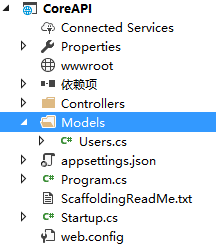
6.点击 Controllers文件夹
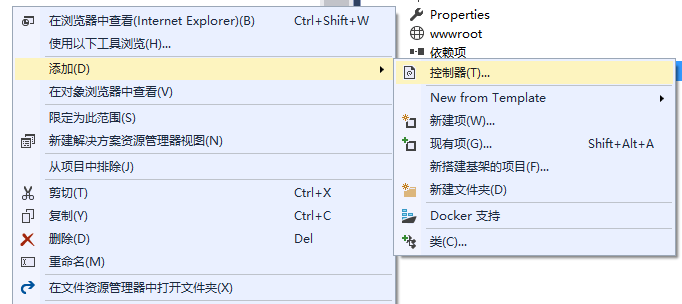
添加-->>控制器 在弹出的对话框中选择 Minimal Dependencies
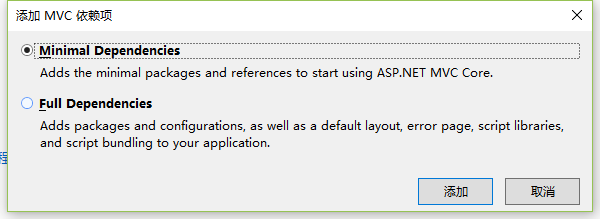
点击添加
7.等待完成之后 再次点击Controllers文件夹 再次选择添加--》控制器,在弹出的对话框中选择最后一个
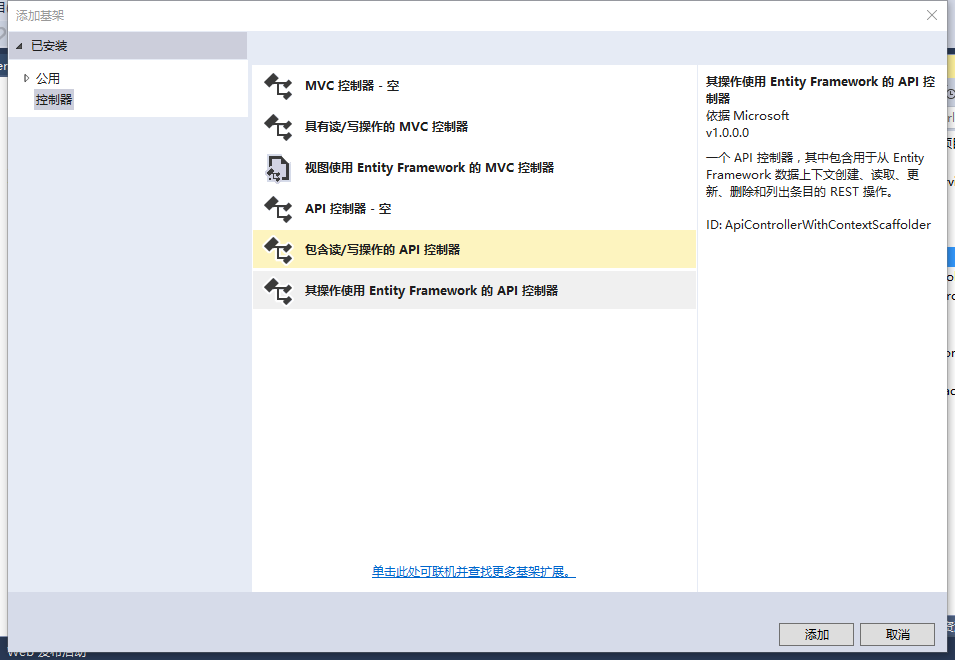
点击添加 在弹出的对话框中设置模型类为Users.cs

数据上下文类点击最右边的那个加号
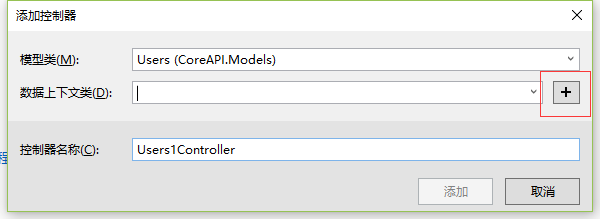
在弹出的对话框中设置名字我这里设置为Users 点击添加即可。


点击添加即可完成
8.打开appsettings.json 文件 修改

Server为你的数据库的服务器地址 和database为你的数据库名字。
9.点击项目名称,右键点击属性 选择调试选项 在启动 URL中设置为api/Users(这里对大小写不敏感)
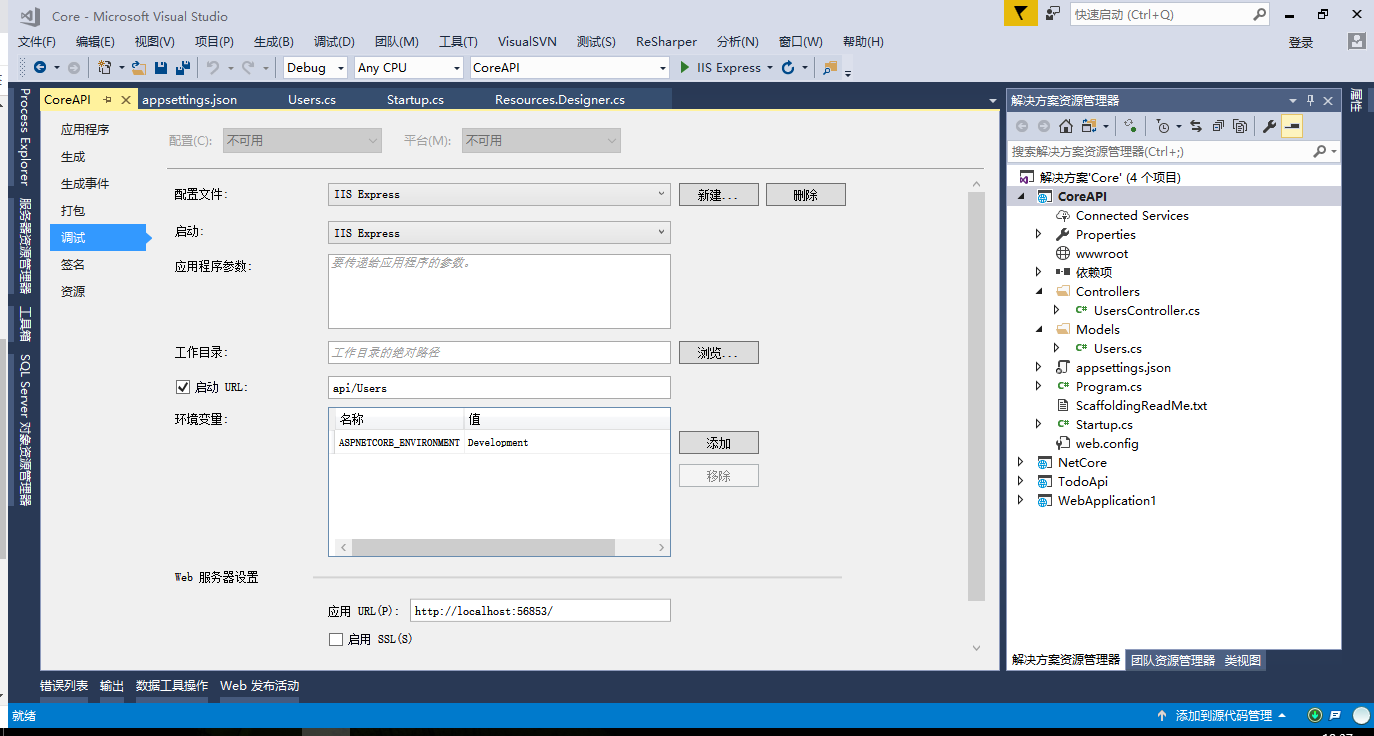
具体的设置URL的地址看你的controllers

特性 [Route("")]里边的字符串就是你的URL地址
10.这里可以直接启动项目了 基本算大功告成了。
二、关于测试
有两种方法 1.用ajax进行测试
2、用Postman或者 Fiddle等第三方测试工具测试
测试方法一:用ajax进行测试
我这里随便建了个项目 添加了一个html页面
<!DOCTYPE html>

<html>

<head>

    <meta charset="utf-8" />

    <title></title>

</head>

<body>

<input id="btn" type="button" value="test"/>

</body>

</html>

<script src="../../wwwroot/lib/jquery/dist/jquery.js"></script>

<script type="text/javascript">

    $("#btn").click(function() {

        $.ajax({

            type: "get",

            url: "http://localhost:56853/api/users",

            success:function(data) {

                alert(data[0].name+data[0].pwd);

            }

        });

    });

</script>
用了ajax进行数据测试 测试结果如下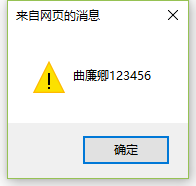
这里只进行了数据的获取;
添加 修改type:"post" data://json格式的数据
修改 type:"put" data://Json格式的数据 url:要添加路由的ID号
删除 type: "Delete" 不需要data url:需要添加路由的ID号
测试方法二 : 用第三方工具进测试 这里用postman进行测试
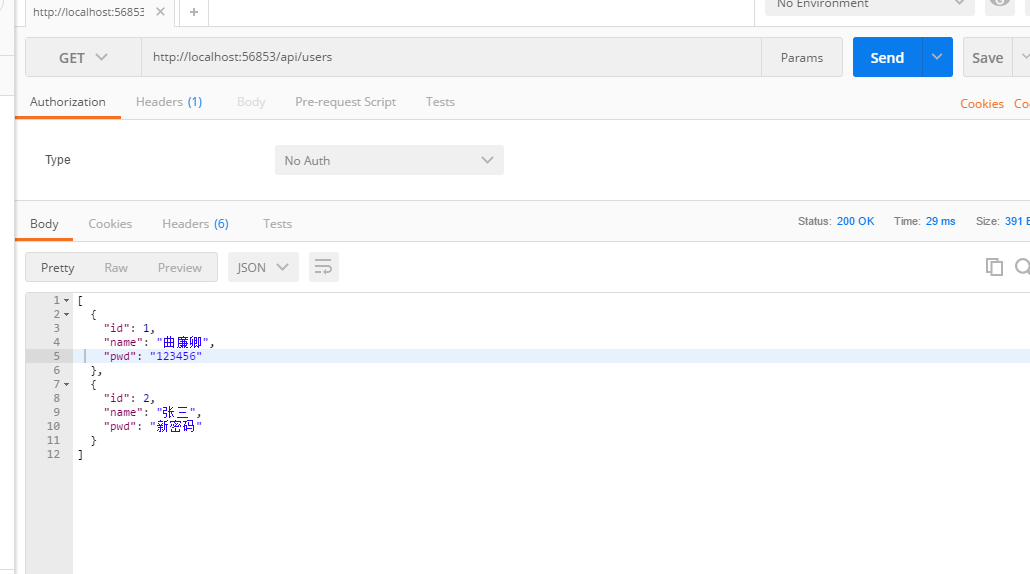
在地址栏里边输入URL 选取get类型 点击send 就获取到数据了
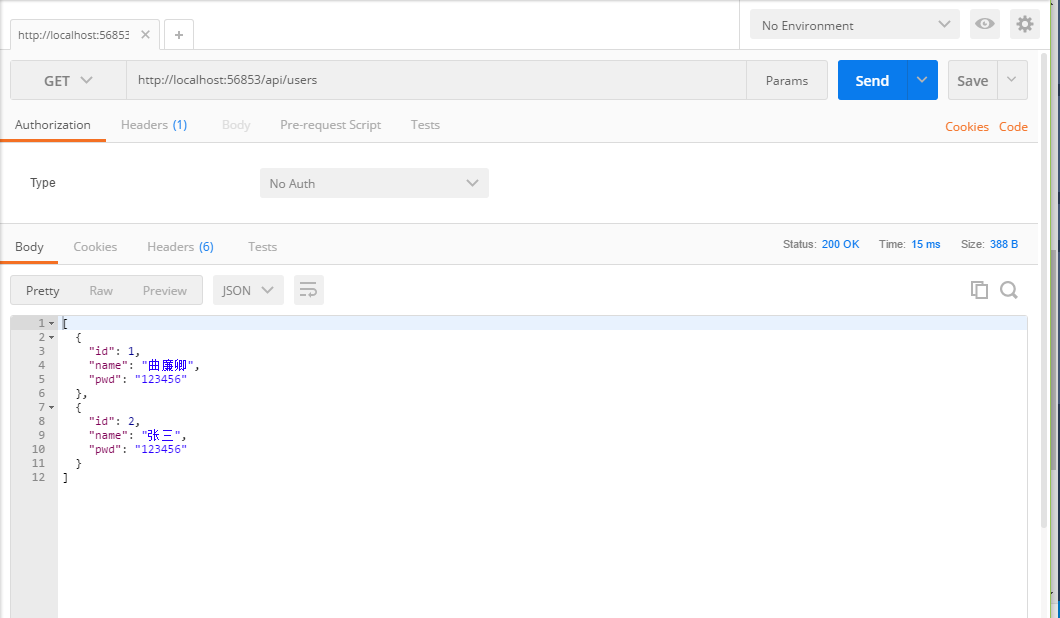
添加 第一步类型改为post 第二步点击body 第三步 在body中添加数据 第四步点击send 第五步 查看一下状态 是否为 200

这里进行查询一下
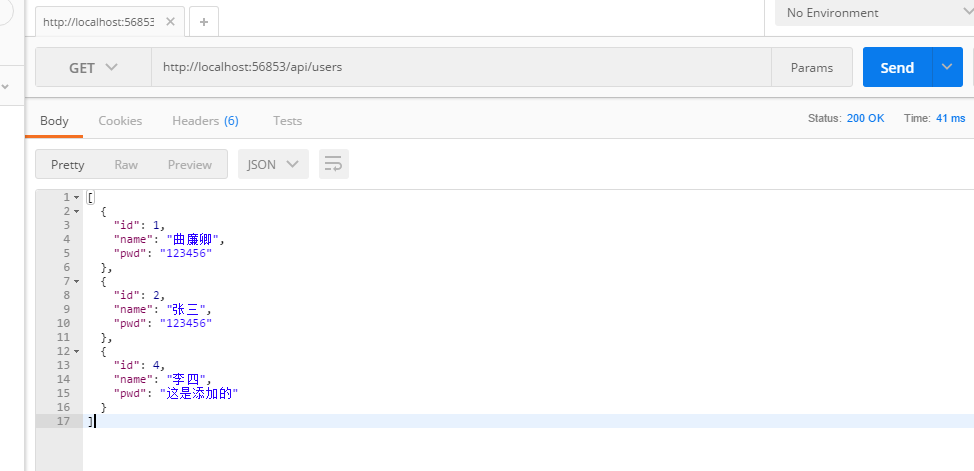
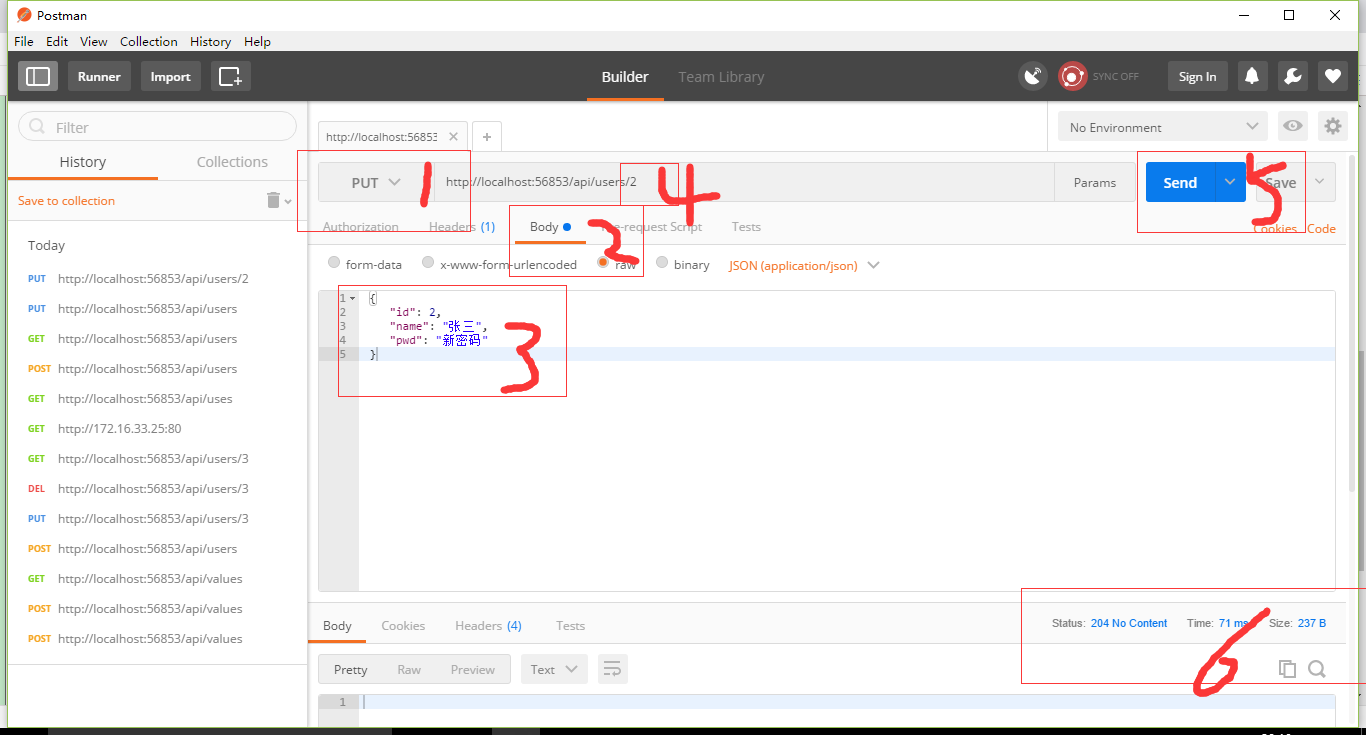
修改 按照下边的步骤 第一步类型改为put 第二步点击body 第三步在body中填入数据 第四步在url中添加ID号 第五步点击send 第六步查看状态 这里需要注意的是url需要路由ID号 如果没有会出现状态为404
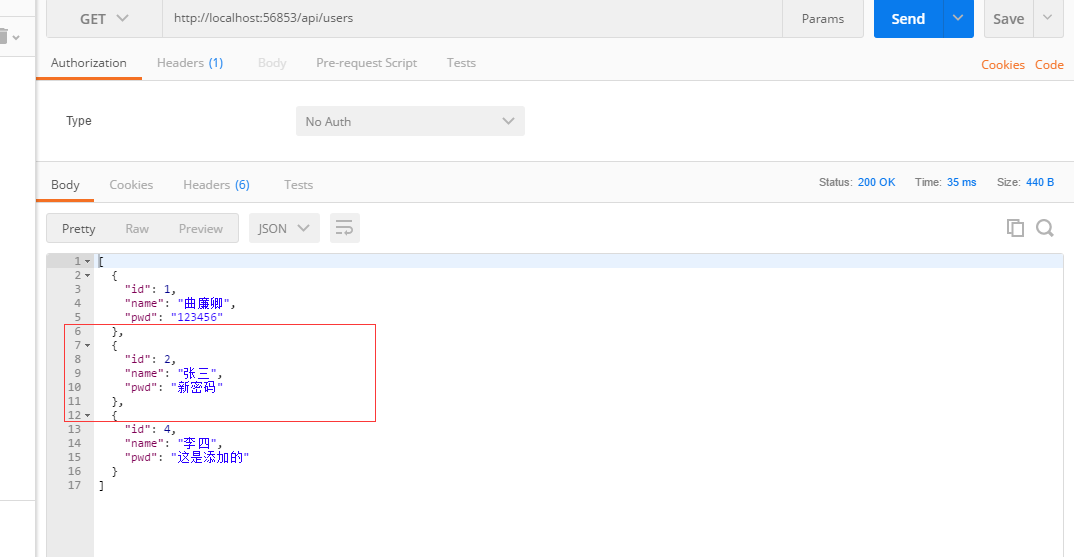
验证一下
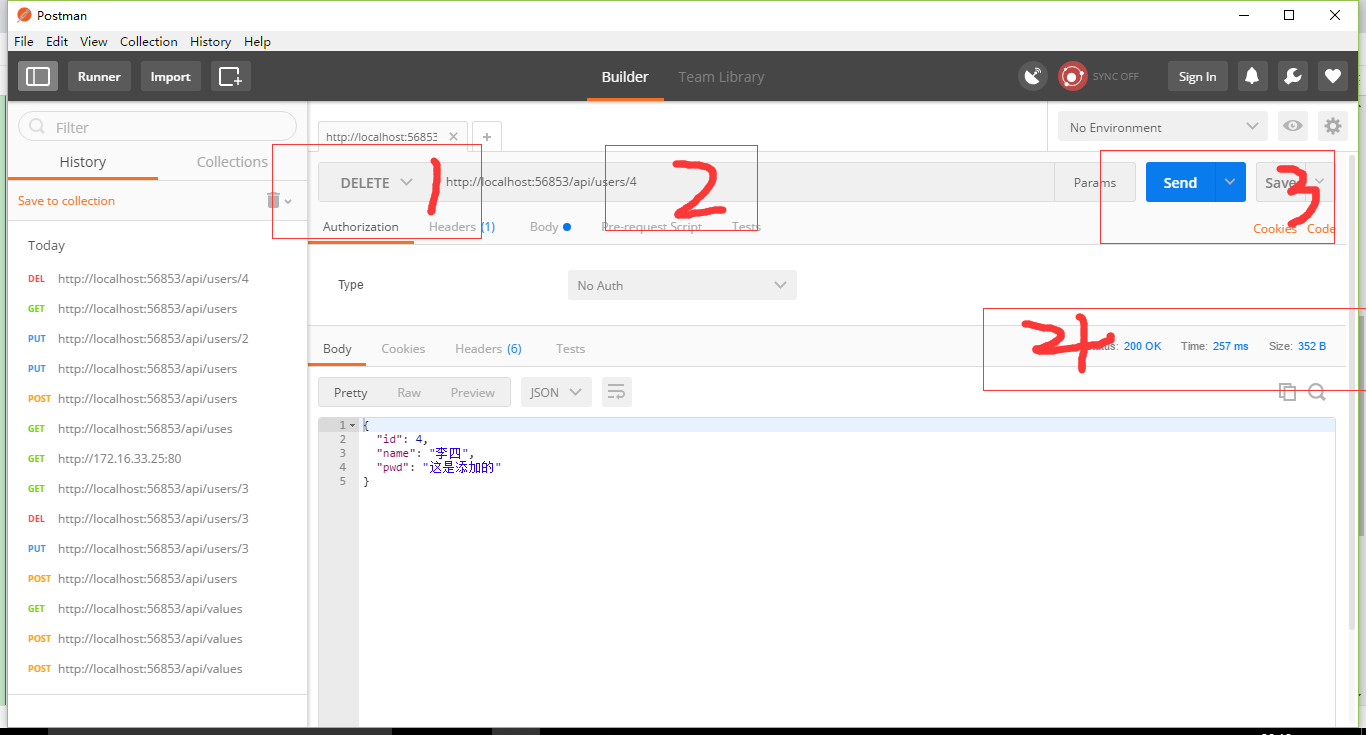
关于删除 第一步类型改为delete 第二步想要删除的数据的主键添加到URL中 第三步点击send 第四步检查状态
验证一下
到这里全部大功告成了,基础的东西基本都有了。
git 地址:https://github.com/1483523635/dotNetCoreAPIDemo.git
本人也是才学的有错误希望大家可以指正,互相学习。
Asp .net core api+Entity Framework core 实现数据CRUD数据库中(附Git地址)的更多相关文章
- ASP.NET Core 配置 Entity Framework Core - ASP.NET Core 基础教程 - 简单教程,简单编程
原文:ASP.NET Core 配置 Entity Framework Core - ASP.NET Core 基础教程 - 简单教程,简单编程 ASP.NET Core 配置 Entity Fram ...
- Working with Data » Getting started with ASP.NET Core and Entity Framework Core using Visual Studio » 读取关系数据
Reading related data¶ 9 of 9 people found this helpful The Contoso University sample web application ...
- Working with Data » Getting started with ASP.NET Core and Entity Framework Core using Visual Studio » 创建复杂数据模型
Creating a complex data model 创建复杂数据模型 8 of 9 people found this helpful The Contoso University sampl ...
- Working with Data » Getting started with ASP.NET Core and Entity Framework Core using Visual Studio » 更新关系数据
Updating related data¶ 7 of 7 people found this helpful The Contoso University sample web applicatio ...
- Working with Data » Getting started with ASP.NET Core and Entity Framework Core using Visual Studio »迁移
Migrations¶ 4 of 4 people found this helpful The Contoso University sample web application demonstra ...
- Working with Data » Getting started with ASP.NET Core and Entity Framework Core using Visual Studio » 排序、筛选、分页以及分组
Sorting, filtering, paging, and grouping 7 of 8 people found this helpful By Tom Dykstra The Contoso ...
- Working with Data » Getting started with ASP.NET Core and Entity Framework Core using Visual Studio » 增、查、改、删操作
Create, Read, Update, and Delete operations¶ 5 of 5 people found this helpful By Tom Dykstra The Con ...
- [UWP小白日记-11]在UWP中使用Entity Framework Core(Entity Framework 7)操作SQLite数据库(一)
前言 本文中,您将创建一个通用应用程序(UWP),使用Entity Framework Core(Entity Framework 7)框架在SQLite数据库上执行基本的数据访问. 准备: Enti ...
- 【EF Core】Entity Framework Core 批处理语句
在Entity Framework Core (EF Core)有许多新的功能,最令人期待的功能之一就是批处理语句.那么批处理语句是什么呢?批处理语句意味着它不会为每个插入/更新/删除语句发送单独的请 ...
随机推荐
- smarty基本用法,循环,判断
require './smarty/Smarty.class.php'; $sm = new Smarty; $sm->setTemplateDir("./dir");//设 ...
- Wordpress主题站
深度剖析WordPress主题结构 http://down.chinaz.com/try/201106/640_1.htm wordpress工作原理 http://blog.csdn.net/liu ...
- PHP面向对象——三大基本特性与五大基本原则
三大特性是:封装.继承.多态 所谓封装,也就是把客观事物封装成抽象的类,并且类可以把自己的数据和方法只让可信的类或者对象操作,对不可信的进行信息隐藏. 封装是面向对象的特征之一,是对象和类概念的主要特 ...
- ubuntu 12.04 下 Vim 插件 YouCompleteMe 的安装
作者:jostree 转载请注明出处 http://www.cnblogs.com/jostree/p/4137402.html 1.需要保证vim的版本大于7.3.584,否则的话需要更新vim 可 ...
- IMP-00013: 只有 DBA 才能导入由其他 DBA 导出的文件
IMP-00013: only a DBA can import a file exported by another DBA 处理方法:在给目标环境的用户赋予dba权限,或者细粒度一些,赋予imp_ ...
- Oracle DB备份恢复篇之丢失控制文件
实验目的 本篇主要模拟控制文件丢失后,如何根据实际情况恢复数据库,才能使数据库尽可能不丢失数据. 实验环境 1)Linux系统环境 [oracle@DG1 ~]$ lsb_release -a LSB ...
- linux的mysql
mysql https://www.cnblogs.com/cnblogsfans/archive/2009/09/21/1570942.html https://blog.csdn.net/Smal ...
- 应用程序 system 函数
1.使用实例 system("ps"); //执行shell命令ps 2.使用注意事项 system相当于创建了一个子进程,在子进程中调用程序.所以system执行的程序会继承主进 ...
- ConditionObject分析
ConditionObject是AQS中的内部类,提供了条件锁的同步实现,实现了Condition接口,并且实现了其中的await(),signal(),signalALL()等方法. Condi ...
- SQL 只取重复记录一条记录并且是最小值
and not exists( and a.StateValue>StateValue ) '