
Node+fs+定时器(node-schedule)+MySql
目标:将本人写博客时候的截图保存到桌面的图片
执行保存到指定文件进行整理
并写入数据库
先看最终的目录结构:
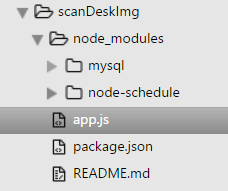
package.json文件:
{

  "name": "zqz",

  "dependencies": {

    "mysql": "^2.10.2",

    "node-schedule": "^1.1.0"

  }

}
通过npm install node-schedule --save //--save的作用是将其加入package.json的dependencies(依赖项中)
2个依赖项:
node-schedule https://github.com/node-schedule/node-schedule 定时器
mysql https://github.com/felixge/node-mysql mysql
app.js文件:
var schedule = require('node-schedule');

var mysql = require('mysql');

var fs = require('fs');

const desktopPath = 'C:/Users/Administrator/Desktop/';

const targetPath = 'F://Blog_ScreenShot//';

const metaInfo = 'blog';

var operationType = {

    0 : '插入',

    1 : '删除',

    2 : '修改',

    3 : '查询'

}

/**

 * 轮询桌面

 * @return {[type]} [description]

 */

function timePoll(){

    console.log('--------[开始轮询]----------')

    schedule.scheduleJob('30 * * * * *', function(){

        visitDesk();

          console.log('每分钟的30s都会执行!:' + (new Date).toLocaleTimeString());

    });

}

/**

 * 访问桌面

 * @return {[type]} [description]

 */

function visitDesk(){

    console.log('--------开始访问桌面----------')

    fs.readdir(desktopPath,function(err, files){

       if (err) {

           return console.error(err);

       }

           files.forEach( function (file){

              if(file && judgeImage(file)){

                   saveImageToFile(file);

              }else{

                   console.log('桌面无资源!');

                   return;

              }

           });

    });

}

/**

 * 判断文件类型,取出我们需要的png图片

 * @return {[type]} [description]

 */

function judgeImage(file){

    var postfix = getPostfix(file);

    if(postfix === 'png' && file.indexOf(metaInfo) > -1){

        return file;

    }

}

function getPostfix(file){

    var dotIndex = file.indexOf('.');

    var fileLen = file.length;

    return file.substring(dotIndex+1,fileLen);

}

/**

 * 将获取的图片存入

 * pipe,它以用来把当前的可读流和另外一个可写流连接起来。可读流中的数据会被自动写入到可写流中

 * @return {[type]} [description]

 */

function saveImageToFile(file){

    var fileReadStream = fs.createReadStream(desktopPath + file);

    var lastPath = targetPath + createDateFolder();

    if(!isFolderHave(lastPath)){

        createLastFloder(lastPath);

    }

    var fileWriteStream = fs.createWriteStream(lastPath + file);

    fileReadStream.pipe(fileWriteStream);

    fileWriteStream.on('close',function(){

          console.log('复制成功!');

          deleteDeskImage(file);

          //写入数据库

          connectMysql(file, lastPath, '0');

    })

}

/**

 * 删除桌面文件

 * @param  {[type]} file [description]

 * @return {[type]}      [description]

 */

function deleteDeskImage(file){

    fs.unlink(desktopPath + file, function(){

        console.log('删除成功!')

    })

}

/**

 * 以系统时间创建文件夹/年月日

 * @return {[type]} [description]

 */

function createDateFolder(){

    var day = (new Date).getDate();

    var month = (new Date).getMonth()+1;

    var year = (new Date).getFullYear();

    return year + '_' + month + '_' + day + '//';

}

/**

 * 判断文件夹是否存在

 * @return {[type]} [description]

 */

function isFolderHave(lastPath){

    fs.exists(lastPath, function(exists){

        if(exists){

            return true;

        }else{

            return false;

        }

    })

}

/**

 * 创建最终目标文件夹

 * @param  {[type]} lastPath [description]

 * @return {[type]}          [description]

 */

function createLastFloder(lastPath){

    fs.mkdir( lastPath, function(){

        console.log('[文件夹创建]-' +lastPath + "成功!");

    })

}

/**

 * 连接数据库

 * @return {[type]} [description]

 */

function connectMysql(picname, picurl, time){

    var connection = mysql.createConnection({

      host     : 'localhost',

      user     : 'root',

      password : 'root',

      database : 'nodejs'

    });

    connection.connect(function(err){

        if(err){

            console.log(err);

            return;

        }

        console.log('连接成功!');

    });

    saveToDataBase(connection, picname, picurl);

    connection.end(function(err){

        if(err){

            return;

        }

        console.log('关闭连接成功!');

    });

}

/**

 * 将数据存入数据库,进行持久化

 * @return {[type]} [description]

 */

function saveToDataBase( connection, picname, picurl){

    var  querySql = 'INSERT INTO scaingDeskImg(Id,picname,picurl,time) VALUES(0,?,?,?)';

    //注意存入数据库中的数据如果有中文会出现,乱码错误,导致执行失败!

    var  querySql_Params = [picname, targetPath+picurl+picname, new Date];

    operationDataBase( connection,querySql, querySql_Params, operationType['0']);

}

/**

 * 对数据库的操作

 * @return {[type]} [description]

 */

function operationDataBase( connection, querySql, querySql_Params,flag){

    connection.query( querySql, querySql_Params, function (err, result) {

        if(err){

         console.log('[' + flag + 'ERROR] - ',err.message);

         return;

        }

       console.log(flag + '成功!');

    });

}

timePoll();
结果:

涉及的知识:
定时器:
schedule.scheduleJob('30 * * * * *', function(){

    visitDesk();

      console.log('每分钟的30s都会执行!:' + (new Date).toLocaleTimeString());

});
定时器中的第一个参数:
秒 分 时 日 月 周
*    *    *    *    *    *

┬    ┬    ┬    ┬    ┬    ┬

│    │    │    │    │    |

│    │    │    │    │    └ day of week (0 - 7) (0 or 7 is Sun)

│    │    │    │    └───── month (1 - 12)

│    │    │    └────────── day of month (1 - 31)

│    │    └─────────────── hour (0 - 23)

│    └──────────────────── minute (0 - 59)

└───────────────────────── second (0 - 59, OPTIONAL)
例如:
30 * * * * * 就表示每分钟的30秒执行
30 2 * * * * 就表示每小时的2分30秒执行
30 2 21 * * * 就表示每天的21点2分30秒执行
30 2 21 8 * * 就表示每月的8号21点2分30秒执行
...依次类推
读写文件:
//从桌面将文件读入流
var fileReadStream = fs.createReadStream(desktopPath + file);
//从要存入的文件创建写入流
var fileWriteStream = fs.createWriteStream(lastPath + file);
//最后通过node的pipe()的方法连接两个数据流,犹如管道一样将数据读入写入
fileReadStream.pipe(fileWriteStream);
具体的可以参见API。
Node+fs+定时器(node-schedule)+MySql的更多相关文章
- paip.最好的脚本语言node js 环境搭建连接mysql
paip.最好的脚本语言node js 环境搭建连接mysql #====下载node...走十一个exe..容易的.. 1 #0----Hello world .js 2 #---------模 ...
- 解决node fs.writeFile 生成csv 文件乱码问题
解决node fs.writeFile 生成csv 文件乱码问题: fs.writeFile('xxx.csv', '\ufeff' + 要传入的数据, {encoding: 'utf8'}); \u ...
- Solve Error: node postinstall sh: node: command not found
When install the yeoman using the following command: npm install -g yo You might have the following ...
- 一起来学node.js吧 node school简介
node.js这几年火爆的简直丧心病狂,去lagou.com查查node.js的职位,那叫一个多. 要说火爆到什么程度,竟然有一个网站专门去教大家学习node.js, Node School. 进去逛 ...
- 获取所有树叶子节点 注册添加事件 if ($(node).tree('isLeaf', node.target)) 是否叶子节点
//获取所有树叶子节点 注册添加事件 if ($(node).tree('isLeaf', node.target)) 是否叶子节点 $(function () { $('.easyui-tree') ...
- .NET程序员也学Node.js——初识Node.js
清明在石门休了八天假,一眨眼,4月又到中旬了...看到.NET在天朝彻底沦陷而又无能为力,我开始尝试去学习一些新的东西来充实自己,我自然是打死不会去学java的,没有为什么,于是乎,最近开始学习一些前 ...
- node基础篇一:node介绍、node http、node event 课堂(持续)
最近工作一直很忙,没时间更新,谅解,这次准备更新一次node教程,本课堂将持续更新,每周坚持更新一到两章,希望对大家有一些小帮助吧: 一.首先什么是node? 1/Node.js 是一个基于 Chro ...
- elasticsearch节点(角色)类型解释node.master和node.data
在生产环境下,如果不修改elasticsearch节点的角色信息,在高数据量,高并发的场景下集群容易出现脑裂等问题. 默认情况下,elasticsearch集群中每个节点都有成为主节点的资格,也都存储 ...
- elasticsearch负载均衡节点——客户端节点 node.master: false node.data: false 其他配置和master 数据节点一样
elasticSearch的配置文件中有2个参数:node.master和node.data.这两个参 数搭配使用时,能够帮助提供服务器性能. 数据节点node.master: false node. ...
随机推荐
- Golang, 以17个简短代码片段,切底弄懂 channel 基础
(原创出处为本博客:http://www.cnblogs.com/linguanh/) 前序: 因为打算自己搞个基于Golang的IM服务器,所以复习了下之前一直没怎么使用的协程.管道等高并发编程知识 ...
- C#中那些[举手之劳]的性能优化
隔了很久没写东西了,主要是最近比较忙,更主要的是最近比较懒...... 其实这篇很早就想写了 工作和生活中经常可以看到一些程序猿,写代码的时候只关注代码的逻辑性,而不考虑运行效率 其实这对大多数程序猿 ...
- jquery.Callbacks的实现
前言 本人是一个热爱前端的菜鸟,一直喜欢学习js原生,对于jq这种js库,比较喜欢理解他的实现,虽然自己能力有限,水平很低,但是勉勉强强也算是能够懂一点吧,对于jq源码解读系列,博客园里有很多,推荐大 ...
- MFC中如何画带实心箭头的直线
工作中遇到话流程图的项目,需要画带箭头的直线,经过摸索,解决:思路如下: (1) 两个点(p1,p2)确定一个直线,以直线的一个端点(假设p2)为原点,设定一个角度 (2)以P2为原点得到向量P2P1 ...
- const extern static 终极指南
const extern static 终极指南 不管是从事哪种语言的开发工作,const extern static 这三个关键字的用法和原理都是我们必须明白的.本文将对此做出非常详细的讲解. co ...
- AFNetworking 3.0 源码解读(七)之 AFAutoPurgingImageCache
这篇我们就要介绍AFAutoPurgingImageCache这个类了.这个类给了我们临时管理图片内存的能力. 前言 假如说我们要写一个通用的网络框架,除了必备的请求数据的方法外,必须提供一个下载器来 ...
- 【Reading Note】Python读书杂记
赋值 >>> list=[] >>> app=[list,list,list] >>> app [[], [], []] >>> ...
- Ubuntu搭建lnmp环境
1.安装nginx 安装 sudo apt-get install nginx 服务启动.停止.重启 /etc/init.d/nginx start /usr/sbin/nginx -c /etc/n ...
- JDBC增加删除修改
一.配置程序--让我们程序能找到数据库的驱动jar包 1.把.jar文件复制到项目中去,整合的时候方便. 2.在eclipse项目右击"构建路径"--"配置构建路径&qu ...
- Android之Pull解析XML
一.Pull解析方法介绍 除了可以使用SAX和DOM解析XML文件,也可以使用Android内置的Pull解析器解析XML文件.Pull解析器的运行方式与SAX解析器相似.它也是事件触发的.Pull解 ...