
C# OpenFileDialog
OpenFileDialog 用于浏览并打开文件,在Windows Forms中使用,表现为标准的Windows对话框。
实例:
1.新建Windows Form Application

2.添加OpenFileDialog
打开Toolbox,找到并双击OpenFileDialog:
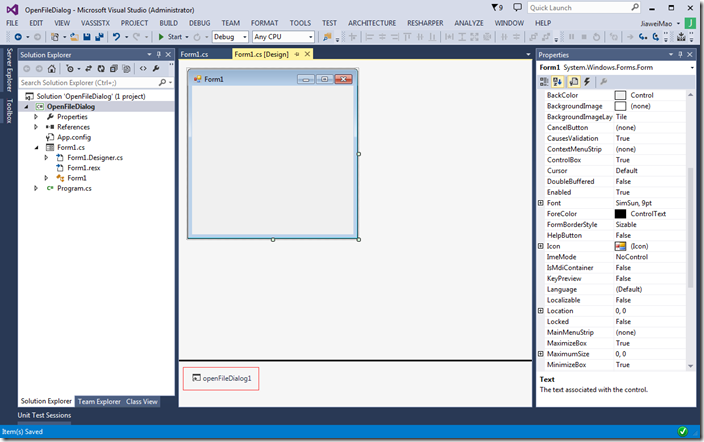
可以在窗口下方看到添加到OpenFileDialog.
3.添加按钮和事件
OpenFileDialog对话框需要通过事件激活,添加一个Button到Form中,双击Button以添加事件,事件代码如下:
using System;

using System.Windows.Forms;

namespace OpenFileDialog {

    public partial class Form1 : Form {

        public Form1() {

            InitializeComponent();

        }

        private void button1_Click(object sender, EventArgs e) {

            // show the dialog and get result

            DialogResult result = openFileDialog1.ShowDialog();

            if (result == DialogResult.OK)

            {

            }

            Console.WriteLine(result);

        }

    }

}
4.读取文件
可以通过OpenFileDialog读取文件,修改按钮的点击事件,具体代码如下:
using System;

using System.IO;

using System.Windows.Forms;

namespace OpenFileDialog {

    public partial class Form1 : Form {

        public Form1() {

            InitializeComponent();

        }

        private void button1_Click(object sender, EventArgs e)

        {

            int size = -1;

            // show the dialog and get result

            DialogResult result = openFileDialog1.ShowDialog();

            if (result == DialogResult.OK)

            {

                string file = openFileDialog1.FileName;

                try

                {

                    string text = File.ReadAllText(file);

                    size = text.Length;

                }

                catch (Exception)

                {

                    throw;

                }

            }

            Console.WriteLine(result);

            Console.WriteLine(size);    // 文件大小

        }

    }

}
编译运行,点击button1,会显示OpenFileDialog,然后验证DialogResult,通过File.ReadAllText读写文件,然后获得文件大小。
5. 属性
| 属性 | 说明 |
| AddExtension | 扩展名是否添加到文件名,默认为真,如果想自动修改文件扩展名,可将其设置为false。 |
| AutoUpgradeEnabled | 用于获得Vista风格的打开文件对话框,默认为true,推荐使用。 |
| DefaultExt | 默认文件扩展名,如果文件扩展名没有指定,则自动添加该扩展 |
| DereferenceLinks | 从对话框返回路径前是否解引用快捷键 |
| FileName | 在对话框最开始显式的文件名 |
| InitialDirectory | 对话框的初始目录 |
| Multiselect | 是否一次可选择多个文件,可通过SHIFT或CTRL键进行多项选择 |
6.Filter
Filters能帮助有效的筛选文件,OpenFileDialog支持文件名过滤,可用*代表任意字符。
Filter:
用于指定过滤器,如:“C# files|*.cs”,此时只显式以”.cs”结尾的文件
FilterIndex:
用于指定默认Filter,其Index为1.其后的filter的Index依次递增
ValidateNames:
Windows文件系统不允许文件名包含特定字符如”*”,该选项一般为True。
7.ReadOnly
OpenFileDialog部分属性可允许指定文件是否为只读。可以显式read-only checkbox。大多时候用不着.
ReadOnlyChecked:
用于设置”read only”复选框的值,仅当”ShowReadOnly”设置为True才可见。
ShowReadOnly:
“Read-only”复选框是否可见。
C# OpenFileDialog的更多相关文章
- 1、怎样设置C#OpenFileDialog(文件选择窗体)的指定路径、文件格式等属性(设置打开默认路径、文件格式、窗体显示文本)
C#的OpenFileDialog的常用属性设置 1.设置属性 1)设置弹出的指定路径(绝对路径.相等路径) 2)设置标题 3)设置文本格式 2.打开方式1(绝对路径) 2.1) 打开的路径
- Dev 关于用openFileDialog控件上传图片的问题
1. OpenFileDialog控件有以下基本属性 InitialDirectory 对话框的初始目录 Filter 要在对话框中显示的文件筛选器,例如,"文本文件(*.txt)|*.tx ...
- C# winform OpenFileDialog MessageBox
1.弹出窗体选择本地文件-OpenFileDialog OpenFileDialog openFileDialog = new OpenFileDialog(); openFileDialog.Tit ...
- OpenFileDialog获取文件名和文件路径问题
OpenFileDialog获取文件名和文件路径问题(转) 转自:http://blog.sina.com.cn/s/blog_7511914e0101cbjn.html System.IO.Path ...
- 使用OpenFileDialog会更改默认程序目录
这个问题可能只有在特定的程序中会发现:当我们在程序中使用相对路径时是依赖于当前目录的.所以在使用类似代码: XElement rootNode = XElement.Load(@"zips/ ...
- OpenFileDialog - 设置 - Filter 笔记
using (OpenFileDialog fileSelectDialog = new OpenFileDialog()) { fileSelectDialog.Multiselect = fals ...
- C#的OpenFileDialog和SaveFileDialog的常见用法(转)
OpenFileDialog openFileDialog1 = new OpenFileDialog(); openFileDialog1.InitialDirectory = ...
- OpenFileDialog使用方法
OpenFileDialog基本属性 AddExtension 控制是否将扩展名自动添加到文件名上 CheckFileExists 指示用户指定不存在的文件时是否显示警告 CheckPathExist ...
- C# OpenFileDialog和PictrueBox
string resultFile = ""; OpenFileDialog openFileDialog1 = new OpenFileDialog(); openFile ...
随机推荐
- 动态SQL之标签
本节主要讲了动态SQL的几个标签:where set trim where: 检出where语句的最前面是否含有AND和一个空格 或者 or和一个空格 ,如果有的话删除 set: 检出set的最后是否 ...
- 【原】Centos 7 下创建LVM流程
阅读目录 个主分区,1个扩展分区] 或 [4个主分区],扩展分区又可以有多个分区: window常见的分配方式: 方式1:[1个主分区(C盘)+1个扩展分区(包括3个分区,D,E, ...
- lwip:网络数据包读取和解析过程
1. 程序的某处(poll or interrupt)在有数据可读时调用ethernetif_input,该函数依次调用以下函数: 1.1 low_level_input(),将网络数据读入内存: 1 ...
- 51nod 1211 数独
数独游戏规则如下:在9 * 9的盘面上有些已知的数字及未知的数字,推理出所有未知的数字,并满足每一行.每一列.每一个粗线宫内的数字均含1-9,不重复. 有些局面存在多个解或无解,这属于不标 ...
- 关于snprintf的一个warning
在编一段代码时用到snprintf,有个很奇怪的warning 编译提示: warning C4013: 'snprintf' undefined; assuming extern returning ...
- 【Linux】系统 之 Load
一.查看系统负荷 在Linux系统中,我们一般使用uptime命令查看(w命令和top命令也行).你在终端窗口键入uptime,系统会返回一行信息.这行信息的后半部分,显示"load ave ...
- 输出一个对象的所有属性的值,可以不用反射机制,用JSON处理更方便
String r = ""; ObjectMapper mapper = new ObjectMapper(); r = mapper.writeValueAsString(cre ...
- Can not perform this action after onSaveInstanceState
java.lang.RuntimeException: Unable to resume activity {com.tongyan.nanjing.subway/com.tongyan.struct ...
- KEIL编译错误总结:
1 expected an identifier:#define宏定义常量后,如果再用前面定义的常量作为枚举常量就会报错,方法,去掉#define宏定义
- tar.gz和rpm安装文件(转载)
from:http://bbs.chinaunix.net/thread-2277750-1-1.html Linux软件的二进制分发是指事先已经编译好二进制形式的软件包的发布形式,其优点是安装使用容 ...