
QQl聊天消息
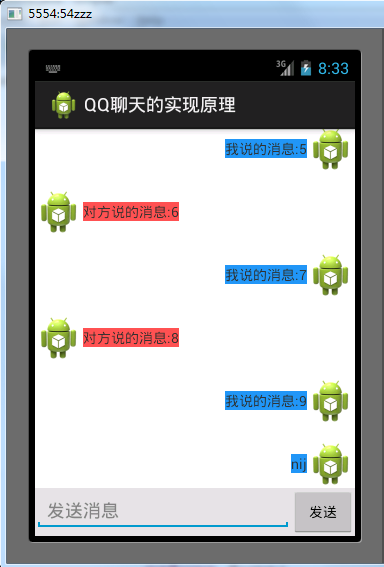
Activity:
 package com.zzw.qqchat;

 import java.util.ArrayList;

 import java.util.HashMap;

 import android.app.Activity;

 import android.content.Context;

 import android.os.Bundle;

 import android.view.LayoutInflater;

 import android.view.View;

 import android.view.View.OnClickListener;

 import android.view.ViewGroup;

 import android.widget.ArrayAdapter;

 import android.widget.EditText;

 import android.widget.ListView;

 import android.widget.TextView;

 public class MainActivity extends Activity {

     private final int VIEW_TYPE = 0x001;

     private final int MESSAGE = 0x002;

     private final int VIEW_TYPE_LEFT = -1;

     private final int VIEW_TYPE_RIGHT = -2;

     private ArrayList<HashMap<Integer, Object>> items;

     private MyAdapter adapter;

     @Override

     protected void onCreate(Bundle savedInstanceState) {

         super.onCreate(savedInstanceState);

         setContentView(R.layout.activity_main);

         final ListView listView = (ListView) findViewById(R.id.list);

         items = new ArrayList<HashMap<Integer, Object>>();

         addData();

         adapter = new MyAdapter(this, -1);

         listView.setAdapter(adapter);

         final EditText et = (EditText) findViewById(R.id.msgEditText);

         findViewById(R.id.msgSend).setOnClickListener(new OnClickListener() {

             @Override

             public void onClick(View v) {

                 String msg = et.getText() + "";

                 HashMap<Integer, Object> map = new HashMap<Integer, Object>();

                 map.put(VIEW_TYPE, VIEW_TYPE_RIGHT);

                 map.put(MESSAGE, msg);

                 items.add(map);

                 // item数据变化时通知adapter刷新及时改变view

                 adapter.notifyDataSetChanged();

                 // 刷新后清空输入框

                 et.setText("");

                 // 输入框发送消息后将ListView滚动到底部

                 listView.setSelection(ListView.FOCUS_DOWN);

             }

         });

     }

     private void addData() {

         for (int i = 0; i < 10; i++) {

             if (i % 2 == 0) {

                 HashMap<Integer, Object> map = new HashMap<Integer, Object>();

                 map.put(VIEW_TYPE, VIEW_TYPE_LEFT);

                 map.put(MESSAGE, "对方说的消息:" + i);

                 items.add(map);

             } else {

                 HashMap<Integer, Object> map = new HashMap<Integer, Object>();

                 map.put(VIEW_TYPE, VIEW_TYPE_RIGHT);

                 map.put(MESSAGE, "我说的消息:" + i);

                 items.add(map);

             }

         }

     }

     private class MyAdapter extends ArrayAdapter {

         private LayoutInflater inflater;

         public MyAdapter(Context context, int resource) {

             super(context, resource);

             inflater = LayoutInflater.from(context);

         }

         @Override

         public int getCount() {

             return items.size();

         }

         @Override

         public String getItem(int position) {

             String message = items.get(position).get(MESSAGE) + "";

             return message;

         }

         @Override

         public View getView(int position, View convertView, ViewGroup parent) {

             int type = getItemViewType(position);

             String message = getItem(position);

             switch (type) {

             case VIEW_TYPE_LEFT:

                 if (convertView == null) {

                     convertView = inflater.inflate(R.layout.left, null);

                 }

                 TextView textViewLeft = (TextView) convertView.findViewById(R.id.textView);

                 textViewLeft.setText(message);

                 break;

             case VIEW_TYPE_RIGHT:

                 if (convertView == null) {

                     convertView = inflater.inflate(R.layout.right, null);

                 }

                 TextView textViewRight = (TextView) convertView.findViewById(R.id.textView);

                 textViewRight.setText(message);

                 break;

             }

             return convertView;

         }

         @Override

         public int getItemViewType(int position) {

             HashMap map = items.get(position);

             int type = (Integer) map.get(VIEW_TYPE);

             return type;

         }

         @Override

         public int getViewTypeCount() {

             return 2;

         }

     }

 }
activity_main.xml:
 <?xml version="1.0" encoding="utf-8"?>

 <RelativeLayout xmlns:android="http://schemas.android.com/apk/res/android"

     android:layout_width="match_parent"

     android:layout_height="match_parent" >

     <ListView

         android:id="@+id/list"

         android:layout_width="match_parent"

         android:layout_height="wrap_content"

         android:layout_above="@+id/commentLinearLayout"

         android:layout_alignParentTop="true"

         android:divider="@android:color/transparent"

         android:dividerHeight="15dip"

         android:scrollbars="none" />

     <LinearLayout

         android:id="@+id/commentLinearLayout"

         android:layout_width="match_parent"

         android:layout_height="wrap_content"

         android:layout_alignParentBottom="true"

         android:background="#e0e0e0"

         android:orientation="horizontal" >

         <EditText

             android:id="@+id/msgEditText"

             android:layout_width="0dip"

             android:layout_height="wrap_content"

             android:layout_weight="8"

             android:hint="发送消息" />

         <Button

             android:id="@+id/msgSend"

             style="?android:attr/buttonStyleSmall"

             android:layout_width="0dip"

             android:layout_height="wrap_content"

             android:layout_weight="2"

             android:text="发送" />

     </LinearLayout>

 </RelativeLayout>
activity_main
left.xml:
 <?xml version="1.0" encoding="utf-8"?>

 <RelativeLayout xmlns:android="http://schemas.android.com/apk/res/android"

     android:layout_width="match_parent"

     android:layout_height="match_parent"

     android:orientation="horizontal" >

     <ImageView

         android:id="@+id/imageView"

         android:layout_width="wrap_content"

         android:layout_height="wrap_content"

         android:layout_alignParentLeft="true"

         android:layout_centerVertical="true"

         android:singleLine="false"

         android:src="@drawable/ic_launcher" />

     <TextView

         android:id="@+id/textView"

         android:layout_width="wrap_content"

         android:layout_height="wrap_content"

         android:layout_centerVertical="true"

         android:layout_toRightOf="@+id/imageView"

         android:background="#ff5252"

         android:text="left" />

 </RelativeLayout>
left
 <?xml version="1.0" encoding="utf-8"?>

 <RelativeLayout xmlns:android="http://schemas.android.com/apk/res/android"

     android:layout_width="match_parent"

     android:layout_height="match_parent"

     android:orientation="horizontal" >

     <ImageView

         android:id="@+id/imageView"

         android:layout_width="wrap_content"

         android:layout_height="wrap_content"

         android:layout_alignParentRight="true"

         android:layout_centerVertical="true"

         android:src="@drawable/ic_launcher" />

     <TextView

         android:id="@+id/textView"

         android:layout_width="wrap_content"

         android:layout_height="wrap_content"

         android:layout_centerVertical="true"

         android:layout_toLeftOf="@+id/imageView"

         android:background="#2196f3"

         android:singleLine="false"

         android:text="right" />

 </RelativeLayout>
right
QQl聊天消息的更多相关文章
- 即时通信系统中如何实现:聊天消息加密,让通信更安全? 【低调赠送:QQ高仿版GG 4.5 最新源码】
加密重要的通信消息,是一个常见的需求.在一些政府部门的即时通信软件中(如税务系统),对聊天消息进行加密是非常重要的一个功能,因为谈话中可能会涉及到机密的数据.我在最新的GG 4.5中,增加了对聊天消息 ...
- spark结合 Openfire服务器,发送聊天消息
1.下载OpenFire服务器,进行安装,参考http://www.cnblogs.com/hoojo/archive/2012/05/17/2506769.html 2.程序运行客户端:下载客户端代 ...
- 微信技术分享:微信的海量IM聊天消息序列号生成实践(算法原理篇)
1.点评 对于IM系统来说,如何做到IM聊天消息离线差异拉取(差异拉取是为了节省流量).消息多端同步.消息顺序保证等,是典型的IM技术难点. 就像即时通讯网整理的以下IM开发干货系列一样: <I ...
- 【转】编写微信聊天机器人4《聊天精灵WeChatGenius》:实时获取到微信聊天消息,hook数据库插入操作。
接上篇,使用Xposed来hook微信,找到微信进程:https://blog.csdn.net/weixin_42127613/article/details/81839537 既然已经找到了微信进 ...
- 即时通信系统中实现聊天消息加密,让通信更安全【低调赠送:C#开源即时通讯系统(支持广域网)——GGTalk4.5 最新源码】
在即时通讯系统(IM)中,加密重要的通信消息,是一个常见的需求.尤其在一些政府部门的即时通信软件中(如税务系统),对即时聊天消息进行加密是非常重要的一个功能,因为谈话中可能会涉及到机密的数据.我在最新 ...
- iOS开发学习-类似微信聊天消息中的电话号码点击保存到通讯录中的功能
类似微信聊天消息中的电话号码点击保存到通讯录中的功能,ABAddress的实现在iOS9中是不能正常使用的,点击完成后,手机会非常的卡,iOS9之后需要使用Contact新提供的方法来实现该功能.快捷 ...
- Smack 结合 Openfire服务器,建立IM通信,发送聊天消息
在文章开始,请你了解和熟悉openfire方面的相关知识,这样对你理解下面代码以及下面代码的用途有很好的了解.同时,你可能需要安装一个简单的CS聊天工具,来测试你的代码是否成功的在openfire服务 ...
- 融云技术分享:解密融云IM产品的聊天消息ID生成策略
本文来自融云技术团队原创分享,原文发布于“融云全球互联网通信云”公众号,原题<如何实现分布式场景下唯一 ID 生成?>,即时通讯网收录时有部分改动. 1.引言 对于IM应用来说,消息ID( ...
- reactnative实现qq聊天消息气泡拖拽消失效果
前言(可跳过) 我在开发自己的APP时遇到了一个类似于qq聊天消息气泡拖拽消息的需求,因为在网上没有找到相关的组件,所以自己动手实现了一下 需求:对聊天消息气泡拖拽到一定长度松开时该气泡会消失(可自行 ...
随机推荐
- 动态代理实现AOP【转】
http://blog.csdn.net/beijiguangyong/article/details/8624016 根据前面介绍的Proxy和InvocationHandler,实在很难看出这种动 ...
- OC基础(25)
NSNumber NSValue NSDate NSFileManager *:first-child { margin-top: 0 !important; } body > *:last-c ...
- Eclipse Gtk+
From: http://hi.baidu.com/spmno/item/9425018707f295dfd1f8cdbe 1. Project->Properties,然后选 C/C++ Bu ...
- github添加ssh认证
总概:在使用git的时候,和目标仓库建立关系有两种方式https,ssh.一般用的是https认证(这样简单方便),但有个缺点,pull,push等操作需要频繁输入用户验证.虽然可以把用户验证账号密码 ...
- 在UltraEdit的查找和替换中使用正则表达式 (转)
很多朋友都用过或者正在用UltraEdit,这个编辑器陪伴我也好几年了,从很多地方影响着我写代码的快捷键习惯,Ultraedit提供了非常丰富的编辑功能,其中非常重要的查找和替换功能一定大家都用过,U ...
- 将Excel中数据导入数据库(一)
在工作中经常要将Excel中数据导入数据库,这里介绍一种方法. 假如Excel中的数据如下: 数据库建表如下: 其中Id为自增字段: Excel中数据导入数据库帮助类如下: using System; ...
- VS2013 当前不会命中断点还未为文档加载任何符号
情况:在别人那边的项目可以调试,在我这边不行.看来是电脑环境问题了 自己试过 VS2013修复下(用了1个半小时),点评:无效 网上 五花八门的都不适合 1.设置与当前版本不一致取消打勾. 点评 ...
- Add, remove, shuffle and sort
To deal cards, we would like a method that removes a card from the deck and returns it. The list met ...
- oracle11g空表不能导出记录
select 'alter table '||table_name||' allocate extent(size 64k);' from tabs t where not exists (selec ...
- php中实现17种正则表达式
php中实现17种正则表达式 该教程来自:php教程网:http://php.662p.com "^\d+[ DISCUZ_CODE_1 ]quot; //非负整数(正整数 + 0) &qu ...