
新浪微博登录界面上下拉伸图片--第三方开源--PullToZoomListViewEx(二)
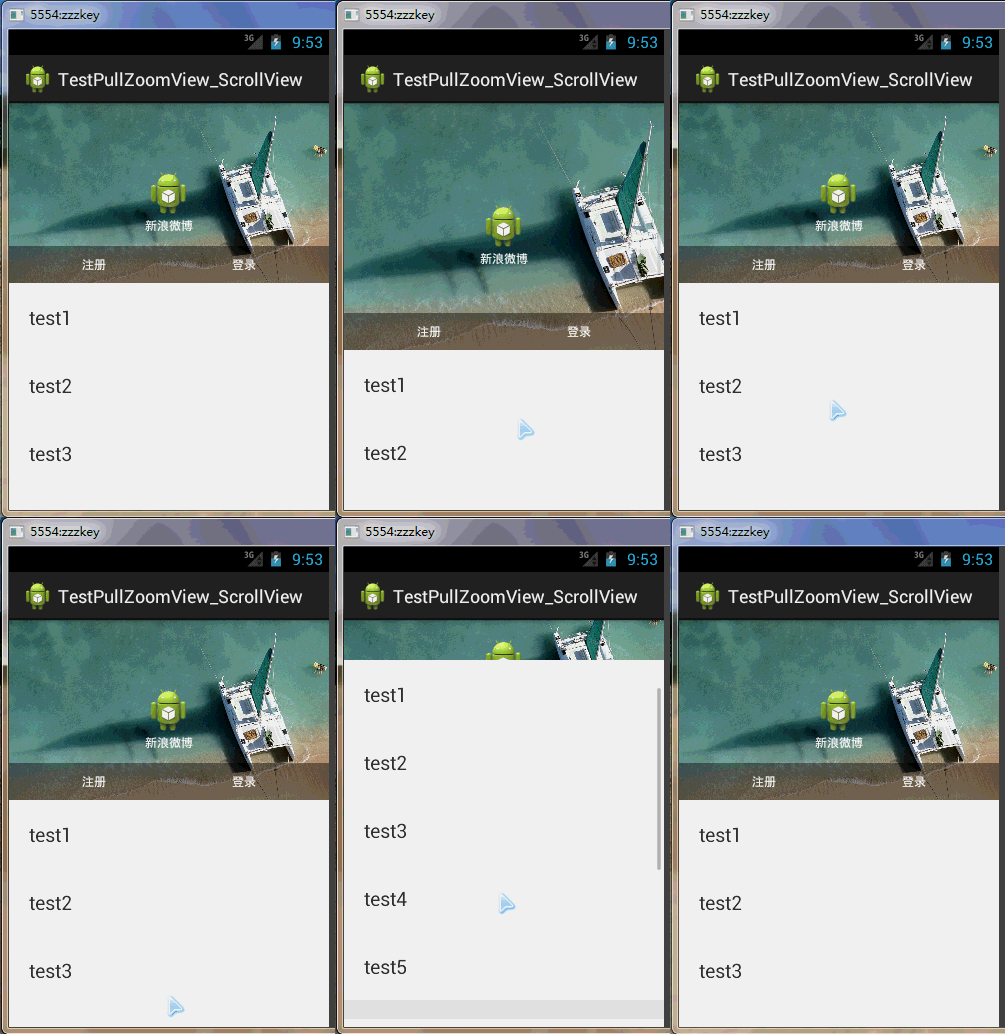
这是PullZoomView在ScrollView实现,Android PullZoomView在ScrollView的实现是:PullToZoomScrollViewEx
下载地址:https://github.com/Frank-Zhu/PullZoomView
本文要说的PullToZoomScrollViewEx则以另外一种方式在Java代码中动态的为PullZoomView装载View:
private void loadViewForPullToZoomScrollView(PullToZoomScrollViewEx scrollView) {

        View headView = LayoutInflater.from(this).inflate(R.layout.head_view, null);

        View zoomView = LayoutInflater.from(this).inflate(R.layout.head_zoom_view, null);

        View contentView = LayoutInflater.from(this).inflate(R.layout.content_view, null);

        scrollView.setHeaderView(headView);

        scrollView.setZoomView(zoomView);

        scrollView.setScrollContentView(contentView);

    }
两点内容需要注意:
(1)所有Android PullZoomView的头部及缩放效果都可以关闭或者开启,具体方式就是通过改变设置各种方法的true或false值。以下是比较重要的几个方法:
setParallax(boolean b);
true则有视差效果,false则无。
setHideHeader(boolean b);
true则隐藏自己定义的head view,false则显示。
setZoomEnabled(boolean b);
true支持缩放,false不支持缩放。
默认的,
setParallax(true);
setHideHeader(false);
setZoomEnabled(true);
(2)PullZoomView中嵌套的子View,需要通过getPullRootView().findViewById(R.id.xxxx)这样的方式找出来,而不是直接的findViewById()。
下面给出一个完整例子加以说明。
先写一个布局:
 <RelativeLayout xmlns:android="http://schemas.android.com/apk/res/android"

     xmlns:tools="http://schemas.android.com/tools"

     xmlns:custom="http://schemas.android.com/apk/res-auto"

     android:layout_width="match_parent"

     android:layout_height="match_parent" >

     <com.ecloud.pulltozoomview.PullToZoomScrollViewEx

         android:id="@+id/scroll_view"

         android:layout_width="match_parent"

         android:layout_height="match_parent" />

 </RelativeLayout>
Java代码:
 package com.zzw.testpullzoomview_scrollview;

 import com.ecloud.pulltozoomview.PullToZoomScrollViewEx;

 import android.app.Activity;

 import android.os.Bundle;

 import android.util.DisplayMetrics;

 import android.util.Log;

 import android.view.LayoutInflater;

 import android.view.Menu;

 import android.view.MenuItem;

 import android.view.View;

 import android.widget.LinearLayout;

 public class MainActivity extends Activity {

     @Override

     protected void onCreate(Bundle savedInstanceState) {

         super.onCreate(savedInstanceState);

         setContentView(R.layout.activity_main);

         // 注意初始化顺序,不要弄乱,否则抛出运行时空指针

         PullToZoomScrollViewEx scrollView = (PullToZoomScrollViewEx) findViewById(R.id.scroll_view);

         loadViewForPullToZoomScrollView(scrollView);

         scrollView.getPullRootView().findViewById(R.id.tv_test1).setOnClickListener(new View.OnClickListener() {

             @Override

             public void onClick(View v) {

                 Log.d("PullToZoomScrollViewEx1", "onClick");

             }

         });

         scrollView.getPullRootView().findViewById(R.id.tv_test2).setOnClickListener(new View.OnClickListener() {

             @Override

             public void onClick(View v) {

                 Log.e("PullToZoomScrollViewEx2", "onClick");

             }

         });

         scrollView.getPullRootView().findViewById(R.id.tv_test3).setOnClickListener(new View.OnClickListener() {

             @Override

             public void onClick(View v) {

                 Log.d("PullToZoomScrollViewEx3", "onClick");

             }

         });

         setPullToZoomViewLayoutParams(scrollView);

     }

     private void loadViewForPullToZoomScrollView(PullToZoomScrollViewEx scrollView) {

         View headView = LayoutInflater.from(this).inflate(R.layout.head_view, null);

         View zoomView = LayoutInflater.from(this).inflate(R.layout.head_zoom_view, null);

         View contentView = LayoutInflater.from(this).inflate(R.layout.content_view, null);

         scrollView.setHeaderView(headView);

         scrollView.setZoomView(zoomView);

         scrollView.setScrollContentView(contentView);

     }

     // 设置头部的View的宽高。

     private void setPullToZoomViewLayoutParams(PullToZoomScrollViewEx scrollView) {

         DisplayMetrics localDisplayMetrics = new DisplayMetrics();

         getWindowManager().getDefaultDisplay().getMetrics(localDisplayMetrics);

         int mScreenHeight = localDisplayMetrics.heightPixels;

         int mScreenWidth = localDisplayMetrics.widthPixels;

         LinearLayout.LayoutParams localObject = new LinearLayout.LayoutParams(mScreenWidth,

                 (int) (9.0F * (mScreenWidth / 16.0F)));

         scrollView.setHeaderLayoutParams(localObject);

     }

 }
java代码需要的子布局:
head_view.xml:
 <RelativeLayout xmlns:android="http://schemas.android.com/apk/res/android"

     android:id="@+id/layout_view"

     android:layout_width="match_parent"

     android:layout_height="match_parent"

     android:layout_gravity="bottom"

     android:gravity="bottom">

     <ImageView

         android:id="@+id/iv_user_head"

         android:layout_width="wrap_content"

         android:layout_height="wrap_content"

         android:layout_centerInParent="true"

         android:src="@drawable/ic_launcher" />

     <TextView

         android:id="@+id/tv_user_name"

         android:textSize="12sp"

         android:layout_width="wrap_content"

         android:layout_height="wrap_content"

         android:layout_below="@id/iv_user_head"

         android:layout_centerHorizontal="true"

         android:text="新浪微博"

         android:textColor="#ffffff" />

     <LinearLayout

         android:id="@+id/ll_action_button"

         android:layout_width="match_parent"

         android:layout_height="wrap_content"

         android:background="#66000000"

         android:layout_alignParentBottom="true"

         android:padding="10dip">

         <TextView

             android:id="@+id/tv_register"

             android:layout_width="match_parent"

             android:layout_height="wrap_content"

             android:text="注册"

             android:layout_weight="1"

             android:textSize="12sp"

             android:gravity="center"

             android:layout_gravity="center"

             android:textColor="#ffffff" />

         <TextView

             android:id="@+id/tv_login"

             android:layout_width="match_parent"

             android:layout_height="wrap_content"

             android:text="登录"

             android:layout_weight="1"

             android:textSize="12sp"

             android:gravity="center"

             android:layout_gravity="center"

             android:textColor="#ffffff" />

     </LinearLayout>

 </RelativeLayout>
head_zoom_view.xml:
 <?xml version="1.0" encoding="utf-8"?>

 <ImageView xmlns:android="http://schemas.android.com/apk/res/android"

     android:id="@+id/imageView"

     android:layout_width="match_parent"

     android:layout_height="match_parent"

     android:layout_gravity="center_horizontal"

     android:scaleType="centerCrop"

     android:src="@drawable/a" />
head_zoom_view其实就放了一张可供缩放拉伸的图片。
content_view.xml:
 <?xml version="1.0" encoding="utf-8"?>

 <LinearLayout xmlns:android="http://schemas.android.com/apk/res/android"

     android:layout_width="match_parent"

     android:layout_height="match_parent"

     android:background="#ffffff"

     android:orientation="vertical" >

     <TextView

         android:id="@+id/tv_test1"

         android:layout_width="match_parent"

         android:layout_height="wrap_content"

         android:gravity="center_vertical"

         android:padding="20dp"

         android:text="test1"

         android:textSize="20sp" />

     <TextView

         android:id="@+id/tv_test2"

         android:layout_width="match_parent"

         android:layout_height="wrap_content"

         android:gravity="center_vertical"

         android:padding="20dp"

         android:text="test2"

         android:textSize="20sp" />

     <TextView

         android:id="@+id/tv_test3"

         android:layout_width="match_parent"

         android:layout_height="wrap_content"

         android:gravity="center_vertical"

         android:padding="20dp"

         android:text="test3"

         android:textSize="20sp" />

     <TextView

         android:layout_width="match_parent"

         android:layout_height="wrap_content"

         android:gravity="center_vertical"

         android:padding="20dp"

         android:text="test4"

         android:textSize="20sp" />

     <TextView

         android:layout_width="match_parent"

         android:layout_height="wrap_content"

         android:gravity="center_vertical"

         android:padding="20dp"

         android:text="test5"

         android:textSize="20sp" />

     <TextView

         android:layout_width="match_parent"

         android:layout_height="wrap_content"

         android:background="#eeeeee" />

     <TextView

         android:layout_width="match_parent"

         android:layout_height="wrap_content"

         android:gravity="center_vertical"

         android:padding="20dp"

         android:text="test1"

         android:textSize="20sp" />

     <TextView

         android:layout_width="match_parent"

         android:layout_height="wrap_content"

         android:gravity="center_vertical"

         android:padding="20dp"

         android:text="test2"

         android:textSize="20sp" />

     <TextView

         android:layout_width="match_parent"

         android:layout_height="wrap_content"

         android:gravity="center_vertical"

         android:padding="20dp"

         android:text="test3"

         android:textSize="20sp" />

     <TextView

         android:layout_width="match_parent"

         android:layout_height="wrap_content"

         android:gravity="center_vertical"

         android:padding="20dp"

         android:text="test4"

         android:textSize="20sp" />

     <TextView

         android:layout_width="match_parent"

         android:layout_height="wrap_content"

         android:gravity="center_vertical"

         android:padding="20dp"

         android:text="test5"

         android:textSize="20sp" />

 </LinearLayout>
实际开发中,如果确定要用ScrollView包括自己项目中的子View,那么content_view.xml就是其他View的装载“父”布局。重点需要在content_view.xml中展开。
新浪微博登录界面上下拉伸图片--第三方开源--PullToZoomListViewEx(二)的更多相关文章
- Python3.x:获取登录界面校验码图片
Python3.x:获取登录界面校验码图片 实例代码: # python3 # author lizm # datetime 2018-06-01 18:00:00 # -*- coding: utf ...
- Windows 10 登录界面的背景图片地址
C:\Users\******\appdata\Local\Packages\Microsoft.Windows.ContentDeliveryManager_********\LocalState\ ...
- swing实现QQ登录界面1.0( 实现了同一张图片只加载一次)、(以及实现简单的布局面板添加背景图片控件的标签控件和添加一个关闭按钮控件)
swing实现QQ登录界面1.0( 实现了同一张图片只加载一次).(以及实现简单的布局面板添加背景图片控件的标签控件和添加一个关闭按钮控件) 代码思路分析: 1.(同一张图片仅仅需要加载一次就够了,下 ...
- 界面编程模仿篇(QQ登录界面逼真篇)
写了好多天的爬虫,偷空前前后后用了两天的时间(排除吃饭睡觉)写完了这个QQ登录界面,看起来还凑和着吧,如果是的大神的,莫见笑,纯属业余作品,废话先不多说,截图如下,其中第二幅图片中的红色方框部份有待完 ...
- jquery自己主动旋转的登录界面的背景代码登录页背景图
在其他网站上看到比较爽Web登录界面.背景图片可以自己主动旋转. 介绍给大家.有兴趣的可以改改下来作为自己的系统登录界面. 如图: watermark/2/text/aHR0cDovL2Jsb2cuY ...
- 怎么更改win7登录界面
方法/步骤 1 第一步,先打开注册表.快捷键是win+R.Win就是Windows图片那个键.打开会是这个. 2 在其中输入Regedit.就打开了传说中的注册表了.然后在注册表中选择.选择的顺序 ...
- 030 Android 第三方开源下拉框:NiceSpinner的使用+自定义Button样式+shape绘制控件背景图+图片选择器(selector)
1.NiceSpinner下拉框控件介绍 Android原生的下拉框Spinner基本上可以满足Android开发对于下拉选项的设计需求,但现在越来越流行的下拉框不满足于Android原生提供的下拉框 ...
- Android的SwipeToDismiss第三方开源框架模拟QQ对话列表侧滑删除,置顶,将头像图片圆形化处理。
<Android SwipeToDismiss:左右滑动删除ListView条目Item> Android的SwipeToDismiss是github上一个第三方开源框架(github ...
- 第三方登录 QQ登录 人人网登录 新浪微博登录
http://www.pp6.cn/Index.aspx http://www.pp6.cn/Login.aspx 网站有自己的账号系统,这里使用的第三方登录仅仅是获取第三方账号的唯一id,昵称,性别 ...
随机推荐
- Need help with design ReadOnlyListBase (Insert, Update, Delete from ReadOnlyListBase)
原文地址:http://forums.lhotka.net/forums/p/3166/21214.aspx My task is: For select client, I have a modal ...
- Oracle教程:如何诊断节点重启问题(转载)
本文对如何诊断RAC环境中节点重启问题进行了介绍.适用于10gR2和11gR1. 首先我们对能够导致节点重启的CRS进程进行介绍.1.ocssd : 它的主要功能是节点监控(Node Monitori ...
- Kafka单机版环境搭建
使用版本:kafka_2.10-0.8.1.1 安装: -0.8.1.1.tgz -C ~/app/ 添加环境变量:.bash_profile export KAFKA_HOME=/home/spar ...
- MFC学习 修改窗口样式
1. 在PreCreateWindow中可用CREATESTRUCT cs, cs.lpszName修改窗口标题, cs.lpszClass = AfxRegisterWndClass 修改图标与样式 ...
- 剑指Offer:面试题3——二维数组中的查找(java实现)
问题描述:在一个二维数组中,每一行都按照从左到右递增的顺序排序,每一列都按照从上到下递增的顺序排序.请完成一个函数,输入这样的一个二维数组和一个整数,判断数组中是否含有该整数. 思路:取数组中的元素与 ...
- VC 三点 划 曲线
y = ax2+bx+c 条件,三点成一曲线 pointone(x1,y1)//(y1在X柱上,必须为零,如果不为零这个公式要重新求值) pointtwo(x2,y2)// 可以为任意值 pointt ...
- Spring缓存注解@Cache使用
参考资料 http://www.ibm.com/developerworks/cn/opensource/os-cn-spring-cache/ http://swiftlet.net/archive ...
- 终于解决了PHP调用SOAP过程中的种种问题。(转)
最近在做公司和第三方的一个合作项目,需要调用统一验证接口和统一支付接口.由于牵涉公司机密,所以我要单独写一层PHP的接口给第三方用.前面那个验证接口主要卡在了des加密的方式上,这个有时间再说.这篇主 ...
- 进程内外的session
进程内session:缺点:当访问量大的时候,会导致进程内session的重启优点:存储速度快 进程外session: 01.将session存储在状态服务器中 asp.net state servi ...
- EFDC_EE如何设置自适应时间步长
下图是EFDC_EE的运行时间参数的设置界面,在时间步长的设置中,如果“Safety Factor”参数,设置为非0,即可实现自适应时间步长的设置,但要注意如下几点: 1.“Safety Factor ...