
Unity3D中的Attribute详解(三)
上一篇我们对系统的Attributes进行了MSIL代码的查看,了解到了其本质就是一个类的构造函数。本章我们将编写自己的Attributes。
首先我们定义书的属性代码,如下:
    [AttributeUsage(AttributeTargets.Field | AttributeTargets.Class,

                             AllowMultiple = true,

                             Inherited = false)]

    class BookAttribute : Attribute

    {

        private string bookName;

        private string bookAuthor;

        private int bookPrice;

        public int year = 1990;

        public int version = 0;

        public BookAttribute(string bookname,

                                         string bookauthor,

                                         int bookprice)

        {

            bookName = bookname;

            bookAuthor = bookauthor;

            bookPrice = bookprice;

        }

        public string BookName { get { return bookName; } }

        public string BookAuthor { get { return bookAuthor; } }

        public int BookPrice { get { return bookPrice; } }

    }
写自己的Attribute其实非常简单,首先你的类需要直接或者间接地继承自系统类Attribute。我们查看Attribute类就会发现该类只有两大类的方法,获取Attribute和IsDefined。
其次,使用AttributeUsage这个Attribute,非常有意思。查看AttributeUsage类,发现构造函数的参数只有一个AttributeTargets,就是Attribute的限制范围,这是系统定义的枚举,我们稍后再做详解。暂时限制只在指定的代码域和类上才能用BookAttribute。AllowMultiple参数指定了是否允许同一代码区间多次使用Attribute,Inherited则指定该类的子类是否继承该属性。
紧接着我们写一个体育书的类:
[BookAttribute("SportsBook", "sports", 10)]

public class SportsBook

{

}
在这里,BookAttribute就和一个构造函数一样调用,构造函数的参数顺序不能调换,不能省略,类型也必须匹配,这些参数因此得名“定位参数”。
我们发现在BookAttribute里面还有一些变量,他们有默认值,如果我们一定要给这些变量赋值,可以写在定位参数的后面,如下:
[BookAttribute("SportsBook", "sports", 10, version = 1, year = 1995)]

public class SportsBook

{

}
这些参数的名字叫命名参数,顾名思义。对于这类参数,我们可以完全不写,也可以写其中的某几个变量,当然,调换顺序也是完全没问题的,但注意不能和定位参数调换顺序。
接下来我们利用反射来取Attribute的值,代码如下:
static void Main(string[] args)

        {

            System.Reflection.MemberInfo memberinfo = typeof(SportsBook);

            BookAttribute attribute = (BookAttribute)Attribute.GetCustomAttribute(memberinfo, typeof(BookAttribute));

            if (null != attribute)

            {

                Console.WriteLine(attribute.BookName);

                Console.WriteLine(attribute.BookAuthor);

                Console.WriteLine(attribute.BookPrice);

                Console.WriteLine(attribute.version);

                Console.WriteLine(attribute.year);

            }

            Console.ReadKey();

        }
利用反射稍微繁琐了一点,但总体流程很清晰。运行程序后得到结果:
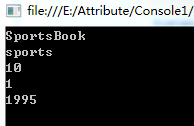
可以看到,Attribute和继承有点像,但是我们在SportsBook类内部是无法直接使用Attribute的变量的。
如果我们在SportsBook上放多个Attribute会怎么样?
代码如下:
[BookAttribute("SportsBook", "sports", 10, year = 1995, version = 1)]

[BookAttribute("ArtBook", "art", 20, year = 1999)]

public class SportsBook

{ }
直接运行程序,系统报错了~
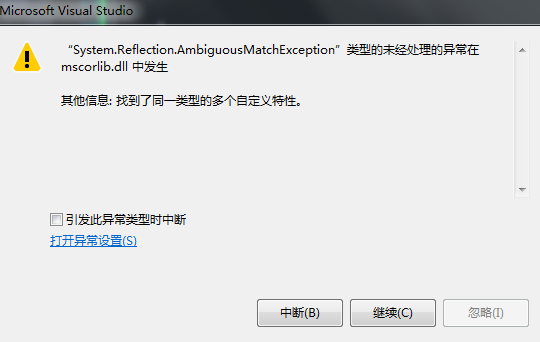
当使用GetCustomAttribute获取Attribute的时候发生了语义异常。修改我们的Main方法:
static void Main(string[] args)

{

        System.Reflection.MemberInfo memberinfo = typeof(SportsBook);

        Attribute[] attribute = Attribute.GetCustomAttributes(memberinfo, typeof(BookAttribute));

        for (int i = 0; i < attribute.Length; ++i)

        {

            var attr = attribute[i];

            if (attr is BookAttribute)

            {

                var battr = (BookAttribute)attr;

                Console.WriteLine(battr.BookName);

                Console.WriteLine(battr.BookAuthor);

                Console.WriteLine(battr.BookPrice);

                Console.WriteLine(battr.version);

                Console.WriteLine(battr.year);

            }

        }
}
我们使用了GetCustomAttributes的方法,该方法返回一个Attribute的数组。通过遍历数组我们能够取到我们定义的所有属性。输出如下:
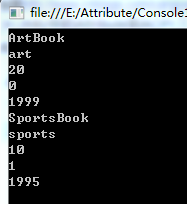
可以看到写在越下面的Attribute在数组中的位置更靠前。
继续改造我们的SportsBook类:
[BookAttribute("SportsBook", "sports", 10, year = 1995, version = 1)]

public class SportsBook

{

        [BookAttribute("ArtBook", "art", 20, year = 1999)]

        public string bookName;

}
我们在类内部增加了一个变量bookName,虽然和BookAttribute的变量重名了,但并没有影响。把BookAttribute的作用范围改为All,所以我们能把属性直接加到变量的字段上面。依然使用获取Attribute数组的方法,跑我们的程序:
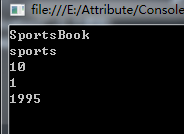
可以看到并没有取得类内部的Attribute。修改Main方法:
        static void Main(string[] args)

        {

            System.Reflection.MemberInfo memberinfo = typeof(SportsBook);

            Attribute[] attribute = Attribute.GetCustomAttributes(memberinfo, typeof(BookAttribute));

            System.Reflection.PropertyInfo propertyInfo = typeof(SportsBook).GetProperty("bookName");

            BookAttribute bookattr = (BookAttribute)Attribute.GetCustomAttribute(propertyInfo, typeof(BookAttribute));

            for (int i = 0; i < attribute.Length; ++i)

            {

                var attr = attribute[i];

                if (attr is BookAttribute)

                {

                    var battr = (BookAttribute)attr;

                    Console.WriteLine(battr.BookName);

                    Console.WriteLine(battr.BookAuthor);

                    Console.WriteLine(battr.BookPrice);

                    Console.WriteLine(battr.version);

                    Console.WriteLine(battr.year);

                }

            }

            Console.WriteLine("----------------分割线------------------");

            Console.WriteLine(bookattr.BookName);

            Console.WriteLine(bookattr.BookAuthor);

            Console.WriteLine(bookattr.BookPrice);

            Console.WriteLine(bookattr.version);

            Console.WriteLine(bookattr.year);

            Console.ReadKey();

        }
继续利用反射获取单个变量的property,并从该property上获得了对应的attribute。运行代码如下:
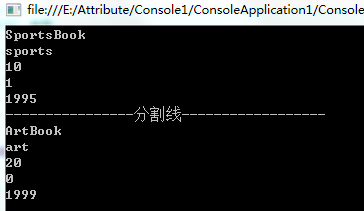
至此,我们自己的Attribute写完了。
回头再看看AttributeTargets的定义:
public enum AttributeTargets

    {

        // 摘要:

        //     可以对程序集应用属性。

        Assembly = 1,

        //

        // 摘要:

        //     可以对模块应用属性。

        Module = 2,

        //

        // 摘要:

        //     可以对类应用属性。

        Class = 4,

        //

        // 摘要:

        //     可以对结构应用属性,即值类型。

        Struct = 8,

        //

        // 摘要:

        //     可以对枚举应用属性。

        Enum = 16,

        //

        // 摘要:

        //     可以对构造函数应用属性。

        Constructor = 32,

        //

        // 摘要:

        //     可以对方法应用属性。

        Method = 64,

        //

        // 摘要:

        //     可以对属性 (Property) 应用属性 (Attribute)。

        Property = 128,

        //

        // 摘要:

        //     可以对字段应用属性。

        Field = 256,

        //

        // 摘要:

        //     可以对事件应用属性。

        Event = 512,

        //

        // 摘要:

        //     可以对接口应用属性。

        Interface = 1024,

        //

        // 摘要:

        //     可以对参数应用属性。

        Parameter = 2048,

        //

        // 摘要:

        //     可以对委托应用属性。

        Delegate = 4096,

        //

        // 摘要:

        //     可以对返回值应用属性。

        ReturnValue = 8192,

        //

        // 摘要:

        //     可以对泛型参数应用属性。

        GenericParameter = 16384,

        //

        // 摘要:

        //     可以对任何应用程序元素应用属性。

        All = 32767,

    }
可以看到基本区分段都有了,二进制移位的赋值,也能让我们直接使用与或操作来达到自己想要的效果。注意经常用的Field字段指代类或者结构体里的区域。
下一章节我们将探索Unity中定义好的各个Attribute。
Unity3D中的Attribute详解(三)的更多相关文章
- C#中的Attribute详解(下)
原文地址:https://blog.csdn.net/xiaouncle/article/details/70229119 C#中的Attribute详解(下) 一.Attribute本质 从上篇里我 ...
- Unity3D中的Coroutine详解
Unity中的coroutine是通过yield expression;来实现的.官方脚本中到处会看到这样的代码. 疑问: yield是什么? Coroutine是什么? unity的coroutin ...
- 【Unity3D/C#】Unity3D中的Coroutine详解
Unity中的coroutine是通过yield expression;来实现的.官方脚本中到处会看到这样的代码. 疑问: yield是什么? Coroutine是什么? unity的coroutin ...
- js中的attribute详解
Attribute是属性的意思,文章仅对部分兼容IE和FF的Attribute相关的介绍.attributes:获取一个属性作为对象getAttribute:获取某一个属性的值object.getAt ...
- [翻译]Unity中的AssetBundle详解(三)
构建AssetBundles 在AssetBundle工作流程的文档中,我们有一个示例代码,它将三个参数传递给BuildPipeline.BuildAssetBundles函数.让我们更深入地了解我们 ...
- .Net Attribute详解(下) - 使用Attribute武装枚举类型
接上文.Net Attribute详解(上)-Attribute本质以及一个简单示例,这篇文章介绍一个非常实用的例子,相信你一定能够用到你正在开发的项目中.枚举类型被常常用到项目中,如果要使用枚举To ...
- .Net Attribute详解(一)
.Net Attribute详解(一) 2013-11-27 08:10 by JustRun, 1427 阅读, 14 评论, 收藏, 编辑 Attribute的直接翻译是属性,这和Property ...
- Python中time模块详解
Python中time模块详解 在平常的代码中,我们常常需要与时间打交道.在Python中,与时间处理有关的模块就包括:time,datetime以及calendar.这篇文章,主要讲解time模块. ...
- JavaScript正则表达式详解(二)JavaScript中正则表达式函数详解
二.JavaScript中正则表达式函数详解(exec, test, match, replace, search, split) 1.使用正则表达式的方法去匹配查找字符串 1.1. exec方法详解 ...
- oracle中imp命令详解 .
转自http://www.cnblogs.com/songdavid/articles/2435439.html oracle中imp命令详解 Oracle的导入实用程序(Import utility ...
随机推荐
- 利用expect交互批量修改普通用户过期密码
利用expect交互批量修改普通用户过期密码 因为公司接了一个密码托管的活,有10000多台机器,系统有 openSUSE,SUSE,Ubuntu,centos,Oracle-Linux, 而且什么版 ...
- UCID数据集
UCID数据集,做实验使用, 免费分享. 自取 链接:https://pan.baidu.com/s/1etMgXShdd_tJFHWbP3ipNw 提取码:62ww
- ceph PG 故障状态
PG 故障状态 Creating(创建中)在创建POOL时,需要指定PG的数量,此时PG的状态便处于creating,意思是Ceph正在创建PG Peering(互联中)peering的作用主要是在P ...
- JS笔记(四):面向对象、异常处理
镇楼图 Pixiv:torino 六.JS中的面向对象 类(class) 博主视为你已拥有相关基础,这里不再赘述相关概念 类的语法如下,class在本质上是function,可以说class只是针对构 ...
- 字符串替换Replace仅替换第一个匹配项
C#里面的String.Replace(string,string)方法替换的时候是替换所有的匹配项,但是有时候我们会遇到这样的需求,就是只替换第一个匹配项. 我这里自己写另一个方法来实现这个功能,求 ...
- Websocket是什么?
一. WebSocket是什么? Websocket是一种网络通信协议,是一个在计算机里专门在[两点]之间传输数据的约定和规范. 二. 为什么存在WebSocket? 因为 HTTP 协议有一个缺陷: ...
- Ansys-CHEMKIN-pro表面反应机制输入(Surface Kinetics Input)规则
chemkin表面反应机制文件(Ansys-CHEMKIN-pro表面反应机制输入) 1. 文件包含表面活性位(相).表面组分,固相组分.固相,热力学数据,反应机制: 2. 顺序:物质名称,活性位数据 ...
- 使用ansible批量推送公钥
准备两个yml文件 send-pubkey.yml - hosts: all remote_user: root # 连接远程主机的用户,密码就是文件中设置好的 ansible_ssh_pass 的值 ...
- 第二节 printf语句和C++中的判断结构
第二节 printf语句和C++中的判断结构 1.1printf语句作用 保留几位小数:%.4lf 保留四位小数 %.3lf 保留三位小数, 格式化输出:整数:printf("%5d!&qu ...
- idea plugins搜不出来东西
今天学习Vue要安装一个Vue.js的插件,在idea的plugins上搜死活搜不出来,参照了网上的关防火墙,勾选什么auto什么的选项还是不管用,最后瞎捣鼓弄好了,在博客上记录一下. 打开手机数据( ...