
SpringBoot——自定义start
更多内容,前往 IT-BLOG
一、Mybatis 实现 start 的原理
首先在写一个自定义的 start 之前,我们先参考下 Mybatis 是如何整合 SpringBoot:mybatis-spring-boot-autoconfigure 依赖包:
<dependency>

    <groupId>org.mybatis.spring.boot</groupId>

    <artifactId>mybatis-spring-boot-starter</artifactId>

    <version>1.3.2</version>

</dependency>
mybatis 依赖包展示:重要文件:spring.factories、MybatisAutoConfiguration、MybatisProperties

starters 命名:Spring Boot 官方的启动器都是以 spring-boot-starter-命名的,代表了一个特定的应用类型。第三方的启动器不能以 spring-boot开头命名,它们都被 Spring Boot官方保留。一般第三方应该这样命名,像 mybatis 的 mybatis-spring-boot-starter。
【1】查看 spring.factories 文件:配置自动配置类 MybatisAutoConfiguration。spring.factories 会引导springboot 哪个是自动配置类。
org.springframework.boot.autoconfigure.EnableAutoConfiguration=\

org.mybatis.spring.boot.autoconfigure.MybatisAutoConfiguration
【2】进入 MybatisAutoConfiguration.class类:下面 @EnableConfigurationProperties(MybatisProperties.class) 引入了配置文件MybatisProperties.class。之后就可以利用这个配置文件里的参数实例化一个对象完成整个 mybatis 的创建。
在 Spring开发过程中我们常使用到 @ConfigurationProperties注解,通常是用来将 properties和 yml配置文件属性转化为 Bean对象使用和修改。在获取这些 Bean之前,首先需要使用 @EnableConfigurationProperties({ConfigBean.class}) 注解的作用是开启 @ConfigurationProperties注解,当满足 Condition 条件的时候才执行。
 1 @Configuration

 2 @ConditionalOnClass({SqlSessionFactory.class, SqlSessionFactoryBean.class})

 3 @ConditionalOnBean({DataSource.class})

 4 /**

 5  * @ConfigurationProperties注解主要用来把properties配置文件转化为bean来使用的,

 6  * 而@EnableConfigurationProperties注解的作用是@ConfigurationProperties注解生效。

 7  * 如果只配置@ConfigurationProperties注解,在IOC容器中是获取不到properties配置文件转化的bean的。

 8  */

 9 @EnableConfigurationProperties({MybatisProperties.class})

10 @AutoConfigureAfter({DataSourceAutoConfiguration.class})

11 public class MybatisAutoConfiguration {

12     private static final Logger logger = LoggerFactory.getLogger(MybatisAutoConfiguration.class);

13     private final MybatisProperties properties;

14     private final Interceptor[] interceptors;

15     private final ResourceLoader resourceLoader;

16     private final DatabaseIdProvider databaseIdProvider;

17     private final List<ConfigurationCustomizer> configurationCustomizers;

18

19     public MybatisAutoConfiguration(MybatisProperties properties, ObjectProvider<Interceptor[]> interceptorsProvider, ResourceLoader resourceLoader, ObjectProvider<DatabaseIdProvider> databaseIdProvider, ObjectProvider<List<ConfigurationCustomizer>> configurationCustomizersProvider) {

20         this.properties = properties;

21         this.interceptors = (Interceptor[])interceptorsProvider.getIfAvailable();

22         this.resourceLoader = resourceLoader;

23         this.databaseIdProvider = (DatabaseIdProvider)databaseIdProvider.getIfAvailable();

24         this.configurationCustomizers = (List)configurationCustomizersProvider.getIfAvailable();

25     }

26 //......

27 }
【3】进入 MybatisProperties:这里所有的属性,就是之后我们在 properties 配置文件中配置的项,而@ConfigurationProperties(prefix = "mybatis")定义了前缀。举个栗子:我们一般会在 application.yml 或者 application.properties中 xml 映射文件的路径:mybatis.mapperLocations=classpath:mapping/*.xml 就是以 mybatis 作为前缀的。
mybatis 正是这个
MybatisProperties的@ConfigurationProperties配置的前缀而mapperLocations就是我们这个MybatisProperties.class的其中一个成员变量 !
 1 @ConfigurationProperties(

 2     prefix = "mybatis"

 3 )

 4 public class MybatisProperties {

 5     public static final String MYBATIS_PREFIX = "mybatis";

 6     private String configLocation;

 7     private String[] mapperLocations;

 8     private String typeAliasesPackage;

 9     private String typeHandlersPackage;

10     private boolean checkConfigLocation = false;

11     private ExecutorType executorType;

12     private Properties configurationProperties;

13     @NestedConfigurationProperty

14     private Configuration configuration;

15

16     public MybatisProperties() {

17     }

18 //......

19 }
【4】现在来看最后一个问题:spring.factories 文件什么时候加载,我们定位到我们的启动类,进入@SpringBootApplication 注解,点进去之后是一个 @EnableAutoConfiguration 注解,再点进去可以看到一个叫做 AutoConfigurationImportSelector.class 的类,就是这里了再点进去,在这个类的源码里搜索 spring.factories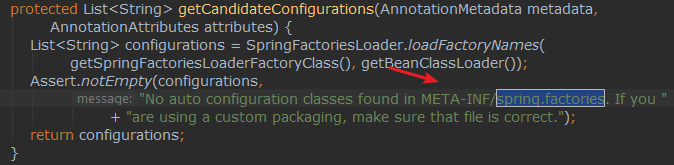
原来springboot 会去 META-INF 目录下找到这个 spring.factories文件,到现在为止我们已经理清楚了整个 start 加载的流程:
【1】去 META-INF 目录下找到这个 spring.factories文件;
【2】通过文件内指定的类路径,找到配置类;
【3】配置类加载进属性类;
【4】配置类通过属性类的参数构建一个新的 Bean;
二、用户自定义 start
就按照这个 Mybatis 的格式,自己写一个 redis 的 start 由于 spring.factories 是指定入口的我们可以放在最后写。下面创建一个普通的 springboot 工程。
【1】编写属性类:添加 @ConfigurationProperties注解和前缀 redis。之后我们就可以在 properties或yml 中 使用 redis.port=指定参数了;
1 @ConfigurationProperties(prefix = "redis")

2 public class RedisProperties {

3     private Integer port;

4     private String host;

5     private String password;

6     private int index;

7     //省略了get set 方法

8 }
【2】编写配置类:添加配置类注解 @Configuration 和加载条件,以及 @EnableConfigurationProperties(RedisProperties.class) 引入属性类,注入到 IOC 容器中。
 1 @Configuration

 2 //只有当Jedis 存在的时候 才执行,就是说一定要引入了Jedis的依赖才会执行这个配置

 3 @ConditionalOnClass(Jedis.class)

 4 //引入属性类

 5 @EnableConfigurationProperties(RedisProperties.class)

 6 public class RedisAutoConfiguration {

 7     @Bean

 8     //当这个bean不存在的时候才执行,防止重复加载bean

 9     @ConditionalOnMissingBean

10     public Jedis jedis(RedisProperties redisProperties) {

11         Jedis jedis = new Jedis(redisProperties.getHost(), redisProperties.getPort());

12         jedis.auth(redisProperties.getPassword());

13         jedis.select(redisProperties.getIndex());

14         return jedis;

15     }

16 }
【3】编写 spring.factories 文件:在 resources 目录下创建入口文件,编写内容:指定配置文件的全路径。随后通过 mvn install 打到本地仓库。
org.springframework.boot.autoconfigure.EnableAutoConfiguration

    =com.yintong.myjedis.RedisAutoConfiguration
【4】测试:然后我们新建一个 springboot项目,在 pom中加入依赖:
<dependency>

    <groupId>com.yintong</groupId>

    <artifactId>redis-start</artifactId>

    <version>0.0.1-SNAPSHOT</version>

</dependency>
【5】测试类:@Resource 的作用相当于 @Autowired,只不过 @Autowired 按 byType自动注入,而 @Resource默认按 byName自动注入罢了。下面如果你能成功输出就成功了!
 1 @RunWith(SpringRunner.class)

 2 @SpringBootTest

 3 public class TestStartApplicationTests {

 4     @Resource

 5     private Jedis jedis;

 6     @Test

 7     public void contextLoads() {

 8         jedis.set("test","测试成功");

 9         String test = jedis.get("test");

10         System.out.println(test);

11     }

12 }
SpringBoot——自定义start的更多相关文章
- SpringBoot自定义拦截器实现IP白名单功能
SpringBoot自定义拦截器实现IP白名单功能 转载请注明源地址:http://www.cnblogs.com/funnyzpc/p/8993331.html 首先,相关功能已经上线了,且先让我先 ...
- SpringBoot自定义错误信息,SpringBoot适配Ajax请求
SpringBoot自定义错误信息,SpringBoot自定义异常处理类, SpringBoot异常结果处理适配页面及Ajax请求, SpringBoot适配Ajax请求 ============== ...
- SpringBoot自定义错误页面,SpringBoot 404、500错误提示页面
SpringBoot自定义错误页面,SpringBoot 404.500错误提示页面 SpringBoot 4xx.html.5xx.html错误提示页面 ====================== ...
- springboot自定义错误页面
springboot自定义错误页面 1.加入配置: @Bean public EmbeddedServletContainerCustomizer containerCustomizer() { re ...
- SpringBoot自定义Filter
SpringBoot自定义Filter SpringBoot自动添加了OrderedCharacterEncodingFilter和HiddenHttpMethodFilter,当然我们可以自定 义F ...
- springboot 自定义LocaleResolver切换语言
springboot 自定义LocaleResolver切换语言 我们在做项目的时候,往往有很多项目需要根据用户的需要来切换不同的语言,使用国际化就可以轻松解决. 我们可以自定义springboor中 ...
- SpringMVC拦截器与SpringBoot自定义拦截器
首先我们先回顾一下传统拦截器的写法: 第一步创建一个类实现HandlerInterceptor接口,重写接口的方法. 第二步在XML中进行如下配置,就可以实现自定义拦截器了 SpringBoot实现自 ...
- [技术博客] SPRINGBOOT自定义注解
SPRINGBOOT自定义注解 在springboot中,有各种各样的注解,这些注解能够简化我们的配置,提高开发效率.一般来说,springboot提供的注解已经佷丰富了,但如果我们想针对某个特定情景 ...
- SpringBoot --- 自定义 Starter
SpringBoot --- 自定义 Starter 创建 1.需要创建一个新的空工程 2.新的工程需要引入两个模块 一个Maven 模块 作为启动器 一个SpringBoot 模块 作为自动配置模块 ...
- Java之SpringBoot自定义配置与整合Druid
Java之SpringBoot自定义配置与整合Druid SpringBoot配置文件 优先级 前面SpringBoot基础有提到,关于SpringBoot配置文件可以是properties或者是ya ...
随机推荐
- python -m pip install --upgrade pip 解决升级不成功问题
使用pip 提示更新: You are using pip version 18.1, however version 20.0.2 is available. You should consider ...
- js 正则表达式与 python正则表达式
修饰符 1.js i g m i 忽视大小写g 执行全局匹配(查找所有匹配,而非找到第一个匹配后停止)m 执行多行匹配gi 全局匹配+忽略大小写 2.python re.Ire.IGNORECASE让 ...
- 关于unity游戏的类名查找
这里我用火影演示 首先我们知道,鸣人的决斗场技能代码为900010151,0251,0351,0451等等 我们进行搜索 然后再转到第二个进去(第一个为忍者技能的序列表) 注:序列表里的代码与那个他相 ...
- double 四舍五入和去尾
// import java.math.RoundingMode;// import java.text.NumberFormat; double d= 1.345233; //四舍五入 保留两位小数 ...
- python播放音频文件
可在nano或者gax上面使用(已测试过) 将mp3文件转换为wav文件 trans_mp3_to_wav.py from pydub import AudioSegment # 这里filepath ...
- mysql 的小问题
首先按下win+R 执行 services.msc 进入服务,查找到MySQL,点击停止服务,然后在控制台cmd进入本地的MySQL文件夹,我的文件名是mysql-8.0.26-winx64,进入后执 ...
- QT动态库的创建和使用
QT动态库的创建和使用 步骤一: 创建一个库文件 Library 步骤二:进行动态库封装方法的实现 注意事项:要注意共享类均需要包含导出的宏定义 这个宏定义和导出向导的宏定义一致 宏定义: 向导文件: ...
- PTA1001 害死人不偿命的(3n+1)猜想 (15 分)
1001 害死人不偿命的(3n+1)猜想 (15 分) 卡拉兹(Callatz)猜想: 对任何一个正整数 n,如果它是偶数,那么把它砍掉一半:如果它是奇数,那么把 (3n+1) 砍掉一半.这样一直反复 ...
- Nginx 代理解决跨域问题分析
Nginx 代理解决跨域问题分析 当你遇到跨域问题,不要立刻就选择复制去尝试.请详细看完这篇文章再处理 .我相信它能帮到你. 分析前准备: 前端网站地址:http://localhost:8080 ...
- 联想lxh-ekb-10ya键盘拆机
今天清理想清理一下键盘,键盘很多年了,没找到拆机教程,注意,如果没有配套螺丝可用拆手机的小螺丝刀,太次的螺丝刀容易弄坏螺丝 1.先上型号 2.第一步肯定是拆螺丝,要注意的是除了明确能看到的螺丝外,标签 ...