
【原创】解决Multiple dex files define问题的思路
Multiple dex files define Landroid/support/v4/media/MediaMetadataCompat$Builder;
工作中我们可能会遇到各种 muxtiple dex files define的问题。本文主要来分析此类问题需要如何解决。
下面是build.gradle信息
compileSdkVersion 26

defaultConfig {

    minSdkVersion 21

    targetSdkVersion 22

    versionCode 100

    versionName "1.0.0"

}

dependencies {

    implementation fileTree(dir: 'libs', include: ['*.jar'])

    implementation project(':tm.libs')

    implementation 'com.android.support:appcompat-v7:26.1.0'  // 此处有一个红色告警

    implementation 'com.android.support:design:26.1.0'

    implementation 'com.android.support.constraint:constraint-layout:1.1.3'

    implementation ('com.google.android.exoplayer:exoplayer-core:2.9.6'

    implementation ('com.google.android.exoplayer:exoplayer-ui:2.9.6'

    implementation 'com.googlecode.mp4parser:isoparser:1.1.21'

    implementation 'io.reactivex.rxjava2:rxandroid:2.1.0'

    implementation 'io.reactivex.rxjava2:rxjava:2.2.5'

}
红色告警内容, 意思是com.android.support中存在多版本依赖,可能导致运行时崩溃:
All com.android.support libraries must use the exact same version specification (mixing versions can lead to runtime crashes).

Found versions 27.1.1, 26.1.0. Examples include `com.android.support:support-compat:27.1.1` and `com.android.support:animated-vector-drawable:26.1.0`
遇到这个错误,我们大概是知道原因可能是工程中引用的第三库存在重复依赖的情况。 我们要做的就是如果找到重复依赖的库. 我们可以使用gradlew命令查看依赖,或者直接使用AS提供的工具直接查看。
在Gradle标签下,找到所在工程下面的 dependencies, 双击执行这个任务
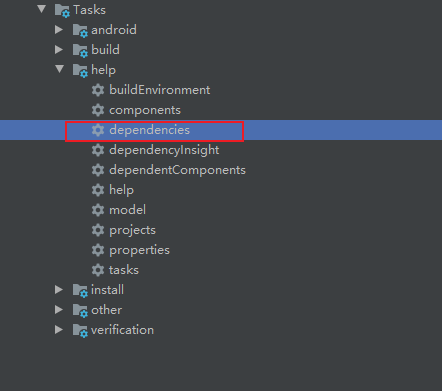
如果你的代码没有其他其他编译错误的话,可以看到下面的依赖信息
debugAndroidTestCompileClasspath - Resolved configuration for compilation for variant: debugAndroidTest

+--- project :tm.libs

+--- com.android.support:appcompat-v7:26.1.0

|    +--- com.android.support:support-annotations:26.1.0 -> 27.1.1

|    +--- com.android.support:support-v4:26.1.0

|    |    +--- com.android.support:support-compat:26.1.0 -> 27.1.1

|    |    |    +--- com.android.support:support-annotations:27.1.1

|    |    |    \--- android.arch.lifecycle:runtime:1.1.0

|    |    |         +--- android.arch.lifecycle:common:1.1.0

|    |    |         \--- android.arch.core:common:1.1.0

|    |    +--- com.android.support:support-media-compat:26.1.0 -> 27.1.1

|    |    |    +--- com.android.support:support-annotations:27.1.1

|    |    |    \--- com.android.support:support-compat:27.1.1 (*)

|    |    +--- com.android.support:support-core-utils:26.1.0

|    |    |    +--- com.android.support:support-annotations:26.1.0 -> 27.1.1

|    |    |    \--- com.android.support:support-compat:26.1.0 -> 27.1.1 (*)

|    |    +--- com.android.support:support-core-ui:26.1.0

|    |    |    +--- com.android.support:support-annotations:26.1.0 -> 27.1.1

|    |    |    \--- com.android.support:support-compat:26.1.0 -> 27.1.1 (*)

|    |    \--- com.android.support:support-fragment:26.1.0

|    |         +--- com.android.support:support-compat:26.1.0 -> 27.1.1 (*)

|    |         +--- com.android.support:support-core-ui:26.1.0 (*)

|    |         \--- com.android.support:support-core-utils:26.1.0 (*)

|    +--- com.android.support:support-vector-drawable:26.1.0

|    |    +--- com.android.support:support-annotations:26.1.0 -> 27.1.1

|    |    \--- com.android.support:support-compat:26.1.0 -> 27.1.1 (*)

|    \--- com.android.support:animated-vector-drawable:26.1.0

|         +--- com.android.support:support-vector-drawable:26.1.0 (*)

|         \--- com.android.support:support-core-ui:26.1.0 (*)

+--- com.android.support:design:26.1.0

|    +--- com.android.support:support-v4:26.1.0 (*)

|    +--- com.android.support:appcompat-v7:26.1.0 (*)

|    +--- com.android.support:recyclerview-v7:26.1.0

|    |    +--- com.android.support:support-annotations:26.1.0 -> 27.1.1

|    |    +--- com.android.support:support-compat:26.1.0 -> 27.1.1 (*)

|    |    \--- com.android.support:support-core-ui:26.1.0 (*)

|    \--- com.android.support:transition:26.1.0

|         +--- com.android.support:support-annotations:26.1.0 -> 27.1.1

|         \--- com.android.support:support-v4:26.1.0 (*)

+--- com.android.support.constraint:constraint-layout:1.1.3

|    \--- com.android.support.constraint:constraint-layout-solver:1.1.3

+--- com.google.android.exoplayer:exoplayer-core:2.9.6

|    \--- com.android.support:support-annotations:27.1.1

+--- com.google.android.exoplayer:exoplayer-ui:2.9.6

|    +--- com.google.android.exoplayer:exoplayer-core:2.9.6 (*)

|    +--- com.android.support:support-media-compat:27.1.1 (*)

|    \--- com.android.support:support-annotations:27.1.1

+--- com.googlecode.mp4parser:isoparser:1.1.21

+--- io.reactivex.rxjava2:rxandroid:2.1.0

|    \--- io.reactivex.rxjava2:rxjava:2.2.0 -> 2.2.5

|         \--- org.reactivestreams:reactive-streams:1.0.2

\--- io.reactivex.rxjava2:rxjava:2.2.5 (*)
可以看到,部分依赖后面标注了(*)号, 表示此依赖会被忽略。 -> 表示此依赖由原版本修改到了新版本。
如果你无视告警,直接运行的话,会报下面的错误
java.lang.RuntimeException: Unable to start activity ComponentInfo{com.tsing.mediaplayer/com.tsingtech.player.MainActivity}: android.view.InflateException: Binary XML file line #0: Binary XML file line #0: Error inflating class com.google.android.exoplayer2.ui.PlayerView

...

  Caused by: java.lang.NoSuchMethodError: No static method getFont(Landroid/content/Context;ILandroid/util/TypedValue;ILandroid/widget/TextView;)Landroid/graphics/Typeface; in class Landroid/support/v4/content/res/ResourcesCompat; or its super classes (declaration of 'android.support.v4.content.res.ResourcesCompat' appears in /data/app/com.tsing.mediaplayer-1/base.apk)
通过build.gradle可知,我们期望的com.android.support:appcompat 版本和design版本均为26.1.0, 但是support-media-compat, support-annotations 和support-compat被修改成了27.1.1,也就是说gradle会自动寻找当前匹配库的最高版本进行依赖。 再结合上面的红色告警信息,表示support-compat库可能存在冲突。 再结合最初的Muxtiple dex错误,确认MediaMetadataCompat所在包正好在support-media-compat
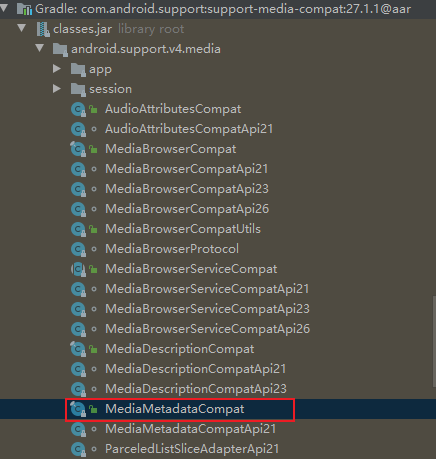
我们已经知道了重复依赖所在的包,解决办法就是将你不需要的包从依赖中排除即可。
implementation ('com.google.android.exoplayer:exoplayer-core:2.9.6') {

	exclude module: 'support-annotations'

}

implementation ('com.google.android.exoplayer:exoplayer-ui:2.9.6') {

	exclude module: 'support-media-compat'

	exclude module: 'support-annotations'

}
查看一下现在的依赖关系:
debugAndroidTestCompileClasspath - Resolved configuration for compilation for variant: debugAndroidTest

+--- project :tm.libs

+--- com.android.support:appcompat-v7:26.1.0

|    +--- com.android.support:support-annotations:26.1.0

|    +--- com.android.support:support-v4:26.1.0

|    |    +--- com.android.support:support-compat:26.1.0

|    |    |    +--- com.android.support:support-annotations:26.1.0

|    |    |    \--- android.arch.lifecycle:runtime:1.0.0

|    |    |         +--- android.arch.lifecycle:common:1.0.0

|    |    |         \--- android.arch.core:common:1.0.0

|    |    +--- com.android.support:support-media-compat:26.1.0

|    |    |    +--- com.android.support:support-annotations:26.1.0

|    |    |    \--- com.android.support:support-compat:26.1.0 (*)

|    |    +--- com.android.support:support-core-utils:26.1.0

|    |    |    +--- com.android.support:support-annotations:26.1.0

|    |    |    \--- com.android.support:support-compat:26.1.0 (*)

|    |    +--- com.android.support:support-core-ui:26.1.0

|    |    |    +--- com.android.support:support-annotations:26.1.0

|    |    |    \--- com.android.support:support-compat:26.1.0 (*)

|    |    \--- com.android.support:support-fragment:26.1.0

|    |         +--- com.android.support:support-compat:26.1.0 (*)

|    |         +--- com.android.support:support-core-ui:26.1.0 (*)

|    |         \--- com.android.support:support-core-utils:26.1.0 (*)

|    +--- com.android.support:support-vector-drawable:26.1.0

|    |    +--- com.android.support:support-annotations:26.1.0

|    |    \--- com.android.support:support-compat:26.1.0 (*)

|    \--- com.android.support:animated-vector-drawable:26.1.0

|         +--- com.android.support:support-vector-drawable:26.1.0 (*)

|         \--- com.android.support:support-core-ui:26.1.0 (*)

+--- com.android.support:design:26.1.0

|    +--- com.android.support:support-v4:26.1.0 (*)

|    +--- com.android.support:appcompat-v7:26.1.0 (*)

|    +--- com.android.support:recyclerview-v7:26.1.0

|    |    +--- com.android.support:support-annotations:26.1.0

|    |    +--- com.android.support:support-compat:26.1.0 (*)

|    |    \--- com.android.support:support-core-ui:26.1.0 (*)

|    \--- com.android.support:transition:26.1.0

|         +--- com.android.support:support-annotations:26.1.0

|         \--- com.android.support:support-v4:26.1.0 (*)

+--- com.android.support.constraint:constraint-layout:1.1.3

|    \--- com.android.support.constraint:constraint-layout-solver:1.1.3

+--- com.google.android.exoplayer:exoplayer-core:2.9.6

+--- com.google.android.exoplayer:exoplayer-ui:2.9.6

|    \--- com.google.android.exoplayer:exoplayer-core:2.9.6

+--- com.googlecode.mp4parser:isoparser:1.1.21

+--- io.reactivex.rxjava2:rxandroid:2.1.0

|    \--- io.reactivex.rxjava2:rxjava:2.2.0 -> 2.2.5

|         \--- org.reactivestreams:reactive-streams:1.0.2

\--- io.reactivex.rxjava2:rxjava:2.2.5 (*)
已经没有了 27.1.1的依赖,上面的红色告警也消失了。同理,其他的multiple dex define问题, 也可以用这个方法来根本解决!
【原创】解决Multiple dex files define问题的思路的更多相关文章
- Unable to execute dex: Multiple dex files define 解决方法
程序编译正常,在用Eclipse调试执行时,报错Unable to execute dex: Multiple dex files define: 方法: 原因是有重复的.jar被引用,可以 ...
- Unable to execute dex: Multiple dex files define异常的解决办法
问题: [2016-01-06 16:47:58 - Dex Loader] Unable to execute dex: Multiple dex files define Landroid/sup ...
- Multiple dex files define Lcom/sina/sso/RemoteSSO错误解决办法
在安卓上遇到了Multiple dex files define Lcom/sina/sso/RemoteSSO的编译错误 在网上找解决办法 搜到了解决办法是这样的 方案1:Eclipse->P ...
- eclipse:运行 Android 项目时出现 “Unable to execute dex: Multiple dex files define” 解决方法
android 项目在eclipse 出现Unable to execute dex: Multiple dex files define Conversion to Dalvik format fa ...
- Unable to execute dex: Multiple dex files define 的解决方法
我们在引入library时可能会出现这个错误 比如: [2013-11-05 14:22:15 - Dex Loader] Unable to execute dex: Multiple dex fi ...
- 转:Unable to execute dex: Multiple dex files define 解决方法
转自:http://blog.csdn.net/mxlxiao7/article/details/8978930 问题发生概述: 程序编译正常,在用Eclipse调试执行时,报错Unable to e ...
- 解决com.android.dex.DexException: Multiple dex files define Lcom/google/gson/JsonSerializer;
我在开发Windows Azure的Mobile Service(隔天补上创建过程)的安卓客户端时,报出了com.android.dex.DexException: Multiple dex file ...
- Android Multiple dex files define 解决包冲突
这段时间有一个新需求,安卓App通过URL在线预览PDF.选择使用并倒入PdfViewPager库时,报了如下异常: jdmerchants:transformDexArchiveWithExtern ...
- Multiple dex files define解决记录
引用多个library时经常会遇到Multiple dex files define错误,最常见的是support库多次定义,此时可用以下gradle命令来查看工程的引用树: gradlew -q d ...
- Multiple dex files define Lcom/google/zxing/BarcodeFormat
解决zxing “Could not find class 'com.goole.zxing.Result”和“Multiple dex files define”问题 时间 2014-04-24 1 ...
随机推荐
- 使用 p7zip 加密解密
1. 安装 yum install p7zip p7zip-plugins 2. 加密打包 7z a -ptest test.7z test.php -p 密码 test.php 可以是目录 或者 多 ...
- file类型的input框获取文件
- SQL Server【提高】分区表
分区表 分区视图 分区表可以从物理上将一个大表分成几个小表,但是从逻辑上来看,还是一个大表. 什么时候需要分区表 数据库中某个表中的数据很多. 数据是分段的 分区的方式 水平分区 水平表分区就是将一个 ...
- react的生命周期和使用
完整的生命周期 我们都知道生命周期分为三个大阶段: 挂载 更新 卸载 挂载的时候我们我们有 constructor . getDerivedStateFromProps .render . compo ...
- JMETHOD
#include <iostream> #define JMETHOD(type,methodname,arglist) type (*methodname) arglist JMETHO ...
- h5项目
h5项目,用vue3,用vite搭建就好,是一个新的项目. 接口还在开发,可以用mock模拟. 现有信息:接口url,ui-url,原型url(各部分的交互关系)
- Es6中模块引入的相关内容
注意:AMD规范和commonJS规范 1.相同点:都是为了模块化. 2.不同点:AMD规范则是非同步加载模块,允许指定回调函数.CommonJS规范加载模块是同步的,也就是说,只有加载完成,才能执行 ...
- 【论文写作】Vancouver style
参考文献引用风格之 Vancouver style 需要在引用出使用阿拉伯数字(1,2,3...)标注参考文献序号. 示例: Deep Learning [1]. Reference [1] LeCu ...
- Qt6以上安装速度慢解决-国内镜像加速
1.安装抓包软件Fiddler最新版本 Fiddler30天试用 2.在软件下方输入栏内粘贴以下命令 urlreplace download.qt.io mirrors.tuna.tsinghua.e ...
- 通过网页下载qq音乐在线听歌曲
1.输入网址 打开 qq音乐网页版 https://y.qq.com/ 2.搜索喜欢的歌曲 3.播放喜欢的歌曲 4.谷歌浏览器检查代码 5.找到 network栏 搜索 m4a 6.找到相关地址 复制 ...