
nuxt.js中登录、注册(密码登录和手机验证码登录)
<!-- 登录弹框 -->

        <div class="mask" v-show="flag">

          <div class="mask_content" v-show="type_d=='sign'">

            <p class="mask_gb" @click="cloces"><img src="../static/img/home/gw_icon.png" alt=""></p>

            <div class="mas_title">

                <h3>登录</h3>

                <img src="../static/img/home/logo.png" alt="">

            </div>

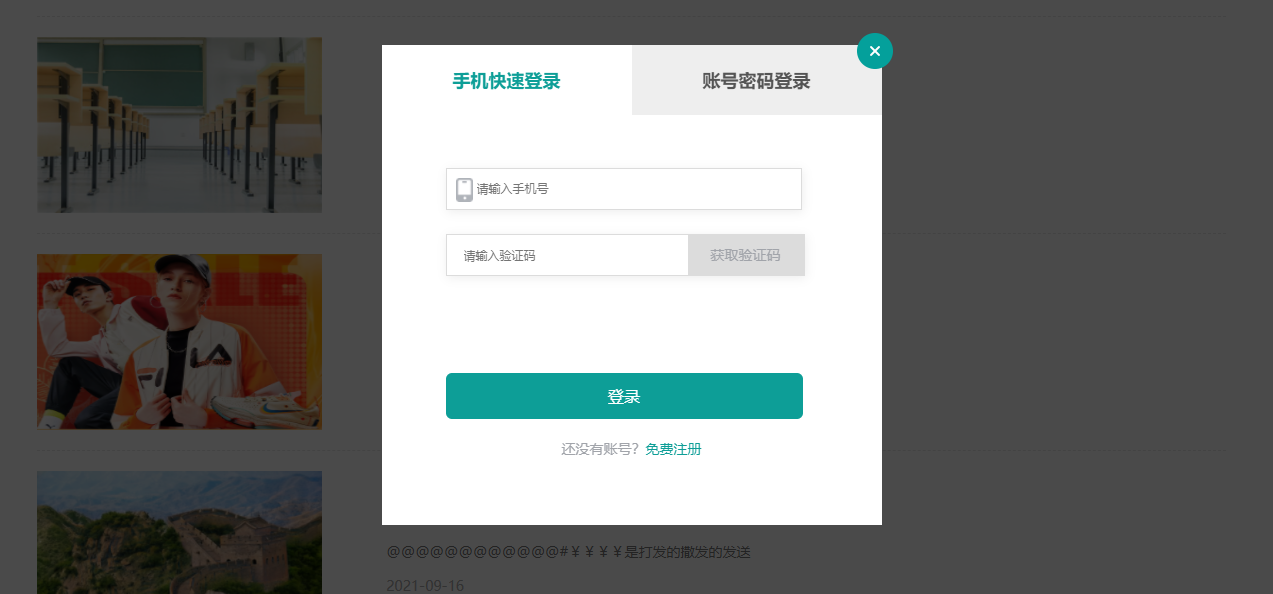
            <div class="mask-title">

              <h3 @click='typ=0' :class="{mk_a:typ===0}">手机快速登录</h3>

              <h3 @click='typ=1' :class="{mk_a:typ===1}">账号密码登录</h3>

            </div>

            <!-- 手机快速登录 -->

            <div class="mask-meuns font14" v-show="typ==0">

              <p class="ks_tels fe_tel">

                <img class="tel_icon tel" src="../static/img/home/tel.png" alt="">

                <input class="inp_tel" v-model="phone" @blur="get_phone" type="text" maxlength="11"  placeholder="请输入手机号" />

              </p>

              <p class="p_inp">

                <input class="inp_getS" v-model="yzm" type="text" maxlength="4" placeholder="请输入验证码" /><span class="yz" @click="send_yzm" :class="{actives_color:color==1}">{{ yzm_interval }}</span>

              </p>

              <button class="font16 sign" @click="phone_login">登录</button>

            </div>

            <!-- 账号密码登录 -->

            <div class="mask-meuns" v-show="typ==1">

              <p class="ks_tels">

                <img class="tel_icon icon" src="../static/img/home/pep.png" alt="">

                <input class="inp_tel" v-model="username" type="text" placeholder="请输入账号">

              </p>

              <p class="ks_tels">

                <img class="tel_icon icon" src="../static/img/home/mn.png" alt="">

                <input v-model="passwords" @input='is_icon=false' @blur="is_icon=true" class="inp_tel inp_pass" type="password" placeholder="请输入密码">

                <img v-show="is_icon==true" class="icon_jp" src="../static/img/home/jp.png" alt="">

              </p>

              <button class="font16 sign" @click="pwd_login">登录</button>

            </div>

            <p class="font14 goreg" @click="goto_regist">还没有账号?<span class="mf_reg">免费注册</span></p>

          </div>

          <!-- 注册账号 -->

          <div class="mask_content" v-show="type_d=='register'">

            <p class="mask_gb" @click="cloces"><img src="../static/img/home/gw_icon.png" alt=""></p>

            <div class="mas_title">

                <h3>注册</h3>

                <img src="../static/img/home/logo.png" alt="">

            </div>

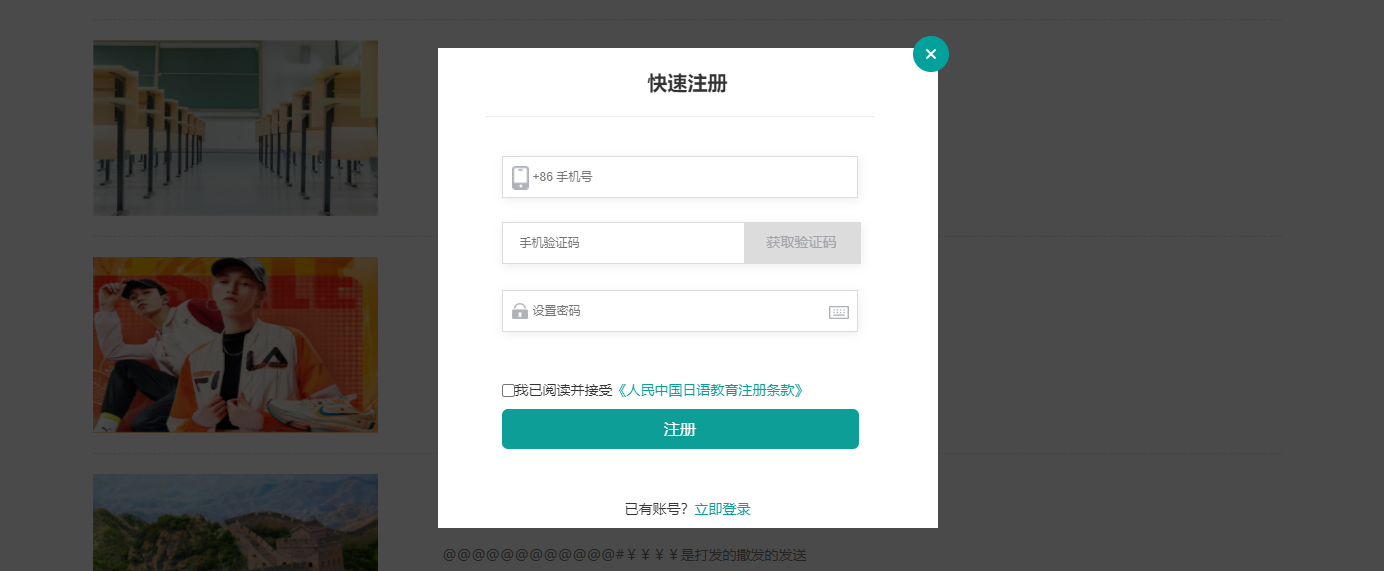
            <div class="reg_title">

              <h3 class="font20">快速注册</h3>

              <div class="mask-top-link"></div>

            </div>

            <form class="mask-meuns reg_ma font14">

                <p class="ks_tels">

                  <img class="tel_icon tel" src="../static/img/home/tel.png" alt="">

                  <input v-model="mobile" @blur="check_mobile" maxlength="11" class="inp_tel" type="text" placeholder="+86 手机号"/>

                </p>

                <p class="p_inp">

                  <input class="inp_getS" v-model="sms" type="text" placeholder="手机验证码" /><span class="yz reg_yz" @click="send_sms" :class="{actives_color:color==1}">{{sms_interval}}</span>

                </p>

                <p class="ks_tels">

                  <img class="tel_icon icon" src="../static/img/home/mn.png" alt=""><input v-model="password" class="inp_tel inp_pass" type="password" placeholder="设置密码"><img class="icon_jp" src="../static/img/home/jp.png" alt="">

                </p>

                <form class="font14 regulations">

                  <input class="inp_check" type="checkbox" v-model="checked_zc"><span>我已阅读并接受<b class="clause" @click="is_kxy=true">《人民中国日语教育注册条款》</b></span>

                  <p class="font16 sign reg_zc" @click="register">注册</p>

                </form>

            </form>

            <p class="font14 reg_sign" @click="goto_sign">已有账号?<span class="mf_reg">立即登录</span></p>

          </div>

      </div>
data() {

      return {

        is_kxy:false,

        jp_icon:false,

        activeIndex: '1',

        flag: false,

        type_d: 'sign',

        mk_a: 0,

        typ: 0,

        checked: true,

        xisign: 0,

        mo_isflag:false,

        // headList:[],

        mobile:'',

        sms:'',

        password:'',

        sms_interval: '获取验证码',

        is_send: false,

        phone:'',

        passwords:'',

        username: '',

        yzm: '',

        login_method: 'is_pwd',

        yzm_interval: '获取验证码',

        is_yzm: false,

        color:0,

        checked_zc:false,

        xiey:'',

      }

    },
methods: {

      handleSelect(key, keyPath) {},

      init(){

        return get('api/Common/getHeader')

          .then((res) => {

            if(res.code==1){

              // this.headList = res.data.menu;

              this.siteObj = res.data.site;

              this.titl_first = res.data.menu.slice(0,3);

              this.titl_two = res.data.menu.slice(3,7);

              this.titl_three = res.data.menu.slice(7);

            }

          })

      },

      //协议

      xiy(){

        return get('api/About/privacy').then(res=>{

            if(res.data){

                this.xiey = res.data.pageInfo

            }

        })

      },

       //去搜索页面

      go_searchPage(){

        if(this.search){

          this.$router.push({

            name:'search',

          })

          sessionStorage.setItem('search_meun',this.search)

          this.search =''

        }else{

          this.$message({

              message: '请输入搜索关键字',

              type: 'error',

          });

        }

      },

      check_mobile() {

          if (!this.mobile) return;

          if (!this.mobile.match(/^1[3-9][0-9]{9}$/)) {

              this.$message({

                  message: '手机号有误',

                  type: 'error',

                  duration: 1000,

                  onClose: () => {

                      this.mobile = '';

                  }

              });

              return false;

          }

          this.is_send = true;

      },

      //注册

      register() {

        if(!(this.mobile &&this.sms && this.password )){

            this.$message({

                    message: '手机号,验证码,密码不能为空',

                    type: 'error',

                })

            return

        }

        if(!this.checked_zc){

          this.$message({

            message: '请阅读并勾选隐私协议!',

            type: 'error',

          })

          return

        }

        this.is_reg()

      },

      is_reg(){

        return post('api/User/register',{

            mobile: this.mobile,

            code: this.sms,

            password: this.password

        }).then(res => {

            if (res.code==1) {

                this.$message({

                    message: '注册成功',

                    type: 'success',

                })

                //关掉注册框

                this.flag= false;

                this.xisign= 1;

                localStorage.setItem('token',res.data.userinfo.token)

                this.$router.push({

                  name:'index'

                })

            } else {

                this.$message({

                    message: '注册失败,请稍后再试',

                    type: 'error',

                })

          }

        })

      },

      send_sms() {

        if (!this.is_send) return;

        this.is_send = false;

        let sms_interval_time = 60;

        this.color =1

        this.sms_interval = "发送中...";

        let timer = setInterval(() => {

            if (sms_interval_time <= 1) {

                clearInterval(timer);

                this.color =1

                this.sms_interval = "获取验证码";

                this.is_send = false; // 重新恢复点击发送功能的条件

            } else {

                sms_interval_time -= 1;

                this.color =0;

                this.sms_interval = `${sms_interval_time}秒后再发`;

                this.is_send = false;

            }

        }, 1000);

        return post('api/Sms/send', {mobile:this.mobile,event:'register'}).then(res=> {

            if (res.code==1) {

                this.$message({

                    message: res.msg,

                    type: 'success',

                })

            }else{

                this.$message({

                    message: res.msg,

                    type: 'error',

                })

            }

        })

      },

      //登录  密码登录方法

      pwd_login() {

        if (!(this.username && this.passwords)) {

            //用户名或密文为空

            this.$message({

                message: '用户名或密码不能为空',

                type: 'warning'

            });

        } else {

            //发送axios请求

          return  post('api/User/login', {

                account: this.username,

                password: this.passwords

            }).then(res => {

                if (res.code==1) {

                    //登录成功

                    this.$message({

                        message: res.msg,

                        type: 'success'

                    });

                    localStorage.setItem('token',res.data.userinfo.token);

                    //2 销毁框

                    this.flag = false;

                    this.xisign =1

                } else {

                    this.$message({

                        message: res.msg,

                        type: 'warning'

                    });

                }

            this.username =""

            this.passwords =""

          })

        }

      },

    //手机号登录

phone_login() {

        if (!(this.phone && this.yzm)) {

            //用户名或密文为空

            this.$message({

                message: '手机号或验证码不能为空',

                type: 'warning'

            });

        } else {

            //发送axios请求

          return  post('api/user/mobileLogin', {

                mobile: this.phone,

                captcha: this.yzm

            }).then(res => {

                if (res.code==1) {

                    //登录成功

                    this.$message({

                        message: res.msg,

                        type: 'success'

                    });

                    localStorage.setItem('token',res.data.userinfo.token);

                    this.flag = false;

                    this.xisign =1

                } else {

                    this.$message({

                        message: res.msg,

                        type: 'warning'

                    });

                }

            })

        }

    },

    //退出登录

    out_login(){

      return get('api/User/logout').then(res=>{

        // if(res.code==10401){

        //     localStorage.removeItem("token");

        //     this.xisign = 0;

        //   }

        if(res.code==1){

          this.$message({

              message: res.msg,

              type: 'success'

          });

          localStorage.removeItem("token");

          this.xisign = 0;

        }else{

          if(res.code==10401){

            localStorage.removeItem("token");

            this.xisign = 0;

          }else{

            this.$message({

                message: res.msg,

                type: 'error'

            });

          }

        }

      })

    },

    get_phone() {

          if (!this.phone) return;  //如果手机号没填,这个方法结束了

          //js的正则   字符串.match('/正则表达式/')

          if (!this.phone.match(/^1[3-9][0-9]{9}$/)) {

              this.$message({

                  message: '手机号有误',

                  type: 'warning',

                  duration: 1000,  //message的显示时间

                  onClose: () => {

                      this.phone = '';  //把手机号清空

                  },

              });

              return false;

          }

          this.is_yzm = true;

      },

      send_yzm() {

          if (!this.is_yzm) return;

          this.color=1;

          this.is_yzm = false;

          let yzm_interval_time = 60;

          this.yzm_interval = "发送中...";

          let timer = setInterval(() => {

              if (yzm_interval_time <= 1) {

                  clearInterval(timer);

                  this.yzm_interval = "获取验证码";

                  this.is_yzm = true; // 重新回复点击发送功能的条件

              } else {

                  yzm_interval_time -= 1;

                  this.yzm_interval = `${yzm_interval_time}秒后再发`;

              }

          }, 1000);

          //向后端发送短信接口发请求,给这个手机号发短信

         return post('/api/Sms/send',{mobile:this.phone,event:'mobilelogin'}).then(res => {

              if (res) {

                  this.$message({

                      message: '短信发送成功',

                      type: 'success',

                  })

              } else {

                  this.$message({

                      message: '短信发送失败,请稍后再试。。。',

                      type: 'error',

                  })

              }

          })

      },

      mo_flag(){

        var that = this;

        that.mo_isflag = !that.mo_isflag;

      },

      close_mo_isflag(){

        var that = this;

        that.mo_isflag = !that.mo_isflag;

      },

      //登录

      go_sign(){

        var that = this;

        that.flag = true;

        that.type_d = 'sign';

      },

      go_register(){

        var that = this;

        that.flag = !that.flag;

        that.type_d = 'register'

      },

      //关闭弹窗

      cloces(){

        var that = this;

        that.flag = false;

      },

      //去注册页面

      goto_regist(){

        var that = this;

        that.flag = true;

        that.type_d = 'register'

      },

      //去登录页面

      goto_sign(){

        var that = this;

        that.flag = true;

        that.type_d = 'sign'

      },

       flag_tel(){

          this.isShows = true

      },

      no_flag_tel(){

            this.isShows = false

      },

      flag_wechat(){

          this.isFlag = true

      },

      no_flag_wechat(){

          this.isFlag = false

      }

    }
参考文档:https://blog.csdn.net/weixin_44621343/article/details/116870284
nuxt.js中登录、注册(密码登录和手机验证码登录)的更多相关文章
- Spring Security 实现手机验证码登录
思路:参考用户名密码登录过滤器链,重写认证和授权 示例如下(该篇示例以精简为主,演示主要实现功能,全面完整版会在以后的博文中发出): 由于涉及内容较多,建议先复制到本地工程中,然后在细细研究. 1. ...
- RabbitMQ+Redis模拟手机验证码登录
RabbitMQ+Redis模拟手机验证码登录 依赖 <dependency> <groupId>org.springframework.boot</groupId> ...
- shiro整合shiro多验证登录(账号密码登录和使用手机验证码登录)
1. 首先新建一个shiroConfig shiro的配置类,代码如下: @Configuration是标识这个类是一个配置文件,在启动时会加载这个类里面的内容,这个配置文件的位置的一定一定一定不能 ...
- js中一次性注册多个事件
在js中,如果想一次性给一个控件或者标签初测多个事件的方法: 假如有个<input>标签: <input id=”inputValue” value=”www.baidu.com”/ ...
- Nuxt.js中scss公用文件(不使用官方插件style-resources)
项目多多少少应该都遇到有公用文件这种情况,比如说偶尔某一天产品来找你,能不能明天把网站的这个颜色给我改下?第二天再来给我换回来? 如果再css2.x时代,不使用css预处理技术,这一改只能“查找替换” ...
- nuxt.js中引入lib-flexible 和 postcss-px2rem 实现pc自适应
最近一个需要用nuxt框架实现的pc自适应项目,从网上找了很多资料,最终完美实现 一.下载相关插件 npm i lib-flexible -Snpm i px2rem-loader -Dnpm ins ...
- js中的 Date对象 在 IOS 手机中的兼容性问题
项目中有个时间相关的需求,很自然的用到了 js 中的 new Date() 获取时间,浏览器使用模拟手机模式访问没有问题,但是真机测试时发现,ios系统的手机无法显示时间. 定位问题发现是 new D ...
- JS中调用android和ios系统手机打开相机并可选择相册功能
编写不易,如有转载,请声明出处: 梦回河口:http://blog.csdn.net/zxc514257857/article/details/57626154 实现android手机打开相机选择相册 ...
- 表单注册及自定义validate手机验证码验证实例
<!DOCTYPE html> <html lang="zh-CN"> <head> <meta charset="utf-8& ...
随机推荐
- C#-1 .Net框架
一 .Net框架组成分为三部分:公共语言运行时CLR.框架类库FCL和编程工具 1.CLR:公共语言运行时(Common Language Runtime): 是一个运行时环境负责代码安全验证.代码执 ...
- 用 VS Code 搞Qt6:使用 PySide 6
一般来说,用C++写 Qt 应用才是正宗的,不过,为了让小学生也能体验 Qt 的开发过程,或者官方为了增加开发者人数,推出了可用 Python 来编程的 Qt 版本.此版本命名比较奇葩,叫 PySid ...
- SpringBoot+MyBatis Plus对Map中Date格式转换的处理
在 SpringBoot 项目中, 如何统一 JSON 格式化中的日期格式 问题 现在的关系型数据库例如PostgreSQL/MySQL, 都已经对 JSON 类型提供相当丰富的功能, 项目中对于不需 ...
- vscode markdown WYSIWYG 所见即所得编辑和预览
一直使用Typora编写markdown,随着vscode在工作中使用的越来越多,产生了一个想法:能不能在vscode中写markdown,减少软件的成本? 可是vscode官方自带的的markdow ...
- Windows活动目录_票据——敬请期待!
票据:域控&域机子之间的信任密钥 [缺省40天更换一次] 域用户登录过程 域用户的账户密码(用信任密钥加密的)传递至域控: 域控验证账户密码成功后,构造域用户SID和组SID(用信任密钥加密的 ...
- PaddleOCR-EAST
目录 EAST Abstract Train PreProcess Architecture Backbone Neck Head Loss Dice Loss SmoothL1 Loss Infer ...
- 9.为url添加可选的后缀
为url添加可选的后缀 在drf的机制中,响应数据的格式不再与单一内容类型连接,可以同时享有json格式或html格式,我们可以为api路径添加格式后缀的支持,使用格式后缀给我们明确指定了给定格式的u ...
- 动态爱心-详细教程(小白也会)(HTML)
动态爱心 超级超级超级简单!!!赶紧做给你们的"Ta"看吧! (最后有详细步骤) 视频效果: 话不多说直接上代码 点击查看代码 <!DOCTYPE HTML PUBLIC & ...
- Jmeter之聚合报告“造假”
通过Jmeter,模拟一个"虚假"的聚合报告,可"应付"日常现场项目的性能测试验收.本文档着重介绍jmeter的固定定时器,通过设置随机的延迟时间(如想业务场景 ...
- 【Azure API 管理】Azure APIM服务集成在内部虚拟网络后,在内部环境中打开APIM门户使用APIs中的TEST功能失败
问题描述 使用微软API管理服务(Azure API Management),简称APIM. 因为公司策略要求只能内部网络访问,所以启用了VNET集成.集成方式见: (在内部模式下使用 Azure A ...