
【Azure 应用服务】NodeJS Express + MSAL 应用实现AAD登录并获取AccessToken -- cca.acquireTokenByCode(tokenRequest)
问题描述
在上一篇博文 “【Azure 应用服务】NodeJS Express + MSAL 应用实现AAD集成登录并部署在App Service Linux环境中的实现步骤”中,实现了登录,并获取登录用户在AAD中的个人信息,但是没有一个显示的方法输出所获取到的Access Token,则通过新建Express项目,加载MSAL的代码实现此目的。
实现步骤
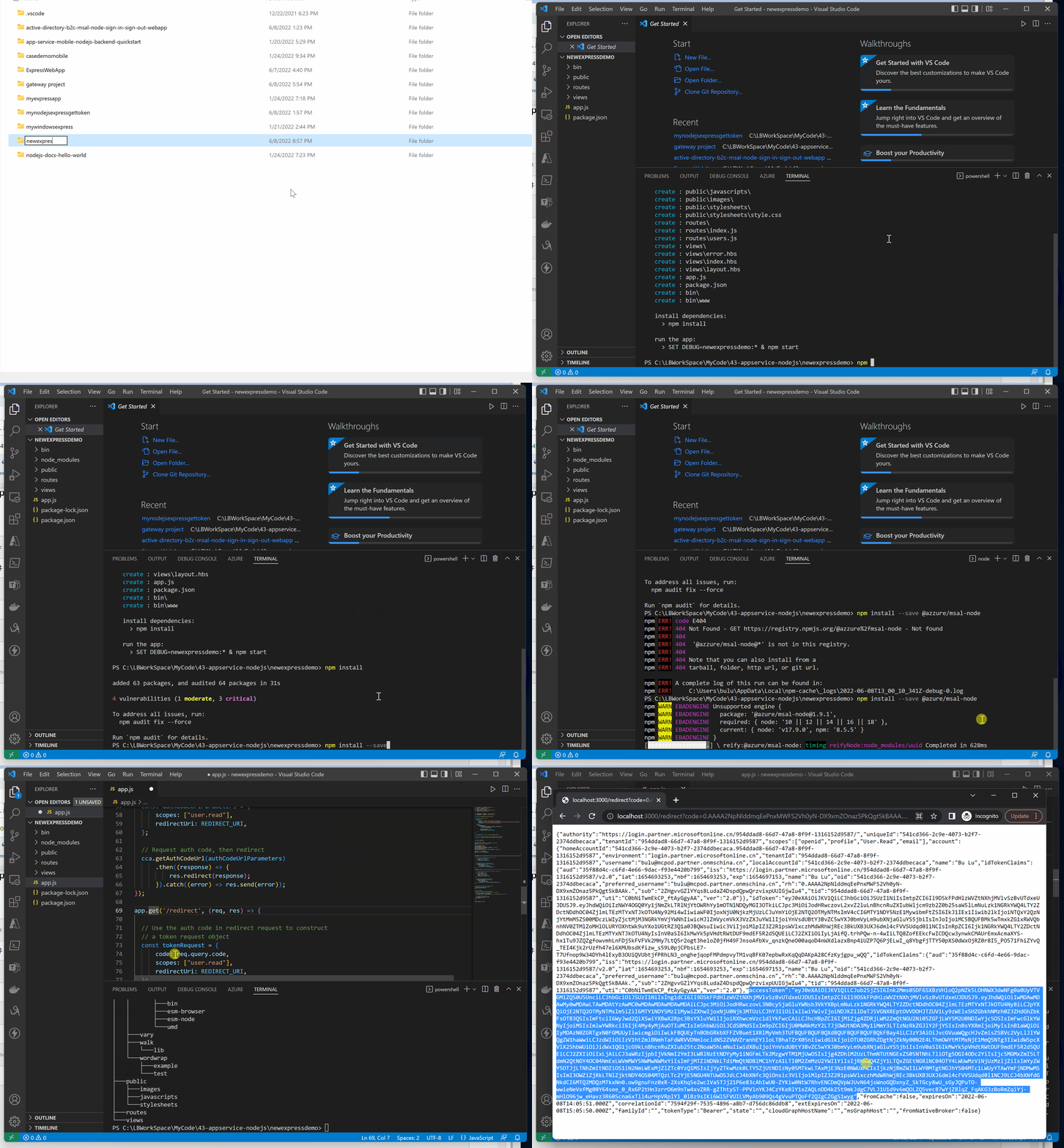
第一步:创建 NodeJS Express项目,并添加@azure/msal-node 项目包
前提条件:安装 Node.js 和 VS Code
使用npm安全express项目生成器
npm install -g express-generator
在当前目录在生成 express项目默认文件
express --view=hbs
开始生成项目文件
npm install
安装MSAL package
npm install --save @azure/msal-node
项目生成后的完整路径
myExpressWebApp/

├── bin/

|    └── wwww

├── public/

|    ├── images/

|    ├── javascript/

|    └── stylesheets/

|        └── style.css

├── routes/

|    ├── index.js

|    └── users.js

├── views/

|    ├── error.hbs

|    ├── index.hbs

|    └── layout.hbs

├── app.js

└── package.json
第二步:在 app.js 中添加 MSAL object,添加 '/auth' 接口登录AAD并获取Access Token
引入 msal 对象
const msal = require('@azure/msal-node');
配置AAD Authentication 参数 clientId, authority 和 clientSecret (与上一篇博文中第一步相同, 也需要添加 http://localhost:3000/redirect 在 AAD注册应用的Redirect URIs中)。
// Authentication parameters

const config = {

    auth: {

        clientId: " Enter_the_Application_Id_Here",

        authority: "https://login.partner.microsoftonline.cn/<#Enter_the_Tenant_Info_Here>",

        clientSecret: "xxxxxx.xxxxxxxxxxxxxxxxx" #Enter_the_Client_Secret_Here

    },

    system: {

        loggerOptions: {

            loggerCallback(loglevel, message, containsPii) {

                console.log(message);

            },

            piiLoggingEnabled: false,

            logLevel: msal.LogLevel.Verbose,

        }

    }

};

const REDIRECT_URI = "http://localhost:3000/redirect";
然后根据上一步的config参数初始化 msal confidential client applicaiton对象
// Initialize MSAL Node object using authentication parameters

const cca = new msal.ConfidentialClientApplication(config);
app.get('/auth', (req, res) => {

  // Construct a request object for auth code

  const authCodeUrlParameters = {

      scopes: ["user.read"],

      redirectUri: REDIRECT_URI,

  };

  // Request auth code, then redirect

  cca.getAuthCodeUrl(authCodeUrlParameters)

      .then((response) => {

          res.redirect(response);

      }).catch((error) => res.send(error));

});

app.get('/redirect', (req, res) => {

  // Use the auth code in redirect request to construct

  // a token request object

  const tokenRequest = {

      code: req.query.code,

      scopes: ["user.read"],

      redirectUri: REDIRECT_URI,

  };

  // Exchange the auth code for tokens

  cca.acquireTokenByCode(tokenRequest)

      .then((response) => {

          res.send(response);

      }).catch((error) => res.status(500).send(error));

});
完整 app.js 代码为:
var createError = require('http-errors');

var express = require('express');

var path = require('path');

var cookieParser = require('cookie-parser');

var logger = require('morgan');

var indexRouter = require('./routes/index');

var usersRouter = require('./routes/users');

const msal = require('@azure/msal-node');

// Authentication parameters

const config = {

    auth: {

        clientId: " Enter_the_Application_Id_Here",

        authority: "https://login.partner.microsoftonline.cn/<#Enter_the_Tenant_Info_Here>",

        clientSecret: "xxxxxx.xxxxxxxxxxxxxxxxx" #Enter_the_Client_Secret_Here

    },

    system: {

        loggerOptions: {

            loggerCallback(loglevel, message, containsPii) {

                console.log(message);

            },

            piiLoggingEnabled: false,

            logLevel: msal.LogLevel.Verbose,

        }

    }

};

const REDIRECT_URI = "http://localhost:3000/redirect";

// Initialize MSAL Node object using authentication parameters

const cca = new msal.ConfidentialClientApplication(config);

var app = express();

// view engine setup

app.set('views', path.join(__dirname, 'views'));

app.set('view engine', 'hbs');

app.use(logger('dev'));

app.use(express.json());

app.use(express.urlencoded({ extended: false }));

app.use(cookieParser());

app.use(express.static(path.join(__dirname, 'public')));

app.use('/', indexRouter);

app.use('/users', usersRouter);

app.get('/auth', (req, res) => {

  // Construct a request object for auth code

  const authCodeUrlParameters = {

      scopes: ["user.read"],

      redirectUri: REDIRECT_URI,

  };

  // Request auth code, then redirect

  cca.getAuthCodeUrl(authCodeUrlParameters)

      .then((response) => {

          res.redirect(response);

      }).catch((error) => res.send(error));

});

app.get('/redirect', (req, res) => {

  // Use the auth code in redirect request to construct

  // a token request object

  const tokenRequest = {

      code: req.query.code,

      scopes: ["user.read"],

      redirectUri: REDIRECT_URI,

  };

  // Exchange the auth code for tokens

  cca.acquireTokenByCode(tokenRequest)

      .then((response) => {

          res.send(response);

      }).catch((error) => res.status(500).send(error));

});

// catch 404 and forward to error handler

app.use(function(req, res, next) {

  next(createError(404));

});

// error handler

app.use(function(err, req, res, next) {

  // set locals, only providing error in development

  res.locals.message = err.message;

  res.locals.error = req.app.get('env') === 'development' ? err : {};

  // render the error page

  res.status(err.status || 500);

  res.render('error');

});

module.exports = app;
运行效果动画展示:
参考资料
NodeJS Express + MSAL 应用实现AAD集成登录并部署在App Service Linux环境中的实现步骤:https://www.cnblogs.com/lulight/p/16353145.html
Tutorial: Sign in users and acquire a token for Microsoft Graph in a Node.js & Express web app: https://docs.microsoft.com/en-us/azure/active-directory/develop/tutorial-v2-nodejs-webapp-msal
Example: Acquiring tokens with ADAL Node vs. MSAL Node:https://docs.microsoft.com/en-us/azure/active-directory/develop/msal-node-migration#example-acquiring-tokens-with-adal-node-vs-msal-node
【Azure 应用服务】NodeJS Express + MSAL 应用实现AAD登录并获取AccessToken -- cca.acquireTokenByCode(tokenRequest)的更多相关文章
- 【Azure 应用服务】NodeJS Express + MSAL 应用实现AAD集成登录并部署在App Service Linux环境中的实现步骤
问题描述 实现部署NodeJS Express应用在App Service Linux环境中,并且使用Microsoft Authentication Library(MSAL)来实现登录Azure ...
- 【Azure 应用服务】NodeJS Express + MSAL 实现API应用Token认证(AAD OAuth2 idToken)的认证实验 -- passport.authenticate('oauth-bearer', {session: false})
问题描述 在前两篇博文中,对NodeJS Express应用 使用MSAL + AAD实现用户登录并获取用户信息,获取Authorization信息 ( ID Token, Access Token) ...
- Nodejs&express+mongodb完成简单用户登录(即Nodejs入门)
刚了解nodejs,发现nodejs配置起来不复杂,但也有很多需要注意的地方,今天就记录一下,以后也可拿出来看看. 要完成这个简单的示例,从零开始,走三步就行了. 一.搭建开发环境 二.创建项目(ex ...
- nodejs+express+mysql 增删改查
之前,一直使用的是nodejs+thinkjs来完成自己所需的项目需求,而对于nodejs中另外一中应用框架express却了解的少之又少,这两天就简单的了解了一下如何使用express来做一些数据库 ...
- nodejs学习篇 (1)webstorm创建nodejs + express + jade 的web 项目
之前简单了解过nodejs,觉得用nodejs来做个网站也太麻烦了,要自己拼html的字符串返回,这能做网站嘛? 最近看到使用jade模板来开发,觉得挺新奇的,于是试了一把,也了解了一些特性,算是个新 ...
- 使用nodejs+express+socketio+mysql搭建聊天室
使用nodejs+express+socketio+mysql搭建聊天室 nodejs相关的资料已经很多了,我也是学习中吧,于是把socket的教程看了下,学着做了个聊天室,然后加入简单的操作mysq ...
- CentOS编译安装NodeJS+Express
NodeJS是基于Chrome’s Javascript runtime,也就是Google V8引擎执行Javascript的快速构建网络服务及应用的平台,其优点有: 在CentOS编译安装Node ...
- nodejs+express使用html和jade
nodejs+express经常会看到使用jade视图引擎,但是有些人想要访问普通的html页面,这也是可以的: var express = require('express'); var port ...
- nodejs+express中设置登录拦截器
在nodejs+express中,采用nodejs后端路由控制用户登录后,为了加强前端的安全性控制,阻止用户通过在浏览器地址栏中输入地址访问后台接口,在app.js中需要加入拦截器进行拦截: /*** ...
随机推荐
- in a frame because it set 'X-Frame-Options' to 'sameorigin'
不是所有网站都给 iframe嵌套的, 有的网站设置了 禁止嵌套!!! 浏览器会依据X-Frame-Options的值来控制iframe框架的页面是否允许加载显示出来, 看你们公司这么设置了!! ...
- OllyDbg---数学指令
数学指令 INC和DEC 分别执行增加1和减少1的操作. ADD 该指令有两个操作数,相加后的结果存放到第一个操作数中. ADDC 带进位的加法 两个操作数的和加上进位标志的值,结果存放到第一个操作数 ...
- 防抖-小程序-input输入频繁时搜索出bug
html: <input type="text" class="input_search" placeholder="搜索周边店铺" ...
- go sync.map源码解析
go中的map是并发不安全的,同时多个协程读取不会出现问题,但是多个协程 同时读写就会出现 fatal error:concurrent map read and map write的错误.通用的解决 ...
- 使用 HTML5 input 类型提升移动端输入体验(转翻译)
在过去的几年里,在移动设备上浏览网页已变得难以置信的受欢迎. 但是这些设备上的浏览体验,有时遗留很多的有待改进.当涉及到填写表单时,这一点尤为明显.幸运的是,HTML5规范引入了许多新input类型, ...
- C# 11 的这个新特性,我愿称之最强!
前言 在日常开发中我们经常会将JSON.XML.HTML.SQL.Regex等字符串拷贝粘贴到我们的代码中,而这些字符串往往包含很多的引号",我们就必须将所有引号逐个添加转义符\进行转义.这 ...
- 一文看懂:网址,URL,域名,IP地址,DNS,域名解析
一个执着于技术的公众号 前言 今天给大家梳理一篇关于网址.URL.IP地址.域名.DNS.域名解析的白话长文,并以简单的提问-解答 形式让读者更加深刻理解,希望有助于读者的学习,面试和工作! 1.一个 ...
- iptables系列教程(三)| iptables 实战篇
一个执着于技术的公众号 实战1 服务器禁止ping iptables -A INPUT -p icmp --icmp-type 8 -s 0/0 -j DROP // 禁止任何人ping通本机 &qu ...
- 154寻找旋转排序数组中的最小值II
title: 寻找旋转排序数组中的最小值II 题目描述 题目链接:寻找旋转排序数组中的最小值II 解题思路 和上题同理:数组特点有 nums[mid] < nums[right],最小值肯定在m ...
- Nginx的常用配置
Nginx配置文件结构 设置worker进程的用户,指的linux中的用户,会涉及到nginx操作目录或文件的一些权限,默认为 nobodyuser root; worker进程工作数设置,一般来说C ...