
Android第六次作业
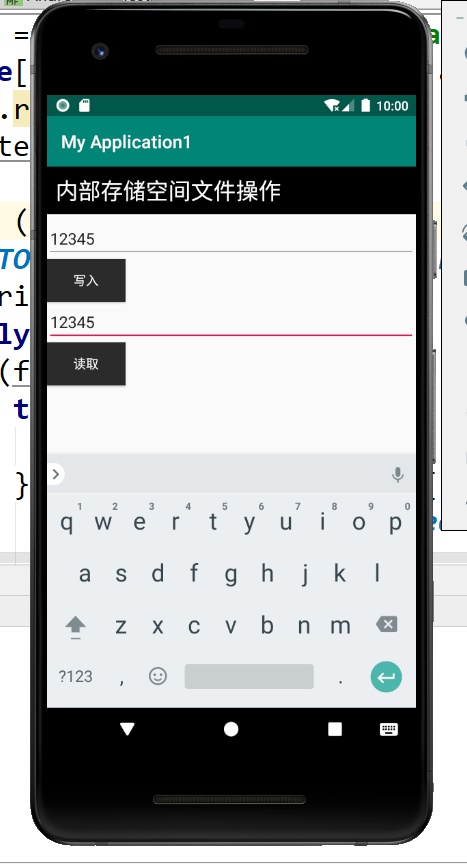
图片一 用内部存储实现文件写入和读取功能
<?xml version="1.0" encoding="utf-8"?>

<LinearLayout xmlns:android="http://schemas.android.com/apk/res/android"

    xmlns:app="http://schemas.android.com/apk/res-auto"

    xmlns:tools="http://schemas.android.com/tools"

    android:layout_width="match_parent"

    android:layout_height="match_parent"

    android:orientation="vertical"

    tools:context=".MainActivity">

    <TextView

        android:id="@+id/tv_1"

        android:layout_width="match_parent"

        android:layout_height="wrap_content"

        android:layout_marginBottom="5dp"

        android:background="#000000"

        android:padding="10dp"

        android:text="内部存储空间文件操作"

        android:textColor="#ffffff"

        android:textSize="25sp" />

    <EditText

        android:id="@+id/et_1"

        android:layout_width="match_parent"

        android:layout_height="wrap_content"

        android:hint="输入你想输入的内容" />

    <Button

        android:id="@+id/btn_1"

        android:layout_width="wrap_content"

        android:layout_height="wrap_content"

        android:background="#FFFFFF"

        android:onClick="click1"

        android:text="写入"

        android:textColor="#ffffff" />

    <EditText

        android:id="@+id/et_2"

        android:layout_width="match_parent"

        android:layout_height="wrap_content"

        android:hint="显示读取的内容" />

    <Button

        android:id="@+id/btn_2"

        android:layout_width="wrap_content"

        android:layout_height="wrap_content"

        android:background="#2C2A2A"

        android:onClick="click2"

        android:text="读取"

        android:textColor="#ffffff" />

</LinearLayout>
package com.example.myapplication1;

import androidx.appcompat.app.AppCompatActivity;

import android.os.Bundle;

import android.view.View;

import android.widget.EditText;

import android.widget.Toast;

import java.io.FileInputStream;

import java.io.FileOutputStream;

import java.io.IOException;

public class MainActivity extends AppCompatActivity {

    @Override

    protected void onCreate(Bundle savedInstanceState) {

        super.onCreate(savedInstanceState);

        setContentView(R.layout.activity_main);

    }

    public void click1(View view) {

        String filename = "data.txt";

        String content=((EditText)findViewById(R.id.et_1)).getText().toString();

        FileOutputStream fos = null;

        try {

            fos = openFileOutput(filename, MODE_PRIVATE);

            fos.write(content.getBytes());

        } catch (Exception e) {

            // TODO Auto-generated catch block

            e.printStackTrace();

        } finally {

            if (fos != null)

                try {

                    fos.close();

                } catch (IOException e) {

                    // TODO Auto-generated catch block

                    e.printStackTrace();

                }

        }

        Toast.makeText(this, "保存成功", 0).show();

    }

    public void click2(View view) {

        String content = "";

        FileInputStream fis = null;

        try {

            fis = openFileInput("data.txt");

            byte[] buffer = new byte[fis.available()];

            fis.read(buffer);

            content = new String(buffer);

        } catch (Exception e) {

            // TODO Auto-generated catch block

            e.printStackTrace();

        } finally {

            if (fis != null)

                try {

                    fis.close();

                } catch (IOException e) {

                    // TODO Auto-generated catch block

                    e.printStackTrace();

                }

        }

        ((EditText) findViewById(R.id.et_2)).setText(content);

    }

}
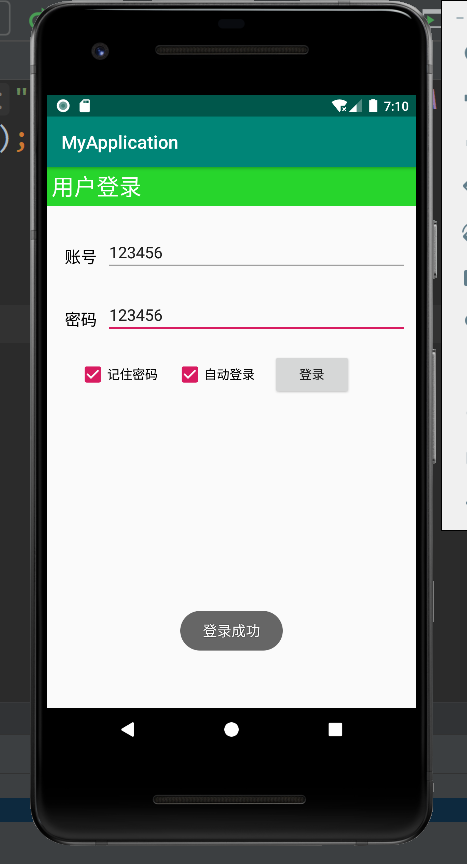
图片二 使用sharedpreference实现记住密码功能
<?xml version="1.0" encoding="utf-8"?>

<LinearLayout xmlns:android="http://schemas.android.com/apk/res/android"

    xmlns:app="http://schemas.android.com/apk/res-auto"

    xmlns:tools="http://schemas.android.com/tools"

    android:layout_width="match_parent"

    android:layout_height="match_parent"

    tools:context=".MainActivity"

    android:orientation="vertical">

    <TextView

        android:id="@+id/tv1"

        android:layout_width="match_parent"

        android:layout_height="wrap_content"

        android:layout_marginBottom="15dp"

        android:background="#27D52C"

        android:padding="5dp"

        android:text="用户登录"

        android:textColor="#FFFFFF"

        android:textSize="25sp" />

    <LinearLayout

        android:id="@+id/ll_1"

        android:layout_width="match_parent"

        android:layout_height="50dp"

        android:layout_margin="10dp"

        android:orientation="horizontal">

        <TextView

            android:id="@+id/tv2"

            android:layout_width="wrap_content"

            android:layout_height="wrap_content"

            android:layout_margin="10dp"

            android:text="账号"

            android:textColor="#000000"

            android:textSize="18sp" />

        <EditText

            android:id="@+id/et1"

            android:layout_width="match_parent"

            android:layout_height="wrap_content"

            android:layout_marginTop="10dp"

            android:hint="请输入账号" />

    </LinearLayout>

    <LinearLayout

        android:id="@+id/ll_2"

        android:layout_width="match_parent"

        android:layout_height="50dp"

        android:layout_margin="10dp"

        android:orientation="horizontal">

        <TextView

            android:id="@+id/tv3"

            android:layout_width="wrap_content"

            android:layout_height="wrap_content"

            android:layout_margin="10dp"

            android:text="密码"

            android:textColor="#000000"

            android:textSize="18sp" />

        <EditText

            android:id="@+id/et2"

            android:layout_width="match_parent"

            android:layout_height="wrap_content"

            android:layout_marginTop="10dp"

            android:hint="请输入密码" />

    </LinearLayout>

    <LinearLayout

        android:id="@+id/ll_3"

        android:layout_width="match_parent"

        android:layout_height="80dp"

        android:layout_marginLeft="25dp"

        android:orientation="horizontal">

        <CheckBox

            android:id="@+id/cb1"

            android:layout_width="wrap_content"

            android:layout_height="wrap_content"

            android:layout_margin="10dp"

            android:text="记住密码" />

        <CheckBox

            android:id="@+id/cb2"

            android:layout_width="wrap_content"

            android:layout_height="wrap_content"

            android:layout_margin="10dp"

            android:text="自动登录" />

        <Button

            android:id="@+id/btn1"

            android:layout_width="wrap_content"

            android:layout_height="wrap_content"

            android:layout_margin="10dp"

            android:text="登录" />

    </LinearLayout>

</LinearLayout>
package com.example.myapplication;

import androidx.appcompat.app.AppCompatActivity;

import android.os.Bundle;

import android.text.TextUtils;

import android.view.View;

import android.widget.Button;

import android.widget.CheckBox;

import android.widget.CompoundButton;

import android.widget.EditText;

import android.widget.Toast;

import java.util.Map;

public class MainActivity extends AppCompatActivity implements View.OnClickListener, CompoundButton.OnCheckedChangeListener {

    private EditText et_account;

    private EditText et_password;

    private Button btn_login;

    @Override

    protected void onCreate(Bundle savedInstanceState) {

        super.onCreate(savedInstanceState);

        setContentView(R.layout.activity_main);

        initView();

        Map<String, String> userInfo = saveQQ.getUserInfo(this);

        if (userInfo != null) {

            et_account.setText(userInfo.get("account"));

            et_password.setText(userInfo.get("password"));

        }

    }

    private void initView() {

        et_account = (EditText) findViewById(R.id.et1);

        et_password = (EditText) findViewById(R.id.et2);

        btn_login = (Button) findViewById(R.id.btn1);

        btn_login.setOnClickListener(this);

        CheckBox cb1 = (CheckBox) findViewById(R.id.cb1);

        cb1.setOnCheckedChangeListener(this);

        CheckBox cb2 = (CheckBox) findViewById(R.id.cb2);

        cb2.setOnCheckedChangeListener(this);

    }

    @Override

    public void onClick(View v) {

        switch(v.getId()){

            case R.id.btn1:

                String account=et_account.getText().toString().trim();

                String password=et_password.getText().toString();

                if(TextUtils.isEmpty(account)){

                    Toast.makeText(this,"输入QQ账号",Toast.LENGTH_SHORT).show();

                    return;

                }

                if (TextUtils.isEmpty(password)){

                    Toast.makeText(this, "请输入密码", Toast.LENGTH_SHORT).show();

                    return;

                }

                Toast.makeText(this, "登录成功", Toast.LENGTH_SHORT).show();

        }

    }

    @Override

    public void onCheckedChanged(CompoundButton compoundButton, boolean b) {

        switch (compoundButton.getId()){

            case R.id.cb1 :

                String account=et_account.getText().toString().trim();

                String password=et_password.getText().toString();

                boolean isSaveSuccess=saveQQ.SaveUserInfo(this, account, password);

                if(isSaveSuccess&&b){

                    Toast.makeText(this, "保存成功", Toast.LENGTH_SHORT).show();

                }else{

                    Toast.makeText(this, "保存失败", Toast.LENGTH_SHORT).show();

                    et_account.setText(null);

                    et_password.setText(null);

                }

                break;

            case R.id.cb2: account=et_account.getText().toString().trim();

                password=et_password.getText().toString();

                if(TextUtils.isEmpty(account)){

                    Toast.makeText(this, "请输入账号", Toast.LENGTH_SHORT).show();

                    return;

                }

                if(TextUtils.isEmpty(password)){

                    Toast.makeText(this, "请输入密码", Toast.LENGTH_SHORT).show();

                    return;

                }

                if(b)

                    Toast.makeText(this, "登录成功", Toast.LENGTH_SHORT).show();

                else{

                    Toast.makeText(this, "请登录", Toast.LENGTH_SHORT).show();

                }

        }

    }

}
package com.example.myapplication;

import android.content.Context;

import android.content.SharedPreferences;

import java.util.HashMap;

import java.util.Map;

public class saveQQ {

    public static boolean SaveUserInfo(Context context, String account, String password) {

        SharedPreferences sp = context.getSharedPreferences("data", Context.MODE_PRIVATE);

        SharedPreferences.Editor edit = sp.edit();

        edit.putString("account", account);

        edit.putString("pwd", password);

        edit.commit();

        return true;

    }

    public static Map<String,String>getUserInfo(Context context){

        SharedPreferences sp=context.getSharedPreferences("data",Context.MODE_PRIVATE);

        String account=sp.getString("account",null);

        String password=sp.getString("pwd",null);

        Map<String,String>userMap=new HashMap<String,String>();

        userMap.put("account",account);

        userMap.put("password",password);

        return userMap;

    }

}
Android第六次作业的更多相关文章
- 17秋 软件工程 第六次作业 Beta冲刺 Scrum3
17秋 软件工程 第六次作业 Beta冲刺 Scrum3 各个成员冲刺期间完成的任务 世强:完成手势签到模块,重构活动详情页面: 陈翔:完善超级管理员后端login模块,完成logout模块: 树民: ...
- 17秋 软件工程 第六次作业 Beta冲刺 总结博客
题目:团队作业--Beta冲刺 17秋 软件工程 第六次作业 Beta冲刺 总结博客 Beta冲刺过程中各个成员的贡献百分比 世强:15.5% 陈翔:14.5% 树民:12.0% 媛媛:14.0% 港 ...
- 耿丹CS16-2班第六次作业汇总
Deadline: 2016-11-13 11:59 作业内容 第六次作业总结 00.本次题目分值最高为**6分/题 × 7题 + 5分/篇 × 1篇 = 47分**,其中有新解法者每题加原创分**2 ...
- C2第六次作业解题报告
看过题解后如果觉得还算有用,请帮忙加点我所在团队博客访问量 http://www.cnblogs.com/newbe/ http://www.cnblogs.com/newbe/p/4069834.h ...
- C语言程序设计第六次作业——循环结构(2)
C语言程序设计第六次作业--循环结构(2) 之前的博客园图片没处理好,对大家说一声抱歉.希望大家能够多多指出我的错误,我来认真修改 ^ - ^ !. (1)改错题 序列求和:输入一个正实数eps,计算 ...
- 17秋 软件工程 第六次作业 Beta冲刺 Scrum1
17秋 软件工程 第六次作业 Beta冲刺 Scrum1 各个成员冲刺期间完成的任务 重新梳理项目架构与当前进展,并且对我们的Alpha版本项目进行完整测试,将测试过程中发现的问题列入Github i ...
- 17秋 软件工程 第六次作业 Beta冲刺 Scrum2
17秋 软件工程 第六次作业 Beta冲刺 Scrum2 我们组转会成员:杰麟: 我们组新成员:宏庆. 各个成员冲刺期间完成的任务 世强:完成分页功能的演示: 陈翔:完成超级管理员后端login模块: ...
- 17秋 软件工程 第六次作业 Beta冲刺 Scrum4
17秋 软件工程 第六次作业 Beta冲刺 Scrum4 各个成员冲刺期间完成的任务 世强:完成APP用户签到模块.群发短信模块前端界面: 陈翔:恢复Github项目,完成Scrum博客: 树民:和超 ...
- 17秋 软件工程 第六次作业 Beta冲刺 Scrum5
17秋 软件工程 第六次作业 Beta冲刺 Scrum5 各个成员冲刺期间完成的任务 世强:完成APP端相册.部员管理.手势签到模块: 陈翔:完成Scrum博客.总结博客,完成超级管理员前后端对接: ...
- 2018-2019-1 20189221 《Linux内核原理与分析》第六周作业
2018-2019-1 20189221 <Linux内核原理与分析>第六周作业 实验五 实验过程 将Fork函数移植到Linux的MenuOS fork()函数通过系统调用创建一个与原来 ...
随机推荐
- Oracle中新建数据表的两种方法
首发微信公众号:SQL数据库运维 原文链接:https://mp.weixin.qq.com/s?__biz=MzI1NTQyNzg3MQ==&mid=2247485212&idx=1 ...
- perl中ENV的使用
在打印环境变量的时候可以用到.实际上是%ENV,perl中的哈希变量,里面保存的是环境变量.键是环境变量名,值是环境变量值.例如,有一个环境变量是PATH,其值为C:\windows,那么,打印这个环 ...
- 给ofo共享单车撸一个微信小程序
想学一下微信小程序,发现文档这东西,干看真没啥意思.所以打算自己先动手撸一个.摩拜单车有自己的小程序,基本功能都有,方便又小巧,甚是喜爱.于是我就萌生了一个给ofo共享单车撸一个小程序(不知道为啥of ...
- 【DL论文精读笔记】 深度压缩
深度压缩 DEEP COMPRESSION: COMPRESSING DEEP NEURAL NETWORKS WITH PRUNING, TRAINED QUANTIZATION AND HUFFM ...
- SpringBoot使用@Async的总结!
一些业务场景我们需要使用多线程异步执行任务,加快任务执行速度. 之前有写过一篇文章叫做: 异步编程利器:CompletableFuture 在实际工作中也更加推荐使用CompletableFuture ...
- Java网络编程:Socket 通信
client----发送数据(输出流)------------(输入)-[管道流处理数据]-(输出)------接收数据(输入流)------server URL:协议+IP+端口+资源位置 客户端: ...
- day28-jQuery01
jQuery01 参考文档1:jQuery API 中文文档 | jQuery API 中文在线手册 | jquery api 下载 | jquery api chm (cuishifeng.cn) ...
- 2.5:Python常用内置数据结构、多维数组ndarray、Series和DataFrame
一.Python内置数据结构 1.赋值生成列表 la=[1,2,3,4] la 2.强制转换为列表 lb=list("Hello") lb 3.推导式生成列表 s="ab ...
- 锂电池升压芯片,IC电路图资料
锂电池常规的供电电压范围是3V-4.2V之间,标称电压是3.7V.锂电池具有宽供电电压范围,需要进行降压或者升压到固定电压值,进行恒压输出,同时根据输出功率的不同,(输出功率=输出电压乘以输出电流). ...
- 虚拟网络VLAN
一.VLAN划分基础 1.VLAN概念 VLAN叫做虚拟局域网,逻辑上将网络划分 2.VLAN的分类 静态vlan:基于端口划分静态VLAN 动态vlan:基于MAC地址划分动态VLAN 3.VLAN ...